
Quick Answer
Set up a professional voicemail by verifying every promise before you record, giving callers one clear next action, and using only routes you actually monitor. State your full name and business name, ask for a name, callback number, and brief reason for the call, include a response window you can keep, then test the greeting on the live line and update it when anything changes.
Beyond 'Hello': Crafting a Voicemail That Projects Premium Authority#
A strong professional voicemail greeting is short, clear, and believable. In a few lines, it should do three jobs: confirm who you are, tell the caller what to do next, and set an expectation you can actually meet. If any one of those is vague, callers can get confused and your business can feel harder to reach than it is.
You do not need a clever script. You need a message that sounds intentional and holds up in practice. Start with a simple structure, then verify every part before you record it.
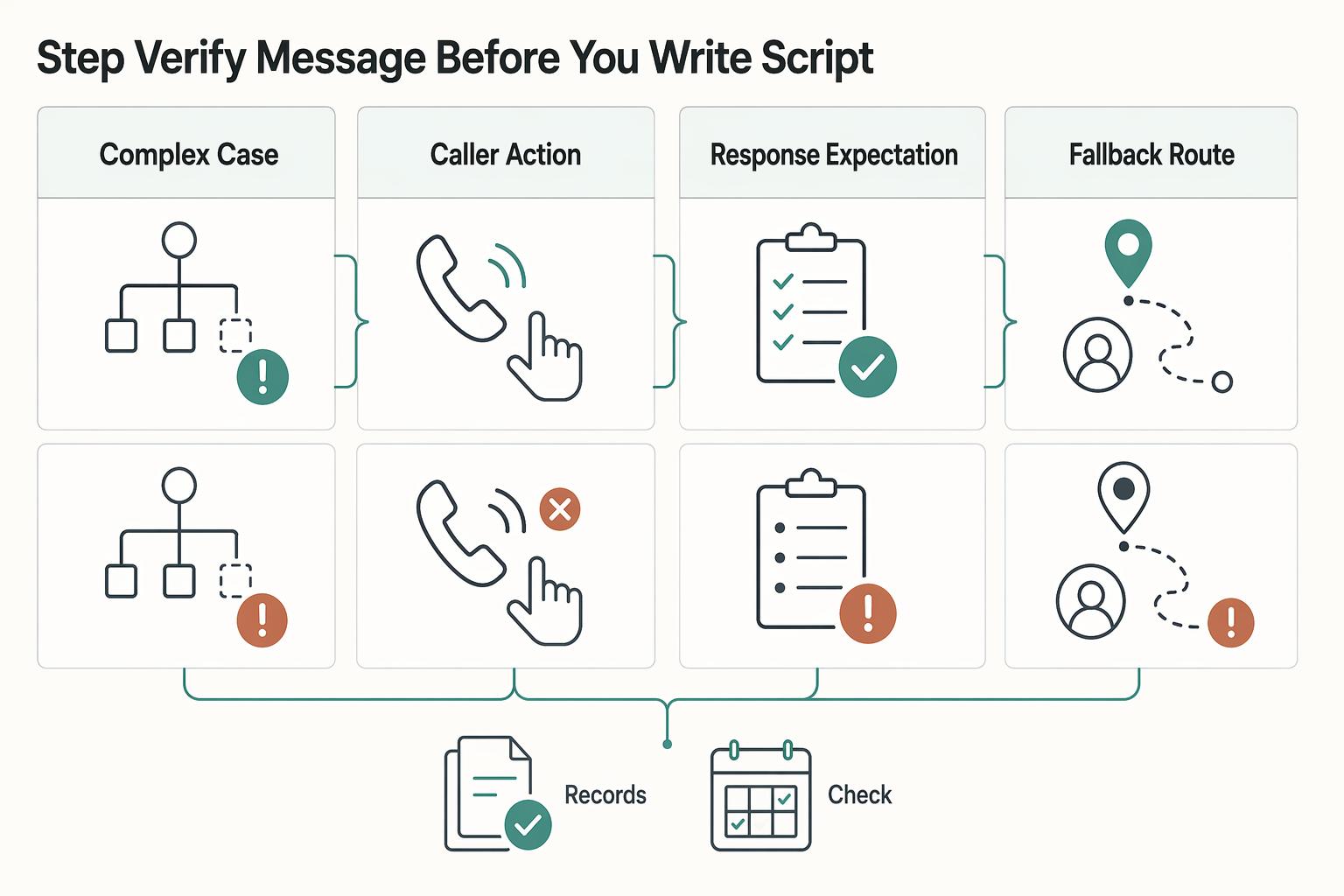
Step 1. Verify the message before you write the script#
Treat the greeting like an intake point, not a personality test. Before you record, confirm what you can honestly say, where each instruction sends people, and who is responsible for checking that route.
| Decision to verify | What you say | Where it routes | Who monitors it | Remove it if unowned |
|---|---|---|---|---|
| Identity | Your full name and business name | Confirms the caller reached the right line | Not applicable | Do not add titles or brand names you do not actively use |
| Caller action | "Please leave your name, callback number, and a brief reason for your call" | Voicemail inbox | You or the person assigned to return calls | Do not ask for extra details you never use |
| Response expectation | State the response window your business policy actually commits to | Sets caller expectations | You | Do not promise "same day" or "within 24 business hours" unless that is consistently true |
| Fallback route | One alternate channel for a specific case, such as urgent scheduling changes | Email inbox or another monitored contact point | A named owner or shared monitored inbox | Remove any email, second number, or text option that no one checks |
That last column matters more than most people expect. A polished message that sends callers to an unmonitored inbox can create frustration. If you do not own the route end to end, do not mention it.
Step 2. Match one caller intent to one next action#
Once the base message is set, adjust the wording for the calls you actually get. The rule is simple: one scenario, one route. That is what keeps callers from guessing.
| Scenario | Unclear | Clear |
|---|---|---|
| New inquiry | Hi, leave a message and I'll get back to you. | You've reached my business line. Please leave your name, callback number, and a brief note about your project or service need. I return calls within the response window stated in my current business policy. |
| Existing client update | Sorry I missed you. Leave the details. | You've reached my business line. If you're calling about an active project, please leave your name, callback number, and the project name so I can place your message correctly. I return client calls within the response window stated in my current business policy. |
| Scheduling or urgent issue | Call back later or send me a message somewhere. | You've reached my business line. For urgent scheduling changes, use the monitored scheduling inbox. For all other calls, leave your name, callback number, and a brief reason for calling. |
- New inquiry
Unclear: "Hi, leave a message and I'll get back to you." Clear: "You've reached my business line. Please leave your name, callback number, and a brief note about your project or service need. I return calls within the response window stated in my current business policy."
- Existing client update
Unclear: "Sorry I missed you. Leave the details." Clear: "You've reached my business line. If you're calling about an active project, please leave your name, callback number, and the project name so I can place your message correctly. I return client calls within the response window stated in my current business policy."
- Scheduling or urgent issue
Unclear: "Call back later or send me a message somewhere." Clear: "You've reached my business line. For urgent scheduling changes, use the monitored scheduling inbox. For all other calls, leave your name, callback number, and a brief reason for calling."
Notice what is missing: a pile of fallback options. If you tell callers to email, text, call again, and use a contact form, callers may not know which path actually gets a response.
If your phone service offers separate work-hours and after-hours greetings, or custom routing, that can help. If those features are not available, do not write a script that assumes they exist. Keep one base greeting and one verified fallback. If you are still choosing a provider, compare those features before you commit in The Best Virtual Phone Number Services for Freelancers.
Step 3. Record on the live line and run a QA loop#
A good draft is not enough. The only version that matters is what a caller hears on the actual line.
- Draft the message and verify every variable detail, especially your response window and fallback contact.
- Record it on the live business number or phone app that callers actually reach.
- Test-call from another phone and listen like a first-time caller.
- Fix anything unclear, outdated, or hard to act on.
- Retest until the message passes in one listen.
Before you publish, catch the common failure modes. The first word gets clipped. Your name is hard to understand. Your domain or email is impossible to spell from audio. Your hours are outdated. Or the fallback route lands in a mailbox nobody checks. A practical checkpoint is simple: on one listen, a caller should know they reached the right person, know what details to leave, and know when to expect a reply.
Once that basic greeting works, the next decision is bigger than wording. You need to decide what the line should and should not handle. Related: How to Manage Your Personal Brand as a Freelancer.
Your Voicemail as a Strategic Boundary Tool#
Your voicemail should enforce your boundary policy, not just sound polite. Before you record, decide what you handle on this line, what qualifies as urgent, where non-urgent requests should go, and what this line does not cover.
Step 1. Define the boundary before you script it#
Set your policy first, then script it. Use this quick framework so each promise maps to an owned channel:
| Boundary | Decide this before recording |
|---|---|
| Availability | When you return calls, your time zone, and a response window you can reliably keep |
| Escalation | The narrow urgent case you will route differently, if any |
| Fallback | One monitored non-urgent route (for example, email or booking) |
| Exclusions | What this line is not for, when it helps prevent misrouted requests |
Write these rules in your onboarding language, booking flow, and email signature first. If a route is unowned or rarely checked, remove it from the script.
Step 2. Turn each boundary into one caller action#
Use a clear introduction, brief context, and one next action. Avoid stacking options unless each option maps to a different verified case.
| Scenario | Weak script | Stronger script |
|---|---|---|
| Availability boundary | "I'm away right now. Leave a message." | "You've reached my business line. Please leave your name, callback number, and a brief reason for calling. I return calls within the response window stated in my current business policy." |
| Urgent path | "If it's urgent, email or text me." | "You've reached my business line. For urgent scheduling changes, use the monitored scheduling inbox. For all other calls, please leave your name, callback number, and a brief reason for calling." |
| Temporary absence | "I'm out this week. Leave a message." | "You've reached my business line. I'm currently away. For non-urgent requests, use the monitored email or booking route named in my current out-of-office instructions." |
If callers cannot tell what to do next, they are more likely to hang up or leave incomplete details.
Step 3. Check every channel for the same promise#
After drafting, compare your voicemail language with your email signature, booking confirmations, contact page, and onboarding materials. Remove conflicts, then update the wording everywhere so callers are not given competing instructions.
Step 4. Test from the caller side and govern temporary messages#
Call your own line once and listen like a first-time caller. Confirm that the identity is clear, the next action is obvious, the fallback is monitored, and the response expectation is believable.
| Control | What it does |
|---|---|
| Activation trigger | When it goes live |
| Review trigger | When you re-check it |
| Retirement trigger | When it must be removed |
For temporary greetings, set three controls before publishing: an activation trigger (when it goes live), a review trigger (when you re-check it), and a retirement trigger (when it must be removed). A temporary message usually fails because it stays live too long, not because it was written badly.
Once your boundaries are clear, the next step is operational: each caller intent should map to a destination, an owner, and a backup route. If you want a deeper dive, read Thailand's Long-Term Resident (LTR) Visa for Professionals.
Transform Your Voicemail into an Automated Workflow#
Treat your greeting like an intake system, not just a recording: one intent, one owner, one fallback. If any route has unclear ownership, callers can still get dropped even when the script sounds polished.
Step 1. Build the routing matrix before you record#
List the call intents you actually receive, then assign one primary route, one accountable owner, one fallback, and only the intake details needed for that route.
| Caller intent | Primary route | Owner | Fallback behavior | Minimum intake fields |
|---|---|---|---|---|
| New inquiry | Lead inbox | You or assigned teammate | Voicemail to shared review inbox | Name, callback number, brief reason |
| Active client issue | Client portal or project thread | Account or project owner | Voicemail tagged for client follow-up | Name, project name, specific issue |
| Scheduling change | Booking email or scheduling inbox | You or ops contact | Voicemail for manual reschedule | Name, callback number, meeting purpose |
| General call | Standard voicemail box | You | Email follow-up route if you use one | Name, callback number, brief reason |
Keep your spoken script equally tight. If you promise a callback window, use the response window stated in your current business policy.
Step 2. Use the smallest useful intake standard#
Ask for a short, repeatable set of details first, then add one extra field only when that path truly needs it. In most cases, name, callback number, and a brief reason are enough; active-client routes may also need a project identifier.
If your prompt starts to sound like a form, simplify it. The goal is a first-listen prompt callers can follow without replaying.
Step 3. Publish only routes that pass a reliability check#
Before any path appears in your greeting, confirm it is:
| Check | Requirement |
|---|---|
| Owned | One person is accountable for that inbox, portal, or voicemail box |
| Monitored | Someone checks it on the response rhythm your message promises |
| Active | The route works now and is not stale, disabled, or unattended |
If you automate handoffs, verify the integration itself. For example, voicemail events can be routed through Zapier into tools like Slack, Trello, or HubSpot, but only after setup is confirmed in your platform settings (including webhook connection and a real Test Trigger call).
Step 4. Test failure paths, not just normal flow#
Run test calls for normal voicemail, no input, caller hang-up, and unavailable primary route. Each case should land in an intentional inbox, queue, or voicemail destination you already own and monitor.
If your provider offers auto attendant behavior or transcript callbacks, verify those settings in your platform and version-specific documentation rather than assuming defaults. Cisco documentation, for example, is release-specific (including Cisco Unified Communications Manager Release 12.5(1)).
You might also find this useful: How to Create a Professional Freelance Email Signature.
Your Voicemail is Your Gatekeeper#
Treat your voicemail as a live operating policy: it screens access, sets expectations, and directs the next action. Keep it current, because outdated instructions create friction fast.
Step 1. Publish only what you can verify now#
Use one script standard: confirm identity, give one routing path per caller type, and promise only a callback window you can currently keep. If timing is not verified yet, keep the callback promise out of the live script until your policy is confirmed.
| Channel | What must match | Failure risk | Corrective action |
|---|---|---|---|
| Voicemail | Name, business name, callback promise | Caller cannot confirm they reached the right line | Re-record and replay once from a caller perspective |
| Scheduler | Availability, time zone, service type | Wrong slot or wrong hour gets booked | Review booking details before script goes live |
| Inbox | Monitored address and response language | Messages go to an unmonitored account | Send a test message and confirm owner response |
| Client thread or portal | Exact support path named in script | Active clients post in the wrong channel | Post matching routing instructions in the client channel |
Step 2. Test every promised path end to end after each script change#
After each script edit, test every route you named: leave the voicemail, send the email, submit the booking, and post in the client thread. Email can support voicemail, but it does not replace it, so verify both paths. If you propose follow-up times, treat them as calendar-backed commitments, send the invites, and follow up at the exact times you stated.
Step 3. Update on triggers, not memory#
Retire and replace the script whenever one trigger fires: service change, availability change, routing-owner change, or temporary-status change. Keep a dated version history so ownership and routing edits are visible, and stale instructions do not stay live.
For a step-by-step walkthrough, see Choosing a Small Business Lawyer for Cross-Border Freelance Work.
Frequently Asked Questions
What is a good voicemail greeting for a consultant?
A good consultant voicemail greeting helps callers confirm they reached the right mailbox and understand the next step. Include your name, business name, and one route you actually monitor. Otherwise, ask them to leave their name, callback number, and a brief reason for calling.
How do you create a professional voicemail greeting for international clients?
Use a version that stays clear across time zones. Include your time zone and the channel you check first if that helps callers choose the right path. Avoid local-time assumptions or fixed callback promises you cannot meet.
What should you say in your vacation voicemail if you work alone?
Use an alternate or out-of-office greeting for the temporary absence. Say when you return and give one backup contact only if it is actively monitored. Avoid stale dates or fallback channels with no owner, and set an end date and time if your platform supports it.
How can voicemail help manage client expectations?
Voicemail helps manage client expectations by setting a clear boundary without sounding vague. Give one route per intent and ask for only the intake details you need. That tells callers what this line handles, what qualifies as urgent, and what happens next.
Should your greeting be long or short?
Keep your greeting short enough to follow in one listen. Include your identity, one next action, and only the details you need. A simple check is whether a caller can repeat the instruction without replaying it.
Try a related tool
Researched and edited by the Gruv editorial team. Gruv builds cross-border billing, payouts, and finance-operations software for global businesses.
Sources
Includes 5 external sources outside the trusted-domain allowlist.
- archive.cdc.gov/www_cdc_gov/hiv/pdf/archive/nhbs/NHBS-HET5_O...trusted
- das.nebraska.gov/materiel/purchasing/rfp5885/5885%20Z1%20Cent...trusted
- uit.stanford.edu/service/voicemail/instructions/greetingstrusted
- audiocodes.com/media/ekzfkzh0/mediapack-5xx-users-manual-ve...external
- cisco.com/c/en/us/td/docs/voice_ip_comm/connection/15/...external
- cisco.com/c/en/us/td/docs/voice_ip_comm/cucm/admin/12_...external
- cohm.com/the-complete-guide-to-writing-professional-v...external
- iamagazine.com/2016/01/04/using-voicemail-as-an-effective-s...external
Educational content only. Not legal, tax, or financial advice.
Related Posts

Thailand's Long-Term Resident (LTR) Visa for Professionals
For a long stay in Thailand, the biggest avoidable risk is doing the right steps in the wrong order. Pick the LTR track first, build the evidence pack that matches it second, and verify live official checkpoints right before every submission or payment. That extra day of discipline usually saves far more time than it costs.

How to Manage Your Personal Brand as a Freelancer
Your brand is not a mood board. Think of it as the experience people have of your work: the promise you make, the proof you can show, and the way you present yourself across client touchpoints. Get that clear first, and your fit is easier to read from profile to proposal.
The Best Virtual Phone Number Services for Freelancers
To choose the **best virtual phone number for freelancers**, start with one filter: pick a line you can separate, document, and port when your business changes. Price matters, but a cheap number gets expensive fast if it blurs personal boundaries, creates texting issues, or locks you in.