
Quick Answer
Start by setting one reliable path in ci/cd with github actions: test every pull request, build an artifact, and permit deployment only through a defined trigger such as merge or GitHub Release. Keep workflow files in .github/workflows readable enough that a reviewer can identify the event, jobs, and approval point in under a minute. Use tight trigger scope, clear step names, and written rollback ownership so failures are diagnosable instead of surprising.
Start here and set the promise for this pipeline#
With ci/cd with github actions, build an operating path you can trust under client pressure, not a demo that passes once. The goal is durable reliability: every pull request is checked, every deploy path is explicit, and every GitHub Release follows a process you can explain without handwaving.
Step 1 Set the reliability target#
Keep the success criteria simple, because vague success turns into vague ownership. You want three outcomes:
- every pull request runs the agreed checks before merge
- every deployment happens through an explicit route, not a side script or someone's laptop habit
- every GitHub Release is predictable enough to tie back to code, build output, and approval
Use one early verification point: can you answer three questions in under a minute? What runs on a PR, what can trigger deployment, and who is allowed to approve release? If any answer starts with "it depends" or "we usually just," treat that as a red flag. Reliability often breaks first in hidden exceptions, not the main path.
Step 2 Scope the parts you will actually decide#
GitHub Actions is native CI/CD in GitHub, so CI/CD logic stays close to the repository. The practical unit is the workflow, defined by a YAML .yml file that tells GitHub what to run and how to run it.
For this guide, focus on the few choices that drive most of the result: what event starts automation, how you separate checks from deployment logic, and the order of execution. That is enough to make sound early decisions. You do not need to solve every future release case before the first file exists, but you do need one clear path that another reviewer can read and challenge.
A simple checkpoint works well here. If a peer opens the YAML file and cannot tell what triggers it, what it checks, and what it might deploy, the problem is not scale yet. It is clarity.
Step 3 Keep the promise grounded#
Stay practical about what this guide can support. This guide supports the setup sequence: configure secrets, create the workflow, then monitor execution. It also supports the basic components and the fact that GitHub introduced native CI/CD in 2019 through Actions.
What it does not support is a hard cost or performance ranking across CI/CD tools, so do not base your tool choice on invented benchmark certainty. Optimize first for explicit triggers, reviewable YAML, and visible execution evidence. If you can prove what ran, why it ran, and what it produced, you are building something that can survive growth instead of just passing a test run.
What to prepare before you create the first workflow file#
Prepare decisions and inputs first, then write YAML. In ci/cd with github actions, you get better results when your team agrees on what must pass, who approves release, and who owns rollback before automation starts.
Step 1 Define the decisions that gate change#
Use a short readiness checklist and keep it visible in your repo notes.
- branch strategy
- required checks on every pull request
- release approval owner
- rollback owner (and fallback owner)
Make each item specific enough to automate. A quick handoff test helps: a peer should be able to answer what can trigger deployment, what checks are mandatory on pull requests, and who approves release or rollback.
Step 2 Gather exact commands and expected output#
List the assets your first workflow will rely on before you build it.
- repository access
- exact test command
- exact lint command
- exact security scan command
- expected build artifact output
Write commands exactly as they run today, and define what output counts as success so reviewers can verify what the pipeline produced.
GitHub can also suggest workflow templates by analyzing your repository code. Use those templates as a starting draft, then adjust them to your real commands and release process.
Step 3 Confirm execution targets and review rules#
Decide execution targets based on where your app actually needs to run, then start with that scope and expand only when needed. Set the workflow file location, naming convention, and code review expectations up front so pipeline changes are reviewed as delivery logic, not casual config edits.
Decide your trigger and gate policy before you automate anything#
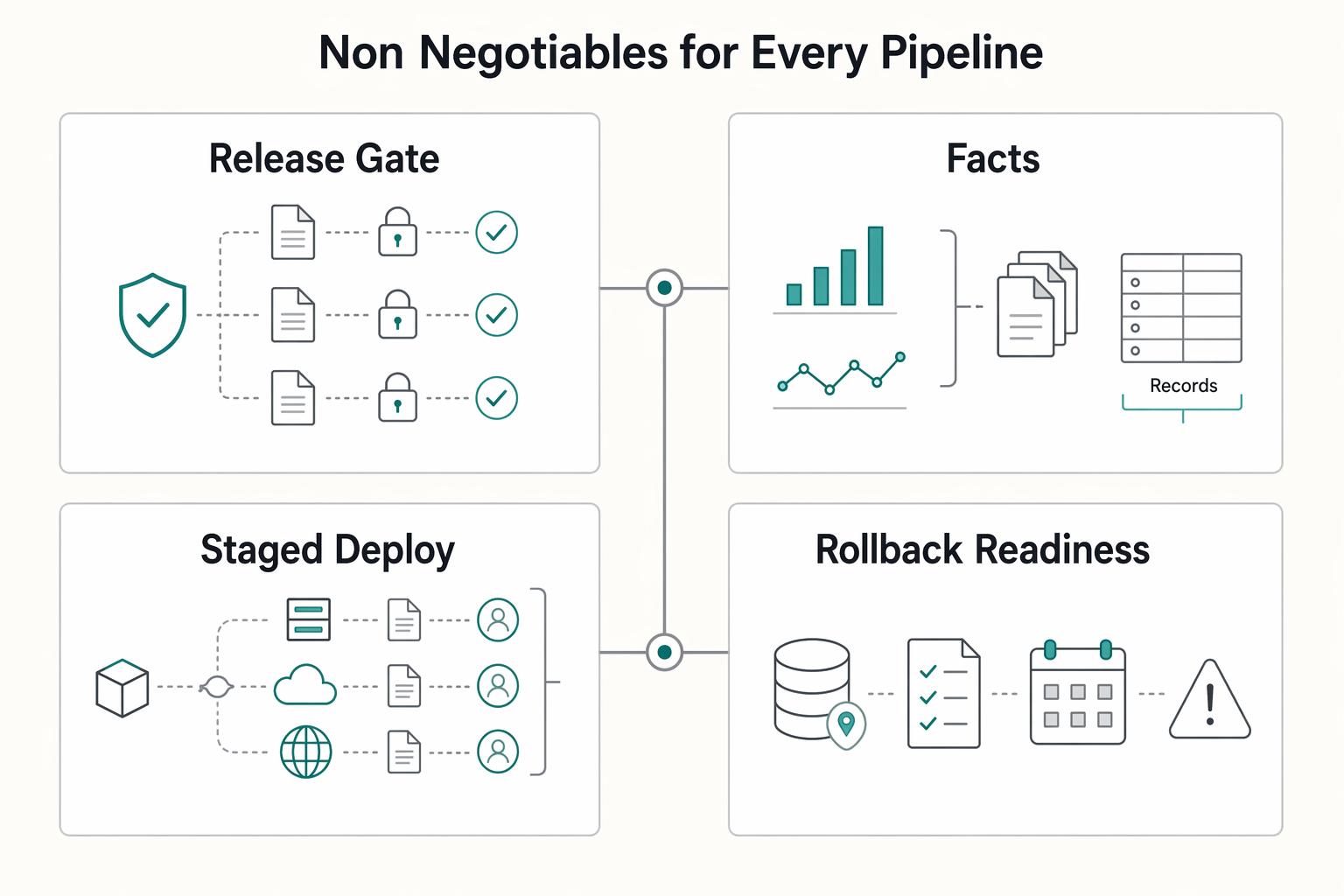
Set trigger intent first: run CI on pull_request, run deployment on a tightly scoped release path, and block deploy whenever required checks fail.
Step 1 Choose one trigger per purpose#
Use separate events so each run has one job to do. GitHub Actions supports common triggers like pull_request, push, and manual workflow_dispatch.
| Trigger choice | Best use | Scope tightly | Main tradeoff |
|---|---|---|---|
pull_request | CI confidence before merge | Target branch (for example main) and relevant PR activity | Strong pre-merge signal, not a shipment event |
push to main | Controlled CD after merge | Only main | Fast, but every merge can become a deploy |
| Release-led shipment decision | Explicit handoff for client-critical changes | Named release approval, then intentional deploy start (often manual) | Clear accountability, slower than merge-triggered deploys |
If deployment risk is low and internal, merge-triggered deploys can work with strict CI gates. If changes are client-critical, use an explicit release handoff before deployment.
Step 2 Make deployment depend on passing checks#
Define a hard gate: if test/build/security jobs fail, deploy does not run. Configure this explicitly with job dependencies and conditions so deployment cannot bypass failed checks.
Use environments (staging, production) as the final control point. Environments can enforce approvals, branch restrictions, protection rules, and secret access controls before a deploy job proceeds.
Step 3 Keep event definitions narrow and checkpoints explicit#
Scope PR CI to the branch and PR activity you actually care about (for example opened, synchronized, reopened against main). Scope CD push to main only, and avoid broad event patterns that trigger unintended runs.
Track four checkpoints in order:
- PR checks passed
- Artifact built successfully
- Release approved or explicitly initiated
- Deploy confirmed in target environment
Choose GitHub-hosted or self-hosted runners with clear decision rules#
Start with a GitHub-hosted runner, and move to self-hosted only when you can name a hard dependency that requires it.
Step 1 Start with the default and require a concrete reason to deviate#
Use this rule in your repo notes: GitHub-hosted is the default; self-hosted needs a specific, written reason.
| Decision factor | GitHub-hosted runner | self-hosted runner |
|---|---|---|
| Control | Default when you do not need machine-level control | Use when you must control the machine setup directly |
| Maintenance burden | Keep as default unless you can justify added ownership | You install and operate the runner machine |
| Operational risk | Keep scope simple unless a hard dependency forces change | You own machine health, connectivity to GitHub Actions, and failure investigation |
A valid reason for self-hosted should be concrete, not vague. One grounded example: if you run Docker container actions or service containers on self-hosted, the runner must be Linux with Docker installed. Also confirm the machine can communicate with GitHub Actions and has enough hardware resources for your workflows.
Step 2 Match the runner OS to real compatibility risk#
Pick one OS that matches what you actually need to validate, and add others only for real compatibility risk.
For self-hosted runners, GitHub documents support across Linux, Windows, and macOS, with examples including Ubuntu 20.04 or later, Windows Server 2016/2019/2022 64-bit, and macOS 11.0 (Big Sur) or later. GitHub also lists ARM64 support as public preview, so treat ARM64 as an explicit choice, not a quiet default.
Avoid multi-OS jobs unless they close a real risk you can name.
Step 3 Document ownership before trusting runner output#
Before you rely on runner output, assign clear ownership for:
- who patches runner dependencies and base machine software
- who rotates runner credentials
- who investigates failed runner environments
For self-hosted runners, add two setup checks to your notes: machine connectivity to GitHub Actions, and Linux + Docker when Docker container actions or service containers are involved. If either check is missing, failures can look like app defects when the issue is the runner environment.
Build the CI pipeline in .github/workflows step by step#
Build one pull request path first, and make it easy to read and verify. Put a single workflow file in .github/workflows that answers one question: did this PR pass checks, produce the expected artifact, and leave clear evidence in GitHub?
| CI step | Order | Note |
|---|---|---|
| Lint | First | Use explicit names so failure reason is obvious at a glance |
| Security checks | After lint | Use explicit names so failure reason is obvious at a glance |
| Tests | After security checks | Use explicit names so failure reason is obvious at a glance |
| Build artifact | Only after those pass | Treat the artifact and logs as release evidence |
Step 1 Start with a pull request trigger. Anchor CI to pull requests first so every change follows one consistent path. GitHub documents that workflows can run tests on code changes, and you can use a starter workflow template as a base, then trim it to only the events and jobs you actually need.
Run one real test PR to confirm you get one expected workflow run with the right name and branch scope. If the same file starts running on pull request, push, and other events without a clear reason, review noise and duplicate runs grow fast.
Step 2 Keep checks small, named, and in a clear order. Run lint, then security checks, then tests, then build the artifact only after those pass. Use explicit names so failure reason is obvious at a glance.
Prefer reusable actions only when they reduce maintenance. If an action improves readability and updates, keep it; if it hides too much logic, keep the workflow more direct.
Step 3 Treat the artifact and logs as release evidence. Name artifacts so reviewers can quickly tie them back to the PR context and commit context. Keep test output clear enough that someone can answer: what failed, and what was built.
A successful build with weak traceability is still risky. CI output should support an auditable release decision, not just a green check.
Step 4 Validate every workflow edit before trusting it. Treat .github/workflows edits as production-facing. Use the same checks each time: YAML syntax check, limited logic validation where possible, and one real PR validation in GitHub.
Failure visibility is required. Each failed step should clearly show whether the problem is lint, security, tests, or build, so recovery does not depend on tribal knowledge.
Add CD without creating deployment surprises#
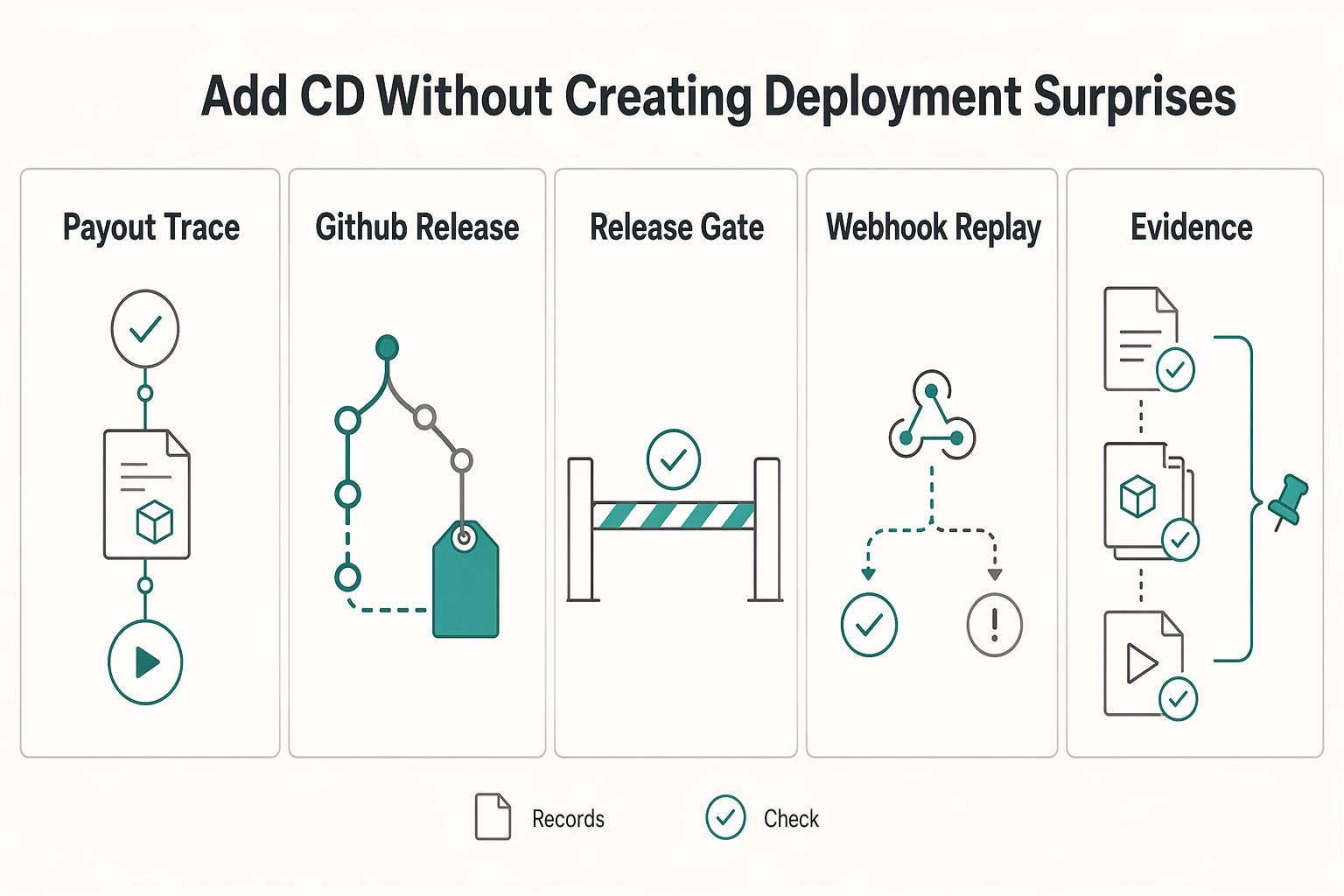
Keep CD predictable by enforcing one promotion path: a passed CI run plus one approved trigger should be the only way a deployment job starts.
| Control | Guidance | Check |
|---|---|---|
| Promotion path | A passed CI run plus one approved trigger should be the only way a deployment job starts | Trace one CI run, one artifact, and one deployment trigger |
| GitHub Release | Use a release/tag flow when you need a deliberate handoff | Treat release as promotion, not rebuild |
| Staging and production environments | Separate staging and production and keep environment-specific secrets scoped correctly | Apply manual approval on deployment jobs where needed |
| Webhook-based deploys | Safely handle duplicate delivery for the same tag or commit | Surface a clear success/failure status |
| Deployment evidence | Record the commit range, release tag, and rollback reference together | Keep it in release notes, job summary, or deployment logs |
Step 1 Define one promotion path and remove shadow paths. Choose one trigger per app, then retire side routes like ad hoc scripts, direct server changes, or unreviewed webhook paths. For any release candidate, you should be able to trace one CI run, one artifact, and one deployment trigger.
Step 2 Use GitHub Release when you want a clear promotion record. If you need a deliberate handoff, use a release/tag flow as the checkpoint and keep release notes tied to that version. Treat release as promotion, not rebuild: deploy the artifact that already passed CI.
Step 3 Add staging and production guardrails with explicit go/no-go checks. Use GitHub Actions environments to separate staging and production, keep environment-specific secrets scoped correctly, and apply manual approval on deployment jobs where needed. Write the checks down before production (for example: staging deploy completed, app started, smoke check passed, approver confirmed).
Step 4 Make webhook-based deploys repeatable and visible. Assume retries can happen. Your receiving system should safely handle duplicate delivery for the same tag or commit, and your workflow should surface a clear success/failure status instead of fire-and-forget behavior.
Step 5 Record deployment evidence every time. Store the commit range, release tag, and rollback reference together in release notes, job summary, or deployment logs. That gives you a usable trail when you need to verify or reverse a change quickly.
Related reading: How to Set Up Your First Sales Call Funnel Using Calendly and a Typeform Quiz.
Add operational controls that protect a professional client-facing practice#
After you lock your promotion path, lock the workflow files that can change it. Treat .github/workflows as a critical attack surface, because even small YAML edits can change how event-driven deploy logic runs.
Step 1 Require review on deployment workflow changes#
Set a minimum governance rule: any pull request that changes .github/workflows needs a named reviewer, and deploy-related workflow edits need explicit approval before merge.
Use a quick audit check on a recent PR: can you point to the reviewer, the approval, and the exact workflow diff that changed deployment behavior? If not, your process still allows quiet release-path changes.
Step 2 Keep sensitive data out of logs and issue trails#
Assume workflow security is your team's responsibility, and assume poor scripting or a compromised action can leak secrets. Keep build logs and GitHub issue writeups free of tokens, headers, payload bodies, client data, and copied secret values.
Share only what is needed to debug safely: run URL, commit SHA, event name, environment, and failed job or step. If troubleshooting requires broad raw output, tighten the step so it emits a narrower error message.
Step 3 Turn failed event runs into incident notes#
Create a short incident-note template tied to failed runs: event name, run link, commit SHA, failed step, impact, immediate fix, and the next rule/check you will add.
This discipline supports fewer deployment surprises, clearer client communication during failures, and cleaner delivery records over time.
Common GitHub Actions mistakes and how to recover fast#
Fast recovery in ci/cd with github actions usually comes from reducing complexity, because CI/CD environments are active targets and compromises have increased over time.
| Mistake | Recovery | Quick check |
|---|---|---|
| trigger sprawl across too many events | start with pull_request for confidence checks and release for explicit shipment, then add other events only when you have a written reason | each active event should have a clear owner and one-sentence purpose |
| one oversized job that does everything | split work into smaller jobs and sequence them with needs so failures are easier to isolate | you can point to a single job for each outcome (test, build, deploy) |
| runner mismatch with supported environments | align runs-on with production or the real supported platform set (Linux, Windows, macOS) | compare a recent failed run to the environment that run was meant to protect |
| unclear output from a failing step | name steps clearly, make error messages explicit, and use explicit exit conditions so failures stop for a clear reason | from the run summary alone, you can tell whether the failure came from lint, tests, packaging, or deploy |
| no rollback path in release notes | require each GitHub Release to include a short reversal instruction before deployment | if a release note explains only the new version and not how to back it out, pause and add rollback instructions first |
- Mistake: trigger sprawl across too many events.
Recovery: start with pull_request for confidence checks and release for explicit shipment, then add other events only when you have a written reason. Quick check: in .github/workflows/*.yml, each active event should have a clear owner and one-sentence purpose.
- Mistake: one oversized job that does everything.
Recovery: split work into smaller jobs and sequence them with needs so failures are easier to isolate. Quick check: you can point to a single job for each outcome (test, build, deploy) instead of debugging one monolithic job.
- Mistake: runner mismatch with supported environments.
Recovery: align runs-on with production or the real supported platform set (Linux, Windows, macOS). Quick check: compare a recent failed run to the environment that run was meant to protect.
- Mistake: unclear output from a failing step.
Recovery: name steps clearly, make error messages explicit, and use explicit exit conditions so failures stop for a clear reason. Quick check: from the run summary alone, you can tell whether the failure came from lint, tests, packaging, or deploy.
- Mistake: no rollback path in release notes.
Recovery: require each GitHub Release to include a short reversal instruction before deployment. Quick check: if a release note explains only the new version and not how to back it out, pause and add rollback instructions first.
These are practical controls, not cosmetic ones: they reduce blast radius and speed recovery. Related: How to Calculate ROI on Your Freelance Marketing Efforts.
Final checklist before you rely on this in production#
Use this as a go/no-go check: if any box is unclear, keep the pipeline in pre-production.
- CI runs on every pull request with lint, tests, and a build artifact (and any additional checks your team requires).
- CD trigger is explicit, either merge or GitHub Release, and documented with an owner plus rollback note.
- Runner choice, either GitHub-hosted runner or self-hosted runner, is justified and actively maintained.
- Changes under
.github/workflowsrequire review in your process and produce clear pass/fail evidence. - Failed jobs and steps have defined recovery actions and incident notes.
- The pipeline is understandable by someone other than the original author.
The first two checks matter most because they define what runs and when. For CI, verify one real pull request shows the expected job results and that the build artifact is actually available. Keep trigger scope tight so events like push, pull_request, and release do not overlap in ways you did not intend.
For CD, keep one promotion path and document it plainly. If deploy starts on merge, say that; if deploy starts on release, say that and map it to the environment controls you use (approvals, protection rules, secrets). A teammate should be able to answer: what event deploys, who approves (if needed), and how rollback works.
Treat .github/workflows/*.yml as operational code. Review workflow edits like app code, and make sure each PR leaves clear evidence of what passed or failed. If a peer cannot explain the trigger, jobs, runner, deploy path, and rollback from the repo artifacts, the setup is not production-ready yet.
Frequently Asked Questions
What is ci/cd with github actions in practical terms for a solo professional?
It means your repository can automatically run checks when a repository event happens, such as a pull request opening, and can continue to deployment after your merge gate. In GitHub’s terms, a workflow is the automated process, and GitHub can build and test every pull request and show the results in the pull request itself. For a solo operator, this can reduce manual release steps and leave a visible record of what passed, failed, and shipped.
What is the minimum pipeline I should ship first in GitHub Actions?
Start with one workflow file in .github/workflows triggered by pull_request, with one job that at least runs tests (and optionally lint or build steps). Your checkpoint is simple: open a real pull request and confirm GitHub shows each test result in the PR before you merge. If deployment is added too early, diagnosis can get harder while the basic checks are still unstable.
Which GitHub Actions components matter most at the start: workflow, event, job, step, action, or runner?
Start with the workflow and the event, because those decide what runs and when. Then shape clear jobs and steps so failures are easy to locate, and only add reusable actions when they reduce manual maintenance rather than hiding logic you still need to understand. Runner choice matters early too, but mostly as a reality check: use Linux, Windows, or macOS based on where your code actually needs to run.
When should I choose a GitHub-hosted runner instead of a self-hosted runner?
Choose a GitHub-hosted runner first unless you have a hard dependency on infrastructure you manage yourself. Workflows can run on GitHub-hosted virtual machines or on machines you host yourself, but do not assume there is a universal cutoff for when self-hosting becomes worth the overhead. If you go self-hosted, make sure you can name the owner for patching, credentials, and failed-environment investigation before you switch.
Should deployment run on pull request, merge, or GitHub Release?
Do not deploy from pull_request if that event is mainly your confidence check. The strongest source-backed default here is to run validation on pull requests and deploy after merge, because GitHub explicitly supports building and testing PRs and deploying merged pull requests to production. If you add GitHub Release as an approval layer, treat that as your process choice, and document the rollback note with the release.
How do I keep GitHub Actions automation from becoming expensive operational overhead?
Keep the trigger list short, keep jobs small, and avoid multi-OS runs unless they protect a real compatibility risk. A good recurring check is to review each workflow file and confirm every event, job, and runner still has a purpose you can explain in one sentence. Overhead can grow quickly when one file tries to handle every case, every platform, and every deployment path.
What can we not confirm from current public excerpts about tool-to-tool performance tradeoffs?
We cannot confirm hard pricing, runtime speed, ROI, or a proven cost advantage for GitHub Actions versus other CI/CD tools from the provided excerpts. We also cannot confirm an exact threshold for when self-hosted runners outperform GitHub-hosted runners in practice. If that comparison matters for your team, treat it as a separate measurement exercise, not something settled by these sources.
Try a related tool
Researched and edited by the Gruv editorial team. Gruv builds cross-border billing, payouts, and finance-operations software for global businesses.
Sources
Includes 7 external sources outside the trusted-domain allowlist.
- media.defense.gov/2023/Jun/28/2003249466/-1/-1/0/CSI_DEFENDING...trusted
- arctiq.com/blog/top-10-github-actions-security-pitfalls...external
- brandonkindred.medium.com/creating-your-first-ci-cd-pipeline-using-git...external
- dev.to/goodluck_ekeoma_2c98866d0/cicd-with-github-a...external
- docs.github.com/en/actions/reference/runners/self-hosted-run...external
- docs.github.com/actions/quickstartexternal
- freecodecamp.org/news/how-to-build-a-production-ready-flutter...external
- github.blog/enterprise-software/ci-cd/build-ci-cd-pipeli...external
Educational content only. Not legal, tax, or financial advice.
Related Posts

Value-Based Pricing for Freelancers Under Real Payment Risk
Value-based pricing works when you and the client can name the business result before kickoff and agree on how progress will be judged. If that link is weak, use a tighter model first. This is not about defending one pricing philosophy over another. It is about avoiding surprises by keeping pricing, scope, delivery, and payment aligned from day one.
How to Calculate ROI on Your Freelance Marketing Efforts
If you want ROI to help you decide what to keep, fix, or pause, stop treating it like a one-off formula. You need a repeatable habit you trust because the stakes are practical. Cash flow, calendar capacity, and client quality all sit downstream of these numbers.
A Guide to Continuous Integration and Continuous Deployment (CI/CD) for SaaS
You are not choosing between speed and safety. You are choosing how much business risk each release can carry. As the CEO of a business-of-one, your release process is part of your risk strategy.