
Quick Answer
Use your remote daily stand-up as a short decision checkpoint, not a task recital. Give updates in a fixed order: what changed, what comes next, and what is blocked. Keep each item tied to a milestone, name the owner for any dependency, and move off-topic requests to a parking lot for separate review. Then publish a written recap in one channel so status, handoffs, and billing notes stay consistent.
Your Remote Stand-Up Isn't a Meeting - It's Your Most Powerful Business Tool. Here's How to Use It.#
Short answer: In a remote daily stand-up, stop giving a task diary. Lead with the objective, show a concrete signal, and ask for the next decision or unblock.
In your next stand-up, do those three things in order: name the objective, show a concrete signal, and ask for a decision or unblock. That turns a quick check-in into a control point, which matters because vague updates hide real impediments.
A stand-up should be short and focused, usually 5 to 15 minutes, with 15 minutes as the ceiling. If you use the usual 3 core questions, answer them with evidence, not activity. "Moved the onboarding card to review, waiting on client access approval" gives a real signal. "Working on bugs" is opaque and hides whether anything important is actually blocked.
| Mode | Focus | Language | Client reaction | Downstream effect |
|---|---|---|---|---|
| Task report mode | What you did | "Worked on tickets" | Hears motion, not value | More follow-up, less clarity |
| Business outcome mode | What changed | "Checkout fix is in review; launch date still holds" | Sees progress against a result | Better alignment and clearer decisions |
| Business outcome mode | What is stuck | "Need copy approval today to keep the milestone on track" | Understands the ask and urgency | Earlier blocker removal |
Step 2 Run a 20-second check before you speak#
Before you speak, run a 20-second check against three things:
- Intended outcome: what should be true after today?
- Milestone linkage: which deliverable or priority does this move?
- Risk to surface: what could slow the work if not addressed now?
If any of those is missing, your update is not ready. Once you can frame updates this way, the next step is to set a few rules that keep the check-in disciplined and useful every day.
Set a Small Fixed Core and Name What Is Flexible#
Use this rule set to keep your stand-up predictable without making it rigid: keep a small fixed core, and be clear about what is flexible. When people know that boundary, they spend less time debating format and more time moving work.
Step 1 Rewrite each prompt as a speaking template#
Keep Yesterday / Today / Blockers, but make every answer include three parts: outcome, business impact, and next dependency. That keeps each update decision-ready instead of activity-heavy.
- Yesterday: "Yesterday, I moved the stated outcome forward. That matters because of the business impact already tied to the work. The next dependency is the person, approval, asset, or review needed for handoff."
- Today: "Today, I am advancing the next outcome. That keeps the relevant milestone or deadline on track. I will need the verified dependency to finish or hand off."
- Blockers: "I am blocked by a specific issue. The impact is the delay, risk, or decision gap created by that issue. I need the owner to provide the required item by the agreed time or meeting."
| Prompt | Weak update | Strong update |
|---|---|---|
| Yesterday | "Yesterday I worked on the onboarding flow." | "Yesterday, I finished the onboarding flow revisions. That removes friction in first-time setup. The next dependency is design approval on final screen copy." |
| Today | "Today I'm doing QA fixes." | "Today, I'm closing the remaining QA fixes for checkout. That protects the current release target. I need the client test account reset to verify the payment path." |
| Blockers | "I'm blocked on feedback." | "I'm blocked on homepage copy approval. The impact is that the page cannot move to final review. I need marketing to confirm the headline in the project channel today." |
Quick self-check: if someone cannot repeat what changed, why it matters, and what happens next, your update is still too vague.
Step 2 Set only the guardrails you will actually enforce#
Think of guardrails as a short shared note: a few fixed rules plus explicit flexibility. That keeps consistency without turning every preference into a mandate.
| Guardrail | What to set | Use it when |
|---|---|---|
| Hard stop | Set a clear end time and hold it | Updates drift into problem-solving |
| Camera discipline | Decide the default before the meeting and allow practical exceptions | You want to avoid debating camera expectations live |
| Parking lot | Capture the item, assign an owner, and name the follow-up channel before moving on | A topic needs diagnosis, scope discussion, or separate approval |
- Hard stop: Set a clear end time and hold it.
- Camera discipline: Decide the default before the meeting and allow practical exceptions, for example bandwidth or accessibility limits.
- Parking lot: When a topic needs diagnosis, scope discussion, or separate approval, capture it, assign an owner, and name the follow-up channel before moving on.
Step 3 Run a pre-stand-up checklist before you join#
Before each call, confirm these four items so your update stays operational:
- Intent: What decision, confirmation, or visibility do you need today?
- Milestone linkage: Which deliverable, deadline, or client priority does this update move?
- Blocker owner: If something is stuck, who can unblock it?
- Follow-up channel: If this needs more than a quick answer, where does it continue: chat, ticket, email, or a separate call?
The Strategic Shift: Running the Stand-Up With Your Client#
In your next client-facing stand-up, treat it as a short stakeholder check-in, not an internal task recap. Keep the three-question format, make each update client-readable, protect the timebox, and log follow-ups in the project channel before you return to execution.
Step 1 Translate technical work into client-readable outcomes#
Use a simple pattern in every update: work completed or in progress -> outcome -> next milestone. If you do not have a verified impact metric, say so directly instead of estimating.
| Technical update | Client-ready update |
|---|---|
| "Yesterday I refactored the authentication service." | "Yesterday I completed the login security update. The sign-in flow is now ready for the next release checkpoint." |
| "Today I'm optimizing database queries." | "Today I'm improving checkout response speed. I'll share the measured impact once it's confirmed from the source record." |
| "I resolved merge conflicts in the main branch." | "I finished integrating the latest changes, and the build is ready for the next testing step." |
Quick self-check: after you speak, your client should be able to repeat the current status and the next milestone without extra translation.
Step 2 Route new requests without turning the stand-up into scope review#
When a new request comes up, keep control with a repeatable decision path:
| Step | What to say |
|---|---|
| Acknowledge | That is useful and worth reviewing. |
| Park | Let's add it to the parking lot so we keep today's updates on time. |
| Route | We'll review fit with current scope in a separate scope discussion. |
| Log ownership | I'll post it in the project channel with owner and next review point. |
Use those four steps in order every time. Do not commit delivery, timing, or cost in the stand-up unless that review is already complete.
Step 3 Use a repeatable progress sequence in every update#
Use the same sequence every day: prior commitment -> current status -> next milestone. That gives clients a clear narrative of movement without adding meeting overhead.
Example: "As planned yesterday, I completed staging setup. Right now the environment is ready for QA review. Next I'm moving into test fixes so review can continue on schedule."
Use the same structure for blockers: "We expected copy approval yesterday. It is still pending, so the page cannot move to final review. If approval lands today, the current milestone can continue."
Keep the stand-up to 5 to 15 minutes, with a hard cap at 15 minutes. If the conversation turns into diagnosis or tradeoffs, move it to a follow-up and post that handoff in the same project channel. Related: Performance Management for Remote Teams: A Guide for IT Agencies.
Treat a Blocker as a Project Risk and Document It#
When something is blocked, treat it as a project risk, not a personal obstacle. In a client-facing stand-up, give a short risk statement in the meeting, then document the same facts right away so scope, timeline, and billing context stay clear.
Step 1 State the risk in business terms during the stand-up#
Keep it concise in a 15-minute window: dependency, impact, owner, next move.
Use this pattern: "We are waiting on the stated dependency. This affects the named deliverable or milestone. The current owner is needed for the next action. Once the dependency is received, I can continue with the next scheduled step."
| Weak blocker update | Risk-based update | Why this protects you |
|---|---|---|
| "I'm blocked on API keys." | "We are waiting on client-side API keys, which blocks checkout testing for the current milestone." | Keeps the focus on delivery impact, not personal friction. |
| "Design still isn't ready." | "Homepage work is waiting on approved design assets, so it cannot move to review today." | Makes timeline risk visible early. |
| "Still waiting on feedback." | "Copy approval is pending, so the landing page cannot move to final QA yet." | Preserves scope and sequencing clarity. |
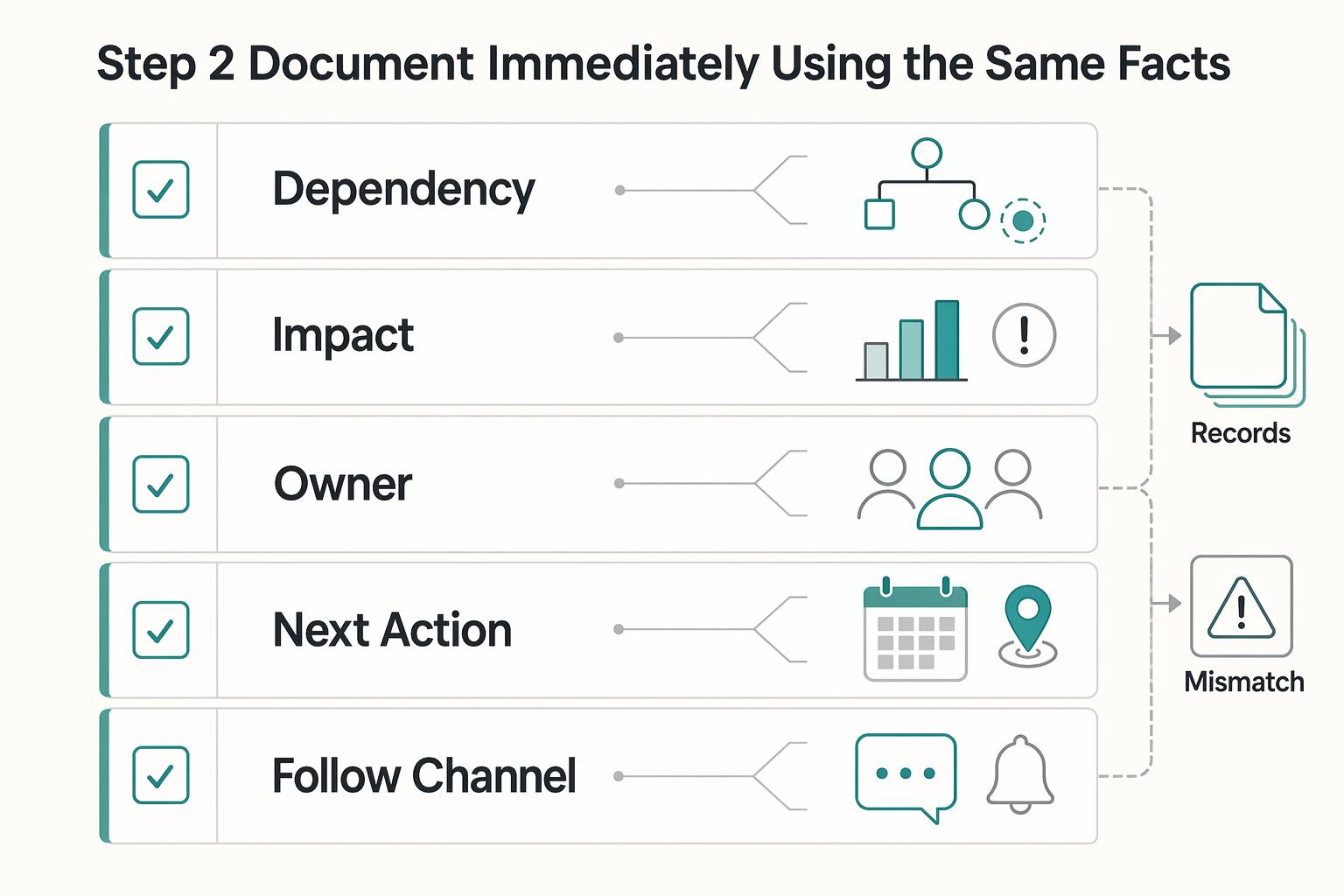
Step 2 Document immediately using the same facts#
Post a time-stamped note in the agreed channel right after the call. Keep the wording consistent with what you said live.
| Field | What to record |
|---|---|
| Dependency | What is pending |
| Impact | What deliverable, review, or milestone is affected |
| Owner | Who provides or decides the next input |
| Next action | What you will do once unblocked |
| Follow-up channel | Where updates/replies should happen |
If scope, timing, or paused work is involved, reference the governing SOW/MSA clause category (for example: client dependencies, review responsibilities, change control, or pause terms) only after verifying the current clause reference from the contract or source record.
Project tool block: "Stand-up risk update: verify the affected deliverable, dependency, impact, owner, next action, follow-up channel, and any current clause reference from project and contract records before sending the update."
Email handoff block: "As discussed in the stand-up, verify the deliverable, dependency, impact, owner, next action, and any clause reference from project and contract records before sending the handoff. Please reply in the agreed channel when the dependency is available so I can confirm the next scheduled step."
For a step-by-step walkthrough, see How to Give Effective Feedback to a Remote Team Member.
The Final Evolution: Asynchronous Stand-Ups to Protect Deep Work#
Use asynchronous stand-ups as your default for routine updates when your team is distributed or your work needs uninterrupted focus blocks. Move to a live call when the written thread is not resolving the issue clearly enough to keep work moving.
Step 1 Choose the format based on the work, not habit#
Frequent meetings can erode deep-work time, while async updates reduce interruptions and leave a written record from the start. Use this quick comparison before you decide:
| Format | Interruption risk | Clarity of record | Response latency | Best fit for distributed client work |
|---|---|---|---|---|
| Synchronous stand-up | Higher, because everyone pauses at once | Lower unless someone writes follow-up notes | Lower | Fast back-and-forth, sensitive topics, complex blockers |
| Asynchronous stand-up | Lower, because people do not need to be online together | Higher, because updates are documented in-channel | Higher | Routine progress, timezone-spread teams, decisions that need traceability |
Step 2 Use one reusable update format every day#
Post in the agreed channel using the same fields each time:
- Outcome: What moved forward since the last update
- Next dependency: What input, approval, or asset is needed next
- Owner: Who owns the next move
- Follow-up channel: The thread, task, or email where replies should happen
If someone can scan your update and answer those four points, it is clear enough. If replies are split across DMs, tasks, and email, your record weakens and decisions slow down.
Step 3 Apply a simple escalation rule and implement it in your tools#
Use async by default for normal progress and blocker visibility. Escalate to a live call when the written exchange stays ambiguous, turns into conflict, or raises a blocker with meaningful scope or timeline impact.
Implementation checklist:
- Post all stand-up updates in one project channel or dedicated thread.
- Copy blockers and decisions into your task tracker so execution and record stay connected.
- Set notification norms so response expectations are explicit.
- Reserve live calls for issues the async thread cannot resolve cleanly.
Integrating Your Stand-Up: From Daily Update to Paid Invoice#
Your written stand-up can double as invoice support when each update leaves a clear audit trail from status update to billing note. You are not turning a stand-up into an invoice on its own. You are making the work record traceable, so billing does not rely on memory.
Step 1 Log daily updates in a fixed structure. Use the same fields each day: what you completed, what you are doing next, and blockers. Keep completed work and blockers in separate fields. For each completed item, link the task or deliverable record; for each blocker, note the dependency, owner, and follow-up thread.
Step 2 Tag completed work vs blockers for billing handoff. Mark finished items as completed and attach the proof record (task card, deliverable link, or approved thread). Mark blocked items as blockers and record the missing input or approval. At billing close, map each invoice line to three references: the stand-up entry, the linked task record, and the related time entry.
That mapping gives you a plain "chain of custody": an audit trail from update to invoice. It lowers handoff risk when records would otherwise be split across chat, task tools, and time logs.
| Tool layer | Neutral examples | Evidence quality | Handoff reliability check |
|---|---|---|---|
| Communication channel | Slack, Teams, email thread | Strong when updates are time-stamped in one project thread | Can you trace each invoice note back to one visible update thread? |
| Task tracker | Jira, Trello, Asana | Strong when each update links to a specific task record | Can completed work move to billing without retyping details? |
| Time tracking | Built-in timer, Harvest, Toggl | Strong when time is attached to the same project/task context | Can you match each time entry to the task and stand-up note? |
| Invoicing | Xero, QuickBooks, FreshBooks | Strong when invoice lines reference existing work records | Can completed records become invoice notes without re-entry? |
Step 3 Pick tools by handoff quality, not brand. Pick the stack that keeps context intact from communication to task status to time to invoicing. When that chain breaks, details get lost, prices drift, and approvals stall.
Step 4 Automate after your manual record is clean. Automation is useful once your required fields are stable. You can automate stand-up collection, build a recap, and trigger an internal follow-up task after submission. For client-facing recaps, still review before sending: confirm completed items are actually done, blockers are current, links resolve, and time entries match the billing period.
Conclusion: Your Stand-Up Isn't a Chore; It's Your Daily Business Review#
If your stand-up feels repetitive, it is probably doing the wrong job. Use it as a brief daily coordination check that tells you what matters today, what is blocked, and who needs support, not as a ritualized status report.
Step 1 Route scope instead of solving it live#
When a new request appears, do not answer it in the check-in. Capture it, move it to the right follow-up thread or review point, and name the next owner. Your verification point is simple: after the meeting, can someone find the request, the impact question, and the next step in writing? If not, important follow-through can get lost.
Step 2 Log blockers early and with enough detail to act#
A blocker is only useful when it is specific. Write down what is blocked, who or what it depends on, what work is waiting, and what support is needed next. That keeps the stand-up focused on communication and coordination, which is its actual purpose. The failure mode is the opposite: repeated updates that nobody acts on, or a check-in that expands into a draining, unfocused meeting.
Step 3 Translate activity into the next outcome#
Do not stop at "worked on X." Say what moved forward, what you will move next, and why that matters to the current milestone or deliverable. Your check is whether today's note makes tomorrow's priority obvious. If everyone is already fully aligned, shorten the meeting rather than stretching it to fill time.
Before you close each day, make sure you can do four things:
- prep the update from real task or deliverable notes
- run the check-in around focus, blockers, and support
- document owners, risks, and follow-ups in one place
- use that record for clean weekly recaps and follow-through
The real habit is consistency. If your notes are clear enough to review later without guessing what happened, your daily stand-up is doing useful work.
Frequently Asked Questions
How do you run a remote daily stand-up with a client?
Treat it as a short stakeholder check-in, not an internal status recital. Lead with business value, state the next expected outcome, log any risk, and hold the boundary of the meeting. For example, say yesterday’s work moved a milestone forward, today’s work targets the next outcome, and the current risk is a named dependency with a named owner and a clear impact if it is not resolved. If the conversation drifts into approvals, redesign, or new requests, park it in a separate thread or follow-up call so the stand-up stays a coordination point, not a working session. Your check after the meeting is simple: can someone read the written recap and see outcome, next step, blocker, owner, and linked task without asking what happened?
What is the right format for an asynchronous stand-up?
Use the same 3 prompts in writing: yesterday, today, and blockers. Pick live or async based on the coordination you need, then keep the record in one place because remote teams can break down when they scatter updates across too many tools. A good checkpoint is whether your written update can stand alone as documentation by default. If people still need to ask what you meant, who owns the blocker, or where the task lives, your format is too loose. | Format | Use it when | Include | Evidence it creates | | --- | --- | --- | --- | | Live sync | You need fast clarification, dependency resolution, or a shared decision that cannot wait | Yesterday, today, blockers, plus the current owner of any open dependency | Meeting notes, action items, named owners, and a follow-up record if captured properly | | Async update | You want routine visibility without interrupting deep work | Yesterday, today, blockers, task links, and whether anything is waiting on someone else | Time-stamped written updates that are easier to trace into delivery notes and project records | | Hybrid | You mostly work async but escalate only the blocked items into a short live conversation | Written update first, then a live discussion only for exceptions | A cleaner audit trail because the normal work stays documented and only exceptions become meetings |
How do you handle scope creep during the stand-up?
Use the same escalation path every time. Capture the request, route it to your change process, log the likely impact, and confirm the next owner. In plain terms, acknowledge the idea, note it in the project record, move it out of the check-in, and set who will review scope, cost, or timeline impact next. The failure mode is answering on the spot and quietly absorbing extra work, because then your notes stop matching the actual agreement.
What should you do when a blocker comes from the client side?
Treat it as an operational risk, not a complaint. Capture the dependency, route it to the right owner, log the impact on work already planned, and confirm the next step in writing. Your evidence pack should include the stand-up entry, the linked task or deliverable, the follow-up message, and any related time entry that shows what paused or shifted. If your contract or policy allows timeline adjustments, verify the current timeline adjustment policy from the governing contract or policy record before using it in the update.
Are stand-ups useful if you work solo?
Yes. Keep the same documentation path you would use with a team so your notes can still flow into client updates and project records. Write your own yesterday, today, and blockers in one project location, link completed work to the task or deliverable, and tag anything blocked or waiting on input. The checkpoint is the same as for a team: can you turn that note into a weekly client recap or status log without rebuilding the story from memory?
Are stand-ups supposed to be status meetings?
No. A good check-in creates transparency, inspection, adaptation, and blocker visibility, but it should not turn into a performance report for its own sake. If people spend most of the day in meetings or recreate office habits online, the stand-up is doing too much and your writing is doing too little.
Try a related tool
Researched and edited by the Gruv editorial team. Gruv builds cross-border billing, payouts, and finance-operations software for global businesses.
Sources
- access-board.gov/abatrusted
- comptroller.war.gov/Portals/45/documents/fmr/Volume_05.pdftrusted
- dash.harvard.edu/server/api/core/bitstreams/c65d93de-db18-409...trusted
- ecommons.cornell.edu/server/api/core/bitstreams/13e8f3ba-9a61-40f...trusted
- energy.gov/cmei/communicationstandards/style-guide-full...trusted
- faa.gov/sites/faa.gov/files/regulations_policies/han...trusted
- fbi.gov/file-repository/cjis-security-policy_v5-8_20...trusted
- fema.gov/sites/default/files/documents/fema_rd_federa...trusted
Educational content only. Not legal, tax, or financial advice.
Related Posts
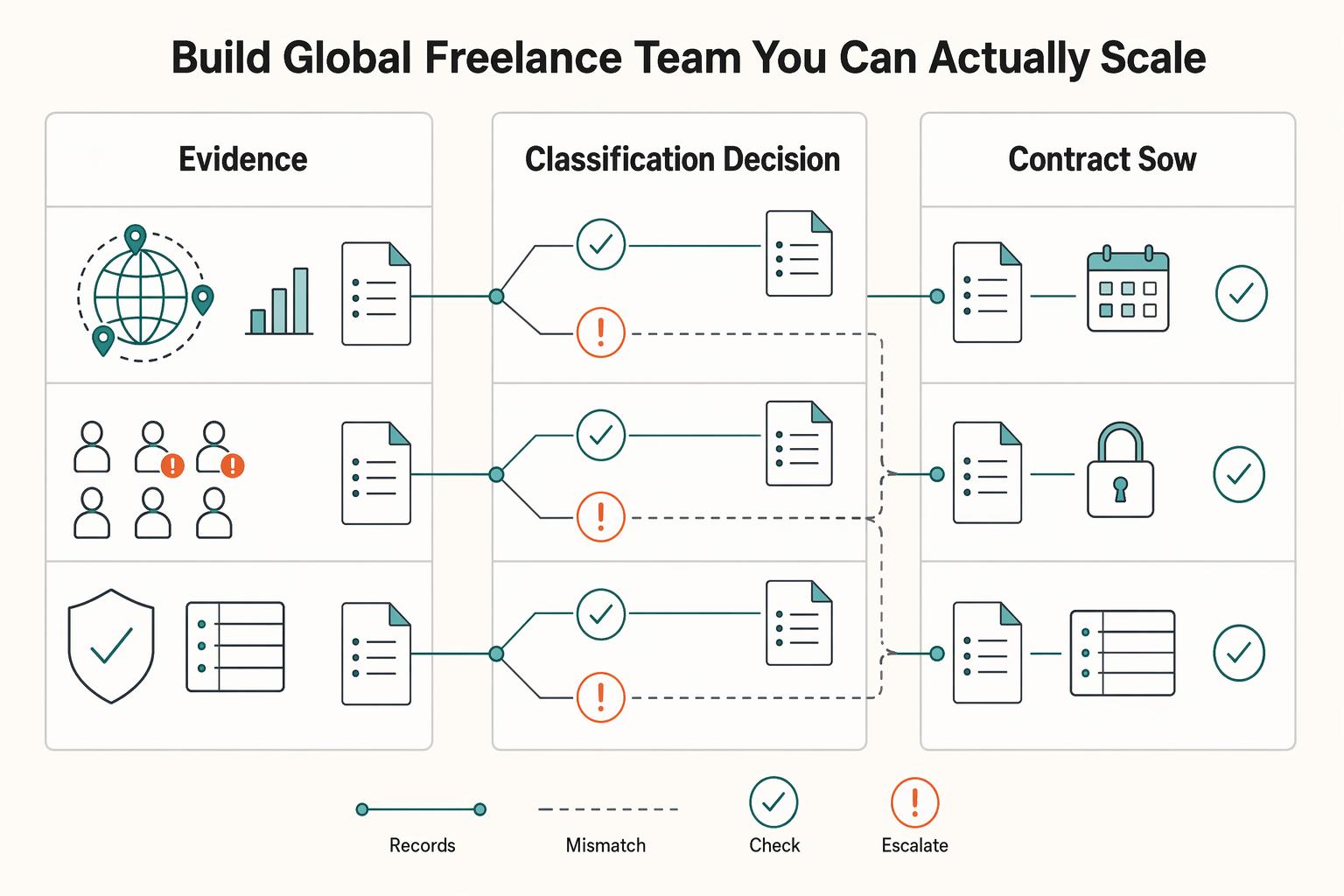
How to Manage a Global Freelance Team Without Compliance Gaps
If you want to manage a global freelance team without constant cleanup, use the same intake-to-payout process for every engagement and save an artifact at each gate. Common failure points are instinct-based classification, vague scope, and payments approved in chat with no audit trail.
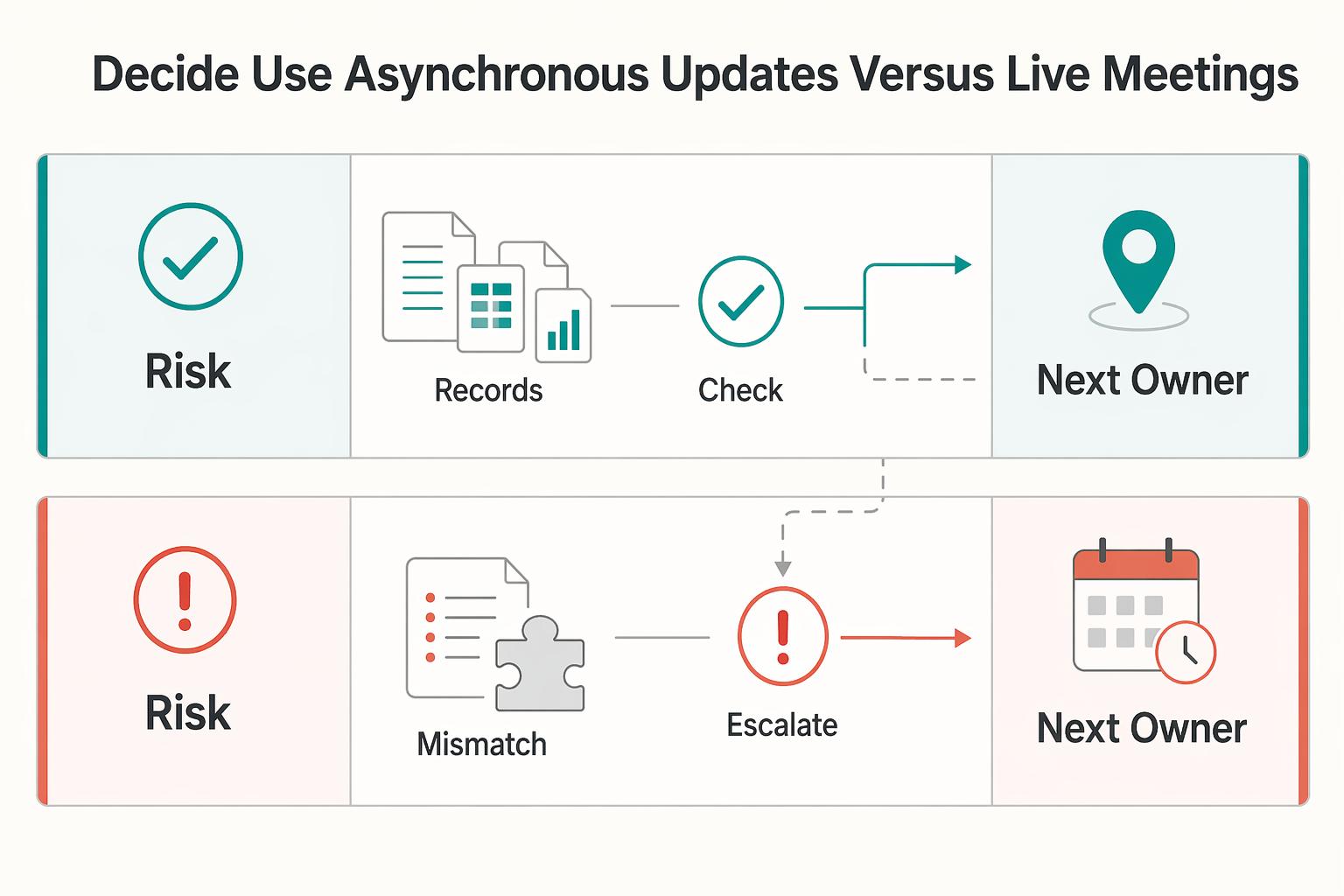
Remote Team Performance Management for IT Agencies
If your remote team performance management feels inconsistent, the problem is often not distance itself. It is ambiguity. Performance breaks down when expectations, feedback, and decisions live in chat history or manager memory instead of a written record you can review. In remote and hybrid teams, documented expectations and [outcome-based measures](https://www.opm.gov/telework/tmo-and-coordinators/performance-management) matter more than office visibility, so your first move is to make the standard visible.
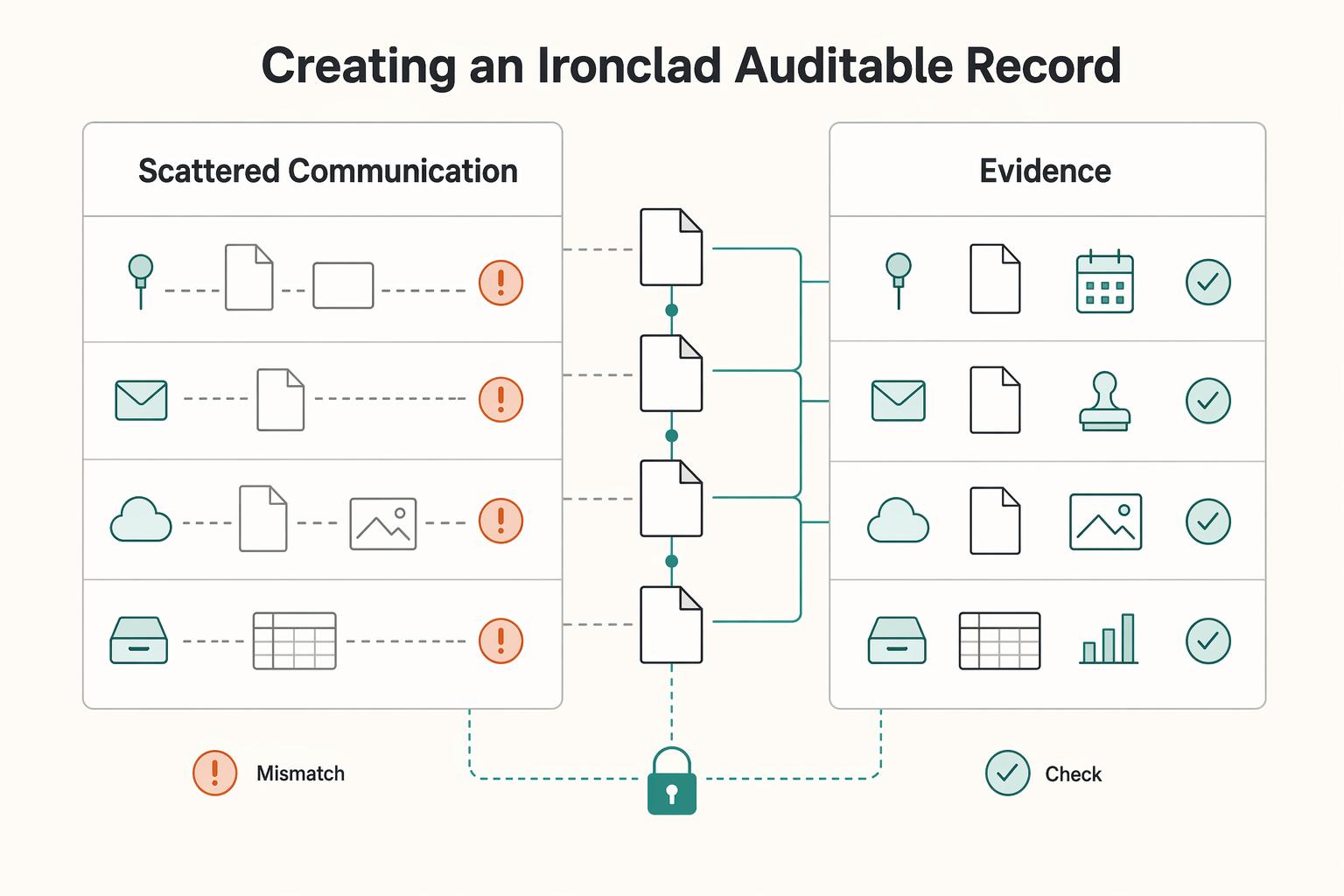
How Solo Professionals Create an Async-First Client Communication System
For a solo professional, async is not just a style preference. It is an operating mode that protects focus by reducing constant interruption and pushing more work into clear written communication.