
Quick Answer
Start by building a repeatable system, not a one-off scramble. To recruit for user research effectively, set document checkpoints first, separate payout compliance from transfer convenience, and treat study data with controlled access at a higher tier like P3 when needed. Then choose sourcing channels based on where your audience actually participates, run a screener that tests evidence instead of confidence, and track drop-off from invite through scheduling so you can fix the real bottleneck.
Participant recruitment is often the bottleneck for independent consultants and boutique firms. It is high-risk, time-consuming, and easy to underestimate until it starts consuming the hours you need for the research itself. It also brings compliance traps, scheduling friction, and the constant risk that poor-fit participants will compromise the project.
The way out is to stop treating recruitment as a string of one-off tasks and build a professional process you can repeat.
There are three parts. First, put a compliance foundation in place so risk is controlled before outreach starts. Second, build a sourcing approach that protects your time. Third, turn each study into an asset by capturing what should carry forward. That is how recruitment stops being operational drag and starts supporting your reputation and your margins.
Phase 1: Mitigate Your Risk with a Compliance Foundation#
If you want recruiting to stay repeatable, put the controls in place before you contact anyone. In practice, lock three things in this order: documents, payment handling, and a privacy/security setup you can actually manage.
Step 1. Set your document checkpoints before outreach#
Start here because disclosure failures can become major compliance problems. The baseline is simple: protect the work, reduce risk, and be clear about what you are collecting and why.
| Checkpoint | When to use | Key note |
|---|---|---|
| Consent and participant information | Before screening or scheduling | Make sure the version you send matches the tools and process you will actually use |
| Confidentiality terms (if needed) | If participants will see confidential client material such as unreleased concepts, internal workflows, or prototypes | Decide upfront whether an NDA or similar confidentiality agreement is appropriate |
| Version log | When documents change | Track changes and note why they changed for an audit trail |
In practice, prepare consent and participant information before screening or scheduling, decide early whether confidential materials require an NDA or similar agreement, and keep a version log so you can show what changed and why.
Step 2. Separate payment compliance from payout convenience#
For cross-border studies, do not leave payment as a last-minute admin task. Break it into three parts. First, collect any participant tax documentation your jurisdiction requires before payout. Second, keep payer-side records for each payment and the related correspondence. Then choose the transfer method. If local reporting or withholding rules are unclear, verify requirements before you send funds.
| Payout option | Compliance coverage | Audit trail quality | Operational effort | Participant experience |
|---|---|---|---|---|
| Bank transfer | Varies by jurisdiction and your process | Can be strong with organized records | Often high | Varies |
| Consumer payment app | Varies by provider and business controls | Varies; may be limited without business-grade records | Often low | Varies |
| Specialized payout platform | Varies by provider and configuration | Varies; confirm what records are retained | Medium | Varies |
Step 3. Apply a lightweight data-governance layer#
Treat screener responses, calendar data, and recordings as sensitive by default. If the study touches personal or sensitive details, handle it at a higher tier such as P3 (Protection Level 3). Enforce access control so only authorized users and processes can view the files. Use secure websites, document where external tools connect, and set a deletion check for study closeout.
Before launch, ask each vendor where data is stored, who can access it, how deletion works, and how flaws are identified, reported, and corrected.
Related: How to Price a UI/UX Audit for a SaaS Company.
Phase 2: Maximize Your Time with an Elite Sourcing System#
Once Phase 1 is in place, save time by making tighter sourcing decisions, not by sending more outreach.
Step 1: Price total recruiting effort before you choose a channel. Use the same decision formula for every option:
(your hourly rate x sourcing hours) + channel fees + incentive spend + replacement effort from poor-fit recruits
Then add your own placeholders for: response rate, qualified pass rate, show rate, and replacement rate. If you do not have reliable values yet, mark them as assumptions, run a small pilot, and update after the first batch. Track time from first outreach to confirmed invite so you can see which channel is actually consuming operating time.
Step 2: Pick channels where your audience is already active, then accept the tradeoff. Channel choice should follow participant behavior, not habit. You might use LinkedIn, GitHub, Stack Overflow, niche communities, referral networks, or outsourced support, but only if your target participants are truly there.
| Sourcing option | Speed to first responses | Participant quality control | Niche reach | Operational load |
|---|---|---|---|---|
| Direct outreach in target communities | Medium | Medium to high (if screening is strict) | High when community fit is strong | High |
| Broad panel or recruiting platform | Medium to high | Varies by screener discipline and replacement rules | Medium | Medium |
| Referrals from clients, peers, or past participants | Medium | High when referrers understand your criteria | Medium to high | Low to medium |
| Outsourced recruiting partner / RPO-style support | Medium | Varies by provider and brief quality | High for harder audiences | Lower execution load, less direct control |
If you outsource, do not hand over a vague brief. Define criteria, disqualifiers, incentive tiers, and replacement rules up front, or you will spend the time you saved fixing fit issues later.
Step 3: Run a screener mini-playbook that filters for evidence, not confidence. Start with hard disqualifiers, then move to behavioral prompts that require concrete examples.
Use four checks in order:
- Disqualifier criteria: role fit, recency, tool usage, or task exposure.
- Behavioral prompts: what they did, when they did it, and how they did it.
- Consistency checks: compare answers for contradictions or generic copy-paste patterns.
- Anti-fraud pass: include a CAPTCHA checkpoint and a quick duplicate-response scan.
Treat coherence as your quality signal. A respondent can pass checkboxes and still fail the interview if their examples do not hold together. Log source, screener outcome, disqualifier reason, and attendance; underused tracking systems are a known failure mode in pipeline execution.
Step 4: Tier incentives by participant complexity and study burden. Use a simple three-tier model so payouts match effort and specialization.
| Tier | When to use it | What to set before launch |
|---|---|---|
| Tier 1 | Lower complexity, lower burden | Insert verified local market range for this audience |
| Tier 2 | Either complexity or burden is high | Insert verified range and confirm replacement plan |
| Tier 3 | Both complexity and burden are high | Insert verified range, then validate confirmation and completion quality closely |
Complexity is how specialized or hard to reach the participant is. Burden is what you ask them to do (prep, tools, longer sessions, multi-step tasks). Verify ranges for audience and geography before invites go out.
If you want a deeper dive, read Thailand's Long-Term Resident (LTR) Visa for Professionals.
Phase 3: Scale Your Process with a Professional Flywheel#
After each study, run the same post-study sequence: close the participant experience cleanly, capture recontact consent, update panel records, and automate only the logistics.
Step 1. Run the same participant journey every time#
Start with clear recruitment criteria and a screener survey, then move participants through a short, predictable flow.
| Stage | What happens |
|---|---|
| Invite | Send purpose, time commitment, incentive, and screener link |
| Apply | Participants complete the screener |
| Review and approve | Review qualified applications and approve final participants; this step can be automated, but does not have to be |
| Schedule and remind | Confirm logistics and send prep details |
| Close and follow up | Send thank-you, trigger payout, and ask for consent to future contact |
Track where drop-off happens after invite, screener, approval, or scheduling so you fix the right bottleneck instead of just sending more messages.
Step 2. Treat each completed session as panel maintenance work#
A private panel is only useful if it stays usable. Record recontact consent in a dedicated field, tag profiles with fields you will actually filter on, and run a repeatable refresh process so your list stays current.
Use a lightweight lifecycle:
- Consent to recontact: store explicit yes/no as structured data.
- Profile tagging: keep tags consistent across role, context, and fit notes.
- Refresh cadence: choose a cadence you can maintain and apply consistently.
- Removal rules: remove or archive records when consent is withdrawn, contacts are no longer reachable, or profiles remain stale after refresh attempts.
Panel health still matters: filling quickly by reusing the same people can weaken long-term quality.
Use this as a planning table, not an evidence-ranked scorecard:
| Panel approach | Control | Maintenance effort | Recontact speed | Data-governance burden |
|---|---|---|---|---|
| Self-managed list | Define who can edit, approve, and export records | Define who owns updates after every study | Define target time from "need participant" to outreach | Define storage, access, and deletion rules |
| CRM-led workflow | Define field ownership, stage gates, and permissions | Define tagging, dedupe, and review routines | Define automation triggers for recontact campaigns | Define audit trail, retention, and role-based access |
| Specialist panel tool | Define what stays in-tool vs your internal system | Define sync checks and exception handling | Define how fast approved participants can be re-invited | Define vendor + internal responsibilities for governance |
Step 3. Automate coordination, keep judgment human#
Use automation for repetitive operations, and keep human review for fit decisions.
| Task | Handling |
|---|---|
| Invite sends and screener routing | Automate |
| Scheduling and reminders | Automate |
| Payout triggers | Automate |
| Record syncing and tag updates | Automate |
| Open-text screener judgment | Keep manual |
| Contradiction and edge-case review | Keep manual |
| Rapport-building communication | Keep manual |
| Final participant-fit approval | Keep manual |
This balance helps you fill studies quickly while protecting panel health and reducing fraud risk. Keep watching the same risk pattern from study to study: too few qualified participants, long timelines, and reliability issues.
You might also find this useful: How to conduct a 'Heuristic Evaluation' of a website.
From Operational Drag to Strategic Advantage#
You move from reactive recruiting to a strategic workflow when three outcomes show up each cycle: lower risk exposure, more research time protected, and stronger repeat access to qualified participants.
1) Reduce risk exposure with a fixed planning start#
Start every study the same way: confirm project type, update the research plan, and lock ethics and documentation decisions before outreach. That keeps approvals and exceptions explicit instead of buried in chat or memory. If you cannot show a clear path from participant source to screening and final status, the workflow is still reactive.
2) Reclaim research time with a repeatable recruiting checklist#
Run sourcing, screener review, and incentives as one checklist, not custom admin each round. Tag every candidate by source and review source quality after fielding so channel decisions are based on fit, not volume. Progress looks like fewer manual handoffs, fewer borderline approvals, and less rework in raw responses.
3) Build compounding participant access with useful retention records#
Keep only the records that improve the next cycle: source, screener signal quality, final fit, and outreach or incentive history. This gives you a usable pool of strong repeat candidates without assuming every prior participant should be reused. If your records cannot tell you who to recontact and why, you are not compounding yet.
Strategic vs reactive: quick audit#
- Strategic: one planning document, one recruiting checklist, and one participant log used on every study.
- Strategic: source tags and screener outcomes reviewed after each fielding round.
- Strategic: repeat-candidate decisions based on documented fit signals.
- Reactive: participant rules spread across inboxes and chat threads.
- Reactive: approval reasons are hard to reconstruct later.
- Reactive: channel choices are made by habit, not observed quality.
Try this in your next study cycle first, then standardize it by reviewing the same signals every round. For a step-by-step walkthrough, see A guide to 'Affinity Mapping' for synthesizing user research.
Frequently Asked Questions
How do you handle international participant payments legally?
Treat payment and legal details as unverified until you confirm them. Requirements can vary by business location, participant location, and payment method, so verify current rules before sending funds. If you cannot explain what records you need to keep for each payout, pause and verify before launch.
What documents do you actually need for a study?
Define participant-facing documents for each study, and have the right owner review what is needed for your context. If participants will see confidential product, roadmap, or client information, consider a confidentiality agreement format your team has already reviewed. The checkpoint is simple: each participant record should show which document version they saw, when they agreed, and whether they later gave recontact permission in the Phase 3 follow-up. If sensitive information is involved, collect and store it only through official, secure websites or tools you have already verified.
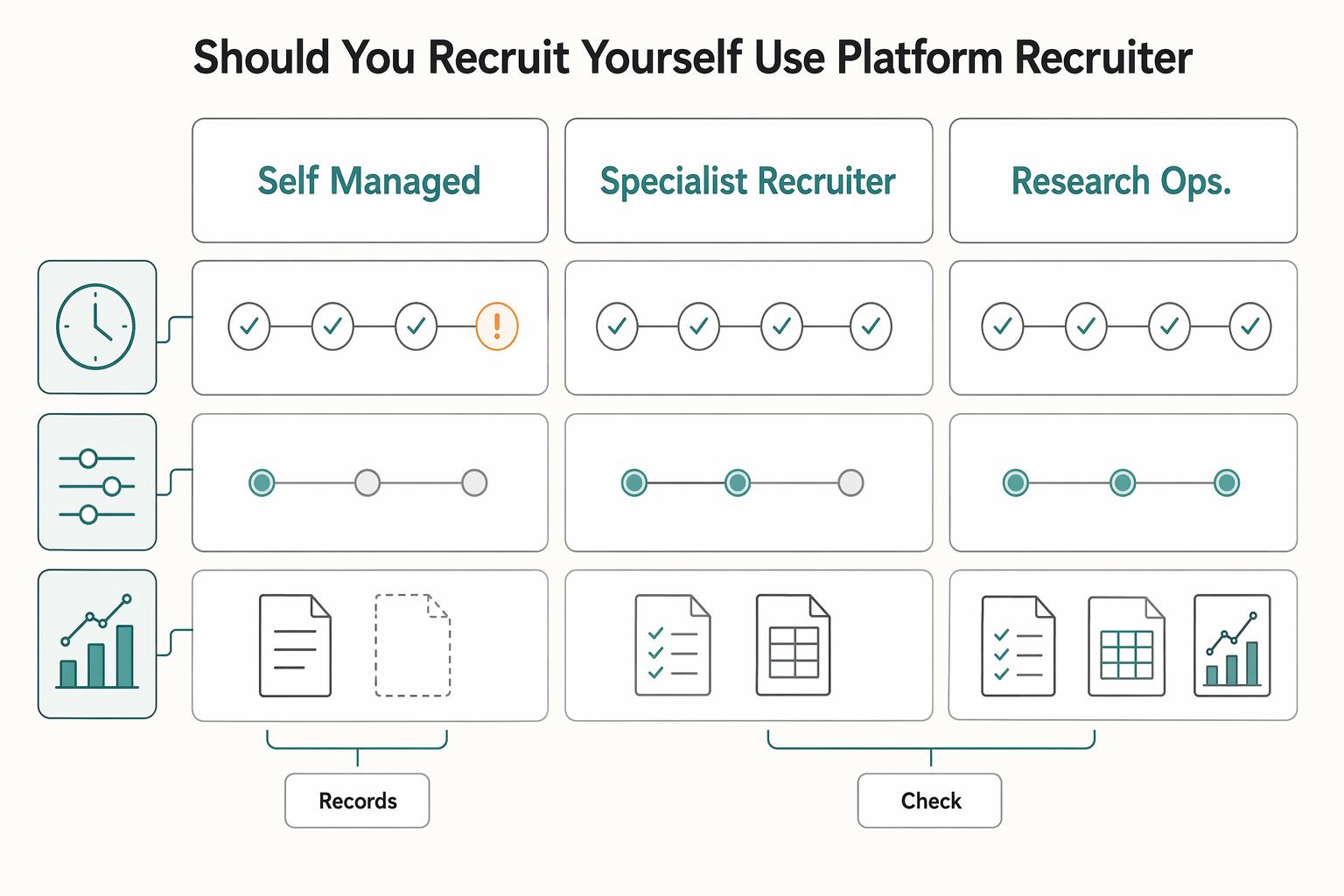
Should you recruit yourself or use a platform or recruiter?
Make this a decision about time, control, and evidence, not instinct. Recruiting is usually a multi-step process (attracting participants, scheduling sessions, reminders), so compare options based on who owns each checkpoint and how fit decisions are validated. Recheck the sourcing logic from Phase 2 before you choose. | Option | Time tradeoff | Cost tradeoff | Screening control | Compliance support | Operational overhead | Auditability | | --- | --- | --- | --- | --- | --- | --- | | Self-managed outreach | Often higher internal time | Direct spend can be lower, internal time cost can be higher | Can be high if you review screening responses yourself | Owned by you; verify your own document and payment process | Can be high: sourcing, scheduling, reminders, payouts | Depends on your record quality and storage discipline | | Specialist recruiter or agency | Internal time can be lower | Vendor spend is usually higher | Shared; verify who writes the screener and approves edge cases | Varies by provider and jurisdiction; verify in contract | Often medium: vendor coordination replaces some manual work | Depends on deliverables such as candidate logs and approval history | | Research ops or panel platform | Admin time can be lower for invites/scheduling/reminders | Usually direct spend plus setup effort | Varies by tool setup and panel quality; inspect screening and approval rules | Varies by vendor; verify payment, privacy, and consent handling | Lower day-to-day admin, but setup still matters | Depends on export history, consent records, and permission controls |
How do you write an effective screener for B2B research?
Treat the screener like a filter, not a formality, because attendance alone does not mean fit. Use screening questions that test role-relevant experience, and add a follow-up step for borderline responses before approval. If you skip that validation step, poor-fit participants can weaken the research and the decisions that follow.
Is an email confirmation enough for an NDA?
Do not rely on a casual email if confidentiality matters. Use a documented agreement format that clearly captures assent, version history, and signer identity, then store that acceptance with the participant record. If you would struggle to show what the person agreed to later, the documentation is too weak.
What are your privacy obligations when you collect participant data?
Assume obligations are jurisdiction-specific and verify them for your context. As a practical baseline, collect only what the study needs and keep sensitive information in controlled, secure systems rather than scattered inbox threads. If sensitive information is involved, use official, secure websites or similarly verified secure tools.
How do you reduce recruiting bias without slowing the project down?
Check your source mix and your screener before you blame the market. If all qualified candidates come from one channel or one familiar corner of your network, you may fill the calendar and still miss participants who are representative of your target audience. The practical fix is to review source tags, compare who is being excluded by your screener, and broaden the Phase 2 channels before concluding that the right people do not exist.
Try a related tool
Researched and edited by the Gruv editorial team. Gruv builds cross-border billing, payouts, and finance-operations software for global businesses.
Sources
Includes 3 external sources outside the trusted-domain allowlist.
- dhs.gov/cx/learning-trainings/cx-learning/basics-of-...trusted
- irs.gov/irm/part21/irm_21-003-004rtrusted
- nsf.gov/research-securitytrusted
- pmc.ncbi.nlm.nih.gov/articles/PMC10885741trusted
- rac.berkeley.edu/research-security/program.htmltrusted
- dscout.com/people-nerds/generative-research-complete-guideexternal
- elitebrains.com/blog/guide-to-hiring-tech-talentexternal
- eliterecruiterpodcast.com/recruiting-on-the-edge-with-sam-kuehnle-ai-a...external
Educational content only. Not legal, tax, or financial advice.
Related Posts

Thailand's Long-Term Resident (LTR) Visa for Professionals
For a long stay in Thailand, the biggest avoidable risk is doing the right steps in the wrong order. Pick the LTR track first, build the evidence pack that matches it second, and verify live official checkpoints right before every submission or payment. That extra day of discipline usually saves far more time than it costs.

How to Price a UI/UX Audit for a SaaS Company
If you need to price UI/UX audit work for a SaaS client, the job is not finding a magic market number. It is turning uncertain scope into a quote you can defend, a Statement of Work (SOW) the client can approve, and payment terms that do not leave you carrying the risk.
How to Conduct a Heuristic Evaluation of Your Website
Treat your site like an operating asset, not a gallery of past work. A portfolio mindset asks, "Does this look good?" An asset mindset asks, "Does this communicate clearly, build trust, and move the right person to act?"