
Quick Answer
Open the Reconcile tab for the bank account. Match a statement line to an existing transaction, or create the missing transaction after checking its supporting records. Leave unclear lines unreconciled and record the next action. Finish by checking the statement balance and reconciliation reports for the same date.
Clear statement lines, isolate exceptions, and close each period in Xero#
To reconcile in Xero safely, run a weekly or daily system on the Reconcile tab that clears statement lines, isolates exceptions quickly, and closes each period with documented completion.
Bank statement lines show what the bank processed; Xero transactions record how you accounted for it. Reconciliation links them. When the link is wrong, a payment can look unpaid, an expense can be duplicated, or your cash reports can miss the reason for a balance difference.
In Xero, bank reconciliation is the process of confirming your accounting records reflect transactions in your bank account. The Reconcile tab is where statement lines are matched to Xero transactions. Bank feeds or manual imports bring in statement lines, and you decide how each line should land in your books so your cash position stays trustworthy.
-
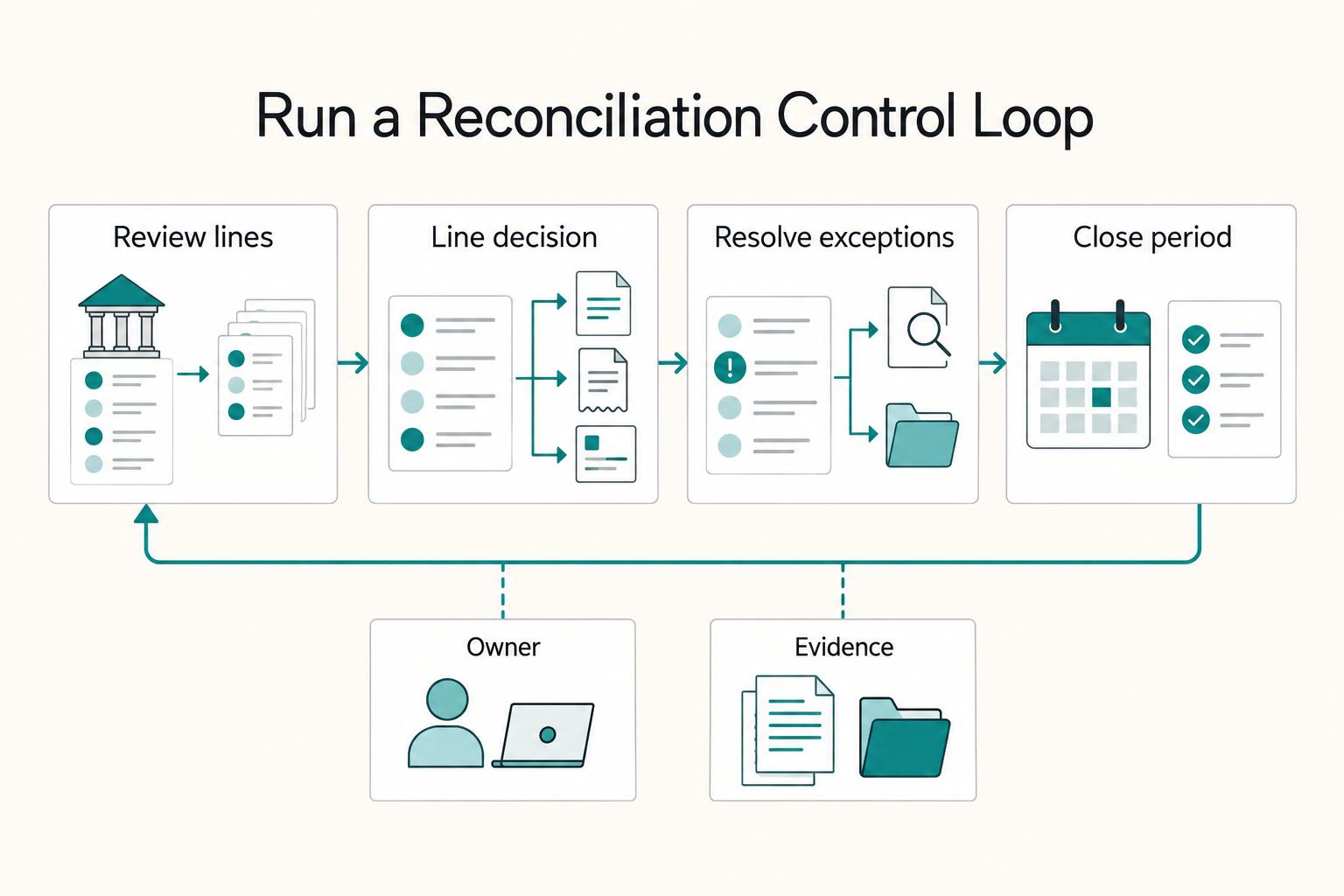
Step 1. Run a fixed cadence. Review new lines weekly or daily so details stay fresh and small issues do not turn into month-end fire drills.
-
Step 2. Make one decision per line. For each line, match it to an existing transaction, record what is missing, or hold it for investigation. Treat this as risk control, not admin. Clean decisions keep cash reporting honest and client conversations predictable.
-
Step 3. Close the period with evidence. Reconcile to the current bank statement, then use period reconciliation at period end to document completion. When you enter the date range and opening and closing balances, Xero automatically shows and selects transactions in that period. After you finish, close the period so transactions in that window cannot be deleted or unreconciled by accident.
| Reconcile tab signal | Decision | Recovery action |
|---|---|---|
| Existing transaction aligns with the statement line | Match | Confirm payee and timing, then clear |
| Transaction is missing and support is complete | Record | Enter it once, then validate coding |
| Details conflict or data is incomplete | Hold | Park it, assign ownership, and set a deadline |
Here, hold means leaving a line unreconciled while you investigate it. It is an internal workflow label, not a third Xero reconciliation button. Use Discuss for the context and your tracker for an owner and follow-up date.
What should you prepare before you reconcile in Xero?#
Have the bank statement, supporting invoices and bills, and any missing statement lines ready before you start.
The weekly control loop only works if your inputs are dependable. Do this prep once per cycle so the work stays low-drama and repeatable.
Before you start: Keep one working packet for this cycle: current bank statement, open invoice payments, expected bill payments, and your import fallback file. If your setup still feels loose, review A Guide to Xero for Freelancers and Small Businesses first.
-
Step 1. Confirm foundation settings in Xero. Make sure statement lines are coming in, opening and closing balance logic is correct for your period, and import mappings are sound. Weak foundations create false exceptions later on the Reconcile tab.
-
Step 2. Collect source records before you click reconcile. Pull the current bank statement, list outstanding invoice payments, and list expected bill payments. This gives you one place to assess what should have moved in cash.
-
Step 3. Set a manual import fallback for missing lines. Xero documents manual CSV import for missing statement lines, including lines dated before an automatic feed starts. Keep your CSV columns clear so mapping stays simple, and confirm mapping settings before import. If you import precoded files, match Account Code and Tax Type to Xero fields.
Check whether your subscription and user permissions include the bulk features you plan to use. Xero’s US pricing page lists current plan features; other regions can differ.
Example: your bank feed pauses during a high-activity week. Because you set up the CSV fallback and mapping upfront, you can keep reconciling missing lines while feed timing catches up instead of scrambling.
When should you match, create, or hold for investigation?#
Use a strict triage rule on the Reconcile tab: match what already exists, create only what is truly missing, and hold anything unclear until you verify it.
This is where clean reconciliation decisions matter. The goal is control, not speed.
-
Step 1. Start with a short triage pass. Open a set of bank statement lines and process each line once. Keep the first decision simple: Match, Create, or Hold.
-
Step 2. Match when proof already exists. Match when the line ties cleanly to an existing transaction in Xero. Confirm payee and timing before you accept. If one statement line maps to multiple items, use Find & Match to link them together and account for adjustments like bank fees.
-
Step 3. Create only when evidence is complete. Create a new transaction only when records show the item is genuinely missing and no existing transaction can be matched. Check your bank statement, supporting docs, and expected payment lists first.
-
Step 4. Hold when details conflict. Hold the line when reference data, amount context, or counterparty details do not align. Add a comment in the Discuss tab so collaborators with reconciliation access can review the context, then assign an owner and follow-up date in your own workflow tracker.
Example: a payout arrives with a vague reference that could map to multiple items. Hold it, ask for clarification, then resolve it in the next pass so your records stay clean and reliable.
Set up automation that saves time without losing control#
Set automation in Xero for repeatable lines, then keep human review on exceptions so you save time without losing control.
Automation should speed up the boring patterns and surface the weird stuff faster. It should not replace judgment.
-
Step 1. Configure bank rules for clean recurring patterns. Use bank rules for statement lines that do not need a bill, invoice, or other pre-entered transaction. When a line links to an existing transaction, use Find & Match instead of forcing a rule-created entry.
-
Review suggested matches. Check the amount, counterparty, and supporting invoice or bill before accepting a suggestion. If it is wrong, use Find & Match to locate the recorded transaction rather than creating another entry.
Example: a platform payout arrives with a familiar description but a different fee pattern. Pause, review, and correct the suggestion before posting.
-
Use cash coding for eligible cash transactions. It can process several statement lines together. Keep lines relating to existing invoices or bills out of this create-entry workflow, and review account and tax coding before accepting the batch.
-
Step 4. Keep a lightweight governance log. Track every new bank rule and reconciliation override in one place with date, owner, reason, and expected outcome. Then review History and notes with filters by date, item, and user so changes stay explainable.
How often should you reconcile to protect cashflow?#
Use a two-speed cadence in Xero: a short frequent scan and a deeper weekly review, so small issues do not compound quietly.
Once triage and automation are in place, cadence becomes the control system. This helps you stay ahead of payout timing issues without living in month-end cleanup.
-
Step 1. Run a quick scan in Xero, daily when activity is high. Review new bank statement lines, check stuck exceptions, and review suggested matches before you accept them. Focus on movement and risk.
-
Step 2. Run a weekly deep reconcile on the Reconcile tab. Clear aged items, validate recorded payments against statement lines, and confirm outflows are categorized as expected.
-
Step 3. Review cash flow reports after each weekly cycle and escalate fast. Compare expected and actual movement, then flag anything that could affect payout timing or near-term obligations. If cash activity is frequent, a monthly-only routine forces you to relearn context under pressure.
Example: a client payment lands with an unfamiliar descriptor right before vendor payouts. Your quick scan catches it, your weekly deep pass resolves it, and your cash plan stays intact.
What should you check first when Xero will not reconcile?#
Check the balances for the same date, confirm feed coverage, and look for duplicate statement lines before editing transactions.
When your cadence is working, these problems surface earlier. Fix the root cause first, then reconcile with confidence.
-
Compare balances for the same date. The imported statement balance should agree with the actual bank statement. The balance in Xero can differ because of outstanding transactions; use the reconciliation report to explain those items rather than forcing the balances to match with a new entry.
-
Step 2. Refresh feed health. Open the account, refresh bank feeds, and confirm the latest cleared transactions have landed. Because bank feeds import cleared transactions, very recent activity can look missing until the bank clears it.
-
Step 3. Check duplicate import risk before you edit anything. Verify whether manual statement imports were added on top of feed lines. Use the Duplicate Statement Lines report to compare date and amount patterns and isolate potential duplicates quickly.
-
Step 4. Confirm transaction presence and detail alignment in Xero. If a line exists but will not match, inspect core details against the bank statement. If no transaction exists, route it to the right next action in your workflow.
| Mismatch type | First test | Action |
|---|---|---|
| Timing gap | Feed just refreshed, but line still absent | Wait for clearance, then recheck |
| Detail mismatch | Amount is close but key details conflict | Relink or correct mapping |
| Duplicate entry | Same date and amount appears more than once | Confirm which line is duplicated before removing it; keep legitimate same-date, same-amount activity |
| Amount variance | Statement and transaction differ | Correct mapping or hold for investigation |
- Test an unfamiliar correction in the Xero demo company. Reproduce the entry and matching steps before applying them to live records.
Example: a payout line appears twice after a manual import during a feed delay. Confirm the duplicate pattern, keep one valid line, relink the payment, and close the exception without distorting your records.
Close the period with proof you can trust#
Close each period by reconciling every bank statement line, then closing the period and saving a reusable reconciliation report pack.
Once mismatch patterns are under control, closing becomes a verification step, not a reconstruction project. The goal is simple: when someone asks how you reached the ending balance, you can show it without rebuilding the story.
-
Step 1. Reconcile the full period against the bank statement. In Xero, run a Reconcile period pass using the statement opening and closing balances, then complete bank reconciliation for that window. When the period is fully reconciled, close it so transactions in that window cannot be deleted or unreconciled by accident.
-
Resolve statement-line exceptions before closing the period. Verify the correct match or missing entry. If you cannot resolve a line, leave it unreconciled, document the blocker in Discuss, and keep an owner and next action in your tracker.
-
Step 3. Record what changed this period. Keep close notes on key reconciliation decisions, including any manual statement imports completed during the period. Use the History and notes report to confirm changes are date stamped and linked to the user who made the change.
-
Step 4. Publish a lightweight close pack you can reuse. Save Reconciliation Reports as a custom report pack. Store it with close notes as your close artifact for future reviews and audit requests.
| Close artifact | What it proves | Why it protects financial accuracy |
|---|---|---|
| Reconciliation report pack | Period tie out to the bank statement | Shows consistent bank reconciliation controls against the bank statement |
| Unclear-line notes (Discuss + close notes) | No unresolved reconciliation questions are left undocumented | Reduces the risk of issues rolling into the next close |
| History and notes report plus close notes | Who changed what, when, and related context | Keeps records operational and traceable |
If a payout line feels ambiguous at close, do not let it roll forward quietly. Document the rationale and close only when the outcome is explicit.
Build your weekly system and keep it running#
Run a repeatable weekly bank reconciliation system in Xero so cash flow visibility stays strong and your close stays cleanly on track each week.
You already have the mechanics. The win is turning them into a standing operating rhythm you can run even when feeds lag or inputs arrive late.
Run the weekly operating loop#
| Weekly step | Primary action | Watchpoint |
|---|---|---|
| Check feed health first | Confirm bank feeds updated as expected and scan for known disruptions before you start | If feeds are unavailable, import bank statement lines manually and keep moving |
| Process new lines on the Reconcile tab | Work statement lines from left to right and resolve each line with one explicit decision; use bank rules and cash coding for repeat patterns | Review exceptions one by one |
| Validate cash movement outcomes | Confirm invoice payments and bill payments tie to expected movement; review cash flow reports where supported by your plan and log exceptions | Keep the log short so it stays operational |
| Close with proof | Reconcile the period against the statement and retain the reports explaining balance differences and outstanding transactions | Resolve missing or duplicated lines before period completion; do not create balancing entries without support |
Finish the cycle with completed matches, a clear log of remaining unreconciled exceptions, and the report for the period. A note explains an unresolved item; it does not reconcile it.
Copy paste weekly checklist#
- Confirm bank feeds status and manual import fallback readiness (CSV, OFX, QFX, QIF, or QuickBooks format)
- Reconcile new bank statement lines on the Reconcile tab
- Apply or verify suggested matches and bank rules
- Clear or assign all unresolved items with owner and due date in your tracker
- Verify invoice payments and bill payments tie to expected cash movement
- Review cash flow reports (plan dependent) and log exceptions
- Finalize period pack with bank statement tie-out and reconciliation report
Example: a feed stalls right before close. You switch to manual import, run the same decision workflow, and still ship a clean weekly close with your records intact. For a broader setup walkthrough, read A Guide to Xero for Freelancers and Small Businesses first.
Frequently Asked Questions
How do I reconcile in Xero step by step?
Open the Reconcile tab and work through the bank statement lines. Use Match for an existing transaction and Create only for a genuinely missing entry with supporting records. Use Find & Match for combined items or adjustments. Leave unclear lines unreconciled with a documented next action.
What is the difference between bank statement lines and transactions in Xero?
Your bank feed or CSV import creates bank statement lines from bank activity. Transactions in Xero are the accounting records that explain that activity. Reconciliation links the two so your books reflect the bank statement.
When should I match versus create during reconciliation?
Use Match when an unreconciled transaction already exists and the amount and context align. Use Create when you have confirmed there is no valid transaction in Xero for that statement line. If the line is complex, use Find & Match to locate the right unreconciled items. If anything is unclear, hold the line and verify before posting.
How often should I reconcile in Xero daily weekly or monthly?
Reconcile on a regular cadence you can sustain. Xero recommends regular reconciliation, but it does not set one universal daily, weekly, or monthly rule in this guidance. Choose a frequency that keeps context fresh and unresolved items under control.
Why will transactions not reconcile in Xero and what should I check first?
Check whether the bank feed is current and whether the statement line exists for the dates you are working. Next, confirm the related transaction exists in Xero. If items still will not reconcile, check for known issues such as feed delays, missing statement lines, or duplicate entries.
Can I reconcile in bulk in Xero and which plans support it?
Use cash coding for suitable cash transactions when your subscription and permissions include it. Match existing invoices, bills, and other recorded transactions instead of creating duplicate entries through bulk coding. Review exceptions separately.
How do I reconcile if my bank feed is unavailable?
Import your bank statement lines manually with CSV, then continue the same Match, Create, or Hold workflow in Xero. Reconcile each line against transactions and clear the period as usual. When feeds return, review for overlap before importing again to reduce duplicate-line risk.
Try a related tool
Researched and edited by the Gruv editorial team. Gruv builds cross-border billing, payouts, and finance-operations software for global businesses.
Sources
Includes 6 external sources outside the trusted-domain allowlist.
- central.xero.com/s/article/Bank-reconciliation-in-Xeroexternal
- central.xero.com/s/article/Reconcile-a-periodexternal
- loveyourbooks.com.au/resources/xero-bank-reconciliation-not-matchingexternal
- xero.com/us/accounting-software/reconcile-bank-transa...external
- xero.com/us/pricing-plansexternal
- xero.my.site.com/s/article/Reconcile-a-bank-statement-line-us...external
Educational content only. Not legal, tax, or financial advice.
Related Posts

Value-Based Pricing for Freelancers Under Real Payment Risk
Value-based pricing starts with the client’s expected benefit and willingness to pay. It still needs a deliverable, scope and payment agreement you can perform. Use a discovery phase when the benefit or effort is too uncertain to support a defensible quote.

A Guide to Xero for Freelancers and Small Businesses
Use Xero to connect your accepted scope, invoices, reminders and accounting records. Decide billing triggers and due dates first, then configure the workflow so you can see what is owed, what arrived and which items need follow-up.

The Freelance Payment Penalty: A Modeled Audit of Platform Fees, FX Spreads, and Payout Delays
The money rarely disappears through a single, easy-to-spot fee. The real loss is stacked. A marketplace takes its commission, a processor adds a charge for international cards, a bank or payment company converts the currency at a spread, a platform holds the funds before release, and a wire sheds a little to intermediaries on the way in. Each layer looks defensible on its own, but the worker feels the combined result as a smaller deposit and a later payday.