
Quick Answer
Compare perpetual, seat-based, usage-based and hybrid models using expected-month and peak-month invoices. Add operating and exit costs, then confirm renewal notice, downgrade timing and post-cancellation access in the signed terms. Vendor examples illustrate questions to ask; they do not replace your own contract.
The real cost of software is not the headline price. The license and pricing model shape your cashflow, your day-to-day workload, and how hard it is to change course later. If you focus only on sticker price, you miss the tradeoffs that matter.
This guide gives you a practical way to evaluate a deal through three business lenses: CFO, COO, and CEO. Used together, they move the conversation from "What does it cost?" to "Can we afford it, run it, and trust it?"
The Cashflow Lens: Pricing Models Your Margins Can Absorb#
Start with cashflow risk, not the sticker price. The right deal is the one your margins can absorb if users spike, usage jumps, or renewal terms lock you in at the wrong time.
| Vendor example | Topic | Current vendor example; confirm your signed terms |
|---|---|---|
| Atlassian | Seat billing and cancellation | Monthly bill is based on the highest seat count reached during the billing cycle; added seats are prorated; removing seats mid-cycle does not reduce that period's bill; after cancellation, a paid subscription is deactivated 15 days after the end of the current subscription period |
| Salesforce | Auto-renew | Salesforce describes a renewal window beginning 90 days before contract end. Confirm the actual notice deadline and permitted changes in your signed terms and Billing Portal. |
| Microsoft Enterprise Agreement | True-up | True-up is annual and reconciles added products, services, users, and devices at pre-agreed terms and pricing |
Step 1. Define your budget tolerance. A perpetual license can grant indefinite use under its terms and may require a large upfront payment, with maintenance and upgrades charged separately. Separate cashflow planning from the accounting and tax treatment of the specific arrangement.
A SaaS subscription can spread cost into monthly or annual billing, which may be easier on cash than a large upfront payment. In the IFRS cloud-arrangement agenda decision fact pattern, the right to receive SaaS access is treated as a service, not a software asset. The practical question is simple: can you absorb a large upfront payment, or do you need the cost to stay inside a predictable operating budget?
Step 2. Forecast your volume variability honestly. Seat-based, usage-based, and hybrid pricing each break in different ways. With seat-based billing, the common failure mode is user creep. Atlassian's monthly rule is a useful example. The bill is based on the highest seat count reached during the billing cycle, added seats are prorated, and removing seats mid-cycle does not reduce that period's bill.
With usage-based pricing, the risk is invoice volatility because charges rise with consumption. A hybrid model softens that with a fixed fee, included usage, and separate overage charges. Ask for one invoice example for an expected month and one for a peak month. A contract that explains the base price clearly but stays vague on overages, seat resets, or downgrade timing is a red flag.
| Model | Cashflow pattern | Levers to negotiate | What to verify now |
|---|---|---|---|
| Perpetual license | High upfront payment | Installments, support renewal notice, maintenance pricing basis | Upfront amount, upgrade rights, ongoing support cost |
| Seat-based subscription | Predictable base, but seat creep risk | Billing cadence, highest-seat versus end-of-period billing, downgrade timing | Does mid-cycle seat removal lower the invoice? If not, when does it reset? |
| Usage-based | Low entry cost, variable invoices | Usage alerts, spend cap, overage rate card | Meter definition, invoice timing, overage math |
| Hybrid fixed fee + overage | Stable base with variable tail | Included usage, overage terms, rollover or true-up, downgrade rights | Included units, reset date, exact overage trigger |
Step 3. Model renewal exposure before you negotiate price. Salesforce describes a renewal window beginning 90 days before contract end. Confirm the actual deadlines for non-renewal, product changes and renegotiation in your signed terms and Billing Portal; one product example does not define every subscription.
If your contract includes a true-up, pin down the frequency and price in writing. Microsoft Enterprise Agreement true-up is annual and reconciles added products, services, users, and devices at pre-agreed terms and pricing. Do not rely on a sales email. Get the renewal window, overage rules, and downgrade language into the contract or order form.
Step 4. Choose terms that protect margin. If your user count and revenue are steady, an annual commitment can make sense. In Microsoft's Enterprise Agreement context, the company describes this structure as helping reduce initial costs and forecast annual software budget requirements. If demand is lumpy, monthly billing, hard usage alerts, and clear downgrade rights usually matter more than a small discount that traps you for a year.
Before you sign or renew, check your renewal date, the auto-renew notice window, seat or usage reset rules, and post-cancellation access. One concrete checkpoint: Atlassian says a paid subscription is deactivated 15 days after the end of the current subscription period after cancellation.
The COO Lens: Calculating the True Total Cost of Ownership (TCO)#
After cashflow, look at operating load. A lower sticker price is a worse deal if the tool adds admin work, creates integration friction, or makes switching hard later.
Step 1. Map the work the software creates around the work#
Start from your real workflow, not the product demo. For most freelancers and small teams, that includes onboarding clients or teammates, setting permissions, connecting billing or project tools, reconciling invoices, handling renewals, and exporting data for reporting or handoff.
List the non-billable tasks the tool adds each month, including onboarding, billing operations and support. Compare the actual annual discount against monthly flexibility, cancellation rights and notice requirements; neither a particular discount nor30 days notice is universal.
Before signing, ask for the plan terms and billing documents that show how charges, renewals, support access, and data export actually work. If features are clear but billing ownership, support path, or exit details are vague, treat that as TCO risk.
Step 2. Estimate the hidden operating drag#
TCO is an operating-cost check, not just the subscription line item. Hidden cost usually shows up where people, process, and technology meet, so pressure-test these three buckets:
Count the time you spend managing seats, handling access issues, chasing receipts, reviewing overages, and managing renewals. For rightsizing, login activity alone is weak evidence; feature-level usage is more useful when available.
If the product does not connect cleanly to your accounting, PM, CRM, or delivery stack, you pay through manual work or extra tools. Integration complexity is a recurring hidden-cost driver, and bad assumptions often appear late.
Validate the exit path now, not at cancellation. Confirm what data you can export, in what format, and whether migration support is included or separately charged.
| Cost area | Low sticker price, high ops drag | Higher sticker price, lower ops drag |
|---|---|---|
| Admin overhead | More manual seat cleanup, invoice chasing, and guesswork rightsizing | Clearer billing controls, stronger usage visibility, less monthly intervention |
| Integration burden | More CSV/manual handoffs and add-on tools | Cleaner integrations and fewer process workarounds |
| Switching risk | Export and migration obligations unclear until late | Export path and migration responsibilities clearer up front |
Step 3. Compare vendors on total operating load#
Compare options on what they cost to run, not just what they cost to buy. Use this short workflow before approval:
- Map your current process.
- Estimate monthly operational drag for each option.
- Flag lock-in risk in export and migration terms.
- Choose the vendor with the lower total operating load at your expected usage.
If usage visibility, billing terms, or exit obligations are not clear in writing, treat that as a real operating-cost risk.
The Risk Lens: Data Exit, Continuity, and Compliance Duties#
Before you approve a license, confirm three things in writing: you can exit with your data, the vendor can support continuity, and your compliance duties are covered if something goes wrong.
Step 1. Lock down your data exit before you sign#
Treat data ownership as contract language you can enforce, not a sales claim. Your agreement should state how data is exported, what support is included, whether access continues after termination, and who must do what during handover.
Confirm the actual export method and format in the contract and product documentation. GDPR portability concerns an individual’s personal data in qualifying consent- or contract-based automated processing. It does not guarantee export of your entire business database or application configuration. Specify the records, attachments and usable formats needed for your commercial exit.
Confirm whether export is self-serve, support-assisted, or paid professional services. If support is required, define scope in writing before signature.
Confirm whether read-only access continues after termination and for how long. Do not assume a default 30/60/90-day window if the contract is silent.
For personal data, your terms should give you control over whether the processor deletes or returns data at end of service.
A practical check is to request a sample export and the exact end-of-contract clause before you sign.
Step 2. Compare continuity signals you can actually verify#
Do not rely on "startup vs incumbent" labels. Compare vendors on continuity signals you can verify now.
| Signal | What you can verify now | Red flag |
|---|---|---|
| Roadmap clarity | Written roadmap themes, release cadence, or update notes | Direction is only verbal or vague |
| Support responsiveness | Presales/trial response times, named escalation path, support hours in contract | No escalation path or generic inbox only |
| Product change history | Public changelog/release notes and notice pattern for major changes | Breaking changes with little notice |
| Incident communication | Status page, prior incident notices, post-incident updates, contract notice clause | No clear notification process |
| Dependency risk | Disclosure of critical third parties, subprocessors, and component inventory (for example SBOM) where available | Vendor cannot explain key dependencies |
Before signature, run supplier due diligence and make sure cybersecurity requirements are in the contract, including participation expectations for incident planning, response, and recovery.
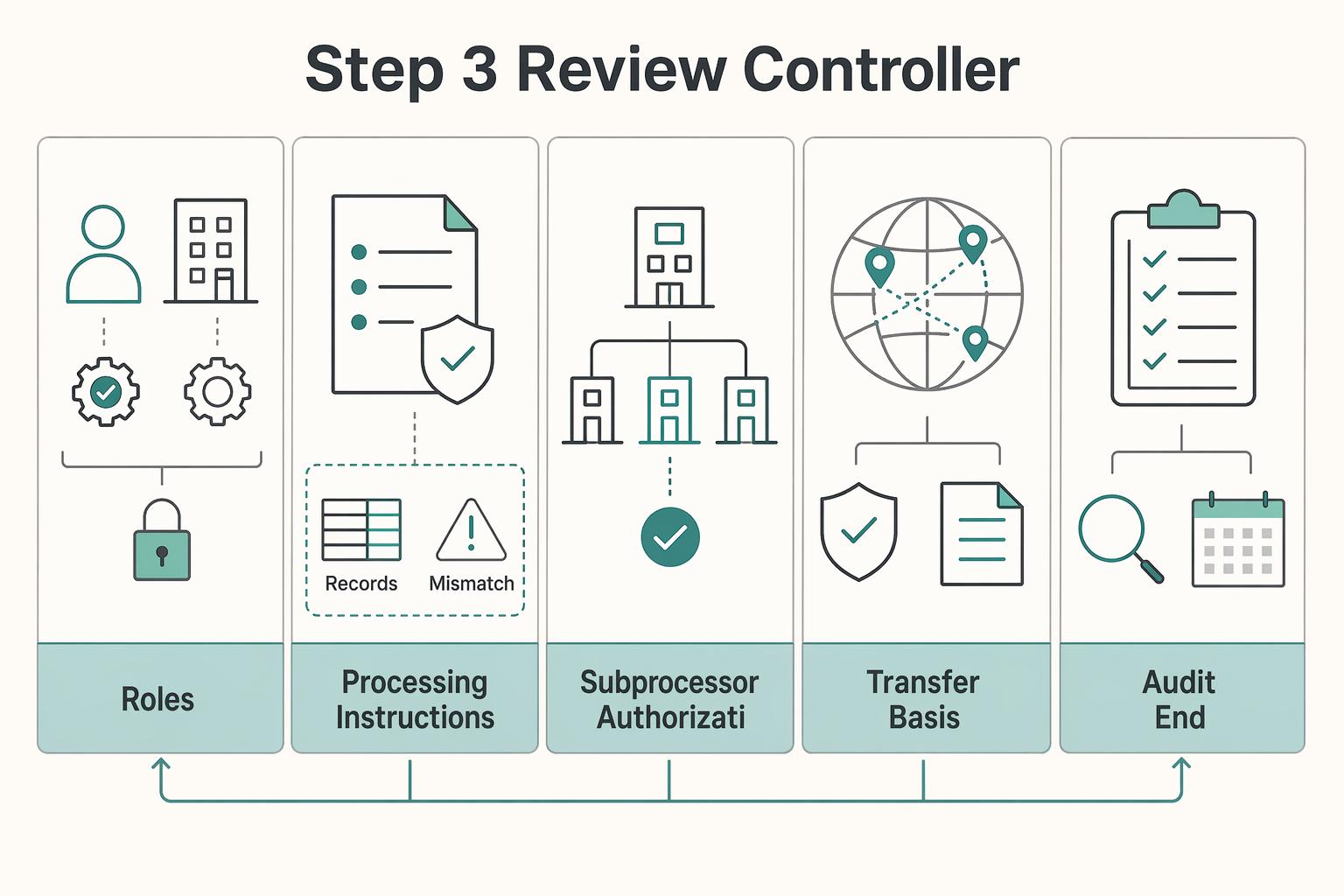
Step 3. Review controller, processor, and transfer terms like an operator#
Determine controller and processor roles for each relevant processing activity. You are generally the controller when you determine purposes and means; a vendor processing personal data on your behalf is a processor for that activity. A vendor may have separate controller purposes, so do not assume one role covers every use of the data.
| Term area | What to confirm | Grounded detail |
|---|---|---|
| Roles | Whether you are the controller and the vendor is the processor for the relevant personal data | Determine roles for each activity; a vendor may be a processor for your service data and a controller for separate purposes |
| Processing instructions | The DPA binds processing to your documented instructions, including international transfers | The DPA is described as core deal paper |
| Subprocessor authorization | Whether prior specific or general written authorization is required | With general written authorization, require notice of additions or replacements |
| Transfer basis | Whether the vendor relies on an adequacy decision or appropriate safeguards | If neither is available, transfer options narrow to limited derogations |
| Audit and end-of-contract terms | Whether audit or inspection terms and end-of-contract terms are included | Your DPA should include both |
| Incident notice | Whether incident-notice language works for your obligations | A processor notifies its controller without undue delay; the controller’s authority-notification deadline is generally72 hours where notification is required, with reasons for delay |
Your DPA should bind processing to your documented instructions, including international transfers, and include audit/inspection terms plus end-of-contract terms. If subprocessors are allowed, require prior specific or general written authorization; with general authorization, require notice of additions or replacements.
For cross-border transfers, verify whether the vendor relies on an adequacy decision or appropriate safeguards. If neither is available, transfer options narrow to limited derogations. Recheck over time because adequacy status can change.
Make breach notice operationally workable. Under GDPR, a processor must notify its controller without undue delay. Where notification to a supervisory authority is required, the controller must act without undue delay and, where feasible, within72 hours after awareness; later notice needs reasons for delay. A vendor’s notice terms should leave you time to meet your own duties.
Pre-sign risk gate Approve only if all three are yes:
- Data exit readiness: export method confirmed, handover support defined, post-termination access window stated, delete-or-return clause present.
- Business continuity: retain roadmap and dependency evidence, test the escalation path, review incident communications and assign an internal owner for unresolved gaps.
- Applicable data-protection terms: confirm the DPA, subprocessor authorization and notice process, transfer basis, audit provisions and end-of-contract duties.
Your Software Stack is Your Strategic Foundation#
Use the CFO/COO/CEO check as a pre-sign go/no-go gate. Approve only when budget impact, operating burden, and strategic/legal exposure are documented in signed terms, not vendor collateral.
CFO lens: Budget impact Treat price as a lifecycle cashflow decision, not a first-invoice decision. A lower upfront subscription can still create risk through usage charges, overages, or egress fees, and implementation costs may require separate accounting review depending on the arrangement. Go/no-go check: document month-one cash outflow, modeled worst-case variable monthly charge, renewal timing, and set an internal finance-approval threshold using the modeled exposure.
COO lens: Operating burden (TCO) Assume Total Cost of Ownership includes ongoing work, not just license fees. Before approval, assign and document who owns setup, training, admin, meter tracking, and exit export in the order form, SOW, or master agreement. Go/no-go check: if ownership is unclear, pause approval until responsibilities are explicit.
CEO lens: Strategic and legal exposure. Determine the vendor’s role for each personal-data activity. Require processor terms where it processes data on your behalf under the applicable regime; for separate controller activities, confirm the relevant responsibilities and terms. Review your own security controls. Independently confirm commercial export format, handoff and post-termination access. Keep the executed agreement, order form, applicable data-protection terms, security exhibit and export provisions together. A SOC 2 report supports review but does not replace these commitments.
| Red flag | Required action before approval |
|---|---|
| Modeled spend or implementation cost exceeds your finance-approval threshold | Route to finance approver and document cashflow impact |
| Meter, overage, or egress terms are vague | Get written definitions and a capped-charge scenario |
| Missing applicable data-protection terms or unclear commercial exit obligations | Resolve the role-specific terms and usable export commitments before approval |
Apply this on the next decision cycle: review active agreements, prioritize renewals with auto-renew risk, unclear usage charges, or weak exit terms, and run the same checklist across the full stack.
Frequently Asked Questions
How do you choose between a perpetual license and a subscription?
Start by separating licensing from pricing. A perpetual license can fit when you can absorb a one-time upfront payment and want indefinite use. If perpetual terms are not the best fit for your cashflow, compare subscription terms carefully before signing. In the agreement, confirm license scope, access rights, payment timing, renewal terms, and post-termination access.
What costs get missed most often?
Common misses include add-ons, usage growth, support, administration, integrations and migration work. Estimate them for your own usage rather than assuming a standard multiplier over the license fee. Check included services, meters, overage treatment and pricing thresholds.
Which pricing model is easiest to operate day to day?
There is no universally easiest model. Pricing models define how software usage is charged, so day-to-day fit depends on your usage patterns, billing predictability, and internal admin capacity. Before signing, test each option against likely usage changes and contract controls.
How do you handle renewal and auto-renew risk?
Treat renewal mechanics as a contract issue, not an admin detail. The risk is not just surprise spend; it can also include access disruption at a bad time. Confirm the renewal term, auto-renew language, notice clause, and what read-only access or data export support is available after termination.
What should you confirm before agreeing to enterprise-tier terms?
Confirm the specific enterprise commitments: licensed users and products, support scope, annual reconciliation or true-up, renewal notice, price changes and reduction rights. Request a normal-year and growth-year invoice example. Assign owners for inventory and notice dates before signing.
Try a related tool
Researched and edited by the Gruv editorial team. Gruv builds cross-border billing, payouts, and finance-operations software for global businesses.
Sources
Includes 4 external sources outside the trusted-domain allowlist.
- commission.europa.eu/law/law-topic/data-protection/information-bu...trusted
- edpb.europa.eu/sme-data-protection-guide/international-data...trusted
- edpb.europa.eu/sme/assess-the-risks/data-breaches_entrusted
- legislation.gov.uk/eur/2016/679/article/28trusted
- atlassian.com/licensing/cloudexternal
- help.salesforce.com/s/articleViewexternal
- ifrs.org/content/dam/ifrs/supporting-implementation/a...external
- microsoft.com/licensing/guidance/Enterprise-Agreementexternal
Educational content only. Not legal, tax, or financial advice.
Related Posts
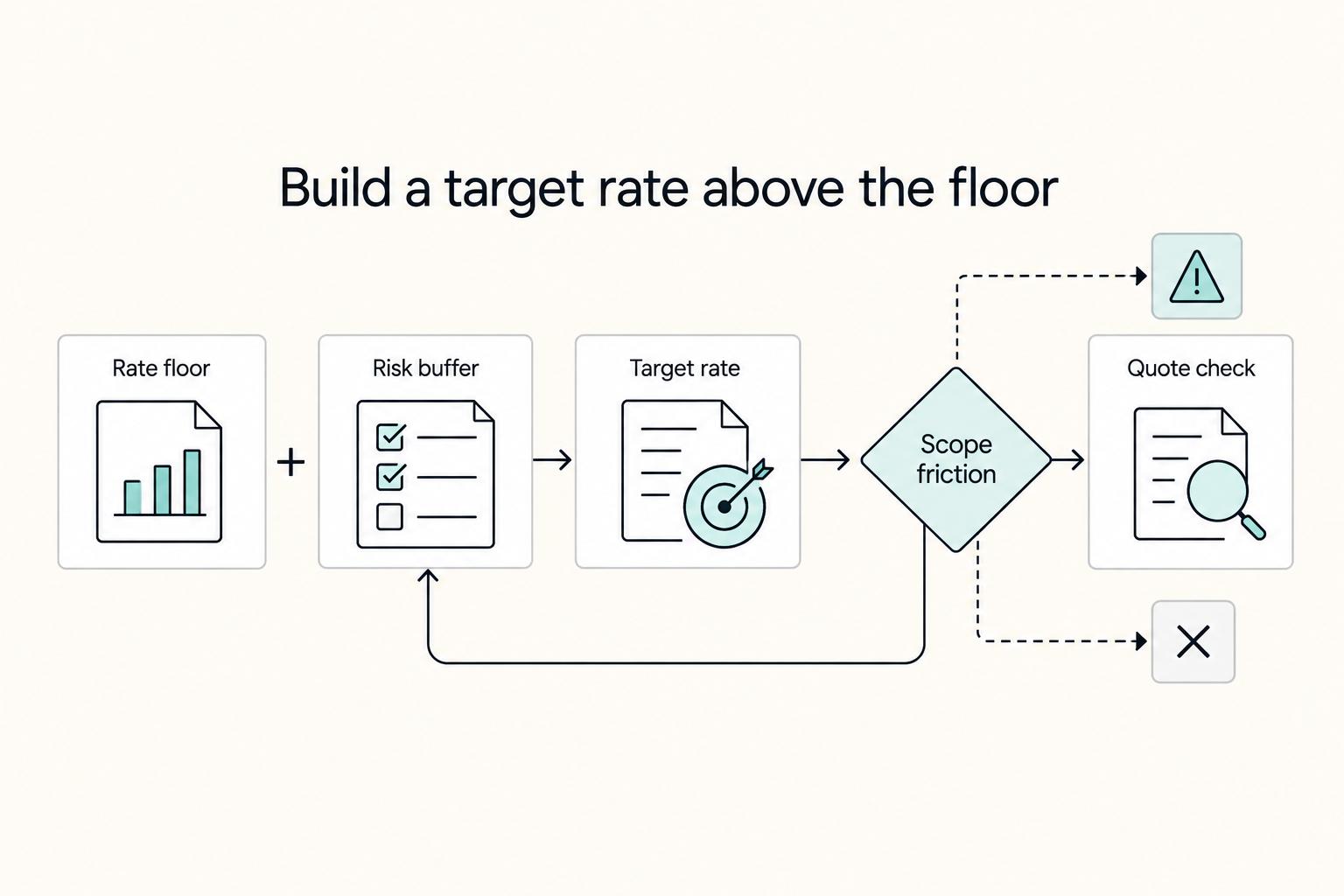
How to Calculate a Freelance Rate You Can Actually Get Paid On
A workable rate is not the neat number a calculator produces. It is the number that still works after you account for real billable capacity, non-client time, scope drift, and the gap between sending an invoice and receiving cleared cash. Start with hourly math even if you do not plan to bill hourly, then turn that number into a quote with clear `payment terms`.
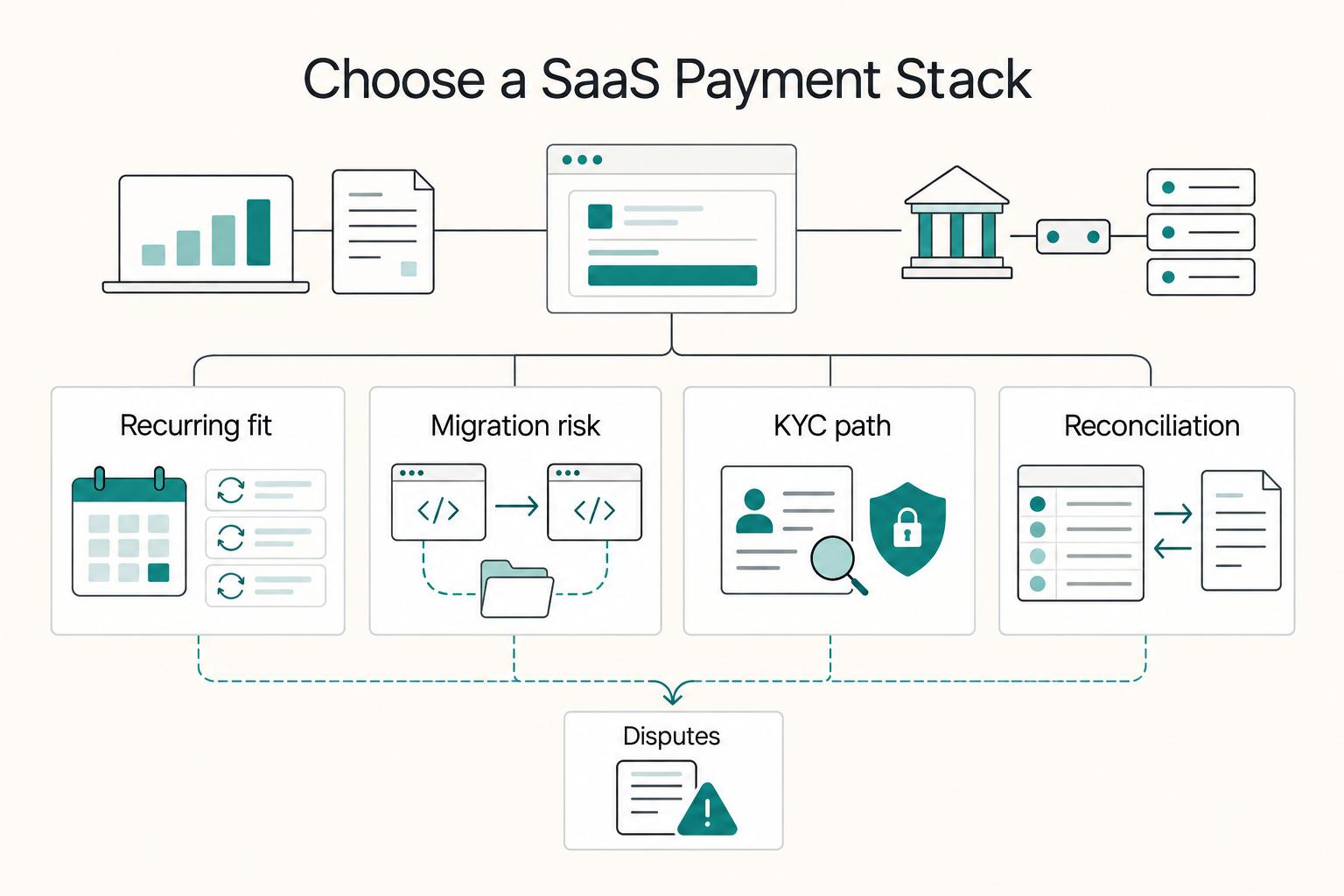
Choosing Payment Gateways and Billing for SaaS Businesses
The first checkout is only one payment in a SaaS relationship. Your provider must also support the next renewal, a seat change, a failed collection and a cancellation that stops future billing. Evaluate those cases before choosing a checkout logo.

The Freelance Payment Penalty: A Modeled Audit of Platform Fees, FX Spreads, and Payout Delays
The money rarely disappears through a single, easy-to-spot fee. The real loss is stacked. A marketplace takes its commission, a processor adds a charge for international cards, a bank or payment company converts the currency at a spread, a platform holds the funds before release, and a wire sheds a little to intermediaries on the way in. Each layer looks defensible on its own, but the worker feels the combined result as a smaller deposit and a later payday.