
Quick Answer
Start by matching each video to one buyer question, then optimize youtube videos for search by keeping the title, opening, and description aligned to the same intent. Use YouTube Studio checks like Advanced Mode and Channel keywords before production, then treat tags as support rather than a fix for weak positioning. After publishing, review attention patterns and update one element at a time so you can see what improved results.
--- To optimize YouTube videos for search, decide what buyer question the video answers before you record. Then package and manage it like a business asset. That is where many experienced professionals get stuck. They see the upside, but most advice pushes them toward trend chasing, vanity metrics, and shallow formats that do not fit a serious business.
That is the core mistake. Many people adopt the mindset of a YouTuber when they are really the CEO of their brand. A YouTuber chases virality. A CEO builds a portfolio of intellectual property. A YouTuber fixates on subscriber counts. A CEO looks at lead quality and buyer intent. That shift turns a channel from a time-consuming marketing task into a more reliable client acquisition asset.
This playbook walks through a three-stage system to make that shift. The aim is to develop, publish, and manage video content as durable business assets, not one-off uploads.
Stage 1: Qualify the Topic and Write the Brief Before Recording#
Before you record anything, make a go or no-go call. If you cannot tie a topic to a real buyer question, a natural search phrase, and a service-relevant next step, do not spend production time on it.
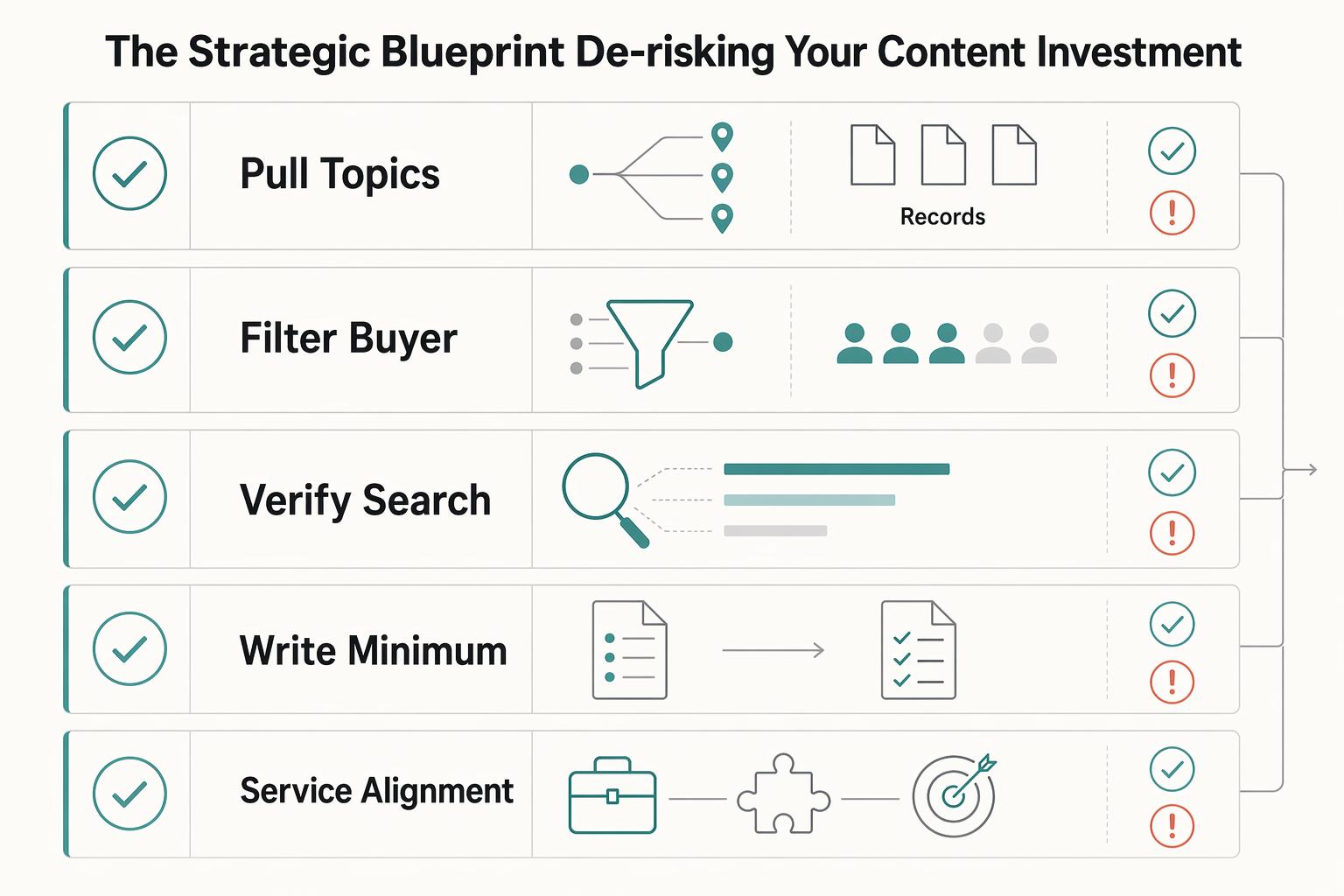
| Step | Focus | Checkpoint |
|---|---|---|
| Pull topics from your pipeline | Use discovery calls, sales calls, proposal objections, pricing questions, onboarding calls, support emails, DMs, and comments | Rewrite recurring questions into natural search phrasing |
| Filter for buyer intent | Check service alignment, buyer intent, audience quality, and proof strength | Drop curiosity traffic that attracts the wrong audience |
| Verify search alignment inside YouTube | Review Analytics in Advanced Mode and channel metadata | Confirm channel keywords and tighten channel description basics before production |
| Write a minimum viable brief | Define the problem, audience, promise, proof, CTA, and format/runtime | Do not record until every field is filled in |
Step 1: Pull topics from your pipeline, not your imagination. Start with the questions that already show up while you sell and deliver your service. Good inputs usually come from:
- discovery calls and sales calls
- proposal objections and pricing questions
- onboarding calls, support emails, and DMs
- comments where people ask for comparisons, red flags, or decision help
Take each recurring question and rewrite it the way someone would actually search. Keep the wording close to how your prospects talk. If a client asks, "How do I know whether I need a consultant or an agency?" start from that language. The search version might be "consultant vs agency how to choose." That is better than forcing an unnatural phrase just because it seems more SEO-friendly. Question-style keywords are often useful in titles, descriptions, and tags when they match how viewers search.
Step 2: Filter for buyer intent before you script. This is where most wasted effort starts. YouTube's guidance is to optimize for viewer satisfaction, and recommendations reflect viewer behavior signals like what people watch, how long they watch, and what they skip. A topic that attracts the wrong audience can still waste your time, even if it gets clicks. Use this keep-or-drop table before you commit:
| Check | Keep the topic when... | Drop the topic when... |
|---|---|---|
| Service alignment | the video clearly leads toward a service you sell or a problem you solve | it is interesting but disconnected from your offer |
| Buyer intent | the viewer is evaluating options, risks, pricing, fit, or next steps | the viewer is mostly browsing out of curiosity or entertainment |
| Audience quality | it attracts decision-makers, qualified leads, or referral partners | it is likely to pull in students, hobbyists, or bargain hunters |
| Proof strength | you can support the answer with a process, comparison, case example, or evidence | you would be forced to stay vague, generic, or speculative |
A common failure mode here is curiosity traffic. A topic can look promising, bring views, and still train your channel toward the wrong audience. If your channel sells expertise, reject ideas that create attention without helping someone make a decision.
Step 3: Verify search alignment inside YouTube before production. Do a short check in YouTube Studio before you write a script. In Analytics, open the report area labeled Advanced Mode or See more. Use it to spot trends in what content types viewers interact with most and what video lengths work best.
Next, confirm your Channel keywords in Studio settings still reflect your core service area and audience (Settings -> Channel -> Basic info). Then review your channel description from Customize Channel -> About, and make sure the opening 100-150 characters clearly communicate what your channel is about.
Your checkpoint is simple: the planned query should appear naturally in the title, description, and spoken content of the video.
Step 4: Write a minimum viable brief, then earn the right to record. The brief is a discipline tool. If you cannot complete it without hand-waving, the topic is not ready.
- Problem: The exact buyer problem this video solves
- Audience: Who this video is for, and who it is not for
- Promise: What the viewer will understand, decide, or avoid by the end
- Proof: The process, comparison, example, or evidence you can credibly show
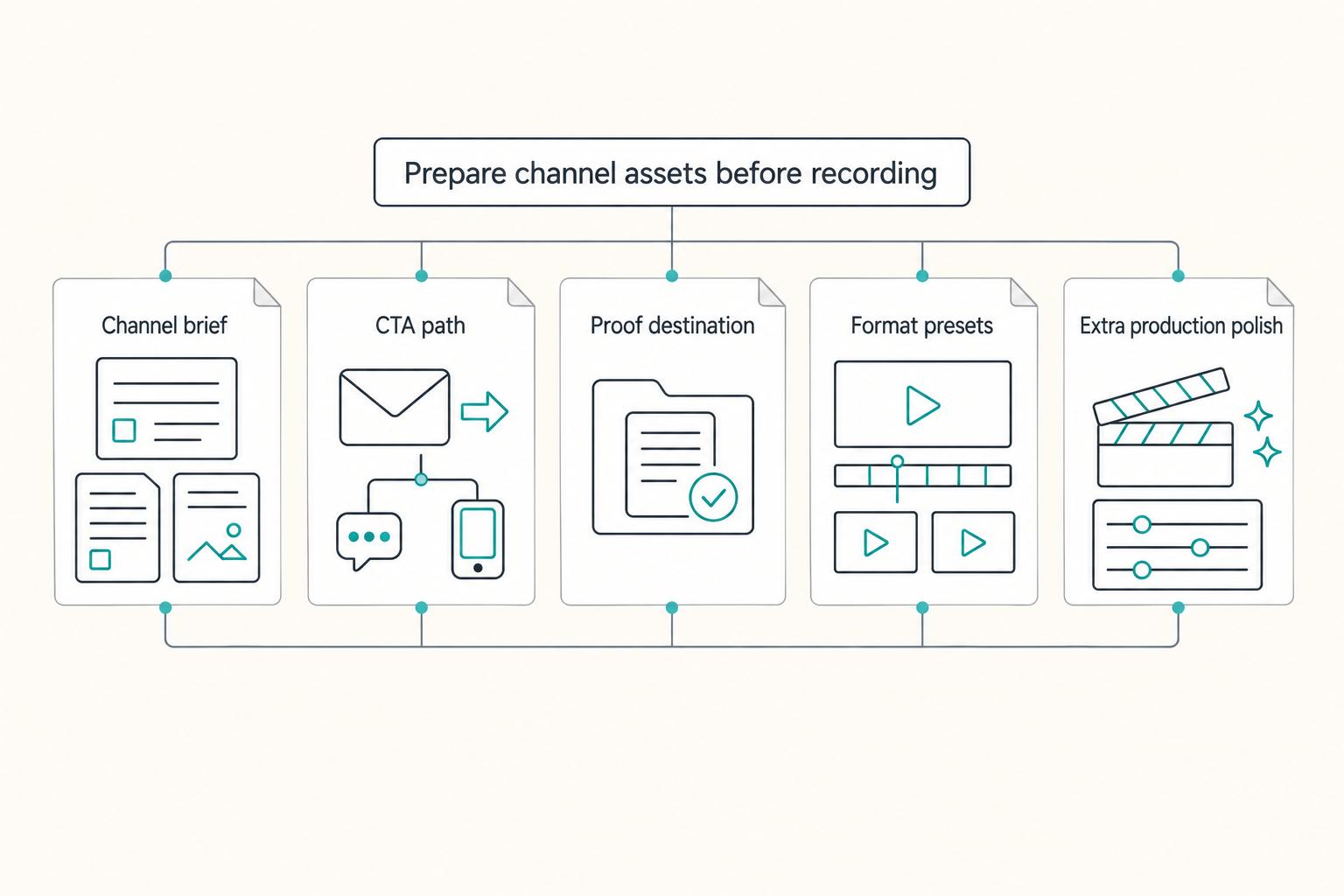
- CTA: What a qualified viewer should do next
- Format and runtime: The format that fits the answer, based on your own Analytics check
Do not record until every field is filled in. If you cannot name the qualified viewer, the evidence you will show, and the next business-relevant action, the topic is still an idea, not an asset. That discipline keeps your channel aligned with qualified leads instead of generic traffic.
If you need a setup guide, see How to Create a YouTube Channel to Showcase Your Freelance Skills. For a deeper dive, read How to Use SEO to Attract High-Quality Freelance Clients.
Stage 2: Professional Asset Deployment (Executing for Authority)#
Once a topic clears Stage 1, your job is straightforward: package the video so the right viewer can find it, trust it, and take a clear next step.
| Step | Focus | Checkpoint |
|---|---|---|
| Package as a system | Optimize title, thumbnail, keyword usage, tags, structure, playlists, and end screens together | Revise if one element makes a different promise than the others |
| Write title + description for one decision | Lead with the real problem or comparison, then the practical outcome and one CTA path | Rewrite if a qualified viewer cannot tell who it helps and what action to take next |
| Design for authority over curiosity | Use thumbnails and structure that clarify the topic and outcome, not hype | Simplify if the click promise and video value feel mismatched |
| Run the execution review | Check captions, terminology consistency, metadata alignment, playlist/end-screen fit, upload timing, and format mix (Shorts vs long-form) | Change one variable at a time so results are diagnosable, not guesswork |
Step 1: Package the asset as a complete system. Do not optimize one field in isolation. Treat the title, thumbnail, keyword usage, tags, video structure, playlists, and end screens as one deployment unit. If those pieces do not align, trust drops and performance data gets harder to interpret.
Step 2: Write title and description around one clear decision outcome. Lead with the exact buyer problem or comparison, then state what the viewer should be able to decide after watching. Keep the description focused on that same promise, and use one CTA path so qualified viewers are not split across competing next steps.
Step 3: Use authority signals, not trend-only packaging. Your thumbnail and video structure should support the title, not compete with it. Avoid surface-level trend mimicry; platform behavior changes, and trend-only execution makes it harder to build durable performance.
Step 4: Run a final execution review before publish. Before you publish, use a checklist: correct captions, keep terminology consistent, confirm metadata alignment, and verify playlist/end-screen placement matches the intended viewer journey. Then review timing and format mix (Shorts vs long-form), and use competitor analysis to turn what you see into practical decisions instead of guesswork.
If you want a deeper dive, read A Freelancer's Guide to LinkedIn Marketing. Related: Color Grading Videos for Client Work That Stays Consistent.
Stage 3: Long-Term Portfolio Management (Compounding Your Returns)#
After publishing, run your channel like an asset library, not a reactive posting feed. The goal is to keep each video useful, connected, and trustworthy over time.
| Step | Focus | Checkpoint |
|---|---|---|
| Set a sustainable cadence | Define frequency and consistency and use one governance checklist per video | Lower volume if standards start slipping |
| Route by viewer intent | Use awareness, evaluation, and decision lanes with one clear next action and one qualifying CTA per lane | Keep end screens focused even though up to 4 elements are allowed on standard 16:9 videos |
| Review in controlled cycles | Review performance on a consistent schedule and document changes | Change one variable at a time so results are diagnosable |
| Repurpose from a canonical master file | Use the final export, corrected transcript or captions, approved title, approved description, thumbnail, and rights or licensing notes | Pause redistribution if any rights are unclear |
Step 1: Set a sustainable cadence and govern it in one operating sheet. Choose an upload and review rhythm you can maintain with corrected captions, checked metadata, and intentional handoffs. Define both frequency and consistency, then protect quality by lowering volume if standards start slipping. Use one governance checklist per video:
- Publish date
- Target query
- Playlist lane (awareness, evaluation, decision)
- Intended next action
- CTA destination
- Review date
- Production cost note
- Owner
- CTR baseline
- Retention baseline
- Qualified-action baseline
Step 2: Route by viewer intent, not just topic similarity. Keep the awareness, evaluation, and decision playlist structure, and assign one clear next action and one qualifying CTA per lane.
| Playlist lane | Viewer intent | Intended next action | Qualifying CTA |
|---|---|---|---|
| Awareness | Name and frame the problem | Move to a relevant evaluation video | Playlist element to evaluation |
| Evaluation | Compare options and tradeoffs | Move to a decision video | End screen to decision asset |
| Decision | Remove final friction | Take one business action | Single CTA (for example, inquiry form or diagnostic call) |
Use these operational guardrails:
- End screens require a video length of at least 25 seconds.
- Place end-screen handoffs in the last 5-20 seconds.
- On standard 16:9 videos, you can add up to 4 end-screen elements, but keep the set focused.
- Playlist routing is supported through a dedicated playlist end-screen element.
- During the end screen, other interactive elements (like card teasers and video watermarks) are suppressed.
- End screens are not available for made-for-kids videos, in the YouTube Music app, flash videos, mobile web, or 360 videos.
- External website links from end screens are available only if your channel is in the YouTube Partner Program.
Step 3: Review in controlled cycles and change one variable at a time. Use a consistent review cycle, compare results by lane, and document what changed before you make another adjustment.
| Metric | Decision question | One controlled change | What to document |
|---|---|---|---|
| Impressions + CTR | Is this package attracting the right viewer for this lane? | Change title or thumbnail, not both | Review date, old vs new package, result |
| Average view duration | Does the video deliver on its promise early enough? | Move the key answer earlier | Drop point, edit made, result |
| Regular viewers | Are you building repeat viewing over time? | Strengthen playlist handoff for that lane | Trend note, next action, result |
Step 4: Repurpose from one canonical master file and clear rights first. Repurpose only from an approved master file. That file should include the final export, corrected transcript or captions, approved title, approved description, thumbnail, and rights or licensing notes.
Before redistribution, run three checks:
- Message consistency: reused clips still match the original claim.
- Metadata consistency: title and description intent stays aligned across surfaces.
- Rights and licensing clearance: you own or can use every reused element.
If you use an end-screen link to an external website, keep that destination policy-safe. Violations can lead to link removal and can escalate to strikes or account termination.
For a step-by-step walkthrough, see Best Lighting for YouTube Studio Videos That Build Trust. For another walkthrough, see How to Record High-Quality Audio for Your Videos.
Conclusion: Attract the Right Viewer, Make a Clear Promise, Read the Signal#
Once your review cycle is in place, the job gets simpler. Make asset decisions, not creator-mood decisions. If you want your videos to show up in search, act like the owner of a library that must attract the right viewer, make a clear promise, and produce a signal you can actually learn from.
| Decision point | Reach-first habit | CEO decision | Act now if |
|---|---|---|---|
| Topic fit | Chase broad interest | Qualify the topic against a defined target audience | The video would attract curiosity clicks but weak audience fit |
| Packaging match | Write title, opening, and description separately | Align them around one promise and one intent | The title, intro, and first 150 characters point in different directions |
| Signal review | Judge by views alone | Review attention and drop-off patterns first | You cannot tell where viewers tune out or why |
| Iteration | Change everything at once | Change one variable and log it | You made a tweak without a date, baseline, or result note |
Step 1: Qualify the topic. Publish only when you can name the viewer problem in one sentence and define who the video is for. With 400 hours uploaded to YouTube every minute, weakly positioned videos can get buried, so broad relevance is not enough.
Step 2: Align the package. Your description helps search systems interpret relevance. The first 150 characters are high-priority because they are what viewers see before "Show More." Check one thing before you publish: do the title, spoken opening, and description opening answer the same search intent? If not, revise the package instead of adding more keywords or tags.
Step 3: Review the signal. In YouTube Analytics, first separate videos that hold attention from videos that lose viewers early. That tells you whether the problem is packaging, topic fit, or delivery. If you need a deeper review method, use A Practical Guide to YouTube Analytics for Freelance Creators.
Step 4: Iterate deliberately. Change one element at a time, document the date, and compare the result later. A common failure mode is assuming any video will rank if it is merely published. Clearer intent and stronger packaging still matter.
Do tags matter much?#
Treat tags as secondary. They are not the place to rescue a weak topic or confused packaging. Fix audience fit, title, opening, and description first.
What should go in the description first?#
Put the core problem and promised answer early, ideally within the first 150 characters. Write for humans first, then make sure the language still reflects the actual search intent.
What should I review first in analytics?#
Start with which videos hold attention and which ones lose viewers. That first pass gives you a better next decision than raw views alone.
You might also find this useful: How to Monetize a YouTube Channel for Reliable Cashflow.
Frequently Asked Questions
Do tags matter much?
Treat tags as secondary. They are not the place to rescue a weak topic or confused packaging. Fix audience fit, title, opening, and description first.
What should go in the description first?
Put the core problem and promised answer early, ideally within the first 150 characters. Write for humans first, then make sure the language still reflects the actual search intent.
What should I review first in analytics?
Start with which videos hold attention and which ones lose viewers. That first pass gives you a better next decision than raw views alone.
Try a related tool
Researched and edited by the Gruv editorial team. Gruv builds cross-border billing, payouts, and finance-operations software for global businesses.
Sources
Includes 7 external sources outside the trusted-domain allowlist.
- bu.edu/prsocial/best-practices/search-engine-optimi...trusted
- acte.in/seo-tips-for-youtubeexternal
- averi.ai/how-to/faq-optimization-for-ai-search-gettin...external
- crazyegg.com/blog/search-ranking-videoexternal
- forbes.com/councils/forbescommunicationscouncil/2024/06...external
- influenceflow.io/resources/youtube-seo-optimization-technique...external
- instagram.com/reel/DWlcDO2CFpmexternal
- marketingagent.blog/2026/02/16/building-a-search-first-youtube-c...external
Educational content only. Not legal, tax, or financial advice.
Related Posts

LinkedIn for Freelancers Who Want a Predictable Client Pipeline
Treat LinkedIn as two jobs you run at the same time: a credibility check and a conversation engine. If you only chase attention, you can get noise. If you only send messages, prospects may click through to a thin profile and hesitate.
How to Create a YouTube Channel to Showcase Your Freelance Skills
Treat this like a business decision, not a creator identity project. Your goal is to publish videos that attract qualified inquiries instead of random attention.

How to Use SEO to Attract High-Quality Freelance Clients
**Build your *seo for freelancers* around qualified leads, not raw traffic: tighten who you target, what you prove, and how you gate inquiries.** You're the CEO of a business-of-one. Your marketing job isn't "get more attention." It's "get the right work, predictably, without turning your calendar into a sorting machine."