
Quick Answer
Choose one default path per segment, then run the first session to a single value outcome in 5 to 15 minutes. That means using self-service, admin provisioning, or JIT based on access needs, not preference. Track whether users hit the role-critical action, and treat tour completion as secondary. If progress stops, respond at the exact blocked step with a role-specific prompt, then escalate only when evidence shows permissions, invite, or workspace issues.
Stop Losing New Users in Week One#
If you want week-one retention to improve, stop treating onboarding like a welcome sequence and start treating it like a repeatable operating process. In early-stage SaaS user onboarding, the metric that matters most is not signups or checklist clicks. It is activated accounts, new users who actually get value during onboarding.
That distinction changes what you build. In practice, activation is the first value moment, and adoption is what happens when value repeats after that moment. For a team admin, activation might be importing data and seeing the first usable dashboard. For an agency owner, it might be inviting one client and sending the first approved deliverable. For an ops manager, it might be turning on one automation that saves real manual work. If the first session does not get the user close to that outcome, activity alone will mislead you.
| Vanity event | Decision-grade signal | What you should do next |
|---|---|---|
| User opened the app | User reached the first role-critical outcome | Double down on the path that got them there |
| User clicked checklist items | User completed the one task tied to value | Remove checklist clutter that does not move value |
| User sent an invite | Invited teammate accepted and used the core feature | Add follow-up for team setup, not just invite prompts |
| User filled a long signup form | User got to the aha moment within 5 to 15 minutes | Cut fields and reduce setup friction |
The practical takeaway is simple. Ship for value speed first, not information capture. Data consistently points to heavy first-week drop-off when onboarding is weak and to lower completion when you add extra signup fields.
- Step 1. Choose one onboarding model per segment.
Owner (example): one named person, usually you at first. Pass condition: each segment has a default path, such as self-serve or admin-led setup. Failure trigger: users stall because they are seeing the wrong path or too many choices.
- Step 2. Design the first session around one outcome.
Owner (example): whoever controls product copy and in-app prompts. Pass condition: you can name the single action that proves value for that role. Failure trigger: the session teaches features but does not produce an outcome within 5 to 15 minutes.
- Step 3. Add basic governance.
Owner (example): the person reviewing onboarding accounts each week. Pass condition: every milestone is logged, and every stalled account has a next action. Failure trigger: you can see drop-off, but no one knows who should respond or what evidence to check.
- Step 4. Recover stalled accounts fast.
Owner (example): the person who can contact the account or fix the blocker this week. Pass condition: stalled users are routed to a specific intervention. Failure trigger: no engagement within 72 hours, a serious churn risk.
A simple week-one triage flow works well:
- If the account never finished setup, check for friction first, especially long forms or required fields that are not essential.
- If setup is complete but no value event happened, send one role-specific prompt tied to the next meaningful action.
- If the value event happened once but did not repeat, review notes, event history, and support replies to find the adoption blocker.
That is the map for the rest of this guide: choose the right model, tighten the first session, assign ownership, and recover stalls before early churn hardens. If you want a deeper dive, read Thailand's Long-Term Resident (LTR) Visa for Professionals.
What should you prepare before you onboard anyone?#
Prepare your onboarding kit before you send a single invite, so users move through a controlled path to first value instead of a loose mix of tours, emails, and support threads.
| Asset | What it should do |
|---|---|
| Welcome message | Frame the first meaningful outcome for that role |
| Guided flow | Cover only the 3-5 steps needed to reach the first meaningful outcome |
| Quick-start path | Focus on one core use case, not broad feature education |
- Step 1. Build three assets, each with one job.
Tie every asset to one activation behavior. Your welcome message should frame the first meaningful outcome for that role, your guided flow should cover only the 3-5 steps needed to reach it, and your quick-start path should focus on one core use case, not broad feature education.
- Step 2. Finalize your internal checklist and RACI before launch.
Keep a team-facing checklist in addition to the user-facing flow. It should cover what customer success needs before kickoff, what must be handed over, and how implementation is sequenced. For each checkpoint, define one handoff rule: when pass is met, the next named owner in the RACI takes over; when risk appears, recovery is routed immediately.
- Step 3. Define checkpoints, evidence, and recovery actions.
Measure whether each step advances activation, and retain documented evidence that required activities were completed.
| Checkpoint | Owner | Pass condition | Risk trigger | Next action |
|---|---|---|---|---|
| Invite accepted | Named owner in RACI | User enters the role-specific welcome flow | Invite accepted but no first action | Check event history and confirm the user is on the correct path |
| First guided action | Named owner in RACI | First core setup action is completed | User exits before step 3 | Send one role-specific prompt tied to the next required action |
| Access and permissions | Named owner in RACI | Required access is confirmed | Invite accepted but user is blocked by permissions | Verify role mapping, then unblock access or route approval |
- Step 4. Mark where the path changes by operating context.
Adjust the kit by segment, service model (low-touch vs high-touch), and access-control complexity. Self-serve users may only need a quick-start path, while high-touch accounts may need guided setup plus implementation sequencing. If permissions vary by role, add: Insert verified requirement for sensitive-role approvals.
A common stall is simple: the invite is accepted, but the first guided action never completes because permissions block progress. The detection signal is that gap between invite acceptance and guided-action completion. The accountable owner checks role mapping first, then unblocks access or routes approval so the account is not left unowned.
That prep makes your next decision cleaner: which accounts can stay self-serve, and which need tighter provisioning from day one.
You might also find this useful: A Guide to SOC 2 Compliance for SaaS Companies.
Which onboarding model fits your SaaS right now?#
Choose one default onboarding model per segment at intake, then document exactly when you switch models. That keeps access decisions consistent and prevents support from becoming your unofficial provisioning team.
Classify each account by access control needs first#
Use self-service when users can safely create their own access. Use admin provisioning when the customer needs tighter control over invitations or role assignment.
| Selection criterion | Self-service onboarding | Admin provisioning |
|---|---|---|
| Identity setup | User signs up directly | Customer administrator invites users |
| Role sensitivity | Fits lower-risk or limited early roles | Fits tighter control of role assignment |
| Invite ownership | Product-led entry path | Customer-side admin controls who gets access |
| Expected support load | Lower-touch motion | Higher-touch motion with more coordination |
| Operational tradeoff | Faster first access | Stronger customer control of access |
Verification check: for each segment, your team should state the same default model in one sentence. If sales, CS, and support give different answers for the same account type, your intake rule is not ready.
Use JIT only with clear governance and a fallback path#
JIT provisioning can work well when the identity source is trusted and the target organization is already known. It creates the account at first SSO login, but it should only be allowed when the user lands with bounded role access.
| JIT checkpoint | Guidance |
|---|---|
| When it fits | The identity source is trusted and the target organization is already known |
| Access rule | Only allow it when the user lands with bounded role access |
| Provisioning failure | Route to invitation flow with a named owner |
| Offboarding | JIT does not handle deactivation by itself |
Require approval when a self-service or JIT path would grant privileged access, enter a sensitive role, or bypass customer-side review. If provisioning fails, route to invitation flow with a named owner; use the invitation link so the user is added to the correct organization after signup or login.
JIT also does not handle deactivation by itself. If offboarding is not handled elsewhere, access can linger after someone leaves.
Map customers cleanly in Auth0 Organizations and route exceptions on purpose#
Use Auth0 Organizations as your policy boundary: model each B2B customer as a distinct organization, then manage users, connections, and policies per organization. Track membership lifecycle states clearly: invite sent, invite accepted, membership created, role policy applied. Your checkpoint is simple: accepted users must land in the correct organization, not just any authenticated state.
Set an exception-routing pattern per segment:
- Default model: name the standard path for that segment.
- Switch trigger: define what event forces a model change (for example, sensitive-role request, customer-admin ownership request, or provisioning failure).
- Override owner: assign one named decision owner for exceptions.
Choose now with three signals, not preference: time-to-value, access integrity at first login, and escalation volume. If one signal repeatedly fails, switch the default model.
Once your entry model is stable, move to first-session execution. Need the full breakdown? Read How to Build a Waitlist for Your SaaS Product Launch.
What should users complete in the first session?#
Run the first session as a strict four-step checklist: each step needs a pass signal, a fail signal, and a clear recovery action. If a step does not move the user toward a first meaningful action, remove it or delay it.
Activation is the first meaningful action, not tour completion. Your job in session one is to bridge signup to that moment and confirm the result is usable in real work. If you need a performance target, leave the benchmark unresolved until it is verified against current product analytics or an approved operating target.
Set the next job, not a long welcome#
Tell the user what to do next, why it matters, and what success looks like for their role. Keep this step short, and collect only what is required to get started; ask for extra details after value is visible.
Pass when the user starts the first guided action from the welcome state. Fail when they leave, stall in setup, or divert into nonessential screens.
Guide the interface only as far as needed#
Use the tour to orient the user to the minimum controls needed for the next action. Tours can help users learn the interface, but they do not prove value on their own.
Pass when the user completes the minimum path and starts the core task. A practical sequence can be: create a project, invite your team, create your first task. Fail when the user clicks through guidance but never begins the core task.
Drive one Quick Start sequence to first meaningful value#
This is the make-or-break step. Quick Start passes only when the user produces a usable outcome in a real workflow, not when they collect checklist completions.
| Role | Quick Start passes when |
|---|---|
| Individual contributor | Creates the first usable output |
| Team lead | Creates and shares the first usable result |
| Admin | Confirms access/ownership and completes the first real action without manual repair |
Use role-specific pass criteria:
- Individual contributor: creates the first usable output.
- Team lead: creates and shares the first usable result.
- Admin: confirms access/ownership and completes the first real action without manual repair.
If you run a 7-day trial, this is the point that matters for day-7 retention.
| Step | Outcome | Pass signal | Fail signal | Owner or next recovery action |
|---|---|---|---|---|
| 1. Set the next job | User understands and starts the first task | First guided action started | Exit, setup stall, or wrong-screen drift | Product/lifecycle owner updates welcome prompt and relaunches in-app restart |
| 2. Guide the interface | User can find and use minimum controls | Minimum guided path completed and core task started | Tour abandoned, or finished with no core task start | Trigger guided retry to the missed step |
| 3. Complete Quick Start | User reaches first meaningful value | Usable result created in real context | Steps completed but outcome not usable/shareable/live | Customer success/support runs assisted completion |
| 4. Check progression | Team can detect progress and stalls | Clear completion event at each step | Missing events or no stall trigger | Product owner fixes tracking and sets assist trigger before scaling |
Step 4: trigger assist as soon as progress stalls. If a user starts but does not finish the core sequence, use a concrete recovery path: in-app prompt, then guided retry, then human handoff if the retry still fails.
Your event trail should show the sequence in order: welcome viewed, first action started, guided path completed, core task completed, usable result created. If setup is complete but the core job still cannot be done, mark the session as failed and intervene.
Once the first session works, make each checkpoint reviewable so you can see exactly where accounts stall and who responds next. For a step-by-step walkthrough, see A guide to Stripe's 'Identity' product for user verification.
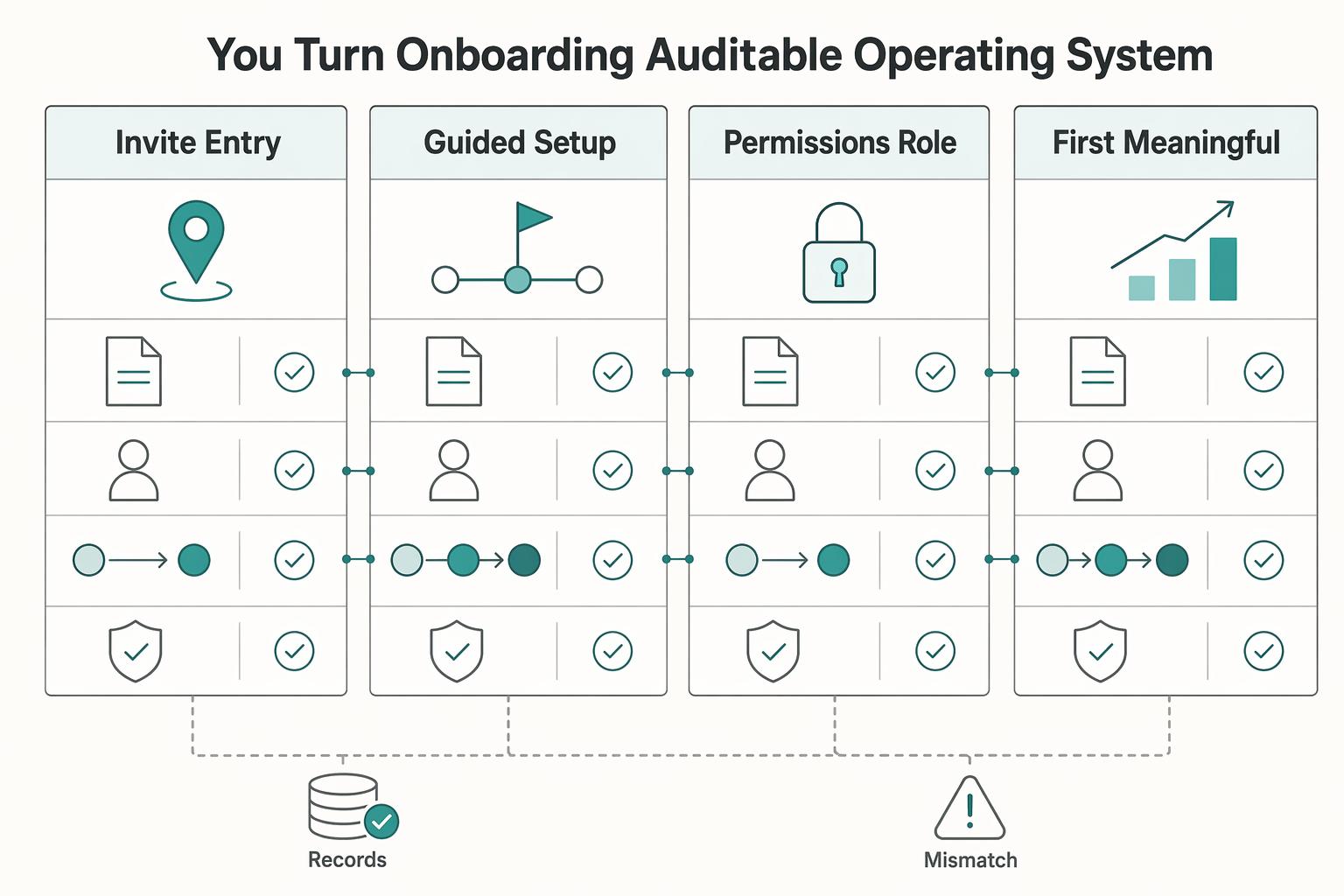
How do you turn onboarding into an auditable operating system?#
Treat onboarding as a repeatable operating process, not a set of activities. If you cannot reconstruct who moved an account forward, what state changed, and why, you cannot reliably audit or improve it.
- Step 1. Define checkpoints as state changes, not activity logs.
For each milestone, document the entry state, exit state, and progression rule. Use the same minimum evidence package at every checkpoint: event name, actor, state transition, and approval basis. If a checkpoint needs a strict pass rule, leave the threshold unresolved until it is verified against the current CRM or source records and the approved operating target.
A practical starting set is: invite accepted, first guided action started, role confirmed, and first meaningful value created. Your test is simple: open one account record and confirm the sequence is readable in order without extra explanation. If you log "tour completed" but cannot show a real state transition, treat it as noise.
- Step 2. Assign one owner, one escalation trigger, and one system of record per milestone.
Self-service and admin provisioning fail differently, so ownership should be model-specific. Keep one accountable owner per milestone, define the escalation trigger, and specify the system of record so audit retrieval is unambiguous.
| Milestone | Self-service owner | Admin provisioning owner | Escalation trigger | System of record |
|---|---|---|---|---|
| Invite and entry | Product or lifecycle owner | Customer admin plus Support | Invite not accepted, bad invite path, or duplicate account | Account timeline or invite log |
| Guided setup start | Product | Customer success | User lands in app but does not start the first guided action | Product event stream tied to account record |
| Permissions and role confirmation | Support | Support plus customer admin | Role mismatch, missing workspace membership, or blocked feature access | Permission log and account record |
| First meaningful value | Customer success | Customer success | Core task started but usable result not created | Success notes plus product completion event |
If two teams can both "own" the same stall, accountability is unclear. Your retrieval test: can an on-call teammate find the account, current stage, and evidence location without asking in chat?
- Step 3. Compare guided vs unguided paths by failure point.
The useful question is not "Which path completed more?" It is "Where did users drop, which onboarding asset failed, and who ships the next fix?"
- Drop before first guided action: likely welcome message, entry screen, or invite flow; Product/lifecycle owns the next fix.
- Drop after guide completion but before core task start: likely tour, checklist, or Quick Start copy; treat this as asset failure.
- Drop after task start but before usable result: likely templates, data setup, permissions, or workspace configuration; Support/Customer Success handles recovery, and Product may own root-cause changes.
Keep audit standards consistent over time so reviews stay comparable. Use the weekly 90-minute leadership meeting to resolve only the top 1-3 issues. Also avoid KPI-only audits; results alone can misidentify ownership before you check asset quality, training, or capacity.
- Step 4. Use explicit exception handoff states and return users to the missed step.
Define consistent internal handoff states for recurring failures, then route users back to the exact point they missed. For example: invite_failure_detected -> invite_retry_sent -> human_followup_needed, role_mismatch_detected -> permissions_review_open -> role_corrected_confirmed, and workspace_blocked_detected -> access_validation_open -> workspace_access_restored.
For each exception, set a response owner, a resolution owner, and a re-entry point. Do not send repaired users to a generic home screen.
Example: a customer admin invites Nina. The account logs invite_accepted, actor Nina, transition pending_invite -> active_user, and approval basis valid invite token. Nina then hits workspace_blocked_detected. Support moves the case to access_validation_open, confirms the membership rule, logs the approval basis, and updates to workspace_access_restored. Customer Success routes Nina back to the blocked setup step, and the record later shows first_value_created. That is auditability in practice: who acted, what was logged, and how the user returned to value.
How do you prevent churn without adding friction?#
Choose the lightest onboarding path that still gets each account to first value with the control it actually needs. If you add steps before you confirm a real stall, you increase drop-off risk.
- Step 1. Set a default path by account context, then switch only when evidence shows the current path failed.
Use self-service when customer fit is clear and users can move without role or workspace dependencies. Use admin provisioning when access, roles, or shared workspace setup must be coordinated. Use JIT provisioning when users enter through an identity provider and role mapping is the control point.
| Account context | Default path | Friction risk | Control requirement | Owner | Fallback action |
|---|---|---|---|---|---|
| Individual or small team with clear customer fit | Self-service | High if you require approvals before setup | Low | Product or lifecycle owner | If role or access blocks first value, move only that blocked step to admin review |
| Team account with shared workspace and role decisions | Admin provisioning | High if everyone waits on one admin | Medium to high | Customer success + customer admin | If invites are accepted but setup stalls, return users to guided self-serve after access is confirmed |
| SSO-ready organization entering through identity provider | JIT provisioning | Low at entry, high if role mapping is wrong | High | Support + customer admin | If JIT assigns the wrong role or no workspace access, open permissions review and route back to the missed step |
When to switch paths: switch when your record shows control failure, role mismatch, or repeated setup blocks. Do not switch because one account asks for high-touch support without evidence.
- Step 2. Personalize only the moments that change activation behavior.
Keep personalization tied to observable events, not broad campaigns.
| Trigger event | Personalized touchpoint | Expected activation behavior | Review owner |
|---|---|---|---|
| Invite accepted | Role-based welcome | First guided action started | Product or lifecycle |
| Guided action completed, but no core task start | Contextual help at the exact stuck step | Core task started | Product or customer success |
| Core task started, but no usable result | Short first-week email or targeted human check-in | First value created | Customer success |
If a touchpoint does not map to a measurable behavior, remove it.
- Step 3. Use a lightweight intervention ladder after verified stall signals.
Because churn often clusters in the first 30-90 days, review stalled accounts weekly and escalate in small steps: in-app prompt at the failed step -> short email that links directly to the missed action -> optional human handoff only when the stall persists or records show access or permissions problems.
Do-not-add-friction guardrails: - Do not require every account to book a call. - Do not gate simple actions behind approval. - Do not front-load every feature; use progressive disclosure.
Mini-scenario: a finance lead finishes setup but does not create the first report. You detect the missing completion event, send one prompt that routes straight to the report step, and hand off to Support only if the account record shows access denial rather than hesitation.
If that is how you prevent avoidable churn, the next question is what to do when the path is already broken. Related: How to Create a Knowledge Base for Your SaaS Product.
What breaks most onboarding programs and how do you recover fast?#
Most onboarding failures come from three issues: you give everyone the same path, no one owns the blocked step, or the account is in the wrong provisioning model.
Step 1. Diagnose before you redesign. Do not ship a fix until you can name the failure. Quick patches without root-cause diagnosis usually bring the same stall back under a new label.
Start from evidence at the exact drop-off point: event trail, server and application logs, browser console errors, and the last screen the user saw. If multiple changes landed recently, test them one at a time to isolate the variable. Your recovery checkpoint is simple: each stalled account has one failure label, one owner, and one next action.
| Failure mode | What you should look for | Diagnostic signal | Immediate fix | Accountable owner | Recheck event |
|---|---|---|---|---|---|
| Generic tour | Users complete clicks but do not start the core task | High tour completion, low time-to-first-value, or no core action started | Replace the broad tour with one role-based Quick Start action tied to one job | Product | Core action started |
| Ownership gap | Users stall between invite, setup, and first task | A handoff has no response, no follow-up, or conflicting instructions | Assign one checkpoint owner and one backup, then resend the exact next step | Onboarding lead or customer success | Blocked step completed |
| Model mismatch | Solo users hit admin gates, or team accounts fail in self-serve | Repeated permission errors, invite dependency, or workspace access confusion | Reroute to the correct path and reopen only the blocked step | Product plus support or customer admin | Access confirmed and first task resumed |
Step 2. Keep the default route unless evidence shows a control block. Keep self-service when users can register, enter the product, and reach the first guided task without waiting on another person. Move to admin provisioning when access, role assignment, or workspace setup must be controlled by a customer admin and that dependency is already blocking progress.
Your exception trigger is verified failure evidence, not a general request for extra help. If you reroute, change only the blocked step instead of rebuilding the whole journey.
Step 3. Escalate in a clear ladder. Start with a targeted Quick Start action: one role-specific prompt, one screen, one next task. For example, prompt a finance lead to connect a data source or create a first report, not to rewatch a full tour.
Move to assisted completion only after a verified stall signal, such as no core action after the prompt, repeated error evidence, or a permissions block. If diagnosis runs past 2 hours without clear progress, or the issue touches security, data integrity, or revenue loss, escalate to an expert.
Step 4. Tighten Auth0 invite recovery if you use Organizations. Treat invite failure as an operational flow you own. Check that invitation links preserve invitation and organization context, that sign-in preserves continuity with the invited email when your setup requires it, and that users can always find a visible resend or status path.
Assign an owner for each failed invite state, including expired invite, wrong identity used, missing org context, and access not granted after acceptance. Keep a practical evidence pack for each case: failed URL sample, sign-in email used, timestamp, and screenshot of the user-visible state. If these handoffs keep failing, the right support stack can reduce silent drop-off.
Step 5. Run a compact recovery cadence. Pick one bottleneck causing the most early loss, ship one fix in the next release cycle, and define one outcome to recheck in the cycle after release.
That outcome can be faster time-to-first-value, more invite completions, or fewer permission-related stalls. Keep the loop disciplined: one bottleneck selected, one fix shipped, one outcome checked. We covered this in detail in How SaaS Teams Set Pricing and Packaging for International Markets.
Document the default path, activation event, and owner before each release#
Use this as an operating runbook: before each release, document your segment, default path, first task, activation event, primary owner, stall trigger, and recovery action in one shared note or ticket.
- Choose one default path and write your switch trigger in advance. Keep the path explicit per segment so the team does not improvise mid-onboarding.
| Default path | Start here when | Switch when |
|---|---|---|
| Self-service | A user can reach core value without waiting on anyone else | Access, roles, workspace setup, or permissions block the first task |
| Admin provisioning | A customer admin must complete setup before users can work | Setup is complete and users now only need task-level guidance |
| JIT guidance | The user is already in context and needs help on the next step | The blocker is setup, approval, or missing access that guidance cannot resolve |
If you add in-app guidance, match it to user type: a skippable guided tour for experienced users, and an interactive walkthrough for non-technical users.
- Run the first session as a fixed action flow. Keep it short enough to aim for first value in under 5 minutes: confirm access, show the next best action, complete one core task, then present the immediate next step.
Attach one owner and one completion event to each stage. If a stage has no observable event, rewrite the stage until it does.
- Gate on activation, not activity. A pass is the activation event completed (the action that proves value). A fail is no activation by session end, or no activation within 24 hours after signup.
Tie recovery to the failed step: if they never started, improve the empty state or CTA; if they stalled mid-task, send one role-specific prompt with the exact next action; if they hit access issues, route to your exception owner.
- Define handoffs before release. Assign a primary owner per stage, an exception owner for blocked accounts, and one escalation condition your team can apply consistently.
For each stalled account, capture: last completed event, timestamp, blocker reason, next action, and current owner. If product, email, and support events do not align, fix that instrumentation gap before adding more onboarding steps.
- Ship one onboarding fix per release. Review signup completion, activation, retention, trial-to-paid conversion, and early churn, then pick the single largest drop-off and change only that step.
Keep the change narrow: remove extra signup fields, tighten one checklist item, or rewrite one empty state, then verify the exact event pair you expected to move. Related reading: How to Choose a Tech Stack for Your SaaS Product.
Frequently Asked Questions
What is saas user onboarding?
It is a single flow from a defined start point to a resulting point where the user reaches first meaningful value. Start by naming the activation signal, the concrete product action that proves value. You know it is working when users complete that action, not just a tour.
How do you onboard new SaaS users effectively?
Move users to one segment-appropriate task that proves value quickly, then remove anything that does not help them reach it. Track the exact event that marks activation. Verify progress with faster day-1 activation, not just higher click counts on guidance.
Self-service onboarding vs admin provisioning which should I choose?
Use account context first when deciding. If users can reach activation on their own, a self-service path may fit. If access, roles, or workspace setup depend on a customer admin, include that dependency explicitly in the flow and monitor where activation stalls.
What should be included in a SaaS onboarding checklist?
Include the start point, the resulting point, the role-based next task, and the activation event. Keep each item tied to a concrete product action such as creating the first project or completing the first transaction. Verify the checklist by artifact creation or task completion, not checklist boxes alone.
How do I reduce onboarding risk and churn without adding friction?
Aim for activation on day 1, then add controls only where access or setup actually blocks progress. If users stall, simplify the blocked step and keep guidance focused on the next meaningful action. Check whether day-7 or day-30 retention improves after the change.
How personalized should SaaS onboarding be?
Personalize by segment first, including role and account context, because the right first task can change by user type. Apply tailoring at key decision points such as the first prompt or checklist, not on every screen. Verify it by higher completion of each segment's activation action.
When should I use JIT flows in a B2B SaaS onboarding process?
Use just-in-time guidance when users are already in product context and need help with the next task. If activation is still blocked by account setup or access dependencies, resolve those blockers first. Verify JIT usefulness by whether completion of the target action improves.
Try a related tool
Researched and edited by the Gruv editorial team. Gruv builds cross-border billing, payouts, and finance-operations software for global businesses.
Sources
Includes 8 external sources outside the trusted-domain allowlist.
- arxiv.org/pdf/2602.11224external
- auth0.com/blog/user-onboarding-strategies-b2b-saasexternal
- custify.com/blog/saas-customer-onboarding-guideexternal
- flook.co/blog/posts/saas-onboarding-checklistexternal
- flowjam.com/blog/saas-onboarding-best-practices-2025-gui...external
- gleap.io/blog/saas-user-onboarding-guideexternal
- infoseemedia.com/business/saas/saas-onboarding-playbook-7-day...external
- isms.online/managed-service-providers/iso-27001-msp-clie...external
Educational content only. Not legal, tax, or financial advice.
Related Posts

Thailand's Long-Term Resident (LTR) Visa for Professionals
For a long stay in Thailand, the biggest avoidable risk is doing the right steps in the wrong order. Pick the LTR track first, build the evidence pack that matches it second, and verify live official checkpoints right before every submission or payment. That extra day of discipline usually saves far more time than it costs.
The Best Customer Support Software for SaaS Businesses
When you compare the **best saas customer support software**, start with one question: when a customer issue changes hands, who owns it next? A shared inbox can work when one person reads and replies to everything. It can start to crack when onboarding questions, account requests, and product issues arrive across multiple channels and need triage and reassignment.

The Freelance Payment Penalty: A Modeled Audit of Platform Fees, FX Spreads, and Payout Delays
The money rarely disappears through a single, easy-to-spot fee. The real loss is stacked. A marketplace takes its commission, a processor adds a charge for international cards, a bank or payment company converts the currency at a spread, a platform holds the funds before release, and a wire sheds a little to intermediaries on the way in. Each layer looks defensible on its own, but the worker feels the combined result as a smaller deposit and a later payday.