
Quick Answer
Start by qualifying for YPP and completing tax and payment details early, then build income beyond ads so one weak RPM month does not break your plan. For how to monetize a youtube channel, the practical sequence is activate ads and fan funding, test one validated non-ad offer, and lock payout operations. Use the monthly cadence in the article to track finalized earnings, tax set-asides, and reserve coverage before you scale.
You are not just a content creator. You are running a business of one. That shift matters because most guides stop at feature checklists. They show you how to switch revenue on, but not how to build something resilient, compliant, and easier to manage over time.
This blueprint takes a broader view. It is for a global professional who wants more control over revenue, operations, and risk. The work comes down to three pillars: Activate, Diversify, and Protect.
- Pillar 1: Activate is about building your first reliable revenue layer. You will set up the YouTube Partner Program properly, make sensible ad decisions, and use on-platform features as signals about what your audience will actually pay for.
- Pillar 2: Diversify is about reducing dependence on the platform. Your channel can drive demand, but it should not be your whole business. This is where you add higher-margin income streams you control more directly, including sponsorships, affiliate offers, your own products or services, and your email list.
- Pillar 3: Protect is where you tighten the business around the revenue. That means handling taxes, choosing a structure that fits your risk, and setting up payout and cash management so cross-border income does not get chipped away by avoidable mistakes.
The point is simple: stop treating views as if they are the business. Build a media business that can earn, adapt, and hold up under real-world admin. Start with the foundation.
Pillar 1: ACTIVATE - Build Your Foundational Revenue Engine#
If you are figuring out how to monetize a YouTube channel, start by activating the YouTube Partner Program cleanly, not quickly. The goal is simple: unlock the earliest revenue features you qualify for, avoid preventable review issues, and make sure payouts can actually leave AdSense when the time comes.
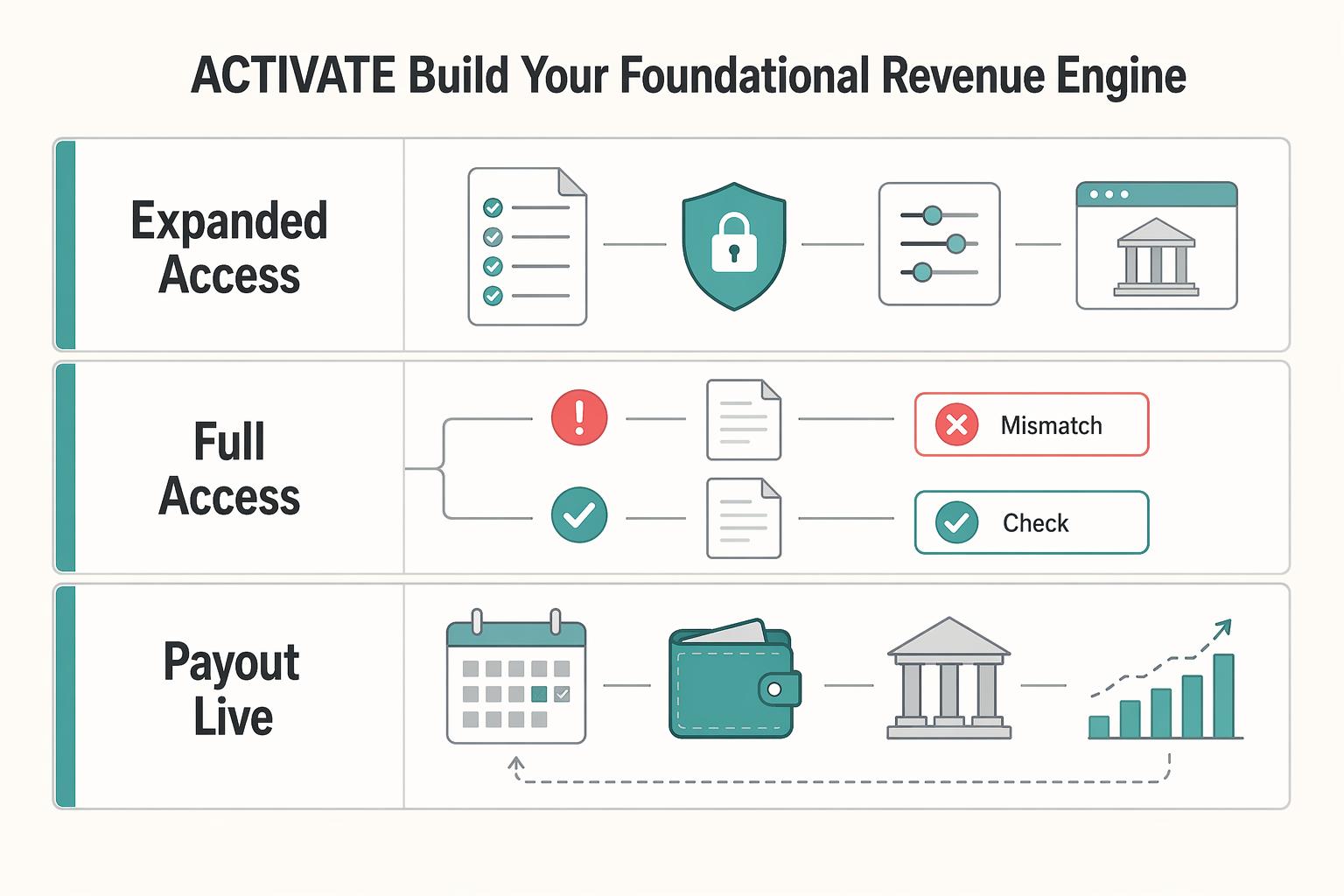
| YPP stage | Verify the current requirement before applying | What it unlocks | What it means for cashflow |
|---|---|---|---|
| Expanded access | Confirm the current platform threshold from YouTube's official documentation. | Fan funding features and, where available, Shopping access | Earliest direct viewer revenue, but not ad revenue sharing |
| Full access | Confirm the current platform threshold from YouTube's official documentation. | Ad revenue sharing plus other YPP features | Broadest on-platform income, with monthly earnings posted to AdSense first |
| Payout live | Payment threshold reached, payment info complete, no holds | Funds can be issued from AdSense | Previous month earnings are typically finalized in AdSense between the 7th and 12th, with payment issuance typically between the 21st and 26th |
Step 1. Verify channel readiness before you click Apply now. In YouTube Studio, go to Earn only after you have checked the basics: no active Community Guidelines strikes, 2-Step Verification turned on for your Google Account, advanced features access enabled, and one active AdSense for YouTube account ready to link. A common blocker is policy readiness, not just growth. If your videos are repetitive, or you cannot commercially use all audio and visual elements, review can fail.
Step 2. Apply inside Studio in execution order. In YouTube Studio > Earn, select Apply now, accept the Base Terms, then link or create your AdSense account. After submission, the review step should show In progress. Even if you are approved, incomplete payment details can still make you miss that month's payout window. Treat tax and bank details as part of activation, not admin to clean up later.
Step 3. Turn on ads with restraint, then test. For new long-form uploads, YouTube can automatically serve pre-roll, post-roll, skippable, and non-skippable ads when ads are enabled. The real decision is usually mid-rolls. Place them only at natural pauses or transitions, because disruptive placements are less likely to serve and can hurt the viewing experience. Review a set of similar videos in the Engagement tab. If watch time or average view duration drops after you add mid-rolls, pull back. Also read impressions and CTR together before you blame ad choice.
Step 4. Treat fan funding as buyer-intent data. Memberships, Super Chat, and Super Stickers can show you who will pay, when, and for what. Watch three signals: which topics trigger paid messages, which perks members ask for repeatedly, and which viewers pay more than once. If paid activity clusters around live problem-solving, your Pillar 2 offer may be group coaching or office hours. If it clusters around tutorials or assets, test a template pack or paid resource.
Step 5. Use Shopping as a low-risk product test. Start with the easiest offer to deliver and validate, not the flashiest thing to sell. Different product types have different fulfillment, margin, and control tradeoffs. Keep the first test narrow, tag products in relevant videos, and check Shopping performance in YouTube Analytics before you scale anything.
Once this base layer is active, reduce your dependence on it. Related: How to Create a YouTube Channel to Showcase Your Freelance Skills. Need a quick next step? Try the free invoice generator.
Pillar 2: DIVERSIFY - Architect an Anti-Fragile Business#
Once ads, fan funding, or Shopping are live, treat YouTube as one revenue channel, not the whole business. Your goal is cashflow resilience: a weak month in Studio should not automatically become a weak month in your bank account.
| Revenue line | Setup | Control point |
|---|---|---|
| Sponsorships | Define deliverables, revision limits, usage rights, exclusivity, billing contact, invoice route, and when payment is due before filming | Your signed agreement, creative brief, and invoice details should match |
| Affiliate offers | Show the problem, show where the product fits your process, note one limitation, and say who should skip it | Promote if you use it, can show it, and can explain both fit and limits |
| Email capture | Match each content theme to one lead magnet and place the opt-in in the spoken CTA, top description lines, pinned comment, and relevant linked page | Each new video should point to one primary email entry point, not many competing offers |
Step 1. Map a value ladder you can validate before you scale#
Build offers from real audience signals, then scale only after a light version proves demand. Repeated questions, paid comments on one topic, and requests for direct help are your best starting signals.
| Offer type | Buyer intent signal | Delivery effort | Margin profile | Risk notes |
|---|---|---|---|---|
| Template, checklist, swipe file | Viewers want the exact asset or process | Low after creation | Often strong if support stays light | Easy to underprice or drift into custom work |
| Paid workshop or live session | Viewers want help applying your method | Medium and recurring | Depends on prep time and attendance | Scheduling and no-shows can erode returns |
| Course or resource library | Viewers want a full path, not one answer | High upfront, lower per sale later | Can improve if updates stay controlled | Heavy build before demand is proven |
| Consulting, coaching, done-with-you service | Viewers ask for direct review or strategy | High and hands-on | Usually premium, but time-bound | Hard to scale and easy to oversell capacity |
Before launch, make sure each offer maps to one clear problem, one buyer type, and one delivery method. If that fit is unclear, simplify before you build more.
Step 2. Lock sponsorships down before the work starts#
Sponsorship income is only reliable when scope and payment are clear before production starts. Treat every deal like client work, not a handshake.
Define deliverables in plain language: integration or dedicated video, length, platform, posting window, and whether cutdowns, Shorts, thumbnails, links, or whitelisting are included. Set revision limits so "small tweaks" do not become open-ended rework. Narrow usage rights to specific channels and timeframes, and treat expanded usage as added value.
Set exclusivity boundaries with the same precision: name the category or competitor set and what work is restricted. For payment protection, confirm billing contact, invoice route, and when payment is due relative to approval, delivery, or publish. Before you film, make sure your signed agreement, creative brief, and invoice details match. If they do not, pause.
Step 3. Filter affiliate offers through trust first#
Affiliate revenue works best when it feels like curation, not link stuffing. Promote offers you can demonstrate and explain honestly, including limits.
Use a simple proof-of-use format: show the problem, show where the product fits your process, note one limitation, and say who should skip it. Keep disclosure clear wherever the link appears, and verify the links and landing pages before you publish.
Use this quick decision check:
- Promote if you use it, can show it, and can explain both fit and limits.
- Promote if it solves a problem your audience already asks about.
- Skip if payout is the main reason but the fit is weak.
- Skip if the vendor asks for claims you cannot verify yourself.
Step 4. Build an email capture flow you own#
An email list you own reduces dependence on platform reach and gives you a direct line to your audience. Keep the system simple enough to repeat.
Match each content theme to one lead magnet that delivers an immediate next step. Place that opt-in in the spoken CTA, top description lines, pinned comment, and relevant linked page. After signup, run a short onboarding sequence: deliver the asset, point to related content, then use one question or click path to segment intent.
Segment by buying intent, not broad demographics. Keep separate paths for people who want templates, services, or tool recommendations. Operational checkpoint: each new video should point to one primary email entry point, not many competing offers.
Once revenue comes from multiple channels, your main risk shifts from demand to execution discipline. For a step-by-step walkthrough, see How to Price a YouTube Sponsorship Deal.
Pillar 3: PROTECT - Erect Your Compliance and Financial Shield#
Once revenue is live, weak admin turns into real loss. Protect cashflow early so earnings do not leak into tax errors, fee drag, or personal liability.
| Checkpoint | What to verify | Timing or effect |
|---|---|---|
| Tax information | Creators in the YouTube Partner Program must submit tax information, no matter where they live | If tax info is missing or incomplete, Google may have to deduct up to 24% of total earnings worldwide |
| Jurisdiction check | Confirm tax residency, whose legal name and tax ID belong on the payout profile, and local filing requirements | Google is explicit that it does not provide tax advice |
| Payout cycle | Threshold reached, payment info complete, and no holds | Earnings are typically finalized between the 7th and 12th, and payment is usually issued between the 21st and 26th |
| Payment changes | Update payout details before the 20th if you want changes to affect that month's cycle | Changes made after the 20th generally apply to the next cycle |
| Settlement timing | Track how long funds take after payout starts | EFT: 4-10 days; bank transfer: up to 15 working days |
Step 1. Verify your tax exposure before the next payout. Start with what YouTube and Google require: creators in the YouTube Partner Program must submit tax information, no matter where they live. If tax info is missing or incomplete, Google may have to deduct up to 24% of your total earnings worldwide. If you are outside the US, you may still owe taxes in your own country or region, so do not treat Google forms as your full tax setup.
Run a jurisdiction check in order: confirm your tax residency, whose legal name and tax ID belong on the payout profile, then local filing requirements. If you are in the US and your net self-employment earnings are $400 or more, you generally have to file. If you are outside the US, verify local filing requirements from official source records before using them in your plan, then confirm with a qualified adviser. Google is explicit that it does not provide tax advice.
Keep one control point in mind: the legal name on your tax profile, the payee on your payment method, and your bookkeeping records should match.
Step 2. Choose a structure for risk control, not just convenience. You can operate as a sole proprietor, but that does not create a separate legal entity. A single-member LLC can improve liability separation, but it does not automatically reduce taxes.
| Structure | Liability separation | Admin overhead | Tax handling | Sponsor-contract readiness |
|---|---|---|---|---|
| Sole proprietorship | No separate entity; personal liability exposure remains | Lower setup/admin burden | Typically reported on your personal return | Usable for early deals, but you sign personally |
| Single-member LLC | State-created separate entity for liability purposes | State formation + ongoing compliance + cleaner records | Often treated as a disregarded entity for federal income tax; self-employment tax treatment can still mirror sole proprietorship | Cleaner for contracts, invoices, and banking under a business name |
Reconsider your structure when one or more of these apply:
- You are signing sponsorships or licensing deals regularly.
- You are hiring contractors or team support.
- You need clear separation between personal and business finances.
- Your channel value is high enough that personal-liability exposure is unacceptable.
Step 3. Fix payout plumbing before funds arrive. You only get paid after you reach the payment threshold, and the timing is staged. YouTube earnings are typically finalized between the 7th and 12th, and payment is usually issued between the 21st and 26th when threshold and hold conditions are met. Changes made after the 20th generally apply to the next cycle.
Use this cost-leak checklist before each cycle:
- Confirm which payment methods are actually available in your country.
- Confirm the receiving account can accept the payout currency.
- Check whether intermediary institutions can set exchange rates or add fees.
- Track settlement timing after payout starts (EFT: 4-10 days; bank transfer: up to 15 working days).
If you work across currencies, keep routing simple: map each income source to one receiving account, one bookkeeping label, and one sweep day. You should be able to explain every deduction from gross payout to cleared cash.
Step 4. Run a monthly operating cadence for variable income. Treat YouTube income as variable by default, because payout amounts are not guaranteed. Build forecasts from recent finalized results and keep sponsor invoices, memberships, and affiliate payouts in separate lines so one-off spikes do not look like stable income.
When money clears, split it immediately into operating, tax, and reserve buckets. Do not copy a fixed percentage from someone else: tax set-asides are jurisdiction-specific, and reserve levels should match your own volatility and fixed costs. If you are US self-employed, estimated taxes are generally paid during the year (Apr 15, Jun 15, Sept 15, Jan 15), and underpayment can trigger penalties.
Define a low-revenue fallback before you need it: cut discretionary spend first, pause owner draws before touching tax funds, and use reserves for essential operating costs only. At month end, verify four items: finalized platform earnings, cleared bank cash, tax amounts set aside, and remaining operating runway.
If you want a deeper dive, read How to Calculate Your Billable Rate as a Freelancer.
Conclusion: Sequence the three pillars into a next-week action plan#
The practical answer is sequence, not doing everything at once. If you want steadier cashflow, less payment friction, and fewer avoidable risk problems, use the three pillars as your next-week action plan.
| Step | Focus | Checkpoint |
|---|---|---|
| Activate your base revenue | Verify YPP status against current official requirements and confirm channel standing | You know whether ads via AdSense are actually available to you now |
| Diversify before ads become your single point of failure | Start with one path that fits your audience, often affiliate marketing, then add either sponsorships or a digital product | Choose one non-ad revenue stream to launch next |
| Protect the money flow you already created | Track earnings and ad performance, and make sure monetization setup and policy checks stay aligned | Do not treat monetization as solved once revenue turns on |
| Run this first-actions checklist this week | Check YPP eligibility and channel standing; review recent earnings and ad performance; choose one non-ad revenue stream; complete platform-required account and payment details | Review results, adjust what is underperforming, and repeat |
Step 1. Activate your base revenue. Verify your YouTube Partner Program status against current official requirements before you plan around ad income. A 2026 guide still lists 1,000 subscribers plus either 4,000 valid public watch hours in 12 months or 10 million valid public Shorts views in 90 days for full access. Thresholds can change, so treat them as a checkpoint, not a promise. Also confirm your channel is in good standing with no active Community Guidelines strikes. Your verification point is simple: you know whether ads via AdSense are actually available to you now.
Step 2. Diversify before ads become your single point of failure. Do not build your whole income plan on RPM. The range can be wide: RPM can run from about $0.50 to over $20, and 100,000 views might earn $50 or $2,000. If you are not ad-eligible yet, start with one path that fits your audience, often affiliate marketing, then add either sponsorships or a digital product. Pick one or two methods, not five.
Step 3. Protect the money flow you already created. Track earnings and ad performance, and keep your monetization setup and policy checks aligned. A common failure mode is treating monetization as finished once revenue turns on, then getting hit by algorithm shifts, demonetization, or preventable policy mistakes.
Step 4. Run this first-actions checklist this week.
- Check YPP eligibility and channel standing.
- Review recent earnings and ad performance.
- Choose one non-ad revenue stream to launch next.
- Complete any platform-required account and payment details after confirmation.
Then keep the cadence boring on purpose: review results, adjust what is underperforming, and repeat. That is how you make monetization decisions that also improve payment reliability and reduce avoidable risk.
You might also find this useful: A guide to 'YouTube Analytics'.
Frequently Asked Questions
What are the current YouTube Partner Program requirements?
Check the live YouTube Help pages before you plan around ad revenue. A commonly published early-access path is 500 subscribers plus 3 valid public uploads in 90 days and either 3,000 valid public watch hours in 12 months or 3 million valid Shorts views in 90 days. A commonly published full ad-revenue path is 1,000 subscribers plus either 4,000 watch hours in 12 months or 10 million Shorts views in 90 days. Also confirm 2-Step Verification is on, you have no active Community Guidelines strikes, and one active AdSense for YouTube account is linked. Channels also need to follow YouTube monetization policies, and YouTube reviews channels before and after acceptance.
Can you monetize before you join YPP?
For YouTube monetization features, no. You can earn money on YouTube by applying for and being accepted into YPP. Keep any other revenue lines tracked separately so ad delays do not blur your cashflow.
What is usually the strongest money mix?
Start with ads if you qualify, but do not stop there. Add one non-ad stream you control so one policy change or weak RPM month does not become your single point of failure.
How do sponsorship disclosures work?
If you have a material connection to a brand, disclose it clearly. On YouTube, mark paid promotion in the video details, and do not assume that box alone covers local legal disclosure rules.
What should a sponsorship contract include?
Get the payment terms in writing before you publish. You want deliverables, approval scope, usage rights, exclusivity, fee, currency, payout method, and payment date spelled out so a late-pay dispute is easier to prove.
Do you need an LLC or company to start?
An LLC is not listed as a YPP eligibility requirement. If revenue becomes meaningful or contracts get larger, ask a local advisor whether a company structure improves liability, tax treatment, or banking in your jurisdiction.
How are earnings taxed if you live abroad?
It depends on where you are tax resident and what local filing rules apply. Review your YouTube tax info before Dec. 10 each year where relevant. Remember forms can expire at the end of the third full calendar year after signing, and get local advice before assuming treaty or withholding outcomes.
How do you set up payouts without leaking money on fees?
Confirm your AdSense payout route and receiving bank details before the 20th if you want changes to affect that month’s cycle. Finalized YouTube earnings are typically added between the 7th and 12th. Payments are issued between the 21st and 26th when requirements are met, and your bank may apply its own FX rate, so test the account and compare conversion costs early.
Try a related tool
Researched and edited by the Gruv editorial team. Gruv builds cross-border billing, payouts, and finance-operations software for global businesses.
Sources
Includes 3 external sources outside the trusted-domain allowlist.
- consumerfinance.gov/rules-policy/regulations/1005/interp-32trusted
- ftc.gov/business-guidance/resources/disclosures-101-...trusted
- irs.gov/businesses/small-businesses-self-employed/si...trusted
- irs.gov/businesses/small-businesses-self-employed/se...trusted
- sba.gov/business-guide/launch-your-business/choose-b...trusted
- bix-tech.com/data-monetization-what-it-is-why-it-matters-...external
- blog.luvi.fans/how-to-make-money-on-youtubeexternal
- ifc.org/content/dam/ifc/doc/mgrt/reinventing-busines...external
Educational content only. Not legal, tax, or financial advice.
Related Posts
How to Calculate a Freelance Rate You Can Actually Get Paid On
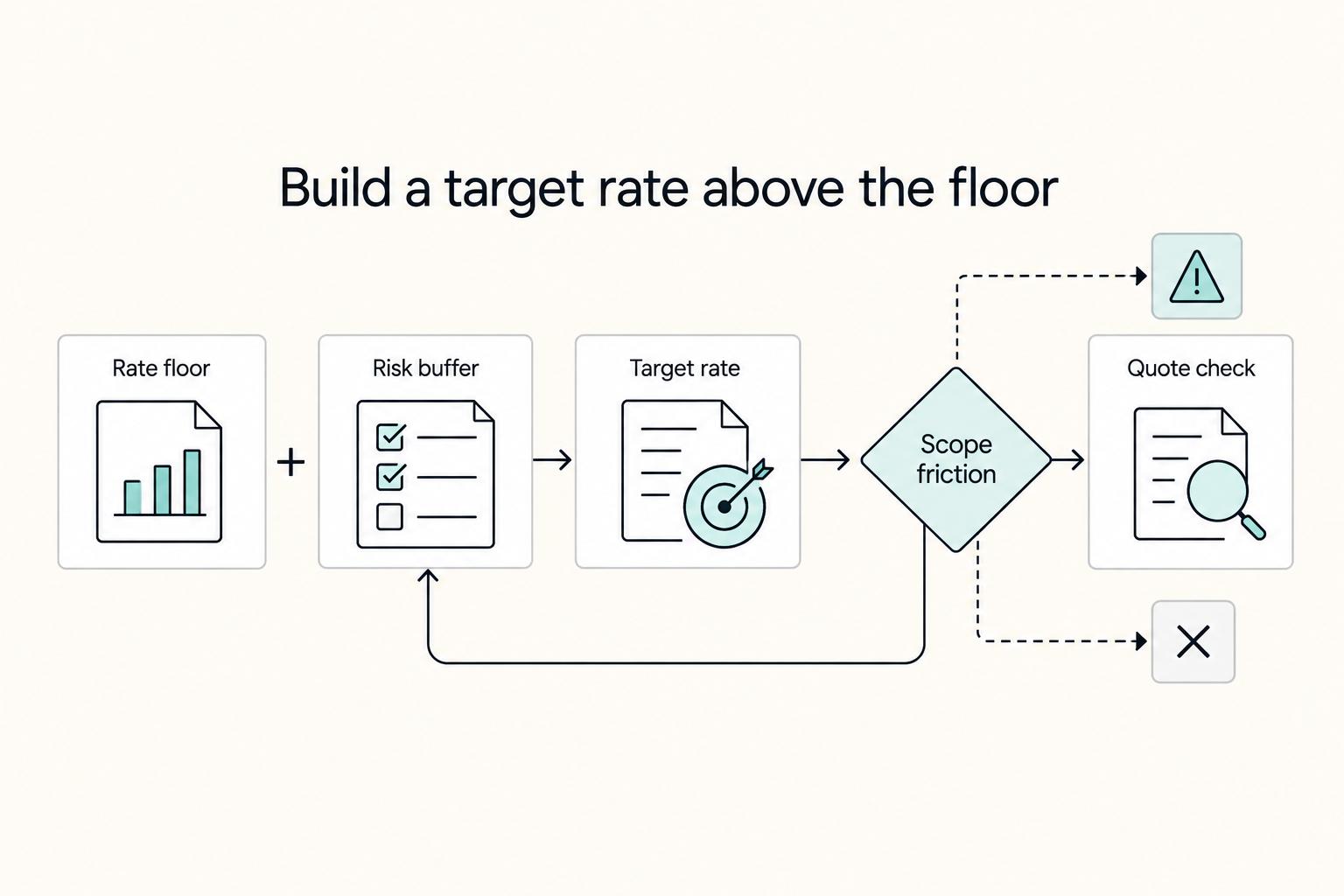
A workable rate is not the neat number a calculator produces. It is the number that still works after you account for real billable capacity, non-client time, scope drift, and the gap between sending an invoice and receiving cleared cash. Start with hourly math even if you do not plan to bill hourly, then turn that number into a quote with clear `payment terms`.
How to Create a YouTube Channel to Showcase Your Freelance Skills
Treat this like a business decision, not a creator identity project. Your goal is to publish videos that attract qualified inquiries instead of random attention.
A Practical Guide to YouTube Analytics for Freelance Creators
If you try to interpret everything in YouTube Studio at once, it is easy to react to noise. One practical way to review your channel is in three levels: health first, diagnosis second, business fit third.