
Quick Answer
Start by documenting expectations before adjusting your hours: define an overlap window, keep routine work in asynchronous communication, and put terms in your Statement of Work and SLA. Require written approval for scope or deadline changes, route urgent issues through one escalation channel, and keep approvals plus dependencies in one shared board. This setup lets you manage time zones with clients without turning your day into constant reactive coverage.
Set Clear Expectations Across Time Zones#
Treat time zones as an operating choice#
You can get better control of client time zones with a short setup pass. Stop treating timing as a courtesy issue and treat it as a written operating choice. The goal is simple: clearer rules, fewer delays, and fewer boundary problems because everyone knows which local time controls scheduling, what counts as urgent, and when a reply is actually due.
One practical example is local time zone booking. For non-in-person services, some tools let clients book and receive reminders in their own local time while you still see those bookings in your calendar in your local time. That can reduce confusion. It is not a universal setting, though. Timely specifically notes that local time booking is not recommended for in-person services or businesses operating across multiple time zones, which is a useful reminder that the setup has to fit the service.
What problem are you actually fixing?#
If you work independently and serve clients in places like New York and Sydney, vague communication rules get expensive fast. Approval requests sit overnight, "quick" revisions land at bedtime, and your calendar gets chopped into fragments that kill deep work. What looks like a time zone problem is usually an expectation problem hiding in email, chat, and verbal agreements.
When work depends on an immediate reply, a sleeping client can stop delivery. Redesign the handoff so the next person can act from the written record, then reserve live time for decisions that need discussion.
A quick checkpoint tells you whether you already have a problem. Can you point to one place, usually your Statement of Work, onboarding email, or client guide, that states your working hours, response-time policy, approval method, and escalation path? If not, the client is probably filling in those blanks for you.
Start with the promises already made, then choose an overlap window, a response policy and a handoff record. Review them when a client joins, either party travels or daylight saving changes.
Gather the inputs before you change your schedule#
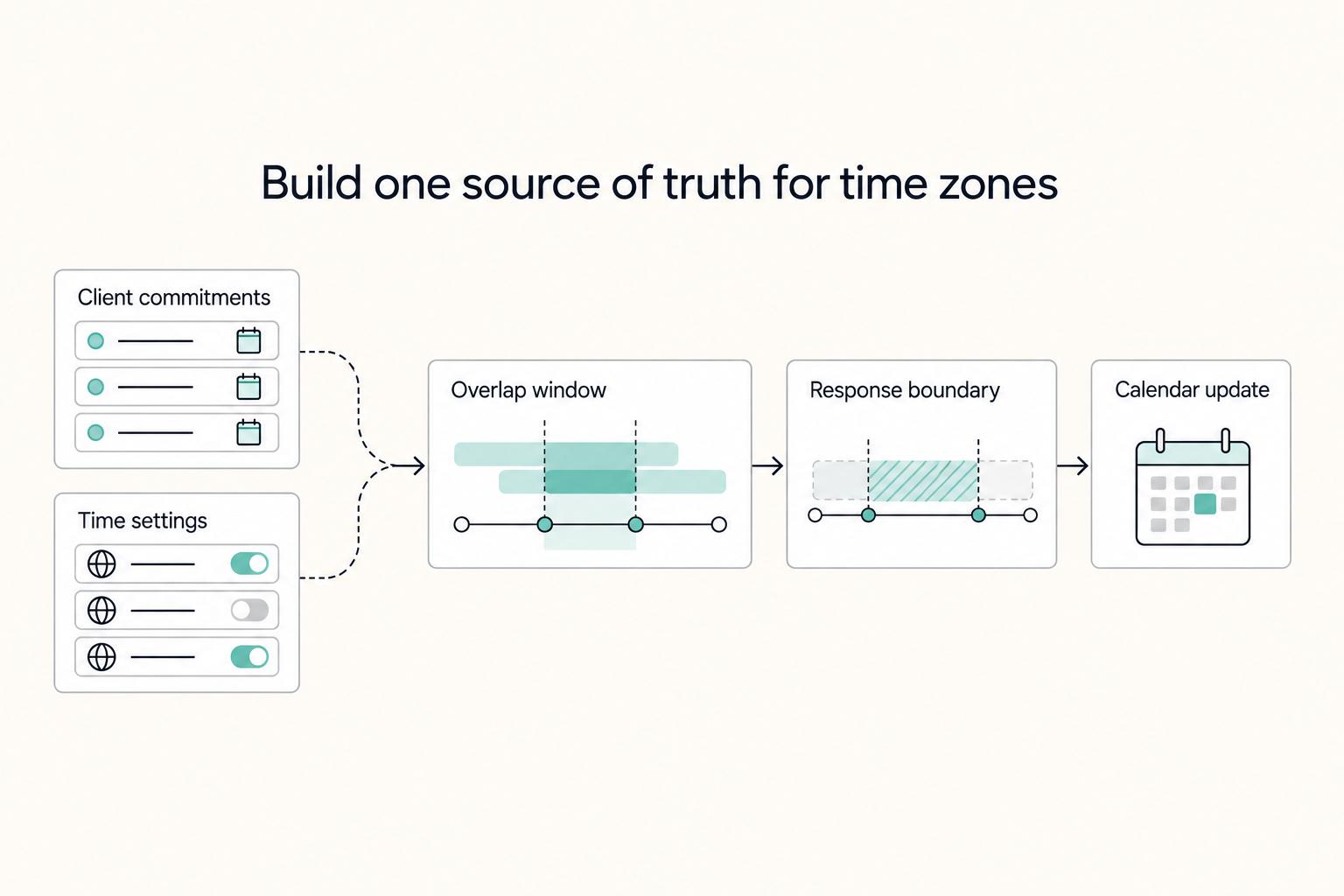
Before you move any hours, build one source of truth for commitments and time settings. This intake step keeps you from redesigning your week around assumptions instead of what you already promised.
| Input | What to include | Purpose |
|---|---|---|
| Time-zone-labeled calendar | Each client's city, working week, preferred channel for normal updates vs. urgent contact; recurring meetings, review windows, and deadlines; confirm a sample event shows the correct local time | Creates one source of truth for commitments and time settings |
| Formal and informal records | Each Statement of Work plus relevant email and chat threads for response-time or availability promises | Captures commitments that never made it into contract language |
| Non-negotiables | Deep-work windows, personal hard stops, and your maximum acceptable split-shift days | Prevents overlap from pushing focus time into leftovers |
| Shared board | Pending approvals, dependencies, deadline-buffer ownership, what is waiting, who is next, and who owns the buffer | Keeps blockers and ownership visible in one place |
- List every active client in one time-zone-labeled calendar. Track each client's city, working week, and preferred channel for normal updates vs. urgent contact. Add recurring meetings, review windows, and deadlines, then sanity-check a sample event per client to confirm their local time is showing correctly. Use named zones such as America/New_York, not a permanent UTC offset. Review recurring events when daylight saving or travel changes the local time.
- Pull your real commitments from formal and informal records. Start with each Statement of Work, then review relevant email and chat threads for response-time or availability promises. Treat the SOW as a formal agreement input, and use message history to catch commitments that never made it into contract language.
- Mark non-negotiables before planning overlap. Block deep-work windows, personal hard stops, and your maximum acceptable split-shift days. If you design overlap first, focus time usually gets pushed into leftovers.
- Set up one shared board in Trello, Asana, or ClickUp. Keep pending approvals, dependencies, and deadline-buffer ownership visible in one place. For each open project, you should be able to answer: what is waiting, who is next, and who owns the buffer. Related reading: How to Manage Your Time Effectively as a Freelancer.
How much overlap do you actually need#
Set overlap by where work actually gets blocked. Approval-heavy work may benefit from frequent short decision windows; execution-heavy work can often proceed with written feedback and a scheduled check-in. Live signoff is a choice for decisions needing discussion, not a requirement for every approval.
There is no universal minimum. As an initial trial, reserve two 30-minute decision windows each week for a light review cycle. Increase frequency if decisions keep blocking delivery, and reduce it when written approvals work reliably.
Step 1. Classify each client by decision load. Review recent work and ask what caused delays: missing live decisions or weak handoffs. If handoffs are the issue, adding meetings will not solve the core problem.
Step 2. Define the rule in a simple table before you change your calendar.
| Client type | Decisions that may need discussion | Acceptable lag | Escalation trigger |
|---|---|---|---|
| Approval-heavy | Complex signoffs, priority shifts or scope questions; written approval for straightforward items | Agreed approval deadline or next negotiated shared window | Delivery is blocked or deadline risk cannot move without approval |
| Review-heavy | Feedback rounds, clarifications, tradeoff calls | Next agreed shared window | Conflicting or unresolved feedback blocks next steps |
| Execution-heavy | Usually none beyond planned check-ins | Next fixed sync slot with async updates | A blocker cannot be resolved in the board or message thread |
Step 3. Keep the minimum live time that unblocks delivery. Reserve overlap for decisions and blockers; keep routine updates, handoffs and status reporting in documented async channels. Before overlap ends, both sides should know what happens next while the other is offline.
In thoughtbot’s account of cross-time-zone work, shifting a lunch break increased one team’s overlap from four to five hours. That is an example of using existing hours better, not a target every freelancer should adopt.
Step 4. Write a rule for ad hoc calls. Calls outside agreed windows need the agreed escalation basis and available coverage. A deadline does not make someone available while asleep; plan a backup or move the decision earlier.
Set communication terms in writing so expectations survive busy weeks#
Put your communication rules into the SOW and client-facing SLA so they still hold when schedules get crowded. Clear writing cuts repeated questions, duplicated work, and avoidable delays, and it makes approvals and escalations easier to act on.
Step 1. Add a working-hours clause to each SOW. Name your local working hours, overlap window, and standing exceptions (holidays, travel, pre-agreed schedule changes). Put a time zone next to every time entry. Avoid labels like "business hours" or "same day" without a zone, because they break down across regions.
Example language to adapt: “Working hours are Monday–Friday, 09:00–17:00 Asia/Bangkok, excluding agreed holidays. Live review slots are booked within those hours. Routine requests receive a reply within eight working hours, counted only during that schedule. Off-hours coverage requires a separately agreed arrangement.” Specify which party’s holidays govern the clock.
Step 2. Publish an SLA matrix that separates priority from channel. Define which channel to use, what each priority means, and the response-time policy for each level. Without this, high message volume and frequent interruptions can turn your overlap window into constant reactive work.
| Priority | Channel | Illustrative reply target | Coverage and meaning |
|---|---|---|---|
| Routine | Shared board or email | Within eight working hours | Clock runs only during the stated work schedule and agreed working days |
| Time-sensitive | Named project thread | Within two working hours | For a decision needed before the next handoff; record the requested decision deadline separately |
| Urgent | Agreed escalation phone/channel | Within 30 minutes during booked coverage | Acknowledgment and triage, not a promise of resolution; outside coverage contact the named backup or next agreed window |
These are example commitments to negotiate, not industry standards. A reply target measures acknowledgment or an initial answer. State a separate resolution plan when diagnosis, client approval or another party is needed. If nobody provides off-hours coverage, say so explicitly.
Step 3. Define the escalation path and context. State the first contact, channel, backup and available coverage. Include what is blocked, the deadline with its zone, the decision needed and a link to prior context. An urgent incident can be reported immediately; a missing field should not prevent someone from raising it.
This reduces cognitive load because the request carries its context instead of forcing reconstruction.
Step 4. Require written approval checkpoints for changes and off-hours requests. Require written approval before starting scope changes, timeline shifts, or same-day requests. In cross-time-zone work, this avoids disputes when "today" or "end of day" means different local times.
Include an off-hours pricing note in writing: off-hours work is an exception, needs explicit approval, and may be priced differently. If exceptions are not clearly written, boundaries blur into an infinite workday. Before you accept a rush request, confirm: written request, due time in both time zones, impact on existing work, and written approval for any fee or schedule change.
Build a weekly cadence that protects delivery quality#
Protect delivery quality with a predictable weekly rhythm: one recurring live checkpoint, clear async production time, and a fixed status format clients can act on quickly.
Step 1. Block your calendar by work mode. Reserve separate blocks for async production, client overlap, and admin. Keep them distinct so focused work is not broken up by scattered calls. A quick visual check of next week should show exactly when you are available for live decisions and when you are in delivery mode.
Step 2. Share the burden of inconvenient meetings. For clients in New York and Sydney, agree which calls truly need live discussion and rotate an inconvenient slot only within each party’s accepted limits. One weekly call can be a trial cadence; shorten or replace it with written review when there is no decision to make.
Step 3. Run one weekly planning pass in your project board. Use your collaboration tool to review upcoming deadlines, dependencies, and approvals in one pass. Flag items waiting on client input early, then add buffer before deadlines tighten. Each near-term task should show an owner, any blocker, and a date that accounts for time-zone lag.
Step 4. Send the same weekly status format every time. Use one fixed update structure so clients can scan it quickly:
- completed work
- pending written approval items, with links to the relevant task or document
- next deadlines in client-local time, with the time zone written out
If approval is pending, state what is blocked, which deadline is at risk, and when written approval is needed. We covered this in detail in How to Manage an Offshore Development Team Across Time Zones.
Run handoffs and approvals like an operator#
Handoffs fail when ownership, timing, and approval status stay vague. Treat every multi-day task as a formal handoff so work can move cleanly across different local days.
| Control | What to document | Check |
|---|---|---|
| Handoff note | Context, current status, next action owner, and unblock conditions | A third party should be able to continue from the note alone |
| Dual time stamp | Delivery promises, approval deadlines, and review windows in client-local time and your local time in the same message | Do not rely only on platform timestamps |
| Pre-delivery verification | Written approvals received, dependencies cleared, and SLA response windows still realistic | If any check fails, adjust the commitment before promising the send |
| Decision record | Final decision, owner, and timestamp in one project board, shared doc, or dedicated email thread | You should be able to answer who approved this, when, and what changed in under two minutes |
Step 1. Use the same handoff protocol every time. For any task that continues tomorrow, passes to someone else, or waits on client input, send one short handoff note with four fields: context, current status, next action owner, and unblock conditions. That is the minimum needed to keep momentum when people are not online at the same time.
Example: "Context: homepage copy revision for round 2. Current status: draft updated, legal disclaimer still pending. Next action owner: client to give written approval. Unblock condition: approval in email or project board comment." If a third party cannot continue from that note alone, the handoff is incomplete.
Step 2. Date commitments and show both zones. For example: “Feedback needed Tuesday, 6 October 2026, 16:00 Australia/Sydney (UTC+11) / 12:00 Asia/Bangkok (UTC+7).” Check the conversion for the actual date. Sydney observes daylight saving while Bangkok does not, so a fixed three-hour difference is unsafe for a recurring commitment.
Do not rely only on platform timestamps. Time displays can vary by organization and user time-zone settings, and some date/time values may be stored in UTC and then shown differently by user profile. The written dual-time stamp is your clarity check.
Step 3. Add a pre-delivery verification checkpoint. Before a major delivery, confirm three items: written approvals received, dependencies cleared, and SLA response windows still realistic. If approval is still pending and the expected response lands outside your workable window, the delivery is not truly ready.
If any check fails, adjust the commitment before promising the send. Many "time zone" misses are actually approval assumptions that were never verified.
Step 4. Keep one searchable decision record. Keep final decisions in one place, such as your project board, shared doc, or a dedicated email thread. Chat and calls can surface issues, but the final decision, owner, and timestamp should be captured in that single record so asynchronous work does not fragment.
Use a simple retrieval test: can you answer "who approved this, when, and what changed?" in under two minutes? If not, scope and timeline disputes become much harder to resolve.
Decide when to use split shifts and when to refuse them#
Use split shifts as a short-term exception, not your default. They are most useful when work is truly blocked by live decisions; if delays come from unclear approvals or weak handoffs, extending your day usually adds strain without fixing the root problem.
A split shift divides your day into separate work blocks with a substantial break. Agree the total hours, break and latest finish time before trying it; the gap between blocks is personal time, not standby availability.
Check the dependency before you change your hours#
Change your hours only when the dependency is genuinely live. If the blocker can be handled through written approvals, clear handoffs, or a fixed overlap window, keep your normal schedule and improve the process instead.
Look at recent delays and identify the real cause. If the issue was missing approvals, unclear ownership, or vague response expectations, fix that first. If progress repeatedly depends on a real-time decision while work is in motion, a temporary split shift can be reasonable.
Box the exception in writing before you start#
Write the temporary arrangement clearly before it begins so it does not become your new normal. Keep it in the same place as your core communication agreements, and make three points explicit:
- what qualifies as urgent enough for after-hours contact
- which channel is allowed for that contact
- when the temporary schedule ends or is reviewed
Clear communication rules reduce ambiguity, especially with narrow overlap windows. Set meeting format and contact flow up front, and pre-schedule recovery time so the exception does not turn into an always-on pattern.
Review output quality, not just responsiveness#
Judge the trial by delivery quality, not just faster replies. If late calls rise but handoffs get weaker, revisions increase, or approvals get messier, switch back to async-first and tighten the escalation path.
The key check is whether the temporary hours removed real blockers without increasing errors or missed commitments. If not, refuse ongoing split-shift requests, restate response expectations, and move more coordination into planned asynchronous communication.
If the issue is not just time zones but also local expectations around tone, directness, or decision-making, see How to Handle Cross-Cultural Communication with International Clients.
Common failures and fast recovery moves#
When a handoff fails, tell the client what is affected, give the next action and revised timing, then update the written rule that allowed the miss.
| Failure | Recovery move | Quick check |
|---|---|---|
| Missed deadline because approval sat overnight | Add a mandatory written approval checkpoint before each major handoff, plus a buffer before the downstream task starts | The approval is dated and easy to find in the same record as the task or status update, with the due date and owner clear if anything changed |
| Client starts expecting instant replies | Restate your existing response-time policy in the next status update, then carry that same language into the next SOW revision or renewal | Requests follow the agreed urgency and escalation path instead of ad hoc pings |
| Too many channels create confusion | Set one channel for urgent escalations and one for standard async updates, and state that other channels are reviewed on the normal cadence | Someone outside the thread can find the latest decision and owner without hunting across tools |
| Calendar drift after new onboarding or temporary exceptions | Run a recurring review of overlap windows, calendar blocks, and how escalations are actually being used | If overlap keeps expanding, deep work keeps shrinking, or urgent requests bypass your rules, reset the calendar and restate terms in writing |
The pattern is simple: fix the immediate miss, then update the rule in writing so you are not renegotiating the same problem next week.
Conclusion and copy-paste weekly checklist#
Before the week starts, check the commitments that could stall while either party is offline:
- Confirm overlap windows and any daylight-saving or travel changes.
- Check working hours, holidays, response clocks and escalation coverage.
- List pending approvals with the next owner, deadline and effect of a late reply.
- Protect production time and leave buffer before dependent work.
- Send one weekly update with dated deadlines in both parties’ time zones.
If a missing approval threatens delivery, raise it before the client’s review window closes. Change the commitment explicitly rather than relying on an overnight reply.
Frequently Asked Questions
What is the best way to manage time zones with clients without being online all day?
Default to asynchronous communication, then add a small overlap window only where live decisions actually matter. Your goal is not maximum availability. It is a setup where work keeps moving without real-time replies. A good check is whether urgent issues come through one escalation path and normal updates live in one searchable place.
How many overlap hours should I maintain for international clients?
There is no universal number. Start with the decisions that need discussion and trial short shared windows. For example, on 9 November 2026, two 09:00–17:00 workdays in New York and London overlap from 09:00–12:00 in New York and 14:00–17:00 in London: three hours. Recalculate for the actual dates, especially around daylight-saving changes.
Should I use a split-shift schedule or stay fully async-first?
Stay async-first unless a temporary project has a genuine live dependency. A split shift can help with that dependency, but it needs agreed total hours, a protected break and an end or review date. If longer availability increases errors or weakens delivery, end the trial and improve written handoffs.
What must be included in a timezone communication policy for clients?
Put the policy in writing and keep it easy to find. At minimum, list each party's time zone, local working hours, the expected overlap window, which channel is for standard updates, and which channel is for urgent escalation. Use shared calendars with time zone labels to reduce scheduling confusion, and rotate recurring meeting times when possible so early/late-call burden is shared. A simple verification test is whether a new client contact can tell, without asking you, when to expect a reply and how to raise a real blocker.
How do I prevent missed deadlines when approvals cross time zones?
Assign an approval owner, send the request before their review window and state the deadline with its date and time zone. Keep a buffer before the dependent task. If feedback does not arrive, follow the agreed escalation or replan the delivery; silence is not approval unless the agreement explicitly defines that process.
Which tools are essential for timezone-labeled planning and status handoffs?
You do not need a huge stack. The minimum useful set is a shared calendar with time zone labels, one shared task tracker for approvals and dependencies, and one searchable decision record for status handoffs. Every deadline should be visible in the relevant time zone, and a third party should be able to reconstruct the last decision without opening five channels.
Try a related tool
Researched and edited by the Gruv editorial team. Gruv builds cross-border billing, payouts, and finance-operations software for global businesses.
Sources
Includes 3 external sources outside the trusted-domain allowlist.
Educational content only. Not legal, tax, or financial advice.
Related Posts

The Freelance Payment Penalty: A Modeled Audit of Platform Fees, FX Spreads, and Payout Delays
The money rarely disappears through a single, easy-to-spot fee. The real loss is stacked. A marketplace takes its commission, a processor adds a charge for international cards, a bank or payment company converts the currency at a spread, a platform holds the funds before release, and a wire sheds a little to intermediaries on the way in. Each layer looks defensible on its own, but the worker feels the combined result as a smaller deposit and a later payday.

How to Respond to a Subpoena for Business Records
Move fast, but do not produce records on instinct. If you need to **respond to a subpoena for business records**, your immediate job is to control deadlines, preserve records, and make any later production defensible.

A US Expat's Guide to Investing in UCITS ETFs to Avoid PFIC Issues
The real problem is a two-system conflict. U.S. tax treatment can punish the wrong fund choice, while local product-access constraints can block the funds you want to buy in the first place. For **us expat ucits etfs**, the practical question is not "Which product is best?" It is "What can I access, report, and keep doing every year without guessing?" Use this four-part filter before any trade: