
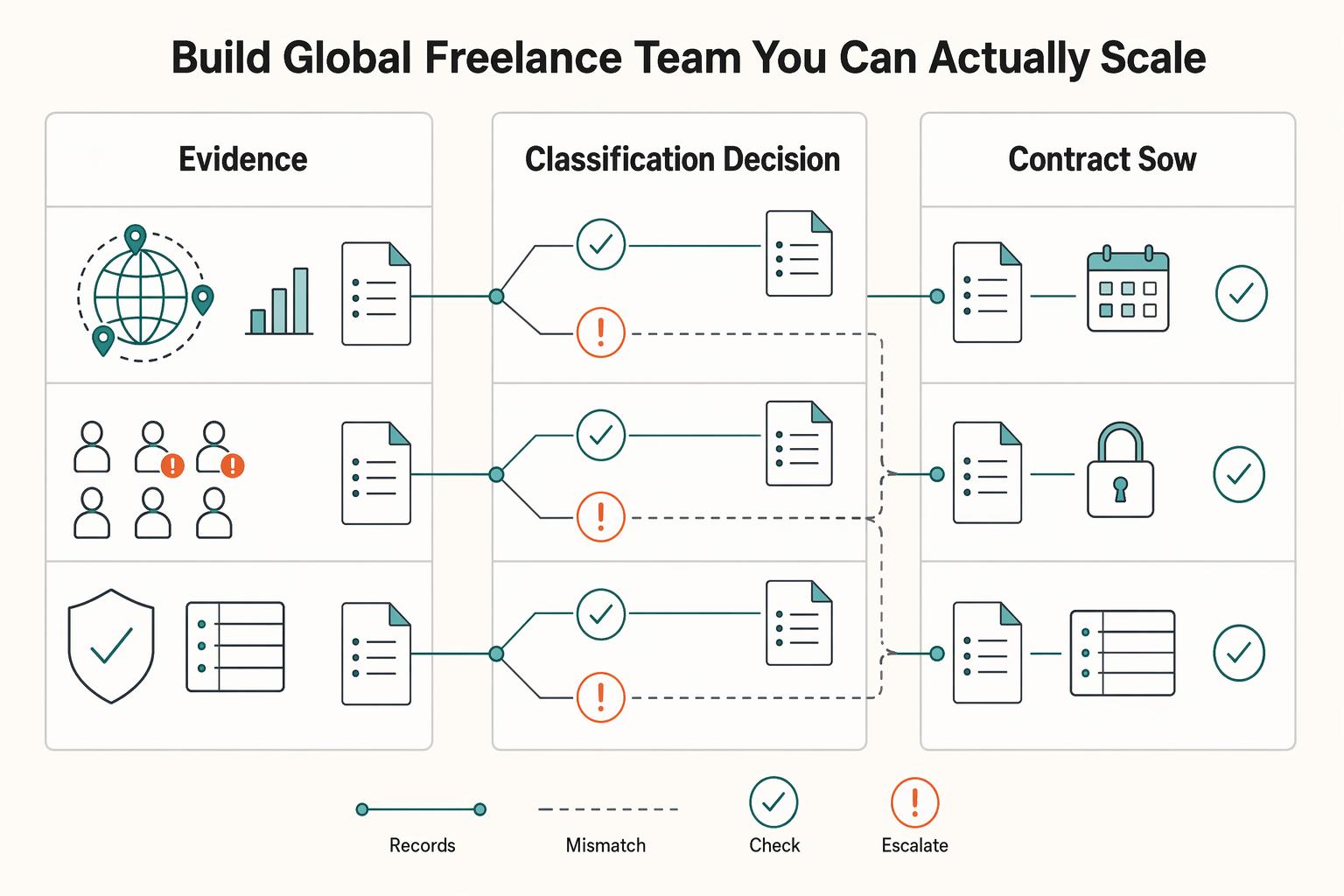
Quick Answer
Keep one linked record from engagement intake to reconciled payment. Assess the actual relationship under local rules, agree scope and billing triggers, grant limited access and record delivery decisions. Verify approval and beneficiary instructions before sending, then attach payout outcomes and reconciliation afterward. Deposits and approved hours need their own agreed triggers; an internal review cutoff does not change mandatory payment rights.
Manage a global freelance team from intake to reconciled payment#
If you want to manage a global freelance team without constant cleanup, use the same intake-to-payout process for every engagement and save an artifact at each gate. Common failure points are instinct-based classification, vague scope, and payments approved in chat with no audit trail.
Use a stored record at each approval gate. A sourcing service can help assess talent, but its vetting does not determine employment status, IP ownership, data-transfer authority or payment obligations. Check those separately for the actual engagement.
- Step 1: Capture intake and create an intake record
Document who the freelancer is, where they work, whether they operate as an individual or business, what they will deliver, target dates, dependencies, and the tools or data they need. Store this in a project-linked vendor or contractor folder.
Clarify the scope and billing basis: outputs, milestones or hours can all be part of an independent engagement. A fixed deliverable alone does not prove independence, and hourly billing alone does not prove employment. Record acceptance or time-approval rules appropriate to the agreement.
- Step 2: Make the engagement call and log the reason
Select the engagement model from the actual working relationship and applicable local rules. Contractor, agency/COR and EOR are different contractual structures, not levels of guaranteed protection. Record the relevant status tests, working location, control rights and review date before onboarding.
Another reviewer should understand the actual status analysis from the record. For an employed route, identify the employer and remaining client obligations; for an independent route, explain the factors supporting it. Use current official local guidance for the relevant tax and labor regimes rather than extending the IRS control test to every country.
- Step 3: Contract the work before it starts and store the full pack
Put the contract and SOW in place before kickoff. The contract defines relationship terms. The SOW defines deliverables, timeline, price, revision limits, dependencies, and acceptance criteria. Add an NDA or DPA when the work requires it.
Readiness check: someone who missed kickoff should still be able to define "done" and payment triggers from the SOW alone.
- Step 4: Provision minimum access and create an access setup record
Grant only the access required for the SOW work. Log each tool, permission level, start date, and accountable access owner.
Readiness check: every permission should map to a specific deliverable. If access is broad "just in case," fix it before work expands.
- Step 5: Accept deliverables against written criteria and create an acceptance record
Review against SOW acceptance criteria, not memory or urgency. Record submission details, reviewer, decision date, pass or fail status, and required corrections.
Finance should be able to match each invoice line to the agreed payable event and supporting evidence: signing for a deposit, approved hours for time billing, or accepted work for an acceptance-triggered milestone.
- Step 6: Approve payout only when the evidence pack lines up
Before release, match the payable event, invoice or agreed billing record, authorization, payee, amount, currency and verified instructions. Add payout confirmation and reconciliation after submission and receipt evidence become available. Deposits, retainers or approved hours may have different triggers from deliverable acceptance; use the agreement and applicable payment deadlines.
Readiness check: reconstruct why payment was due, to whom and under which contractual trigger. For multi-country programs, see International Accounts Payable for Platforms.
| Artifact | When to create it | Risk if missing | Where to store it |
|---|---|---|---|
| Intake record | Before any verbal yes | Higher risk of bad scope, location, or data-access assumptions | Central contractor folder linked to the project |
| Classification decision log | Before contracting | Harder to explain why the model matches the real relationship | Compliance folder with date and reviewer |
| Contract + SOW pack | Before work starts | Higher risk of scope drift, IP ambiguity, weak acceptance, and payment disputes | Signed-contract repository with version history |
| Access setup record | Before first login | Higher risk of over-permissioning and difficult offboarding | Admin or IT record tied to tool owner |
| Payable-event evidence | When the agreed billing trigger occurs; acceptance only for acceptance-triggered invoices | Disputes about deposit, hours, delivery or approval conditions | Contract-linked project or billing record with timestamps |
| Payout record | Every payment | Higher fraud exposure and weaker finance or tax support later | Finance folder and payment confirmation archive |
Use this as a scaling test. If a staffing partner promises fast placement or rigorous vetting, such as technical challenges, culture interviews, or mock project review, ask what evidence you will actually receive. Then run your own six gates anyway. Speed helps, but speed without artifacts creates faster confusion.
If you want a deeper dive, read How to Build and Manage a Team of Freelance Creatives.
Step 0 - Prep your "Global Freelancer Ops Pack" (prerequisites + tools + vendor controls)#
Set this up before you add another contractor. The goal is a consistent identity, access, review, and offboarding path instead of ad hoc decisions. You want a repeatable record, clear gates, and a usable audit trail.
Step 1. Build a vendor directory that acts as a control record#
Make the vendor directory a required control. Each freelancer, agency, or subcontractor should have one record so your team can answer basic access and ownership questions without digging through chat or email.
At minimum, include identity details, systems accessed, access scope, lifecycle dates, and named internal owners. In practice, that means legal name, primary contact, start and end dates, linked agreement packet, access owner, and offboarding owner.
The ownership fields do most of the real work. When access scope changes, a permission looks wrong, or access needs to be removed, someone has to be clearly accountable for updating the record and triggering the next check.
Verification point: pick one active contractor and confirm that, from the directory alone, you can answer who they are and what systems they can access. You should also be able to identify who approves changes and who removes access at offboarding.
Step 2. Define approval gates before work starts#
Set your gates before onboarding begins. This does not need to be heavy, but each gate needs a trigger, an approver, and stored evidence.
| Gate | When it applies | Who approves | Evidence stored |
|---|---|---|---|
| Access scope approval | Before the first account is created or access is granted | Named system or business owner | Approved request tied to the contractor record |
| Centralized access coverage check | When each app is assigned | IAM or IT owner | Note whether the app is covered by SSO or central IAM |
| Non-centralized app lifecycle plan | When an app does not support SCIM, SAML, or SSO | IAM or IT owner | Documented manual provisioning and deprovisioning steps with owner |
| Access review or audit | On a recurring cadence and at key lifecycle changes | System owner plus IAM reviewer | Review log, including removed unused or orphaned access |
| Offboarding confirmation | At engagement end or access-removal trigger | Named offboarding owner | Deprovisioning completion checklist |
Keep the lifecycle-plan gate active on purpose. If centralized coverage is unclear, do not approve access until the fallback owner and deprovisioning path are explicit.
Step 3. Map one source of truth across identity, access, reviews, and offboarding#
Pick one home for each lane, then define the handoffs between them. Tool choice matters less than consistency. Tools help, but they do not replace disciplined operating habits.
| Lane | What it stores |
|---|---|
| Vendor directory | Identity profile, lifecycle dates, access and offboarding owners |
| IAM/SSO directory | Centralized accounts and group assignments |
| App admin records (non-centralized apps) | Accounts that require manual lifecycle actions |
| Access review record | Audit findings and access cleanup decisions |
| Offboarding tracker | Revocation tasks and completion status |
In practice, the handoffs should run like this: vendor directory -> access approval -> IAM/SSO or app-admin provisioning -> access review record -> offboarding tracker.
If a handoff exists only in email or chat, your audit trail is likely already split. For access controls, keep the baseline practical:
- Grant only the access needed for the agreed work.
- Track which apps sit outside centralized IAM or SSO.
- For those apps, assign explicit manual deprovisioning ownership.
- Name the offboarding owner before granting access.
- Run ongoing access reviews and clean up abandoned or unused access.
Readiness check before any contractor starts:
- Vendor record exists with named access and offboarding owners.
- Requested access is documented and approved.
- Each required app is marked as centralized or non-centralized.
- Manual lifecycle steps are documented for non-centralized apps.
- Access-review cadence is defined.
- Offboarding owner is named and can revoke access.
If any item is missing, pause onboarding. That pause can reduce the risk of orphaned accounts, compliance gaps, or unused licenses later.
For step-by-step walkthroughs, see How to Manage a Global Equity Plan for a Remote Team and Global Freelance Payment Readiness Report 2026 Across 50 Countries.
Contractor, agency, or Employer of Record (EOR): which is the safe default?#
Assess status before choosing a provider or granting access. Defined output can support an independent engagement but is not a safe default by itself. An agency/COR may administer a contractor relationship, while an EOR employs the worker under a local structure. Verify the actual arrangement, local permissions and client obligations.
For U.S. federal tax purposes, the IRS control analysis considers the right to direct how work is done, not merely the contract label. Other countries and labor-law regimes may apply different tests. Agency/COR is a provider arrangement, not a uniform legal status; an EOR employment contract also needs the correct jurisdictional setup.
Step 1. Classify the role by control, duration, and integration#
Use a simple lens: control, duration, and integration into your day-to-day operations. Misclassification risk rises when a contractor relationship starts functioning like regular employment.
| Model | Decision signal | Risk direction | What to document internally |
|---|---|---|---|
| Contractor | Project or scoped work, outcome-based deliverables, contractor controls working method and typically timing or tools | Requires actual independence under the applicable local tests; output-based wording alone is insufficient | Scope, vendor record, and who controls work methods |
| Agency or intermediary (COR) | You want a third party managing the contractor engagement | Varies by provider structure and day-to-day control; verify before assuming protection | Provider agreement, supervision path, and escalation owner |
| EOR | Ongoing role, close supervision, strong continuity, or deep operational integration | Employment structure and remaining client duties require local verification; provider involvement alone is insufficient | Provider agreement, reporting line, and business rationale |
Evaluate the local status factors, actual management plan and rights as well as duration, budget, IP and privacy. Invoicing and a defined scope are useful operating facts but not a classification conclusion. An ongoing employee-like role calls for an employment-route assessment rather than a rewritten contractor label.
Step 2. Choose the model and record why#
Once you choose the model, log the rationale before any account is created. This is what makes later audits defensible, and it should be updated when working reality changes.
Capture, at minimum, the following:
- worker or vendor name, role, country, and start date
- who controls work method
- expected continuity, whether project-based or ongoing
- supervision path, such as direct manager or provider contact
- escalation owner in your company
- linked documents for the chosen model, plus onboarding and offboarding owners
| Model | Day-to-day operating pattern | Payment or admin clue | Key file note |
|---|---|---|---|
| Contractor | Manage against scope and acceptance criteria, not minute-by-minute execution | Worker invoices you; you pay directly | Signed agreement, scope, acceptance criteria, method-control note |
| Agency or intermediary (COR) | Follow the documented supervision path; avoid bypassing the provider with direct manager control | Payment flow follows the provider setup | Provider agreement, named provider contact, escalation path |
| EOR | Run it as an employment-shaped relationship with a clear reporting line and business rationale | Provider handles employment administration such as payroll, contracts, taxes, and compliance | Provider agreement, reporting line, and review notes |
An EOR does not erase client obligations. Verify who employs the person, supervises the work, owns payroll compliance, handles termination and responds to claims; confirm the provider can lawfully operate this arrangement locally. An intermediary contract does not fix an incorrect status assessment.
Step 3. Check manager behavior before access starts#
This is where otherwise sound model choices break down. Before onboarding starts, confirm that the hiring manager's operating plan matches the chosen model.
| Stop | Start |
|---|---|
| fixed attendance control | clear deliverables, acceptance criteria and deadlines |
| open-ended duties without updated scope | written scope-change updates |
| directing daily methods | a documented supervision path |
| expanding scope without updating the status decision | a pause on access changes when the working reality becomes employee-like |
Verification check: get four written answers before access is granted. Who controls how work is done? Is continuity expected to be indefinite? Who gives day-to-day direction? Who owns escalation? If the answers point to line management of a regular team member, revisit the model first.
If you are already in a blurred relationship, treat it as an escalation, not paperwork cleanup. Start with What to Do If You've Been Misclassified as an Independent Contractor. If you rely on outside specialists through vendors, use How to Manage a Remote Team of Subcontractors to keep supervision and ownership lines clean after model selection.
Keep employment-model selection separate from buyer-facing sales services. Merchant of Record handles specified sales obligations; it does not decide worker status or replace contractor/EOR employment arrangements.
Step 1 - Contracting that prevents surprises: ICA + SOW + NDA (+ DPA when needed)#
Once the engagement model is set, your contract stack should make scope, confidentiality, and data handling easy to follow as the work evolves. Written contracts help, but contractor versus employee status is still fact-specific.
| Document | Purpose | Use it when | Who signs (confirm before issue) | Risk if missing |
|---|---|---|---|---|
| ICA | Baseline engagement terms | You are running a direct freelancer engagement | Confirm the correct contracting parties | Relationship terms become unclear, and classification factors are easier to overlook |
| SOW | Defines the work being delivered | You are defining a project, phase, or retainer segment | Confirm the same parties tied to the active scope | Scope drift and approval disputes increase |
| NDA | Covers non-public information sharing | You will share confidential business information | Confirm all parties receiving that information | Sensitive information may be shared without clear written boundaries |
| DPA | Covers personal-data processing terms | The engagement includes controller-processor personal-data processing | Confirm the parties involved in that processing | Data handling can start without clear written processing terms and instructions |
Identify the actual data roles first. A controller-processor arrangement requires appropriate processing terms where the applicable law requires them; an NDA alone does not do that. For a UK GDPR-scoped engagement, separately assess whether access from abroad is a restricted transfer and which transfer mechanism is needed. A DPA by itself does not establish lawful international access.
1. Make the SOW executable#
A clear SOW makes approval easier. Before work starts, make sure these items are explicit:
- deliverables
- acceptance criteria
- definition of done
- revision boundaries
- dependencies
- exclusions
- change-order trigger conditions
Quick check: if someone outside the scoping conversation cannot tell what is in scope, what is done, and what is excluded, revise the SOW first.
2. Record changes before more work starts#
Scope changes are easier to handle when you record them before the work moves on. Keep change control simple: request, impact review, approval, then re-baseline.
| Step | What to record |
|---|---|
| request | state what is changing |
| impact review | record scope, timeline, price, and dependency impact |
| approval | capture written approval |
| re-baseline | update the current SOW and plan before additional work proceeds |
Approve added deliverables or changed assumptions before work proceeds under the revised scope. Correcting defects against the original criteria is not automatically a paid change. Preserve the old version, agreed adjustment and any resulting due-date change.
3. Confirm must-know risk points before signature#
Before signature, verify the plain-language terms that can cause trouble later:
- ownership of final work product
- termination path for each side
- liability boundaries
- dispute forum terms
Have the engagement owner confirm these from the draft set, then store signed versions, effective dates, and ICA-to-SOW links in one place.
Related reading: Manage a Remote Finance Team at a Payment Platform.
Step 2 - Onboard freelancers fast without giving away the keys (repeatable + secure)#
Fast onboarding is only useful if it stays controlled. Run the same sequence every time: pre-start checks, minimum access, first-task validation, then a documented handoff into normal delivery. No one starts until core legal and tax documents are collected, Day One access is ready, and onboarding ownership is clear.
Execute the onboarding checklist#
| Stage | Key checks | Record or outcome |
|---|---|---|
| Pre-start checks | Confirm signed contract terms and the required tax form; add an NDA or jurisdiction-specific forms when needed; name a single point of contact with a backup; confirm the escalation channel; define the first deliverable with clear acceptance expectations | Record first, login second |
| Access provisioning | Grant only the tools, instruction, and people access needed for assigned tasks; have credentials ready by Day One | Log what was granted, why it was needed, and who approved it |
| First-task validation | Assign one small but real deliverable; review it against the agreed scope, schedule, and acceptance criteria | Acceptance or rejection against the baseline |
| Handoff to ongoing delivery | Record the acceptance or rework outcome; update the working plan; confirm cadence and escalation ownership | Store links to onboarding artifacts with the active contract record |
-
Pre-start checks (record first, login second). Confirm the agreement and tax documentation actually required for this payer/payee relationship. In a U.S. tax-documentation context, W-9 generally documents a U.S. person, W-8BEN a foreign individual and W-8BEN-E a foreign entity; special situations require other forms. Nationality or “international freelancer” alone does not select the form. Record where services are performed because that generally determines personal-service income source. Name a contact and backup, escalation channel and first-task expectations.
-
Access provisioning (minimum necessary). Grant only the tools, instruction, and people access needed for assigned tasks, and have credentials ready by Day One. Log what was granted, why it was needed, and who approved it.
-
First-task validation (prove shared understanding). Assign one small but real deliverable and review it against the agreed scope, schedule, and acceptance criteria. If the work cannot be accepted or rejected against that baseline, tighten the task before broader execution.
-
Handoff to ongoing delivery (documented). Record the acceptance or rework outcome, update the working plan, confirm cadence and escalation ownership, and store links to onboarding artifacts with the active contract record.
| Work type | Permissions | Access guardrails | Documentation to confirm before start |
|---|---|---|---|
| Creative or content work | Project workspace and assigned folders only | Access aligned to task scope; credentials ready by Day One | Signed contract terms, required tax form, NDA or required forms |
| Code or technical delivery | Project systems needed for assigned deliverables only | Access aligned to task scope; credentials ready by Day One | Signed contract terms, applicable tax documentation, confidentiality terms and first-task scope/acceptance criteria; acceptance record follows delivery and review |
| Personal-data handling | Only the systems and data needed for assigned processing tasks | Access aligned to task scope; documented handling instructions | Signed contract terms, required tax form, NDA or required forms, jurisdiction-specific forms when needed |
Keep onboarding outcome-based to help reduce classification risk. You can set deliverables, deadlines, and review points, but avoid managing the freelancer like an employee through day-to-day method control. If status is unclear, pause and review classification before continuing.
Before work starts, pass a final go or no-go gate: core documents collected, named onboarding contact confirmed, and Day One access ready.
We covered this in detail in How to Manage a Remote Team of Subcontractors.
How do you manage freelancers across time zones without meetings eating your week?#
The practical answer is simple: use written status by default, and reserve overlap time for decisions, blockers, and dependency resolution. If an issue does not change delivery risk, handle it async.
That works because many updates do not require everyone online at once. Async is not right for every task, though, so your job is to define when written updates are enough and when a live call is worth it.
Step 1. Set one decision window and normalize time-zone handling#
Protect overlap time for decisions, not routine reporting. Create one recurring overlap window per dependent workstream and use it for approvals, priority conflicts, and blockers.
Set a home time zone in your scheduling tool so invites default correctly, then send a test invite before week one. That small check catches avoidable scheduling mistakes.
What good looks like: one named decider per workstream, one escalation channel, and clear written response expectations.
Step 2. Standardize the minimum async protocol#
Weak async is usually a handoff problem, not a time-zone problem. Keep updates attached to the work item, not scattered across DMs and calls. Your minimum protocol should include:
- Decision log: one place for approvals, rejections, and scope-impacting choices
- Escalation lane: one channel for blockers that threaten timing, quality, or dependencies
- Owner handoff: each update states the current owner and next owner
- Acceptance link: each handoff links to the draft, ticket, file, or review note that proves readiness
Quick verification: a third person should be able to answer what changed, what is next, who owns it now, and what decision is pending.
If coordination time rises without better delivery, inspect the handoffs: missing owners, unanswered decisions and inaccessible artifacts create avoidable work. Measure your own time and blocked tasks rather than assuming a universal hours-per-team benchmark.
| Handoff area | Strong handoff record | Escalate when |
|---|---|---|
| Current status | Specific state with link to the current artifact or task | Status cannot be verified from the record |
| Next action | One concrete next step with a named next owner | No owner is named or ownership is ambiguous |
| Decision needed | Direct question with recommendation or options | Work will pause or rework is likely without an answer |
| Acceptance evidence | Link to review notes, comments, or agreed criteria | Receiver cannot confirm the work is ready |
Step 3. Use handoffs to create follow-the-sun progress#
Time-zone separation can increase throughput if the handoff is complete. A contributor several hours ahead can move work forward while others are offline. In some teams, that may be eight hours ahead. It only works if the written record is usable.
For exploratory work, conflict-heavy decisions, or live review, run a short call and then write the outcome back into the task. Recordings can add context, but the written log stays the source of truth.
When should you schedule a live call?#
Schedule one when written updates cannot clear a blocker quickly enough or when the work truly needs real-time review. After the call, log the decision, owner, and next action so the team does not have to reconstruct what happened.
If you want a deeper operating model for distributed delivery, see How to Manage a Remote Team of Subcontractors. You can also read How to Manage an Offshore Development Team Across Time Zones.
Related: How to Manage a Software Project in ClickUp with a Remote Team.
Step 3 - Quality control and scope discipline: measure outputs, trigger change orders, prevent disputes#
Once handoffs are stable, manage by output, not online presence. Review each deliverable against the SOW and acceptance criteria, record the inspection result in one place, and push any real scope shift into a written change order before work continues.
Step 1. Review the deliverable against clear standards#
Your review question is simple: does this deliverable meet the agreed standard? Acceptance criteria are the approval test. In practice, that means comparing the work to the standard, measuring required elements, and checking functionality.
Use a simple scorecard for each deliverable:
- Quality against standard: defects found when checked against the stated standard
- Acceptance outcome: accepted, accepted with fixes noted, or not accepted
- Rework needed: what changed after submission, and whether the cause was execution, unclear criteria, or a scope shift
| Area | Weak QA and scope control | Strong QA and scope control |
|---|---|---|
| Review basis | "Looks fine" | Review tied to SOW and acceptance criteria |
| Evidence | Feedback buried in chat | Inspection results logged on the task, with version and defect notes |
| Approval | Verbal or DM approval | Approval logged in one shared record with approver, date, and accepted version |
| Scope drift | Extra asks handled informally | New asks documented and approved as a change order before more work starts |
Verification point: if you cannot point to which criterion passed or failed, your QA record is not usable.
Step 2. Log acceptance and route misses the same way every time#
Consistency matters more than complexity here. Keep one canonical record for the final file, review comments, and acceptance decision. A practical pattern is a task status update plus a short note with the reviewed version, criteria checked, and approver.
| Review outcome | Action | Record focus |
|---|---|---|
| Work is in scope but fails criteria | Return for revision with exact defects listed | Exact defects listed |
| Part passes and part fails | Log partial acceptance so the approved portion is explicit | Approved portion is explicit |
| The request changes deliverables, timeline, or price | Stop treating it as revision and open a change order | Open a change order |
Use the same routing logic every time. Before review starts, rewrite any insider shorthand in acceptance criteria into plain language. If reviewers and freelancers read criteria differently, confusion and unmet expectations follow quickly.
Related reading: A Guide to Salary Bands and Compensation for a Global Remote Team.
Need the full breakdown? Read How to Write a Freelance Change Order That Holds Up in Practice.
How do I pay international freelancers legally and safely? (Global Payouts SOP + FX + audit trail)#
Separate the pre-release gate from post-payment reconciliation. Verify the contractual payable event, invoice, approval and beneficiary details before sending; then attach provider outcomes, receipt evidence and ledger matching. Internal review should not be used to postpone a payment already due under the agreement or mandatory law.
Step 1. Build one payout record before release#
Open one payment record with ownership and links to the artifacts available at each stage. Investigate conflicting data before sending, then record pending, failed, returned or received outcomes after execution. If payment is legally or contractually due, use an authorized exception and timely escalation rather than an indefinite undocumented hold.
| Artifact | Primary owner | System of record | Exception handling |
|---|---|---|---|
| Invoice from freelancer | AP or finance | AP or accounting system | Return or reject with reason logged |
| Acceptance evidence tied to SOW or milestone | Delivery owner | Project or task system | Apply the agreed billing trigger and mandatory deadlines; log disputes and undisputed payable portions |
| Payment approval | Authorized approver | Accounting or payment platform | Escalate for approval; do not approve in chat |
| Payout trace and settlement proof | Payments ops | Bank or payout provider | Investigate before marking as paid |
| Reconciliation note + vendor tax record | Independent reconciler or tax or finance owner | Accounting file or vendor master | Tax owner records applicable documentation before required use; reconciler links payout outcomes and ledger entries after execution |
Verification point: you should be able to pull one record showing the approved milestone or deliverable, payee, amount, currency, send date, and destination outcome. Worked example: a €1,200 design SOW allows a €400 deposit and an €800 accepted-delivery balance. The deposit is payable at signing, so no final acceptance is required for that leg. A signed €150 added deliverable raises the total to €1,350 and the remaining balance to €950. If the payer bears a €10 payout fee, fund €960 to deliver the agreed €950; book the fee separately. Attach the final provider/receipt record after execution, clear the €950 payable when supported and prevent a retry from creating a second payment.
Step 2. Run the payment gate every time#
Many payout failures come from process breakdowns, not edge cases. Before release, run this checklist every time:
- Match the invoice to the agreed payable event and supporting evidence, contract reference, payee name, amount and currency; require deliverable acceptance only where it is the billing trigger.
- Confirm the invoice number, issue date, and payout details match the vendor master.
- If payout details changed, verify them out of band with a trusted contact already on file, not through the channel that requested the change.
- Where possible, keep initiation, approval, and reconciliation split across different owners. If that is not possible, document the exception and add an independent post-payment review.
Do not fix it in chat and pay anyway. That pattern can lead to delays, fee disputes, and weaker audit records.
Step 3. Choose payout rails for tradeoffs, not shortcuts#
Cross-border payouts are a tradeoff across FX, conversion fees, bank charges, currency support, and country availability. In some jurisdictions, local-currency payout may be required, so store the current jurisdiction rule in the vendor file only after verification.
| Product check | Payoneer | PayPal Payouts | Operating decision |
|---|---|---|---|
| Recipient route | Verify bank-delivery or recipient-account product for the actual program | Verify recipient PayPal/Venmo eligibility and subsequent withdrawal needs | Compare usable funds at the contractor’s intended destination |
| Batch interface | Published bank-recipient batch feature supports up to 1,000 entries; actual program approval still matters | Confirm API or file interface limits for the enabled account | Size the run for the selected interface and reconcile each item |
| Cost | Obtain the route’s funding, FX, delivery and recipient charges | Payouts charges the sender; do not substitute merchant receiving-fee rates | Record who bears each fee and the contractor’s agreed net receipt |
| Timing | Confirm funding, review and delivery stages for this route | Distinguish payout processing/claiming from withdrawal to a bank | Set a route-specific estimate and exception owner |
| Evidence | Require item IDs, fee/FX records and exportable outcomes | Require batch and item IDs plus failure/unclaimed outcomes | Submission success does not prove all contractors received funds |
Compare the actual product and corridor rather than blending merchant-acceptance fees with bulk-payout fees. Validate onboarding, permitted commercial use, beneficiary receipt, withdrawal/FX costs and exportable item-level statuses. A product’s public reach does not mean every registered entity can use every route.
What if a freelancer changes payout details right before payment?#
Pause the payout and re-verify the new details out of band before releasing anything. Update the vendor master first, then attach the confirmation note to the same payout record.
If verification misses the cutoff, notify the contractor, retain the reason and escalate promptly for a safe verified route or other agreed solution. Track the original due date and any payment-rights exposure; an internal cutoff does not authorize late payment.
Before finalizing the SOP, confirm your actual provider’s status model, approval controls and exports. Gruv’s Payouts overview can inform the service-fit discussion; the signed program and tested route establish what is available.
Frequently Asked Questions
When should you schedule a live call?
Schedule one when written updates cannot clear a blocker quickly enough or when the work truly needs real-time review. After the call, log the decision, owner, and next action so the team does not have to reconstruct what happened.
What if a freelancer changes payout details right before payment?
Pause the payout and re-verify the new details out of band before releasing anything. Update the vendor master first, then attach the confirmation note to the same payout record. If verification misses the cutoff, notify the contractor, retain the reason and escalate promptly for a safe verified route or other agreed solution. Track the original due date and any payment-rights exposure; an internal cutoff does not authorize late payment.
Try a related tool
Researched and edited by the Gruv editorial team. Gruv builds cross-border billing, payouts, and finance-operations software for global businesses.
Sources
Includes 2 external sources outside the trusted-domain allowlist.
- developer.paypal.com/payouts/feestrusted
- developer.paypal.com/payouts/faqstrusted
- irs.gov/newsroom/worker-classification-101-employee-...trusted
- irs.gov/businesses/small-businesses-self-employed/in...trusted
- oregon.gov/das/Procurement/Guiddoc/SOWWritingGuide.pdftrusted
- projectdelivery.gov.uk/teal-book/home/part-e-planning-and-control/c...trusted
- gov.uk/employment-status/selfemployed-contractorexternal
- ico.org.uk/for-organisations/uk-gdpr-guidance-and-resou...external
Educational content only. Not legal, tax, or financial advice.
Related Posts

What to Do If You've Been Misclassified as an Independent Contractor
If a business calls you an independent contractor but directs your work like an employee, check the rules for the rights you need to recover. A contract label, LLC or Form 1099 does not decide every legal status. Federal wage law, federal employment taxes and state employment laws can use different tests and provide different remedies.

Opening a Bank Account in the Netherlands as a Foreigner
The goal is simple: get paid predictably in EUR, reconcile cleanly, and avoid preventable blocks or delays caused by incomplete documentation or unclear onboarding status.

The Freelance Payment Penalty: A Modeled Audit of Platform Fees, FX Spreads, and Payout Delays
The money rarely disappears through a single, easy-to-spot fee. The real loss is stacked. A marketplace takes its commission, a processor adds a charge for international cards, a bank or payment company converts the currency at a spread, a platform holds the funds before release, and a wire sheds a little to intermediaries on the way in. Each layer looks defensible on its own, but the worker feels the combined result as a smaller deposit and a later payday.