
Quick Answer
Start by creating one standardized Client HQ template, then run every request through a scope gate before anyone begins work. To manage software project in clickup with a remote team, keep shared deliverables separate from internal execution, store the SOW in the admin area, and require `In Scope`, `Needs Estimate`, `Out of Scope`, or `Approved Change` on each request. Pair that with task-level time logging and a weekly dashboard review so scope, margin, and delivery risks are visible before client updates.
For a solo professional, ClickUp works best as the control center for the business, not just a to-do list. The shift from a basic task tracker to a reliable client system starts with one deliberate choice: build a repeatable structure for every new engagement before the work begins.
Before you write code or book the kickoff call, set up a standard workspace that becomes your single source of truth. The goal is clarity, not rigidity. A strong setup sets boundaries early, reduces avoidable risk, and gives every project a place where scope, communication, and decisions are easy to find. Here's how to build that system.
Part 1: The Foundation - Building a Repeatable Client HQ#
This structure only works if you can repeat it every time. If you want to manage software projects in ClickUp with less handoff confusion and scope drift, treat your Client HQ as a pre-kickoff checklist for every engagement.
Build your Client HQ before the kickoff call#
Build the workspace first, then invite people into something that is already organized. Duplicate one standard client template and fill in the basics before work starts: project start date, target end date, stakeholder objectives, the main client approver, and your internal owner. If those details are missing, the setup is not ready no matter how tidy it looks.
A practical default is to separate client-visible work, private delivery work, and admin records. That keeps roles clear and prevents client communication from getting mixed in with internal execution.
| Area | What it includes | Who has access | What should never live there | Main view for that audience |
|---|---|---|---|---|
| Shared Deliverables | Milestones, review items, approved next steps, client-facing decisions | You and client stakeholders | Internal estimates, bug triage noise, margin notes, team debate | Simple Board or List with client-friendly statuses |
| Internal Delivery | Backlog, bugs, engineering tasks, blockers, sprint items | You and your delivery team | Contracts, invoices, commercial negotiations | Board grouped by status or assignee |
| Admin and Commercial | Final SOW, change requests, kickoff notes, invoices, approval record | You, and only trusted ops support if needed | Day-to-day task chatter and unfinished delivery items | Docs plus a compact admin list |
Before kickoff, verify that every area has an owner and that the shared area contains only work you would be comfortable screen-sharing live. When this structure is in place, scope control gets much easier because every request has an obvious home.
Make the SOW your intake rule#
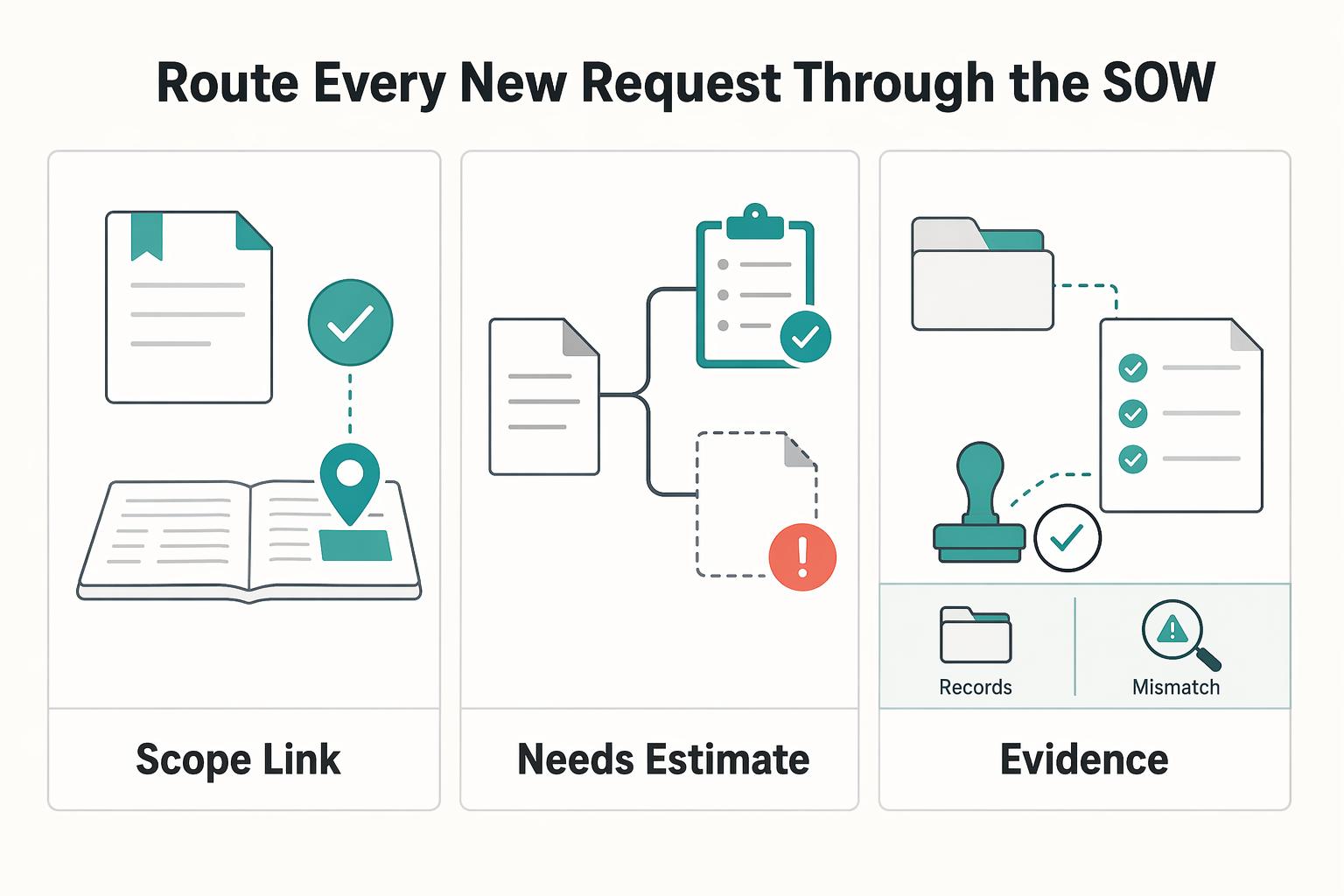
Treat the Statement of Work as the source document for scope decisions. Keep it in your admin area, and make one operating rule non-negotiable: every new request gets logged, assigned a scope status, and linked back to the SOW or a change note before work starts.
A simple scope status set is enough, for example: In Scope, Needs Estimate, Out of Scope, and Approved Change. If a request comes in during a call or Slack thread, create the task immediately, add a short request summary, and link the relevant SOW section. If you skip that step, scope creep usually shows up later as lost margin: small internal tweaks and high-value deliverables start getting treated as the same kind of work. Checkpoint: nothing moves into active work unless it has a scope status and a source link.
Share progress without exposing internal noise#
Clients need visibility into progress, approvals, and review timing. They do not need your internal back-and-forth. Give them a shared view of deliverables only and keep implementation detail private. That boundary keeps status updates out of long email threads and messy calls.
| Element | Applies to | Values |
|---|---|---|
| Client comments | Shared area | Review items; questions; approvals |
| Approval path | Shared items | Pending Review; Feedback Provided; Approved |
| Internal status flow | Private delivery area | Backlog; Ready; In Progress; In Review; Blocked; Done |
| Core fields | Private delivery area | owner; priority; scope status; due date |
Set comment etiquette early. Client comments belong on review items, questions, and approvals in the shared area. Internal implementation discussion stays private. Name one client approver and use a simple approval path such as Pending Review, Feedback Provided, and Approved on shared items.
In your private delivery area, use a clear internal status flow your team can apply consistently. One example is Backlog, Ready, In Progress, In Review, Blocked, and Done, but the exact labels matter less than consistent use. Track core fields from day one: owner, priority, scope status, and due date. That small amount of structure is usually enough to create cleaner client communication and a more consistent start to each project.
Part 2: The Engine - Turning ClickUp into a Profit-Maximization Tool#
Once Client HQ is in place, protect your margin with a few repeatable habits: log work on tasks as you do it, route every request through Scope Status, and review one private dashboard before client updates.
Track time while the work is happening#
The safest habit is to log time while you work, not at the end of the week. Reconstructing it later usually loses detail and blurs what was actually billable.
| Work type | What to do | Where to keep it |
|---|---|---|
| Task or subtask work | Log time against that item when you start | The task or subtask |
| Unrelated admin or internal non-chargeable work | Stop and switch entries | A separate time entry |
| Meetings | Keep it inside the same task structure | The related task structure |
| Bug triage | Keep it inside the same task structure | The related task structure |
| Fixes | Keep it inside the same task structure | The related task structure |
| Reviews | Keep it inside the same task structure | The related task structure |
| Revisions | Keep it inside the same task structure | The related task structure |
When you start a task or subtask, log time against that item. When you switch to unrelated admin or internal non-chargeable work, stop and switch entries. Use your Billable Status field with Billable and Non-Billable, and set it before you start so each entry is categorized from the beginning.
Keep meetings, bug triage, fixes, reviews, and revisions inside the same task structure instead of dumping them into generic buckets. ClickUp's folder/list/task/subtask hierarchy gives each unit of work a clear home.
Run one weekly check: every active task has an owner, a Billable Status, and either current time logged or a clear note explaining why not. Those logs make pricing reviews easier because you can see where estimates were thin and where non-billable effort keeps expanding. If you want a pricing framework for that review, see Value-Based Pricing: A Freelancer's Guide.
Route every new request through the SOW#
Treat every new ask as a scope decision before it becomes a delivery task. Move it from chat, email, or call notes into ClickUp immediately, link the relevant SOW section or note that there is no match, and assign Scope Status before you schedule the work.
Scope Status | Required next action | Owner | Client communication step |
|---|---|---|---|
In Scope | Link the matching SOW section and move to normal planning | Project owner | Confirm it is covered and share timing |
Needs Estimate | Size effort/cost impact and hold from active work | Project owner or delivery lead | Confirm estimate/change note is in progress |
Out of Scope | Keep it documented but unscheduled | Project owner | State it is outside the current SOW |
Approved Change | Attach approval record and schedule work | Project owner | Confirm approved change, cost, and updated timing |
Audit this weekly: any item in Ready or In Progress without SOW linkage and Scope Status is a scope-control gap. Keep the record simple and complete: request, timestamp, SOW link or mismatch note, estimate note if needed, and approval record for Approved Change.
Review one private dashboard before you update the client#
Before you send a status update, check your private dashboard first so you catch risk early. Keep client-facing views simple, and use private views to spot time leakage, scope pressure, and delivery slowdowns.
ClickUp supports different views over shared underlying data, so each audience sees what it needs without splitting the source of truth.
| Dashboard view you create | What question it answers | Corrective action it should trigger |
|---|---|---|
| Profitability | Where is billable time concentrated, and where is non-billable work growing? | Tighten task definitions, limit avoidable overhead, and adjust future pricing assumptions |
| Scope risk | How much work sits in Needs Estimate, Out of Scope, or Approved Change? | Pause unsanctioned work and send the estimate/change note |
| Delivery pace | Is work completing, or accumulating in In Progress or Blocked? | Reduce WIP, clear dependencies, and reset dates early |
Run this review at least weekly and again before invoicing. If you add automation later, map your current manual process first, then apply trigger-based rules where they remove repetitive steps. Otherwise, teams tend to fall back to manual work. For a planning-view walkthrough, see How to Create a Project Timeline in Notion.
Part 3: The Insurance Policy - Using ClickUp as Your System of Record#
If you want fewer timeline arguments and cleaner handoffs, keep one rule: every delay, decision, code change, and approval belongs on the task, not buried in email or chat.
| Step | What to record | Why |
|---|---|---|
| Log decisions on the task the same day | Add one comment with decision, owner, next step, and due trigger after any call or chat | The task is the primary record and messages are temporary |
| Mark blockers so accountability is obvious | Apply your blocker label, add a dependency, attach evidence, and note what you need, who owns it, and when you will check again | Execution order and accountability stay visible |
| Keep a consistent request-to-code chain | Link the task in the branch or PR description, then link the branch or PR back in the task with the approval or acceptance note | Review and handoff are faster |
| Capture the record early when risk rises | Keep a dated copy of the relevant activity history with your engagement files | Context is preserved while details are still easy to verify |
Step 1: Log decisions on the task the same day. Use the task as the primary record and treat messages as temporary. After any call or chat, add one comment in this format: decision, owner, next step, due trigger.
Example: "Decision: proceed with option B. Owner: me. Next step: build and open PR. Due trigger: after client sends final copy." If direction, priority, or scope changes, the matching comment should appear that day.
Step 2: Mark blockers so accountability is obvious. When work is blocked, do not leave it as active work. Apply your existing blocker label, for example Waiting On in your own status or field setup, then add a dependency so execution order is visible.
Attach evidence to the task: request note, approval ask, file request, or linked message summary. Then add a follow-up comment with what you need, who owns it, and when you will check again.
Step 3: Keep a consistent request-to-code chain. For development work, use one repeatable traceability rule: link the task in your branch or PR description, then link the branch or PR back in the task with the approval or acceptance note. This is a team discipline, not an automation guarantee, but it makes review and handoff faster.
| Record location | Record this | Why it belongs there |
|---|---|---|
| Task fields | status, owner, scope status, blocker state | Fast filtering across work |
| Task comments | decisions, approvals, follow-ups, meeting outcomes | Durable timeline of what changed |
| Docs | longer specs, SOW excerpts, reference context | Stable detail that is too long for comments |
| Repo links | branch, PR, commit references | Clear path from request to shipped change |
| Activity history copy | dated snapshot of key task/project history | Handoffs and scope/payment review when memory diverges |
Step 4: Capture the record early when risk rises. If scope, timing, or payment starts to blur, capture a dated copy of the relevant activity history early and keep it with your engagement files. You are preserving context while details are still easy to verify.
Keep expectations realistic: automations may not cover every edge case, so review critical tasks manually. Use access controls for sensitive internal details, and rely on the recorded task history to resolve issues faster and communicate more clearly with clients. For a related operations view, read The Best CRMs for Freelancers to Manage Client Relationships.
Conclusion: Your Business, Under Your Control#
Use ClickUp as your system only if you are willing to use it as your system of record. Keep client work, scope decisions, and delivery updates in one place, and rely on one current dashboard view of execution. That gives you control over the areas that usually slip first: scope, documentation, and delivery.
That discipline matters even more when you work with a remote team, subcontractors, or clients who want regular visibility. As teams grow, informal processes can turn into operational chaos, so shared progress views and written task history help keep expectations clear and decisions traceable.
-
Standardize your base setup. Save one clean project structure and use it for every new project. Your check is simple: open the client-facing view yourself and confirm it shows milestones, owners, and dates clearly.
-
Audit active work for missing decisions. Filter for tasks where scope, approvals, or handoff decisions are not documented yet, then close those gaps before work moves forward.
-
Review your dashboards before every update and invoice. Check delivery status, capacity, blockers, and QA checkpoints before you send a client note or bill. If you cannot tell where the project stands in a couple of minutes, simplify the view until you can.
If you want less friction in ClickUp, keep the structure tight, review it often, and improve it through use instead of rebuilding from scratch each time. You might also find this useful: How to Manage a Remote Team of Subcontractors. Want to talk through your setup? Talk to Gruv.
Frequently Asked Questions
How do you use ClickUp for client projects?
Put each engagement in a dedicated client area, keep internal delivery tasks separate from client-facing items, and share only the view the client actually needs to see. Use that setup when a client wants progress visibility, and avoid exposing internal estimates, margin notes, or rough implementation tasks that create noise or confusion. Before you share anything, open the shared view yourself and confirm it shows milestones, owners, dates, and the right statement-of-work context, not internal comments or private fields. Next action: create one clean client-facing view now and confirm the current sharing settings in your workspace.
What is the best ClickUp template for a solo software developer?
The best template is the one that matches how you already deliver work, not the most detailed one you can build. Start with a reusable client-project template that covers initiation and planning cleanly: a statement-of-work doc, delivery lists, admin items, and clear tags or custom fields for billing and scope. Use this when your projects repeat enough to benefit from consistency, and avoid overbuilding if your service shape still changes every month because dead fields and unused views turn into maintenance debt. Next action: duplicate your last clean project, remove anything you never filtered or reviewed, and save that trimmed version as your base template.
How do you track billable hours in ClickUp?
Turn on the relevant time feature if needed through ClickApps, since those features can be activated at the Workspace or Space level, then log time on the task where the work actually happened. Use this when you invoice hourly or need effort evidence, and avoid mixing ClickUp time with scattered notes or a second tracker unless you have a deliberate reconciliation step because mismatched records are hard to defend later. Before invoicing, review entries by client and date range and make sure closed tasks also include a clear billing note. Next action: audit your last three completed tasks and fix any one that has time logged but no billing note or completion note.
How can I prevent scope creep with ClickUp?
Put the statement of work inside the project from day one, then require a scope value on every new request task before anyone starts work. Use this when clients add quick extras in chat or calls, and avoid verbal approvals that never get written back to the task because that is where free work hides. A real checkpoint is that every item marked out of scope should include the request, the decision, the owner, and the next commercial step in the task comments. Next action: make a saved view filtered to out-of-scope requests and review it before your next client update.
Can ClickUp replace a CRM for a freelancer?
Sometimes, but mainly when your sales process is simple and closely tied to delivery. Use ClickUp alone when the same person handles leads, project setup, and handoff into delivery work. Once lead management becomes a separate operating need, keep ClickUp for delivery and use integrations and the API to connect a CRM instead of stretching one tool too far. Next action: review your last five leads and ask one question, “Did I lose control in sales follow-up or in project delivery?” | Setup | Use this when | Main tradeoff | | --- | --- | --- | | ClickUp only | You have a light pipeline and one clear handoff into delivery work | Sales and delivery records sit close together, so naming and field discipline matter | | ClickUp plus CRM via integrations/API | You want project delivery in ClickUp but lead handling elsewhere | You add setup and field-mapping work | | Dedicated CRM stack plus separate PM tool | Sales activity is now distinct from delivery work | You gain separation but create more tool switching |
Try a related tool
Researched and edited by the Gruv editorial team. Gruv builds cross-border billing, payouts, and finance-operations software for global businesses.
Sources
Includes 8 external sources outside the trusted-domain allowlist.
- blogs.fsd-tech.com/clickup-project-managementexternal
- capterra.com/p/158833/ClickUpexternal
- clickup.com/hub/project-managementexternal
- clickup.com/blog/small-business-operating-systemexternal
- github.com/viktorbezdek/awesome-github-projectsexternal
- help.clickup.com/hc/en-usexternal
- instagram.com/p/DVcNbp8EuyOexternal
- launchthedamnthing.com/freebiesexternal
Educational content only. Not legal, tax, or financial advice.
Related Posts

Value-Based Pricing for Freelancers Under Real Payment Risk
Value-based pricing works when you and the client can name the business result before kickoff and agree on how progress will be judged. If that link is weak, use a tighter model first. This is not about defending one pricing philosophy over another. It is about avoiding surprises by keeping pricing, scope, delivery, and payment aligned from day one.

Best CRM for Freelancers Who Need Reliable Client Follow-Up
If your client work is solid but your admin lives across email, notes, calendar alerts, and a spreadsheet, your CRM choice will succeed or fail on operations, not features. That is why so much advice on the **best crm for freelancers** misses the real issue. The main risk is not choosing a tool with too few buttons. It is choosing one that looks polished in a demo but still lets follow-ups slip when work gets busy.
The Best Project Management Tools for Freelance Developers
Freelance delivery gets more predictable when planning and client updates follow one clear setup instead of improvised tickets and scattered chat threads. In practice, project management for developers means planning, scheduling, and organizing software work so scope, time, quality, and stakeholder expectations stay aligned.