
Quick Answer
Start with a written three-phase process: contract controls, daily access discipline, and documented offboarding. Put account inventory, permission boundaries, and incident contacts in the agreement, then use the FTC sequence "Take Stock, Scale Down, Lock It" to keep data scope tight. During delivery, use delegated roles or an approved vault path instead of passwords in email or Slack, and require written approval before privilege increases. At exit, remove native roles, disconnect third-party tools, revoke API tokens, and wait for written confirmation that passwords, backup codes, and recovery methods were reset.
If you manage client social accounts, security is part of the job, not an extra. The real line between amateur and professional is not just the quality of the content. It is how you handle access. Sending credentials over email or Slack is not just messy; it creates avoidable risk for the client and unnecessary liability for you.
The fix is a protocol you can use every time. This three-phase approach starts in the proposal, carries through day-to-day operations, and ends with a clean offboarding process. When you treat security as part of the service, you replace guesswork with clear decisions, records, and control.
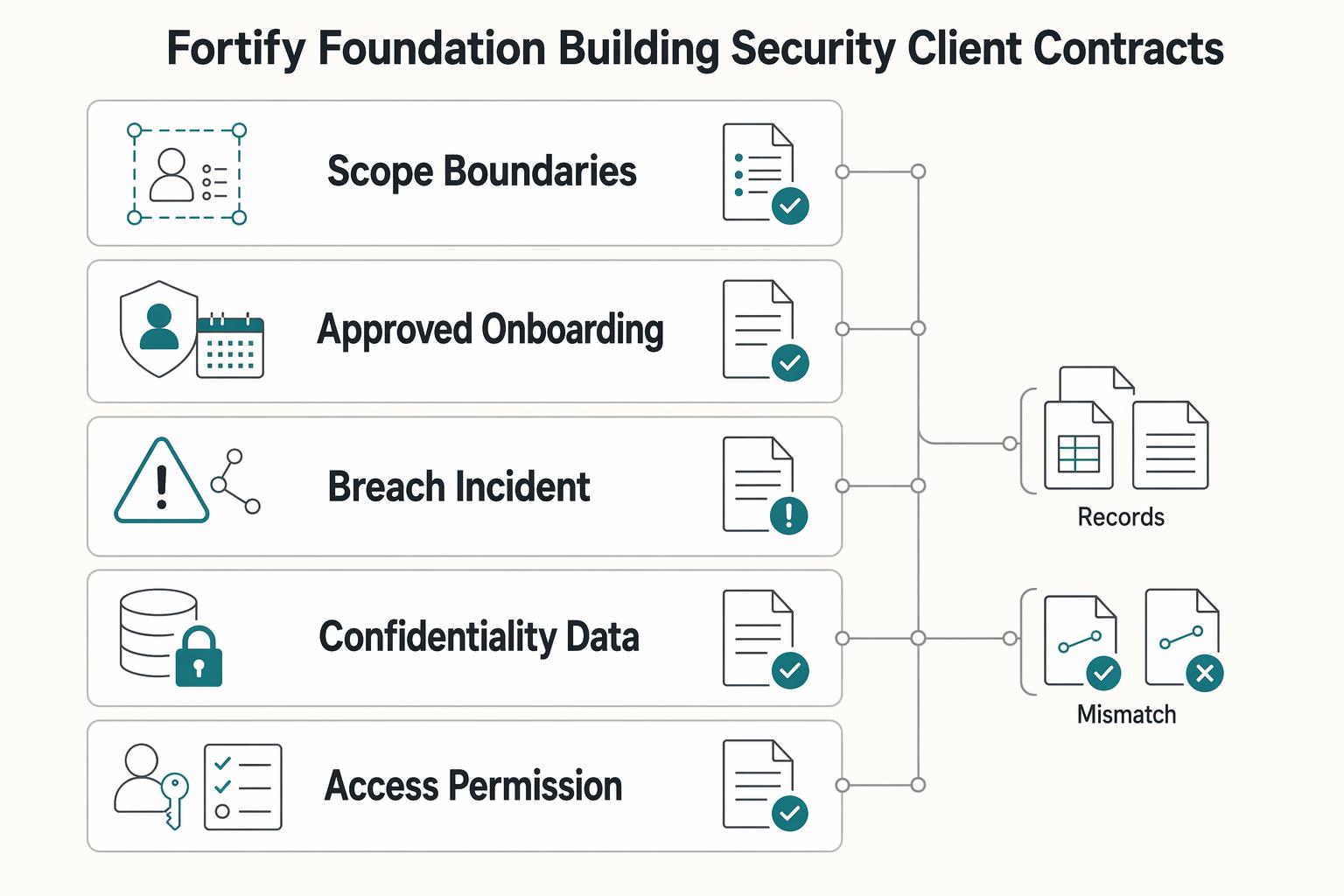
Phase 1: Fortify Your Foundation - Building Security into Client Contracts#
Before kickoff, put the access rules in writing. Your contract should define what personal information is in scope, how access will be granted, who owns each security task, and what happens if something goes wrong.
| Contract area | What to define | Record to keep |
|---|---|---|
| Scope, boundaries, and responsibilities | Name the exact accounts and the exact activities you will perform; document which actions are permitted and which actions require written approval | Account inventory, permission boundaries, and client-side security contacts approved in writing |
| Approved onboarding method | Credentials and account access will be transferred only through an approved secure process | Process documented by both parties |
| Breach and incident clause | Define triggers, who owns communication on each side, notification timing, immediate containment ownership and escalation steps, and the documentation trail required | Evidence pack with timestamps, affected accounts, actions taken, people notified, and current status |
Use the FTC's sequence as your test: TAKE STOCK, SCALE DOWN, LOCK IT. In plain terms, list what information is actually in scope, keep that scope narrow, and protect whatever access or personal information you do keep. That matters even for social media work because inboxes, lead forms, ad tools, and support handoffs can expose sensitive personal information such as names, credit card data, or other account data.
Step 1. Define scope, boundaries, and responsibilities before you ask for access. Your agreement should name the exact accounts and the exact activities you will perform. It should also document which actions are permitted and which actions require written approval.
Your verification checkpoint is simple. No posting starts until the account inventory, permission boundaries, and client-side security contacts are approved in writing. A common failure mode is vague scope like "full social media management," which can create confusion during incidents.
| Contract item | Add it when | Operational risk it covers | Artifact to attach |
|---|---|---|---|
| Confidentiality and data-handling clause | You may see internal docs, customer messages, or employee info | Overexposure of business or personal information | Confidentiality appendix |
| Access and permission clause | You will log into platforms or connected tools | Unclear authority over account actions | Access-control appendix |
| Data-in-scope inventory note | You may encounter personal information | Unclear boundaries on what information is handled | Data-scope appendix |
| Incident communication clause | Any account or data access could be compromised | Delayed response, missing records, blame shifting | Incident-contact appendix |
Step 2. Mandate one approved onboarding method. Do not leave access transfer to habit or convenience. Your contract should say that credentials and account access will be transferred only through an approved secure process documented by both parties.
Choose the method based on the work:
- Prefer delegated, role-based access where the platform supports it.
- If direct credentials are unavoidable, use a controlled handoff method agreed in writing.
- Escalate before kickoff if the proposed method does not meet the agreed security process.
The tradeoff is clear. Delegated access usually makes offboarding and permission control easier. Direct credential sharing can be necessary in some setups, but it raises the need for tighter handling controls and clear ownership.
Step 3. Add a breach and incident clause you can actually follow. Keep this short and operational. Your clause should define:
- what counts as a trigger, such as suspected unauthorized access, exposed credentials, or unexpected account changes
- who owns communication on each side
- notification timing, agreed after legal review for the jurisdictions involved
- immediate containment ownership and escalation steps
- the documentation trail required
That last point matters more than most people expect. If something happens, keep an evidence pack with timestamps, affected accounts, actions taken, people notified, and current status. The FTC makes the business downside clear: poor handling can lead not just to technical cleanup, but loss of trust and even legal defense costs. A contract will not prevent an incident, but it gives you a response path before pressure and confusion take over.
Phase 2: Run the Same Four Access Controls Every Day#
A contract only helps if your daily behavior matches it. Run the same four controls every day: zero-password access, least-privilege permissions, strong MFA, and documented access reviews.
| Control | What to do | What to record |
|---|---|---|
| Zero-password access | Use a zero-password workflow for every account; do not accept or request passwords over email, chat, or shared notes | One approved access path per account in the inventory |
| Least privilege | Request only the minimum access needed for the specific task and keep high-impact rights separate from routine publishing work | Who approved it, when it changed, and why |
| MFA and recovery ownership | Require MFA and assign recovery ownership; document the primary MFA method, backup code holder, recovery owner, recovery artifact storage location, and loss-of-device recovery steps | Proof at setup, such as a live check or screenshot |
| Access audits | Use a recurring review cadence and also audit on trigger events such as collaborator departure, client contact change, privilege upgrade, unexpected login, or credential rotation | Current user list, current permission levels, MFA status, actions taken, timestamp, and client sign-off |
Step 1. Use a zero-password workflow for every account. Do not accept or request passwords over email, chat, or shared notes. Intercepted traffic can be observed or tampered with in transit, so stop insecure sharing at the first step.
Record one approved access path per account in your inventory:
| Access path | Setup effort | Control visibility | Revocation speed | Best-fit use case |
|---|---|---|---|---|
| Native platform delegation | Verify client invites and role mapping during onboarding | Usually clear when access is tied to named users/roles | Usually fast by removing the user | Ongoing publishing, moderation, reporting, or multi-person workflows |
| Shared vault in a password manager | Verify vault permissions, item ownership, and sharing rules before launch | Depends on vault permission design and sharing records | Fast to remove vault access; rotate credential if exposure is suspected | Direct-login or legacy accounts with a small approved operator group |
| Escalate and reset | Reset first, then migrate to an approved method | Clear after reset and inventory update | Fast once old credentials are invalidated | Any case where plaintext credentials were sent or over-shared |
Before you start work, confirm each account has one approved path, named operators, and a client security contact.
Step 2. Apply least privilege before any work begins. Request only the minimum access needed for the specific task, and keep high-impact rights separate from routine publishing work.
Use this execution checklist each time access is granted or changed:
- Define the task first (publishing, moderation, reporting, ad coordination, or admin support).
- Map that task to the lowest role available on that platform; verify current role labels against the platform before use.
- Keep publishing rights separate from billing, ownership, security settings, and user-management rights.
- Require written client approval before any privilege increase.
- Log who approved it, when it changed, and why.
Step 3. Require MFA and assign recovery ownership. "MFA enabled" is incomplete unless recovery ownership is clear. MFA should use at least two independent factors, with phishing-resistant FIDO2/passkeys for critical access where available, push with number-matching as a baseline, and SMS only as fallback.
Document this handoff for each account:
- Primary MFA method
- Backup code holder
- Recovery owner
- Recovery artifact storage location
- Loss-of-device recovery steps
Capture proof at setup (live check or screenshot) and keep it with the access record.
Step 4. Run access audits as an SOP, not an exception. Use a recurring review cadence you and the client agree in writing, and also audit on trigger events: collaborator departure, client contact change, privilege upgrade, unexpected login, or credential rotation.
For each audit, capture:
- Current user list
- Current permission levels
- MFA status
- Actions taken
- Timestamp
- Client sign-off
If someone loses approval or leaves, deprovision immediately, then document it. Remove delegated users directly; for vault access, remove sharing and decide whether credential rotation is also required.
Step 5. Keep one operating cadence. Make this cycle repeatable:
- Onboarding validation: approved access path, named users, least-privilege roles, MFA, and recovery ownership.
- Day-to-day checks: watch for privilege creep, unusual access requests, and insecure password-sharing attempts.
- Periodic + event-driven review: reconcile access with the client, record evidence, get sign-off, and remove unnecessary access.
This keeps operations aligned with your contract instead of drifting over time. Related: The Best Password Managers for Freelancers and Teams.
Phase 3: The Clean Exit - Securely Offboarding Clients to Eliminate Future Liability#
Treat offboarding with the same rigor as onboarding. Your job is to close every access path, document what was transferred, and keep a clear record of what is complete and what still depends on the client.
| Offboarding step | What to do | Proof or confirmation |
|---|---|---|
| Checklist with proof | Run one checklist per client exit so completion is verifiable, not assumed | Do not mark an item complete until its evidence is attached |
| Remove access in layers | Deprovision in sequence: native roles first, then connected systems; verify third-party tools, shared vault items, API tokens, automation links, and backup recovery paths | Each connection gets its own check |
| Client resets | After your access is removed, ask the client to reset credentials and recovery methods in writing | Written confirmation that passwords, backup codes, and account recovery methods have been updated |
| Closure packet and data minimization | Send a documented packet with actions completed, remaining client tasks, acknowledgment requested, and where records are stored; delete from active systems, archive only what is required, and dispose on schedule | Client acknowledgment and retained records required by contract or verified policy |
Incomplete decommissioning is the main risk at exit. If passwords, privileged access, or old accounts stay active, they can become unmonitored entry points and create avoidable liability later.
Step 1. Use a single offboarding checklist with proof for every row#
Run one checklist per client exit so completion is verifiable, not assumed.
| Offboarding item | Owner | Required evidence | Status |
|---|---|---|---|
| Final handover of deliverables and working knowledge | You | Transfer record (shared folder/export) and handover note | ☐ |
| Native platform role removal | You | Screenshot/export showing your named user and any teammate access removed or reduced | ☐ |
| Third-party tool disconnects | You | Confirmation that connected tools were reviewed and disconnected where needed | ☐ |
| Shared vault cleanup | You | Vault share removed; item access list reviewed; credential rotation flagged when needed | ☐ |
| API tokens and automation links | You | Token/API key revoked, integration disabled, automation path removed | ☐ |
| Backup and recovery method cleanup | You and client | Record of recovery ownership/method handoff or replacement | ☐ |
| Client credential reset | Client | Written confirmation using reset verification language | ☐ |
| Closure packet sent and acknowledged | You and client | Final packet plus client acknowledgment (reply or signature) | ☐ |
Do not mark an item complete until its evidence is attached.
Step 2. Remove access in layers#
Deprovision in sequence: native roles first, then connected systems. Remove your named users and elevated rights, then verify linked third-party tools, shared vault items, API tokens, automation links, and backup recovery paths.
Do not assume one removal action closes everything. Native role removal may not revoke third-party or token-based access, so each connection needs its own check.
Step 3. Run client resets as a controlled confirmation step#
After your access is removed, ask the client to reset credentials and recovery methods in writing. Confirm the reset window from the client or security policy before setting a deadline.
Use explicit confirmation language: "Please reply once passwords, backup codes, and account recovery methods have been updated." If the client cannot reset immediately, record that status, keep closure open, and confirm any remaining tool connections stay suspended until written confirmation is received.
Step 4. Send a closure packet and apply data minimization#
Close the engagement with a documented packet: actions completed, remaining client tasks, acknowledgment requested, and where records are stored. This creates transfer-of-custody evidence if questions come up later.
Separate retention actions clearly:
- Delete from active systems: temporary exports, local working copies, chat attachments, and any downloaded credentials.
- Archive only what is required: signed agreement, completed checklist, final deliverables, approval records, and client acknowledgment.
- Dispose on schedule: follow contract or verified policy for retention duration, then delete archived records when that period is met.
You might also find this useful: How to Manage Client Assets Securely in 1Password.
Conclusion: Turn Security from an Obligation into an Advantage#
The advantage is practical: a deliberate, documented access process can strengthen trust and lower avoidable risk. If you treat onboarding, daily access, and offboarding as one repeatable practice instead of three separate chores, collaboration is easier to verify and manage from day one.
Standardize what you promise#
Start by making compliance and access expectations part of the engagement, not an afterthought. In Phase 1, document the approved access method, who can authorize changes, privacy expectations, and how offboarding will be handled. Your checkpoint is simple: you should be able to pull the agreement, the access approval, and any later change records without digging through old chat threads.
Control access in ways you can prove#
Day-to-day discipline is where most risk reduction happens. In Phase 2, use access methods that limit unnecessary exposure and are easy to review later.
The failure mode to avoid is informal access drift, especially if you assume privacy settings work the same everywhere. A real review means checking who can see posts, what non-connections can see on profile pages, and whether connection lists need pruning.
Leave a clean evidence trail when work ends#
When the engagement ends, make the exit as controlled as the entry. In Phase 3, remove access, disconnect tools that are no longer needed, and close the loop in writing. Keep a clear record of what changed and when. That documentation helps if questions come up later.
Quick recap checklist#
- Document the access method, privacy expectations, and offboarding steps up front
- Use controlled, reviewable access methods instead of ad hoc sharing
- Keep approval notes, access change records, and offboarding confirmation together
- Review privacy visibility because platform controls vary
- End every engagement with written confirmation, not assumptions
If you want to run client social access to a higher standard, use this on your very next onboarding. Send your access policy with the contract, get approval for the access method in writing, and create the evidence folder before any account invite goes out.
For a step-by-step walkthrough, see How to Create a Social Media Report for a Client.
Frequently Asked Questions
What should be in my social media management contract?
Document the access method, account ownership, confidentiality expectations, incident-reporting process, offboarding expectations, and how responsibility is handled if something goes wrong. Pair each point with records you can retain, such as approval emails, access-change logs, and final client acknowledgment.
How do I get access without asking for passwords?
Use access methods that minimize password sharing and support clean revocation. Native platform roles and approved management tools can help; if credentials still need to be shared, use an approved vault process. Treat any “urgent” access request as suspicious until you verify it through a separate channel, because phishing can impersonate a friend, colleague, bank, or government department. | Method | Control | Audit trail | Revocation ease | Setup burden | | --- | --- | --- | --- | --- | | Native platform role | Platform-dependent; often scoped by role | Platform-dependent | Platform-dependent | Medium | | Third-party management tool | Tool-dependent | Tool-dependent | Tool-dependent | Medium | | Password manager share | Depends on vault permissions and process | Depends on vault logs and recordkeeping | Depends on credential-rotation process | Low to medium |
What does secure offboarding look like?
Secure offboarding means removing access from each route used (native roles, connected tools, and vault shares) and confirming the client has updated credentials and recovery options. Keep proof, such as screenshots or exports showing access removal plus written confirmation that resets were completed.
What should a client security policy include?
Keep it short: approved access methods, who can grant access, who to contact if compromise is suspected, and a recurring review of privacy settings and platform terms. That review matters because visibility settings can limit who sees your information, and platform data-use terms can change without your knowledge.
Who is liable if a client account is hacked?
That depends on the cause, your contract, and the laws that apply where you operate. The 2026 Minnesota Privacy and Data Security legal guide is a useful reminder that federal privacy, security, and data-breach rules exist, but it does not make any one contract clause sufficient in every jurisdiction.
Try a related tool
Researched and edited by the Gruv editorial team. Gruv builds cross-border billing, payouts, and finance-operations software for global businesses.
Sources
Includes 3 external sources outside the trusted-domain allowlist.
- cyber.gov.au/protect-yourself/staying-secure-online/conne...trusted
- ftc.gov/business-guidance/resources/protecting-perso...trusted
- mn.gov/deed/assets/a-legal-guide-to-privacy-and-dat...trusted
- pmc.ncbi.nlm.nih.gov/articles/PMC8406980trusted
- consumer-action.org/english/articles/social_media_privacy_controlsexternal
- delinea.com/blog/it-offboarding-checklist-templateexternal
- lawsociety.ab.ca/resource-centre/key-resources/practice-manag...external
Educational content only. Not legal, tax, or financial advice.
Related Posts

Value-Based Pricing for Freelancers Under Real Payment Risk
Value-based pricing works when you and the client can name the business result before kickoff and agree on how progress will be judged. If that link is weak, use a tighter model first. This is not about defending one pricing philosophy over another. It is about avoiding surprises by keeping pricing, scope, delivery, and payment aligned from day one.

The Best Password Managers for Freelancers and Teams
A client asks for an urgent file, you open their portal, and the login fails. Ten minutes later your invoicing app wants a reset too. That is why your password setup is a business risk, not just a nuisance. Weak credential habits can turn one mistake into wider account access problems, then into delivery delays and cleanup work.
How to Manage Client Assets Securely in 1Password
To manage client assets in 1Password well, stop treating credentials like loose project notes. You need a process you can verify inside the workspace itself: create the right vault, assign access per person, change permissions when scope changes, then revoke or archive cleanly when the work ends.