
Quick Answer
Use hourly billing for uncertain scope, fixed fees for a defined deliverable, and a hybrid for a stable base plus approved extras. Set the rate or price, change approval and invoice dates in the agreement. Track delivery time under every model; fixed-fee time is for costing, rather than an additional client charge.
Use hourly billing when scope is uncertain#
If scope is still fuzzy, do not force a project fee. Here, hourly billing is your risk-control model. It makes the work visible, catches scope drift early, and reduces the chance that effort slips into unpaid goodwill.
Read the signals before you price#
Before you choose a billing model, get clear on the signals that most directly affect dispute risk and billing capture:
| Factor | Stay hourly when | Consider a project fee when |
|---|---|---|
| Scope boundary | Scope is still fuzzy or boundaries are still moving | The scope boundary is clear enough to defend in the engagement agreement |
| Boundary test | You cannot describe the boundary of the work in one short paragraph and defend it in an engagement agreement | The engagement has a fixed deliverable |
| Predictability | Uncertainty is still high | Inputs are stable and historical patterns are reliable |
In practice, focus on whether the scope boundary is clear enough to defend in the engagement agreement, whether work descriptions are specific and understandable to the client, and whether your tracking process is consistent enough to avoid missed billable entries.
Hourly is usually the safer default when uncertainty is still high and boundaries are still moving. If the engagement has a fixed deliverable, stable inputs, and reliable historical patterns, that is usually when it makes sense to consider a project fee.
A simple rule: if you cannot describe the boundary of the work in one short paragraph and defend it in an engagement agreement, stay hourly for now.
Run a no surprises cadence#
Log time promptly and tie it to the agreed service and customer. Review unbilled entries before each invoice so omissions are caught while the work is still easy to explain.
| Step | When | Detail |
|---|---|---|
| Log time | The same day | Time tracking is about dispute prevention and billing capture |
| Tie each entry to the right client and service description | When logging time | Use the right client and service description for each entry |
| Write descriptions a client can understand without translation | When logging time | Use descriptions a client can understand without translation |
| Send client-facing updates | Usually weekly or at each agreed checkpoint | So the invoice never lands as a surprise |
| Do one approval check | Before billing | Confirm the work matched the engagement agreement, out-of-scope requests were flagged in writing, and billing descriptions line up with updates |
Keep the operating standard plain: log time the same day, tie each entry to the right client and service description, and write descriptions a client can understand without translation. Then set a client-facing update cadence, usually weekly or at each agreed checkpoint, so the invoice never lands as a surprise.
Before billing, do one approval check. Did the work match the engagement agreement? Were out-of-scope requests flagged in writing? Do your billing descriptions line up with what the client already saw in updates?
That last step matters. Clear engagement agreements and transparent billing descriptions are strong protection against disputes. Common failure modes are predictable: undercharging, missed billable-time capture, and billing arrangements that create avoidable ethics risk.
Keep hourly profitable in QuickBooks#
For supported US QuickBooks Online plans, enable billable time in Settings → Account and settings → Time. Create a Single time activity, select the employee or vendor and customer/project, enter the service, description, hours and agreed rate, then mark it Billable and save. Role permissions and payroll connections can change available fields; use Intuit’s current time-tracking instructions for your configuration.
Create the customer invoice and add the outstanding billable time rather than entering the same hours again. For example, 12 approved hours at $100 per hour should produce $1,200 before tax. Review dates, service descriptions and prior billing to confirm the hours appear once. Time capture alone is not an invoice or a payment.
Use hourly when scope uncertainty makes a fixed price difficult to estimate. Agree a budget or not-to-exceed limit and flag approaching it before doing more work; logging time does not authorize unlimited billing.
Related: Choosing Time Tracking Software for Billable Hours.
Use project fees for a defined deliverable#
Use project fees only when you can still see profitability clearly as work moves. The goal is not just to quote a fixed number, but to keep your fee, costs, and profitability visible in your records so surprises show up early.
A practical readiness check before you quote: confirm the work is clear enough to track, review, and approve without constant re-interpretation. If it is not, keep using hourly billing until the engagement is more stable.
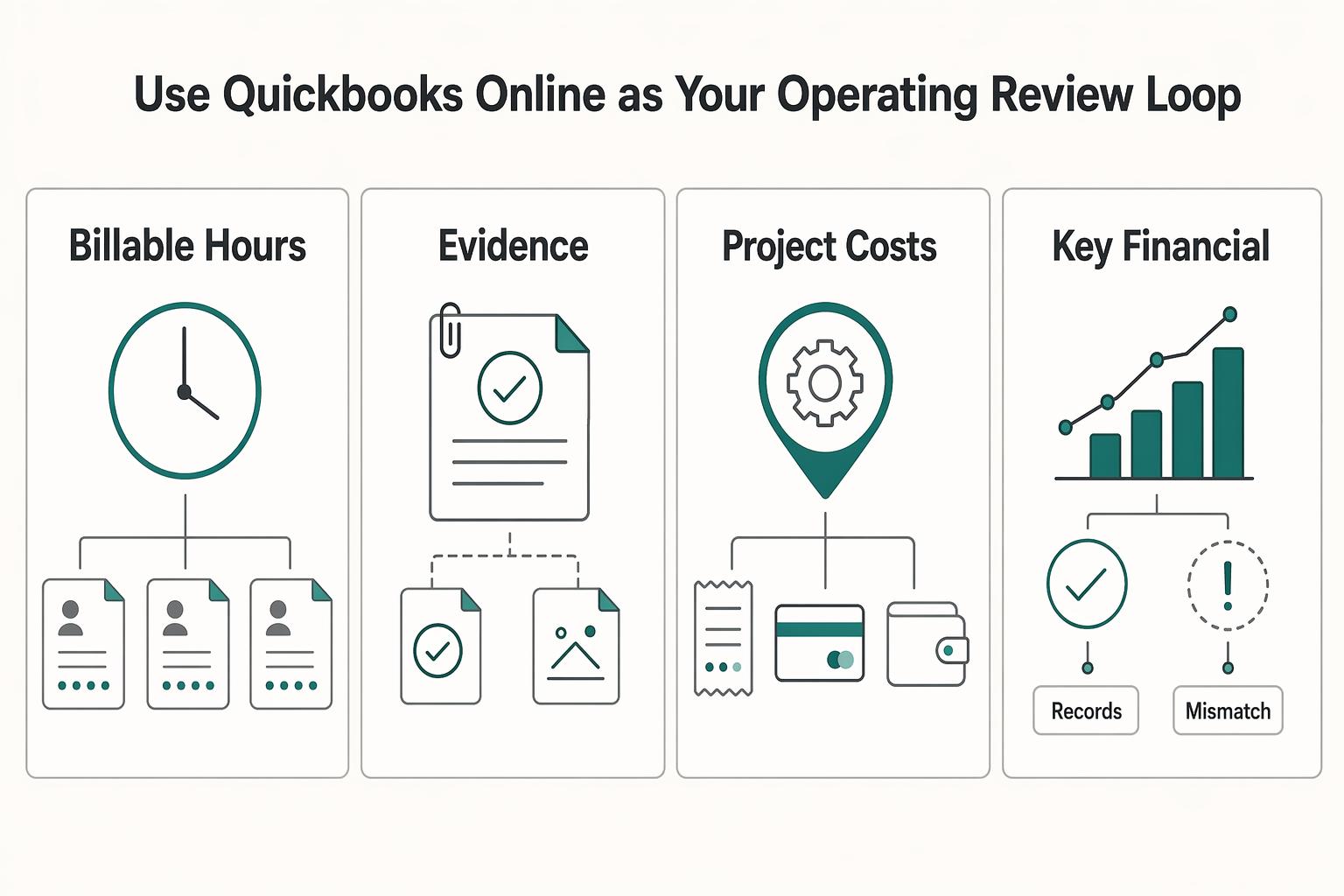
Use QuickBooks Online as your operating review loop#
QuickBooks Online Projects groups income and costs under a customer project in supported plans, including US Plus and Advanced. Assign relevant invoices, bills and expenses to the project, then review profitability. Confirm how labor enters your reports so estimated costs and actual payroll are not counted twice.
| What to review | Why it matters | Action if trend weakens |
|---|---|---|
| Delivery hours | Shows whether delivery effort is being captured consistently | Review scope and delivery process before the next proposal |
| Expenses | Shows whether project spending is being recorded on time | Tighten coding and entry discipline, then recheck margin impact |
| Project costs | Helps you see whether total delivery cost is drifting | Revisit project assumptions and reset how you price similar work |
| Key financial metrics and reports | Surfaces trend changes for resource and pricing decisions | Make the next pricing or staffing adjustment from report data, not guesswork |
Run this review on a recurring cadence during active work. Data quality is the control point: if entries are late or inconsistent, profitability signals degrade. If others touch the books, train them and enforce clear entry rules so reporting stays decision-ready.
Document genuine scope changes and align invoice timing with the agreement. Correcting your own error or underestimating delivery time does not automatically create a billable change. Profitability and collections are separate: a profitable invoice can still remain unpaid.
Project fees reward efficient delivery within the agreed scope, while hourly billing pays for recorded time. Neither guarantees a higher margin: compare the fee with actual and remaining delivery cost before changing your pricing.
For a step-by-step walkthrough, see How to Automate Pass-Through Expense Tracking from Clients in QuickBooks.
Protect a project fee with usable scope and change terms#
State the deliverable, client inputs, revision allowance, acceptance criteria and invoice dates in the agreement. Define who may approve a change and how it affects price and schedule. A signed estimate can support approval evidence, but does not replace missing scope terms.
Use this sequence before billing fixed-fee changes:
| Item to lock down in your own documents | What to confirm before work starts |
|---|---|
scope and out-of-scope | Your contract language is explicit and signed |
change request and change order | Your approval path is written and date-stamped |
overage work terms | Your policy is current and documented |
| Invoicing enforcement in QuickBooks | Your estimate/invoice records preserve approvals and history |
For a hypothetical $3,000 project billed in three $1,000 milestones, create an estimate and use supported progress invoicing to bill each agreed portion. A separately approved $500 add-on needs a clear change reference and its own line or estimate. Check the estimate’s invoiced and remaining amounts before sending each invoice; do not accidentally bill the full $3,000 after two installments.
An estimate is non-posting; converting it to an invoice creates the billing record. Progress invoicing tracks billed portions, not proof that a deliverable was accepted or cash arrived. Retain the client’s approval and apply received payments to the relevant invoice separately.
Match hybrid, retainer, or value-informed pricing to the work#
The strategic move is to shift from reactive rate-setting to evidence-based pricing, and to use the model your current evidence can support without exposing you to avoidable margin risk.
| Current condition | Recommended move | Reason |
|---|---|---|
| Scope is mostly stable but extras are common | Start with hybrid | Clear base deliverable, with likely extras or revisions |
| Client needs regular access or recurring outputs | Move to a retainer | Ongoing support, recurring production, or steady advisory work |
| Business impact is clear and both sides accept shared assumptions | Evaluate value-based | Work tied to a clearly measurable business outcome |
| Conditions are not clear yet | Do not force a jump | Unclear models can quietly kill margins |
These models are alternatives, not stages every freelancer must pass through. Choose hybrid for a stable base with variable extras, a retainer for recurring defined access or outputs, or a value-informed fee where the client’s expected benefit supports the price.
| Model | Best-fit use case | Cashflow predictability | Margin upside | Execution risk |
|---|---|---|---|---|
| Hybrid | Clear base deliverable, with likely extras or revisions | Depends on invoice dates and collections | Medium to high | Medium |
| Retainer | Ongoing support, recurring production, or steady advisory work | More predictable only if funded and renewed as agreed | Medium | Medium |
| Value-informed | Work tied to a clearly measurable business outcome | Depends on fee and payment trigger | High | High |
Hybrid implementation checklist:
- Keep base scope pricing and overage handling separate.
- State exactly what triggers overage work.
- Require written approval before extra work starts.
- Keep invoice visibility clean in QuickBooks by separating base fee lines from approved extra lines.
- Before sending, confirm each extra line maps to an approval date and approver name.
Retainer guardrails:
- Set service boundaries in writing.
- Set response expectations in writing.
- Set rollover policy in writing.
- Set a review cadence to confirm the retainer still matches real demand.
- Use supported recurring invoices for the agreed cadence, then review the generated invoice and actual receipt; scheduling is not payment.
Value-based workflow:
- Baseline the current state.
- Define the outcome metric.
- Agree on attribution logic.
- Set pricing bands tied to that shared logic.
- If a required figure is not verified yet, mark it as pending in your working notes and keep it out of the pricing logic until both sides agree on the source.
Match the model to the work and keep its payment trigger explicit. Value-informed pricing may use a fixed fee payable on agreed dates; if payment depends on a measured result, define the baseline, measurement window, attribution and contingencies separately. Related: Value-Based Pricing.
Choose the model your work and records can support#
Choose where delivery, margin and cashflow risk sits, then use consistent records to see the result.
Use these working definitions to make decisions quickly:
- Billable hours: you bill for recorded time, which lowers delivery-risk exposure when scope is moving, but depends on disciplined time capture and regular invoicing.
- Project fees: you bill one fixed price for a defined scope, which improves price predictability for the client but increases your exposure if scope drifts.
- Hybrid model: you set a fixed base scope and price, then bill approved extras separately to balance predictability with flexibility.
- Value-informed pricing: use the client’s expected benefit to set a fee; a payment contingent on actual results is a separate arrangement requiring explicit measurement terms.
| Model | Main risk exposure | Admin burden | Cashflow pattern | Best-fit work |
|---|---|---|---|---|
| Billable hours | Time not captured or not defensible later | High | Variable unless billed on a tight cadence | Discovery work, shifting scope, clients needing detailed reporting |
| Project fees | Margin erosion from uncontained scope changes | Medium | More predictable when tied to agreed billing points | Clearly bounded deliverables |
| Hybrid | Extras handled informally instead of approved and separated | Medium to high | Depends on agreed invoice dates and collections | Stable core scope with likely add-ons |
| Value-based pricing | Misalignment on what outcome is being priced | Medium | Deal-dependent | Trusted relationships with clear success criteria |
A project report is only as complete as its recorded costs. Keep direct delivery costs separate from shared overhead, use a documented allocation method for management review, and avoid counting labor twice. Classes categorize transactions; they do not automatically allocate all overhead or calculate a fully loaded net margin.
Use this implementation checklist before rollout:
- Scope and revision limits are written in plain language.
- Change requests follow a documented approval path before billing.
- Invoice timing is pre-set (billing periods or milestones) and visible to the client.
- Retainer guardrails are explicit (what is included, what triggers refill, and what is out of scope).
- Reporting views separate revenue, direct delivery costs, and allocated overhead by class/project.
If any item is weak, stay with the lower-risk model until controls are in place. You might also find this useful: A Guide to Time Tracking Software for Billable Hours.
Frequently Asked Questions
Which is usually more profitable: billable hours or a project fee?
Neither is always more profitable. A $3,000 project with $1,800 in direct delivery costs contributes $1,200 before shared overhead and tax. If overruns add $700 of cost, contribution falls to $500. Compare that result with the hourly fee you could charge and collect for the same work.
What is the practical difference between a fixed fee and a hybrid model?
A fixed fee covers the defined scope for one agreed price. A hybrid keeps that fixed base and charges separately for authorized extra work. These are contract terms, not special QuickBooks product definitions; show base and extra charges on distinct invoice lines.
How do I reduce billing leakage when using QuickBooks for hourly or hybrid work?
Log approved billable time against the correct customer/project, then add it to the invoice once. Review unbilled time, descriptions, budget limits and change approvals before sending. For fixed-fee work, track time for cost analysis without also billing those hours unless the contract authorizes an extra.
What is the difference between an estimate and an invoice?
An estimate describes proposed work and price; in QuickBooks it is non-posting. An invoice requests payment and affects the books. Converting an estimate does not establish client acceptance, settle the invoice or prove the contract’s enforceability.
What documents should I keep for each billing model?
Regardless of model, keep dated documentation of what happened: scope and change records, work notes, approvals, and acceptance trail. The recurring failure mode here is weak documentation now, followed by rushed reconstruction later.
Can I trust the books to tell me whether a project fee worked?
Only if income, costs and remaining work are recorded consistently. Project contribution is not the same as net profit or bank cash. Check labor, contractor bills, expenses and separately allocated overhead; reconcile receipts and unpaid invoices as well.
What should I watch if other people help deliver the work?
If you bring in help, worker classification matters because confusing employees and contractors can become costly later. That affects bookkeeping and taxes, not just invoicing. Verify current local rules before building those assumptions into pricing.
Is anything here legally or tax-enforceable by default?
A QuickBooks record documents a transaction; it does not make a contract term legally valid or determine tax treatment. Set terms for the actual jurisdiction and customer, then use the product to preserve approval, billing and payment records.
Try a related tool
Researched and edited by the Gruv editorial team. Gruv builds cross-border billing, payouts, and finance-operations software for global businesses.
Sources
Includes 2 external sources outside the trusted-domain allowlist.
Educational content only. Not legal, tax, or financial advice.
Related Posts

Value-Based Pricing for Freelancers Under Real Payment Risk
Value-based pricing starts with the client’s expected benefit and willingness to pay. It still needs a deliverable, scope and payment agreement you can perform. Use a discovery phase when the benefit or effort is too uncertain to support a defensible quote.

A Guide to QuickBooks Self-Employed for Freelancers
**QuickBooks Self-Employed is a legacy bookkeeping option for existing subscribers. New buyers should compare current products such as Solopreneur, then test their actual billing and tax workflow.**
Choosing Time Tracking Software for Billable Hours in 2026
If a client challenges an invoice, or you need to support a tax position later, vague timers will not help. The goal is simpler: keep records that make disputes easier to resolve, invoices easier to justify, and your file easier to explain when someone asks, "What exactly happened here?"