
Quick Answer
Handle payroll taxes for a remote US team by deciding worker status first, documenting where each employee physically works, registering the required federal and state accounts, and previewing payroll before approval. Keep payroll on hold when location facts, reciprocity, or multi-state treatment are unclear, and treat address changes, hybrid schedules, and new-state hires as tax review triggers.
Start Here and Protect Cashflow Before You Run Payroll#
Use a risk-first setup before your first run. Put decisions and verification in a fixed order so payroll tax mistakes are less likely to turn into cashflow problems.
Use this guide as an operating sequence#
This guide is for small US remote teams with workers across states. The goal is to reduce setup mistakes before they turn into compliance risk and surprise liabilities.
Payroll reporting is a core employer responsibility, and rules vary by state. Treat this as an operating sequence with checkpoints, not legal advice. If a state-specific point is unclear, pause that worker's setup and verify it before payroll is approved.
Define payroll scope before setup#
Define payroll scope before you touch payroll software. For each person in the next pay cycle, document worker status, home state, and where work is physically performed. For remote teams, a common starting point for withholding is the state where the employee physically works.
Lock those facts first. If you run payroll without them, you raise the risk of wrong withholding, missed registrations, and costly cleanup.
Keep the decision order fixed#
Keep the decision order fixed. Decide worker status first, primary work state second, then confirm which tax accounts and payroll settings follow. If you skip those early calls, downstream settings can be wrong, including withholding and reports sent to agencies.
Use one stop rule: no worker goes into payroll setup until you can clearly answer who they are, what they are, and where they work.
Add two verification points to protect cashflow#
Set two verification points to protect cashflow. Before setup, confirm location facts match the tax state you plan to use. Before approval, preview payroll and confirm the right jurisdictions appear for each employee.
Keep a compact record set: worker intake details, registration records, payroll-setting proof, and each period's payroll report. Those reports support federal and state filings, benefits administration, and audits.
Accept the tradeoff early#
Accept the tradeoff early. Remote hiring can reduce costs, but tax mistakes can erase that benefit quickly. With multi-state teams, you may need to register, withhold, and file in each relevant state. Mistakes can lead to penalties, audits, or legal exposure. Use a simple rule: require verified facts before setup, and hold payroll when tax exceptions are still open.
Related: How to Use Gusto for Payroll for a Small US-Based Agency.
Gather the Minimum Data You Need Before Setup#
Do not start payroll setup until you have the few facts that actually drive tax treatment. Capturing them early makes withholding settings easier to set correctly and easier to review later.
Build a simple worker intake for location facts#
Start with a short intake sheet before setup. Capture the basic identity and location details you need to determine where services are physically performed.
If intake details and actual work location conflict, pause setup and clarify before assigning state income tax withholding.
California shows why this matters. For nonresident or part-year resident situations, California source wages depend on the extent to which services were physically performed in California.
Collect worker status evidence before changing withholding settings#
Worker status is the next gate, because tax treatment depends on whether the person is treated as an employee or an independent contractor. The IRS treats status as a critical determination based on the business relationship with the person doing the work.
Keep a compact record of the relationship facts used for that determination. Employees generally require withholding and depositing income tax, Social Security, and Medicare taxes from wages, while independent contractor payments are generally treated differently. If the status evidence is thin or contradictory, hold setup before first pay.
Create a simple treatment map before setup#
Once status and location facts are verified, build a simple map for each jurisdiction you need to handle: worker status, where services are performed, and the withholding approach you plan to apply.
Keep federal and state entries separate so handoffs stay clear. If your team cannot clearly explain the status decision or location basis, treat that setup as incomplete.
Keep a shared proof folder and make it part of approval#
Store intake records, status evidence, and year-round records and receipts in one shared folder. Recordkeeping is a control, not a cleanup step after something goes wrong.
Include complete income records, even when no Form 1099 is issued. Use consistent file names so another operator can trace one worker from intake to status decision to payroll settings quickly. If that path is hard to verify, fix the documentation before payroll approval.
For a step-by-step walkthrough, see A Guide to Salary Bands and Compensation for a Global Remote Team.
Lock Worker Status First So You Do Not Misconfigure Taxes#
Status comes before tax setup because it determines how payments should be treated. IRS guidance is clear on the sequence: identify the business relationship first, then decide tax treatment.
Decide status before the first payment#
Make the employee-versus-independent-contractor decision before the first payment for services. If status is still unresolved, pause payout until the relationship is clear.
For remote payroll, treat this as a setup gate: record the status decision and the business relationship in the worker record before setup is considered complete.
Match tax treatment to the status you chose#
If the worker is treated as an employee, IRS guidance says you generally must withhold and deposit income tax, Social Security, and Medicare from wages. You also generally pay the employer share of Social Security and Medicare plus unemployment tax.
| Tax item | Employee | Independent contractor |
|---|---|---|
| Income tax | Generally must withhold and deposit from wages | Generally do not have to withhold or pay taxes on those payments |
| Social Security | Generally must withhold and deposit from wages | Generally do not have to withhold or pay taxes on those payments |
| Medicare | Generally must withhold and deposit from wages | Generally do not have to withhold or pay taxes on those payments |
| Employer share of Social Security and Medicare | Generally pay the employer share | Generally do not have to withhold or pay taxes on those payments |
| Unemployment tax | Generally pay unemployment tax | Generally do not have to withhold or pay taxes on those payments |
If the worker is treated as an independent contractor, IRS guidance says you generally do not have to withhold or pay taxes on those payments. That is why status has to come first. The wrong status can produce the wrong tax setup.
Escalate unclear cases before payout#
If the facts are mixed or the documentation is weak, pause and review before payment treatment is finalized. Keep a short internal note on what was unclear and how the case was resolved.
Record remediation if you already got it wrong#
If a prior classification appears wrong, document the issue and move into correction steps instead of silently relabeling the worker. Start with What to Do If You've Been Misclassified as an Independent Contractor so your remediation is tracked and repeatable.
For another remote-team operations guide, read How to Manage a Global Equity Plan for a Remote Team.
Decide the Primary Tax State Using a Clear Order of Operations#
Use a consistent order: identify where work is physically performed, check residence-state impact, then confirm any new-state nexus risk before payroll goes live. If location facts are incomplete or conflicting, pause payroll setup until the record is complete.
Record the physical work state first#
Start state income tax withholding analysis with the state where the employee actually performs work. Do not default to company HQ, a manager location, or a mailing address if work happens elsewhere.
Review home address and work location together. They may match for some remote employees, but do not assume they do. Approve setup only after you have one documented primary work state in the employee record.
Validate residence-state impact before finalizing withholding#
Once the work state is documented, check whether residence-state rules change withholding. Depending on the facts, withholding may apply across work and residence states, or reciprocity may allow withholding in one state.
Do not assume reciprocity applies. Verify it with the relevant state tax or revenue department before finalizing settings. If the result is unclear, keep the setup open until it is confirmed.
Check expansion risk before adding hires in new states#
A new remote hire in a new state is not just a hiring event. It is also a tax review step. Before you add that hire, review whether the new presence creates nexus risk or other employer tax obligations.
State thresholds vary. Examples include 14 days in New York and 30 days in Illinois, which is a reminder to confirm each state's rules before approval.
Verify payroll settings against documented facts#
Before the first live run, confirm payroll settings match the employee's recorded home address and actual work location. Also verify state unemployment assignment, since missing or incorrect work-location data can send withholding and SUI to the wrong state.
If the payroll profile and documented facts do not match, hold setup, correct the record, and recheck settings before processing pay.
Handle Two-State Exposure Without Guessing#
Do not set two-state withholding until you classify the case: possible reciprocity, non-reciprocal exposure, or telecommuting facts that require employer-office-state review. That simple sort keeps you from forcing a one-state answer onto a two-state problem.
Classify the two-state pattern before changing withholding#
Start with a provisional bucket, then confirm with state guidance for that exact state pair.
| Scenario | Provisional payroll posture | What to verify before first live run |
|---|---|---|
| Reciprocity may apply | Keep the case open until reciprocity is confirmed for the exact two states. | Confirm the specific state-pair rule. Pairing matters, and rules can differ by state pair. |
| No reciprocity | Treat it as two-state exposure. Follow your work-state withholding analysis, then evaluate resident-state tax exposure. | Confirm resident filing impact and whether a credit for taxes paid to another state may be available on the employee side, if allowed. |
| Telecommuting with employer-office-state questions | Treat it as a special review. Do not assume remote location alone determines tax treatment. | Review employer-office-state guidance directly. The New York nonresident FAQ explicitly flags: "My primary office is inside New York State, but I am telecommuting from outside of the state." |
Use this decision rule: if reciprocity is uncertain, treat the case as non-reciprocal until state guidance confirms otherwise.
Use New York checkpoints when New York is one of the two states#
If New York is involved, determine resident, nonresident, or part-year status first. That changes the rest of the analysis.
| Checkpoint | Article detail |
|---|---|
| Status | Determine resident, nonresident, or part-year status first; that changes the rest of the analysis |
| Domicile | Permanent home and intended return location; a person can have only one domicile |
| Permanent place of abode | A person can have more than one, and a place may still count even if they stay there only occasionally |
| Substantially all of the year | Described as more than eleven months |
| Days in New York | 184 days or more during the taxable year; any part of a day counts as a day |
Then verify domicile and permanent place of abode. New York defines domicile as a person's permanent home and intended return location, and a person can have only one domicile. It also says a person can have more than one permanent place of abode, and a place may still count even if they stay there only occasionally.
Track days early. The statutory-resident path ties to maintaining a permanent place of abode for substantially all of the year, described as more than eleven months. It also requires spending 184 days or more in New York during the taxable year. Any part of a day counts as a day.
Match withholding posture to facts you can prove#
Set withholding based on facts you can support. If reciprocity is confirmed, apply that rule. If it is not, treat the case as non-reciprocal: keep work-state withholding logic and evaluate resident-state exposure separately.
Two-state taxation can still be possible. In practice, you usually need a payroll withholding decision now, while a possible credit-for-tax-paid route may sit on the employee filing side if the states allow it.
For telecommuting facts, do not assume working outside New York automatically settles New York tax treatment when the primary office is in New York.
Keep a short evidence pack before approval#
Before first payroll, keep a compact record. Include home address, actual work location, manager-confirmed primary office, domicile notes when New York is involved, any available day-count log, and the state guidance used for the reciprocity or non-reciprocity decision.
Final check: payroll profile settings must match the documented facts and the scenario bucket above. If facts are unresolved, hold payroll and resolve them before processing.
If you want a deeper dive, read Do I Have to Pay State Taxes While Living Abroad as a Digital Nomad?.
Register State Accounts Before First Remote Payroll Run#
The order matters here: register first, build the payroll profile second, run payroll third. Reverse that order and you can create avoidable corrections and potential penalty risk.
Register state accounts for each active work state#
Start with states where employees actually perform work, since withholding is primarily based on work-state rules. In each active work state, confirm the employer setups for state income tax withholding and state unemployment tax.
Do not treat a mailing address as a shortcut. Remote employees can create enough presence to trigger payroll-tax and unemployment registration, but not every remote employee creates nexus in every state. Your checkpoint is simple: for every active state, confirm the account is open or document why it is not required yet.
If a two-state case is still open, verify reciprocity with the relevant state tax or revenue department before finalizing withholding. Timing can differ by state. ADP's example notes 14 days in New York and 30 in Illinois for when employer tax submission obligations can begin.
Confirm federal setup before payroll settings#
Before you build state settings, make sure the federal layer is right. Confirm worker classification first. For employees, employers generally must withhold and deposit federal income tax, Social Security, and Medicare taxes. Independent contractor payments generally do not use that same withholding treatment.
Then verify that payroll is configured so the expected federal tax withholding appears correctly in payroll preview.
Build payroll profiles only after account IDs exist#
Enter state and federal settings only after required registrations are confirmed. Placeholder IDs, guessed effective dates, or "fix it after first run" setups can lead to corrections and rework.
Keep a compact folder for each jurisdiction with the agency confirmation, employer account ID, effective date, and the payroll-setting screenshot using that ID. That record makes later reviews and audits much easier.
Run a zero-dollar preview before first live payroll#
A zero-dollar test or preview is not a legal requirement, but it is a practical control. Run it for at least one employee in each state pattern and confirm the expected jurisdictions appear: federal withholding, correct state income tax withholding, and correct state unemployment tax.
Use this step to catch setup misses early, such as a missing work state or an unexpected state line. If expected jurisdictions are missing, stop and fix the profile before live payroll.
For a related remote-team policy topic, see A Guide to Harassment Training for Remote Teams.
Add Location Change Triggers for Hybrid and Moving Workers#
Once state accounts are set up, the next risk is drift between payroll records and where people actually work. Treat location changes as payroll tax events, not just HR profile updates. Problems can start when someone moves, commutes across a state line, or begins a temporary work pattern. Payroll often finds out only after the run is processed.
Treat address edits, hybrid schedules, and temporary relocations as tax triggers#
Location changes are not administrative noise. State income tax withholding is based primarily on where services are performed, and sometimes secondarily on where the employee lives. A home address change, a new hybrid schedule, or a temporary period working from another state can all change withholding analysis even when pay, title, and manager stay the same.
Do not limit reviews to permanent moves. Hybrid remote work can create the same recheck need as a formal relocation. Cross-state patterns can also affect unemployment insurance exposure, not just withholding.
Require notice before the location change takes effect#
Require worker and manager notice before any regular work-location change, including temporary ones. This is an internal control so payroll can recheck withholding before the next run instead of repairing it afterward.
Keep the notice short and specific:
- Effective date
- New home address, if relevant
- Expected work state or states
- Temporary versus ongoing pattern
- Estimated in-state workdays
Do not close the location change until payroll documents the withholding decision and updates the employee record.
Re-check state-pair facts instead of assuming one state still controls#
When someone's work pattern changes, retest the state facts from the ground up. Confirm where services are physically performed, whether reciprocity applies, and whether temporary-presence rules create a new trigger.
Example: if someone lives in one state and begins performing services part of the month in another, recheck the setup rather than assuming residence alone still controls withholding. The reverse pattern can also change sourcing outcomes.
Because less than half of states have reciprocity agreements, do not assume two-state work collapses into one withholding state without confirmation. Track in-state days and earnings. Temporary-presence rules vary and may use day counts, such as 14 or 30 days, or earnings thresholds. Utah's SB 39 example used a 20-day threshold, enacted March 2, 2022, which is a reminder that there is no single uniform state or federal teleworker guideline.
Prevent late discovery from turning into prior-period corrections#
The common failure mode is simple: payroll learns about the change after payment is sent. Once withholding liability exists, a state may collect unpaid withholding from the employer, and you may need payroll corrections, including residence-versus-source-state cleanup.
If service location is still unclear, keep the change in exception status and review it before processing the next payroll rather than guessing.
You might also find this useful: How to Set Up Workers' Compensation Insurance for a Remote Team.
Run Each Payroll Cycle with Compliance Checkpoints#
At this point, setup is not the main risk. Drift is. Treat each payroll run as a compliance process, not just a payment process, so issues are caught early, documented, and resolved before they turn into rework.
Validate the pre-run checklist before calculations start#
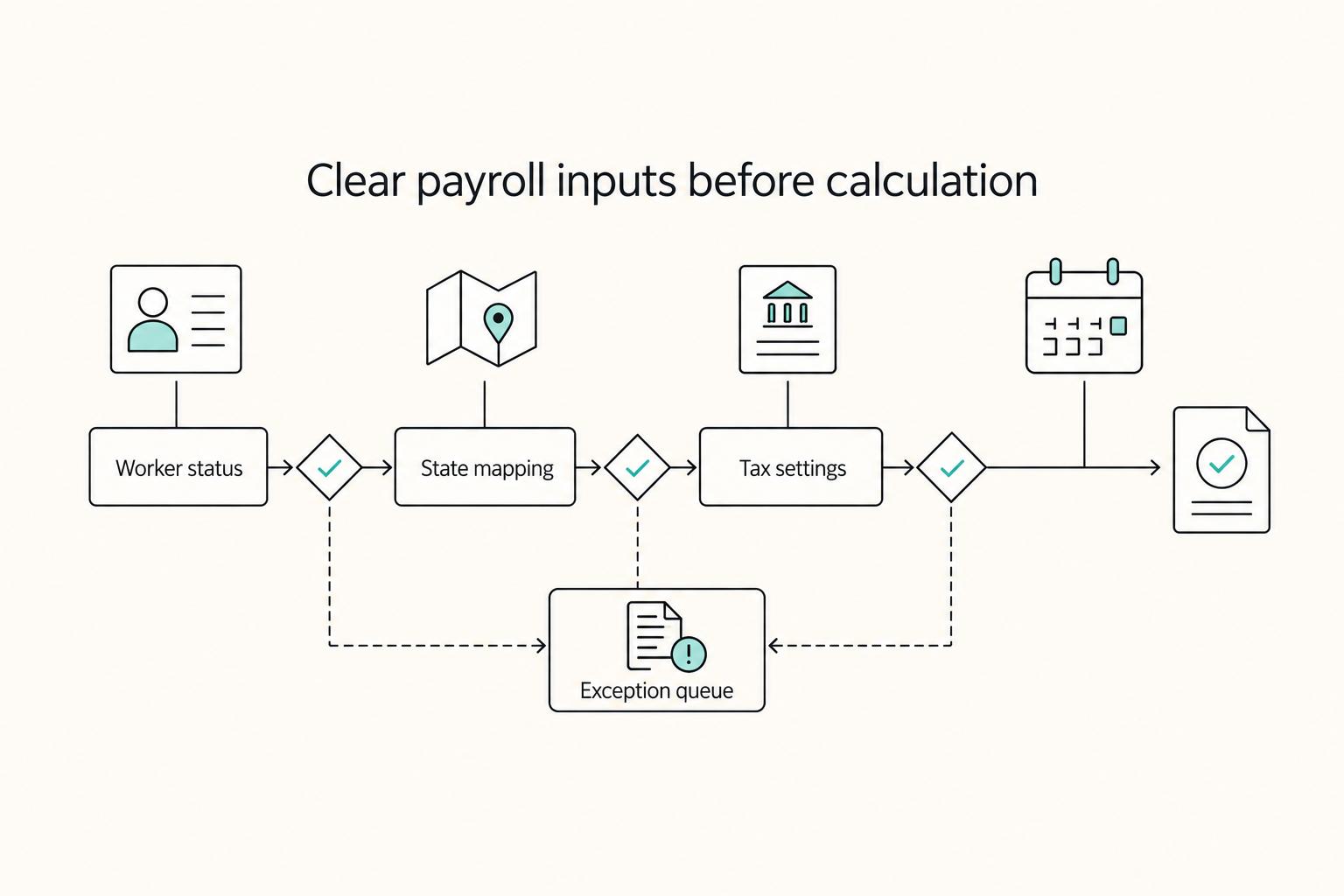
Start with a pre-run check that confirms your core inputs are still valid. This matters most when payroll, HR, and time data live in separate systems, because mismatches can stay hidden until the run is underway. Confirm these items in order:
| Pre-run check | What to confirm | If unclear |
|---|---|---|
| Worker status | Still valid | Move it to exception handling before calculation |
| State mappings | Current for tax treatment | Move it to exception handling before calculation |
| Tax settings | Current in your payroll tool | Move it to exception handling before calculation |
| Exception queue | Empty, or each open item has a documented decision before approval | Move it to exception handling before calculation |
If any tax-impacting item is unclear, move it to exception handling before calculation.
Review federal and state tax outputs during the run#
Before approval, review federal and state tax outputs. Focus on whether the run matches your current worker and state setup, especially for multi-state payroll.
If an expected state is missing, an unexpected state appears, or a worker's tax treatment looks off, stop and resolve the setup issue first. Pausing in preview is usually cheaper than correcting after approval.
Reconcile the run against cash movement and keep the evidence pack#
After funding, reconcile payroll reports against bank outflows to confirm the cycle is complete. At minimum, verify register totals, net pay, employer tax totals, and tax funding amounts against what left the bank.
Keep a consistent record for each cycle:
- final approved payroll register
- tax summary with federal and state totals
- completed pre-run checklist
- notes for resolved exceptions
- funding confirmation or bank outflow record
- approval record
This helps keep payroll audit-ready and gives finance a clearer view of payroll cashflow.
Hold approval when exceptions are unresolved#
Use a simple rule: unresolved tax exceptions block final approval as internal policy. Paying first and correcting later usually creates avoidable correction and reconciliation work.
Not every small question needs to halt payroll, but unresolved items that can change tax treatment should be resolved first. When in doubt, document the decision and clear the exception before approval.
If you want fewer approval surprises, use compliance-gated payout workflows so status and exceptions are reviewed before release.
Fix the Most Common Remote Payroll Tax Mistakes Fast#
When a tax mistake shows up, speed matters, but sequence matters more. Fix the setup before the next live payroll, document the remediation, and rerun only the periods that were actually affected.
Recheck worker status and correct it prospectively#
Wrong worker status can affect withholding and employer tax handling, so re-evaluate whether the worker is being handled as an employee or an independent contractor. Correct prospectively, and document what changed and when so payroll, HR, and finance stay aligned.
If federal employment-tax correction may be involved, use the IRS Voluntary Classification Settlement Program (VCSP) as a checkpoint to review with your advisor rather than improvising. For practical remediation context, see What to Do If You've Been Misclassified as an Independent Contractor. Verification point: preview the next payroll and confirm the worker shows the expected tax treatment.
Verify location assumptions before you change withholding#
Location assumptions are a common cleanup trigger because payroll-tax rates and requirements can vary significantly by location. Verify the worker's residence and work-location inputs before you suppress or shift withholding, and document what you confirmed.
If location-specific rules are still uncertain, treat them as unconfirmed and correct conservatively instead of running on assumptions. Verification point: payroll preview should reflect the intended withholding logic with no unexplained missing lines. Mismanaged payroll taxes can lead to penalties and fines and can also damage staff trust.
Review multi-jurisdiction exposure instead of forcing a one-jurisdiction answer#
If facts suggest exposure in more than one jurisdiction, do not force a one-jurisdiction setup. Keep the open items explicit and escalate state-specific questions for review rather than guessing.
Keep the payroll decision narrow: correct withholding and remittance now, and document unresolved state-specific questions for escalation. At the federal layer, this sits under Title 26 Subchapter C, Employment Taxes and Collection of Income Tax at Source.
Confirm setup before rerunning affected periods#
If the issue is missing payroll setup, complete the required setup steps before rerunning affected periods. If you rerun first, you can end up with corrected reports but no clear path for remittance or filing.
Use closeout checkpoints after reruns, including Deposits and Electronic Filing (MeF) for Employment Tax Returns, and keep a remediation record that shows what changed and why.
This pairs well with our guide on How to Create a Travel Policy for a Remote Team.
Assign Ownership So Nothing Falls Between Payroll and Finance#
Controls fail when a real decision has no clear owner. Even a single out-of-state employee can create tax obligations, so each decision needs a named owner, a reviewer, and a traceable record.
Name ownership by decision, not by a vague "payroll taxes" bucket#
Assign ownership separately for state registration, withholding setup, and payroll approval checkpoints. Keep it explicit who decides, who reviews, and where the supporting records live.
For remote teams, this matters most on state setup: withholding is tied to where the employee works, and remote work can create multi-state obligations.
Define escalation before edge cases happen#
Use payroll software support for product-operation issues, such as setup behavior inside the tool. Escalate to a tax advisor when the answer depends on state-specific judgment, including reciprocity questions or potential multi-state exposure.
Use a simple test: if the answer changes by state law rather than by software workflow, escalate. State rules and thresholds vary.
Track exceptions as open financial risk#
Log each exception with an owner, current status, and target resolution date. Include missing state registrations and any mismatch between documented work state and actual withholding.
If those items are not tracked to closure, they can return later as compliance issues, penalties, or employer exposure such as back taxes and fines.
Keep approvals and money records in one traceable rhythm#
If Gruv is part of your payment stack, keep payroll approvals and payout records aligned to the same pay period and exception log. That gives payroll and finance one traceable trail when something needs quick review.
Copy and Use This One-Afternoon Checklist#
Use this as a release gate, not a reminder list. If one item is unresolved, hold the run until there is a named owner and a documented next action.
-
Confirm each worker's record is current for this pay cycle. Make sure documented work location, posted working hours/time off, and pay setup match the current run. If records conflict, stop and resolve before funds move.
-
Confirm your written remote-work policy is current and applied. Check that it clearly covers employment conditions and company-information protection expectations. Compare policy requirements with each worker's documented arrangement, including hybrid patterns, and flag mismatches as exceptions.
-
Confirm location-related exceptions are documented, not assumed. For workers whose residence and work location differ, record a clear status: resolved or unresolved. If jurisdiction-specific payroll treatment is unclear, keep the case blocked until it is validated separately.
-
Confirm reimbursement rules are documented before processing pay. If you use reimbursements, ensure business purpose and documentation requirements are explicit and consistently applied (for example, under an accountable-plan approach). Without a clear policy, reimbursements can be treated as taxable income.
-
Confirm pre-run and post-run verification logs are complete and stored. Pre-run, record who checked policy alignment, location and schedule records, and reimbursement readiness. Post-run, record who reviewed outputs and exceptions. Keep a regular check-in and review cadence and one consistent proof folder each cycle so handoffs stay auditable.
-
Confirm escalation owner is assigned for any unresolved exception before funds are released. "In progress" is not ownership. Name one owner, define the next action, and mark whether the run is blocked or partially approved.
Related reading: How to Use Brex for a Venture-Backed Startup with a Remote Team.
After you finalize this checklist, use Gruv docs to map the same decision points into repeatable approval, payout, and reconciliation operations.
Frequently Asked Questions
Which state do I withhold for when my employee is remote?
Start with the state where the employee actually performs work. Then check whether residence-state rules or reciprocity change the withholding result. Do not finalize settings until the documented work location matches the payroll profile.
Can one remote employee create taxes in two states?
Yes, depending on where the work is performed and the states involved. If the pattern is not clearly single-state, review both withholding treatment and unemployment tax treatment before approval. Do not force a one-state answer onto an unresolved two-state case.
Do reciprocity agreements eliminate double taxation in all cases?
No. Reciprocity is not universal, and rules can differ by state pair. Keep the setup open until you verify the exact state-pair treatment.
Do employee and contractor tax rules differ for remote teams?
Yes. Employees generally require withholding and depositing income tax, Social Security, and Medicare from wages, and employers generally pay the employer share of Social Security and Medicare plus unemployment tax. Independent contractor payments are generally treated differently, so resolve classification before payment.
Do hybrid workers increase payroll tax risk?
Yes. A new hybrid schedule, address change, or temporary relocation can change withholding analysis and unemployment exposure even if pay and role stay the same. Require notice before the change takes effect so payroll can review the state facts before the next run.
What remains unknown until I validate state-by-state?
Exact filing procedures, registration requirements beyond withholding, and edge-case exceptions can remain unknown until you confirm them with the relevant state. State laws vary, so keep the record tight: documented work location, cross-state work pattern, and proof that payroll settings and state accounts match those facts before pay is released.
Researched and edited by the Gruv editorial team. Gruv builds cross-border billing, payouts, and finance-operations software for global businesses.
Sources
- chartercollege.edu/sites/default/files/Charter%20College%20Cata...trusted
- cs.jhu.edu/~kevinduh/a/multitarget-tedtalks/t/en-de/tok...trusted
- dc.law.utah.edu/cgi/viewcontent.cgitrusted
- ecfr.gov/current/title-26/chapter-I/subchapter-C/part-31trusted
- ecfr.gov/current/title-10/chapter-I/part-50trusted
- federalregister.gov/documents/2024/04/04/2024-06526/cyber-incide...trusted
- ftb.ca.gov/file/personal/residency-status/part-year-and...trusted
- ftb.ca.gov/forms/2023/2023-1031-publication.pdftrusted
Educational content only. Not legal, tax, or financial advice.
Related Posts

Do I Have to Pay State Taxes While Living Abroad as a Digital Nomad?
Living abroad does not end `state income tax` exposure by itself. The first decision is practical: choose a filing position your facts can support, then build records that support the same story all year.

What to Do If You've Been Misclassified as an Independent Contractor
Treat this as a protection problem first, not a label debate. If your work was treated as an independent contractor arrangement even though the relationship functioned differently, your first goal is to protect pay, rights, and records while you choose the least risky escalation path. You can do that without making accusations on day one, which often keeps communication open while you document what happened.
How to Use Gusto for Payroll for a Small US-Based Agency
Gusto is a strong primary payroll system when your agency mostly runs U.S. payroll. Once you start paying people outside the U.S., it becomes one part of a broader stack, because sending money and carrying compliance responsibility are different jobs.