
Quick Answer
To handle an IRS CP2000 notice as a freelancer, treat it as a proposed mismatch case, not a final bill, then reconcile each IRS-listed payer amount against your filed return and supporting documents. Choose one response path (agree, partly agree, or disagree), submit a complete packet by the notice deadline, and keep proof of submission. If facts are unclear or cross-border issues complicate the file, escalate early to a qualified professional.
Treat a CP2000 as a Proposed Change and Answer on Time#
Treat a CP2000 notice as a proposed change you must verify and answer on time, not as a final bill or final determination. If you searched for irs cp2000 notice freelancer, you are not "in trouble" by default. You are looking at a records mismatch under time pressure, and you can manage it. You are the CEO of a business-of-one, and this notice is an operations problem to resolve, not a personal crisis.
For freelancers and consultants, especially a globally mobile independent contractor, the friction can come from records spread across clients, platforms, and countries. A single cp2000 notice can overlap with cross-border paperwork, but your first move stays simple. Classify the notice, reconcile the facts, and respond by the date shown. If you miss that response date, the IRS can send a Statutory Notice of Deficiency.
Before You Start#
Use this one-sitting playbook for an irs notice tied to possible underreported income:
- Decide your path. State whether you agree or disagree with the notice.
- Build your document pack. Match each disputed item to the return line and include supporting documentation.
- Control deadlines. Work backward from the response date listed on the notice and set draft, review, and submission checkpoints.
- Escalate with intent. Bring in a qualified pro when records conflict, payer data is missing, or cross-border treatment may change the facts.
Expected outcome: a documented response path, a complete evidence set, and deadline controls you can defend under freelance tax pressure.
What Tax Topic 652 clarifies and what it does not#
| What you can treat as known | What still needs case review |
|---|---|
| Notice CP2000 is a proposal, not a bill. | Final liability and penalties for your exact file. |
| You should reply by the deadline shown on the notice. | Which party caused each mismatch in disputed entries. |
| Quick response guidance is 30 days, or 60 days if you live outside the United States. | How long IRS processing will take after you submit. |
| You must state whether you agree or disagree and include support. | Whether later amendments make sense after final resolution. |
If this notice feels like a sudden tax audit signal, keep the default simple. Third-party information does not align with your return, so do not panic, do not "just pay," and do not guess. Run a structured response.
Preflight Setup Before You Reply#
Assemble a complete, traceable evidence pack before you send any CP2000 response. Before you write explanations, build the file first. Strong preflight work reduces rework, keeps stress down, and makes your position defensible if this irs notice escalates.
Before You Start#
- Mark the response deadline shown on the notice (Tax Topic 652 notes 30 days, or 60 days if you live outside the United States).
- Read the full Notice CP2000 packet and the included Response form before you draft anything.
- Create one working folder for this cp2000 notice so every document, draft, and submission receipt stays together.
- If you manage cross-border income, keep your broader mobility notes nearby, but keep this workflow focused on the CP2000 mismatch itself. You can review the digital nomad tax guide after you close this loop.
Execute the preflight workflow#
- Step 1. Build your core case file. Collect all CP2000 pages, your filed return, and related Form 1099 records first.
Verification point: you can trace each proposed adjustment to a specific return line and a supporting document.
- Step 2. Pull third-party evidence in AUR order. Gather Form W-2, Form 1098, and Form 1099 so your packet mirrors how the Automated Underreporter (AUR) compares payer data to your return.
Verification point: for every payer amount listed, mark it as matched, missing, or disputed.
- Step 3. Add identity and profile records only when they matter. Attach identity or payer records only when they clarify taxpayer status or payer treatment for a disputed item.
Verification point: each added document answers a specific question tied to a disputed item.
- Step 4. Lock your timeline and submission controls. Set checkpoints for draft, review, submission, and proof capture. Use the IRS Document Upload Tool when available for a fast digital route, or use the notice-listed fax or mail channel.
Verification point: you store confirmation proof the same day you submit.
| Submission channel | Use case | Proof to retain |
|---|---|---|
| IRS Document Upload Tool | Fast, digital reply path | Upload confirmation record |
| Fax listed on your notice | Notice allows fax and file is ready | Fax transmission confirmation |
| Mail listed on your notice | Notice lists mailing instructions and you choose paper | Tracking record and full copy |
If you have mixed U.S. and non-U.S. payer records, treat each payer as its own evidence lane. This keeps an underreported income response clean, even when the notice feels like a tax audit.
If you want a deeper dive, read The Best Digital Nomad Cities for Entrepreneurs and Startups.
Which CP2000 Path Fits Your Case Right Now#
Choose your response path now, then send a packet that matches that path exactly. Once preflight is done, turn the documents into a decision. This step keeps your response narrow, reduces confusion, and prevents deadline drift.
Run this one-page decision tree#
- Step 1. Confirm notice controls. Check whether your letter is CP2000, CP2000A, CP2000B, CP2000C, CP2000D, or CP2000E, then read the exact response date and submission instructions on that notice.
- Step 2. Choose one branch. Use the branch table below and commit to one path.
- Step 3. Build the matching response. State agreement status on the Response form and attach support for any disputed item.
- Step 4. Submit and prove delivery. Use the IRS Document Upload Tool when available, or follow the notice-listed submission method and keep confirmation proof.
| Branch | Decision rule | Immediate action |
|---|---|---|
| Agree | Your records match the proposed changes. | Mark agreement, return the Response form, and follow the notice instructions. If you fully agree and add no new items, you do not need to amend your return. |
| Partly agree | Some items match, others do not. | Mark the appropriate box on the Response form, explain each disputed item, and attach supporting records. Expect a possible revised CP2000 if IRS resolves only part of the case. |
| Disagree | Your records do not support the proposed changes. | Mark disagreement, provide a clear written explanation, and attach complete documentation for every disputed line. |
| Unclear | You cannot verify key facts before the deadline. | Call the number on the notice to request additional time, then consider authorizing a tax professional to represent you. |
Apply cross-border guardrails before you submit#
Keep your CP2000 file separate from other reporting tracks. Form 8938 and FBAR follow separate requirements, and you may need Form 8938, the FBAR, or both. If foreign financial assets may put you near Form 8938 thresholds, flag that review, but do not mix unrelated FATCA analysis into your core irs notice response.
If key records are still missing by the deadline, call the notice number to request additional time. If you do not respond by the due date, the IRS can move the case forward with a CP3219A notice.
Is It a Reporting Mismatch or a True Underpayment#
Reconcile every payer line first, then decide whether your CP2000 reflects a mismatch or true underreported income. This is the control point. The IRS proposal is only as good as the data match behind it, and your job is to make that match explicit.
Reconcile each line before you decide#
- Step 1. Match payer records to your return. Compare each IRS-listed payer amount against your filed amounts using payer documents like Form W-2 and Form 1099 and any related entries.
Verification point: every payer line ends as matched, unmatched, or unclear.
- Step 2. Identify the mismatch type. Separate data-entry gaps from classification problems and missing income lines.
Verification point: each unmatched line has a written reason and supporting document.
- Step 3. Test worker status where needed. If a payer used Form 1099-NEC but your facts suggest employee treatment, request correction. If that fails, use the IRS correction path available to recipients and evaluate whether a Form SS-8 determination makes sense.
Verification point: you document why you kept or challenged independent contractor treatment.
- Step 4. Classify the result. Mark each line as reporting mismatch or probable true underpayment, then total only the probable underpayment items.
Verification point: you can defend each conclusion in one sentence with one supporting record.
| Pattern you find | What it usually signals | Next move |
|---|---|---|
| Payer amount differs from return line | Reporting mismatch | Attach payer document and reconciliation note |
| 1099-NEC where facts look like wages | Classification issue | Pursue correction path and document status review |
| Income exists but support mapping is incomplete | Documentation gap | Rebuild line-level mapping before reply |
| Income omitted with no valid adjustment | Potential true underpayment | Prepare to accept or partially accept that item |
Keep FEIE and FBAR workflows separate#
Treat U.S. CP2000 math and cross-border reporting as parallel tracks. FEIE still requires filing a return that reports income, then applies Form 2555 rules if you qualify. FEIE limits vary by tax year. FBAR also stands apart: the filing goes to FinCEN, not the IRS, and the filing trigger is when aggregate foreign account value exceeds $10,000 at any time during the year.
| Track | Key rule | Separate-track note |
|---|---|---|
| CP2000 | Close the CP2000 line-level reconciliation first. | Treat U.S. CP2000 math and cross-border reporting as parallel tracks. |
| FEIE | Still requires filing a return that reports income, then applies Form 2555 rules if you qualify. FEIE limits vary by tax year. | Run FEIE checks in a separate workstream. |
| FBAR | File with FinCEN, not the IRS, when aggregate foreign account value exceeds $10,000 at any time during the year. | Run FBAR checks in a separate workstream. |
The operating rule: close the CP2000 line-level reconciliation first, then run FEIE and FBAR checks in a separate workstream.
What Should You Send If You Agree Partly Agree or Disagree#
Send a path-specific CP2000 packet that states your position clearly and includes the supporting documentation for that position. Once you have line-level conclusions, your packet should make those conclusions easy to verify. Do not bury the reviewer in unrelated documents.
Build the right packet for your path#
- Step 1. Mark your position on the CP2000 response form. Choose agree, partly agree, or disagree, then include required signatures or statements.
Verification point: your election on the form matches your reconciliation file.
- Step 2. Assemble the minimum package for your branch. Use the table below and include only documents that support your position.
Verification point: each attachment links to a specific line item.
| Path | Include in your packet | Control check |
|---|---|---|
| Agree | Response form marked agree and the notice materials requested for your response | If you fully agree and have no additional items, you do not need to amend your return. |
| Partly agree | Response form marked for partial disagreement, accepted items list, disputed items list tied to payer documents (for example, W-2, Form 1098, or Form 1099), and supporting documentation | Accepted and disputed items stay separate and traceable. |
| Disagree | Response form marked disagree, signed statement explaining why, and supporting documentation for disputed items | Every claim in your statement maps to supporting documentation. |
| Agree plus extra corrections needed | Form 1040-X for that tax year with "CP2000" noted at the top, plus your response package | Amended return scope stays limited to that tax year issues. |
- Step 3. Build a simple disputed-item table. List payer, document type, reported amount, your amount, and supporting file name.
Verification point: a reviewer can follow your argument line by line without extra explanation.
Lock submission controls before you send#
- Step 4. Choose your channel and freeze your final packet. Use the IRS Document Upload Tool when available, and otherwise follow the response channel listed on your notice. Keep one final version and the exact files you sent.
If your case spans CP2000, CP2000A, CP2000B, CP2000C, CP2000D, or CP2000E, keep the same operating rule: follow notice instructions and respond by the response date. For quick resolution, IRS says to respond within 30 days of the date of the notice, or 60 days if you live outside the United States. If the IRS does not hear from you by the response date, it may send a Statutory Notice of Deficiency.
How Globally Mobile Freelancers Keep This Audit Ready#
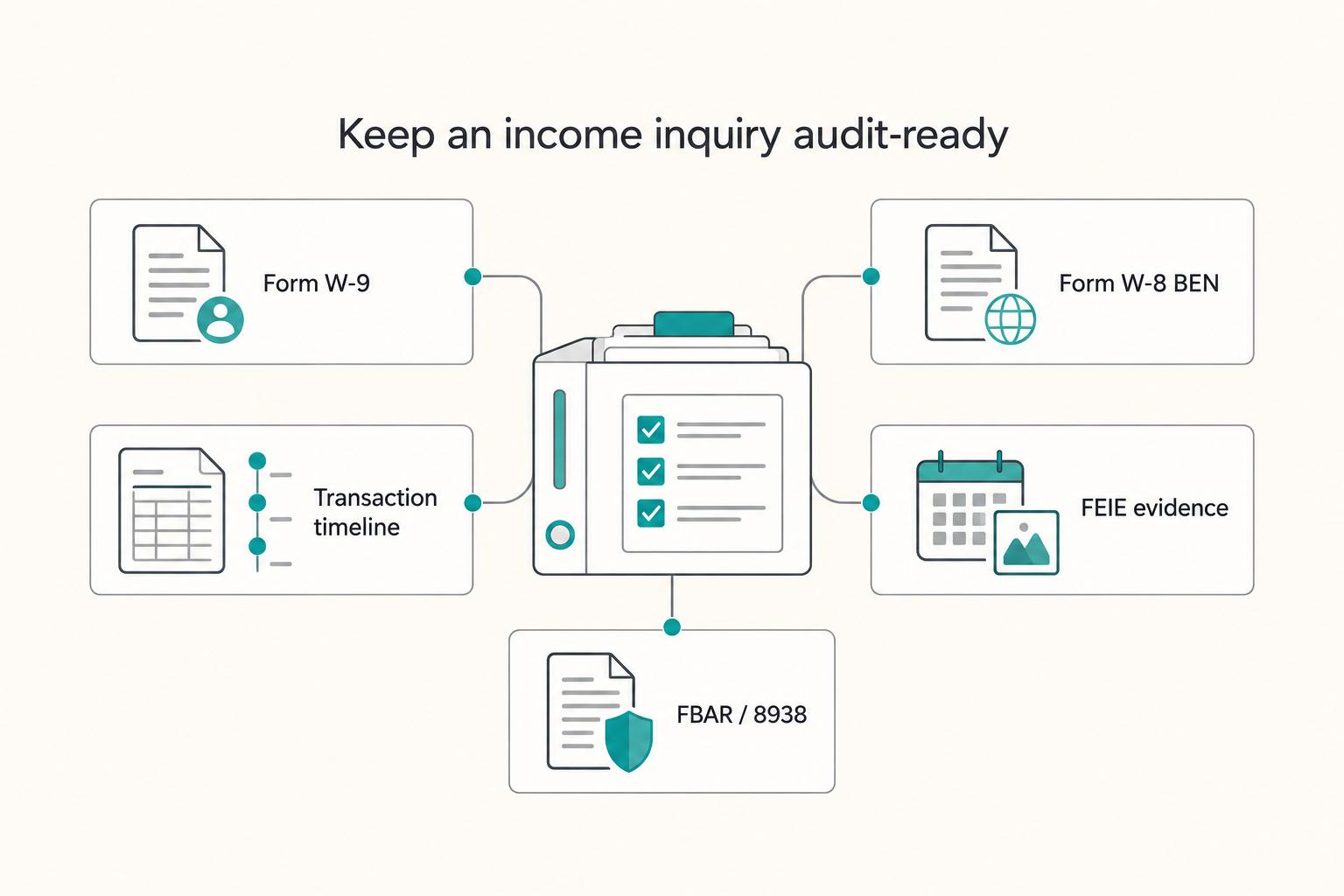
Build one cross-border records timeline that connects payer forms, income evidence, and filing choices before problems compound. Once you have handled this CP2000, you want a system that makes the next one boring. Audit readiness, in practice, is the ability to prove each number quickly without rebuilding your books under pressure.
Run this cross-border records workflow#
| Record or lane | What to keep | Verification point |
|---|---|---|
| Form W-9 | Current files for U.S. payer relationships where you provide a TIN. | Each client record shows which form applied and why. |
| Form W-8 BEN | Records only when you are a foreign person and the payer requests that form. | Each client record shows which form applied and why. |
| Transaction timeline | Invoices, payout records, bank settlement evidence, return inputs, and links to matching tax docs. | Any line on your return traces back to one source chain. |
| FEIE eligibility evidence | Foreign tax home support and physical presence test support (330 full days during a 12-consecutive-month period, where relevant). | Each track has its own checklist and owner date. |
| FBAR and Form 8938 | Separate lanes because one filing does not replace the other. | Each track has its own checklist and owner date. |
- Step 1. Standardize payer identity documents. Keep current Form W-9 files for U.S. payer relationships where you provide a TIN. Keep Form W-8 BEN records only when you are a foreign person and the payer requests that form.
Verification point: each client record shows which form applied and why.
- Step 2. Build one transaction timeline. Tie invoices, payout records, bank settlement evidence, and return inputs into one dated ledger. Add links to matching tax docs (including W-2, 1098, and 1099 when present).
Verification point: any line on your return traces back to one source chain.
- Step 3. Separate U.S. return math from international reporting tracks. Track FEIE eligibility evidence in its own lane, including foreign tax home support and physical presence test support (330 full days during a 12-consecutive-month period, where relevant). Track FBAR and Form 8938 in separate lanes because one filing does not replace the other.
Verification point: each track has its own checklist and owner date.
| Rules vary flag | What to check before filing |
|---|---|
| Form 8938 thresholds | Living in the U.S. and unmarried or MFS: $50,000 year-end or $75,000 anytime. Living outside the U.S. and unmarried or MFS: $200,000 year-end or $300,000 anytime. |
| FBAR threshold | File when aggregate foreign account value exceeds $10,000 at any time in the year. FBAR goes to FinCEN, not the IRS. |
| FBAR timing | Target April 15 receipt date with automatic extension to October 15. |
Keep controls tight and low exposure#
Use traceable file names, monthly reconciliation exports, and a change log for every corrected value. Keep complete records and verify third-party forms for accuracy. If you use online fax for an IRS notice, confirm privacy and security settings before sending.
Common Mistakes and Fast Recovery Moves#
Treat a CP2000 notice as a proposed mismatch case, not a bill, and run a structured recovery pass before you pay or concede anything. This is the fast recovery layer. You move quickly, but you do not trade speed for a sloppy record.
A CP2000 usually points to possible underreported income because third-party records do not match your return. It does not automatically mean a formal tax audit. Your job is to reconcile facts, document your position, and respond by the date on the IRS notice.
Run this five-step recovery pass#
| Recovery move | What to do | Verification point |
|---|---|---|
| Reconcile before payment | Compare every proposed change against each related Form 1099 and the notice instructions before you send money. If a payer record looks wrong, flag it and document why. | You can trace each disputed line to a specific payer document. |
| Rebuild complete evidence packets | For each disputed item, assemble a payer-by-payer file that includes the relevant Form W-2, Form 1098, or Form 1099, plus your matching return support. | Every disputed entry has a complete attachment set, not partial screenshots. |
| Control the deadline with proof | Submit a complete baseline response through the IRS Document Upload Tool when available, then save confirmation artifacts immediately. | You keep date-stamped proof of transmission and a frozen copy of what you sent. |
| Split compliance tracks | Keep CP2000 response work separate from FBAR and Form 8938 workflows. File FBAR with FinCEN, and evaluate Form 8938 on its own rules. | Separate checklists, separate owners, separate submission logs. |
| Escalate ambiguity early | If facts conflict, especially with mixed-source income, stop guessing and bring in a qualified tax professional. | You hand off a concise issue memo with disputed lines, evidence gaps, and open decisions. |
- Reconcile before payment. Compare every proposed change against each related Form 1099 and the notice instructions before you send money. If a payer record looks wrong, flag it and document why.
Verification point: you can trace each disputed line to a specific payer document.
- Rebuild complete evidence packets. For each disputed item, assemble a payer-by-payer file that includes the relevant Form W-2, Form 1098, or Form 1099, plus your matching return support.
Verification point: every disputed entry has a complete attachment set, not partial screenshots.
- Control the deadline with proof. Submit a complete baseline response through the IRS Document Upload Tool when available, then save confirmation artifacts immediately.
Verification point: you keep date-stamped proof of transmission and a frozen copy of what you sent.
- Split compliance tracks. Keep CP2000 response work separate from FBAR and Form 8938 workflows. File FBAR with FinCEN, and evaluate Form 8938 on its own rules.
Verification point: separate checklists, separate owners, separate submission logs.
- Escalate ambiguity early. If facts conflict, especially with mixed-source income, stop guessing and bring in a qualified tax professional.
Verification point: you hand off a concise issue memo with disputed lines, evidence gaps, and open decisions.
Run the CP2000 Response Checklist and Close the Loop#
Close the case with one disciplined loop: classify the notice, reconcile facts, choose your response path, submit evidence, and preserve proof. Execute this in order so nothing slips. In any irs cp2000 notice freelancer case, this checklist keeps your cp2000 notice response accurate, on time, and defensible.
Core system in one line: identify the exact notice variant, verify third-party information mismatches, document your decision, submit your package by the due date, and keep a complete audit trail. Keep it simple, and keep it documented.
- Confirm notice type. Verify whether you received CP2000, CP2000A, CP2000B, CP2000C, CP2000D, or CP2000E, then log the response date shown on the irs notice.
- Reconcile payer records. Match your return against third-party information reports so you can isolate true underreported income issues from reporting mismatches.
- Choose your path. Mark agree, partly agree, or disagree, and write a short reason you can defend under review.
- Assemble the packet. Include the response form, a brief explanation for disputed lines, and a numbered attachment index so each claim maps to evidence.
- Submit and capture proof. Send through IRS Document Upload Tool or the notice-listed fax or mail route, then save the exact files sent, date, and confirmation.
- Separate cross-border tracks. Review FEIE (Form 2555), FBAR (FinCEN Form 114), and Form 8938 under FATCA as separate compliance workstreams when applicable.
- Escalate when risk rises. Bring in a qualified tax professional when facts conflict, foreign-reporting exposure appears high, or independent contractor income sources create ambiguity.
Verification points:
- You can trace every proposed change to a supporting record and a clear decision.
- You can produce proof of submission in minutes.
- You keep CP2000 resolution separate from international filings to reduce preventable compliance risk.
Frequently Asked Questions
Is Notice CP2000 a bill or an audit?
Notice CP2000 is a proposed change notice, not a bill. The IRS sends it when third-party data does not align with your return and it needs your response. Treat it as a verification workflow, not an automatic payment demand.
Why did I get a CP2000 as a freelancer with Form 1099 income?
Freelancers can get a CP2000 when third-party payer data, such as Form 1099 information, does not match what they reported. Start by reconciling the notice against your payer documents and filed return line by line before you respond.
What should I do in the first 24 hours after receiving a CP2000?
Review the entire notice and follow its instructions. Capture the response date listed on the notice, then organize your records and proposed adjustments before choosing your response path.
Do I need to amend my return if I agree with the CP2000?
If you agree and you have no other items to report, you generally do not need to amend your return. If the CP2000 is correct and you also need to report other income, credits, or expenses, file Form 1040-X. That keeps your freelance tax record clean instead of patching it informally.
What do I send if I disagree with the proposed changes?
Mark disagreement on the response form and include a signed statement that explains why you disagree. Attach supporting documentation for each disputed item so the reviewer can trace your logic line by line. Send the package by IRS Document Upload Tool, fax, or mail (based on notice instructions).
What happens if I miss the CP2000 response date?
If you miss the response date, the IRS can escalate the case to a Statutory Notice of Deficiency. For faster resolution, respond within 30 days, or within 60 days if you live outside the United States. If you are late, send a complete response as soon as possible.
Can I include freelancer expenses when resolving a CP2000 mismatch?
Yes, but use the correct route. If the CP2000 position is correct and you need to report additional expenses, include them through an amended return on Form 1040-X. Example: an independent contractor confirms the income mismatch resolved correctly, then files an amended return to report legitimate expenses that were left out.
Try a related tool
Researched and edited by the Gruv editorial team. Gruv builds cross-border billing, payouts, and finance-operations software for global businesses.
Sources
Educational content only. Not legal, tax, or financial advice.
Related Posts

Digital Nomad Taxes in 2026 With a Defensible Filing Plan
With digital nomad taxes, the first move is not optimization. It is figuring out where you may be taxable, where filings may be required, and what proof supports that position.
The Best Digital Nomad Cities for Entrepreneurs and Startups
Choosing a nomad base for your company is an execution decision first. Lifestyle matters, but it belongs in the second round. The costly mistakes usually show up after the city-ranking stage, when a place that looks great online turns into a slow or expensive setup once you start invoicing, signing contracts, and working against real deadlines.

The Freelance Payment Penalty: A Modeled Audit of Platform Fees, FX Spreads, and Payout Delays
The money rarely disappears through a single, easy-to-spot fee. The real loss is stacked. A marketplace takes its commission, a processor adds a charge for international cards, a bank or payment company converts the currency at a spread, a platform holds the funds before release, and a wire sheds a little to intermediaries on the way in. Each layer looks defensible on its own, but the worker feels the combined result as a smaller deposit and a later payday.