
Quick Answer
Start by filing through the official online route, then wait for INSEE assignment and verify the published record before using any identifier externally. To get siren siret number france as a freelancer, keep one clean data pack, submit on procedures.inpi.fr, save your synthese de depot, and confirm that entity and establishment details match in public records. If values conflict, pause client-facing documents, correct the active file, and only resume once your verification checkpoint is clean.
Start Here So You Get Your SIREN and SIRET Right the First Time#
If your goal is to get a SIREN and SIRET in France as a freelancer, treat this as an execution sequence, not a theory piece. The finish line is simple: submit clean data, receive the identifiers that apply to your case, and verify the public record before you use them in business documents.
The fastest way to cut mistakes is to follow the same order every time. Decide your status, prepare one reliable data pack, submit once with consistent entries, then verify before external use. That keeps you out of a common loop: filing quickly, spotting a mismatch later, and spending days correcting records that could have been clean on day one.
Step 1 Lock the core facts before you register#
A SIREN number is the 9-digit identifier for the legal entity. A SIRET number is the 14-digit identifier for an establishment, built from the 9-digit SIREN plus a 5-digit NIC. One business keeps one SIREN and can hold multiple SIRET entries when it operates from multiple establishments.
Keep those roles visible while you work. A common mistake is pasting whichever number is available without checking whether the field is entity-level or establishment-level. Write the role next to the value in your prep notes so you can verify quickly during final review.
Step 2 Use the checkpoint path to avoid guesswork#
Use the same path every time: submit your registration application, track assignment through INSEE (communicated by the CFE), then confirm what is published in the SIRENE directory. This order gives you a clean handoff from filing to verification and helps cut last-minute corrections.
| Checkpoint | What happens |
|---|---|
| Registration application | Submit your registration application |
| INSEE (communicated by the CFE) | Track assignment |
| SIRENE directory | Confirm what is published |
Treat each checkpoint as a gate, not a suggestion. Do not move to onboarding templates, billing details, or compliance-facing documents until the previous gate is complete. A strict gate sequence is usually faster than fixing one wrong identifier across several client and finance files.
Step 3 Separate what is stable from what can vary by case#
The stable layer is the identifier structure and assignment logic. What varies is your filing context, status-specific guidance, whether a SIRET is mandatory in your case, and how many establishment records apply to your setup. Some setups require separate SIRETs for separate businesses, while some micro-entrepreneurs can group multiple activities under one number.
Keep one short rule in mind: if a requirement is tied to a specific status, keep it in a status-only note and do not apply it globally. That habit prevents copy-paste errors when you review multiple pages that look similar but apply to different profiles.
If you want a deeper dive, read Sole Proprietorship vs. LLC: The Definitive Guide for Global Freelancers.
Know What You Are Requesting Before You File#
Most avoidable corrections start the same way: the form asks for one identifier, and the filer pastes another. Confirm the field label first, then match it to the correct identifier role.
This sounds basic, but it drives accuracy across the whole process. If your first identifier mapping is wrong, every later check can still look tidy while pointing to the wrong value. Clean mapping at the start keeps downstream verification meaningful.
Step 1 Match the request to the identifier role#
Treat SIREN number and SIRET number as separate identifiers, and match the form field to the exact identifier requested. In the guidance set, INSEE is described as issuing the SIRET used to identify each establishment. Copy each field label into your prep notes before you start filling the form so you can verify label-to-value matching at review time.
When you review, read each label out loud and answer one question: which identifier is this field asking for? If you cannot answer in one line, pause and clarify before submitting. That short pause usually avoids bigger rework later.
Step 2 Check scope on official guidance first#
Use the Service Public Entreprendre page on getting a SIREN or SIRET as a scope check, but note that its English version is auto-translated and it states that the page does not concern micro-entrepreneur cases. If your status is micro-entrepreneur, switch to guidance specific to that status instead of stretching a page that excludes it.
A practical check here is to write the page scope above your notes before you extract any rule. That small step helps prevent silent scope drift, where a rule from one profile is accidentally reused in another.
Step 3 Flag association-only rules early#
Association material is a boundary reference, not a template for freelance filing. Keep association-specific points, like RNA handling and optional SIRET cases, out of your default freelancer checklist unless your legal setup actually falls into that category.
The failure mode is easy to spot: your checklist starts mixing terms that do not appear in your own filing context. If that happens, split the note into profile-specific blocks and keep only the block that matches your legal setup.
Step 4 Prepare a one-page pre-filing brief#
Before you open the filing form, write a short brief with:
- your legal status and activity context
- the exact identifier label shown on the form
- whether the form asks for establishment-level identification
- the language or version of the official page you used when wording is unclear
Add one final line to that brief: the value you plan to paste into each key field. This turns the brief into an execution sheet, not just a memo.
If you cannot explain each requested field in one sentence, pause and clarify before submission. That pause is not delay. It is a quality-control step that protects everything downstream.
Choose the Right Registration Route for Your Freelancer Situation#
Pick one primary route and stay on it unless you hit a defined ambiguity. Running multiple filing paths at once makes follow-up harder.
Once you choose your route, note why. A one-line rationale makes follow-up easier later, especially if someone else needs to review your file or help with a correction.
Step 1 Confirm your setup before filing#
Set your legal structure, visa context, and status before you enter any form data. Entreprise Individuelle (EI / micro-entreprise) is one option inside broader registration choices in France. Also confirm whether you are being treated as an employee or contractor, since that classification affects which protections apply.
If your setup is still moving, hold submission until the core profile is stable. Filing before those choices are settled can create avoidable edits later.
Step 2 Start with the national online filing path#
Use the national Guichet des formalites des entreprises path as your default route once your visa, legal structure, and status are clear.
Keep one active case thread. If you collect support from multiple sources, centralize decisions in one note and confirm which channel owns the final filing state. If employee versus contractor status is still unclear, resolve that first, since protections differ by classification.
Step 3 Escalate only when there is a clear trigger#
Escalate when you can name the issue in one line, such as uncertain status classification or unclear legal-structure handling. If the trigger is vague, write the question first, then escalate with that exact wording. Clear triggers usually produce clearer answers.
Keep your escalation note short: issue, field affected, and what decision you need. That structure helps you get a usable answer instead of general guidance.
Step 4 Keep a boundary check for readers outside France#
This process is for activity established and operated in France. If you are not establishing locally, do not assume the same requirements apply unchanged. Confirm your establishment scenario first, then verify the applicable registration requirements for that setup.
If you are between setups, document the current state and the target state separately. Mixing those two states in one filing plan creates confusion when you verify records later. Related: Can Digital Nomads Claim the Home Office Deduction?.
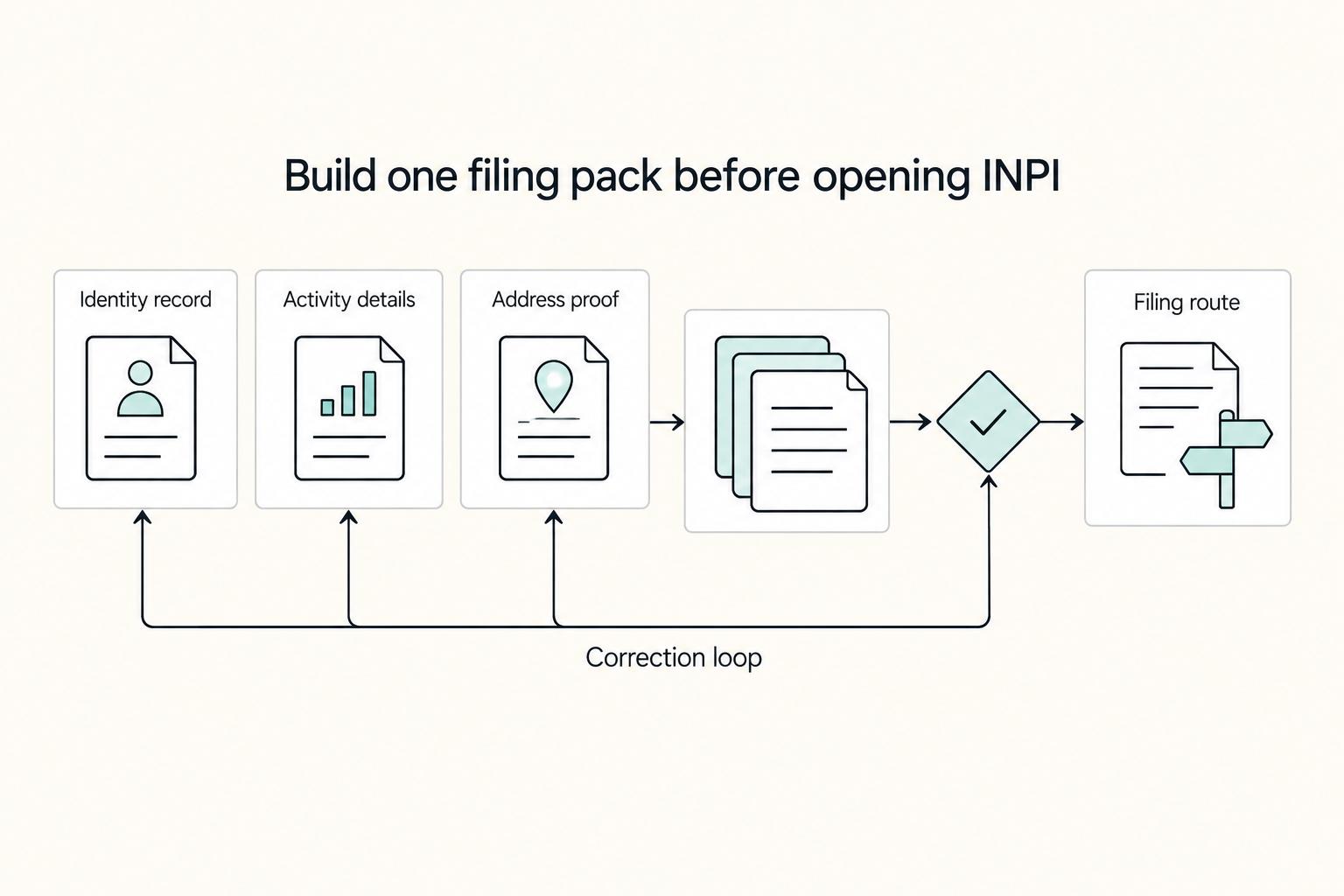
Prepare Your Filing Pack Before Opening INPI#
Preparation often decides whether your filing is one pass or a correction loop. Build one compact pack and copy from it instead of typing from memory.
Treat your filing pack as one current source document with dated edits and clear ownership. That helps keep values stable while forms and support messages change.
Step 1 Confirm your status and activity limits#
Write your status and activity type in plain language, then reuse that exact wording everywhere. In this context, auto-entrepreneur refers to sole proprietorship (micro-entreprise), often described as independent or freelance activity. Run a turnover check before filing: EUR 77,700 for artisanal or liberal activity and EUR 188,700 for commercial activity. If you expect to cross the relevant ceiling, plan a status change.
Do not hide uncertainty in broad wording. If your activity description is still unsettled, resolve that first and then copy the final phrasing into all related fields.
Step 2 Build a minimal evidence pack you can copy from#
Keep one source file with only the inputs you need for filing:
| Pack item | What to include |
|---|---|
| Legal identity | Legal identity details exactly as shown on your primary ID |
| Correspondence address | Legal correspondence address in final format |
| Activity description | Activity description aligned with your status |
| Turnover check | Turnover estimate and the ceiling used for your check |
| ACRE note | If relevant, because it can reduce social security contributions during the first 12 months |
Add a short timestamp at the top of this pack each time you update it. That makes it obvious which version was used for submission and which version came later.
Step 3 Freeze legal name and address consistency#
Run a line-by-line consistency check for legal name and address before you submit anything. Normalize differences in punctuation, abbreviations, and old address fragments now. Address changes should be declared to keep legal information up to date.
A useful check is to compare every place where legal name appears, then every place where address appears. Do these as two separate passes. Splitting the review lowers the chance of skipping a mismatch.
Step 4 Use a strict order for your own execution#
Follow the same order every time: gather and verify inputs, submit, then monitor follow-up checks. Keep one tracking note with submission references and status timestamps so follow-up stays fast.
Record at least three items in that tracking note: submission date, current status, and next checkpoint date. This keeps follow-up active without constant re-reading of old messages.
Submit Registration on INPI Without Creating Rework#
At submission, the goal is simple: enter verified data once, validate carefully, and keep proof files. That is usually faster than a correction cycle.
Treat this as a controlled handoff from preparation to execution. If you feel pressure to rush, use that as a signal to slow down for one final review.
Step 1 Start on procedures.inpi.fr#
Open your account and filing session on procedures.inpi.fr. Since 1 January 2023, this portal replaced the six older registration entry sites, so keep your filing flow in one place.
Before entering data, confirm you are in the correct filing context for your status and activity, since requirements can vary by activity type. A quick context check can help prevent resubmission.
Step 2 Enter entity details exactly as prepared#
Copy legal name and address directly from your filing pack. Even with centralized filing, legacy bodies may still validate parts of the record in the background, so inconsistent entries can create extra validation back-and-forth before the record is forwarded to INSEE.
Before you move on, check three red flags:
- legal name does not match across fields
- street, postal code, or city differs from your supporting details
- any field still contains an old address version
After data entry, run one focused review on entity fields only. Do not combine this with establishment checks in the same pass.
Step 3 Complete establishment details, then apply a pause rule#
Fill establishment details with the same discipline. Keep the format check in mind: SIREN is 9 digits and SIRET is 14 digits (SIREN plus NIC). If establishment structure is unclear, pause and clarify before you submit. Post-issuance fixes can take more time than pre-submit clarification.
If you operate in more than one location, confirm each location record with the same naming and address standards you used for the entity block. Inconsistent formatting between locations can create verification friction.
Step 4 Final validation, submission, and tracking#
Do one final side-by-side check against your pack, submit, and save the synthese de depot. Store submission references and confirmation artifacts immediately. Then monitor status in your INPI personal space and verify published identifiers once available.
Save files in the same folder you used during preparation. Keeping pre-submit and post-submit records together makes mismatch investigation easier if a field later appears differently in public data.
Track Assignment from Submission to Number Issuance#
When you start checking assignment status, use the same review sequence each time. Treat assignment as complete only when structure and consistency checks pass.
First, confirm structure: one SIREN for the entity and one SIRET per establishment. The first nine digits of each SIRET should match the SIREN, with the final five digits representing the NIC.
Next, test consistency across locations. If you operate from multiple establishments, the SIREN block should stay constant while NIC changes. If two records show different first nine digits, treat that as a mismatch and verify before using those identifiers externally.
Then treat timing as variable. There is no standard assignment window defined here, so avoid date promises until identifiers are visible and checked. Use this review sequence each time you check status:
- confirm the expected identifier structure
- compare entity and establishment values against your submission records
- record what is confirmed and what is still pending
Keep this phase focused on identifiers. What you are confirming here is SIREN and SIRET, not a broader timeline.
Verify Your Numbers and Store Proof in One Place#
Do not issue external documents until your filing record and public record agree. Verification is the control point that helps prevent repeat corrections in onboarding and billing.
| Check | Requirement |
|---|---|
| Saved lookup | Lookup result saved with date |
| Record match | Identity details match your filed record |
| Document mapping | Correct establishment-level identifier mapped to each document type |
| Secondary visibility | A free lookup on Infogreffe can be used as a secondary check |
Run your primary check on the INPI data portal, then compare results with your filing records. You can search by company name, SIREN, SIRET, or applicant. Match legal entity name, establishment address, and each establishment-level identifier before you treat the data as ready for external use. Save the lookup with the date, confirm identity details match your filed record, and make sure the correct establishment-level identifier is mapped to each document type.
Add one practical rule for teams: if one checkpoint fails, treat the whole record as not ready. Partial confidence is usually what creates mixed client-facing documents.
If records conflict, pause usage until you resolve the discrepancy in your filing records. Archive dated screenshots, issued-number confirmations, and related files in one folder. As a secondary visibility check, you can also run a free lookup on Infogreffe.
When the record is clean, mark the file as verified and note the date. This gives you a clear baseline for future changes and reduces review time during audits or client onboarding updates.
Handle Multi Location or Activity Changes Without Confusion#
Treat location or activity changes as potential establishment updates first, not automatic entity resets. The entity anchor is stable, while establishment records may need to change.
Your baseline is fixed: the SIREN number is the permanent 9-digit entity identifier. The SIRET number is establishment-level, 14 digits, and built from that SIREN plus a five-digit NIC.
Before you file any change, classify the scenario. If you add or modify an operating address, establishment data may need an update. In this material, the exact trigger for when a new NIC or SIRET is issued is not fully clear, and wording also varies on whether multiple properties can be managed under one SIRET.
Keep one change log with old values, new values, and effective date. That log helps you confirm that downstream files were updated in the same direction as the official record.
Use your official filing path. The sources indicate that, since 2023, business-creation formalities go through the INPI Single Window. Keep one change pack with prior identifiers, new establishment details, effective date, and submission confirmation. After filing, compare public visibility with your submitted data. If values do not align, pause new external documents for that establishment and correct first.
A good checkpoint after each change is to test one real document template against the updated identifiers. If the template still shows old values, update templates before issuing anything externally.
Separate Free Issuance from Registration Costs and Delays#
Cost and timing are the two places where teams overcommit. Treat both as unconfirmed until your own filing context shows concrete values.
The stable part is what each identifier does: the SIREN number identifies the legal entity in France, and the SIRET number identifies each establishment or branch. Accurate verification is linked to smoother reporting and lower penalty risk, while missing verification can lead to delays, fines, and reputational harm. Fee amounts, universal fee rules, and a standard assignment timeline can vary, so confirm current figures through the relevant authority before making hard budget or date promises.
Use a two-bucket plan: one for identifier assignment uncertainty and one for broader registration administration. Keep a contingency line for process expenses so filing does not stall if additional costs appear.
In practice, separate what you know from what you still need to verify. Keep a short list of open questions and close each one before you lock contracts, onboarding dates, or first invoice timing.
For delivery planning, gate commitments on identifier visibility. If numbers are still pending near a deadline, keep non-dependent work moving and hold billing or compliance-facing documents until identifiers are confirmed. Keep status captures, submission confirmations, budget notes, and related receipts in one decision file so final reconciliation is quick.
This approach also protects client communication. You can still show progress without making promises tied to values that are not confirmed yet.
Fix the Most Common Mistakes Before They Compound#
Treat this as a data-quality routine, not a universal correction script. Specific form-usage rules, correction routes, and re-verification procedures vary by case, so confirm requirements in the channel handling your file. Catch inconsistencies early, document them clearly, and verify the applicable steps with the relevant authority.
Correction work is easier to manage when each issue is isolated, evidenced, and tracked to closure. Bundling everything into one request can make follow-up harder because it may be less clear which change should be handled first.
Before You Start#
Create one evidence folder and keep every submission receipt, form version, and status snapshot in it. Use that same folder for updates so you can show exactly what changed and when.
Name files in a way that makes sequence obvious, such as date first and then item type. Clear sequencing can help when you need to show that a value changed after a specific submission event.
- Identify the mismatch type before editing. Define the inconsistency precisely across submitted values, internal records, and public data. Do not combine unrelated issues in one request.
- Collect proof in one place. Store the submitted value, the displayed value, and a dated note describing the gap. Clear proof can reduce back-and-forth.
- Submit one clear correction request through the active channel. Follow instructions in your filing context, and avoid assumptions about escalation paths that are not confirmed for your case.
- Re-check after updates and close the loop. After each change, verify internal records and public entries are aligned, then log final confirmation in your evidence folder.
Add one closure check at the end: confirm templates used by finance and onboarding now match the corrected public record. This discipline can keep small errors from turning into repeated cleanup work.
Copy Paste Checklist for a Clean Freelancer Setup#
Use this as your go or no-go gate before invoicing or onboarding. Run each step in order and move forward only when each checkpoint is satisfied.
Before You Start#
Create one dated evidence folder with identity and activity documents, establishment details, filed form copies, dashboard captures, and confirmation messages. This file set is what you use to verify consistency and handle corrections quickly.
If you work with a teammate, agree on one owner for this folder and one naming rule before starting. Shared ownership without clear structure is a common reason files go missing during follow-up.
- Step 1. Confirm your route and status in France. Choose your path first, including whether you are filing as a
micro-entrepreneur. Since 1 January 2023, formalities are completed online through the guichet unique, which replaced CFE offices. Keep one active filing channel and one person responsible for updates. - Step 2. Prepare and submit a complete digital filing pack. Enter required information and upload required documents in your filing flow. Verify establishment details before final submission, then run a line-by-line check so legal name, address, and establishment data match your evidence folder.
- Step 3. Track assignment in the personal dashboard and capture proof. After validation,
INSEEcommunicates yourSIREN numberandSIRET numberin the dashboard. Confirm format before use: SIREN has 9 digits and SIRET has 14 digits. For newly created businesses, anavis de situationmay appear 24 hours after definitive validation, so save it with your confirmation files. - Step 4. Verify public records and fix mismatches immediately. Check business status in Annuaire des Entreprises and compare identifiers and establishment data against your filing records. If you see references to
sirene.fr, use Annuaire des Entreprises for current checks; functionality moved and closure was announced for December 2025. If any value differs, pause outward-facing documents and submit corrections through your active filing channel. - Step 5. Store final artifacts for recurring compliance tasks. Keep one final packet with dashboard proof, public-record captures, your
avis de situation, and guichet confirmation messages. Keep both identifiers visible in finance and onboarding templates. If a client form conflicts with your public record, stop and reconcile before sending the first invoice.
Before you close this project, run one final pass across templates, contract metadata fields, and onboarding forms. The article sequence only works if your day-to-day documents reflect the verified values you just confirmed.
You might also find this useful: A Freelancer's Guide to Keyword Research. For a next step, browse Gruv tools, or talk to Gruv if you need country or program-specific confirmation.
Frequently Asked Questions
How do you get a `SIREN number` and `SIRET number` in `France` as a freelancer?
Complete registration through the official filing path. Upon registration, each legal entity receives one nine-digit SIREN number from Insee, and every French company or association is assigned at least one 14-digit SIRET number for an establishment. After assignment, verify published details in the public SIRENE directory before using them on external documents. Keep your filing confirmation and verification capture in one folder so later checks are faster.
Is getting a `SIREN number` or `SIRET number` free?
Fee rules and fee amounts vary by filing context, so treat cost claims as unconfirmed until you verify current charges through the relevant authority. Do not promise free without that direct check. Keep a simple budget split so assignment uncertainty and broader registration expenses are tracked separately.
How long does assignment usually take after filing on `procedures.inpi.fr`?
No supported universal timeline is provided here. Track status in your filing context and keep submission receipts available for follow-up. Hold documents that depend on final identifiers until the records are visible and consistent. If a deadline is close, keep non-dependent tasks moving while you wait for confirmed identifiers.
What is the practical difference between a `SIREN number` and a `SIRET number`?
A SIREN number is the company-level legal identifier and has 9 digits. A SIRET number is establishment-level, has 14 digits, and follows SIREN number + NIC. Use SIREN for entity identification and SIRET for a specific location. In form reviews, this difference is your first error-prevention checkpoint.
Can one business have multiple `SIRET number` records in the `SIRENE system`?
Yes. A company can have one SIRET for its head office and additional SIRET entries for other locations. Every French company or association has at least one SIRET. When checking multiple records, the first nine digits should align with the same SIREN and only NIC should differ by establishment.
Where can you check whether your numbers are assigned and correct?
Check the public SIRENE directory and compare it with your filing records. Keep a dated verification record in your files. Do not issue external documents until the filing pack and public record match.
Do non-French freelancers need `SIREN number` or `SIRET number`?
Requirements vary by establishment scenario, so confirm your obligations through the official channel before acting. Also note that one referenced Service-Public page explicitly says it does not apply to micro-entrepreneurs, and its English version is automatically translated with a prompt to check the French page if needed. Keep your case notes specific to your setup so you do not apply the wrong scope by accident.
Try a related tool
Researched and edited by the Gruv editorial team. Gruv builds cross-border billing, payouts, and finance-operations software for global businesses.
Sources
Includes 1 external source outside the trusted-domain allowlist.
Educational content only. Not legal, tax, or financial advice.
Related Posts

Sole Proprietorship vs LLC for Global Freelancers in 2026
For most freelancers in 2026, the practical default is still simple: use the simplest structure you can run cleanly, then formalize when risk actually rises. If your work is still in validation mode and the downside is contained, a sole proprietorship is often the practical starting point. When contract exposure, delivery stakes, or dispute risk starts climbing, forming an LLC deserves earlier attention.

Can Digital Nomads Claim the Home Office Deduction?
Claim the deduction only when your facts and records can carry it. With the home office deduction for digital nomads, the real decision is usually a three-way call: claim it, do not claim it, or pause and get help because your file is not ready.

A Freelancer's Guide to Keyword Research
**You can't run keyword research like a professional service if your "process" changes every time you open a new tool.** If you're running a business of one, your job is to operate with a system you can repeat, quality-control, and defend. Stop shopping for features. Build a repeatable standard you can explain to a client without hand-waving.