
Quick Answer
Build internet for van life around three separate roles: satellite as your main coverage path, a dedicated cellular hotspot for call-critical sessions, and an emergency fallback when both are weak. Set the handoff rules between those layers before client work starts. Then protect operations by checking official documents in their official editions and keeping a small evidence pack for any policy-dependent decisions.
Why "Good Enough" Internet is a Business-Ending Mistake#
If you earn through your connection, "good enough" is not just a budget choice. It's a business continuity decision. Treat your road internet the same way you treat invoicing, backups, or contracts. If it fails at the wrong moment, the damage can be larger than the monthly bill.
Price the real cost of downtime#
Start by calculating your real cost of downtime before you compare plans. The useful question is not "What does this setup cost per month?" It's "What does one failed work block cost me when I cannot deliver, call, upload, or recover quickly?"
Use a fill-in formula based on your own records, not online examples:
Cost of one outage window = blocked revenue (from your invoices) + client credits, refunds, or rush remediation (from your contract terms) + recovery/admin time value (from your time tracking)
Pull those inputs from work you can verify: recent invoices, your calendar, accepted project timelines, and any real penalty or make-good terms you have agreed to. That matters because internet advice gets repeated without context.
If you rely on official guidance for plan or policy decisions, do a quick source check too. Confirm the site is actually a .gov site and that it uses HTTPS. Those are small checkpoints, but they reduce the odds that you build your business around weak information.
Verification point: if one missed half day would wipe out the savings from choosing a cheaper setup, you are not shopping for convenience anymore. You are pricing continuity.
Map the failures clients actually notice#
Clients may care less about the root cause than the impact they experience: a missed handoff, an unstable pitch meeting, or a delayed delivery.
A missed handoff can trace back to preventable choices: relying on one connection, skipping a site test before a scheduled call, or assuming a coverage map equals usable performance. A shaky pitch meeting can come from buying on headline speed instead of evaluating call-quality markers like latency and stability.
A delayed delivery can also be a planning failure. You might start a time-sensitive upload on the same connection you were already stretching, without knowing the plan's priority data terms or having a second path ready. That changes the buying lens:
| Consumer buying question | Professional operating question | Why it matters |
|---|---|---|
| How fast is the download number? | How stable is latency during live calls? | Call quality can degrade before the connection looks fully down. |
| Does it say unlimited? | How reliable is the connection when you need it most? | Reachability may matter more than peak speed. |
| Is this the cheapest large-data plan? | What are the priority data terms and deprioritization rules? | During congestion, cheap plans can stop feeling cheap. |
Operator detail: don't stop at the marketing page. Read the plan terms, screenshots, or account details that describe priority data and deprioritization language, and save them in your notes. That gives you something concrete to verify later if performance changes.
Define your non-negotiable work moments#
Before you buy hardware or plans, remove the single point of failure from your thinking. One carrier, one device, or one connection type may be fine for casual use. For paid work, it can mean one fault takes your whole day with it.
Be especially careful with advice built on one person's setup. A forum report can be useful, but it is not a benchmark. One widely shared van-living thread started on Jun 15, 2022 and described one user's experience over seven months. The author also said there was misleading information circulating about using Starlink as a nomad. That does not make the report worthless. It means you should treat it as a field note, not proof.
The same caution applies to research pages. Seeing an article in PMC does not mean the National Library of Medicine endorses its conclusions. Check the underlying source, the publication date, and whether the advice is still operationally relevant to your route, workload, and client commitments.
Use that lens for the rest of this guide. Before you choose tools, write down your non-negotiable work moments first: live calls, delivery deadlines, and times when being unreachable would visibly hurt trust. Once those are clear, you can build around them with layers instead of one fragile connection.
Set Up Your Connectivity Layers as One Operating Model#
Use this as your operating model: give each connection one clear job so a single failure does not derail paid work. This is a planning framework, not a claim that every van setup must use identical tools.
Assign each layer one job#
Define roles before you compare gear or plans. If multiple layers are expected to do everything, you still have a single point of failure.
| Layer | Purpose | Trigger | Limits |
|---|---|---|---|
| Primary | Runs normal work blocks | Default path when performance is within your verified acceptable range | Can fail from location, congestion, setup errors, or account issues |
| Secondary | Protects client-facing continuity when primary risk rises | Switch before a live task is at risk, or when primary stability is uncertain | Has its own coverage, device, and plan constraints |
| Fail-Safe | Preserves minimum continuity when main paths are not dependable | Use when both main paths are unavailable or too degraded to trust | Not assumed to support full-load work unless you have verified that directly |
Set an early handoff rule#
Use one rule you can execute under pressure: if a client-facing moment is at risk, switch early. Do not wait until the task is already failing.
Write the rule down with a verified handoff trigger so it is operational, not improvised: Handoff trigger: set this from your own field test
Keep evidence with the rule: active plan name, device, and provider limit language from a page or account screen you can verify. Also confirm source relevance, not just recency. For example, an eCFR page can be current (shown up to date as of 3/19/2026) but still be the wrong authority for van-life connectivity decisions.
Implement and rehearse in order#
- Plan role separation and handoff trigger:
set from your field test - Configure each layer for fast switching:
confirm with a failover rehearsal - Test each layer alone and during handoff conditions
- Rehearse failover before live work and log what failed first
Most failures come from late switching, not lack of effort. The next sections break this framework into concrete hardware, plan, and operating choices for each layer.
If you want a next step, turn this framework into a checklist you can run before travel and before live work.
Layer 1: The Primary System for Maximum Coverage (Satellite)#
Use satellite as your Layer 1 coverage anchor when you need usable signal beyond strong tower areas, but treat it as location-sensitive infrastructure, not a guarantee.
Choose satellite for reach first#
In a van, you rely on wireless sources, including cellular towers and satellites, rather than fixed underground cable. That is why satellite fits the Layer 1 role for broad coverage, while your exact setup should follow your operating style.
Starlink RV is one named option in this category. Decide from current provider terms you can verify today:
- Are you mostly stationary, or do you need service while moving?
- Do you want portable placement at each stop, or a fixed install?
- What congestion or priority terms apply to your plan:
confirm on the provider's plan terms
Save the exact plan page or account language you are relying on, so you can change course quickly if terms change.
| Satellite in Layer 1 | Strength | Limitation | Best-fit tasks |
|---|---|---|---|
| Coverage role | Broad reach for usable signal in many locations | Can be affected by obstructions and local conditions | Default path for normal work blocks |
| Throughput role | Supports routine uploads, sync, and office work | Can fluctuate with setup quality and congestion terms | Non-live tasks with some tolerance for variation |
| Live-meeting role | Can work well in clean conditions | Short instability can disrupt calls quickly | Use only after pre-call validation; otherwise hand off to Layer 2 |
Pick portable or fixed based on your stops#
Choose based on your parking reality, not brand preference. Obstructions can include mountains, buildings, canyons, and your own van walls, so placement flexibility can matter as much as hardware.
If your stops are often constrained, portable placement can help you avoid blocked views. If your stops are usually open and you want faster routine setup, fixed mounting may be workable. Confirm current stationary and in-motion terms directly in provider documentation before finalizing.
Size power from your real workday#
Size power for your load, not someone else's build:
- Use your dish power draw once verified
- Multiply by your planned work-block runtime
- Add router/accessory draw once verified if separate
- Add your chosen operating buffer once verified
Your target is simple: power that reliably covers a full work block plus core office load without forcing mid-day shutdown decisions.
Run a repeatable obstruction checklist#
Before you rely on Layer 1, run the same sequence at every stop:
- Scan for likely blockers (terrain, buildings, canopy, van position).
- Validate the location with your provider's obstruction/placement check.
- Place and adjust once if results are marginal.
- Recheck before any critical client-facing session.
Consistency matters more than speed. A repeatable check reduces surprise failures and gives you a clearer handoff signal.
Switch early for client-facing live calls#
Use Layer 1 for normal work when it is stable. For live client meetings, switch to Layer 2 before the call if your pre-call check shows obstruction risk or recent instability.
Your trigger is operational, not theoretical: if confidence is low before a live session, hand off early instead of troubleshooting on camera.
Related: The Best Portable Wi-Fi Hotspots for Travelers.
Layer 2: The Secondary System for Critical Client Calls (Cellular)#
Use Layer 2 as your pre-planned lane for live client work when Layer 1 is not fully trustworthy. The goal is simple: decide your setup before the meeting, not during it.
Choose the device with a call checklist#
Pick between phone tethering and a dedicated mobile hotspot based on how you work, then validate with a real test call.
- Choose phone tethering if you have low call volume, you accept using your phone as your work connection during meetings, and you do not plan to expand with external antenna hardware.
- Choose a dedicated hotspot if you want device independence from your phone, cleaner handoff between layers, and room to add antenna hardware later.
- If phone access during meetings is critical for MFA, client communication, or navigation, separate that risk from your work connection.
Before relying on either option, run one full rehearsal: video on, screen share on, file upload, and a full-length session.
Buy for priority terms, then verify policy language#
Treat priority data and mobility terms as your first buying checks, then confirm the exact terms on your active line. Record the priority amount as pending provider-plan verification until you confirm it on the active plan.
In operational terms, deprioritization means your traffic can be handled later than other users when local capacity is busy. That may still feel usable for light tasks, but it can hurt live meetings.
Use only provider terms tied to your actual account, and check scope and exclusions before you rely on the plan across locations.
MIMO vs booster: test path before you buy#
Use a short comparison pass so you buy the right tool for your tested problem.
| Option | Best use case to verify first | Expected outcome to test |
|---|---|---|
| External MIMO antenna | You want a cleaner external antenna path and your hotspot/modem supports it | More stable behavior in your own side-by-side test setup |
| Cell signal booster | You need a boosted in-vehicle signal path and accept extra hardware/power complexity | More usable in-vehicle connection in your own test setup |
| No added hardware yet | You have not run controlled inside/outside or position-change tests | Avoid buying gear before confirming the real bottleneck |
Run a policy-compliance check before purchase#
Before purchasing any plan, confirm that your intended use matches the policy scope and does not fall into an exclusion. If terms reference fixed location, home service, address limits, or mobility restrictions, resolve that before you depend on the plan.
When entering billing or personal details, use only the provider's official secure site and confirm the lock icon or https://.
Failover trigger: if Layer 1 shows an obstruction warning, recent instability, or a weak pre-call test, move the meeting to Layer 2 before joining.
Layer 3: The Fail-Safe System for Ultimate Redundancy#
Layer 3 is your emergency continuity lane, not a daily work connection. You activate it when Layer 1 and Layer 2 are both not work-grade, and success means you stay reachable long enough to send a critical update, handle a time-sensitive access step, or get navigation support until your primary stack recovers.
Reserve this layer for continuity-only tasks#
Use Layer 3 for short, high-importance actions, then exit. Keep it to things like a brief status message, an urgent login-related step, or route or navigation checks needed to move safely. Wait for Layer 1 or Layer 2 before you run heavy work such as live meetings, backups, large downloads, system updates, or bulk sync jobs.
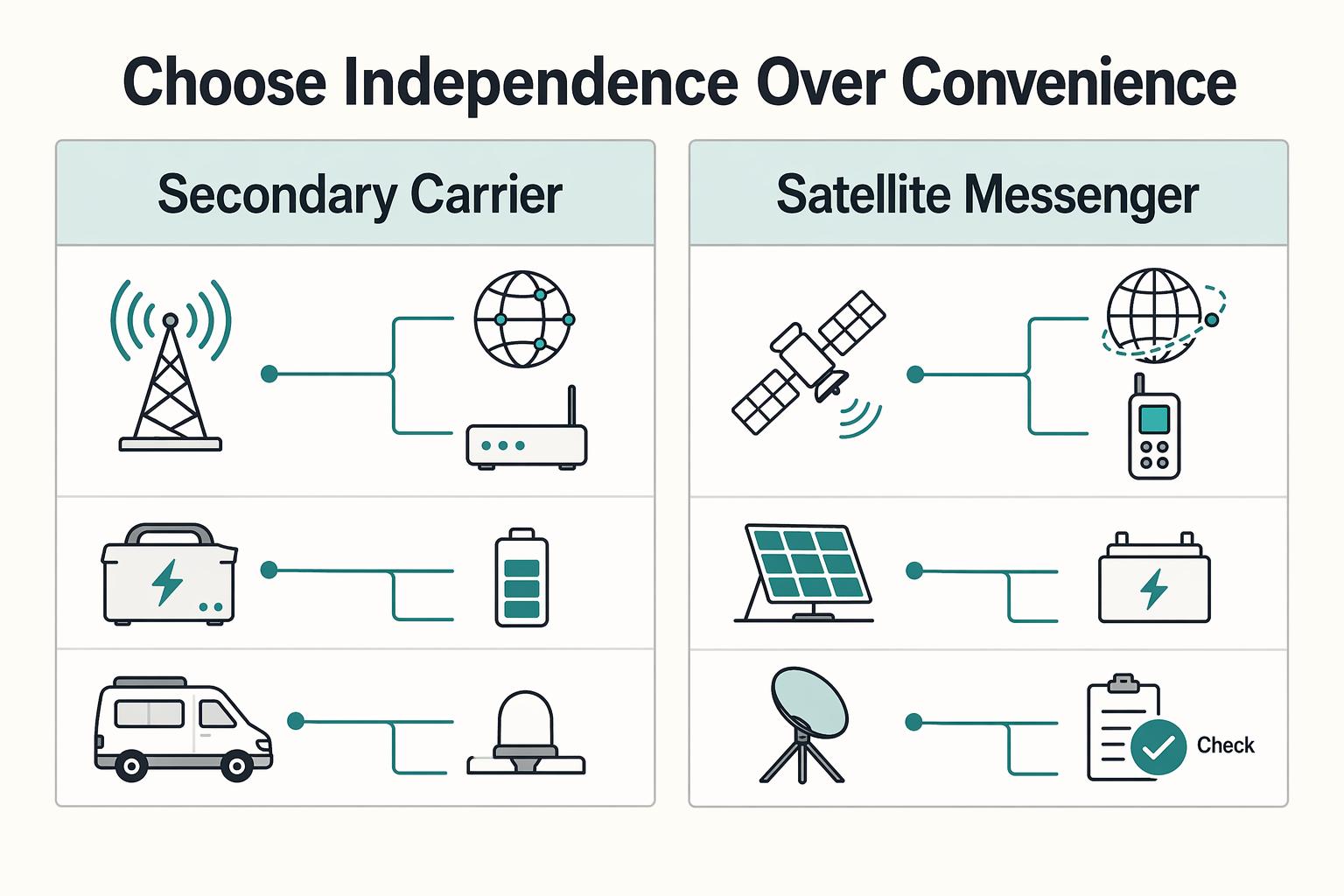
Choose independence over convenience#
Pick a fail-safe option that is operationally independent from your first two layers. In practice, that means using a different network path (for example, a secondary carrier path or a satellite-messaging path), plus separate power and access setup where possible. If you evaluate capability details, mark them as pending field-test verification before you treat them as reliable.
| Option | Coverage profile | Communication type | Practical limits |
|---|---|---|---|
| Secondary-carrier phone | Depends on that carrier at your current location | Calls, texts, light data | Still location-dependent; can fail in weak areas |
| Satellite messenger | Independent of local cell-tower availability | Short messages and check-ins | Not for heavy data or live meeting workflows |
If you automate failover, confirm your router explicitly supports your modem path and health-check-based failover (for example, ICMP/HTTP/DNS probing) before you buy or deploy it.
Keep a five-step emergency runbook#
- Detect the outage.
- Switch to the fail-safe channel.
- Notify clients or teammates with a short delay message.
- Log what failed and where.
- Return to Layer 1 or Layer 2 after stability is confirmed.
This layer completes your three-layer framework: redundancy works only if you rehearse the switch process often enough that execution is automatic under stress.
Treat Document Verification as a Security Control#
Treat document verification as a security control. When a rule or policy affects your client work, rely on the official edition, not just a browser copy.
Check status first#
Before you act on a document, confirm what version you are reading. FederalRegister.gov states its web/prototype view is informational and not an official legal edition of the Federal Register, so use it for reading, then verify against an official edition.
For the FCC rule referenced in this section, verify these details against the official record: 89 FR 45404, Publication Date 05/22/2024, and Effective Date 2024-07-22.
Use the official PDF as your working record#
Use the page's "View printed version (PDF)" link and keep the official PDF on govinfo.gov as your reference copy when decisions, timelines, or client communication depend on the text.
| Version | Status | Acceptable use | Required check |
|---|---|---|---|
| FederalRegister.gov web/prototype/XML view | Informational, unofficial | Quick reading and initial research | Verify against an official edition |
| "View printed version (PDF)" link on FederalRegister.gov | Path to the official printed version | Review and recordkeeping | Confirm citation and dates match |
| Official PDF on govinfo.gov | Official document format | Final reference for verification and records | Keep the file with your notes |
If you rely on unofficial XML alone, it does not provide legal notice to the public or judicial notice to the courts.
Keep a small evidence pack#
When a policy update changes your operations, save a compact record: the official PDF, the page URL, the citation, and your access date. Before client-facing decisions, do a fast check: open the saved PDF, confirm citation and dates, and make sure your notes point to the official edition.
This pairs well with our guide on A Guide to the 'PARA' Method for Organizing Your Digital Life.
Conclusion: You're Not Buying Internet; You're Investing in Your Reputation#
Treat your setup as operating infrastructure, not a bargain hunt. The standard is continuity, call quality, and backup readiness. The real risks are simple and professional: a missed call, a missed deadline, or a client deciding you are harder to trust than the next option.
The key idea is the three-layer model. Layer 1 can give you broader coverage in more isolated areas. Layer 2 can give you a more call-ready cellular connection when service is available. Layer 3 can keep you from being completely offline when the first two fail. That is not extra gear for its own sake. It's how you reduce single points of failure.
- Audit your current setup. Write down what you use for primary access, call-heavy work, and emergency fallback. Then verify each layer in the field: can your satellite setup get a clear sky view from where you usually park, does it have consistent power, and can your dedicated mobile hotspot reliably support a real meeting where you travel most often?
- Identify what can fail at the same time. A common mistake is thinking you have redundancy when both options depend on the same weakness. Obstructions can block satellite, and weak coverage can hurt cellular. If your backup is just another device on the same carrier, or you rely on public Wi-Fi for sensitive work, you still have a reputation problem waiting to happen.
- Set a fallback routine before you need it. Research likely connectivity stops before travel, decide when you switch layers, and keep an essential-task plan for low-bandwidth moments. If your current setup cannot handle one obstruction, one weak-signal stop, or one power issue, fix that next.
We covered this in detail in The Best Satellite Internet Options for Sailors.
Frequently Asked Questions
What is the most reliable setup for internet for van life?
Use all three layers. Your van depends on cellular towers and satellites rather than fixed cable, so each layer should cover a different failure. Layer 1 is satellite for broader-coverage access in remote areas, Layer 2 is a dedicated cellular connection when tower service is usable, and Layer 3 is your emergency fallback when the first two are unavailable. If you are trying to choose one provider instead of building overlap, you are accepting a single point of failure.
Is satellite worth it if you already have a strong cellular plan?
Often yes if your routes include remote areas, because Layer 1 and Layer 2 can fail for different reasons. Cellular may be the better option when tower service is strong, but satellite gives you another coverage option when towers thin out. The practical tradeoff is to avoid relying on either layer alone if your work requires steady connectivity.
Satellite or cellular: which should you use first?
Pick based on the job, then keep the other layer ready. Satellite is usually the broader-coverage choice, while cellular is often the better fit when tower signal is solid. The right first choice depends on whether your current stop gives you clear sky, usable tower service, and a task that can tolerate brief instability. | Decision point | Satellite | Cellular | | --- | --- | --- | | Main role in the 3-layer setup | Layer 1 primary coverage | Layer 2 backup when tower service is available | | Strongest advantage | Coverage option when you are far from town | Can be easier to use when tower signal is solid | | Common blocker | Trees, buildings, and limited sky view | Terrain, distance from towers, and obstructions including van walls | | Use this when | You have clear sky and need to stay online from a remote stop | You need to get work done in an area with usable tower service | | Main risk if used alone | Coverage can fail under obstruction | Service can disappear outside tower range |
How much data do you actually need?
Measure your own work for a month, then map it to the layers. Layer 1 should carry your general work volume, Layer 2 should cover your critical meeting windows, and Layer 3 should be reserved for short, essential tasks only. If a carrier advertises priority data or a threshold, mark the plan threshold as pending provider-plan verification and confirm it on the provider's own plan terms, not a roundup post that may include affiliate bias.
How should you secure your connection on the road?
Use a short priority checklist. First, share sensitive information only on official, secure websites. Second, treat FederalRegister.gov text as informational for legal research and verify legal details against an official Federal Register edition. Third, if a policy or rule change affects operations, save the linked official govinfo PDF rather than relying on an informational web version alone.
What should you do if your signal is poor after you park?
Start with Layer 2 and test from a better spot, because obstructions can include mountains, buildings, canyons, and even van walls. If that does not recover service, reposition for clearer exposure and try Layer 1 where you have better sky access. If both are weak, switch to Layer 3 for the essential message or task, then move before you commit to heavier work.
Researched and edited by the Gruv editorial team. Gruv builds cross-border billing, payouts, and finance-operations software for global businesses.
Sources
- dls.virginia.gov/commissions/jcots/materials/broadband_report...trusted
- docs.fcc.gov/public/attachments/DOC-401676A1.pdftrusted
- docs.fcc.gov/public/attachments/DOC-400675A1.pdftrusted
- ebudget.ca.gov/2026-27/pdf/BudgetSummary/FullBudgetSummary.pdftrusted
- ecfr.gov/current/title-40/chapter-I/subchapter-C/part-51trusted
- energy.gov/sites/prod/files/High-Impact%20Low-Frequency...trusted
- federalregister.gov/documents/2024/05/22/2024-10674/safeguarding...trusted
- federalregister.gov/documents/2024/05/22/2024-10674/safeguarding...trusted
Educational content only. Not legal, tax, or financial advice.
Related Posts

The 2026 Global Digital Nomad Visa Index for 50+ Countries
Start with legal fit, not lifestyle filters. The practical order is simple: choose a route you can actually document, then decide where you want to live. That single change cuts a lot of wasted comparison work and stops you from falling in love with places that were never a real filing option.

The Best Portable Wi-Fi Hotspots for Travelers
If you are trying to buy the **best portable WiFi hotspot** for paid travel work, treat it as an operations decision, not a gadget decision. Route fit comes first, plan terms come second, and hardware comes third. That order helps you avoid the most expensive mistakes.
The Best RVs and Campervans for Digital Nomads
If you're searching for the **best rvs for digital nomads**, do not start with brand hype or dealer roundups. Start with your workday. The wrong layout will cost you every day, even if the rig looks great on the lot.