
Quick Answer
Use a landlord-facing document, not your full file, for how to get a schufa report in Germany for rental applications: request SCHUFA-BonitätsCheck (or BonitätsAuskunft) to share, and keep the Art. 15 DS-GVO Datenkopie for private review. Start by aligning your identity and address details across records, then verify live purchase-page requirements before submitting. This protects privacy and reduces avoidable resubmissions.
The Strategic Choice: Which SCHUFA Report Is Right for Your Mission in Germany?#
Use two different SCHUFA documents for two different jobs: keep the Datenkopie (nach Art. 15 DS-GVO) for your private audit, and share a SCHUFA-BonitätsCheck or SCHUFA-BonitätsAuskunft when a landlord needs proof of creditworthiness.
The main difference is privacy. SCHUFA describes the Art. 15 data copy as personal information that can include sensitive details, while the BonitätsCheck is built for third-party sharing and limited to contract-relevant information.
| Document | Intended use | Who should see it | Data exposure level | Typical delivery format | When to request it |
|---|---|---|---|---|---|
| Datenkopie (nach Art. 15 DS-GVO) | Personal review, error checks, record audit | You only | Higher (includes sensitive information) | Personal access copy from SCHUFA | Before applications, or when you want to audit your file |
| SCHUFA-BonitätsCheck | Shareable proof of creditworthiness | Landlords, employers, other third parties | Lower (contract-relevant information) | Digital PDF | When preparing rental applications |
| SCHUFA-BonitätsAuskunft | Landlord-facing paper option | Landlords needing paper | Lower (landlord-facing format) | Paper | When the rental process asks for a non-digital handoff |
If you request the Datenkopie, treat it as a private control document. SCHUFA says it is provided under Art. 15 DS-GVO for personal information, generally free of charge, with processing often around 4 to 7 days but legally up to one month.
If you need a document to submit in a rental process, use the landlord-facing format instead. The SCHUFA-BonitätsCheck is listed at 29,95 € one-time, and its PDF sharing window is 60 days as currently listed.
The decision rule is simple: if your goal is to check your own file, request the Art. 15 copy; if your goal is to prove creditworthiness to a landlord, share the BonitätsCheck or BonitätsAuskunft. These shareable formats are designed for third parties and focus on contract-relevant information instead of your full data history.
If you want a deeper dive, read Should Your Freelance Business Accept Credit Cards?.
Keep one consistent address and identity record, then request the SCHUFA document#
A practical path is to keep one consistent address and identity record across each step, then request the SCHUFA document that fits your application use case. Clean data handoffs matter more than speed on any single form.
Use live verification before each submission. Hard claims about current fees, processing speed, or universal eligibility rules are not established, and one referenced source explicitly says accuracy is not guaranteed. Verify current requirements directly before you submit.
| Step | What you are establishing | What to verify first | Dependency | Typical blocker | Immediate fallback |
|---|---|---|---|---|---|
| Step 1 | One address anchor you can reuse everywhere | Which address and identity evidence each office or provider says it accepts | None | Temporary housing details are not accepted in one system, or address records conflict | Get written confirmation from the relevant office/provider on what they currently accept |
| Step 2 | A financial profile with matching identity details | The provider's live onboarding requirements, including any address or tax fields | Step 1 often helps, but verify actual rules | Name mismatch, incomplete onboarding, or unsupported verification route | Use an alternative onboarding route, or manual review if available |
| Step 3 | A shareable SCHUFA document for your application use case | Product name, current fee, payment method, and identity requirements shown at checkout | Step 2 may support your identity trail, but confirm before purchase | Portal cannot verify identity or cannot match address details | Use provider support or any listed manual/in-person route instead of repeated blind resubmissions |
Step 1: Secure your address anchor#
Start with the address record you can document most cleanly. Do not assume one office's requirements will match another's; verify current requirements directly before you submit anything.
Finish this step with one exact address format you will reuse everywhere, including apartment notation, c/o line, and spelling. Save a PDF or clear photo of each confirmation. If formats differ across systems, fix that before you move on.
Step 2: Align your financial-account identity data#
Consistency matters more than provider choice here. Use the exact same name and address format from Step 1, and do not switch transliterations, abbreviations, or name variants between systems.
Your checkpoint is that the identity details you plan to use in the SCHUFA request match your account and onboarding records. Save that evidence.
Step 3: Request the shareable SCHUFA document#
Request the document only after your earlier records match. Before paying, verify four live items on the purchase page: exact product name, current fee, delivery wording, and accepted identity route.
At submission, compare name, birth date, address, email, and payment details line by line against your earlier records. If anything is off, correct it first instead of submitting and retrying later.
If you do not have permanent housing yet#
Without permanent housing, address handling can become inconsistent quickly, so avoid improvising. Confirm what each relevant office or provider will currently accept, then use that exact format everywhere.
| Situation | What to do | Keep or use |
|---|---|---|
| Temporary address is confirmed as usable | Keep written confirmation of the exact format and reuse it across all steps | Written confirmation of the exact format |
| Temporary address is not confirmed | Pause and get an approved alternative path before submitting | Approved alternative path before any submission |
| Online identity verification fails | Stop repeated retries and use official support or any listed alternative channel | Official support or listed alternative channel |
- If an office or provider confirms your temporary address can be used, keep written confirmation of the exact format and reuse it across all steps.
- If they do not confirm it, pause and get an approved alternative path before submitting.
- If online identity verification fails, stop repeated retries and use official support or any listed alternative channel.
Rule of thumb: if you cannot prove the same identity at the same address across steps, pause and fix the source record first.
Pre-submission checklist#
Before you submit, do one final consistency pass. This catches more problems than a second or third blind retry.
| Item | Confirm |
|---|---|
| Full name | Matches across ID, address record, financial profile, and portal account |
| Address format | Is identical everywhere, including c/o, unit/apartment, and postal code |
| Portal contact and payment details | Email, phone, and payment details are current and accessible |
| Earlier confirmations | Screenshots/PDFs from earlier steps are saved in one folder |
| Fallback options | Support and manual/in-person fallback options are identified in advance if online verification is unstable |
This consistency pass can prevent avoidable resubmissions.
Related: Can Digital Nomads Claim the Home Office Deduction?.
As you build your rental application packet, keep your residency and finance admin in one repeatable workflow with the Tax Residency Tracker.
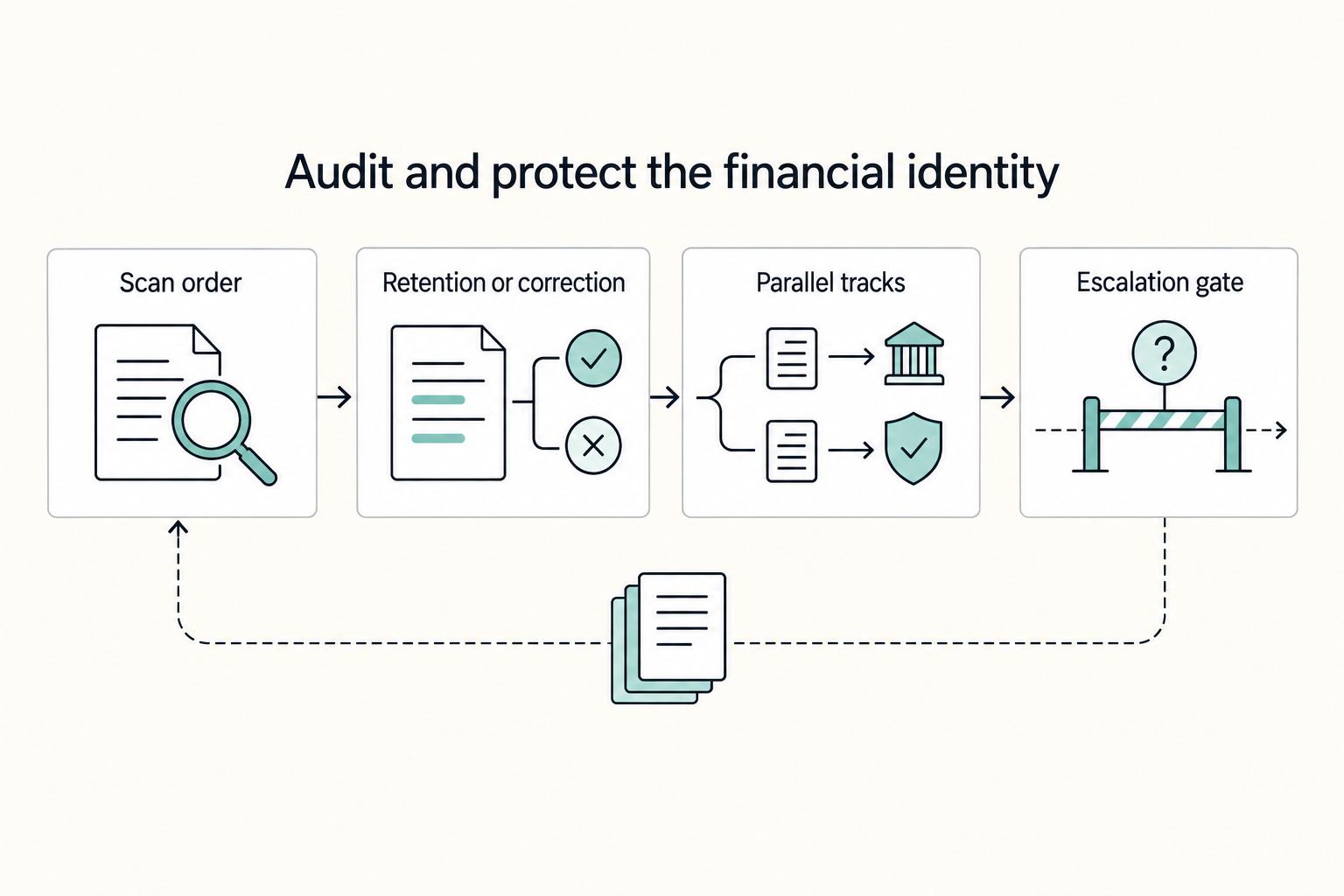
Active Management: Auditing and Protecting Your Financial Identity#
Your SCHUFA-Datenkopie (Art. 15 DS-GVO) is most useful as a private audit tool, not as a document to share. SCHUFA states that only you receive your full stored record, while requesting companies receive less.
Set up your review before you start filing complaints: keep one folder with your data copy, ID, current address proof, closure or settlement documents, and payment receipts, plus a simple issue log with date found, entry, problem, evidence, and next follow-up date.
Scan Checklist (in this order)#
| What to scan | Why it matters | Risk if ignored | Action to take |
|---|---|---|---|
| Name, birth date, current address | These identity fields anchor all matching. SCHUFA also allows address/name changes via its contact portal. | Mismatched identity data can make other entries look inconsistent and slow correction. | Compare line by line with your ID and address proof; save the exact mismatch. |
| Closed or stale accounts with wrong status | Incorrect or incomplete account data should be corrected. | Old or wrong statuses can create avoidable friction in housing or finance checks. | Mark the exact line, note the reporting company, attach closure/final statement proof. |
Inquiry entries, including Konditionenanfrage | Inquiry type matters: Konditionenanfrage is not disclosed to other SCHUFA partner companies. Inquiries are stored for 12 months, with partner-company visibility limited to 10 days. | You may treat normal retention as an error, or miss an unfamiliar inquiry. | Check date, company, and type; if unfamiliar, ask the company to explain its berechtigtes Interesse. |
| Settled debts and paid-off loans | Settlement does not always mean immediate deletion; paid-off loans without payment defaults can remain for 3 years after settlement. | You might dispute a correctly retained entry, or miss a genuinely wrong "open" status. | Split items into "correctly retained" vs "incorrect status," and attach settlement/payment proof. |
If a flagged item has no exact line reference and no matching document, do not file yet.
Separate retention from correction#
Use two labels in your log: Correction request and Retention question.
If data is wrong, incomplete, or assigned incorrectly, request correction. If data appears accurate but older than expected, verify retention logic before you escalate. That split keeps your evidence pack tight and prevents avoidable disputes.
Run two tracks in parallel#
When you identify a true error, open both channels promptly when practical:
| Evidence item | When to include |
|---|---|
| Screenshot or page from your Datenkopie | Include with each submission |
| One short statement of what is wrong | Include with each submission |
| ID and, if relevant, address or name-change proof | Include ID each time and add address or name-change proof when relevant |
| Closure, settlement, or payment documents | Include when the issue involves closure, settlement, or payment status |
| Prior correspondence or portal confirmations | Include when available |
- Contact the reporting company, which is typically the GDPR controller for that data.
- File the issue with SCHUFA Private Customer Service, citing the exact entry.
Send a tight evidence pack each time:
- Screenshot or page from your Datenkopie
- One short statement of what is wrong
- ID and, if relevant, address or name-change proof
- Closure, settlement, or payment documents
- Prior correspondence or portal confirmations
Track both cases with submission date, channel, and reference number. GDPR rights requests must be answered without undue delay and at the latest within 1 month, with a possible extension of 2 further months when justified. If you have no acknowledgment after about two weeks, send one follow-up with your original submission date and attachments.
Escalate only if the first round stalls#
Do not escalate too early. First get a written reason for any rejection and save it in your log. You should also be informed of complaint and judicial-remedy rights. For the SCHUFA ombuds route, SCHUFA indicates you first need review via its Private Customer ServiceCenter and must provide a full case description with relevant document copies.
Keep this process routine: pay on time, close unused accounts cleanly, keep one consistent identity and address format, and archive proof when events happen. That reduces avoidable disputes and makes your file easier to defend when timing matters.
For a step-by-step walkthrough, see How to Get a Mortgage in Portugal as a US Freelancer.
From Anxious Applicant to Confident Resident: Owning Your Financial Identity#
Once you separate what you share from what you keep, the whole process becomes simpler. Share only what is necessary for external review, keep fuller records for private checks, and manage your file like something you maintain over time.
A credit reference agency securely stores data such as credit applications, accounts, and financial behavior, and lenders update that data regularly. So the practical approach is straightforward: disclose only what the other party needs, and review the fuller record yourself.
| Use | What you do | Reader benefit |
|---|---|---|
| Share externally | Send only the information prepared for third-party review | Smoother review and less unnecessary disclosure |
| Keep private | Keep fuller personal records for your own review | Better privacy protection and easier error checks |
| Maintain over time | Save dated copies of documents sent and received | Lower avoidable friction if questions come up later |
Step 1 Separate your files by purpose#
Before you send anything, confirm that you are sharing only what is required, not your full personal record. This is the fastest way to avoid accidental oversharing.
Step 2 Send a clean, consistent application packet#
A strong application packet usually looks ordinary: complete documents, consistent personal details, and clear communication. Missing pages or mismatched details can create avoidable back-and-forth.
Step 3 Keep the full record for review, not distribution#
Use your private copy to check for entries that look unfamiliar, outdated, or inconsistent with your records. Keep a dated folder with the report, submission confirmations, and any correction messages.
Step 4 Reuse the same routine each time#
The goal is not complexity, but repeatability.
- Share only what is needed for external review.
- Keep the full copy private for your own checks.
- Confirm personal details match across every document.
- Save dated copies of what you submit and receive.
- Recheck your record periodically so small issues do not compound.
You might also find this useful: How to Build Credit as a Freelancer.
Once your credit-report process is under control, tighten your broader get-paid workflow with Gruv's practical tools hub.
Frequently Asked Questions
Should you order a `Datenkopie` or a `Bonitätsauskunft` / `SCHUFA-BonitätsCheck`?
The choice depends on timing and intended use. A third-party guide describes two paths: a free SCHUFA copy (once yearly, by post) and a paid Bonitätsauskunft available online right away. Before ordering, confirm the current product details on SCHUFA's site and with the recipient if a landlord or provider requested it.
Is it a good idea to give your landlord the free report?
There is no confirmed official distinction here about whether the free copy is accepted for landlord sharing. Confirm the exact format your landlord accepts before submitting anything; if timing matters, compare that requirement against the free postal copy and the faster paid option.
What is the fastest way to get a SCHUFA document?
A third-party guide describes the paid online route as the fastest path. Because live availability, ordering steps, and charges can change, confirm the current process before relying on it for a rental deadline.
Can you still get one if the website blocks you with captcha or verification errors?
Possibly, but treat it as an access issue to document, not something to guess through. If a captcha or verification page gives you an incident ID, timestamp, or similar error detail, save it. Retry once in a clean browser session, then follow the current contact route shown by SCHUFA if access still fails.
Can you get a report immediately after arriving in Germany?
Not always. A third-party guide says issuance is usually only possible after you have lived in Germany for some time and have a German bank account, so same-day availability is uncertain for newcomers. Complete your local setup, then check whether your record is available before promising a landlord immediate documents.
What if your personal details do not match across documents?
If your personal details differ across documents, keep the mismatch visible and avoid guessing which version SCHUFA will use. Align your details before submitting a new request, and use SCHUFA's current correction path if a record needs to be updated.
Try a related tool
Researched and edited by the Gruv editorial team. Gruv builds cross-border billing, payouts, and finance-operations software for global businesses.
Sources
Includes 2 external sources outside the trusted-domain allowlist.
- commission.europa.eu/law/law-topic/data-protection/information-in...trusted
- commission.europa.eu/law/law-topic/data-protection/rules-business...trusted
- documents1.worldbank.org/curated/en/262691559115855583/pdf/Credit-Rep...trusted
- edpb.europa.eu/system/files/2025-06/spe-training-on-ai-and-...trusted
- eur-lex.europa.eu/eli/reg/2016/679/2016-05-04/engtrusted
- sunyorange.edu/catalog/docs/SUNYOrangeFall2008CollegeCatalo...trusted
- checkyourcreditreport.euexternal
- fsb.org/uploads/P011117.pdfexternal
Educational content only. Not legal, tax, or financial advice.
Related Posts
Should Your Freelance Business Accept Credit Cards?
Offer card payments, but stay in control of how money reaches you. The goal is not a smoother checkout screen. It is predictable cash you can use to run the business.

Can Digital Nomads Claim the Home Office Deduction?
Claim the deduction only when your facts and records can carry it. With the home office deduction for digital nomads, the real decision is usually a three-way call: claim it, do not claim it, or pause and get help because your file is not ready.

How to Build Credit as a Freelancer
To build credit as a freelancer, stop relying on motivation and start running a simple, repeatable system that still works when income is uneven. You run a business-of-one, and credit is part of your operating model, not a personality test. If you've ever blamed your "money habits," you probably just lacked a workflow that turns irregular cashflow into consistent credit behavior. Start thinking like an operator: controls first, then tools.