
Quick Answer
To get a Wyoming LLC Certificate of Good Standing online, use the Wyoming certificate page with your entity's Filing ID. If you do not know the ID, use Name Search first and match the result to your records. Then generate the certificate, save it immediately, confirm the entity details, and validate it with the Certificate ID if the recipient needs that extra proof.
Get your Wyoming certificate without last minute surprises#
Use the Wyoming process in this order: confirm the right entity, generate the certificate, validate it, and save both documents so you can respond quickly when a requester asks for proof.
This is a practical guide, not legal advice. The official materials reflected here support the core sequence: use a Filing ID to generate, then a Certificate ID to validate. They do not fully settle processing time, how long another party will treat a certificate as current, or all fee questions.
In this workflow, execution details matter. A missing ID, a record mismatch, or a skipped validation step can create avoidable rework. Get your inputs straight first, then run the sequence once.
Think of this as a document-control task, not a research project. The goal is not to collect every possible Wyoming record. The goal is to produce the specific certificate the requester needs, confirm it matches your entity, and keep enough backup material that you do not have to reconstruct the process later. That is why the order matters.
If you skip ahead and generate before you verify the entity record, you can create a clean-looking document that still needs to be redone. If you generate correctly but do not validate, you may still need a follow-up before sending. If you do both but fail to save the files and identifiers together, the next follow-up turns into another search.
Follow this sequence#
- Prepare inputs before you start.
Have the exact legal entity name, the Filing ID, and a save location for documents. Wyoming's form expects that ID, and the page shows an example format: 2000-000123456.
- If you do not know the ID, use Name Search first.
The official page directs you to the Name Search page when the identifier is unknown. Do not proceed until the entity details in your records match what you found.
- Generate the certificate using the verified ID.
Enter it on the official page to obtain the Certificate of Good Standing. Before sharing it, confirm the certificate reflects your entity details.
- Validate the certificate before sending it.
Enter the Certificate ID in the validation flow. If the ID is found, the system returns a Validation Certificate in PDF format.
- Save a compact evidence trail.
Keep the generated certificate, the Validation Certificate PDF, the Filing ID, the Certificate ID, who requested it, and the date sent.
If someone is actively asking for proof, generate and validate now. If not, at least confirm and store your ID so the next request does not turn into a scramble.
One practical habit makes the process smoother: write the request context down before you click anything. A single line such as "bank renewal request; asked for current good standing PDF; needs upload today" is enough. That note helps you pick the right path, choose the right file name, and remember later why you generated a fresh document instead of relying on one you already had.
You might also find this useful: What is a 'Certificate of Good Standing' and When Do You Need One?.
Know exactly what document you are requesting#
Start with this distinction: Wyoming separates getting a Certificate of Good Standing for a business entity from validating an existing certificate. If you send the wrong PDF, the requester may reject it even if it looks official.
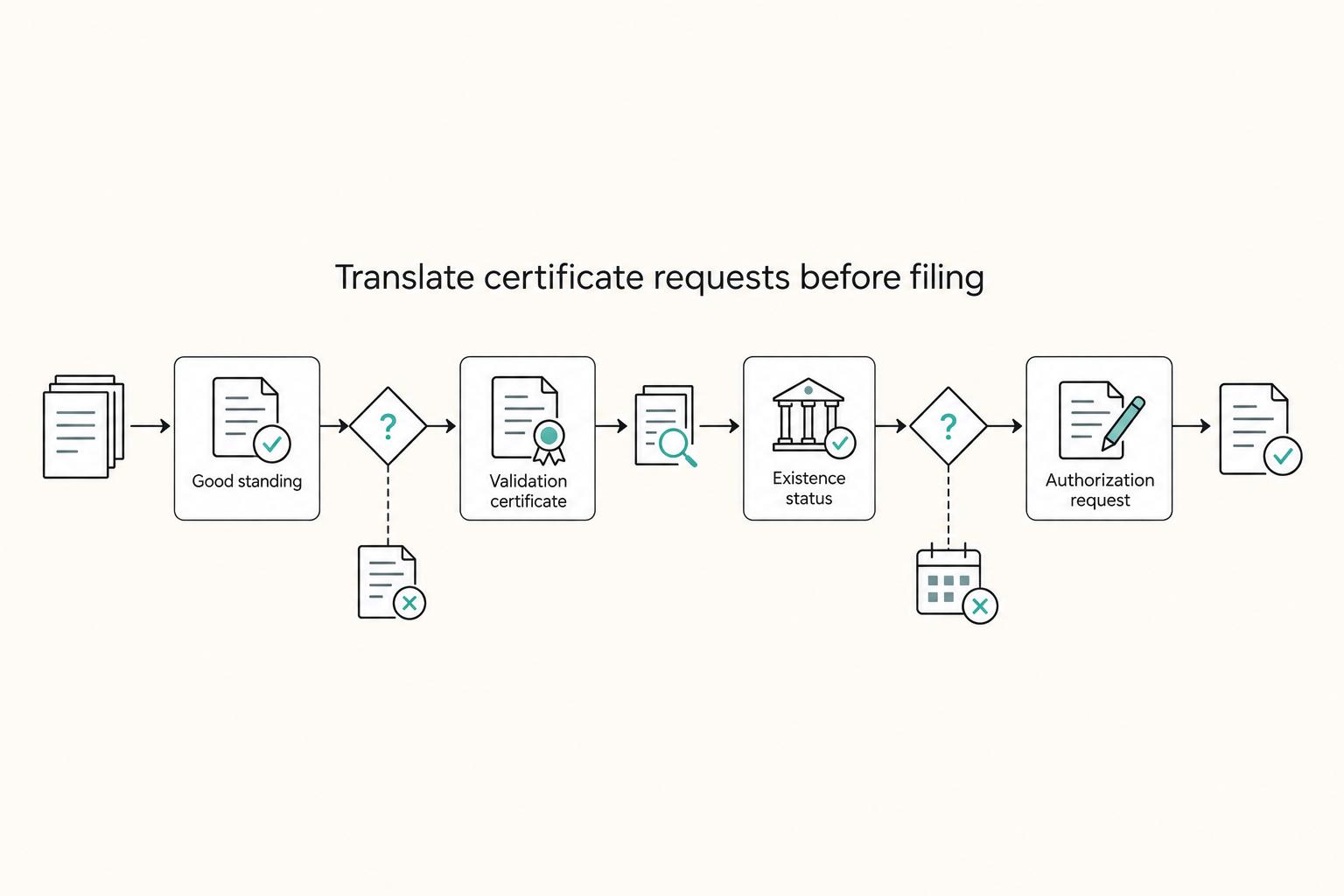
That distinction matters because request language can be loose. A request may say "proof of status," "standing certificate," "entity certificate," or "validation" without clearly mapping to one Wyoming portal action. Translate the request into the right state action before you send anything.
Step 1. Identify the Wyoming document action#
On the Wyoming Secretary of State page, you obtain or verify a Certificate of Good Standing by entering the entity's Filing ID. If you do not have it, use Name Search first. The page shows an example format: 2000-000123456.
Use this quick rule:
- If the request is for entity proof, use the
Filing IDflow. - If the request includes a
Certificate ID, use the validation flow. - If a
Certificate IDis found, the portal returns a Validation Certificate PDF.
If the request is vague, pause and classify it before you touch the portal. Ask yourself what the other side is trying to confirm: proof tied to the entity (Filing ID) or validation of a specific certificate (Certificate ID). Those are related questions, but they are not the same workflow.
Step 2. Translate loose request language before sending anything#
Requesters may use labels that do not match Wyoming's wording. Treat those labels as something to confirm, not an automatic document match.
| Counterparty wording | Likely Wyoming output or next action | What to verify |
|---|---|---|
| "Certificate of Good Standing" | Generate using the Filing ID flow | Entity details match your records |
| "Validate this certificate" or request includes Certificate ID | Retrieve the Validation Certificate PDF | Certificate ID is found |
| "Certificate of Existence" or "Certificate of Status" | May refer to good standing, but confirm | Ask whether a Wyoming Certificate of Good Standing is acceptable |
| "Certificate of Evidence" | Do not substitute automatically | Ask for the exact required document |
| "Certificate of Authorization" | Ambiguous | Confirm jurisdiction and exact filing name |
One mismatch to watch for is sending only the Validation Certificate when the requester wanted the Certificate of Good Standing, or the reverse. If the wording is unclear, tell them exactly which files you can provide and ask them to confirm.
Keep the clarification short and concrete. A useful reply is: "We can provide a Wyoming Certificate of Good Standing and, if needed, the separate validation output tied to the certificate's Certificate ID. Please confirm which file you require."
Another good habit is to compare the requester's label to the file you are about to send. Open the PDF, confirm what it is, and make sure that title lines up with the written request. If it does not, stop and clarify.
Decide whether to pull a certificate now or wait#
Use this rule of thumb: if a counterparty needs current proof now, pull it now. If no one is actively requesting it, document your Filing ID and wait. Use this quick screen:
| Request-driven trigger | Pull now or wait | What to confirm first |
|---|---|---|
| You are submitting a Foreign Qualification or Foreign Business Entity filing packet | Pull now only if that packet or reviewer requests it | Exact document name, accepted PDF, and any recency requirement |
| A bank, lender, or underwriting team asks for standing proof | Pull now | Whether they want the certificate, validation, or both |
| A platform, partner, or onboarding team explicitly asks for proof of good standing | Pull now | Their upload format and document label |
| No open filing, underwriting, or onboarding request | Wait | Keep your ID ready so you can generate quickly |
Keep the timing decision separate from the portal mechanics. Wyoming's page confirms the inputs: use a Filing ID to obtain or verify, and use a Certificate ID to validate an existing certificate, which returns a Validation Certificate PDF when found. If you do not know your Filing ID, use Name Search first. Those mechanics do not create a universal rule that you should always pull one in advance.
Before you generate anything, ask for the requester's recency requirement in writing. If they only say "good standing," confirm whether they want a Wyoming Certificate of Good Standing, validation output, or both.
For solo operators, waiting can be cleaner when there is no live request. For teams dealing with more third-party reviews, it can make sense to pull closer to submission when a reviewer asks, then validate before sending.
The practical reason to wait when there is no live request is simple: document age standards often come from the receiving side, not from your preference. A certificate that is acceptable today may still get challenged later if a bank or agency wants something more recent. Pulling early may not solve that problem, and it can create extra work if the file needs to be replaced anyway. By contrast, keeping the Filing ID ready lets you move quickly without creating stale documents.
If you do decide to pull now, tie that decision to a specific event. For example: "we are sending the filing packet this week," or "the bank asked for current standing today." That keeps your process disciplined. You are not collecting certificates out of habit. You are generating them in response to a concrete need. That small distinction helps when you are deciding whether to refresh, resend, or rely on a file already in your folder. Related: The 'Profit First' Method Part 2: Setting Up Your Bank Accounts.
Gather prerequisites before opening the portal#
A little prep prevents avoidable delays. Before you open the request flow, decide which path you are using, where files will live, and what record you will keep.
1) Gather the inputs for your chosen workflow#
Before you start, gather what your selected request method asks for.
- your exact legal entity name from your records
- any identifier requested by the specific workflow you are using (online or mail)
- access to the records you will use to resolve name or ID questions quickly
A practical Wyoming guide treats "gather required information" as its own step. It also lists both online and mail request paths, so the exact input list can vary by path. An official Wyoming Secretary of State field-by-field requirement list is not provided here, so treat items like Filing ID as workflow-dependent and verify them in the request flow you choose.
Make the inputs match one source of truth before you start. If your internal records, prior PDF names, and onboarding paperwork show slightly different versions of the entity name, settle that first.
2) Set storage before you generate anything#
Create one location for the request package before you download files. Keep:
- the original
PDF - any validation/check output you ran
- a short internal note showing who requested it and when
This simple storage step keeps one-off attachments from disappearing when follow-up requests come in. A third-party workflow explicitly includes a quality-control and storage step, which supports doing this before sharing anything externally.
A workable minimum is one folder containing the certificate, the check output, and a short note with request details.
3) Run a name-match checkpoint#
Before submitting, verify that the entity name you plan to use matches the name on the onboarding or application paperwork. Catching small mismatches early is easier than answering preventable reviewer questions later.
Do this comparison deliberately. Read the legal name from your records, then read the name shown in the request packet or application. If anything looks off, resolve it before you generate the certificate.
4) Record request context and path#
Add one sentence before you start: who asked, what they called the document, and any recency requirement they gave you. If you are using a third-party provider, note whether you are using an online or mail path, and do not assume timing from quoted examples.
That sentence becomes your operating instruction for the rest of the workflow. It tells you what output to seek, what to save, and what to send, while leaving a clear trail for repeat requests.
If you want a deeper dive, read Sole Proprietorship vs. LLC: The Definitive Guide for Global Freelancers.
Step 1 find your Filing ID fast#
Do not generate anything until you have confirmed the Filing ID against your own records. If you do not already have it in your compliance files, stop and recover it first, then match it to your formation documents before moving forward.
If you use a search result to locate entity details, treat that result as the starting point, not the finish line. In the excerpt behind this guide, Filing ID lookup steps are not shown and the term is not defined, so your own verification step is still the real control point.
Before proceeding, confirm the following:
- the exact legal entity name matches your records
- the legal suffix, for example
LLC, matches your documents - the entity details match the entity you intend to request for
After confirmation, store the ID in your compliance file with a short note on when and how you verified it. That turns future requests into a retrieval step instead of another lookup.
If you are moving quickly, this is the step most likely to get rushed. Resist that impulse. A fast lookup is useful only if it points to the right record. The safest pattern is simple: locate the entity, compare it to your own records, then save the Filing ID in the same place you keep your certificate files. That way the next request starts from a verified identifier instead of another fresh search.
When more than one person handles filings, storing the verification note matters almost as much as storing the ID itself. "Verified against formation records" is enough. You do not need a long memo. You just need a clear sign that the identifier was checked and not copied forward blindly from an older document or an email thread.
For the certificate request itself, electronic certificates of good standing are confirmed here to be free and include a validation number for validation. If you need a manually signed original certificate, use the separate Certified Copy/Certificate Request workflow.
Step 2 generate the certificate from the official Wyoming page#
Once you verify the Filing ID, this part should be simple: use the official page, save the output immediately, and confirm the entity name before you share anything.
Enter the Filing ID on the official form#
On the Wyoming Business Division certificate page, use the generate side of the form and enter the ID exactly as it appears in your records.
If you do not know your Filing ID, use the Name Search page first, then return to this form.
Use the form's example, 2000-000123456, as a quick format check. If the ID you pasted looks incomplete or inconsistent with your records, stop and re-check before submitting.
This is one of those steps where being mechanical helps. Copy from the verified record, paste into the form, then compare what you entered to your saved ID once before you submit. Do not rely on memory, and do not "fix" a number because it looks unusual. If the format gives you pause, that is your cue to re-check the source record, not to guess.
Save the output right away#
Generate the certificate, then save the returned document immediately to your compliance folder. Use a consistent filename so retrieval is fast, for example:
YYYY-MM-DD_Wyoming-LLC_Certificate-of-Good-Standing_[Legal-Entity-Name]
If the file opens in your browser first, save and name it while it is still on screen.
Do not leave this for later. Browser tabs get closed, temporary download names get lost, and files saved to a general downloads folder are easy to mix up. Saving right away is part of the workflow, not an afterthought. If you use a standard file name every time, later review gets much easier. The date, state, document type, and entity name are visible before anyone even opens the file.
Confirm details before sharing#
Before you send it, open the file and confirm the legal entity name matches your Wyoming LLC exactly, including the LLC suffix. If it does not match, do not share it. Re-check the ID and generate again.
If the generated certificate includes a Certificate ID, store it with the file. You will use that ID in the next step, and validation returns a Validation Certificate PDF only when the entered Certificate ID is found.
One more practical check here: make sure the file you are reviewing is the file you just generated. That sounds obvious, but it is easy to open an older file with a similar name and think you are done. A consistent naming pattern helps, but the real control is opening the saved file from the folder where this request will live and checking the entity details there. Then, if a Certificate ID appears, copy it into your note or folder record immediately so you do not have to reopen and hunt for it later. Related reading: How to Set Up a US LLC from Australia.
Step 3 validate before you send anything#
Treat this as a send-or-no-send checkpoint. In one excerpted Wyoming guide, Step 3 is choosing your application method, and Step 4 is "Quality Control and Storage."
Step 3 lists two methods: Online Request (recommended for digital entrepreneurs) and Mail Request. Official Wyoming portal-level validation instructions are not provided here, so treat Certificate ID-style checks as unconfirmed unless the filing channel you use explicitly provides them.
Keep a small evidence pack together so follow-ups are fast. Include:
- generated certificate
PDF - any confirmation or check output available in your request channel
- requester name
- submission date
That extra checkpoint takes little time, and it can reduce avoidable back and forth during review.
Quality control also changes how you answer questions later. Without a stored check record, you may have to retrace the request steps. With it, your response is simpler and more consistent.
Operationally, the cleanest approach is to treat Step 3 and Step 4 as one sitting. Choose the application method, complete the request, then finish quality control and storage before you send anything out. If your records do not line up, stop and re-check before sharing files.
When you send the package, keep your description plain. For example: "Attached are the Wyoming Certificate of Good Standing and our quality-control records." That tells the reviewer what is included without creating confusion about which file is which.
Related context: How to Structure an LLC Operating Agreement for a Multi-Member Partnership.
If you want this quality-control process to be repeatable across counterparties, use this checkpoint list as your internal SOP. Then map it to a workflow in the Gruv docs.
Handle unknowns without guessing#
When details are unclear, label the unknowns instead of filling the gaps with guesses. For this process, treat fees, timelines, and document-age rules as unconfirmed until you verify them through an official Wyoming source or receive written requirements from the receiving party. Informational resources can help you get oriented, but they may be unofficial; when legal accuracy matters, verify against the applicable official edition/PDF and written recipient requirements.
| Item | Known now (from your own file) | Unknown until officially confirmed |
|---|---|---|
| Filing ID | If present, the identifier shown in your saved records | Any claim about what Wyoming requires it to mean or how it must be used |
| Certificate ID | If present, the exact ID on your saved document or output | Any claim that a specific Wyoming generation or validation workflow is officially required |
| Generate or validate result | A saved official PDF and matching output you can reproduce | Any assumption based only on memory, screenshots, or summaries |
| Fee | A current official page or receipt in your file | Any amount from blogs, forums, service sites, or old notes |
| Processing time | Current official wording or your own dated completion record | Any promise like instant, same-day, or fixed business-day timing from third-party content |
| Validity period or acceptable age | Written recipient requirements or clear official wording | Any blanket claim that a certificate is always valid for a fixed number of days |
Use this as a hard gate: if it sits in the unknown column, do not present it as settled fact.
Set one strict rule for your process: do not publish fee or timing claims without an official source check at the time you send.
When unknowns affect delivery, ask the counterparty to define the requirement in writing before you send:
- "Please confirm the maximum acceptable document age and whether you require the original PDF, a validated copy, or both."
- "Before submission, please confirm your recency requirement in days and the exact file format you accept."
If they do not define a standard, note that explicitly and send the most current document you can obtain. That keeps your process clear and cuts down on avoidable follow-up.
This habit matters because uncertainty has a way of turning into accidental misstatements. Someone asks, "How long is this good for?" and the temptation is to answer from memory or from what another reviewer said last time. That is exactly what to avoid. If you do not have the rule in writing or on a current official source, state that it is unconfirmed and ask for the standard. Clear uncertainty is better than confident guesswork.
In day-to-day terms, your file should separate facts you hold from assumptions you have not verified. A saved PDF is a fact. A result you can reproduce from saved records is a fact. A fee from an old blog post, a remembered review comment, or a recycled internal note is not. Keeping that distinction sharp reduces the chance that a simple certificate request turns into a debate about timelines, costs, or document age. You never needed to settle those points in the first place.
This pairs well with our guide on How Canadians Can Set Up a US LLC Without Tax Surprises.
Common mistakes that delay approvals and how to recover#
The clearest delay risks documented here are weak books-and-records control and missed foreign-qualification compliance. A practical recovery pattern is consistent: pause, confirm requirements in writing, verify your records, and resend only a corrected package.
| Issue | Risk | Recovery |
|---|---|---|
| Weak books-and-records control | Incomplete or hard-to-trace records can turn routine requests into rework | Run a records checkpoint before sending; keep the current file, the original request, and a clear send log together, then confirm they align |
| Failure to qualify to do business (foreign LLC) | A recognized LLC failure mode is foreign-qualification failure | Verify qualification status in the relevant state; if status is not current, correct that first and then resubmit |
| Sending before verification | Submitting before internal verification can create avoidable back-and-forth | Pause the send, run one full internal check against your records, and send a single corrected package |
| Assuming Wyoming certificate mechanics without confirmed guidance | Confirm current requirements with the Wyoming Secretary of State before acting | Mark those mechanics as unknown here and confirm the current Wyoming requirements directly before acting |
1) Weak books-and-records control#
If your records are incomplete or hard to trace, routine requests can turn into rework. Recovery: run a records checkpoint before sending. Keep the current file, the original request, and a clear send log together, then confirm they align.
The supervisory-procedures excerpt explicitly treats books-and-records retention as a compliance checkpoint. If the record trail is not clean, fix that first.
2) Failure to qualify to do business (foreign LLC)#
A recognized LLC failure mode is foreign-qualification failure. Recovery: verify qualification status in the relevant state before you submit related paperwork. If status is not current, correct that first and then resubmit.
Treat this as a sequence issue, not an explanation issue: clear the compliance condition, then send the package.
3) Sending before verification#
Submitting before internal verification can create avoidable back-and-forth. Recovery: pause the send, run one full internal check against your records, and send a single corrected package.
A short correction with a clean file set is usually easier for reviewers to process than a long narrative.
4) Assuming Wyoming certificate mechanics without confirmed guidance#
Recovery: confirm the current Wyoming requirements directly before acting.
The common thread is control at the moment of action: verify records, verify qualification status, then send.
Need the full breakdown? Read How to Set Up a US LLC as an Indian Citizen.
Keep a lightweight compliance file for repeat requests#
If this comes up more than once, a lightweight compliance file will save you time. The goal is simple: keep the identifiers, current certificate files, and request history together so the next request is mostly retrieval.
| Step | What to do | Key detail |
|---|---|---|
| Build a one-page entity record | Keep a mini record with the legal entity name, Filing ID, last validation number, latest validated certificate file, and a short request log | Exact-match the legal name and suffix to formation paperwork; entity search accepts either Filing ID or entity name |
| Tie the file to annual report maintenance | Track annual report timing in the same file | Use the anniversary month of formation as the due month; Wyoming allows filing up to one hundred and twenty (120) days before the due date; a courtesy reminder is sent sixty (60) days before if an email is on file |
| Refresh only to the requester's stated recency rule | Confirm acceptable document age in writing before generating a new certificate | Generate a new certificate only if the current validated file falls outside that stated standard; printing or validating is at no cost; a last sixty (60) days rule appears as a context example, not a universal rule |
Step 1. Build a one-page entity record#
Create a mini record with only the fields you will reuse:
- legal entity name exactly as registered
- Filing ID
- last validation number from the electronic certificate
- latest validated certificate file
- short request log: requester, date, purpose, and any recency rule they gave you
Use the ID as your anchor. Wyoming describes it as the identification number assigned by the Secretary of State's Office, and entity search accepts either Filing ID or entity name. Before you mark anything as current, exact-match the legal name and suffix in your record to your formation paperwork so the right certificate file stays tied to the right entity.
Keep this record deliberately small. If it becomes a dumping ground for every email and attachment, it stops being useful as a quick operational tool. Aim for one clean page or note that tells you what the entity is, which identifiers matter, what the latest validated file is, and what prior requesters asked for. Everything else can live in the folder beneath it.
Step 2. Tie the file to annual report maintenance#
In Wyoming, staying in good standing requires annual report compliance, so track annual report timing in the same file. Record your anniversary month of formation as the due month, and note that Wyoming allows filing up to one hundred and twenty (120) days before the due date.
If you have an email on file, watch for the courtesy reminder sent sixty (60) days before the due date. Official Wyoming pages show both SOS_AnnualReports@wyo.gov and SOSAnnualReports@wyo.gov, so treat both as valid sender formats. Keep your own calendar control in the file rather than relying only on reminder emails.
Operationally, this matters because certificate requests often arrive when another deadline is already in motion. If you can see your standing-related maintenance and your certificate history in the same place, you spend less time piecing together context from different systems. You are also less likely to assume everything is current just because an older certificate is sitting in the folder.
Step 3. Refresh only to the requester's stated recency rule#
Do not refresh by habit. When a counterparty requests a certificate, confirm the acceptable document age first and get it in writing. Then generate a new certificate only if your current validated certificate file falls outside that stated standard.
Wyoming lets you print or validate a certificate at no cost, but acceptable age is still context-specific. One Wyoming conversion document uses a last sixty (60) days condition in that filing context. Use that as a context example, not a universal rule.
A good lightweight practice is to add one line to your request log whenever you refresh. For example: "new certificate pulled because requester required more current document." That way, future refreshes are based on an actual request history rather than habit. Over time, your file becomes more useful because it shows which counterparties cared about age, which wanted validation, and which were satisfied with the standard certificate alone.
Copy this checklist before you request your next certificate#
Use this only when there is a live request, then run the same four checks every time.
Step 1 Confirm the trigger#
- Confirm who asked and why, for example a bank, investor, state agency, or another requesting party.
- Get any age or format requirement in writing before you generate anything.
- Do not assume a fixed Wyoming fee, processing time, or validity window; confirm current requirements with the requester and official portal flow.
- If the requester cannot define what they accept, pause and clarify first.
A live request should create a clear record, not a scramble. If you cannot say who asked, what they asked for, and what timing they gave you, you are not ready to generate yet.
Step 2 Verify entity details before portal work#
- Match the exact legal business name to your own records.
- Make sure the name in the request packet matches your entity name exactly, including the legal suffix.
- Confirm required reports are filed before you request.
- If you track extra internal identifiers, verify them now, but follow the live portal instructions for what is actually required.
This is the step that prevents you from producing a technically valid document for the wrong record. A one-minute check here can save an entire resend cycle later.
Step 3 Use the official Wyoming path#
- Start from the Wyoming Secretary of State forms page and use its Online Services Portal link for Wyoming LLC online actions.
- Use that state path first instead of assuming a third-party shortcut will satisfy the request.
- Before sharing, confirm the issued document details match your entity record, including legal name and date of issuance.
Once the certificate is generated, save it immediately and make sure you know exactly where it lives. Do not assume you will be able to find it later from browser history or downloads.
Step 4 Validate what you can and store an evidence pack#
- Complete any built-in portal verification step if one is provided.
- If no verification method is shown, follow the portal flow and confirm with the requester what proof they need.
- Store a complete record: issued certificate copy, any verification details, requester name, request purpose, and send date.
If you keep this evidence pack together from the start, the next follow-up is usually easy. You can show what you generated, what you checked, and what you sent without rebuilding the story from memory.
For a step-by-step walkthrough, see Delaware C-Corp vs Wyoming LLC for Your Next Growth Stage.
After you standardize this certificate process, you can run disbursements with clearer status tracking and policy-gated controls through Gruv Payouts.
Frequently Asked Questions
How do I get a Wyoming LLC certificate of good standing online step by step?
Use Wyoming's certificate page and enter the Filing ID to obtain or verify the certificate. If you do not know the ID, use Name Search first, then return to the certificate page. Save the generated file and confirm it matches your entity records before sharing it. If the recipient wants extra proof, complete validation too so you have both outputs together.
What information do I need before I start, and where do I find my `Filing ID`?
You need the Filing ID assigned by the Wyoming Secretary of State. The article shows an example format of 2000-000123456. If you do not have it, use Name Search and cross-check the result against your records. Save the ID with your entity file so future requests start from a verified identifier.
Is a certificate of good standing the same as a `Certificate of Existence` or `Certificate of Status`?
The article does not confirm that Certificate of Existence or Certificate of Status is officially interchangeable with Certificate of Good Standing. Treat the exact name as a recipient requirement and ask the bank, filing office, or onboarding team to confirm what they will accept. If the wording is unclear, send back the Wyoming document name and ask for written confirmation.
When do I need this for `Foreign Qualification` as a `Foreign Business Entity`?
The article does not state that this certificate is required for foreign qualification. Confirm the receiving state's or filing service's requirements before requesting documents. If they ask for standing proof, provide the certificate and its validation output if needed. If they do not specify the document title or age standard, ask them to define both in writing.
What is the `Certificate ID`, and how do I use it to validate a certificate?
Use the Certificate ID from the issued certificate to validate it on Wyoming's certificate page. The article says the electronic certificate includes a validation number assigned when generated. If the ID is found, the system returns a Validation Certificate PDF. Store the Certificate ID with the file so you can run validation without rework.
Are Wyoming fees, processing times, or validity windows confirmed in official excerpts?
The article confirms one point: electronic certificates of good standing are free. It does not confirm official processing times, expiration windows, or a universal recent standard. It also does not provide a fee amount for a manually signed original certificate.
What should I do if a bank asks for a “recent” certificate and rejects my current `PDF`?
Ask the bank to state its required document age and format in writing, because recent is not defined in the article's Wyoming excerpts. Then generate a new certificate and validate it with the Certificate ID before resubmitting. If they require a manually signed original, use the Certified Copy/Certificate Request form path. Keep the resend package simple and explicit.
Researched and edited by the Gruv editorial team. Gruv builds cross-border billing, payouts, and finance-operations software for global businesses.
Sources
- casperwy.gov/Documents/Government/City%20Council/Agendas%...trusted
- dos.ny.gov/system/files/documents/2026/03/031126_0.pdftrusted
- federalregister.gov/documents/2021/12/08/2021-26548/beneficial-o...trusted
- irs.gov/pub/irs-pdf/i1120s.pdftrusted
- irs.gov/pub/irs-pdf/p2104.pdftrusted
- lf-public.deq.utah.gov/WebLink/DocView.aspxtrusted
- nycourts.gov/reporter//files/bv/41Misc3d.pdftrusted
- sec.gov/Archives/edgar/data/1644419/0001580642200035...trusted
Educational content only. Not legal, tax, or financial advice.
Related Posts

Sole Proprietorship vs LLC for Global Freelancers in 2026
For most freelancers in 2026, the practical default is still simple: use the simplest structure you can run cleanly, then formalize when risk actually rises. If your work is still in validation mode and the downside is contained, a sole proprietorship is often the practical starting point. When contract exposure, delivery stakes, or dispute risk starts climbing, forming an LLC deserves earlier attention.
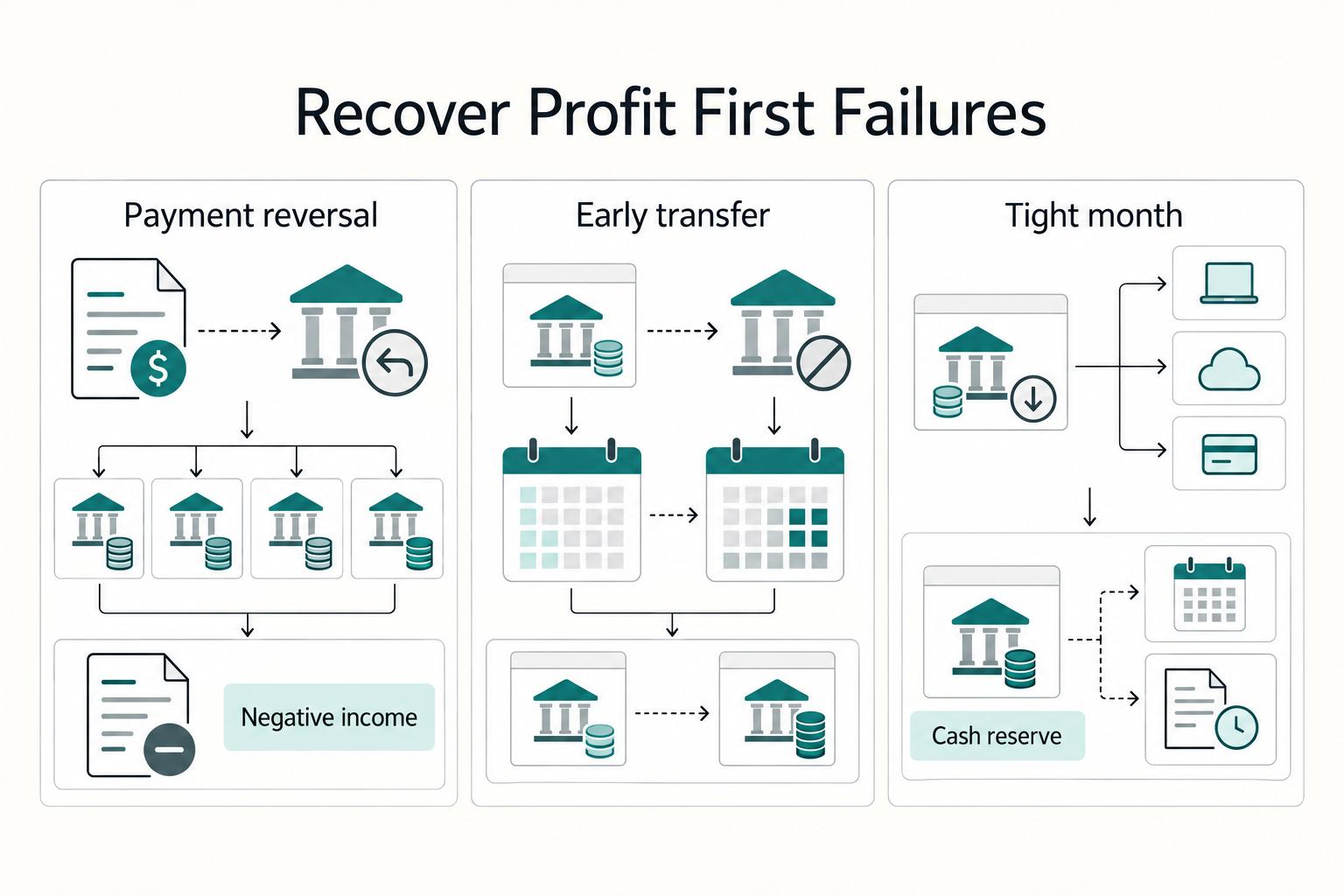
The 'Profit First' Method Part 2: Setting Up Your Bank Accounts
Most freelancers who try Profit First open a few extra bank accounts and call it done. That's the wrong move.
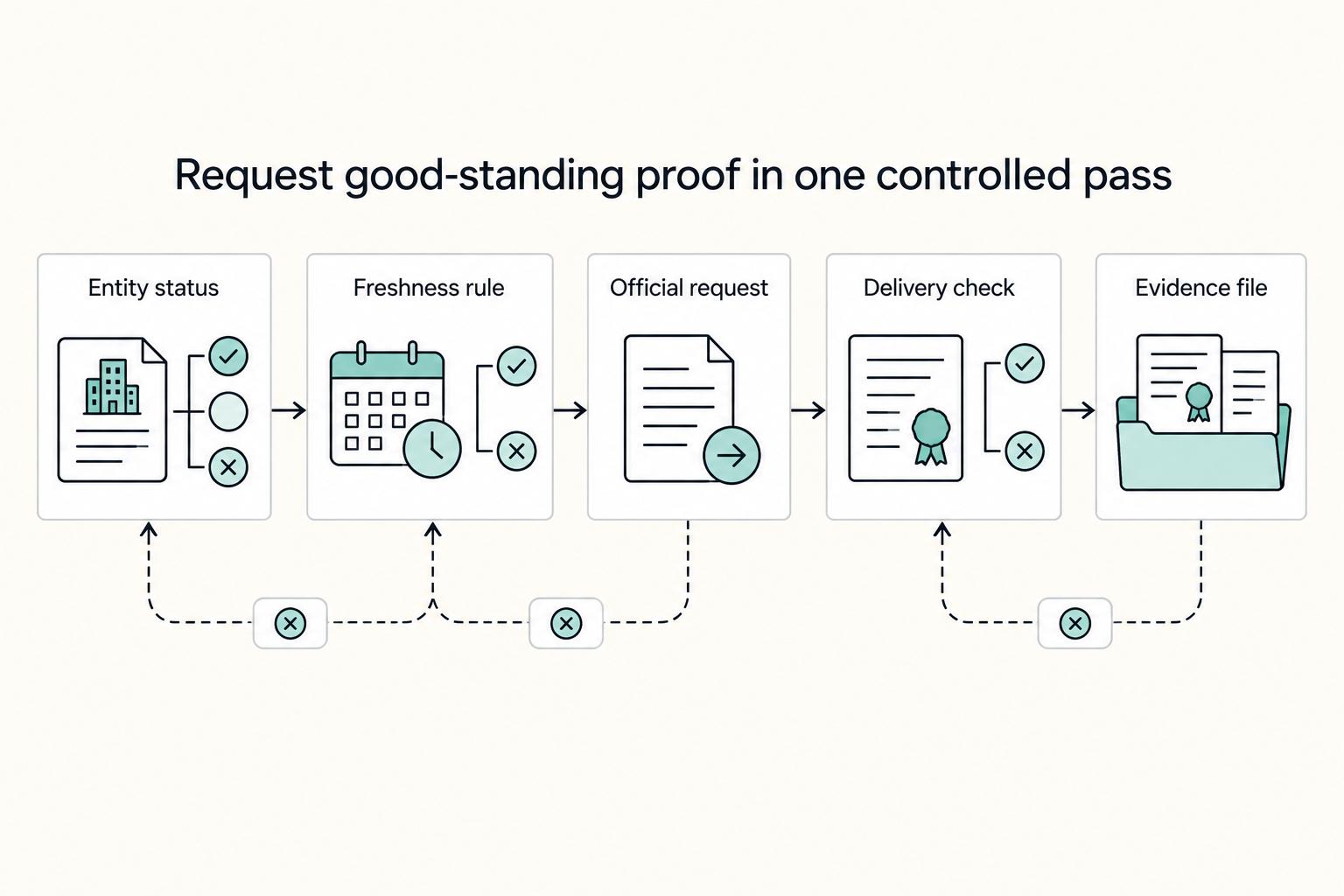
When You Need a Certificate of Good Standing and How to Avoid Delays
Start with two moves, in this order: confirm your entity status, then request the exact document title your reviewer will accept. That sequence removes the most common avoidable delay and keeps you from paying for the wrong output when the clock is already running.