
Quick Answer
For a text-heavy KDP book, start with a clean styled manuscript. Use Word Heading 1 or confirmed Kindle Create chapter elements, build linked navigation and export the appropriate ebook file. Kindle Create supports KPF and reflowable EPUB export; keep the editable KCB project folder for updates. Prepare print separately with the chosen trim, gutter and bleed. Preview each exported/uploaded conversion and review a physical proof for print.
Choose a Formatting Path for Your KDP Book#
Choose your production path before you touch layout. That decision sets the level of rework, the files you will need, and how much of your own time this project will consume. If you want to prepare a manuscript for KDP without avoidable cleanup, start with three practical questions: what are you publishing, do you need outputs beyond Amazon, and how much file-prep work do you want to do yourself?
Choose the outputs first: a reflowable ebook, a fixed-page paperback, or both. Use the ebook formatting guide for reader-adjustable text and the paperback guide for fixed page layout. You can prepare files before opening an account; KDP upload and online preview happen after you create a title in your account.
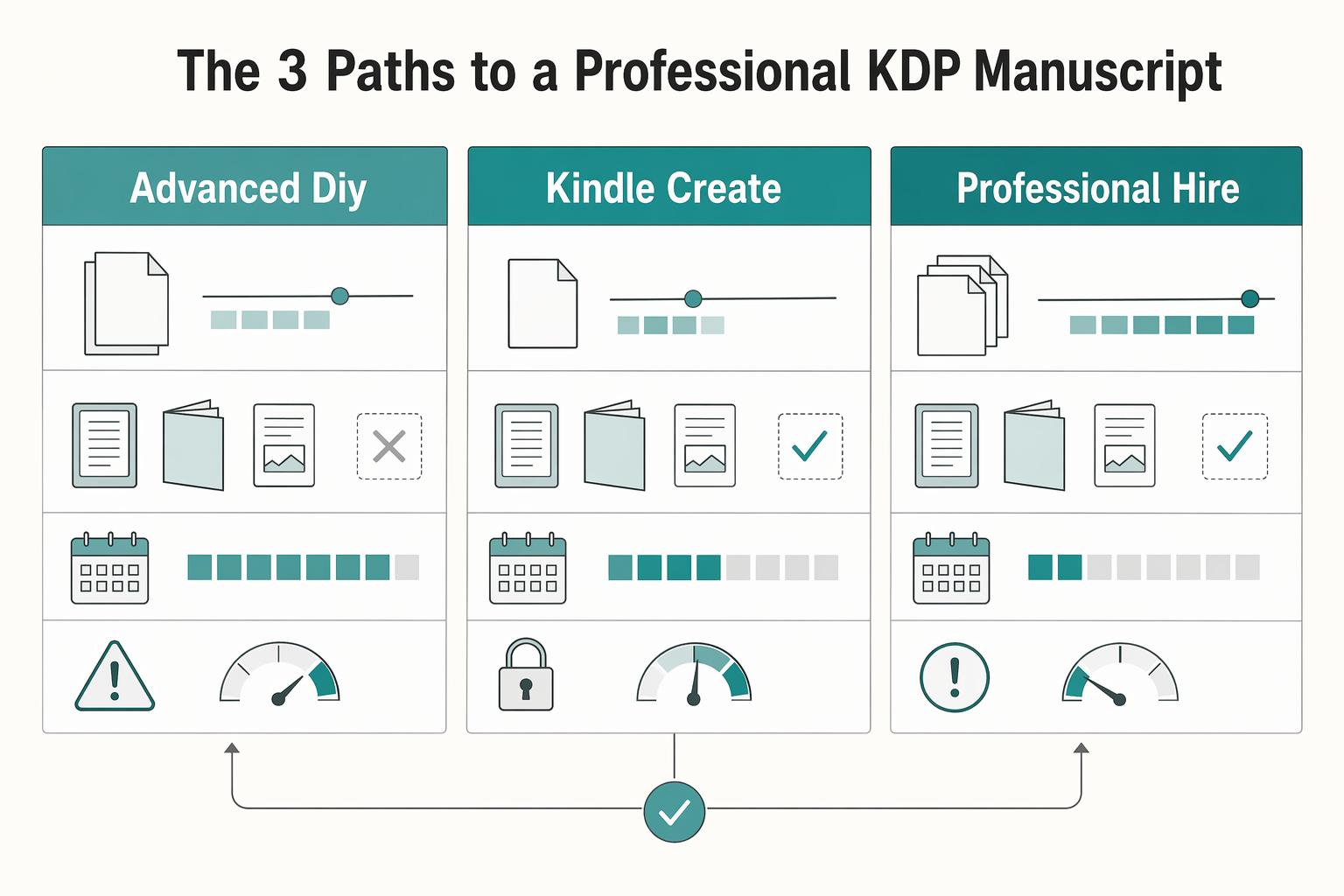
Step 1. Use this table to match the path to your outputs and constraints.
| Path | Control | Learning curve | Delivery speed | Up-front cash cost | Revision flexibility | Multi-platform readiness | Typical failure points |
|---|---|---|---|---|---|---|---|
| Advanced DIY | High | High | Slowest at first | Low cash, high time | High if you keep clean source files | Stronger if you plan for multiple output types | Inconsistent source formatting, ebook and print treated as the same file |
| Kindle Create | Moderate | Lower | Fast for text-heavy books | Low | Moderate, tied to your DOCX to KPF process | Exports EPUB for reflowable books, with feature differences; check each other store’s requirements | Messy DOCX import, expecting custom print-style control |
| Professional hire | Shared control | Low for you | Depends on vendor schedule | Highest cash cost | High if scope includes revisions | Can be stronger when your brief includes Amazon plus non-Amazon outputs | Weak brief, poor handoff, hiring without checking past work |
Step 2. Choose Advanced DIY if you need full control and reusable assets. This is the strongest fit when ownership of the source files matters to you. It is also a clear choice if the same book needs to support more than one output over time.
This path makes the most sense if you are publishing print plus ebook, or if you expect wider distribution beyond Amazon. Your main risk-control move is source discipline. Keep one clean master manuscript, separate reflowable ebook decisions from fixed-layout print decisions, and resist fixing recurring problems with one-off overrides in each chapter.
Step 3. Choose Kindle Create for straightforward text and an integrated KDP workflow. Import DOC/DOCX for a reflowable project, save the editable KCB project folder, and export a KPF for KDP. Kindle Create also exports EPUB for reflowable books. EPUB has some feature differences, so check the exported result and each distributor’s requirements.
Use this path if your first goal is a text-heavy ebook on Amazon and you want the shortest route to a clean upload. The risk-control move here is import hygiene. Simplify the .docx before you bring it in, then verify the converted result against KDP guidelines instead of assuming the tool corrected every structural issue.
Step 4. Hire a professional when the book’s complexity or your schedule warrants it. Request a quote based on word/page count, images, tables, notes, output formats and correction rounds. Separate editing, interior formatting, cover design and upload assistance in the quote; a bundled publishing service is a different scope from formatting alone.
Choose this path if you want professional execution, need multi-format outputs, or cannot afford to learn by trial and error. Quality control starts in the brief. Specify whether you need KDP-only files or files for distribution beyond Amazon, define ebook and print deliverables clearly, and review samples of the vendor's published work before you commit.
For either DIY path, test one representative chapter plus the most difficult image, table or note before formatting the whole book. For a hire, use that same sample to agree the style and acceptance checks.
Path 1: DIY With Reusable Source Files#
Choose Advanced DIY when you want full control and a reusable brand standard, and you are willing to trade speed for consistency. This path works best when you keep one clean source and follow the steps in order instead of jumping ahead.
Step 1. Lock the manuscript before formatting. Stop structural edits first: chapter order is settled, each chapter has a clear purpose, and readers can follow your meaning without extra effort. If the manuscript is still moving, formatting usually creates expensive rework later.
Step 2. Define a minimal style system before visual polish. Set four core styles first: chapter titles, subheads, body text, and scene/section breaks. Apply those consistently across the manuscript before you touch visual extras.
- Do: use named styles, paragraph settings and intentional page/section breaks where needed
- Do: keep one treatment per element type across the full file
- Do: update styles globally instead of fixing one chapter at a time
- Don't: use tabs for indents
- Don't: stack blank returns for spacing
- Don't: patch layout with one-off manual overrides
Those manual shortcuts are a common conversion risk, especially when you revise later.
Step 3. Separate ebook prep from print prep. Treat reflowable ebook handling and print layout as separate workflows. For ebook, prioritize clean structure and predictable navigation. For print, make page-level design decisions after your core manuscript structure is stable. If you combine both too early, you usually redo work.
Step 4. Save a template and create separate outputs. Preserve the styled manuscript and front/back matter, then make ebook and print copies with the appropriate settings. Test the exported ebook locally in Kindle Previewer; use KDP’s online ebook or Print Previewer after upload. A local file check cannot replace the conversion shown in the account preview.
A copyright page belongs in the front matter, but it does not replace any registration or rights clearance. Keep credits, permissions and publishing details with the source project.
Path 2: Kindle Create for Text-Heavy Books#
Choose this path when your priority is a fast, Amazon-first release from a clean, text-led manuscript. KDP supports digital and print publishing and includes an Upload and Preview Book Content checkpoint, so speed comes from disciplined prep before you import.
Step 1. Clean the source and create a project. Finish structural edits, apply consistent headings and remove manual spacing noise. In Kindle Create, choose Create New, select the reflowable DOC/DOCX book option and import the file. Review the suggested chapter titles, confirm intended chapters and apply the appropriate chapter-title element to any misses. Choose a theme and inspect a representative chapter before formatting the rest.
Step 2. Check the feature limits against your book.
| Kindle Create path is a strong fit when... | Use another path when... |
|---|---|
| Text-heavy reflowable ebook or simple non-bleed paperback | Paperback includes tables, footnotes/endnotes or images that bleed |
| KPF for KDP and reflowable EPUB export meet your output needs | You need features not preserved in EPUB or custom print font/margin control |
| You can maintain both the source manuscript and editable KCB folder | You expect the uploaded KPF to be an editable project backup |
Step 3. Preview the export and the uploaded conversion. In the ebook, test every contents link, chapter break, note and image at different text sizes. For paperback, check page flow, automatically placed numbers and any image-driven blank space in Print Previewer. Correct imported tables, lists or footnotes in the source application where Kindle Create cannot edit them. Correct theme or chapter-element settings in the saved project, then export and preview again.
Step 4. Keep the distribution decision explicit. Kindle Create’s export guidance permits reflowable EPUB as well as KPF; KPF is Amazon’s recommended KDP submission. Export availability alone does not prove that a file meets another store’s requirements. Preview EPUB separately and check features such as drop caps and chapter imagery.
Step 5. Back up the editable project. Save the entire Kindle Create folder, including KCB and related resources, alongside the original manuscript and exported release files. KPF is for publishing; KCB is for updates. Amazon does not keep your editable Kindle Create project for you. Date each release and retain notes on which source/project produced it.
For paperback, Kindle Create’s documented limits include no tables, footnotes/endnotes or edge-bleed images, and no custom margins or paperback font. Use a separate print-layout workflow if those features are needed.
Path 3: Hire a Formatter With Clear Deliverables#
Hiring a formatter can save production time, especially with difficult tables, notes or illustrations. Compare the quote with the time and correction work you would otherwise do. For an illustrative budget, a USD 400 quote that saves eight hours valued at USD 50/hour equals that time value before any revisions or extra services; it does not predict sales, royalties or profit.
| Stage | Key points |
|---|---|
| Project brief | manuscript status; distribution targets; output formats you want delivered; interior style references; asset handoff scope |
| Candidate screening | portfolio fit for your book type; evidence they handle tables, images, and other complex elements cleanly; communication quality; published sample quality |
| Written agreement | what files you will receive; how minor corrections are handled after delivery; how larger change requests are scoped and priced; what QA checks must pass before final payment |
| Control points | kickoff alignment on scope and risk-heavy pages; midpoint sample review; final pre-upload review in your preview workflow; one defined revision loop with clear ownership |
Step 1. Lock the project brief before requesting quotes. Treat this as required input, not admin work. Your brief should state:
- manuscript status (final draft or still changing)
- distribution targets
- output formats you want delivered
- interior style references (links or screenshots)
- asset handoff scope (text file, images, tables/charts, and any special pages)
If a new vendor cannot understand the job from this brief alone, tighten it before you hire.
Step 2. Screen for execution fit, not just price. Use a simple framework for each candidate:
- portfolio fit for your book type
- evidence they handle tables, images, and other complex elements cleanly
- communication quality (clear scope boundaries, clear answers)
- published sample quality (navigation flow, spacing consistency, heading consistency)
If the line between editing and formatting is still blurry, resolve that first with your editor or book editor guide.
Step 3. Define deliverables, QA, and payment triggers in writing. Before work begins, confirm:
- what files you will receive (including editable sources, if needed)
- how minor corrections are handled after delivery
- how larger change requests are scoped and priced
- what QA checks must pass before final payment
Use acceptance checks you can verify directly: navigation works, chapter starts are consistent, images and tables are readable, front/back matter order is correct, and obvious spacing issues are resolved.
Step 4. Run a lightweight vendor-risk workflow. Keep four control points:
- kickoff alignment on scope and risk-heavy pages
- midpoint sample review (one representative chapter plus difficult pages)
- final pre-upload review in your preview workflow
- one defined revision loop with clear ownership
Outsourcing works when quality stays measurable and final approval stays with you. Related: The Best Platforms for Self-Publishing Your Book.
The Structural Rules That Apply to Every Path#
Your production path changes the workflow, but it does not change the structural rules that protect reader experience. Before upload, make one core decision first: are you formatting for a reflowable ebook or a fixed print page? Getting that choice right reduces upload surprises, keeps navigation usable, and lowers formatting complaints.
Decide for reflow first, not page appearance#
Most prose ebooks should be reflowable so readers can change text size. Books requiring exact page composition may need a separate fixed-layout ebook workflow, with its own device and accessibility limits. Paperback is a fixed-page output. Do not treat an ordinary print PDF as a universal Kindle ebook file.
In reflowable reading, text must adapt across screen sizes and reader settings, so exact line and page control is limited. In print, page composition stays fixed, so exact placement is part of the job. If a design depends on precise placement, treat that as a print priority, not an ebook expectation.
| Decision point | Reflowable ebook | Fixed-layout print book |
|---|---|---|
| Where layout control lives | Shared with the reader as text adapts on Kindle screens | Primarily with you because page layout stays fixed |
| File behavior to expect | Structure must stay readable when display settings change | Composition should remain where you set it |
| Mistakes that usually break reading experience | Manual spacing hacks, fake headings, inconsistent source formatting | Treating fixed pages like flowing text and losing layout precision |
Use a simple filter: for ebooks, optimize structure and readability; for print, optimize exact page design.
Use Heading 1 for Word Chapter Titles#
In a Word workflow, apply Heading 1 consistently to chapter titles so contents and navigation can use the structure. In Kindle Create, verify the imported chapter-title elements and contents entries instead. Changing a font alone does not establish either structure.
| Rule | What to check |
|---|---|
| Chapter titles | For Word, apply Heading 1; in Kindle Create, confirm the proper chapter-title element |
| Naming and starts | Keep chapter naming and chapter-start treatment consistent across the manuscript |
| Heading formatting | Do not build headings with manual font changes alone |
| Preview check | Verify that chapter navigation and the table of contents reflect your intended order |
After styling the chapter titles, build and test navigation:
- Insert a linked contents page using Word’s References > Table of Contents. For a reflowable ebook, remove printed page numbers and include the desired heading levels.
- Follow the KDP Word procedure to add a bookmark named toc to the contents title and insert a page break after the contents.
- In Kindle Create, review the detected chapter titles and accept only the intended entries; apply the proper chapter-title element to missed titles.
- In the exported ebook, test both the visible contents page and the reader’s navigation menu. Heading appearance alone does not establish both.
For example, if Chapter 3 is missing from the navigation menu, check its style or chapter-title element, rebuild the contents and re-export. Typing a link-looking title into the contents does not repair the underlying navigation.
Clean the source before conversion#
Most formatting failures start in the source file, not at upload. When spacing and layout are forced by hand, conversion becomes fragile.
| Area | What to review |
|---|---|
| Styles | Use built-in styles instead of one-off manual formatting |
| Spacing | Control spacing with paragraph settings, not repeated blank lines |
| Breaks | Manage chapter starts and major transitions with deliberate breaks, not improvised returns |
| Master manuscript | Work from one clean master manuscript, not drifting file versions |
| Preflight scroll | Check for inconsistent chapter titles, uneven spacing, accidental blank pages, or unexplained formatting shifts |
Use source cleanup to make later corrections repeatable:
- Remove tracked changes, unresolved comments and draft placeholders from the release copy; preserve an editing backup.
- Find repeated spaces, tabs used as indents and blank paragraphs used for vertical spacing; replace them with paragraph settings.
- Check chapter starts, scene breaks and image anchors in the source rather than moving each element with returns.
- Compare source, exported file and preview on a difficult chapter; repair the layer that introduced the defect.
Then do a quick preflight scroll for structural red flags: inconsistent chapter titles, uneven spacing, accidental blank pages, or unexplained formatting shifts. This is the fastest way to catch problems before they become conversion noise.
A print edition also needs a trim size, page-count-based gutter and any bleed set before final pagination. Check trim, bleed and margins against the final page count, then refresh printed contents/page numbers. An ISBN decision is a separate publishing task.
Conclusion: Execute Your Publishing Project with Confidence and Control#
Choose one path and own the tradeoff. Formatting is a quality-control decision, not a last-minute cleanup task. Pick DIY when control matters most. Pick Kindle Create when you want a quicker workflow for straightforward reflowable text. Use a professional formatter when you want to delegate execution and are prepared to review deliverables carefully. If the manuscript is not locked yet, stop and finish that first. Structural changes during layout are where time and money start leaking.
Confirm the files match the actual output scope. You can derive both editions from a clean master, but each needs its own settings and preview. Check chapter breaks, contents and images after any final text change rather than assuming the earlier review still applies.
Inspect the print-file requirements before exporting. For example, a 900-pixel-wide image printed three inches wide has 300 pixels per inch; at six inches it has only 150. Changing a metadata label to “300 DPI” does not add detail. Check the resulting print PDF and physical proof for image quality, gutter, page order and unintended blank pages.
Retain the approved release package and an editable backup. When updating the book, record the change, regenerate each affected output and repeat its checks. Upload success and preview acceptance do not mean Amazon has completed its content review or guarantee every device and physical print result.
Frequently Asked Questions
Should you use Word, Kindle Create, or hire a professional formatter?
Use Word or another layout tool when you need reusable source control or custom print composition. Kindle Create suits text-heavy reflowable books and supported simple paperbacks, and it can export EPUB for reflowable distribution. Hire a formatter for difficult layouts or a schedule you cannot support yourself. Require editable source/project files, specified upload formats and a correction process.
How should you verify current KDP specs before upload?
Start in the KDP Help Center. Then open the live page that matches your format: eBook Manuscript Formatting Guide for ebook work, or Build Your Book - Format a Paperback Manuscript (Word for Windows) plus Paperback and Hardcover Manuscript Templates for print. Confirm requirements from those live pages on the day you upload, and use community advice as secondary context only.
How do you create a clickable table of contents?
In Word, apply Heading 1 to chapter titles, insert a linked table of contents and remove page numbers for the reflowable ebook. The KDP contents procedure also adds a toc bookmark and a page break. In Kindle Create, confirm detected chapter titles and contents entries. Test both the visible contents links and the Kindle navigation menu in the export; update and re-export after chapter changes.
What paragraph formatting should you use for a Kindle ebook?
For a Word prose ebook, modify the Normal style rather than using tabs. KDP’s Word guide uses a 0.2-inch/5 mm first-line indent, zero before/after paragraph spacing and single line spacing as a starting setup. Use consistent exceptions for opening paragraphs, lists or scene breaks where needed. Test with larger reader text sizes; source font and spacing choices do not guarantee fixed ebook pages.
What is the real difference between ebook and paperback formatting?
A reflowable ebook prioritizes text resizing, linked navigation and reading across screen sizes; print prioritizes trim size, gutter, pagination and fixed composition. Export and check each separately. For example, a 6 × 9-inch paperback with interior bleed needs a 6.125 × 9.25-inch interior page, while a non-bleed interior stays at the chosen trim size. Bleed does not belong in a reflowable ebook’s page-size settings.
Try a related tool
Researched and edited by the Gruv editorial team. Gruv builds cross-border billing, payouts, and finance-operations software for global businesses.
Sources
Includes 2 external sources outside the trusted-domain allowlist.
Educational content only. Not legal, tax, or financial advice.
Related Posts

Value-Based Pricing for Freelancers Under Real Payment Risk
Value-based pricing starts with the client’s expected benefit and willingness to pay. It still needs a deliverable, scope and payment agreement you can perform. Use a discovery phase when the benefit or effort is too uncertain to support a defensible quote.

The Best Platforms for Self-Publishing Your Book
If you run your publishing like a business-of-one, you need a repeatable system, not vibes.
Best Print-on-Demand for Books Starts With Control, Not Print Specs
If you're choosing the best print-on-demand for books, start with setup, not print finish. A book becomes a business asset through business decisions before print decisions. Before you compare paper weights or cover finishes, secure the asset itself. This first phase covers the compliance, rights, and setup work most self-publishing guides skip, so the rest of the process sits on solid ground.