
Quick Answer
File how to file lut for gst by first confirming you will use the LUT route for eligible zero-rated supplies, then submit Form GST RFD-11 in the GST Portal at Services > User Services > Furnish Letter of Undertaking (LUT). Select the correct financial year, complete witness and declaration details, sign through DSC or EVC, and submit. Treat filing as complete only after you save the ARN and acknowledgement and verify both are retrievable.
Before You File Your GST LUT#
Filing LUT is more straightforward when you lock the sequence before you log in. Set four items first: your tax route, the financial year, who can sign, and where proof will be stored. If any one of those is fuzzy, filing can slow down and invoice treatment can get risky.
The problems are usually less about typing into Form GST RFD-11 and more about timing and ownership. One person assumes another validated signatory authority, someone else assumes year selection will be obvious, and the form gets completed on an assumption that was never checked.
The goal is practical: file once and move to invoicing without rework. To get there, decide the route before billing starts, prep inputs in one place, file in a single pass, and close the task only when proof is retrievable. That order helps keep cash-flow choices and compliance records aligned.
Use this as execution guidance, not theory. Move quickly when the facts are clear. Pause when eligibility, year, or signer authority is uncertain. A short pause before submission can be safer than fixing incorrect treatment after invoices are issued.
Before You Start#
Use this path when you plan to furnish LUT instead of paying IGST first and claiming a refund later.
-
Confirm the route before opening the form. Decide between LUT for zero-rated supplies and the pay-IGST-then-refund path. If eligibility is unclear, pause and get tax advice. Do not open Form GST RFD-11 until you know which route you are using for the period you are about to invoice. A clear route call upfront helps avoid mixed invoice treatment in the same billing cycle.
-
Prepare filing inputs in advance. Verify portal details, confirm the authorized signatory, and keep two witness records ready. This helps prevent last-step stalls where the form is complete but signer or witness data is not. Keep these inputs in one prep note so names and spellings stay consistent from draft to submission proof.
-
Select the correct financial year in Form GST RFD-11. Treat this as a year-specific filing choice before submission. If you are unsure which year applies to your first export for that cycle, resolve that first. Year mistakes are harder to unwind once invoices already assume LUT treatment.
-
Make the cash-flow call deliberately. LUT avoids upfront IGST. The refund route may tie up funds and require additional follow-up. Decide with open eyes, because this choice affects both invoicing pace and compliance load. If your finance team needs certainty before releasing invoices, settle this decision before the first billing run.
-
Set escalation triggers now. Escalate early if signatory authority, filing year, or portal status is unclear. A clear escalation trigger can prevent rushed decisions when filing pressure builds near your first invoice date. Write the trigger in plain language so anyone handling filing can apply the same stop rule.
Do you need to file LUT right now?#
File LUT now only if two conditions are true at the same time: you are GST-registered, and your immediate plan is to export goods/services or supply to SEZs without upfront IGST. If either point is not true right now, filing immediately may be unnecessary. Use this go-or-pause check before filing Form GST RFD-11:
| Decision point | What the article says | Action if unclear |
|---|---|---|
| Current need | File LUT now only if you are GST-registered and your immediate plan is to export goods/services or supply to SEZs without upfront IGST | If either point is not true right now, filing immediately may be unnecessary |
| Timing | LUT is generally handled on a financial-year cycle and is typically renewed each year | If you intend to export without paying IGST, file before the financial year begins |
| Fallback route | If LUT is not furnished, the alternate path is IGST payment followed by refund | If you must bill before resolution, use the fallback route intentionally and document why |
| Eligibility risk | A commonly cited red flag is prosecution for tax evasion above ₹2.5 crore | Pause and get professional advice |
| Portal window | Recheck portal status at filing time; one update notes FY 2026-27 as live with a 31 March 2026 cutoff | Use portal status as the final tie-breaker when public timelines conflict |
- Confirm route and applicability.
Choose LUT only when it is your intended tax route for eligible supplies. A practical check is to map your next invoice batch to the route before filing. If the next invoices are not meant to use LUT treatment, do not file just because filing feels like progress. Filing should support an active billing decision, not sit as an unconnected task.
- Set timing before billing starts.
LUT is generally handled on a financial-year cycle and is typically renewed each year. If you intend to export without paying IGST, guidance says to file before the financial year begins. Avoid starting export or SEZ invoicing on LUT assumptions before filing status is clear.
- Choose your fallback deliberately.
If LUT is not furnished, the alternate path is IGST payment followed by refund. Do not invoice under LUT assumptions while eligibility is unresolved. If you must bill before resolution, use the fallback route intentionally and document why.
- Check obvious eligibility risk before filing.
A commonly cited red flag is prosecution for tax evasion above ₹2.5 crore. If that may apply, pause and get professional advice. Do not treat this as a clerical point you can fix inside the form. Eligibility questions should be settled before any declaration is submitted.
- Verify the live filing window on the GST Portal.
Public explainers can differ by date. One update notes FY 2026-27 as live with a 31 March 2026 cutoff, so recheck portal status at filing time. Use portal status as the final tie-breaker when public timelines conflict. Capture a quick note of what you checked and when.
If eligibility is still unclear, confirm it before filing.
Gather documents and people before GST Portal login#
Do one prep pass before login so you can file in one sitting and avoid preventable retries. Delays usually happen when details are collected during filing instead of beforehand. Here, prep is what keeps submission in the same session.
-
Verify GST identity details. Confirm you have a valid GST registration number (GSTIN) and keep the core registration details in your prep note. If the GST profile view and your internal records do not match, resolve that mismatch before you touch the form.
-
Confirm transaction type for this filing. Proceed only when this filing matches eligible export supplies, such as exports to clients outside India or supplies to SEZs. If there is uncertainty about whether the next supplies fit this route, settle that first instead of treating form submission as a placeholder.
-
Keep required inputs ready in one place. Prepare all details needed for a complete submission, including who will participate in filing or review. If others need to be involved, align that timing in advance so the form does not sit half-complete.
-
Set the fallback cash-flow plan. If LUT is not furnished, the alternate route is to pay IGST and then claim a refund. Plan for this before invoicing, not after an error appears.
-
Write down escalation triggers before submission. If any red flag applies, including possible prosecution-threshold concerns, pause and escalate before filing. Put the trigger in writing so everyone involved follows the same stop rule when time pressure rises.
A short prep checklist can reduce rework and keep records consistent before login.
Done well, this turns filing from a stop-and-restart task into a clean submission with fewer handoffs and fewer corrections. Related: The Rise of Embedded Finance: What It Means for Freelance Platforms.
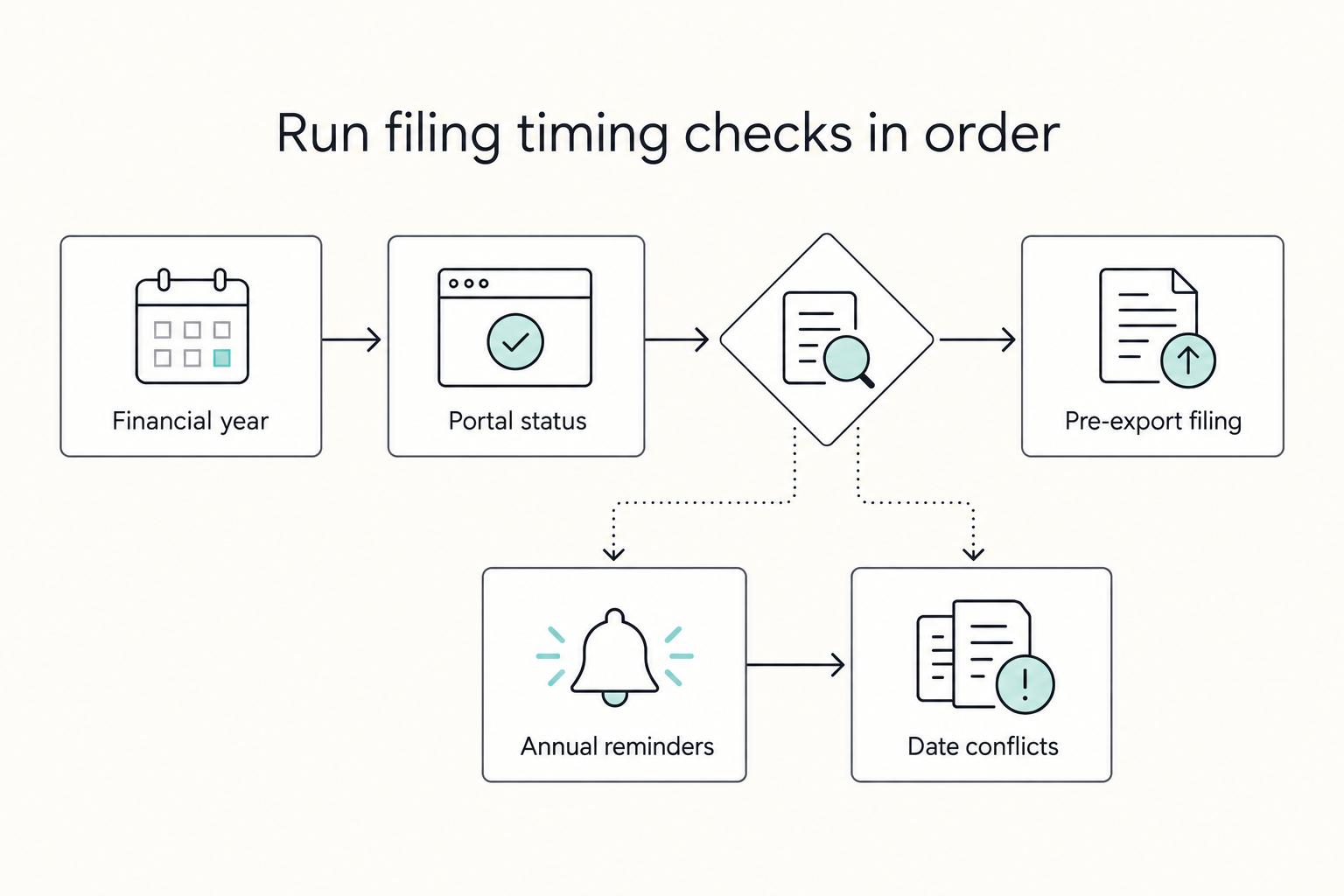
Pick the right financial year and filing timing#
Use one timing rule: file Form GST RFD-11 for the correct financial year before the first export or SEZ supply for that year. Do not assume last year carries forward, because LUT is valid for one financial year and is renewed annually.
Anchor your plan to one date: the first invoice date you intend to treat under LUT. Once that date is fixed, work backward and set two checkpoints: year confirmation and portal-live confirmation. This backward planning reduces last-minute filing pressure.
Step-by-step timing check#
| Timing checkpoint | What to do | Why it matters |
|---|---|---|
| Financial year | Start from your planned first export or SEZ supply date, then select the exact year in Form GST RFD-11 | Have one owner call out the selected year explicitly before data entry starts |
| Portal or GSTN status | Confirm filing is live for your target year and note what you checked | This prevents rechecking the same issue repeatedly when multiple people are involved |
| Pre-export filing | Complete filing before the first export or SEZ supply in that year | Hold LUT-based invoicing assumptions until status is clear |
| Annual reminders | Create one reminder before expected first export month and another to recheck portal-live status | The first reminder drives preparation; the second confirms you can submit without delay |
| Date conflicts | If public date guidance conflicts, rely on current GST Portal or GSTN status and document that check | A documented tie-breaker keeps the team aligned when external updates are inconsistent |
- Lock the financial year first.
Start from your planned first export or SEZ supply date, then select the exact year in Form GST RFD-11. If the team is split across finance and compliance, have one owner call out the selected year explicitly before data entry starts.
- Check GST Portal or GSTN status for that year.
Confirm filing is live for your target year and note what you checked. A quick note with date and status is enough. The value is not the note itself; it is being able to show what you relied on when filing. This also prevents rechecking the same issue repeatedly when multiple people are involved.
- Treat pre-export filing as required sequencing.
Complete filing before the first export or SEZ supply in that year. If filing is still pending, hold LUT-based invoicing assumptions until status is clear. This protects you from having to revise invoices that were issued under an unconfirmed assumption.
- Set annual reminders.
Create one reminder before expected first export month and another to recheck portal-live status. Two reminders work better than one because they separate planning from final verification. The first reminder drives preparation. The second reminder confirms you can submit without delay.
- Use a conflict rule for dates.
If public date guidance conflicts, rely on current GST Portal or GSTN status and document that check. This prevents decision drift when different explainers show different timelines. A documented tie-breaker keeps the team aligned when external updates are inconsistent.
Before the first zero-rated invoice, confirm three fields align: your registration details, the selected year in Form GST RFD-11, and current portal status.
If those three do not align, pause and fix the mismatch first. This checkpoint helps catch year and status errors before billing starts.
Enter Form GST RFD-11 without rework#
Use a fixed entry order to reduce edits: open the form, select year, complete witnesses, preview, then file. Jumping across fields can create small inconsistencies that only show up at preview.
| Step | Action | Key detail |
|---|---|---|
| Open form | Go to Services > User Services > Furnish Letter of Undertaking (LUT) | Wait for Form GST RFD-11 to load |
| Select year | Choose the financial year first | Keep the rest of the form tied to the intended filing period |
| Add witnesses | Enter name and address details for two witnesses | Keep spellings and formatting consistent with your source note |
| Preview | Use PREVIEW before filing | Check the financial year and witness details before submission |
| Resume draft | Use SAVE and return through Services > User Services > My Saved Applications | Continue the same draft if interrupted |
- Open from the exact menu path.
Go to Services > User Services > Furnish Letter of Undertaking (LUT) and wait for Form GST RFD-11 to load. If you are not in this path, stop and correct it before entering any details. Starting from the right screen helps avoid accidental entry into a different flow.
- Select the financial year first.
Choose the year before completing the rest of the form. This keeps every later field anchored to the intended filing period. If anyone asks for a quick progress update mid-entry, confirm year selection first so there is no ambiguity.
- Complete witness details in one pass.
Enter name and address details for two witnesses, then continue with the remaining form fields. Keep your source note open while typing so spelling and formatting stay consistent. Consistency across draft, preview, and saved records reduces later questions during review.
- Use
PREVIEWbefore filing.
Do one full read-through to catch clerical errors before submission. Read from top to bottom once, then do one targeted check for the financial year and witness details. A full pass plus a targeted pass catches more errors than repeating the same quick scan.
- If interrupted, save and resume the same draft.
Use SAVE, then return through Services > User Services > My Saved Applications to continue. Resuming the same draft is usually cleaner than restarting and risking inconsistent data entry. If multiple people might resume, leave a short handoff note on what was already verified.
One practical habit helps here: do not multitask while the form is open. Completing entry and preview in one focused session can lower the chance of a preventable second attempt.
Sign correctly with Authorized Signatory, DSC, or EVC#
Treat signing as a control checkpoint, not just a final click. Validate signer readiness before you submit.
- Confirm filing account details.
Check that the prefilled GSTIN and legal name match the entity filing Form GST RFD-11. If they do not match, pause and confirm the correct account context before signing.
- Validate the Authorized Signatory in the form.
In the signatory dropdown, confirm the intended signer is available and selected. If the expected name is not visible, stop before making additional changes.
- Complete signing in the same filing flow.
Once the form fields are complete, proceed directly to signing where possible so the final step stays focused on authentication.
- If signing fails, recheck signer setup first.
Recheck authorized signatory selection and related signer setup before reworking form content. Keep witness and declaration fields complete, including details for two witnesses.
- If authority is unclear, pause.
Confirm filing authority for that GSTIN before submitting. A short governance check now can reduce rework after submission.
A practical split helps troubleshooting: first complete content checks, then run a dedicated signer check right before submission.
Submit, verify ARN, and store compliance proof#
Treat filing as complete only when proof is saved and retrievable. A successful sign step without retrievable records can still create future risk.
- Capture confirmation right after submission.
Download the LUT certificate and GST LUT acknowledgement from the GST Portal before leaving. Delayed capture increases the chance that key details are missed or mislabeled.
- Store one clean evidence set.
Keep the downloaded LUT certificate and acknowledgement in one folder. Avoid splitting these across different devices or folders where retrieval becomes slow. A single location reduces confusion when someone else needs to verify filing later.
- Record context while fresh.
Add a short note with submit date, signer name, and signing method. This saves time during later checks because you do not need to reconstruct what happened. Keep the note plain and factual so future reviewers can scan it quickly.
- Run a retrieval check.
Open the saved files and confirm they match the entity and the submission you just completed. A file that cannot be opened or matched is not reliable evidence. Check readability now, not when a later review deadline is close.
- Keep the task open if proof is missing.
If confirmation records cannot be retrieved, resolve that before treating filing as closed. Do not assume you can reconstruct missing proof easily later. Closure should mean evidence is complete and immediately accessible.
This evidence habit saves time months later. Clear file names, one folder, and one context note usually turn follow-up requests into a short lookup instead of a long reconstruction.
Handle prior manual LUT records without confusion#
Legacy records are useful only when they are clearly separated from current compliance proof. Confusion usually starts when periods, entities, or route types are not labeled clearly.
- Separate active and legacy records first.
Use clear folder names by year, period, and entity. Keep unresolved items visible but outside the active proof set used for current checks.
- Set one documentation standard before relying on old records.
Define what makes a legacy file usable, then apply that standard consistently across the set. Consistency improves reliability when records are reviewed later.
- Label records by tax route, not only file type.
Mark each record as LUT or Export Bond. Under GST, these are two mechanisms used to export without paying IGST upfront; LUT is generally simpler, while a bond may involve a bank guarantee that can affect liquidity.
- Flag unresolved records tied to timelines.
If period linkage or timing is unclear, mark the file unresolved and keep it out of the active proof set. Missing prescribed timelines can turn a tax-free export into a taxable supply with interest liability.
- Escalate before relying on ambiguous history.
If route or timeline context is unclear, pause and get compliance review before using the record in current decisions. This helps avoid basing current treatment on uncertain history.
If your archive is large, keep a simple index with fields already present in your records: entity, period, route label, and status. The goal is traceability, not extra documentation for its own sake. A clean boundary between active and legacy documentation can make reviews and refreshes easier.
Compare LUT route and IGST payment then refund route#
For eligible exporters, LUT is generally the lower-friction path because it avoids upfront IGST and can reduce compliance follow-up. The IGST payment then refund route remains a fallback when LUT is not furnished, but it shifts effort and cash-flow pressure into the post-payment stage.
If you are deciding on the LUT route for GST, make that call before invoicing begins. Route uncertainty during billing can create avoidable cleanup work.
| Decision point | LUT route | IGST payment then refund route |
|---|---|---|
| Upfront IGST outflow | Not required for eligible zero-rated supplies | Required before refund claim |
| Primary filing action | Furnish Form GST RFD-11 for the financial year | Pay IGST and then pursue refund |
| Follow-up effort | Can be lower when filing and proof are clean | Higher due to refund follow-up |
| Typical use | Eligible supplies where LUT is furnished | Fallback when LUT is not furnished |
- Confirm eligibility before choosing a route.
Use LUT only when you are eligible for the current export activity. A known red flag is prosecution for tax evasion at ₹2.5Cr+, where a Bond route may be needed. If this risk may apply, escalate before deciding invoice treatment.
- Compare operating impact clearly.
With LUT, exports proceed without upfront IGST. Without LUT, you pay IGST first and then claim refund. The difference is not only tax treatment; it also changes compliance steps and cash-flow planning.
- Match the route to the filing path.
If you choose LUT, file Form GST RFD-11 and track it by financial year. If not, plan the IGST payment and refund path from the start. Route choice should be reflected in invoice and proof preparation decisions.
- Use a conservative rule when confidence is low.
If eligibility is unclear, get tax advice before finalizing invoice treatment. A brief delay may be easier to manage than correcting invoices filed on the wrong route. When uncertainty remains, choose the path you can document clearly.
If your activity mix changes during the year, rerun this comparison before changing invoice treatment. Consistency between the chosen route, filing status, and billing assumptions matters more than speed when the facts are uncertain.
Fix common failures fast#
When filing fails, stop, classify the issue, and verify before you retry. Repeated attempts without diagnosis usually waste time.
- Confirm base status in Form GST RFD-11 (LUT).
For export or SEZ supplies without IGST, LUT must be furnished before supply. If base status is unclear, pause and verify before relying on that treatment.
- Handle submission errors by category, then retry once clean.
Common buckets include portal glitches, DSC registration problems, and jurisdiction updates. Classify the error first, fix that condition, then retry. A category-first approach can help avoid re-editing unaffected fields.
- Keep an explicit fallback if LUT is not in place.
Exports can proceed by paying IGST or providing an export bond. Use this deliberately when filing cannot be completed in time. Document the reason so the decision trail stays clear.
- Escalate immediately on eligibility risk.
LUT is not available where there has been prosecution for tax evasion of ₹2.5 crore or more. If this may apply, stop troubleshooting and escalate. Eligibility is a decision issue, not a technical filing issue.
Some issues need a separate check because there is no grounded quick fix here, including wrong financial year selection, saved-draft loss, or missing submission proof.
A useful troubleshooting habit is a one-line attempt log: what failed, what changed, and what happened next. Clean logs can make handoffs faster when another person must continue the task.
Takeaway and copy-paste execution checklist#
Use this as a go-or-pause checklist before you rely on LUT treatment for exports. Run it top to bottom and stop at the first unclear item.
- Confirm LUT scope first.
Proceed only if you are a registered taxpayer making eligible supplies outside India or to SEZs and you intend to export without paying IGST under LUT. If scope is unclear, pause before filing. Do not treat filing as a substitute for eligibility analysis.
- Lock the filing year before anything else.
LUT is filed in Form GST RFD-11 on the GST portal and treated here as recurring for every financial year. Make year selection your first form decision. Year confirmation should happen before final submission.
- File before the year's intended LUT exports begin.
Timing guidance is to file before the financial year begins for the exports you want to treat this way. If your first invoice date is near, verify filing status first. Avoid issuing LUT-based invoices while status remains uncertain.
- Use the RFD-11 path and verify year and scope before submit.
If form or period does not match your intended filing, stop and correct it. Do not rely on memory when you can verify directly on screen. One last pre-submit scan can help avoid refiling.
- Treat date guidance as year-specific.
One published example states a 31st March 2026 deadline for FY 2026-27. Do not generalize this to other years without checking current GST Portal or GSTN notices. Use portal-live status as your final decision anchor.
- Escalate immediately when anything is unclear.
If eligibility, filing period, or current-year timing is uncertain, pause and get tax advice before proceeding.
- Complete final checks before submission.
Confirm key filing details are clear for the intended year and scope in the GST portal session. If anything is unclear, resolve it before final submit.
- Close filing only after filing details are retrievable.
Keep a clear internal record for the filed period and confirm you can retrieve it when needed. If proof is incomplete, keep the item open.
- Separate active and legacy records.
Keep current-year filing records away from historical records. Label unresolved legacy files clearly so they are not mistaken for active compliance proof.
- Re-run this checklist before first LUT-based export each year.
A short annual recheck catches period mismatches early and keeps filing status and invoicing aligned. Repeatable checks are what keep this task simple year after year.
, or
Frequently Asked Questions
How to file LUT for GST?
Log in to the GST Portal and go to Services > User Services > Furnish Letter of Undertaking (LUT). File Form GST RFD-11, complete required fields, and submit from that screen. After submission, save the Application Reference Number (ARN) and acknowledgement as filing proof. Before closing the task, reopen saved files once to confirm they are readable, complete, and labeled for the correct period.
Who must file LUT?
Registered taxpayers making eligible zero-rated export or SEZ supplies without paying IGST should furnish LUT before supply. If LUT is not in place, IGST payment may be required, so confirm treatment before invoicing. If the prosecution-related threshold at ₹2.5 crore or above could apply, escalate before filing. A practical decision rule is resolve eligibility first, then finalize invoice treatment, then issue invoices.
Which form is used for LUT filing?
Use Form GST RFD-11 on the GST Portal. This is the form used to furnish LUT for eligible exports or SEZ supplies without IGST payment. If you are not in that exact form flow, stop and return to the correct filing path. Similar screens can look close enough to confuse rushed filers, so confirm the form name before entering details.
What details are required during filing?
GSTIN and legal name are prefilled from login. You then enter the remaining required fields, including details of two independent witnesses and self-declaration points. If uploading a previous LUT document, one file is allowed per application within the portal size limit of 2 MB, and online recording of a manually approved LUT is optional. Keep witness details prepared in advance so submission is not delayed at the end.
Is LUT filing annual?
Do not assume a universal annual rule applies. Do not assume prior LUT status carries forward automatically. Confirm current period status on GSTN or GST Portal notices before relying on LUT treatment. A short pre-invoice check is usually enough to catch period mismatch before billing starts.
When should LUT be filed?
File LUT before the export or SEZ supply you want to treat as zero-rated without IGST. If timing is tight, verify filing status first and invoice only after confirmation. If invoicing cannot wait, document the tax treatment chosen and the basis of that decision. Written rationale now reduces confusion during later reviews.
What proof confirms successful filing?
Keep the ARN and portal acknowledgement together for that submission. Those two records are the core filing proof for checks and future reference. Store them in the same folder as your period note so retrieval is immediate. If one item is missing, keep the task open until the proof set is complete and readable.
Try a related tool
Researched and edited by the Gruv editorial team. Gruv builds cross-border billing, payouts, and finance-operations software for global businesses.
Sources
Includes 4 external sources outside the trusted-domain allowlist.
- portal.ct.gov/-/media/OHS/ohca/CONApplications/2015/153198...trusted
- msmekipathshala.com/webkype/assets/pdf/Manual_%20Filing%20of%20L...external
- taxabide.com/blog/gst-lut-filing-for-export-of-services-c...external
- taxguru.in/goods-and-service-tax/process-filing-letter-...external
- winvesta.in/blog/businesses/how-to-file-lut-for-export-o...external
Educational content only. Not legal, tax, or financial advice.
Related Posts

Digital Nomad Taxes in 2026 With a Defensible Filing Plan
With digital nomad taxes, the first move is not optimization. It is figuring out where you may be taxable, where filings may be required, and what proof supports that position.

Choosing Embedded Finance for Freelance Platforms With an Operations-First Scorecard
Trend headlines are not a selection method. If you are evaluating embedded finance for freelancers, start with an operations-first scorecard that tests day-to-day execution before you reward product polish.
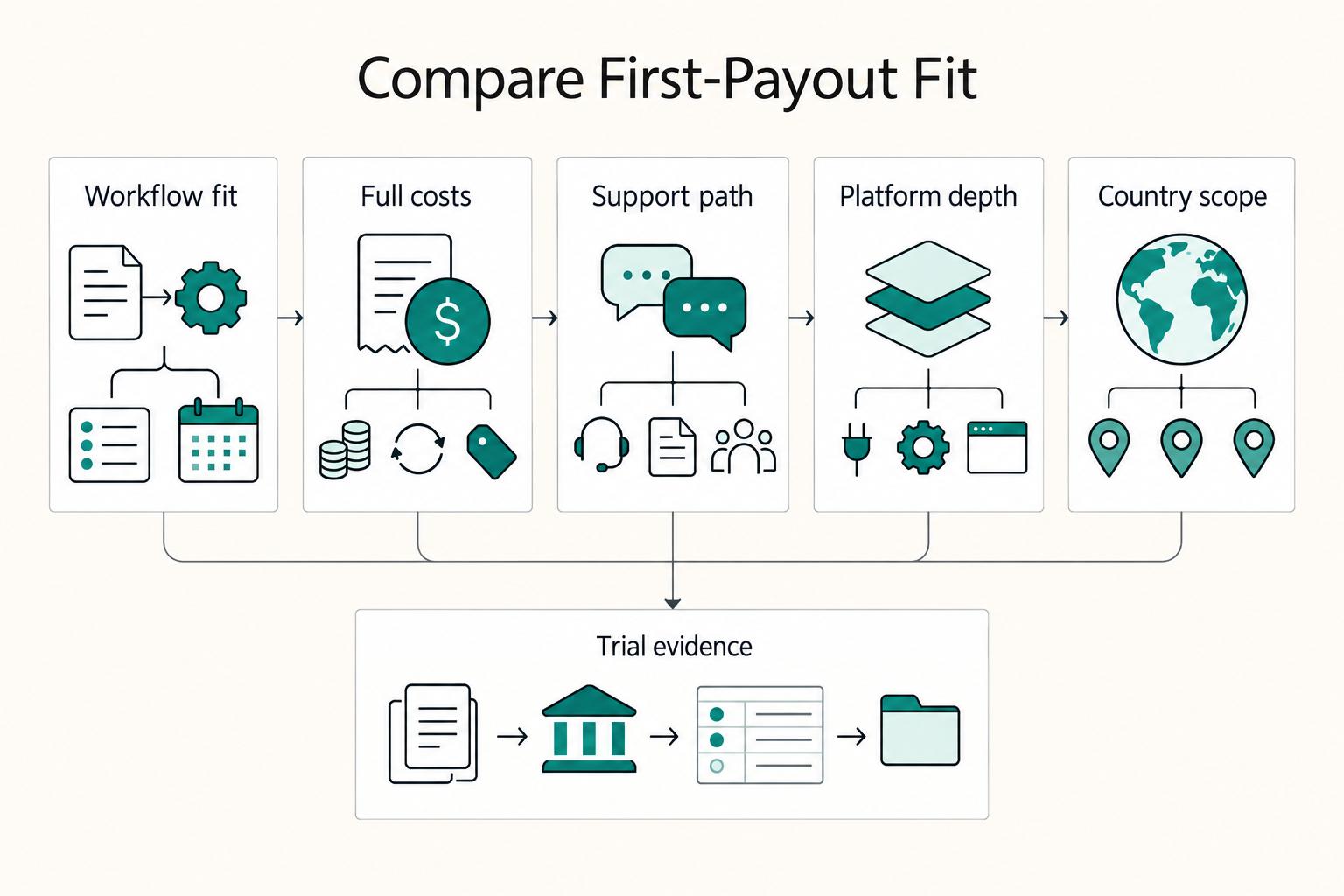
Deel vs Remote for Freelancers Who Need a Clear First-Payout Decision
Choose the platform that makes your first payout cycle predictable and your contracts easier to defend. This is an operating decision, not a brand contest.