
Quick Answer
Design your YouTube thumbnail to pre-qualify the right viewer, not just win clicks. Build a fixed brand system, write one clear promise before choosing the image, and match the visual to a trust signal like authority, proof, or clarity. Then check small-screen readability, keep the promise aligned with the video, and test controlled variants using watch time and retention, not CTR alone.
Your thumbnail is often a client's first impression of your brand. That 1280 x 720 rectangle helps determine whether you look like a credible expert or just another voice in the feed. It signals your value before a word of the video is heard.
For a serious professional, thumbnail design is a business decision, not a creative afterthought. The goal is not empty clicks. It is a repeatable client acquisition channel. That means moving from one-off design choices to controlled execution, from broad appeal to deliberate filtering, and from guesswork to measured performance.
This guide lays out a three-part approach to turning your thumbnails into a reliable part of your brand and growth process.
The Foundation: A Brand System for Scalable Consistency#
If you want to create thumbnails at scale, stop making style decisions from scratch. Build a fixed set of rules another person can follow without asking which font, crop, or logo version to use.
Step 1. Lock your guardrails. Fix the non-negotiables first: palette, headline font, support font, logo behavior, and layout zones. Put approved assets in one shared source, assign one template owner, and use versioned file names that show date, video slug, and revision number. Your verification test is simple: hand the file to a teammate and ask them to export a compliant thumbnail without clarification. If they hesitate, your rules are still too loose.
Step 2. Build intent-based variants, not endless one-offs. Keep the same grid and brand kit, then swap only the message pattern based on what the video needs to do. You get consistency without making every upload look interchangeable.
| Intent type | Visual pattern | Message style | Risk of mismatch | Avoid when |
|---|---|---|---|---|
| Explainer | Face plus one object or simple visual cue | Short, benefit-led phrase | A vague promise that could fit any topic | The video is opinion-heavy, not instructional |
| Case study | Result visual, before-and-after, proof cue | Specific outcome or process label | Overstating results the video cannot show | Proof is weak or confidential |
| Opinion/authority | Strong portrait, direct eye-line, bold framing | Clear stance or claim | Drifting into misleading metadata or thumbnails | The video is mostly neutral or tutorial-based |
Step 3. Pick your tool by review flow. Use Canva when you need brand control, quick handoffs, and simple permissions like edit, comment, or view. Use Photoshop when the design work is heavier but stakeholder review still matters, since review links let people comment without Adobe accounts and send comments back into the file. Use Figma when fast comments and team discussion matter more than pixel-level image editing.
Step 4. Run a two-minute quality gate before publish. Check small-screen readability, keep the layout simple, confirm the thumbnail promise matches the video, and use approved assets only. Export at 1,280 x 720 with a minimum width of 640 pixels, and keep the file under 2 MB for videos.
Also remember that thumbnails render differently across devices. Vertical videos may show an auto-generated 4:5 image on key mobile surfaces instead of your 16:9 custom art. Log every change with the version name, screenshot, date, and reason so you can review impressions and CTR later in context, not in isolation.
With those guardrails in place, the next question is not how to make thumbnails prettier. It is how to qualify the right viewer before the click.
Related: How to Create a Brand Style Guide for a Client.
The Strategy: Designing Thumbnails that Pre-Qualify Your Audience#
Use your thumbnail as a fit filter, not a broad click magnet. Your goal is to attract viewers whose needs and expectations match what the video actually delivers.
A broad promise can raise curiosity but weaken trust after the click. YouTube warns against thumbnails or titles that make viewers expect something the video does not contain, and that mismatch can push viewers to leave early. Treat the thumbnail as expectation-setting, not bait.
Start with the promise#
Write the promise before you choose the image. Use this three-part sequence:
- What is the viewer trying to do right now?
Search viewers often have an immediate need, so name the job they are already trying to complete.
- What single outcome can this video honestly deliver?
Keep it to one outcome per thumbnail. If the line could fit many unrelated uploads, it is too vague.
- Who is this not for?
Add a light disqualifier through scope, stage, or method (for example: "for consultants," "before you hire," "without paid ads").
Use this pattern: intent + one outcome + one screen-out cue. "Fix proposal scope before client pushback" qualifies better than "Proposal Tips" because it signals the problem, outcome, and stage. Then verify that the video delivers that exact promise quickly; if it does not, revise the promise first.
| Intent type | Thumbnail promise style | Strongest visual proof format | Common mismatch risk | Revision cue |
|---|---|---|---|---|
| Problem-aware | Name the pain and immediate fix | Face plus one clear problem cue | Too generic; could fit many topics | Add the specific failure point or stage |
| Solution-aware | State the implementation outcome | Interface crop, process visual, or tool-in-use image | Promise sounds complete, video is only an overview | Narrow claim to the exact step covered |
| Proof-seeking | Lead with evidence, result, or method | Before-and-after, result visual, chart, or mechanism screenshot | Claims proof the video never shows | Replace with the exact proof asset shown in-video |
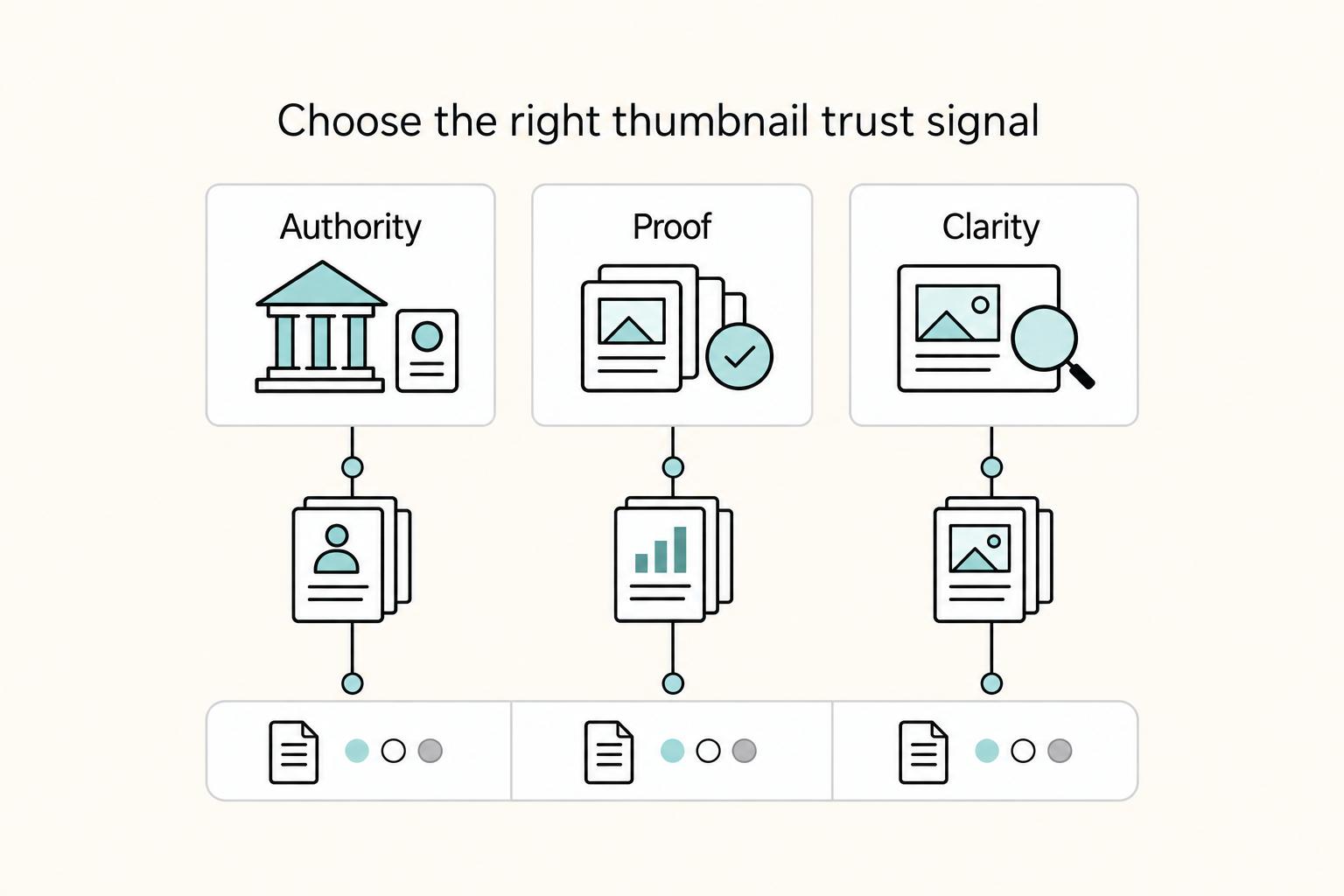
Choose the trust signal#
Pick the trust signal first, then design around it:
| Signal | Viewer needs | Design cue |
|---|---|---|
| Authority | Trust your judgment | Clean portrait and lighter text can work better than a busy collage |
| Proof | Evidence the method works | Make evidence more prominent than personality |
| Clarity | A confusing topic simplified | Keep composition simple and text easy to read |
Then match the image, text weight, and composition to that signal. If you choose authority, a clean portrait and lighter text often work better than a busy collage. If you choose proof, make evidence more prominent than personality. If you choose clarity, keep the composition simple and the text easy to read.
The common failure is claim-visual mismatch. A strong claim with no visible evidence feels unreliable. A detailed tutorial promise with reaction-style visuals can pull the wrong click even if CTR looks strong at first.
Gate the thumbnail before publish#
Run this quick pass/fail gate:
- Small-screen legibility: text readable and focal point obvious on phone-size preview.
- One-idea clarity: the viewer benefit can be stated in one short sentence.
- Promise-to-video alignment: video clearly contains the result, proof, or method implied.
- Revise-before-publish triggers: multiple claims, visual clutter, proof wording without proof asset, or a thumbnail that only makes sense with the title.
If any check fails, revise before you publish. Keep the design simple, keep text readable, and avoid policy risk: misleading thumbnails create obvious risk, and thumbnails that violate Community Guidelines are not allowed.
Make testing a routine, not a rescue step. Save one controlled alternate at publish time, then log version name, screenshot, date, and hypothesis so your later CTR and watch quality review has useful context. If desktop YouTube Studio testing is available, you can compare up to 3 title/thumbnail variants, and YouTube says tests should finish within two weeks. The winner is based on watch time, which is why fit and expectation alignment matter more than raw clicks.
Once your message is doing the work of qualifying the right viewer, move to execution: test variants in a way that gives you a clear decision. If you want a deeper dive, read A Freelancer's Guide to LinkedIn Marketing.
The Workflow: A Data-Driven Process for Measurable ROI#
Run thumbnail testing as an operating routine, not a design debate: define the audience, define success, set a guardrail, test one variable, then make a clear decision.
Write the test brief first#
Before you export variants, lock these three items for that video:
| Brief item | What to lock | Notes |
|---|---|---|
| One audience segment | Pick one monthly audience group from the last 28 days | new, casual, or regular |
| One success definition | Use watch-time outcome or impressions-to-watch-time performance | Do not use CTR alone |
| One guardrail metric | Check that first-30-second retention does not weaken | Review once retention data is available, typically after 1-2 days |
If you cannot state the brief in one sentence, the test is too broad. Example: "For new viewers, Variant B (proof screenshot) should beat Variant A (headshot) on watch-time outcome without hurting first-30-second retention."
Use native testing first#
Use YouTube Test & Compare first when available. It supports up to 3 variants, usually completes within two weeks, and selects a winner by watch time.
| Method | Use it when | Main bias risk | How to reduce false signals |
|---|---|---|---|
| YouTube Test & Compare | You have desktop Studio access and the video is eligible | Mid-test package edits stop the test | Freeze title/thumbnail during the run and isolate one variable |
| Manual swap on one video | Native testing is unavailable | Audience mix changes over time | Change one element only, compare against the same video's prior period, and wait for substantial impressions |
| Post-publish review only | Traffic is too low for a useful comparison | Overreading small CTR movement | Treat as diagnostic only, not as a winner call |
Use these eligibility checks up front: native testing is desktop-only, and Shorts, Scheduled Lives, and Premieres are excluded. Also expect some traffic to be held out as control and excluded from experiment calculations.
Read results in the right order#
Review outcomes in this order: watch-time result -> first-30-second retention -> average view duration -> CTR. CTR still matters, but it is not enough by itself.
| Decision | Trigger |
|---|---|
| Keep | Watch quality holds or improves, and the thumbnail promise matches the opening |
| Revise | CTR rises, but first-30-second retention weakens after the data delay |
| Stop | Both click response and watch quality decline |
| Scale | The same pattern wins again on comparable videos with the same segment and intent |
Keep a lightweight test registry#
Track every run in a simple registry so decisions stay auditable and reusable.
| Field | What to log |
|---|---|
| Variant identity | Variant ID + screenshot |
| Change rationale | Exact element changed + hypothesis |
| Test scope | Target segment + intent type |
| Review window | Start/end dates for the comparison period |
| Metrics reviewed | Watch-time outcome, first-30-second retention, average view duration, CTR |
| Final status | draft, running, keep, revise, stop, promote |
Promote patterns only after repeat evidence#
Promote a winner into the master thumbnail system only after repeat wins, not a single spike. The publisher can run and log tests, but the brand owner should approve promotions so one lucky result does not become a default rule.
Your Thumbnail Is Your First Handshake#
At this stage, run thumbnails as an execution standard, not a taste debate. Use this handoff before every publish so you earn the click without overpromising.
- Lock the template.
Lock what must stay fixed: type treatment, spacing zones, accent color limits, logo behavior, and export setup. Allow variation only in focal image, proof cue, and short text line. Set one owner to approve template edits so "small exceptions" do not become brand drift. Final check: export at 16:9 and confirm your current Studio UI accepts the file, because YouTube guidance can vary by interface (for example, one Help version lists 1,280 x 720 and under 2 MB for video thumbnails).
- Choose one angle.
Publish one audience intent, one promise, and one proof cue per thumbnail. If your text is trying to teach, tease, and prove credibility at once, cut it until the title and image communicate one clear idea together. Use this cut rule: if the wording could fit ten unrelated uploads, it is too broad.
- Gate readability before publish.
Pass or fail it at phone size and on a larger screen, since thumbnails render differently across devices and compete with other videos in the same feed. Pass only when the focal point reads first, any text is easy to read, and the thumbnail-title promise matches what the video delivers. Fail it when the packaging creates clicks but weakens trust, because mismatch can hurt watch behavior and discoverability.
- Log the shipped version.
Record the screenshot, date, exact change, why you changed it, and the result you expect (for example, stronger impressions CTR from clearer proof, or better watch time from a tighter promise). If you run YouTube's test feature, keep variants controlled: you can compare up to 3 combinations, and changing title or thumbnail mid-test stops the test.
Use this as your standing handoff: locked template, single angle, pass/fail readability, clean log. Next action: turn these four checks into a one-page review card and use it on your next upload. Related: How to Create a YouTube Channel to Showcase Your Freelance Skills
Frequently Asked Questions
How do you aim for the right viewer instead of just more clicks?
Aim for audience fit first, not maximum curiosity. Start with what the viewer is trying to do, define one honest outcome, and add a light screen-out cue. If clicks rise but early watch behavior weakens, narrow the promise and make the title more specific.
Do you really need a custom thumbnail?
Yes, in most cases. Put the auto-generated frame beside your custom version at phone size and keep the one that communicates the topic faster. If neither is instantly clear, simplify the focal image before adding more text or decoration.
How do you keep thumbnails consistent without making them repetitive?
Lock the recognition elements like type treatment, spacing, and color limits. Then vary the main proof, expression, or claim angle so uploads look related without becoming near-clones. If recent thumbnails blur together, change the lead image first and log the revision.
What actually counts as thumbnail performance?
Thumbnail performance is click response plus post-click quality. Review results in this order: watch-time result, first-30-second retention, average view duration, then CTR. If clicks rise but viewers leave early, the package is likely overselling and should be revised.
Which tool should you use to design YouTube thumbnail files?
Pick the tool by review flow and speed, not by feature count. Use Canva for brand control, quick handoffs, and simple permissions, Photoshop for heavier image work with review links, and Figma when fast comments and team discussion matter most. If revisions are slow or handoff is messy, switch tools before assuming the concept is bad.
When should you use a face, and when should you skip it?
Use a face when expression communicates the promise fastest, especially for broader, casual-viewer topics. Skip it when proof visuals like a chart, screen, before-and-after, or client-facing outcome build more trust. Check both at small size and keep the version that reads clearly without extra explanation.
How do you choose visuals that stay clear instead of crowded?
Keep one focal point and use the rule of thirds if you need a quick composition check. Test the image on more than one device because details can disappear fast. If it feels crowded, remove elements before boosting color or adding complexity.
Should you refresh older thumbnails, or leave published videos alone?
Refresh older thumbnails when the topic still matters and the original package no longer fits current audience taste or clarity standards. Compare the video against its own prior period and log the new version, the date changed, and the paired signals reviewed. If clicks improve but watch quality weakens, revert and test a truer promise instead.
Try a related tool
Researched and edited by the Gruv editorial team. Gruv builds cross-border billing, payouts, and finance-operations software for global businesses.
Sources
Includes 7 external sources outside the trusted-domain allowlist.
- fws.gov/sites/default/files/documents/Draft%20ETG%20...trusted
- adobe.com/learn/photoshop/web/share-for-review-photosh...external
- canva.com/help/brand-controlexternal
- canva.com/help/version-historyexternal
- graphicdesignforum.com/t/youtube-thumbnail-design/23737external
- help.figma.com/hc/en-us/articles/360039825314-Guide-to-comm...external
- support.google.com/youtube/answer/16767369external
- support.google.com/youtube/answer/2801973external
Educational content only. Not legal, tax, or financial advice.
Related Posts

LinkedIn for Freelancers Who Want a Predictable Client Pipeline
Treat LinkedIn as two jobs you run at the same time: a credibility check and a conversation engine. If you only chase attention, you can get noise. If you only send messages, prospects may click through to a thin profile and hesitate.
How to Create a YouTube Channel to Showcase Your Freelance Skills
Treat this like a business decision, not a creator identity project. Your goal is to publish videos that attract qualified inquiries instead of random attention.
How to Create a Brand Style Guide for a Client
If you work alone, your guide does not need to be a full brand book. It should work as a control document. Standardize the few choices that keep coming up so your proposals, reports, invoices, decks, and delegated work look and sound like they come from the same business.