
Quick Answer
Use one conversion path and build the channel around it: video -> description link -> intake form -> booking page. Define a tight scope line (service, specific buyer, next step), then publish a first-10-video sequence that moves from diagnosis to method, proof, objections, and fit. Track qualified inquiries, calls booked, CTA clicks, and intake quality instead of views alone. Keep one weekly planning block, batch work by task, and protect pre-publish checks for approvals, confidentiality, account access, and records.
You're not starting a "YouTube channel." You're installing a client-acquisition system.#
Treat this like a business decision, not a creator identity project. Your goal is to publish videos that attract qualified inquiries instead of random attention.
Client acquisition means getting clients on purpose. The alternative is hope marketing: you post, wait, and hope the right person finds you. If you want YouTube to work for your freelance business, decide who the content is for, what service it should lead to, and what next step a good prospect should take.
Step 1 Define your inputs, output, and constraints#
Most business channels fail before filming because they skip positioning and jump straight to production. At this stage, strategy matters more than production budget. If your channel is broadly "for anyone who might need my skills," you are more likely to attract broad, low-fit attention. Before you plan a single video, fill this in:
- Audience: I help ___
- Offer: with ___
- Primary conversion action: after watching, I want them to ___
- Non-negotiable boundaries: I will not share ___
Keep these inputs tight. One audience and one core offer is enough to start. Your output should be a business result such as qualified inquiries, not subscribers.
Use this checkpoint: if you cannot describe your audience, offer, and next step in one sentence, you are not ready to publish. Check your CTA path too. If five planned videos each send viewers to different actions, the channel is already drifting.
Step 2 Apply three decision rules before you publish#
Before you publish, use these three rules to decide whether a topic belongs on your channel:
| Rule | Question | If it fails |
|---|---|---|
| Topic-fit test | Can this topic plausibly lead to your actual service? | If not, cut it. |
| CTA-fit test | Does the call to action make sense for the person who would watch this video? | If the video is beginner education but your offer is high-touch consulting, tighten the angle or the CTA. |
| Lead-fit test | If this video performs well, would you want more people like these viewers in your inbox? | If the answer is no, the topic packaging is off. |
A common failure mode is broad educational content that attracts low-fit attention while your real prospects never see themselves in the title, framing, or CTA.
Step 3 Track demand, not applause#
| Vanity signal | Pipeline signal | What it actually tells you | What to do when it moves |
|---|---|---|---|
| Views | Qualified inquiries | Whether attention is turning into buyer intent | If views rise but qualified inquiries do not, narrow the topic and make the CTA more specific |
| Subscribers | Calls booked | Whether interest is entering your sales process | If subscribers rise but calls stay flat, fix the handoff and keep one primary CTA |
| Likes and comments | Intake form quality | Whether the right people are responding | If engagement is high but forms are weak, add qualifier language to titles, descriptions, and forms |
| Watch time | CTA clicks | Whether the offer transition is clear enough to act on | If watch time is solid but clicks are low, move the CTA earlier and make the next step easier |
A quick example: say you sell messaging strategy to B2B teams, but a video draws lots of comments from freelancers and students. The fix is not "make better videos." Repackage the next topic around a buyer problem. Add qualifier language so the right people recognize themselves, and make the CTA sound like an application rather than a general chat. You may see fewer total inquiries, but better-fit ones.
If your buyers spend time on LinkedIn after they discover you on YouTube, make that handoff intentional with A Freelancer's Guide to LinkedIn Marketing.
Is YouTube the right acquisition channel for your freelance business?#
YouTube is a fit only if you can clearly name your service, your buyer, and the next step, then run publishing, intake, and follow-up as one repeatable process. If you cannot do that yet, treat this as a fail-for-now and tighten your setup before you publish more.
Step 1 Write a pass/fail scope line#
Use one sentence that names the service, the buyer, and the next step. The channel should have one clear job: attract inbound leads for the service you sell, from the buyer you serve, and send them to one chosen action.
Pass it only if a stranger can repeat back all three parts without extra explanation. Fail it if it still sounds like "I'll post useful videos and see what happens."
Step 2 Pick a lane based on buyer intent and your operating style#
There is no single client-acquisition method that works for everyone. Your lane should match buyer intent and the way you can execute consistently. Some guidance also claims only a small in-market segment is ready to hire now (often framed as ~3%), while most are not actively ready yet.
| Lane | Effort pattern | Lead quality signal | Operational demand |
|---|---|---|---|
| Search-driven content | Publish focused videos that answer specific buyer problems | Inquiries reference a concrete problem your service solves now | Tight topic selection, clear CTA, proof you can show clearly |
| Relationship-driven content | Publish consistently to build familiarity and trust over time | Leads say they have followed your work before contacting you | Strong consistency, disciplined follow-up, patience for slower conversion |
If your buyers usually act when they have an immediate problem, start search-driven. If they usually need repeated trust signals first, relationship-driven can fit better.
Step 3 Run a channel-fit readiness checklist before increasing output#
Use this as a practical gate:
| Area | What must be ready |
|---|---|
| Intake | One clear path for inquiries. |
| Qualification | A clear way to screen out low-fit leads early. |
| Follow-up | A reliable response workflow you can sustain. |
| Fulfillment readiness | Proof and delivery capacity are ready if qualified demand increases. |
If any one of these is weak, fix operations first, then scale publishing.
Before you hit record: prerequisites, assets, and guardrails (what to prepare)#
Prepare your system before you publish anything. Start with message clarity, proof readiness, and guardrails so your videos attract better-fit inquiries and avoid preventable risk.
Step 1 Write the channel brief you can actually use#
Write a one-page brief before drafting videos. Keep it short enough to reuse across your YouTube About section, LinkedIn profile, and CTA copy.
Offer: name the service you provide. Ideal buyer profile: identify the role, company type, stage, or situation you serve. Promise: state the problem you can credibly help improve, using only claims supported by approved records. Primary CTA: choose one inquiry action, such as an intake form, booked call, application, or project brief.
Keep the promise specific and supportable. Focus on the problem you help solve and the next step, not broad guarantees.
Quick self-test: ask someone outside your business to read it and answer four questions. Who is this for? What do you sell? What problem do you address? What should the viewer do next? If any answer is unclear, tighten the brief before recording.
Step 2 Assemble the minimum viable asset stack#
Build only what helps you publish consistently and route attention into one clear next step.
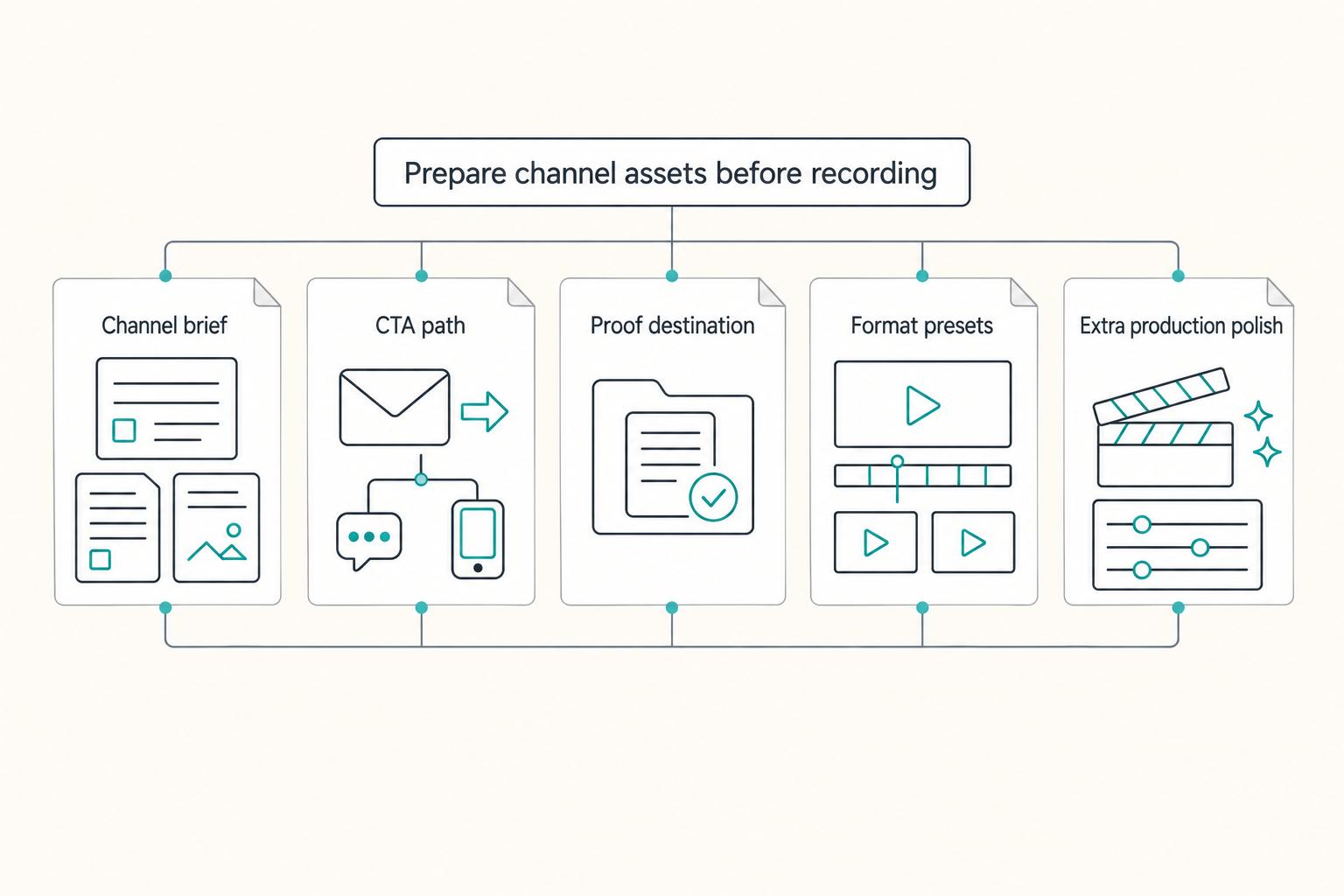
| Asset | Priority | What to prepare |
|---|---|---|
| Channel brief | Must have | The four-field brief above, plus one short and one long profile version |
| CTA path | Must have | One primary inquiry path and one monitored contact method |
| Proof destination | Must have | One page or location where approved proof lives |
| Format presets | Must have | A repeatable YouTube edit workflow and short-form formats for 30-45 second snippets or 30-60 second explainer cuts |
| Extra production polish | Optional | Use only if it does not slow publishing consistency |
Set distribution on purpose. One B2B guide says LinkedIn native uploads usually distribute farther than external-link posts, so package clips accordingly while keeping YouTube as your core library. For platform-specific execution, see A Freelancer's Guide to LinkedIn Marketing.
Step 3 Build the evidence pack and operator guardrails#
Treat proof like an evidence system, not scattered files. Organize four buckets: case artifacts, process artifacts, approved testimonials, and permissions status for each item. Before using any proof publicly, verify the permission status and current requirements from approved records.
Before production, finalize this operator checklist:
- Confidentiality: define what cannot be shared without approval (for example client-identifying or sensitive material). Avoid putting confidential client content into consumer AI tools when training defaults could expose inputs.
- Approval workflow: require human review before anything client-facing or proof-based goes live; include edge-case checks for out-of-scope questions.
- Account access: keep channel and publishing access under business-controlled credentials with recovery coverage.
- Recordkeeping: maintain an audit trail for script versions, source assets, approvals, publish dates, final URLs, and reuse permissions.
Once these are in place, recording becomes execution, not guesswork.
Step 1 - Position like a specialist: niche, promise, and an offer-to-content map#
Start by making your positioning clear enough that a stranger can place you in one sentence. Broad messaging makes your marketing harder; specialist positioning makes you easier to choose for a specific problem.
Step 1 Write a positioning statement with two axes#
Define your niche on two axes: the service you provide and the client type you serve. Then add the outcome and one next action.
Write the positioning statement in one line: name the buyer, the result they want, the service or delivery method, and the single next step you want them to take.
Examples:
- I help seed-stage B2B SaaS teams improve lifecycle email performance through audit, strategy, and retained execution. Next step: submit an email program audit request.
- I help founder-led agencies fix messy proposal pipelines through CRM cleanup and sales ops implementation. Next step: book a discovery call.
Run this checklist before you publish:
- Buyer specificity: Can you name the role, company type, or business context without saying "anyone" or "all industries"?
- Outcome specificity: Is the result clear enough that a buyer can tell it matters?
- Delivery clarity: Is your method visible (for example: audit, implementation, consulting, or retained support)?
- CTA alignment: Is the same next step stated consistently across your YouTube description, channel About text, and LinkedIn profile?
If someone can only summarize your offer as "general marketing" or "you work with everyone," tighten the statement.
Step 2 Map content to buyer stage and one next action#
Use a practical path so each video has a clear job: awareness -> evaluation -> decision -> onboarding. This is your operating map, not a claim about platform behavior.
| Buyer stage | Buyer intent signal | Best content format | CTA destination |
|---|---|---|---|
| Awareness | They can name a painful symptom but not the fix | Diagnostic video, teardown, red-flag checklist | Intake form for audit or assessment |
| Evaluation | They are comparing approaches or providers | Process walkthrough, scope explainer, FAQ video | Service page or booking page |
| Decision | They need proof and risk reduction before choosing | Case walkthrough, objection handling, transition plan video | Inquiry form with project details |
| Onboarding | They are ready to start and want clarity on execution | Kickoff expectations, timeline, communication norms | Client guide or welcome page |
Prioritize high-intent buyer moments that filter for fit, such as switching providers, preparing for a migration, fixing a broken handoff, or replacing ad hoc reporting with a structured dashboard.
Step 3 Check for positioning drift before filming more#
Before each video batch, run a 60-second check: can a viewer restate who you help, what result you deliver, and how to engage you next? If not, revise the title, opening, or CTA before recording.
Then verify your examples match your approved proof assets from the previous section. Keep the rule tight: one clear service, one clear market, one clear outcome, one clear next step.
This pairs well with our guide on How to Launch a Podcast for Your Freelance Business.
Step 2 - Build a channel that looks like a business asset (not a hobby channel)#
Treat your channel like an operator-built storefront: clear routing, visible proof, and one next step. Before you publish more, run one full structure pass so buyers can move from "Who are you?" to "How do I hire you?" without friction.
Step 1 Audit the homepage like a buyer would#
Set up role-based navigation so each visitor type has a clear path:
| Visitor type | Content path |
|---|---|
| First-time visitor | A short "Start here" playlist covering who you help, the problem you solve, and how you work. |
| High-intent buyer | Process walkthroughs, scope explainers, and what engagement looks like. |
| Proof-seeking evaluator | Case walk-throughs, before-and-after examples, teardown videos, or anonymized client situations. |
End every path with the same CTA. Do not split actions across booking links, DMs, and email.
Step 2 Write an About section that can survive verification#
Use a tight structure that forces claim discipline:
Write the About section as a claim checklist, not a brag line: who you help, what result your service supports, what proof can be shown, what credential detail is current, and which single CTA belongs there. Keep unresolved proof, permissions status, credential detail, outcome examples, and service claims out of the published copy until they are verified from approved records.
If a claim is not verified, do not publish it yet. If you run a faceless format, build trust with artifacts: screen walkthroughs, annotated documents, process checklists, working files, hands-on demonstrations, and documented workflow. One contributor-led Forbes example describes a format with "no face. No voice. Just music and hands" and consistent presentation across uploads; use that as a format cue, not as proof this style performs better.
| Element | Inconsistent packaging | Standardized packaging | Trust and conversion impact |
|---|---|---|---|
| Thumbnails | Different fonts, colors, and message style each upload | One repeatable visual pattern | Faster recognition, less friction |
| Titles | Mixed styles (vague, clever, educational) | One clear promise style tied to buyer problem | Clearer intent for the right viewer |
| CTA language | Multiple asks across videos | One repeated action path | Cleaner routing and easier tracking |
Step 3 Install a pre-publish operations gate#
Before any video goes live, confirm these rails:
- Intake routing: one form or one booking path.
- Lead tracking taxonomy: source, service interest, status, next action, date.
- Records hygiene: keep inquiry notes, approvals, contracts, and client communications in one place.
- Proof check: examples are approved, anonymized when needed, and matched to your evidence folder.
The quality test is operational: if a qualified inquiry arrives today, can your workflow handle it cleanly?
Related reading: How to Use Social Media to Build Your Freelance Brand.
Step 3 - What should your first 10 videos be as a freelancer? (a proven sequence)#
Treat your first 10 videos as one buyer journey: help the right person recognize their problem, trust your approach, and then inquire. A passive "publish and wait" approach can stall; one creator described getting no early traction and waiting about 2 months for a first order. So use a deliberate sequence, not disconnected uploads.
A practical way to structure that sequence is to adapt the common progression from Build a Foundation to Niche Down to Position as an Expert into buyer-facing content.
| Video slot | Video type and prompt you can fill with your niche | Buyer intent | Proof signal | Service conversation to trigger |
|---|---|---|---|---|
| 1 to 3 | Problem teardown: "Where scope gets unclear before kickoff," "How approval loops delay delivery," "Why handoffs break after final files" | "You understand my situation" | Clear diagnosis of real delivery friction | "Can you review our current setup and scope the fix?" |
| 4 to 6 | Process walkthrough: "How I set scope boundaries," "How I run approvals," "How I plan timeline and handoff" | "You have a method" | Step order, boundaries, and decision points | "Can you quote this and explain how you'd run it?" |
| 7 to 8 | Case-style breakdown (approved/anonymized): "What changed after we fixed documentation," "How revised approvals reduced rework" | "You've handled this before" | Before/after reasoning with real artifacts | "Can you help us solve a similar issue?" |
| 9 | Objection handler: "What to do when budget is fixed but delivery risk is high" | "This feels safer to buy" | Tradeoff logic and clear limits | "Can you propose an option within our constraints?" |
| 10 | Fit and non-fit: "When this project is a fit for me, and when it is not" | "I know whether to reach out" | Qualification criteria and boundaries | "Here's our situation. Are we a fit?" |
Step 1 Use one production SOP for every draft#
Use one repeatable outline instead of ten formats: problem, stakes, your method, one concrete example, one next step. Before recording, run a service-relevance check: If this video attracts the right viewer, what exact inquiry should it create? If you cannot answer that, narrow the topic.
Keep prompts operational, not generic. Build topics around scope clarity, approvals, handoffs, timelines, and documentation. If you include proof, use only approved and anonymized artifacts.
Step 2 Keep CTA routing and attribution consistent#
Send every video to the same intake path you set in Step 2. Do not rotate between DMs, email, and booking links.
Track lead source with discipline: source, service interest, status, next action, and date. When possible, log the video title or URL so you can see which topics generate qualified conversations, not just views.
We covered this in detail in How to Leverage Guest Posting for Freelance Brand Building.
Step 4 - Run a weekly production + publishing cadence you can sustain (without burning out)#
Run this like client delivery: protect a cadence you can keep, then scale only if your bandwidth stays stable. If your workload shifts week to week, consistency is the win. In manual workflows, one video can take 15 to 25 hours from concept to publish, so your posting plan has to fit real capacity.
Step 1 Lock one weekly planning block and make four decisions#
Use one recurring planning block each week and stop after these four decisions:
- Topic: tied to one service conversation you want to trigger
- Outline: the same repeatable structure from the previous section
- CTA path: the single intake route you already chose
- Working title: names the problem and who it helps
Fallback rule: if you cannot name the exact inquiry this video should create, the topic is too broad. Narrow it from a category to one delivery problem.
Frequency guidance varies, and there is no universal posting rule. Use production velocity as your operating limit: how many quality videos you can ship each month without hurting client work.
Step 2 Batch by task and use a simple asset SOP#
If you work solo, batch by task to reduce context switching:
- Plan in one block
- Record in one block
- Edit in one block
- Upload and schedule in one block
Keep assets traceable with one consistent folder logic for every video: script, raw footage, edit files, thumbnail, and final exports. Use file names with date, short topic slug, and version. The standard is practical: you should be able to find the latest script, thumbnail, and final export quickly when client priorities interrupt the week.
Step 3 Use a pre-publish control table and a recovery rule#
Use this check before every publish so quality stays intact under load.
| Stage | What must be true | Common failure signal | Fix action before publish |
|---|---|---|---|
| Planning | One buyer problem and one service conversation | Topic is broad and could attract anyone | Rewrite around one delivery issue and one intended inquiry |
| Draft/Edit | Promise is clear early; example shows real delivery context | Advice is generic, with weak stakes or no next step | Add one concrete freelance scenario and restate the CTA path |
| Packaging | Title, thumbnail, description, and CTA point to the same offer | Mixed asks or vague packaging | Remove extra CTAs and align all packaging to one offer |
| Scheduling | Publish timing fits your client workload | You keep slipping publish because production is overloaded | Lower cadence to a maintainable level and keep the same workflow |
If you miss a week, do not overcorrect with a production sprint that disrupts client delivery. Publish the next useful video, keep cadence stable, and use analytics to adjust format or posting time. If editing effort keeps expanding, set an effort cap before you start and ship the clearer version on schedule.
Need the full breakdown? Read How to Prepare for a Media Interview as a Freelance Expert.
Step 5 - How do you turn YouTube viewers into freelance clients (not just subscribers)?#
Your publishing cadence creates business results only when each video points to one clear next step. Treat this as an SOP: one primary action, a fit check before you spend call time, and documented handoffs from inquiry to payment.
Step 1 Keep one primary action from video to inquiry#
Use one path: video -> description link -> intake form -> booking page. Say that action in the video, then repeat it at the top of the description in plain language.
A direct booking CTA in the description is a proven pattern, and you can still include supporting assets below it. The rule is priority: supporting links should help the main action, not compete with it.
Audit your last three uploads: can a qualified prospect tell in a few seconds what to do next? If not, tighten your spoken CTA, move the main link higher, and demote everything else.
| Link setup | What the viewer sees | Expected lead quality | Operational impact |
|---|---|---|---|
| One primary inquiry link | One clear next step to apply or book | Clearer intent because viewers self-select into one path | Easier attribution, simpler follow-up, fewer scattered conversations |
| One primary link plus supporting proof links below | Action first, portfolio/reviews second | Usually workable when the main action is still obvious | Manageable if proof links do not compete |
| Many competing links and asks | Book, download, follow, message, subscribe | Mixed intent and more low-context inquiries | Messier handoff, harder tracking, more manual sorting |
Step 2 Qualify before calls, then own the follow-up#
Use your intake form to confirm fit before you give away calendar time. Ask for project goal, timeline, key constraints, and readiness signals (for example, whether they already have the materials or stakeholder input needed to start).
After submission, send one expectation-setting message: confirm receipt, state what happens next, give a reply window, and name who owns the next step. If details are missing, request them in that same message instead of opening a scattered back-and-forth.
When objections appear, send one targeted asset, not a pile of links. A relevant video, portfolio sample, or trust signal like reviews is usually enough to move the decision forward.
Step 3 Assign each channel one conversion job and keep operations traceable#
Keep cross-channel support aligned to the same inquiry path. Let YouTube handle discovery, let LinkedIn reinforce trust, and let portfolio/reviews support decision-making. If LinkedIn is part of your mix, keep it aligned with A Freelancer's Guide to LinkedIn Marketing.
Once a viewer becomes a lead, switch to operator mode: keep a named contact record, saved intake, scope/proposal history, invoice trail, and collection status in one traceable flow. If a payment request would break your records, route it back to your standard invoicing path.
Before turning on any payout or collection stack, verify market and provider requirements for your setup first, then invoice. This reduces the risk of a ready-to-buy lead getting blocked by an unready payment flow.
Conclusion: Your freelancer YouTube channel is a durable asset - if you run it like one#
If you want this channel to keep supporting qualified conversations, run it with the same discipline you use for delivery, invoicing, and client approvals. The win is not more uploads by themselves. It is a repeatable, client-centered process that stays clear, traceable, and usable even when work gets busy.
| Area | Loose behavior | Weekly standard |
|---|---|---|
| Workflow | Topics, edits, and CTAs change ad hoc | One offer, one audience, one next step from video to intake to call |
| Account control | Shared logins or unclear ownership | You keep primary account control and decide who can upload or edit |
| Asset provenance | Music, clips, and visuals arrive with no record | Keep a simple list of major assets used in each edit before publishing |
| Review gates | Final file goes live when it is "good enough" | Approval owner is named, and nothing publishes before review |
| Records | No history beyond the upload itself | Keep a simple episode log with slug, duration, view count, source link, and key notes |
That last row matters more than it looks. A basic record helps you verify what shipped, which CTA was used, and what source link was tied to the episode. If someone helping you cannot show where footage, music, or visuals came from, pause and review before publishing. If your own offer sounds shaky on camera, fix that first. Low confidence in the offer can lower client confidence too. Use this owner check:
- Keep control. You own the channel and final publish decision.
- Name approval. Decide exactly who signs off titles, thumbnails, descriptions, and CTA links.
- Log each upload. Record slug, duration, source link, key notes, and early results such as view count.
If you hire help, hire for execution, not ownership. Your next step is simple: set up that log, define the approval owner, and run your next three videos that way.
Frequently Asked Questions
How should a freelancer use YouTube to get clients, not just views?
Use your videos to answer the real questions prospects repeatedly ask, then move interested viewers to a clear next step. Treat client calls as two-way qualification, not a one-way performance, and remember you can decline bad-fit work before signing.
What should I include in my first 10 videos as a freelancer?
A practical starting format is 10 common freelancer questions. Build topics around recurring concerns like pricing and landing clients. Use portfolio examples (including personal projects), add a short description of what you did and the impact, and do not show work covered by an NDA contract.
Should freelancers create videos themselves or hire help?
This is a tradeoff, not a universal rule. A recurring freelancer question is whether to partner on production/web work or do everything solo, and the right choice depends on your situation.
How do I turn one freelancing skill into a repeatable YouTube content plan?
Start with one service and map it to recurring buyer questions and decision points. A question-led format (like a top-10 FAQ) is a practical way to keep ideas focused and repeatable.
How often should I post on YouTube as a solo freelancer?
This guide does not provide an official or ideal posting frequency. Use a repeatable, question-based plan and choose a pace you can sustain.
Do YouTube Shorts help freelancers get clients, or are they just for reach?
Treat Shorts as a format test, and do not assume any format will guarantee leads or bookings.
How do I connect YouTube with LinkedIn outreach without sounding spammy?
Keep your positioning consistent across channels, starting with a profile headline that clearly states what you do and who you help. If you use both channels, keep them aligned with A Freelancer's Guide to LinkedIn Marketing.
Try a related tool
Researched and edited by the Gruv editorial team. Gruv builds cross-border billing, payouts, and finance-operations software for global businesses.
Sources
Includes 5 external sources outside the trusted-domain allowlist.
- kings.edu/pdf/Catalog2014-2015.pdftrusted
- peace.edu/wp-content/uploads/2025-2026-Academic-Catalo...trusted
- strategicplanning.risd.edu/sites/default/files/2025-12/RISD-Final-Self-...trusted
- 6figurecreative.com/client-acquisition-for-freelancers-how-to-ge...external
- alexberman.com/freelance-marketing-strategyexternal
- contently.com/2025/10/08/the-b2b-brands-guide-to-short-for...external
- forbes.com/sites/renaegregoire/2025/11/25/how-to-build-...external
- humbleandbrag.com/blog/grow-a-youtube-channel-for-your-businessexternal
Educational content only. Not legal, tax, or financial advice.
Related Posts

LinkedIn for Freelancers Who Want a Predictable Client Pipeline
Treat LinkedIn as two jobs you run at the same time: a credibility check and a conversation engine. If you only chase attention, you can get noise. If you only send messages, prospects may click through to a thin profile and hesitate.
How to Get Health Insurance in Portugal as a Digital Nomad
If you are searching for health insurance portugal nomad options, treat the decision as part of your visa file before you treat it as a product search. The policy matters, but timing, wording, and document quality often determine whether your file moves cleanly or turns into a clarification request.

The Best Portable Power Banks for Digital Nomads
**Protect client delivery risk first, then optimize for convenience and price.**