
Quick Answer
Agree on review checkpoints and scope, collect focused comments, and log each decision and version. Correct in-scope defects and discuss added work before it starts. Each month, choose one recurring critique, practice it on permitted samples, and measure the next comparable drafts.
Start here if you want better skills without client chaos#
Better skills without client chaos usually come from a simple loop. Collect feedback at set checkpoints, compare it to scope and approvals, decide what belongs in the current job, and then revise. If your work only gets better after a messy final review, fix the review path before you try to fix your craft.
Step 1 Check whether your service changes through review#
Use this guide if you sell a service that changes through review, not just private practice. That includes Freelance Writing, UX-heavy work, design, content strategy, and similar projects where the client sees drafts, reacts, and shapes the next version.
A feedback loop is a repeatable way to collect, analyze, and apply feedback so future work improves. For freelancers, it works best when the loop sits inside real project boundaries. Your project scope sets those boundaries: goals, deadlines, deliverables, and what is out of scope. When that is vague, feedback can stop being useful input and turn into drifting requests.
Step 2 Build your first loop around one active project#
Build your first loop around one active project and a short window of decisions, not your whole business. The goal is not to collect more comments. The goal is to create a predictable revision path that supports delivery.
Here is the first checkpoint that matters: can you point to one current Scope of Work (SOW) or similar project document and say what the client is approving, when, and where that approval is recorded? If not, you likely have a scope and decision-rights problem before you have a feedback problem.
This guide stays focused on cleaner project operations. You will gather feedback at set moments, compare it against the SOW, decide what belongs in the current job, and document approvals as you go. That is what makes a feedback loop useful instead of noisy.
Step 3 Aim for three concrete outcomes from this guide#
By the end of this guide, aim for three concrete outcomes:
- A repeatable cycle for Client Feedback so comments arrive at planned checkpoints instead of exploding across an email chain.
- A tighter Revision Process with clearer approval points, so you are not revising work that was never properly signed off.
- Fewer surprises from Scope Creep, which is the uncontrolled expansion of requirements beyond the original plan and often leads to delays and budget overruns.
The tradeoff is straightforward. More structure can feel slower at first, especially if you are used to being flexible in the moment. But uncontrolled flexibility is usually what lowers quality and creates rework. A clear scope keeps work focused and supports on-time, on-budget delivery.
Watch for requests that add deliverables or exceed the agreed revision allowance. Discuss the impact and obtain agreement before extra work rather than changing price or scope by assumption.
Next, set up the inputs that make the cycle usable, then run feedback through clear checkpoints and approvals.
For the full breakdown, read How to Create a Business Email Address for Your Freelance Business.
Prepare your inputs before week one#
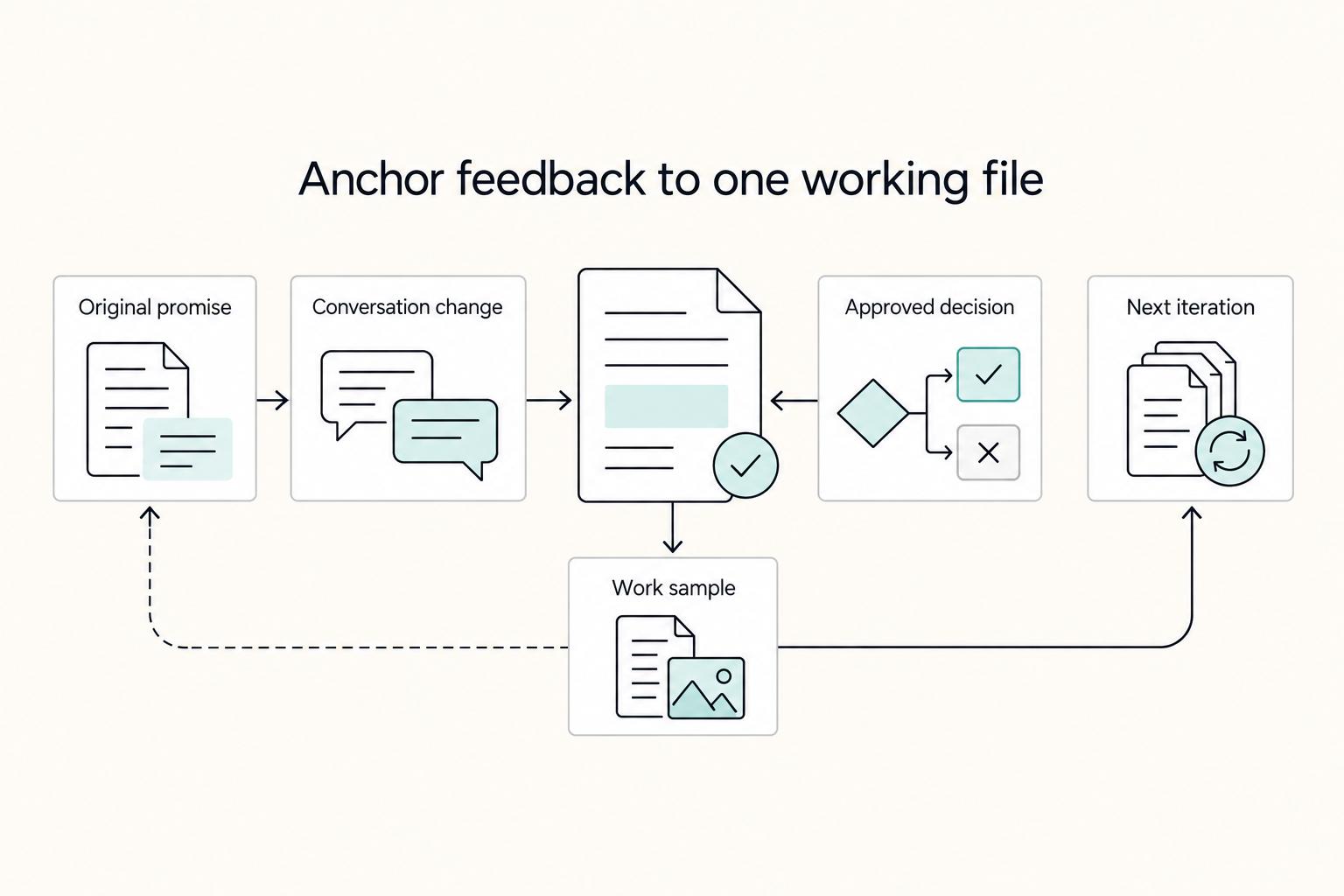
Before week one, build one working file that shows what was promised, what changed in conversation, and what was approved. That single view keeps your feedback loop controlled instead of reactive.
| Record | What it shows | Keep in |
|---|---|---|
| Current Proposal Template | What was promised | One working file |
| Signed Scope of Work (SOW) | Deliverable, deadline, and review expectations | One working file |
| Last three client conversations | What changed in conversation | One working file |
| Feedback notes | Project feedback notes | Evidence folder |
| Deliverable versions | Deliverable versions | Evidence folder |
| Approval Record per milestone | What was approved | Evidence folder |
Step 1 Pull proposal, scope, and recent conversations into one place#
Pull these into one place for one active project:
- your current Proposal Template
- the signed Scope of Work (SOW)
- the last three client conversations from your Email Chain or Client Portal
Then read them side by side and confirm the deliverable, deadline, and review expectations match. If they conflict, resolve that before the next draft.
Step 2 Set checkpoints that each carry one approval decision#
Set 2 to 3 checkpoints on your existing Project Milestone schedule. Kickoff, midpoint, and delivery are usually enough. At each checkpoint, define one approval decision the client is making.
If a milestone has no approval decision, treat it as a status update, not a revision trigger. When comments arrive between checkpoints, check them against the SOW before treating them as required changes.
Step 3 Create a small evidence folder before work starts#
Create a small evidence folder before work starts:
- feedback notes
- deliverable versions
- one Approval Record per milestone
If feedback includes screenshots, recordings, or personal data, agree on the necessary collection, access, storage, and deletion practices. Keep a private learning copy only where permitted, and remove identifying details before using an example outside the project.
You might also find this useful: How to Create a Productized Service for Your Freelance Business.
Define what your feedback loop is measuring#
Define the measurement target before reviews start, or every comment gets treated like the same priority. Keep the loop visible in your Client Portal or main project doc so both you and the client can see what is collected, how it is interpreted, what decision was made, what changed, and how you verified it.
Step 1 Write one line for each stage and reuse it#
Write one line for each stage and reuse it in every review round.
| Stage | What to write on one line | Verification point |
|---|---|---|
| Collect | What feedback came in, from whom, and on which deliverable version | You can point to the exact note, call recap, or comment thread |
| Interpret | Whether the item is a preference, objective issue, or SOW constraint | Each item has one clear tag |
| Decide | Accept, question, defer, or treat as out of scope | A decision-maker is attached |
| Implement | What changed in the draft or design | The new version shows the specific change |
| Verify | Whether the change improved the agreed outcome | You can compare against the original objective |
Your checkpoint: someone joining cold can follow one feedback item from comment to decision to changed deliverable.
Step 2 Track skill metrics and business metrics together#
Track skill metrics and business metrics together, not in separate notes. For skill quality, log defects like UX issues, copy errors, and clarity problems. For business health, log revision rounds, repeat bookings, and Freelancer Retention signals. If you work on a platform, also track ratings and client feedback, since those signals can shape how future clients evaluate you.
Step 3 Tag every feedback item before acting on it#
Tag every feedback item before acting on it, and use only these three tags:
- Preference: subjective taste, tone, style, or direction
- Objective issue: factual error, usability problem, broken link, or unclear sentence
- SOW constraint: timeline, deliverable boundary, approval rule, or required outcome already in the Scope of Work (SOW)
Tag preferences separately so you can discuss them without confusing them with factual defects. An agreed style requirement or included preference revision may still be owed under the scope.
Step 4 Set your review cadence by project type#
Set your review cadence by project type and make it explicit: milestone-based for fixed-scope projects, weekly for ongoing retainers. If cadence slips, decisions tend to scatter across the Email Chain and version control gets unclear. End each round with one current decision record in the same place the next round will begin.
Put feedback terms into your contract language before work starts#
Put the feedback rules into your contract before kickoff so revisions stay bounded and decisions stay traceable.
| Area | Define in writing | Article detail |
|---|---|---|
| Revision Process language | Use the same language in the Proposal Template and Scope of Work (SOW) | Cover included revision rounds, client response windows, and what becomes a Change Request |
| Decision rights | State who can approve revisions and where the final Approval Record is logged | For multi-stakeholder teams, decide whether one person gives final approval or approval comes through one owner |
| Revisions vs new scope | Honor included revisions and corrections owed under the agreed deliverable | Price a change request only for added work beyond scope or the agreed allowance; pause only that affected extra work |
| Data handling | Agree how feedback files are shared and retained | Use only the necessary personal data and confirm permission for reuse |
Step 1. Align the Revision Process across documents. Use the same Revision Process language in your Proposal Template and Scope of Work (SOW): included revision rounds, client response windows, and what becomes a Change Request. If those points differ between documents, resolve that before work starts.
Step 2. Define decision rights and the approval record. State who can approve revisions on the client side and where the final Approval Record is logged. For multi-stakeholder teams, name whether one person gives final approval or approval must come through one owner.
Step 3. Separate revisions from new scope. Treat feedback as revision only when it improves the agreed deliverable inside the current scope. If feedback adds deliverables, audience, research, timeline, or effort beyond scope, convert it to a priced Change Request before proceeding.
Step 4. Keep feedback data private. Agree who may see recordings, screenshots, and comments, and where they will be stored. Redact private client information from practice samples and obtain permission before using a project as public proof.
For related positioning work, see How to Choose a Niche for Your Freelance Business.
Collect feedback at the right moments and in the right channel#
Use a simple feedback rhythm so decisions stay clear and the work keeps moving.
| Step | How to run it | Key detail |
|---|---|---|
| Project Milestones | Request feedback at milestones already defined in the Scope of Work (SOW) | Keep each checkpoint to one version, one approver, and one review window |
| Structured prompts | Ask what to keep, what to change, and what outcome still feels missing against the SOW | Use focused input instead of open-ended prompts like "Any thoughts?" |
| One feedback channel | Use one primary place for written feedback and recap live discussions in writing | Confirm accepted changes, deferred items, approver name, and the version being approved |
| Silence handling | Send a short options-based prompt with a clear response deadline | Reference no-reply contract language if it exists, or escalate to the named approver |
- Step 1: Set feedback checkpoints at your Project Milestones.
Request feedback at the milestones already defined in your Scope of Work (SOW), not ad hoc across scattered messages. Keep each checkpoint focused on one version, one approver, and one review window so you can act on input without mixing stages.
- Step 2: Ask for feedback in a structured format.
Skip open-ended prompts like "Any thoughts?" and ask for focused input you can execute: what to keep, what to change, and what outcome still feels missing against the SOW. This helps separate preference comments from true scope or outcome gaps.
- Step 3: Keep feedback centralized and decisions documented.
Use one primary place for written feedback, then turn live discussions into a short written recap for the Approval Record. Confirm accepted changes, deferred items, approver name, and the version being approved so nothing relies on memory.
- Step 4: Manage silence with a bounded decision request.
If a client goes quiet, send a short options-based prompt with a clear response deadline. If your contract already defines what happens when there is no reply, reference that language; if not, escalate to the named approver for a direct decision window instead of assuming scope changes.
Use a decision matrix so feedback does not wreck margin#
Decide each comment before you revise, or a quick fix can turn into a long, expensive loop.
Step 1 Run every feedback item through two tests#
Run every feedback item through two tests: does it fit the Scope of Work (SOW), and does it improve User Experience (UX) or the business outcome?
| Decision | SOW alignment | UX or business impact | What to do |
|---|---|---|---|
| Accept | Yes | Clear positive impact | Revise now |
| Challenge | Unclear or partial | Benefit is uncertain | Ask for evidence or decision context |
| Defer | Possibly yes, but not for this milestone | Useful, but not urgent now | Park for a later phase or round |
| Reject | No | Little or no outcome benefit | Decline and explain why |
Use this as your working rule: accept quickly when evidence is strong and effort is low; challenge when scope impact is high and benefit is unclear.
Step 2 Challenge feedback with short questions that force clarity#
When you challenge feedback, ask short questions that force clarity: "Which SOW outcome is this tied to?" and "What user or business problem does this solve?" This keeps the discussion practical and helps separate true outcome gaps from preference-only edits.
Step 3 Pause revisions when a request conflicts with prior signoff#
When feedback reopens approved direction, clarify whether it is included under the agreed revision terms. Distinguish correction of your own defect from extra scope: prior signoff does not automatically make every correction chargeable. Pause only the affected additional work while agreeing any change request, and continue unaffected commitments.
Step 4 Add a one-line rationale for each decision#
Add a one-line rationale for each decision in the Approval Record. Clear records matter because the revision stage is often a make-or-break moment for repeat clients and referrals, and organized decisions help you keep expectations clear when opinions collide.
For work inside scope, honor the agreed revision allowance and correct defects you owe. If feedback adds work beyond those boundaries, document the change before starting only that additional work; keep unaffected commitments moving.
For a step-by-step walkthrough, see How to Create a Standard Operating Procedure (SOP) for Your Freelance Tasks.
Implement revisions in order and verify with proof#
Run revisions in sequence, not by comment order: apply approved core changes first, then polish details. That keeps the loop useful and prevents rework across Freelance Writing and UX deliverables.
1. Apply core changes before detail polish#
Start with edits that change structure, meaning, or user path. In writing, that usually means flow, argument order, and message accuracy before tone or line-level cleanup. In UX, that means hierarchy, navigation, and task flow before visual refinements.
Use a quick sort before editing:
- Core changes: structure, flow, meaning, user journey
- Detail polish: clarity, consistency, finish
If a "small wording tweak" changes direction, move it back to core.
2. Verify each round against original goals and milestone scope#
After each revision round, pause and verify against the Proposal Template and current Project Milestone.
- Does this update still match the agreed goal and audience?
- Did it solve the feedback issue without adding unapproved work?
- Does it belong in this milestone, or a later phase?
Treat feedback as a two-way process: respond clearly, then confirm you changed the right thing for the right scope.
3. Record proof in the Approval Record and flag stealth scope expansion#
Log each implemented change in the Approval Record with three fields: what changed, why, and who approved it. Keep entries short, but specific enough to audit later.
Several small edits can collectively add a deliverable or exceed the revision allowance. Identify the actual scope change and agree on its cost and timing before that extra work. Correct defects owed under the original scope without relabeling them as new scope.
Turn project feedback into deliberate practice every month#
Project feedback improves your skills only when you review patterns and turn them into next-month actions. Run a monthly review that ends with one clear skill target and one process update, so the loop does not stop at a single project.
Step 1 Review recurring critique instead of isolated comments#
Start by looking for repeated misses, not the loudest one-off comment. A useful prompt is: is this work making a difference for clients, and where does your performance keep falling short?
Use the same evidence from delivery: Approval Record, revision notes, client recap emails, and final deliverables. Then sort feedback into:
- recurring critique themes
- repeated execution misses
- one-off preferences
For writing, recurring themes might be weak proof, slow openings, or uneven audience fit. For UX, it might be unclear hierarchy, task friction, or screens that need too much explanation in review calls. As a practical trigger, if the same issue appears across three projects, treat it as a systems fix rather than a one-off mistake.
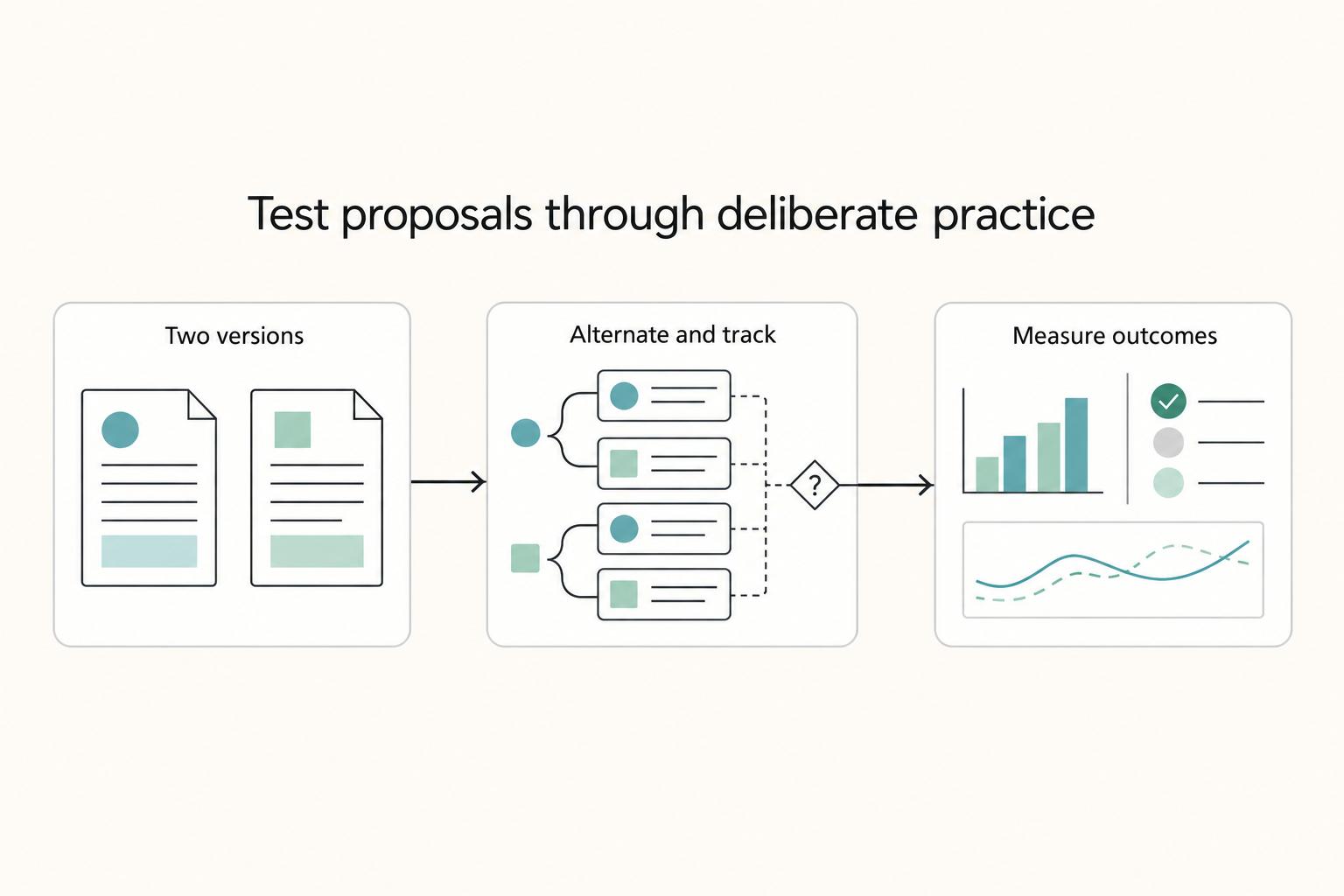
Illustrative skill loop: three client reviews say your case-study opening hides the result. Save permitted, anonymized before/after excerpts; rewrite five openings with the result in the first two sentences; ask a peer to identify the result without extra context. On the next three comparable briefs, record how many first drafts need an opening rewrite and compare with the earlier sample. A smaller count is useful evidence, not proof that every client will prefer the same style.
Step 2 Convert repeated feedback into preemptive standards#
Move repeated feedback upstream into your Proposal Template and Revision Process checklist. If it stays in notes, it rarely changes outcomes.
If clients keep asking for the same clarification, add it to onboarding or scope language. If midpoint reviews keep exposing the same draft weakness, add a pre-submission check before client review. Over time, this kind of market feedback helps you refine the offer and delivery shape clients actually value.
Examples:
- repeated "needs more evidence" feedback becomes a proof-point check before submission
- repeated "this isn't for our audience" feedback becomes a required audience line in the Proposal Template
- repeated "too many revision comments at once" feedback becomes a structured Revision Process with fixed review prompts
Do not turn every comment into a new rule. Promote patterns, not one client's personal preference.
Step 3 Build a Continuous Improvement log you can reuse#
Keep a simple Continuous Improvement log with before/after examples. Capture the issue, the revision, what changed, and what you will check earlier next time.
Save permitted before/after samples and the specific critique for private practice. Redact client details and get permission before turning the example into public portfolio or LinkedIn material.
A short monthly review, done consistently, is what helps you improve month after month.
Related: A freelancer's guide to 'Deliberate Practice'.
Use this copy-paste checklist to run your next project#
Use one repeatable checklist on every job so you do not become the bottleneck. Freelancing is a performance-based path where income tracks your skills, positioning, and consistency, and systemizing onboarding, delivery, and communication helps you scale without immediately hiring a team.
- Confirm your baseline before work starts.
Gather the docs and messages that define the project, for example your proposal, scope notes, milestone plan, and feedback channel. Make sure anyone reviewing the file can see what was agreed, when reviews happen, and where decisions are recorded.
- Set feedback checkpoints at each Project Milestone.
Choose review points up front and name one person who owns final approval for each checkpoint. Put milestone dates and approval ownership in writing to avoid circular revisions.
- Classify feedback before revising.
Use simple working labels such as Accept, Challenge, Defer, and Reject to triage comments consistently. If feedback changes the agreed outcome or adds net-new work, route it as a Change Request instead of absorbing it as a small edit.
- Revise, then verify against agreed outcomes.
Check the revised draft against the agreed outcome and the issue that triggered the change. For the opening exercise above, verify whether a reader can identify the result without extra explanation; compare the next comparable drafts using the same measure.
- Run a recurring improvement review.
On a regular cadence, monthly works well, scan recent projects for repeated critique and convert patterns into one concrete skill target plus one pre-submission check. This is how the loop turns into measurable improvement.
Related reading: How to Create a Content Flywheel for Your Freelance Business.
Frequently Asked Questions
What is a feedback loop for freelancers in practical terms?
It is a repeatable way to gather feedback on past work so it shapes your next action. For freelancers, that usually means collecting client comments at planned points, deciding what to change, updating the work, and then saving what you learned in your proposal template or revision process. That is what makes the loop useful instead of noisy.
How often should I request client feedback during a project?
Set feedback checkpoints early and keep them consistent, rather than sending random pings in the middle of production. A practical approach is to agree on a cadence that fits the project and request feedback again at project close. If feedback arrives too late, rushed rework and confusion around the original Scope of Work (SOW) become more likely.
What questions should I ask clients at each project milestone?
Keep it tight: what should stay, what should change, and what outcome is still missing from the SOW. Those prompts help separate preference from a real problem and keep the conversation tied to outcomes rather than vague reactions. Send the questions in writing and recap the answers in the same thread or client portal.
How do I prevent scope creep while still being collaborative?
Stay open to input, but keep every comment tied to the agreed deliverable. If a client asks for changes, respond with the impact on timing, budget, or deliverable shape instead of silently absorbing the extra work. A common red flag is a string of "small" edits that collectively shift the asset, page, feature, or audience direction.
When should feedback become a formal Change Request?
Use a change request when feedback adds work beyond the agreed scope or revision allowance. Reopening approved direction can be a trigger, but correcting your own in-scope defect is not automatically extra work. Document any additional fee and timing before proceeding with the added work.
How do I convert client feedback into measurable skill improvement?
Do not track comments one by one forever. Review feedback regularly, look for repeated critique across projects, and turn that pattern into one skill target and one pre-submission check. If the same issue keeps showing up, it is no longer just client feedback. It is a skill improvement priority.
What should I keep as an approval record for disputes or compliance?
Keep a clear written trail: the version reviewed, the client decision, and what changed afterward. Before you archive it, make sure the thread shows how feedback moved the work from draft to final. If you handle client data, store only what you need and align your process with applicable privacy requirements, including basic GDPR guidance for freelancers.
Try a related tool
Researched and edited by the Gruv editorial team. Gruv builds cross-border billing, payouts, and finance-operations software for global businesses.
Sources
Includes 1 external source outside the trusted-domain allowlist.
Educational content only. Not legal, tax, or financial advice.
Related Posts

GDPR Compliance Checklist for Freelancers Working With EU Clients
Start by separating the decisions you are actually making. For a workable **GDPR setup**, run three distinct tracks and record each one in writing before the first invoice goes out: VAT treatment, GDPR scope and role, and daily privacy operations.
A freelancer's guide to 'Deliberate Practice'
Let's be direct: as a six-figure freelancer, you have already achieved mastery in your craft. Your technical skills are sharp, your portfolio is impressive, and you deliver exceptional work. That expertise got you here. But it is not what will get you to the next level of security and control. The real ceiling on your income, the true source of that low-grade anxiety humming beneath the surface of a successful business, isn't your talent. It's your business acumen.

The Freelance Payment Penalty: A Modeled Audit of Platform Fees, FX Spreads, and Payout Delays
The money rarely disappears through a single, easy-to-spot fee. The real loss is stacked. A marketplace takes its commission, a processor adds a charge for international cards, a bank or payment company converts the currency at a spread, a platform holds the funds before release, and a wire sheds a little to intermediaries on the way in. Each layer looks defensible on its own, but the worker feels the combined result as a smaller deposit and a later payday.