
Quick Answer
A freelance client welcome packet turns agreed terms into project instructions before kickoff. Include the next action, milestones and dependencies, communication channels, deliverables and revision rules, contacts, and accurate payment instructions. Send it once terms are agreed; an agreed deposit may govern when work starts, but payment instructions can be sent beforehand.
Build a Packet the Client Can Use Before Kickoff#
A welcome packet is one of the first repeatable documents that shows a client you run this like a real business, and it starts doing that work before the kickoff call even happens.
If you work alone, onboarding is not admin you squeeze in around the "real" work. It is part of the work. The way you bring a client in shapes how they see your process, how quickly a project gets moving, and how often you end up answering the same preventable questions.
A client may have approved your proposal while their accounts payable team has never seen your invoice instructions. A reusable packet gives both people the same project reference: who approves work, who pays, what is due next, and which document sets the terms. Customize those fields rather than rebuilding the whole setup email.
Start with the agreed contract and Statement of Work (SOW), then translate their milestones, revision limits and payment dates into a usable client reference. The sections below include a sample project, conditional additions and a final send checklist. Gruv tools can help with the accompanying project documents.
Before You Start#
Client onboarding brings a new client into the way you work, from approval through the first deliverable. The welcome packet explains that sequence and the client’s responsibilities within it. It is one part of onboarding, alongside the agreement, invoice instructions and kickoff.
A typical flow looks like this:
- Proposal accepted — confirm scope, price and the people authorized to approve the engagement.
- Agreement approved — execute the contract and SOW through the agreed approval process.
- Start conditions checked — confirm any agreed deposit has cleared and required inputs are ready; a deposit is not part of every engagement.
- Welcome packet sent — provide project instructions before kickoff, including payment instructions if a deposit is still outstanding.
- Kickoff confirmed — align on goals, timeline and communication, by call or an agreed written handoff.
Send the client-specific packet once the terms are agreed and before kickoff. If work depends on an agreed deposit, distinguish sending instructions from permission to start: the packet can explain how to pay before funds arrive. Do not describe an unreceived deposit as paid, or make an onboarding document a new condition for paying work already performed.
Give the Client a Clear First Action#
A project usually feels easier or harder long before the actual deliverables get hard. It often comes down to the start.
An organized kickoff makes it easier to find the deliverables, upload materials and route questions. Instructions spread across five emails create avoidable searches and inconsistent answers. Put the next action near the top so the client can act without rereading the whole agreement.
A strong packet does three jobs at once:
- Sets expectations so the client knows what happens, when, and how
- Reduces back-and-forth by answering predictable questions before they arrive in your inbox
- Creates a written reference point if a disagreement shows up later around scope, timing, revisions, or payment
It also helps you surface client needs and concerns early, while fixes are still cheap. That is why this document is not a nicety. It is one of the easiest ways to make the rest of the project cleaner.
Turn the Agreed Terms Into Working Instructions#
The fastest way to weaken this document is to treat it like a branding exercise instead of a working one.
A polished PDF can make a good first impression, but appearance is not what protects you. Clear expectations do. So does a clean paper trail. So does having one place where the client can see, in plain language, how the project will actually run.
Name the governing contract and SOW, including their dates or identifiers. Check the packet against them before sending: amounts, due dates, revision rounds and approval roles must agree. Follow the agreement’s document-precedence and amendment provisions. A summary cannot safely introduce a different rule simply because it appears in a welcome PDF.
If you have ever dealt with scope creep, revision friction, late payment awkwardness, or a client saying "I thought it worked differently," you have already felt what happens when this document is missing or weak. A useful packet closes those gaps early, while everyone is still cooperative.
A Sample Project to Build Around#
Suppose your agreed SOW covers a $3,000 website-copy project: a homepage and an about page, two consolidated revision rounds, and a 30/40/30 payment schedule. The following examples use those assumptions to show how project instructions connect. They are commercial choices for the example, not required terms for every freelancer.
Your packet needs to answer these questions:
- What did we agree? A homepage and about page for $3,000, with the identified SOW and approver.
- What happens next? Where to send the approved brief and brand materials, and how kickoff confirms the draft milestone.
- How do feedback and changes work? Who consolidates comments, what the two included rounds cover, and how additional pages are approved.
- When and how do we pay? The $900/$1,200/$900 invoice triggers, agreed due dates, method and billing contact.
- Where do we find instructions and help? The project workspace, communication hours and escalation contact.
For the sample project, the client’s first action is to send the approved brief and existing brand materials to the agreed workspace. Name the approver who will consolidate feedback, and give accounts payable the invoice contact separately. One person’s approval role does not automatically make them the payment contact.
Where the Welcome Packet Fits#
Your contract, SOW, and NDA set the formal rules of the engagement. The packet sits one step later and explains how those rules show up in practice.
Use the packet after terms are agreed and before work begins. If a deposit is a start condition, state its actual status and the agreed trigger. The client also needs the communication channel, timeline, revision process and delivery format. These instructions can be provided while an invoice is awaiting payment; sending them does not waive the start condition.
That in-between window, after signatures and before kickoff, is easy to waste. Used well, it turns a client from "we just signed" into "I know what happens next and how to be a good client in this process." That is why the packet matters so much. It is the bridge between legal agreement and real execution.
Once that boundary is clear, it gets much easier to define what the packet is, and what it is not.
What Is a Freelance Client Welcome Packet (and What It Is Not)?#
A freelance client welcome packet is an onboarding document that turns the agreed project terms into practical instructions before kickoff. It explains what happens next, what the client must provide, how feedback works and how invoices will be paid.
The intended role is an operating companion to the contract, NDA and SOW. However, the title “welcome packet” does not automatically make a document nonbinding. If the agreement incorporates it, or the parties validly agree new terms through it, it may carry contractual effect. Keep its role explicit and use the agreed amendment process for changes.
Keeping that line clean matters more than it seems. Once you start restating legal terms loosely inside a welcome packet, you invite inconsistency. Then the client may rely on the wrong document, or read two documents that appear to say slightly different things. Neither outcome helps you.
Use the governing documents for the terms and the packet for instructions consistent with them. If the packet conflicts with a signed term, correct it and resolve the discrepancy; do not assume its label decides which wording controls.
What It Does Operationally#
In practice, the packet earns its keep by answering the questions clients almost always ask anyway, just earlier and in one place. That changes the tone of the project immediately.
It does four things especially well:
- Reduces inbound questions. Communication channels, response times, file delivery format, and update cadence are easier to absorb once in a clear document than across a chain of emails.
- Sets expectations before work starts. Clients who know the route are less likely to panic when they do not see movement on every day of the calendar.
- Prevents "I didn't know that was extra" moments. Revision limits, rush requests, and out-of-scope work should be surfaced plainly, not introduced mid-project as a surprise.
- Signals professionalism early. An organized handoff tells the client that the rest of the engagement will likely be organized too.
That combination is what makes the packet more than a welcome note. It is your first practical operating document for the project.
The Calibration Problem#
There is a real balance to strike here. Too thin, and the packet does not prevent confusion. Too dense, and it starts reading like a legal threat wrapped in friendly branding.
The standard is simple: the client should finish reading and feel oriented, not managed. They should understand the next steps, the communication norms, and the boundaries around scope and payment without feeling like you are trying to control every movement.
Use the packet to catch practical mismatches early. A corporate approver may need a different upload channel, or accounts payable may require a purchase-order reference. Resolve those requirements against the agreed scope and payment terms before kickoff, rather than interpreting every question as resistance to structure.
With that balance in mind, the next step is deciding what actually belongs in the document.
What to Include in Your Welcome Packet - and Why Each Section Exists#
Every section should solve a specific problem before it turns into extra emails, delayed work, or a pricing fight.
That is the easiest way to build this document well. Do not add sections because other freelancers have them. Add them because each one answers a predictable question or protects a predictable weak spot in the engagement.
Six Operating Sections, Plus Payment Instructions#
Step 1: Write a Welcome and Context Page
Open with a short, warm orientation. Confirm the project name, agreed start conditions and next action. If there is a deposit, report whether it has actually cleared. Keep the welcome to one page at most and put payment instructions in the payment section.
For the sample project: “Welcome to the homepage and about-page copy project. Your $900 deposit has cleared. Please upload the approved brief and brand materials before kickoff; we will confirm the first draft date together.” Use that wording only when the payment status is true. If payment is outstanding, state that status and the agreed start condition instead.
Step 2: Map Your Process
After the welcome, show the client the route from kickoff to final delivery. This can be simple, but it should be explicit.
For the example, show brief review, first drafts, client feedback, revision rounds and final delivery in order. Name the person who approves each stage. Explain whether approval starts the next phase or triggers an invoice, using the SOW’s actual milestones. A simple sequence lets the client see where their input affects progress.
If the process has named phases, use those names consistently. If the SOW already refers to stages or deliverables, mirror that language so the packet reinforces, rather than competes with, the signed document.
Step 3: Set the Project Timeline and Milestones
This is one of the most protective sections in the whole packet because vague timing creates avoidable disputes.
Name specific dates or clearly defined phases rather than loose language like "around three weeks" or "roughly next month." Then spell out what each milestone depends on. If Phase 2 cannot begin until Phase 1 is approved, say that plainly. If your deadline depends on the client sending copy, assets, or feedback on time, make that dependency visible.
Make the agreed delay mechanism visible. If inputs arrive late, notify the client of the affected milestone and propose a revised date based on the agreement and your availability. A packet cannot create an automatic one-day-for-one-day extension where none was agreed, and a late input may affect more than a single calendar day.
Step 4: Define Communication Expectations
Clients usually do not need more communication. They need clearer communication.
State the channels, response window and timezone. An example is email for decisions, the project workspace for files, and replies within one business day during Monday–Friday working hours in your stated timezone. Define urgent issues, such as a broken delivery link, and give the actual contact method. Do not imply around-the-clock support unless that is agreed.
This section also protects your attention. Without it, clients default to whatever channel feels easiest to them in the moment. That is how projects end up split across inboxes, chat apps, text messages, and calendar invites. A packet gives you one place to define where the work lives and how both sides should use it.
Step 5: Clarify Deliverables and Your Revision Policy
This is your plain-language scope defense.
Spell out what is included, what counts as a revision, and what crosses the line into a new request. Clients are much more likely to respect boundaries they saw before work started than boundaries introduced midstream under pressure. They do not like surprises, and neither do you.
Separate revisions to the agreed deliverable from correction of your own errors and requests for additional scope. In the sample project, changing a headline within an included round is a revision; fixing an omitted agreed section is a correction. A third page is additional work: quote its price and schedule, obtain the required authorization, then perform that addition. Continue unaffected contracted work as required.
Step 6: List Contact Details and Escalation Paths
Finish with the practical contact information the client will actually need.
List the freelancer or project lead, the client approver and the billing contact, with their actual addresses. Explain how to flag urgent issues, for example an URGENT subject line sent to the named project contact. State the response hours so the label does not suggest guaranteed immediate or overnight support. Escalations should reach a person who can act, rather than an unspecified “support address.”
This section feels small, but it prevents messy communication behavior under stress, which is exactly when clear contact rules matter most.
Format: Keep It Scannable#
A useful packet should read like a reference document, not an essay.
That usually means short sections, clear headers, bullet points where they help, and enough structure that a client can find what they need fast. A clean PDF is often easier to revisit than a long email thread, but the larger point is readability, not file type. If the client has to work to understand your packet, the packet is doing less work for you.
Before you move on, scan it like a client would. Can they find the payment section quickly? The revision policy? The next step? If not, simplify the layout before you worry about design.
How Do You Handle Payment Terms in a Welcome Packet?#
Payment language should read like a normal business policy, because that is exactly what it is.
This section is one of the biggest dispute preventers in the entire packet. When payment terms are vague, you end up relying on follow-up emails, memory, and tone. None of those are good substitutes for a clear written policy.
The fix is not more legal wording. It is more precision.
Step 1: Define Your Invoicing Cadence#
Start by stating when invoices are issued. Not loosely, and not in a way that requires interpretation later.
Common structures include:
- Project-based: a percentage upfront, the remainder upon delivery or a defined milestone
- Retainer: invoiced on a fixed date each month (e.g., the 1st)
- Milestone-based: invoiced upon completion of each named project phase
For the sample $3,000 project, 30% is $900, 40% is $1,200 and 30% is $900; together they total $3,000. State the SOW’s trigger for each invoice, such as the deposit before work, $1,200 at the agreed draft milestone, and $900 at final delivery. Confirm the billing contact and purchase-order reference before the first invoice.
Step 2: Specify Payment Methods and the Net Window#
Next, name the payment methods you accept and the net window attached to your invoices.
A net payment window gives a number of days from an agreed trigger, which may be invoice date, receipt or another specified event. Copy that trigger accurately. For example, an invoice dated August 1 with an agreed 15-calendar-day period from invoice date is due August 16. State the actual due date and accepted method, and account for any applicable mandatory payment rules.
Ask for billing details and required purchase-order references early so accounts payable can route the invoice. A newly requested onboarding form or an internal payment cycle does not automatically extend an agreed or statutory due date. If there is a genuine dispute about the trigger, resolve it against the governing terms rather than silently restarting the clock.
Step 3: Reference Agreed, Permitted Late Charges#
If late charges are agreed and permitted under the applicable rules, summarize the rate, calculation basis and trigger accurately. If you have no such term, the packet is not a place to invent one.
Distinguish a contractual late charge from any statutory entitlement that may apply. Reference the relevant term and explain how it is calculated; do not assume every client, jurisdiction or invoice allows the same charge. Payment reminders can still state the overdue balance and request a payment date without asserting an unsupported fee.
The tone to aim for is calm and routine: this is how the business runs.
Step 4: Address Cross-Border Payment Logistics (If Applicable)#
If the client is in a different country, say more here, not less.
State the invoice currency, receiving method and agreed allocation of transfer charges. Confirm the documentation relevant to the parties and service, rather than requesting every tax form. For a US payer, Form W-9 concerns US persons; W-8BEN concerns foreign individuals, while W-8BEN-E concerns foreign entities. The appropriate form depends on the facts. Confirm applicable VAT treatment separately and send sensitive tax details through a controlled channel.
You can also include a brief sentence pointing back to the governing-law language in the contract. The packet does not need to restate that detail. It only needs to remind the client that the legal framework lives in the signed agreement.
Payment instructions summarize the governing terms and applicable rules. Check them against the agreement; changing a payment window, fee or start condition requires the appropriate legal or contractual basis, not just a revised packet.
Customize the Packet for This Engagement#
One solid base packet is the starting point. It is not the final version you send every time.
Most projects can use the same core structure. What changes is the small set of additions certain engagements need. This is where people get into trouble: they either oversend a bloated packet full of irrelevant language, or they undersend and leave out the one detail that matters for this client.
The simplest way around that is to run a quick decision check before every send.
Step 1: Identify Your Engagement Type#
Four variables usually determine whether your base packet needs extra language:
| Variable | What to check | What to add if applicable |
|---|---|---|
| Solo vs. subcontractor | Do you use subcontractors on this project? | Name the single client contact, approved subcontractor involvement and access arrangements; obtain any required consent before sharing materials. |
| Startup vs. corporate | Does the client have a procurement or legal team? | Reference any required personal-data processing agreement, agreed liability provisions and insurance evidence; keep confidential documentation in controlled channels. |
| Project vs. retainer | Is this an ongoing engagement? | A clear statement on unused hours (do they roll over?), the notice period in your Termination clause, and how scope expansions are priced |
| Domestic vs. cross-border | Is the client in a different country? | State invoice currency, applicable VAT treatment and the appropriate payer-requested tax documentation for the parties; do not treat US and foreign-status forms as interchangeable. |
What matters here is fit, not volume. You are not trying to make the packet longer. You are trying to make it accurate for the actual engagement in front of you.
For example, a simple project with a founder-led startup may need nothing beyond your standard sections. A corporate retainer with procurement review may need a few clear references so onboarding does not stall. Same core packet, different edge cases handled.
Step 2: Check for an NDA#
If an NDA governs the work, acknowledge it in the packet.
A one-sentence reference is usually enough: name the document and include its effective date. That small addition matters because it shows that information handling is not an unspoken assumption. It has already been documented elsewhere, and both sides are operating under it.
The key distinction is the same one you have seen throughout this guide: the packet points to the NDA. It does not replace it.
Step 3: Flag Corporate-Specific Requirements Early#
Corporate clients often have internal checklists that do not show up until the engagement is already in motion, which is why this step is worth taking seriously.
A Data Processing Agreement (DPA) addresses personal-data processing responsibilities where the applicable regime and roles require it. For example, ICO guidance describes UK GDPR controller–processor contract requirements. Confidential commercial information alone is a separate NDA issue. A liability cap may have exclusions and does not eliminate every exposure. Reference the actual agreed clauses and any required insurance evidence; the packet itself does not satisfy those obligations.
You do not need to guess what every company needs. Ask directly: "Is there any documentation your team needs before the engagement can be processed?" That question alone can save a lot of avoidable delay, especially before the first invoice.
Cross-border work deserves the same kind of early check. If accounts payable will need tax documentation or clarity around currency and VAT status, naming that in the packet helps both sides prepare instead of scrambling later.
Run this decision layer once per engagement. Add what applies. Leave out what does not. That is how you keep the packet lean without making it flimsy.
What Happens When Things Go Wrong? Protective Clauses to Reference#
The packet is not where you invent new rules. It is where you make the existing ones readable enough that clients will actually absorb them.
That matters because most project trouble does not start with bad intent. It starts with assumptions. The client assumes a small extra request is included. You assume it is not. The client assumes the timeline survives delayed feedback. You assume it shifts. If nobody has a practical reference point, the conversation quickly turns personal.
This section gives you that reference point before stress enters the room.
Step 1: Define the Scope Creep Trigger#
Scope creep is the slow expansion of project requirements beyond what was originally agreed, often through a series of small requests that look harmless on their own.
The packet should say, in plain language:
- Identify the additional request against the agreed deliverables; corrections of your own nonconforming work are not automatically extra scope.
- Send the estimate within your stated response window, identifying the added price, schedule impact and authorized approver.
- Use the approval method required by the agreement before performing additional work. Save the approval record, including authorized email where that method is permitted; keep unaffected contracted work moving as required.
For the sample project, an extra service page might be quoted at $400 with one additional working day, subject to approval under the SOW. Record the request, estimate and approval together. That makes the budget and timing change visible without recasting an ordinary correction as a paid addition.
Step 2: Cover the Remaining Failure Points#
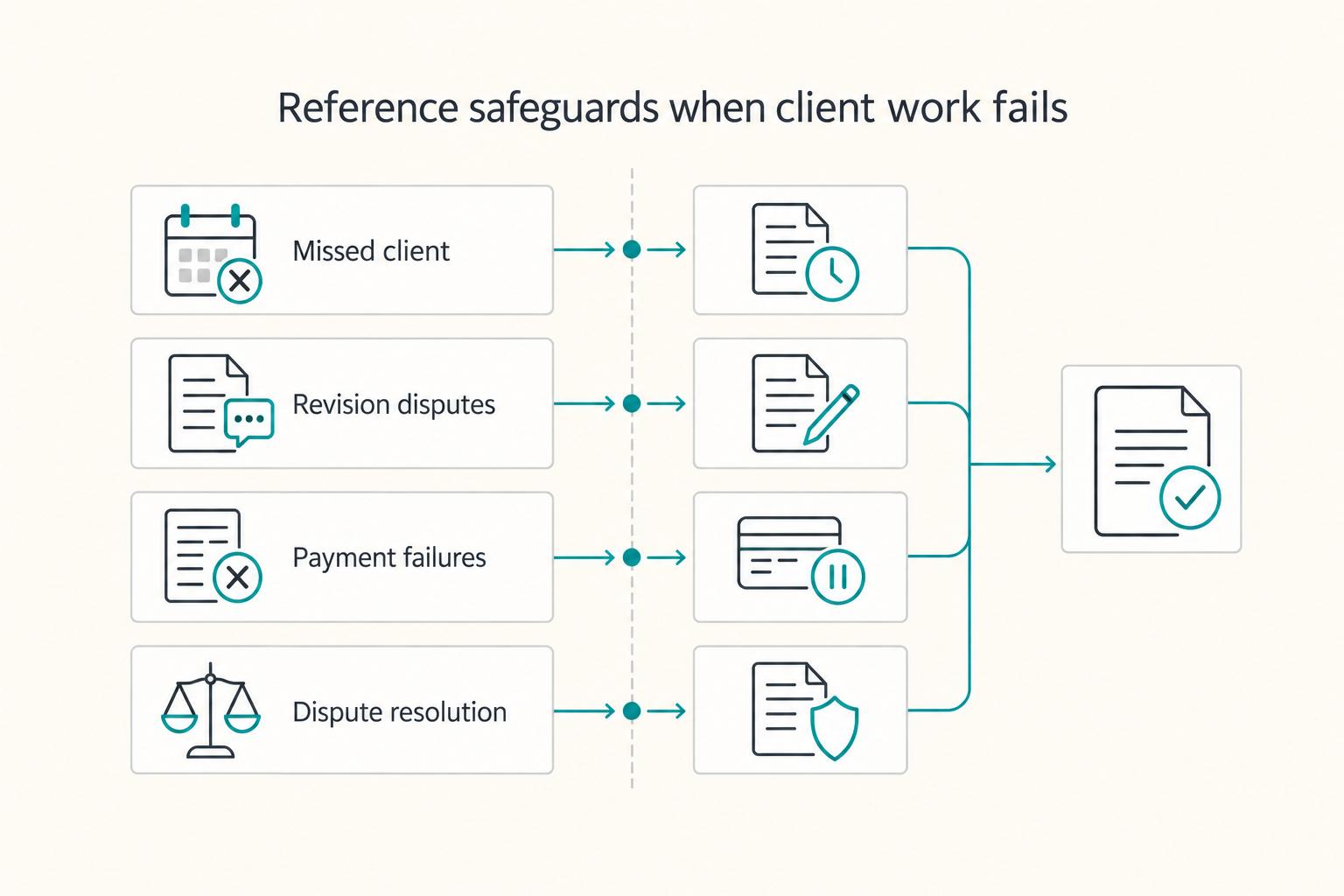
Scope is only one source of friction. Four other failure points are common enough that they deserve a brief reference too:
| Failure point | What to state in the packet |
|---|---|
| Missed client inputs | Identify the missing copy, assets or approval, notify the client of the affected milestone and follow the agreed schedule-change process. Confirm the revised date; do not invent an automatic equivalent extension. |
| Revision disputes | Compare the request with deliverables, included rounds and correction duties. Explain the classification; seek an authorized change for genuine additions. |
| Payment failures | State the due date and balance. Any pause, charge or termination must follow applicable rules and the agreement, including required notice and cure periods. Onboarding paperwork does not suspend payment rights for work already performed. |
| Dispute resolution | Reference the agreed process, formal-notice recipient and forum. Preserve applicable claim deadlines while discussing settlement; a packet summary does not amend arbitration or court provisions. |
Read together, these references do something subtle but important: they move the conversation away from personal interpretation and back toward the documented process. That is a healthier place for both sides when a project gets tense.
What Tools Should You Use to Build and Deliver Your Welcome Packet?#
The best format is the one a client will actually read and the one you will realistically keep updated.
This choice is less about taste than maintenance. A beautiful packet that goes stale is worse than a simpler one that stays accurate. So once the content is clear, choose a delivery method that matches the kind of clients you serve and how often your process changes.
Choose Your Format Based on Client Type#
Different formats fit different kinds of work. Here is the direct trade-off:
| Format | Best for | Trade-offs |
|---|---|---|
| PDF (Canva or InDesign) | Project-based work; clients who expect a polished, formal document | Static; requires a new file for every update; strong for brand consistency |
| Notion page | Ongoing or retainer clients; tech-comfortable clients | Editable in real time; client may need to create an account |
| Client portal (embedded) | Multi-project providers or small agencies | Setup and maintenance depend on your existing tools; confirm client access and preserve the version sent. |
| Google Doc (shared) | Fast setup; familiar to almost everyone | Less branded; requires careful permission settings |
For many independent professionals, a PDF built in Canva is the simplest starting point. It looks intentional, travels well, and does not ask the client to log into anything. If your process changes often, though, a more editable option may be easier to maintain. The right answer is the one that reduces friction on both sides.
Get the Length and Timing Right#
Shorter is usually better, but "shorter" does not mean thin. It means focused.
The common drafting mistake is trying to pour everything you know into one document. When that happens, content that belongs in the contract, the SOW, or the project plan starts leaking into the packet. That is how you end up with a document that is technically thorough and practically unreadable.
Keep the opening reference short enough to scan. A two- or three-page core is one possible design, with project-specific schedules or documents linked separately. It is not a standard length requirement: use enough space to explain the actual engagement without reproducing the whole contract.
Timing matters just as much. Send the packet after the contract is signed and before kickoff. That gives the client enough space to read it, understand the operating details, and arrive at the kickoff call ready to talk about the work instead of the mechanics of working together.
Keep It Current Without Overcomplicating It#
A welcome packet only helps if it reflects the way you actually work right now.
Update the master when your process changes, then check which changes can apply to each existing client. A new default for future engagements does not automatically replace a current client’s payment or revision terms. Keep the prior client edition and arrange any required amendment before changing binding terms.
Keep the maintenance light:
- Review the master whenever you change a core policy, tool or proposed payment term.
- For an active client, distinguish an informational update from a contractual change. Obtain any required agreement first, then send the revised client edition with a dated explanation and preserve the prior edition.
If you start from a purchased template, check the licence and use it as a layout aid. Replace its example language with your actual channels, payment terms and revision process. A designer’s onboarding template is not evidence that its clauses fit your jurisdiction or engagement. Check that every instruction agrees with your own documents.
Check image, font and template permissions before distributing the packet, and respect the client NDA when including work samples. See fair use and copyright for freelancers for the distinction between permission and a context-dependent fair-use assessment.
Your Client Onboarding Sequence: Where the Packet Fits#
The packet works best as part of a repeatable sequence, not as a file you send once and then forget.
That sequence is what turns a useful document into a dependable onboarding habit. It also keeps important steps from slipping through the cracks between the signed agreement and the first real project milestone.
The Full Onboarding Sequence#
Map the sequence clearly so every new engagement follows the same path:
- Pre-contract: confirm scope, price, approval roles and any NDA; complete the agreement’s approval process and identify its start conditions.
- Post-agreement: send the packet before kickoff. Check any agreed deposit and inputs before starting; provide payment instructions while a deposit is outstanding. This process does not erase rights for work already performed.
- Kickoff: confirm the timeline, communication channels and first milestone by call or agreed written handoff. Resolve differences against the governing terms.
- Project handoff: grant the required workspace access, confirm responsibilities and record the first milestone date. Test that the client can open the linked documents.
- Ongoing reference: use the client edition to answer routine questions; use the agreed amendment process for changes and preserve the records.
Seen this way, the packet is not a ceremonial PDF. It is the anchor point for the early stage of the engagement.
Maintain a Versioned Master Document#
The simplest long-term setup is one master document that you update as your process changes.
Date the master, but also save the exact client-specific edition and the message or delivery record that sent it. A dated master alone does not prove what that client received. For a live page, save a PDF or other stable snapshot at handoff and whenever a relevant update is communicated.
A practical approach looks like this:
- Label each client edition with the client or project, date and a unique version identifier, so it can be matched to the send record.
- Review the master periodically, for example twice a year and after changes to SOW structure, payment methods or tools. This is a maintenance practice, not a legal deadline.
- Archive client editions and send records alongside the agreement and authorized changes. Keep the original edition when the master is updated.
Build it once, keep it honest, and let repetition do the rest.
Your Copy-Paste Welcome Packet Checklist#
Run this before every send. It takes less time than the clarification emails it will save you later.
Use the checklist in order: first confirm the structure, then check the decision layer for this specific engagement, then make sure delivery timing and format are right.
Structure#
Confirm each section is present and filled in with real project details, not placeholders:
- Welcome and context - Sets the tone, tells the client what to read and what to do next
- Process overview - Step-by-step from kickoff to final delivery, referenced against the SOW if one exists
- Project timeline or milestone schedule - Specific dates or named phases, not "approximately 4 weeks"
- Communication expectations - Channels named (email, Slack, etc.), response time committed, tools confirmed
- Deliverables and revisions — Agreed scope and included rounds stated; corrections distinguished from additional work and its approval process
- Payment instructions — Invoice triggers, accepted methods, due dates and any agreed, permitted charges match the governing terms
- Contact details and escalation path - Who the client reaches, how, and in what order
Any blank spot here will usually come back as a question later.
Decision Layer#
Now check what applies to this engagement. If a box applies and the packet does not address it, add the missing language before sending.
- Cross-border engagement - Currency preference stated, relevant tax or VAT considerations noted where applicable
- Corporate client - Any compliance or liability provisions flagged per your agreement
- Retainer engagement - Unused hours policy defined, termination notice period included
- NDA in place - Referenced by document name and effective date
- Subcontractors — Single point of contact, required permissions and appropriate access confirmed
Your base packet covers the standard case. This layer is what keeps it accurate for the nonstandard one.
Delivery#
Before you hit send, verify the handoff itself:
- Sent after terms are agreed and before kickoff; any deposit status and start condition accurately stated
- Exact client edition and dated send record saved together, including a snapshot of a live document
- Format and permissions checked so the client can open the packet and linked project documents
- Next action and kickoff call or written handoff confirmed in the accompanying message
A strong packet reduces repetitive questions, creates a clean reference point, and signals from day one that the engagement will be managed with care.
Build it once. Run the checklist every time.
For the documents that accompany onboarding, browse Gruv tools and keep the packet’s project, invoice and contract references consistent.
Frequently Asked Questions
What should a freelance client welcome packet include?
At minimum, include a welcome and context section, a process overview, a timeline or milestone schedule, communication expectations, a deliverables and revision policy, payment terms, and contact details.
When should you send a client welcome packet?
Send the client-specific packet after terms are agreed and before kickoff. If a deposit is an agreed start condition, state its actual status; you can send payment instructions before it clears without starting the work.
How long should a freelance client welcome packet be?
Long enough to cover the working essentials, and no longer.
What's the difference between a client welcome packet and a contract?
The packet is intended as a plain-language operating companion to the contract and SOW. Its legal effect depends on incorporation, agreement and applicable rules; calling it a welcome packet does not automatically make it nonbinding.
Do freelancers need a welcome packet for every client?
A consistent onboarding reference helps even for small engagements, but it need not be a separate long document. A short project-specific email may cover the essentials; a welcome packet is not a universal legal requirement.
How do you handle payment terms in a client welcome packet?
State invoice triggers, accepted methods, the agreed payment window and any permitted late-charge terms. For cross-border work, add currency, charge allocation and relevant VAT or tax-document requirements. Match the governing terms and applicable rules; do not introduce new conditions for paying earned invoices.
What tools do freelancers use to create a client welcome packet?
The usual options are Canva or InDesign for PDF delivery, Notion for a live page, a client portal for more involved setups, and Google Docs for a simple shared version.
Watch
Client Welcome Packet: What Freelancers Should Include
Try a related tool
Researched and edited by the Gruv editorial team. Gruv builds cross-border billing, payouts, and finance-operations software for global businesses.
Sources
Includes 3 external sources outside the trusted-domain allowlist.
Educational content only. Not legal, tax, or financial advice.
Related Posts

Fair Use Decisions for Freelancers in Paid Client Work
If you use third-party material in paid client work, make the call based on sources you can defend, not myths. This guide gives you a practical go-or-no-go path and a permission fallback when support is weak.

The Freelance Payment Penalty: A Modeled Audit of Platform Fees, FX Spreads, and Payout Delays
The money rarely disappears through a single, easy-to-spot fee. The real loss is stacked. A marketplace takes its commission, a processor adds a charge for international cards, a bank or payment company converts the currency at a spread, a platform holds the funds before release, and a wire sheds a little to intermediaries on the way in. Each layer looks defensible on its own, but the worker feels the combined result as a smaller deposit and a later payday.

How to Respond to a Subpoena for Business Records
Move fast, but do not produce records on instinct. If you need to **respond to a subpoena for business records**, your immediate job is to control deadlines, preserve records, and make any later production defensible.