
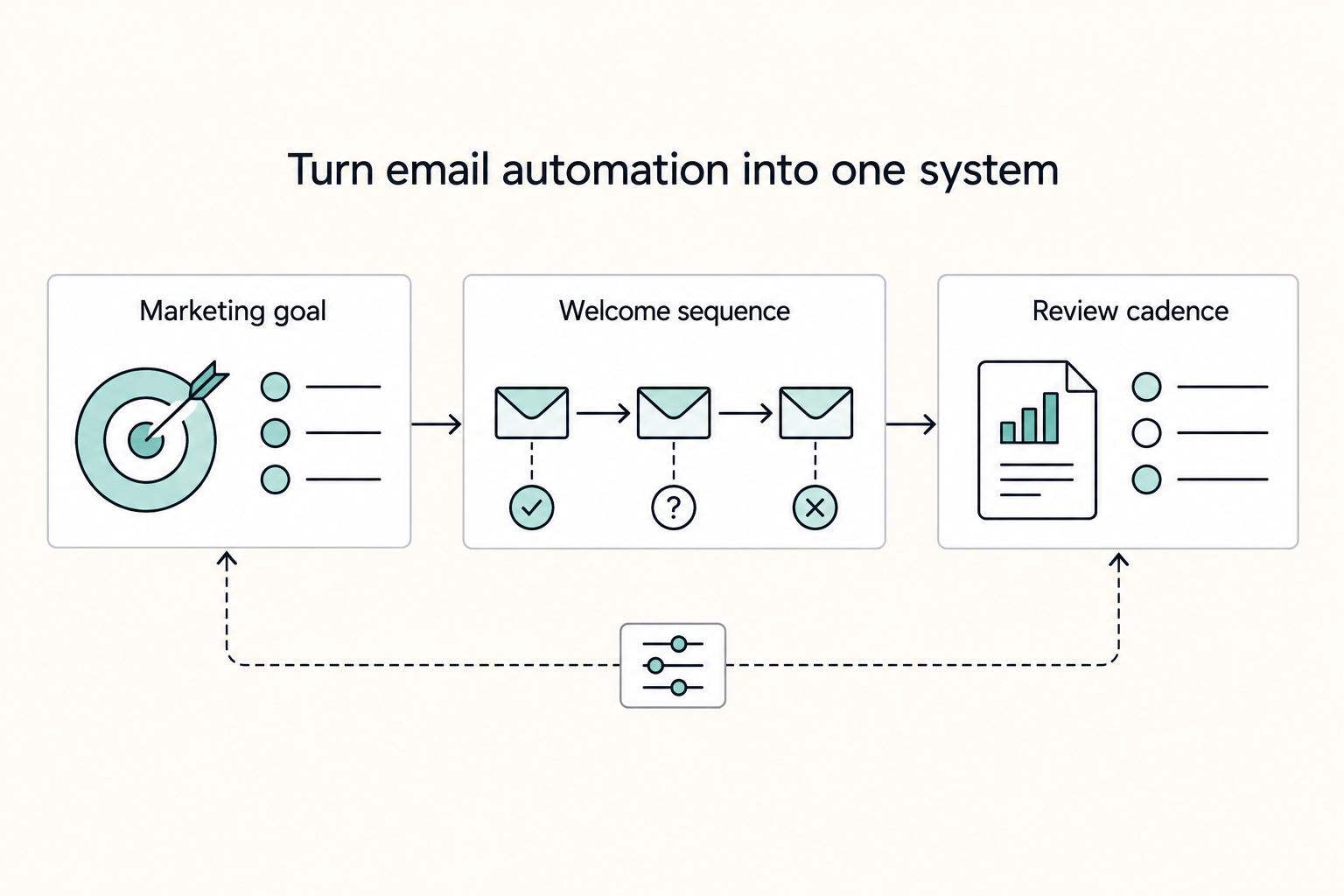
Quick Answer
Create an automated email welcome sequence by treating it like a first-week operating system, not a one-off campaign. Pick one conversion target, define clear entry and exclusion rules, and assign each email a single purpose and CTA. Set timing based on subscriber intent, then measure deliverability, engagement, and your primary outcome so you can improve the sequence with controlled tests.
You're not "doing email marketing" - you're building a first-week operating system#
Treat your automated email welcome sequence like a first-week system: one trigger, one path, one primary call to action (CTA), and a measurement loop you can run without guesswork. If you're a business-of-one, the job is to turn "marketing" into something you can run and improve without relying on motivation.
A welcome sequence works best when you write it like a controlled onboarding flow. Each message should do one job: reduce uncertainty, deliver a tangible win, and point to the next step.
The CTA matters because it defines what "activated" means in your funnel. If every email chases a different outcome, you cannot measure improvement cleanly.
Operator-grade leverage (what you control)#
You cannot control how crowded someone's inbox is. You can control the experience you create:
| If you treat it like... | You end up with... | Operator fix |
|---|---|---|
| "Email marketing" | Inconsistent tone, scattered links, fuzzy results | Define one conversion target for week one |
| "A welcome sequence" | A predictable onboarding experience | Give every email one purpose and one CTA |
| "Email automation" | Set-and-forget drift over time | Add a review cadence and a change log |
If you run a solo consultancy and email #1 pushes a call booking link, email #2 pushes a free guide, and email #3 asks for a reply, you will not know which behavior you actually want to drive. Pick one primary destination for week one, then make every message support that path.
Before you start (don't skip this prep)#
Use this as your safe-default setup so you can build in one focused session:
| Prep item | What to set up |
|---|---|
| Access + authority | Confirm you can log into your ESP and create or edit sequences/automations. |
| Source-of-truth doc | Create one Google Doc with your offer and positioning, plus one primary subject line style guideline. |
| Compliance-minded defaults | Decide what personal data you will not request or paste into emails, keep subscriber handling minimal and consistent, and configure ESP settings in line with the rules that apply to your business. |
| Single conversion target | Choose one CTA destination for week one: calendar link, checkout page, or a hub page. |
A few practical notes before you build:
- Access + authority: Confirm you can log into your ESP and create or edit sequences/automations. If you cannot, fix that first.
- Source-of-truth doc: Keep your offer and positioning in plain language, plus one primary subject line style guideline, in a single Google Doc. That's the place you check before you edit anything.
- Compliance-minded defaults: Decide what personal data you will not request or paste into emails. Keep subscriber handling minimal and consistent, and configure your ESP settings in line with the rules that apply to your business.
- Single conversion target for week one: Choose one CTA destination: calendar link, checkout page, or a hub page. You can expand later, but measure one clean target first.
If list growth is still the constraint, tighten acquisition first: How to Build an Email List for Your Freelance Business.
Step 1 - How many emails should your automated email welcome sequence have?#
Choose the number of emails based on how long a new subscriber needs to understand your value and take your primary action. Sequence length is an operations choice. You want enough touches to move someone forward without creating bloat you never maintain.
A quick anchor: Klaviyo defines an email welcome series as "a sequence of emails that are sent to new subscribers immediately after they sign up." This is a critical moment in the customer lifecycle, so the early window carries real leverage. Emma has also said subscribers "are 50% more likely to open a welcome email than any other kind of email." Use that attention well, then stop.
Use a decision framework (customer lifecycle management + segmentation)#
Customer lifecycle management is the practice of managing what someone needs at each stage (new, evaluating, ready) so your messaging matches reality. Your sequence length should match the time it takes to move a person from "curious" to "confident enough to click your week-one CTA."
Then apply segmentation - at minimum, cold vs warm - so you size the sequence to trust level:
- Cold audience (freebie hunters, broad opt-in): plan for more trust-building before a strong ask.
- Warm referrals (webinar attendees, friend sent them, post went viral in your niche): you can run tighter because they already borrowed trust.
If you sell a done-for-you service, a warm referral might book quickly after a clear "start here" email plus one proof email. A cold subscriber usually needs to see how you think and what "good" looks like before they commit.
Safe defaults you can defend (and won't trap you later)#
Use these as operator defaults, not universal "best practices":
| Length | What it's for | When it fits | Tradeoff you accept |
|---|---|---|---|
| Short series | Minimal viable onboarding | Simple offer, low friction CTA, limited bandwidth | Less room for objections and proof |
| Standard series | Solid onboarding + persuasion | Most offers with a few key objections to cover | Requires a basic refresh cadence |
| Extended series | Deep onboarding | You publish consistently and track tightly | You risk bloat and staleness fast |
Intensity rule: if email #1 sells hard, you need to earn that ask. Set expectations, deliver a quick win, and then ask. If you push too aggressively before trust, you may see weaker engagement and more negative signals.
Practical check (do this before writing): name the purpose of each email using one verb. Example: Welcome, Deliver, Prove, Handle, Invite. If you cannot do that cleanly, shorten the sequence and tighten the goal.
Step 2 - When should each welcome email be sent?#
Send welcome emails closer together when intent is high, and slow the cadence when trust needs time to build. Once you know your sequence length, timing becomes your control knob. Done well, your automation feels helpful and inevitable, not needy.
DeadlineFunnel puts it plainly: "The moment someone subscribes is when they're most engaged. They're curious and more likely to open or click your emails." That means you should avoid a long gap right after signup.
Klaviyo also frames this window as meaningful for action: "We've found that most people make a purchase within 10 days of subscribing to a mailing list." Treat that as a real constraint. Get your clearest value, proof, and next step delivered inside that early window.
Use a simple timing rubric (segmentation first, vibes second)#
Segmentation is your control layer. At minimum, split warm vs cold, then apply a cadence you can actually sustain in ConvertKit or any ESP.
| Signup type | Timing pattern (example) | What you prioritize early | What you delay |
|---|---|---|---|
| Warm signup (webinar, referral, high-intent page) | Tighter spacing early, then taper | Orientation, quick win, direct CTA | Deep education that slows momentum |
| Cold signup (generic freebie, broad opt-in) | More breathing room between messages | Expectations, proof, credibility | Strong "commit" CTA until they trust you |
If you run a niche consulting offer, a webinar attendee already knows your thinking, so you can follow the first email quickly with a clear "here's the next step" message. A cold freebie subscriber needs proof first, so you earn the click before you ask for a call.
Run the "human week" check before you ship#
Write your schedule in a table, then read it the way a subscriber would. If you email frequently, you are claiming you are worth frequent attention. Make sure each send earns that with (1) a subject line that matches the signup promise and (2) a real deliverable inside the email.
Verification points before you turn it on, so you are not debugging later:
- Your timing matches the promise on the opt-in page (no surprise barrage).
- Each email has one job and one next step, not three competing links.
- You track results by segment, then adjust timing only after you see consistent patterns (do not thrash the system).
Step 3 - What should each welcome email include (without sounding generic)?#
Each welcome email should set expectations, deliver a concrete win, and point to a stage-appropriate next step. Timing matters, but it is not the whole job. If the content reads like placeholders, the system will feel off even with a perfect schedule.
Klaviyo calls a welcome email series "your first impression with new subscribers, and it sets the tone." Bloomreach frames it similarly: "you're creating a first impression for your brand...". That is the job. You do not get infinite resets.
Use "Acknowledge, Include, Mobilize" to give each email a job#
This is a simple way to avoid the generic "thanks for joining" trap (Deliberate Directions says a generic "thanks for joining" won't cut it). Use it as a repeatable build pattern, not a rigid rule.
| Part | What to include (practical) | Example (adapt to your voice) |
|---|---|---|
| Acknowledge | Confirm what they did. Restate what they'll get and when. | "You're in. Over the next few days, I'll send X so you can do Y." |
| Include | Deliver one concrete win: a template, example, or decision rule. | "Here's the exact checklist I use before I change anything in a marketing funnel." |
| Mobilize | Ask for one small action that matches intent. Keep it clean. | "Reply with your #1 constraint" or "Read this 3-minute guide next." |
A cold freebie subscriber might join for "subject line ideas." In email #1, acknowledge the download, include one decision rule they can use today, then mobilize with a low-friction CTA like "hit reply and tell me what you sell" so you can personalize later.
Create an operator spec for each email (copy and paste this)#
Klaviyo notes welcome emails can "establish credibility, build trust, introduce products, and gather more information on subscribers." The spec forces you to choose what each email is doing so the sequence stays intentional.
| Spec part | What to define |
|---|---|
| Goal | What change happens in the reader after this email? |
| Primary CTA | One next step you actually want and can track in your ESP. |
| Credibility/trust cue | One small detail that reinforces trust or credibility. |
| Subject line | Write it, and jot an alternate you can test later if you want. |
For each email, define the goal in one sentence, pick one CTA you can actually track, add one small trust cue if you need it, and write the subject line before you draft the body.
Quick quality check: Skim it on mobile. If a reader cannot quickly spot the promise and the CTA, tighten the opening and make the next step easier to find.
Step 4 - Write the sequence like a funnel you can defend (CTA progression + offers)#
Design your welcome sequence as a simple funnel that earns attention first, then asks for commitment. Once each email has a job, you need control over where it sends the reader next. This is the difference between "nice emails" and a sequence that moves someone from subscriber to customer without feeling like a pressure campaign.
An email marketing funnel is a mapped email journey designed to convert subscribers into customers. That definition forces a useful question: what action matters at each stage? Build your CTA progression by stage, not by vibes.
Set a CTA progression you can explain to yourself (and a future teammate)#
Here's a simple framework you can adapt to your offer and list temperature. Most ESPs can run this.
| Funnel stage (example) | What the subscriber needs | Primary CTA you can track | Offer intensity |
|---|---|---|---|
| Start here | Orientation and a quick win | Open your quick-start guide, resource hub, or "best of" page | None to light |
| Engage | Proof you understand their situation | Reply with one constraint, or read one cornerstone post | Light |
| Commit | A clear next step | Book a call, buy, or apply | Medium to strong, only after value |
If someone joins via a lead magnet about pricing, do not jump straight to "book a call." First send them to a pricing quick-start, then ask them to reply with their one sticking point, then make the call invite the obvious next step.
Keep intent aligned when you have multiple lead magnets (without overengineering)#
A lead magnet works best when it stays targeted and provides immediate usefulness. If you run multiple lead magnets, it can help to group subscribers by what they opted into so your CTAs match intent.
You can usually do this with tags or segments in your ESP, then branch lightly instead of rewriting the whole sequence.
Operational defaults that keep you honest:
- Pick one primary CTA per email. You can include a secondary link (privacy policy, "browse all posts"), but keep the email focused on one next step.
- Move offers slower after a download. One recommended approach is to send a prompt welcome email, then provide value and case studies, and introduce offers more slowly.
- Handle data ethically. Stay transparent about what you collect, get unambiguous consent and opt-outs, and deliver the promised value.
Practical check: View the emails in plain text and underline the single call to action (CTA) in each. If you underlined two, decide. Your funnel cannot run on ambiguity.
Step 5 - Build the automation in any ESP (ConvertKit, Klaviyo, Bloomreach, Emma Email) without brittle flows#
Build your welcome automation so it's easy to audit later: define the entry rule, the exclusions, and the naming upfront. Your copy can be great and still underperform if the automation logic is unclear or inconsistent. This is the build step that makes the sequence inspectable.
Before you start (safe operator defaults): Open one "source of truth" doc and write down (1) the trigger event, (2) the exclusion policy, and (3) the exact name you will give the automation. If you cannot point to these three lines later, you will debug blind.
1) Start with entry rules that won't backfire#
Define the trigger in one sentence and document it: "This welcome sequence starts when X happens." The point is not which trigger you pick. The point is that you pick one and treat it like a contract.
Then add segmentation as a policy gate. Policy gate means: who gets this onboarding, and who must never see it?
- Include rules: which signup sources, which topics, which lead magnet paths, as relevant to your setup.
- Exclude rules: people who should not be onboarded again, internal/test addresses, and any other groups that would make the sequence feel wrong.
- Outcome you want: a customer never receives "newbie" onboarding after they already bought.
Someone might join your list from a pricing guide, buy the next day, then download a second freebie a week later. Without an exclusion gate, they can re-trigger the newbie flow and receive awkward "here's what I do" emails after purchase.
2) Use platform mechanics intentionally (cross-platform operating model)#
Different ESPs use different labels for the same building blocks. Do not assume the defaults match your intent. Map the objects before you build.
| What you need to decide | Operator check |
|---|---|
| Entry point | What exact action starts the automation? |
| Policy gates | What conditions include someone, and what conditions exclude someone? |
| Sequence body | Where do emails live, and where do you edit the order? |
| Measurement | Where do you see performance for this specific automation? |
If your tool provides a template or sample flow, treat it like a starting chassis, not a finished vehicle. Rename steps to match your funnel stage (Start here, Engage, Commit). Record edits in your doc so you can later explain why performance changed.
Resilience habit: keep a lightweight change log with what changed and why. That habit prevents the "I tweaked something and now everything feels off" spiral.
Step 6 - Should email and an SMS welcome series be separate?#
In most cases, treat your SMS welcome series as a separate channel with its own purpose, and connect it to email through clear, channel-specific consent and segmentation. SMS can add leverage, but it can also create a fragile system you cannot defend when things get messy.
Decide based on consent + attention cost (not hype)#
Start with two operator questions, and answer them honestly:
- Do you have clear permission to text this person? If not, be cautious about bolting SMS onto the same welcome flow. ActiveCampaign's own demo form treats SMS permission as distinct (example checkbox language: "ActiveCampaign can contact me by SMS and WhatsApp."). Treat that as a signal. Consent is often managed at the channel level, not at the "I joined your list" level.
- What does an interruption cost you? Email tolerates longer onboarding. SMS demands restraint because it grabs attention faster and feels more personal.
Use a simple purpose split:
| Channel | Best for | Avoid using it for |
|---|---|---|
| Onboarding, context, positioning, proof, longer explanations | "Text-length" nudges that add noise | |
| SMS | Single-action nudges tied to one next step | Long-form education, multi-link menus, story time |
A new lead might opt in for your checklist. You deliver the asset via email #1. If you also fire an SMS sequence without clear permission, you risk turning a clean welcome flow into a complaint magnet and a tracking mess.
Use segmentation as the control layer#
Segment by channel consent so your email program does not depend on SMS availability.
- Create two durable states: SMS yes and SMS no/unknown.
- Build your automated email welcome sequence to work end-to-end for everyone.
- Add an "SMS yes" branch that triggers only after email #1 delivers the promised asset (the download, the quick-start, the resource hub). This prevents SMS from becoming the delivery mechanism you now have to maintain forever.
Practical check (non-negotiable): Remove SMS tomorrow. Would your email welcome still deliver the asset, set expectations, and move them to the next CTA? If the answer is no, you built a brittle system.
Step 7 - Prove it's working: metrics hierarchy + A/B testing loop (with honest uncertainty)#
Prove the sequence works by tracking deliverability signals, engagement signals, and one primary business outcome. Without a loop like this, you either panic-tweak or you never update the sequence at all.
Track "layers" (so you don't optimize the wrong thing)#
One practical way to stay sane is to pick metrics that answer three different questions, in order. If you skip deliverability and "health," open and click improvements can still mask a growing spam-folder problem.
| Layer | Question you're answering | What to watch in your ESP | What to do if it looks bad |
|---|---|---|---|
| Health | "Do inboxes accept my mail?" | Delivery issues, spam complaints, and any inbox-placement or spam-risk signals your ESP surfaces | Slow down changes, reduce friction in email #1, align subject line to the signup promise |
| Engagement (directional) | "Do humans engage with the message?" | Opens and clicks (directional), replies, and behavior tied to the CTA link | Rewrite for clarity, strengthen the first screen, make the CTA singular |
| Outcome | "Did it create business value?" | Booked calls, purchases, or qualified leads (choose one primary) | Fix offer and landing page match, not just email copy |
If you start second-guessing the channel entirely, remember that Retail Exec puts it plainly: "email marketing isn't dead." The goal is not novelty. It is a measurable funnel you can run and defend.
Benchmarks rule: treat benchmark ranges as sanity checks, not targets. "Good" varies by list, offer, and audience. Use your own baseline as the reference point you can actually control.
Run A/B tests in a way you can actually learn from#
A/B testing is only useful if you can interpret the result. Keep tests small and legible, and avoid changing a bunch of things at once.
- Start with subject line (attention).
- Then test CTA placement (top vs later in the email).
- Then test offer framing (same offer, different angle).
Keep a simple log in a doc:
- Hypothesis (what you expect and why)
- Change (exactly what you changed)
- Result (directional lift or drop, plus replies)
- Decision (keep, revert, or retest)
If clicks rise after a punchier subject line but booked calls stay flat, the constraint may sit on the CTA page or offer, not in the inbox.
Review cadence (operator default):
- Early on: check often for obvious failures (broken links, wrong trigger, complaints).
- Once stable: review on a regular cadence, and refresh based on objections you see in replies.
Step 8 - Diagnose the failure mode, apply the smallest fix, then verify#
Recover by diagnosing the failure mode, applying the smallest fix, and re-verifying with a controlled test. If you want a sequence you can trust, you need a recovery playbook for the predictable breaks.
Triage first (so you fix the right layer)#
Run this triage before you touch copy or timing:
| Triage check | What to verify |
|---|---|
| Confirm entry | A brand-new subscriber enters exactly once. |
| Confirm delivery | Test emails arrive and links work. |
| Confirm intent match | The email promise matches the next page's first screen. |
| Confirm freshness | Offers, pricing references, and examples still reflect reality. |
Use the table as an order of operations:
- Confirm entry: does a brand-new subscriber enter exactly once?
- Confirm delivery: do your test emails arrive, and do links work?
- Confirm intent match: does the email promise match the next page's first screen?
- Confirm freshness: do your offers, pricing references, and examples still reflect reality?
If your acquisition flow is shaky, fix the inputs too: How to Build an Email List for Your Freelance Business.
Recovery plays (fix, then verify)#
| Failure mode | What you'll notice | Recovery actions (operator-safe) | Verification step |
|---|---|---|---|
| Trigger is wrong (nobody enters, or people enter twice) | New signups do not start the welcome sequence, or returning subscribers loop back in | Audit the trigger conditions and exclusions at the source. Make sure there's a clear "done" state so people don't re-enter the same flow after completing it | Add a test contact and run it through end-to-end. Confirm one entry, and one send per step |
| Emails land in the spam folder | You see low engagement, subscribers say they "missed it," or you spot messages outside the inbox in your own tests | Stop changing multiple variables at once. Align email #1 to the signup promise (including the subject line and first line). Keep email #1 focused on delivering the promised quick win, not aggressive selling | Send test messages to the addresses you use to sanity-check. Change one thing, then re-check so you can tell what actually helped |
| People click but do not convert (CTA mismatch) | Clicks show up, but your primary outcome does not move | Reduce to one call to action (CTA) per email. Mirror the email's promise on the landing page (same wording, same next step). Add one proof element earlier (short testimonial or case snippet) and re-check timing | Read email + landing page back-to-back. If the reader cannot predict the next screen, you found the mismatch |
| Sequence becomes stale and confusing | Old links break, offers drift, and the story stops making sense | Run a repeatable audit: links, offer language, pricing references, and one updated example. Log changes like you would any controlled workflow | Re-run the sequence as a subscriber. Confirm every CTA still points to the correct, current destination |
The same logic applies to your copy choices. ProductLed frames onboarding sequences as value-first systems, not pressure campaigns, advising you to "keep trial users engaged and moving toward value, not just to push upgrades," and to "include one clear CTA." That maps cleanly to welcome sequences too: set expectations, deliver a quick win, then earn the ask.
If you see strong clicks from email #2 but your booking page stays flat, you probably do not need a new subject line. You need the landing page headline and first step to match the email's promise.
Close strong: your automated welcome sequence is now a repeatable asset (copy/paste checklist)#
Treat your welcome sequence like a system you can inspect, not a one-time "email marketing" project. You have the key choices made. The work now is keeping it understandable, testable, and easy to maintain as your list grows and your forms change.
The bar is simple: someone new joins your list, the right messages go out, and you can explain what each message is for without guessing.
How to use this (operator mode)#
Use the checklist below as a launch gate. If you cannot check an item, you found a risk. Fix it, then ship.
A quick "data hygiene" reminder: real forms often require specific fields. For example, the Litmus newsletter form marks "Email Address" and "Country" as required fields, and it includes the note: "This field is for validation purposes and should be left unchanged." Mirror that mindset. Only collect what you need, and do not get clever with fields you do not understand.
If list growth is still the bottleneck, pair this with How to Build an Email List for Your Freelance Business so the subscriber experience stays consistent from opt-in to first conversion.
Copy/paste launch checklist#
- I can describe (in one sentence) what this welcome sequence is meant to do
- I verified my opt-in form collects the fields I actually need (and nothing extra)
- If my form includes a validation field, I left it unchanged ("This field is for validation purposes and should be left unchanged.")
- I confirmed any required fields in my form are intentional (for example, "Email Address" and "Country" can be required)
- I tested a real signup end-to-end and confirmed I see the expected confirmation state (for example: "Thank you for subscribing!")
- I verified the right people enter the sequence (and I know how returning subscribers are handled)
- I sent a test through the full flow and checked formatting, links, and basic deliverability signals
- I know what I'll watch after launch (replies, unsubscribes, bounces, complaints) and where I'll see it
- I wrote down a quick "pause/patch" plan in case something looks off
Frequently Asked Questions
What is an automated email welcome sequence?
An automated email welcome sequence is a series of welcome emails sent to new subscribers, designed to take advantage of their early excitement and interest during onboarding. As Bloomreach puts it, “By sending welcome emails to new leads or new subscribers, you’re creating a first impression for your brand…”. Treat it like infrastructure: predictable entry, intentional messaging, and one outcome you can measure.
How many emails should a welcome sequence have?
Pick the length that matches how much context a new subscriber needs before they can take your primary action, not what a template says. Brittany Berger frames the core reason to run a welcome sequence as speed and momentum: “Your email welcome series is your chance to take advantage of a new email subscriber's excitement and interest.” Operator rule: if you cannot name the job of each email in one verb (deliver, prove, invite), cut the extras.
When should each welcome email be sent?
Send the first message fast enough to honor the signup promise while intent is still fresh. Brittany Berger describes the downside of waiting on a normal newsletter cadence: new subscribers “wouldn’t hear from me again for up to 13 days.” After the first touch, pick a schedule you can sustain, then adjust based on what you learn from how subscribers respond over time.
What should each welcome email include?
Start with the basics: make the first impression count, set clear expectations, and give the subscriber a straightforward next step. Bloomreach emphasizes the “first impression,” so do not waste email #1 on filler. Keep each email focused so the reader always knows why they got it and what to do next.
What metrics prove a welcome sequence is working?
Proof is the action you designed the sequence to produce, measured across the full series, not as isolated sends. monday.com notes that “sending one-off campaigns is rarely enough,” which implies you should evaluate the sequence as a system. Define the outcome first, then judge the welcome sequence by how consistently it moves new subscribers toward that outcome.
Try a related tool
Researched and edited by the Gruv editorial team. Gruv builds cross-border billing, payouts, and finance-operations software for global businesses.
Sources
Includes 5 external sources outside the trusted-domain allowlist.
- catalog.daemen.edu/undergrad/wp-content/uploads/sites/57//2015/...trusted
- bloomreach.com/en/blog/start-the-customer-journey-right-wit...external
- help.klaviyo.com/hc/en-us/articles/115002775172external
- myemma.com/blog/the-ultimate-checklist-for-a-successful...external
- myemma.com/blog/the-ultimate-checklist-for-a-successful...external
- youtube.com/watchexternal
Educational content only. Not legal, tax, or financial advice.
Related Posts
How to Build an Email List for Your Freelance Business
As the CEO of your business-of-one, you need a repeatable system you can actually run.
The Best Anti-Theft Backpacks for Digital Nomads
**Choose your anti-theft backpack by running a 10 minute risk-control decision, then lock in a primary pick, a backup pick, and a theft contingency routine.**
How to Deal with Jet Lag
**Jet lag can cut your decision quality right when your move demands your best judgment, so treat it as an operations problem, not just a sleep problem.**