
Quick Answer
Start by building an anti-burnout system notion dashboard that links your Daily Log to projects, tracks billable versus admin time, and records a simple client friction score. Then run a weekly review, choose one operational change, and place it on Google Calendar as protected focus, admin, recovery, or buffer blocks. The point is not perfect tracking; it is turning low-energy patterns and compliance flags such as Verify now into actions you can execute this week.
Your Burnout Isn't a Personal Failure - It's an Operations Problem#
Reframe the signal#
If you run a solo business, burnout can be a work-design signal, not a character flaw. WHO classifies burn-out in ICD-11 as an occupational phenomenon resulting from chronic workplace stress that has not been successfully managed, and not as a medical condition.
That changes your next move. Instead of blaming yourself, diagnose the way work is set up. CDC describes job stress as a mismatch between job demands and your capabilities, resources, or needs, so review workload, control, deadlines, admin load, and recovery time.
Track causes, not just symptoms#
Track symptoms, but make sure they point to operational causes you can change. A mood note can tell you something is off. Operational tracking tells you what to adjust.
| What you notice | Symptom tracking only | Operational tracking |
|---|---|---|
| Low energy on Tuesday | "2/5 energy" | Link it to client, task type, due date, and time spent |
| Anxiety before week end | "Feeling stressed" | Check unpaid invoices, deadline pileup, or missing tax records |
| Constant context switching | "Hard to focus" | Count meeting blocks, task handoffs, and protected focus time in Google Calendar |
In practice, log the work conditions around the feeling. If a Notion task has only a mood note, it is not diagnostic yet. At minimum, capture status, assignee, and due date. By Friday, you should be able to explain why the week felt heavy from your database and calendar, not from memory.
Define the operating model#
As a Business-of-One, you run a business with no paid employees, so delivery, sales, admin, and compliance all compete for the same attention and calendar. That is why compliance stress belongs in your operating view. Tax compliance burden is the time and money spent on filing work, including recordkeeping, planning, gathering materials, learning requirements, and submitting returns.
This article uses three pillars to make that workload more manageable: diagnose strain, remove avoidable friction, and stabilize compliance load. The sequence matters. Diagnose first. Then reduce friction. Then make compliance work calmer and more predictable.
If you want a deeper dive, read A Freelancer's Guide to Dealing with Burnout.
Pillar 1: The Diagnostic Dashboard - Connect Your Feelings to Your Finances#
Your first move is diagnosis, not self-judgment. Build a dashboard that links how you feel to what you worked on, how your time was used, and which client patterns create drag.
WHO describes burn-out as an occupational phenomenon resulting from chronic workplace stress that has not been successfully managed, not a medical condition, and CDC defines job stress as a mismatch between demands and your capacity or resources. Your system should help you spot that mismatch in the real week you just lived. It should also avoid treating money metrics alone as the full picture of financial well-being.
| Weak tracking | Diagnostic tracking | Decision it unlocks |
|---|---|---|
| Mood-only notes | Daily Log linked to Projects/Tasks with a Notion Relation | Which work repeatedly shows up on low-energy days |
| Total hours only | Time entries tagged Billable vs Admin, linked to client/internal work | Whether your week is revenue-producing or overhead-heavy |
| Revenue-only client view | Client view with revenue + consistent friction score + evidence note | Which clients to keep, re-scope, reprice, or constrain |
1) Set up the Business Health relation#
Start simple. In Notion, create a Daily Log with Date, Energy (1-5), Focus (1-5), and a Relation to your Projects or Tasks database. Name that relation Business Health. At day-end, link only the tasks or projects that actually consumed your attention.
In your weekly review, filter the last 7 days for low-energy entries and check which linked projects or tasks repeat. If the same item appears across multiple low-energy days, test one operational change next week, such as scope, sequencing, meeting timing, or task batching.
2) Track billable time against admin load#
If you do not separate revenue-producing time from internal overhead, you cannot see where the week went. Create a Time Log with Date, Duration, Category, and a relation to Client, Project, or Internal Work. Start with two categories: Billable and Admin. Billable time is client-payable time, so this split shows whether effort is creating revenue or being absorbed by internal work.
In your weekly review, group by Category or use Chart view if available in your workspace, then confirm each entry has both a category and a destination. If you want a utilization view, use billable hours / total available hours x 100 (example: 32/40 = 80%; keep the target range as Current utilization threshold pending business verification until you confirm it). If admin time rises across consecutive weeks, fix the source, such as workflow, scheduling, or process, not just workload volume.
3) Score client friction alongside revenue#
Revenue without friction context hides real cost. In Clients, add a simple internal Friction Score (1-5), Evidence Note, and relations to Projects and Time Log. This is an internal operating metric, not a validated threshold system, so consistency matters more than precision theater.
Each week, sort by high friction and compare that against revenue. Look for clients that are financially meaningful but operationally draining. When the same high-friction pattern keeps showing up, choose one action: tighten scope, adjust pricing, narrow communication channels, or decline renewal.
Diagnosis output for the next pillar#
Before moving on, make sure you can name a few specific patterns:
- Top 1-3 recurring energy drains, whether a project, task type, or day pattern
- Main admin-load hotspots from categorized time data
- Highest-risk client patterns from friction and revenue together
- One concrete change to test next week for each area
Once you can name the drag, you are ready to remove it. For a step-by-step walkthrough, see How to Create a System for Naming and Organizing Your Digital Files.
Pillar 2: The Operational Efficiency Engine - Systematically Eliminate Friction#
Preventable friction compounds when it keeps repeating. Use this pillar to clean up the client cycle: control scope changes, run each project from one Notion home, and handle recurring admin with SOPs instead of memory.
Lock scope before extra work starts#
Scope creep often starts when extra work gets accepted informally. Use one rule every time: if a request changes an approved deliverable, document, or baseline, treat it as a change request before accepting it.
Set up your project template with:
- an explicit
Scopeblock with deliverables, revisions, and timeline boundaries - a linked
Change Requestsdatabase on the project page
| Included work | Out-of-scope request | Change request path |
|---|---|---|
| Already listed in approved deliverables, revision limits, or timeline notes | New deliverable, extra revision, added meeting, or changed requirement not in approved scope | Formal proposal to modify approved deliverable or baseline; log impact, get approval, then schedule |
Decision rule (use before replying in chat or email): If it is already in approved scope, schedule it. If not, pause and route it through the change request path first.
Run every project from one Notion home#
Scattered context creates rework fast. Create one Notion project home page per client project and open it first.
Use it as the operating hub. Keep linked task views filtered to that project, the approved scope and timeline, linked docs and files, communication reference notes such as key decisions, meeting notes, and open questions, plus a linked Change Requests view filtered to that project.
Use linked databases so you keep one underlying source of truth while customizing views per page. Use Notion for planning, status tracking, notes, and decision history. Open external tools when that tool is the source of truth for the work itself. If you use Notion synced databases, update records in the original platform because sync is one-way.
Build SOPs as a repeatable operations system#
SOPs are most useful when recurring work should run the same way every time. For recurring work, create SOPs with four practical fields: Trigger, Checklist, Owner, and Done State. That keeps procedures usable because each SOP defines who, what, when, and how.
| SOP | Trigger | Checklist | Done state |
|---|---|---|---|
| Onboarding | proposal accepted | send contract; confirm signature; send kickoff invoice; create project home; schedule kickoff | agreement signed, invoice sent, kickoff booked, project home live |
| Invoicing | milestone reached or billing date | draft invoice; verify client details; send via standard channel; set follow-up reminder | invoice sent and follow-up scheduled |
| Handoff | final deliverables approved | deliver final assets; share access instructions; record what was delivered; send closure note | client has assets, access, and closure confirmation |
Practical examples:
- Onboarding
Trigger: proposal accepted. Checklist: send contract, confirm signature, send kickoff invoice, create project home, schedule kickoff. Done state: agreement signed, invoice sent, kickoff booked, project home live.
- Invoicing
Trigger: milestone reached or billing date. Checklist: draft invoice, verify client details, send via standard channel, set follow-up reminder. Done state: invoice sent and follow-up scheduled.
- Handoff
Trigger: final deliverables approved. Checklist: deliver final assets, share access instructions, record what was delivered, send closure note. Done state: client has assets, access, and closure confirmation.
Run a weekly friction audit#
Do not try to fix everything at once. After your Pillar 1 review, run this checklist and fix one item:
- Which request should have gone through change request flow?
- Which project required searching multiple places for current context?
- Which recurring admin task was done from memory instead of an SOP?
- Which repeated step should become a template?
- Is the source of truth clear for each key tool and record?
Pick one fix per week. Small, consistent fixes make the system calmer and more reliable. You might also find this useful: How to Create a Project Timeline in Notion.
Pillar 3: Run Finance Checks From Visible Records#
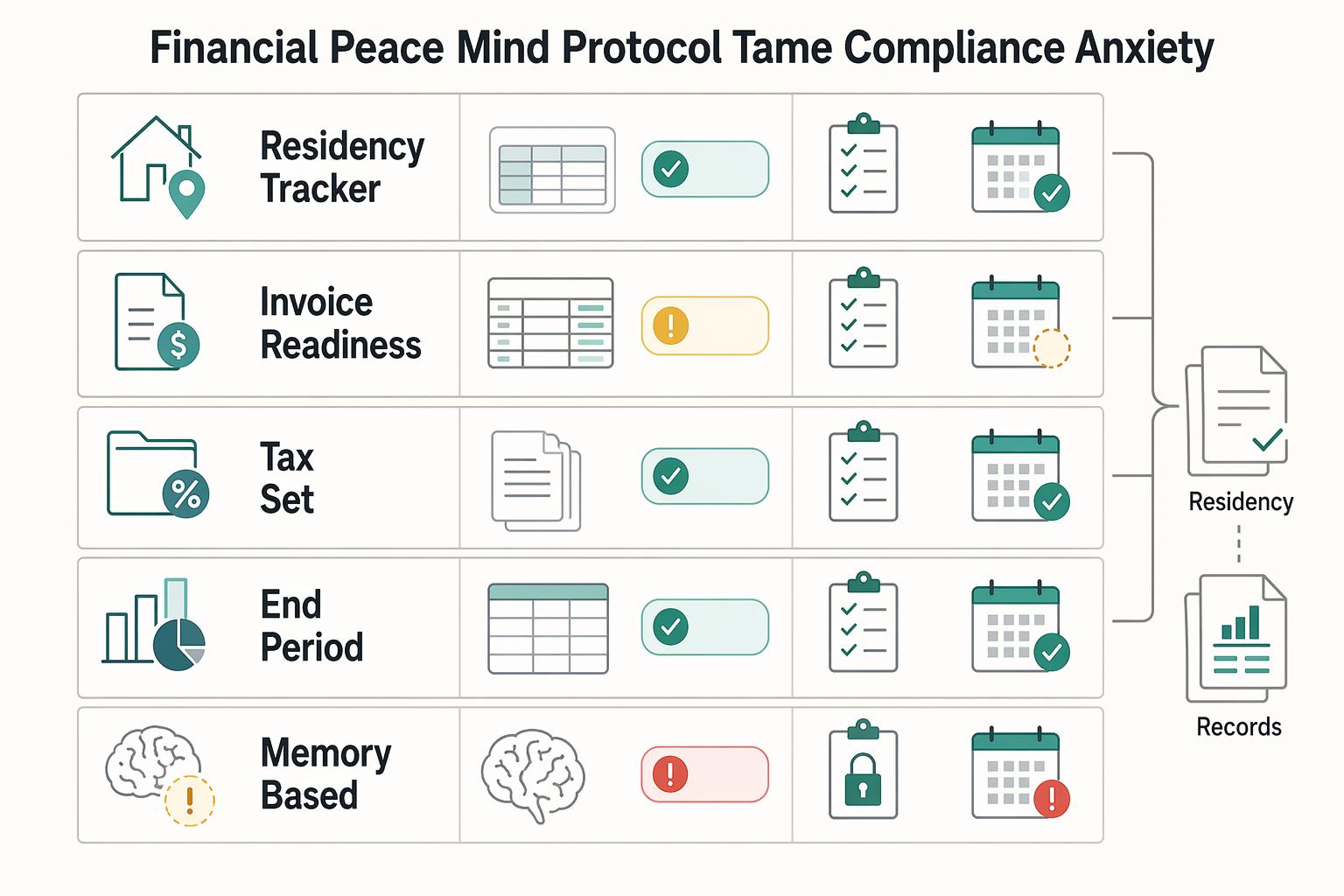
Compliance anxiety can become an operations risk, not a character flaw. The goal is to stop relying on memory and run finance checks from visible records you can review and update.
| Record | Key fields | Status or next step |
|---|---|---|
| Residency Tracker | jurisdiction; date range; days present; current legal or tax threshold pending official verification; source checked; last verified date; status | When status changes, update the record and re-verify the current rule; if status is Verify now, pause decisions and reconcile using actual records |
| Invoice Readiness | legal client name; registered address; tax ID or equivalent if applicable; currency; payment terms; current billing wording pending source verification; linked proof of delivery or approved work | If any required field is missing or unverified, set status to Hold and do not send |
| Tax set-aside workflow | Paid Date; Gross Received; Set-Aside Rule; Reserved Amount; Transfer Date; Holding Account; status | When an invoice moves to Paid, calculate or confirm the reserved amount and transfer it the same day or in the next scheduled finance block; if the transfer is missed, mark Reconcile |
A protocol helps because each item has a status, a next action, and a verification point. You are not trying to memorize rules. You are building a repeatable process and validating requirements for your jurisdiction before acting.
| Reactive habit | Protocol-based operation | Observable result |
|---|---|---|
| End-of-period scramble | Weekly finance review with current statuses | Lower chance of last-minute document hunts |
| Memory-based checks before invoicing | Checklist attached to every invoice record | Lower chance of avoidable corrections or resend requests |
| Treating account balance as available cash | Paid-invoice set-aside tracking with transfer status | Clearer view of spendable cash |
| Reusing old rule notes without re-checking | Fields marked current legal or tax threshold pending official verification or current billing wording pending source verification | Lower risk of acting on stale assumptions |
Build your residency tracker#
Track jurisdiction, date range, days present, a Current legal or tax threshold pending official verification field, source checked, last verified date, and status (On track, Review soon, Verify now). In Notion, keep one Residency Tracker database, ideally with one record per jurisdiction and linked evidence notes.
When status changes, update the record if travel or day counts change, then re-verify the current rule for that jurisdiction. If status is Verify now, pause decisions and reconcile using your actual records, such as calendar entries, travel confirmations, and other entry or exit evidence you keep.
Create your invoice readiness checklist#
Invoice errors can be easier to prevent than unwind. Track the billing details your workflow requires, such as legal client name, registered address, tax ID or equivalent if applicable, currency, payment terms, a Current billing wording pending source verification field, and linked proof of delivery or approved work. In Notion, keep an Invoice Readiness template inside your client or project database so billing checks live with the work record.
If any required field is missing or unverified, set status to Hold and do not send. If client billing details change, update the source client record first so new invoices pull current data.
Set up your tax set-aside workflow#
Treat set-asides as part of the payment process, not a later clean-up task. Track Paid Date, Gross Received, Set-Aside Rule, Reserved Amount, Transfer Date, Holding Account, and status. In Notion, keep this in your Income database, with a Current set-aside rule pending source verification note instead of hardcoding a percentage you have not recently confirmed.
When an invoice moves to Paid, calculate or confirm the reserved amount and transfer it the same day or in the next scheduled finance block. If the transfer is missed, mark Reconcile and clear it before discretionary spending.
Run your weekly compliance review#
Keep this short and repeatable each week:
- Did any travel, client detail, or payment status change that needs a record update?
- Which residency records still show an unverified threshold or an old verification date?
- Which invoice records are on
Hold, and what exact detail is missing? - Do reserved totals in Notion match transfers in your holding account?
- What finance follow-up needs a calendar block next week?
This can move compliance from background worry to scheduled, controlled work. We covered this in detail in How to create an 'invoice template' in Notion.
If compliance admin is draining your week, centralize your checks with the Tax Residency Tracker.
Bringing It All Together: Your Proactive Week with Notion and Google Calendar#
The weekly loop is simple: Review in Notion -> Decide priorities -> Block Google Calendar -> Protect focus -> Close day. Run it the same way each week so your plan comes from records, not memory.
| Step | What to do | Watch-outs |
|---|---|---|
| Review in Notion | filter energy entries to the last 7 days; sort friction notes by newest; filter compliance items to Review soon and Verify now; treat current legal or tax thresholds pending official verification as unresolved | Avoid filling legal or tax gaps with assumptions; if disrupted, run a 10-minute review and flag one energy drain, one repeated friction point, and one compliance item that cannot wait |
| Decide priorities | choose one high-value output, one admin batch, one recovery commitment, and one buffer; if friction notes show repeated approval delays, schedule follow-up or boundary-setting; if compliance shows Verify now, schedule verification before action | Avoid treating all tasks as equal or mixing deep creation and shallow admin in one block; if disrupted, recut the week into must move, should move, and can slip |
| Block Google Calendar | set recurring events for weekly review, admin batch, and shutdown; use Focus time for deep work when your account supports it; use Out of office only when you are actually unavailable | Avoid all-day vague holds or stacking intense blocks without recovery; if disrupted, move blocks before deleting them and keep at least one deep block and one buffer block protected |
| Protect focus | title each block with the intended output; open the related Notion task or project before the block starts; log repeated interruptions in client friction notes for next week's review | Avoid starting deep blocks in your inbox or turning recovery blocks into catch-up work; if disrupted, finish a smaller salvage task or move the remaining work into buffer time |
| Close day | update energy log, friction notes, and compliance entries when travel, payment status, or client details change; if a legal or tax question appears, mark the relevant field as current legal or tax threshold pending official verification and set status to Verify now | Avoid carrying unresolved decisions in your head; if disrupted, do a 5-minute close: capture changes, move one unfinished block, and set tomorrow's first task |
Review in Notion#
Start by confirming what changed last week in your records. Use a weekly review page, such as a repeating database template, and pull linked views so you can see the energy log, client friction notes, and compliance tracker in one place.
- Do: filter energy entries to the last 7 days; sort friction notes by newest; filter compliance items to
Review soonandVerify now. - Do: treat pending legal or tax thresholds as unresolved until official verification.
- Avoid: filling legal or tax gaps with assumptions.
- If disrupted: run a 10-minute review and flag one energy drain, one repeated friction point, and one compliance item that cannot wait.
Decide priorities#
This is where the review turns into tradeoffs. Pick priorities that match your observed energy pattern and current constraints.
- Do: choose one high-value output, one admin batch, one recovery commitment, and one buffer.
- Do: if friction notes show repeated approval delays, schedule follow-up or boundary-setting.
- Do: if compliance shows
Verify now, schedule verification before action. - Avoid: treating all tasks as equal or mixing deep creation and shallow admin in one block.
- If disrupted: recut the week into
must move,should move, andcan slip.
| Block type | Use when your energy is | Best for | Expected outcome |
|---|---|---|---|
| Deep work | High and steady | Drafting, analysis, complex delivery | A meaningful deliverable moves forward |
| Admin | Low to medium | Email, invoicing, scheduling, cleanup | Small obligations cleared in one batch |
| Recovery | Low, depleted, or post-meeting | Break, walk, meal, no-screen reset | Energy stabilizes instead of dropping further |
| Buffer | Uncertain or fragmented | Spillover, follow-up, unexpected issues | Disruptions are absorbed without breaking the week |
Block Google Calendar#
A plan only becomes real when it has time on the calendar. For Focus time blocks, set explicit start and end times and create them from Day or Week view. Use repeating events for routine blocks.
- Do: set recurring events for weekly review, admin batch, and shutdown.
- Do: use Focus time for deep work when your account supports it, and choose whether auto-decline should apply to only new meetings or to both new and existing meetings.
- Do: use Out of office only when you are actually unavailable.
- Avoid: all-day vague holds or stacking intense blocks without recovery.
- If disrupted: move blocks before deleting them; keep at least one deep block and one buffer block protected.
Protect focus#
A planned block works only if you defend it during execution. Open the related Notion task or project before the block starts so the next action is already visible.
- Do: title each block with the intended output.
- Do: log repeated interruptions in client friction notes for next week's review.
- Avoid: starting deep blocks in your inbox or turning recovery blocks into catch-up work.
- If disrupted: finish a smaller salvage task or move the remaining work into buffer time.
Close day#
The close matters because it sets up tomorrow. End each day by updating records so the next day starts clean. Capture what changed, set the next action, and reschedule unfinished work immediately.
- Do: update energy log, friction notes, and compliance entries when travel, payment status, or client details change.
- Do: if a legal or tax question appears, mark the relevant field as pending official verification and set status to
Verify now. - Avoid: carrying unresolved decisions in your head.
- If disrupted: do a 5-minute close: capture changes, move one unfinished block, and set tomorrow's first task.
This is the operating bridge: Notion shows what is true, and Google Calendar shows what you will do about it. Related: A Guide to Notion for Freelance Business Management.
Conclusion: You Are the Architect of Your Sustainability#
Treat burnout as a work-design signal you can act on each week, not a character flaw. WHO frames burn-out as an occupational phenomenon tied to chronic workplace stress, not a medical condition, so this system is for better operating decisions, not self-diagnosis.
- Review pillar: review in Notion and name the drag.
Use your database views to surface recent energy notes, friction flags, and items marked Verify now or Review soon. By the end of review, identify one client, task type, or admin pattern that created avoidable strain.
- Efficiency pillar: make one tradeoff that reduces rework.
Choose one change you will actually apply next week: reduce or reschedule a low-value task, tighten scope, add a missing template, or centralize scattered project information.
- Financial peace pillar: turn one worry into one next action.
Replace vague compliance stress with a tracked step, such as verifying an official rule, marking an unresolved value pending official verification, or preparing a document you have delayed.
Then run the loop in sequence: review in Notion, decide tradeoffs, execute in Google Calendar. Add repeat events where useful, and use Focus time when your account supports it to protect deep-work blocks. This will not remove every hard week, but it can give you clearer priorities, stronger boundaries, and lower compliance anxiety over time.
This pairs well with our guide on Using Notion Rollups and Relations for a Smarter Freelance Dashboard.
If you're ready to pair this system with a cleaner cross-border payment flow, explore Gruv for Freelancers.
Frequently Asked Questions
How do you connect Notion to business performance without overbuilding it?
Start with a simple Business Health relation that links one daily check-in to the client, project, or admin block that shaped your day. Treat it as an operating log, not a scientific or validated score, so you can spot patterns during your weekly review and choose one change for next week. If a field does not help you decide what to adjust, remove it.
Can you build a burnout risk dashboard in Notion?
You can build a conservative, review-driven dashboard in Notion, but treat it as a reflection tool, not a validated risk model. Use three linked views you will actually check each week: recent energy notes, newest friction notes, and items marked Review soon or Verify now. After each review, make one calendar change that matches what you saw.
What should you track first if blank pages make you freeze?
Do not build from a blank page when you are stuck. Use Notion’s in-page templates button, then duplicate a small weekly review, daily log, or project page and start using it immediately. If you are still tweaking properties after a few minutes, stop designing and track only what you will review this week.
What belongs in a simple compliance and tax tracker?
Track only items that support a real decision, and mark any unconfirmed legal or tax number as Current legal or tax threshold pending official verification. Review the tracker on a fixed cadence, then mark the next action so nothing sits as vague worry. | Tracker | Use case | When to review | What action to take | |---|---|---|---| | Residency or rule-check tracker | You need to monitor a location-specific obligation | Weekly, and before travel, invoicing, or filing decisions | Mark uncertain items Verify now and replace unresolved values only after checking an official source or advisor | | Tax savings tracker | You want visibility into money set aside versus money received | At each paid invoice and during weekly close | Update saved amounts, note any gap, and schedule a cash check | | Compliance resources list | You need one place for official links, forms, and notes | Monthly, or when rules or client locations change | Remove stale links, add current sources, and flag unresolved items for verification |
Is Notion better than a to-do list app for this?
Use Notion when you need context across tasks, projects, and review notes in one place. Use a lighter to-do app if you only need a short execution list. If your setup starts feeling heavy, simplify it until you can keep the weekly review habit.
Why add Google Calendar if Notion already has the plan?
For many people, a plan in Notion stays optional until it has time blocks on a calendar. Run the same loop each week: review in Notion, pick a few priorities, then place them in Google Calendar with clear start and end times. Validate the system by behavior: your review decisions should show up as changed blocks, not just extra notes.
Try a related tool
Researched and edited by the Gruv editorial team. Gruv builds cross-border billing, payouts, and finance-operations software for global businesses.
Sources
- cdc.gov/niosh/stress/about/index.htmltrusted
- cdc.gov/niosh/bulletin/2024/workplace-psychosocial-h...trusted
- census.gov/programs-surveys/nonemployer-statistics.htmltrusted
- consumerfinance.gov/consumer-tools/financial-well-being/abouttrusted
- consumerfinance.gov/consumer-tools/educator-tools/financial-well...trusted
- epa.gov/sites/default/files/2015-06/documents/g6-fin...trusted
- epa.gov/quality/guidance-preparing-standard-operatin...trusted
- fda.gov/media/88761/downloadtrusted
Educational content only. Not legal, tax, or financial advice.
Related Posts

A Freelancer's Guide to Dealing with Burnout
**If you are dealing with freelance burnout, you need a better system, not another motivation speech.** Over the next 7 days, you can run a practical reset to decide what to stop, what to protect, and what to review regularly. The goal is momentum you can sustain, even when energy is low.

A Guide to Notion for Freelance Business Management
If your workspace feels busy but fragile, you do not need more pages. You need one connected system. Treat your freelance business like a business-of-one and use Notion as the control layer that connects client decisions, delivery, and billing in one place.

The Freelance Payment Penalty: A Modeled Audit of Platform Fees, FX Spreads, and Payout Delays
The money rarely disappears through a single, easy-to-spot fee. The real loss is stacked. A marketplace takes its commission, a processor adds a charge for international cards, a bank or payment company converts the currency at a spread, a platform holds the funds before release, and a wire sheds a little to intermediaries on the way in. Each layer looks defensible on its own, but the worker feels the combined result as a smaller deposit and a later payday.