
Quick Answer
Start with one storage home, one naming standard, and a small set of auditable automations. A practical digital file organization system is function-based folders (clients, finance, legal/compliance, admin, marketing/IP), date-first filenames with clear descriptor plus version or status, and simple rules for recurring intake like bank statements and receipts. Keep compliance-sensitive items separated by year or matter, document the confirmed retention rule where local rules apply, and run regular retrieval and restore checks so the setup improves findability instead of hiding mistakes.
Make three decisions in order, then automate the repeatable parts#
If you want a file setup that still works six months from now, make three decisions in order. Choose one source of truth, lock one naming rule, then automate only the repeatable parts. A lot of file mess starts when people do those in reverse.
Before you touch folders or rules, pick the one storage location that will hold your primary working files. That choice does not make you compliant by itself, but it does reduce a common failure mode: scattered copies across your laptop, inbox, downloads, and external drives. Once you settle that, the rest is much easier to keep consistent.
Step 1: Choose one source of truth and build by business function#
Start with function-based grouping. It usually scales better than sorting everything by app or by month. Create a small set of top-level folders that reflects how your business actually runs: clients, finance, legal and compliance, admin, and marketing or IP. Numbering them is optional, but it can help keep the order stable.
Inside your client area, use the same subfolder template for every new engagement. Keep it boring and consistent: contracts, invoices, deliverables, source files, and communications. In finance, split by tax year first, then by document type. In legal or compliance, keep signed agreements, registration records, insurance, and any jurisdiction-relevant residency evidence in separate year or matter folders.
Use one simple checkpoint before you go further. Open any active client folder and ask whether another person could understand what belongs there without your help. NIST guidance is blunt on this point. File names should be clear to intended users, not just the creator. The same logic applies to folders. If you need a paragraph to explain the structure, it is too clever.
Set up backups early, not after the first scare. Your main storage should not be your only copy. Follow the 3-2-1 pattern for important files: 3 copies, 2 media types, 1 offsite copy. Then test a restore, because a backup you have never restored is still an assumption.
Step 2: Apply one naming rule and tighten it by document risk#
A single base pattern often does more for findability than an elaborate folder tree. Use the same pattern everywhere, then add only the extra tokens a document type actually needs. YYYY-MM-DD is a strong default because it sorts cleanly and is widely recognized, even though date formats differ across sources. What matters most is internal consistency.
A practical base pattern is YYYY-MM-DD_Descriptor_Version_or_Status.ext.
That gives you a chronological anchor, a human-readable description, and either a version number or a final state. Use version numbers like v01, v02, v03 while a file is still changing. Use a status token like SIGNED, FILED, or PAID when it helps you retrieve the right file and reduces ambiguity.
| File type | Use date | Use descriptor | Use version | Use status |
|---|---|---|---|---|
| Basic working files | Yes | Yes, short and specific | Yes while editing | Usually no |
| Legal files | Yes | Yes, include party or matter | Only for drafts | Yes for final state like SIGNED or EXECUTED |
| Finance files | Yes | Yes, include vendor, client, or form | Rarely | Yes when payment or filing state matters |
A few examples make the rule concrete: 2026-03-24_Acme_Proposal_v02.docx, 2026-03-24_Acme_MSA_SIGNED.pdf, 2026-01-31_Invoice-104_Acme_PAID.pdf.
Treat compliance-sensitive files as risk controls, not just tidy paperwork. The IRS says electronic records are subject to the same requirements as paper. It identifies supporting documents such as sales slips, paid bills, invoices, receipts, deposit slips, and canceled checks.
For tax files, note the retention trigger in folder notes after you confirm the rule that applies to the record. For contracts and residency evidence, use the same approach: record the source you checked, the trigger that starts the clock, and the retention rule you will follow.
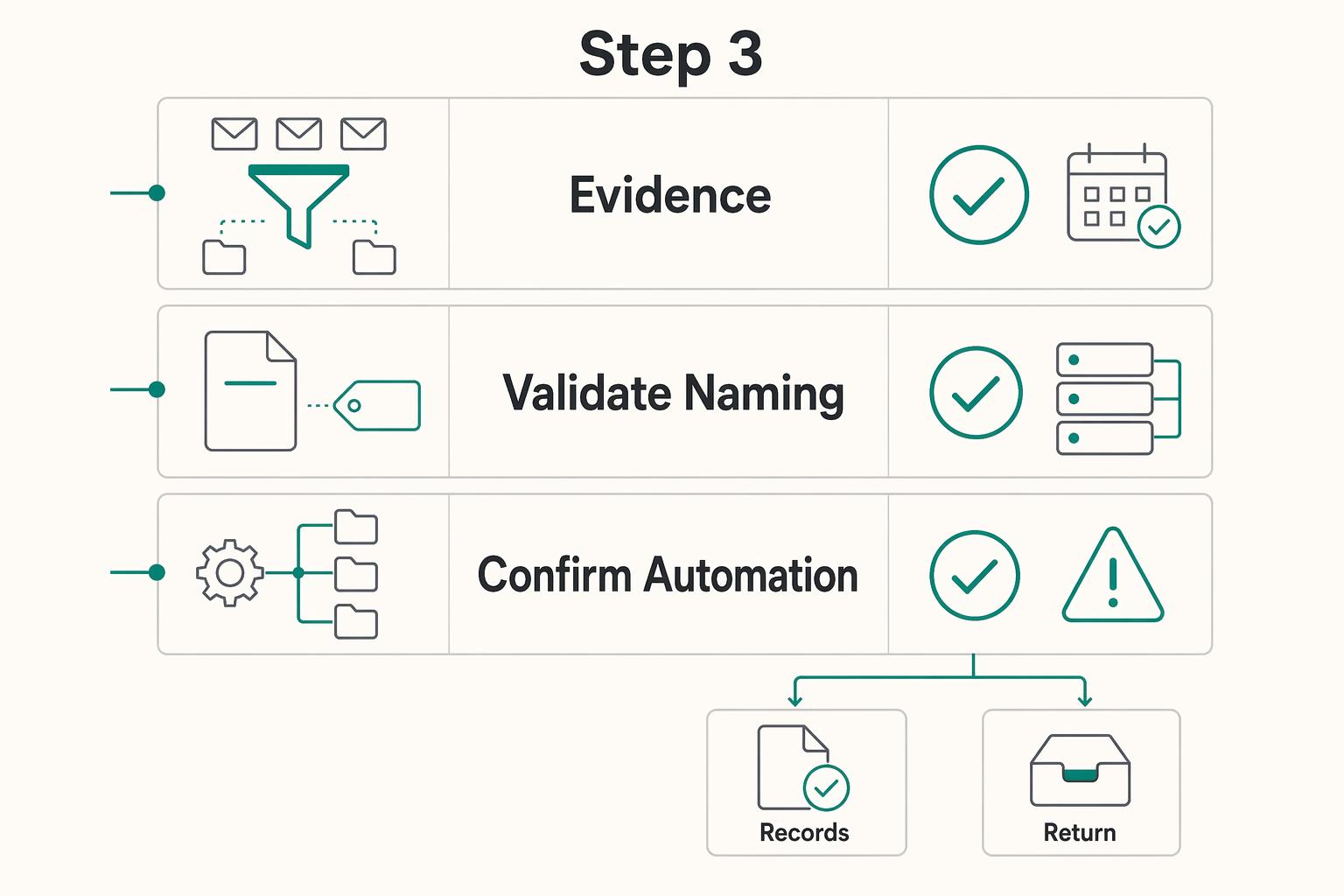
Step 3: Automate filing rules only after you can audit them#
Automation helps only when you can explain what it is doing and catch when it fails. Start with the boring, repetitive intake points: inbox attachments, scanned receipts, and recurring exports. Before you build any rule, define four parts in plain language:
- Trigger: what arrives or changes
- Naming action: what gets added or normalized
- Destination folder: where the file lands
- Review step: how you confirm it was filed correctly
Here is what that looks like in practice. When a monthly bank statement email arrives from your bank, save the PDF to the current year finance folder. Add the statement month if it is missing. Then review the folder at month-end to confirm all 12 are present. Gmail and Outlook both support criteria-based rules for incoming mail, even if exact behavior differs by platform.
A second example is receipt intake. When a file lands in _INCOMING and contains "receipt," prepend the date, move it to the correct expenses folder, then review unmatched files every Friday. A common failure mode is silent misfiling. If the rule is too broad, it can be wrong at scale.
Finish with a monthly recovery check. In platforms that support version history, restore one previous version and confirm you can recover it. That test tells you whether your folders, filenames, and rules are making records easier to find, or just helping you hide mistakes faster.
From Administrative Drag to Strategic Advantage#
Your system is working when it gives you three outcomes: clarity (faster retrieval), control (audit-ready records), and automation (less filing rework). If it only looks neat, it is not doing its job.
Step 1: Test clarity first, because weak naming breaks retrieval#
Test clarity first, because weak naming breaks retrieval quickly. Use date-first filenames like YYYY-MM-DD_ClientName_SOW_SIGNED.pdf or YYYYMMDD_ClientName_Invoice_PAID.pdf so files sort predictably. Then run a simple check: can you find the latest contract, invoice, or residency record without opening multiple near-duplicates? If not, tighten the naming rule.
Step 2: Make it obvious why each file is kept#
Use control to make records defensible, not just tidy. The IRS allows any recordkeeping system that clearly shows income and expenses, and electronic records must meet the same baseline requirements as paper records. Your Finance, Legal & Compliance, and client folders should make it obvious what a file is, why it is kept, and how long it belongs there. That is what supports audit readiness and cleaner handoffs.
Step 3: Automate repeat admin work, then verify it regularly#
Use automation to reduce repeat admin work, then verify it regularly. Inbox rules can route recurring attachments into the right intake path, and date-first naming keeps sorting consistent, but rules still need review. Keep the filename rule simple enough to work across the storage tools your team uses. Track practical outcomes: fewer retrieval steps, fewer filing corrections, and less rework.
| Dimension | Reactive file handling | System-driven operations |
|---|---|---|
| Findability | Search by memory | Search by rule |
| Compliance confidence | Rebuild evidence late | Keep evidence as you go |
| Handoff readiness | Context stays in your head | Another person can file and retrieve |
| Admin effort | Repeated sorting and cleanup | Repeatable intake with review |
Next actions:
- Run a file-find test on one contract, one invoice, and one compliance record.
- Validate naming consistency across your latest 20 files.
- Confirm your automation rules still route files correctly and do not create sync problems.
File-Naming Governance Table for 2026 Operations#
Treat file naming as a governance system, not a style preference. Align naming standards with NIST cybersecurity framework practices, CISA advisory workflows, and IRS recordkeeping expectations when files support tax, legal, or client billing evidence.
| File Type | Required Prefix | Retention Window | Failure Mode if Missing |
|---|---|---|---|
| Client contracts | client-name_contract_YYYY-MM-DD | 7 years | Wrong version used in scope or billing dispute |
| Invoices | client-name_invoice_YYYY-MM-DD_amt | 7 years | Payment reconciliation errors |
| Tax documents | entity_tax_form-year | 7 years+ jurisdiction dependent | Missing support during tax review |
| Security incidents | incident-severity_YYYY-MM-DD | 3 years minimum | Slow incident response and weak audit trail |
Set measurable controls: 100% file date normalization, under 2% weekly misfile rate, and monthly clean-up cycles capped at 60 minutes. Review exception reports at least once per month.
Frequently Asked Questions
What is the best folder structure for a freelancer?
A workable default is function-based top folders, then a client-first area with consistent subfolders per engagement. Adjust only when one area becomes large enough or sensitive enough to need its own branch, since one universal hierarchy does not fit every workflow. The common mistake is over-nesting, which creates long paths that make files harder to move, delete, or share, and Windows guidance still notes a 256 character limit. Do this now: create starter folders like Clients, Finance, Legal & Compliance, Admin, and Marketing & IP, then open one client folder and check whether another person could file a contract or invoice without asking you.
How do I organize tax documents to be audit-proof?
You cannot make records audit-proof, but you can make them much easier to review. Keep finance files in one place, split by tax year first, and name each file consistently. Within each year, organize based on how you actually retrieve records. Do this now: create the current year finance folder, move in your latest five records, and rename them using a date-first pattern.
How long should I keep digital business records?
Keep records based on your jurisdiction, document type, contract terms, and any insurer or advisor requirements, then document that rule where you store the files. Adjust by file category instead of forcing one timeline onto everything. The common mistake is copying a single retention period from a generic article and treating it as universal. Do this now: add a note inside your finance and legal folders that names the source you will verify before setting the retention rule.
What is the best way to name legal contracts digitally?
Use a small, fixed set of filename metadata in the same order every time, usually 2 to 4 pieces, and choose the first field based on how you search. Use version numbers like v01 for drafts, and use a final status label only when the document is actually approved. The common mistake is relying on vague endings like Final or Final2, which become meaningless fast. Do this now: rename one active contract to a date-first or matter-first pattern and reserve status tags for the true final file.
How can I use my digital files to prove tax residency?
If you may need to prove tax residency, keep related records together by year and save records as they arrive instead of rebuilding the file at year-end. Split by month or evidence type only if the volume gets hard to scan. The common mistake is collecting the right documents but naming them so vaguely that you cannot tell what they show later. Do this now: create the current year folder, save your next record with the date first, and add a note naming the local rule or advisor source you still need to confirm.
Try a related tool
Researched and edited by the Gruv editorial team. Gruv builds cross-border billing, payouts, and finance-operations software for global businesses.
Sources
- archives.gov/files/preservation/formats/pdf/naming-and-or...trusted
- archives.gov/files/records-mgmt/transcripts/v1-046-whatis...trusted
- cisa.gov/news-events/cybersecurity-advisoriestrusted
- cisa.gov/sites/default/files/publications/data_backup...trusted
- datamanagement.hms.harvard.edu/plan-design/file-naming-conventionstrusted
- datamanagement.hms.harvard.edu/plan-design/directory-structuretrusted
- finance.uw.edu/recmgt/structuring-electronic-filestrusted
- hhs.gov/sites/default/files/research-based-web-desig...trusted
Educational content only. Not legal, tax, or financial advice.
Related Posts

The Freelance Payment Penalty: A Modeled Audit of Platform Fees, FX Spreads, and Payout Delays
The money rarely disappears through a single, easy-to-spot fee. The real loss is stacked. A marketplace takes its commission, a processor adds a charge for international cards, a bank or payment company converts the currency at a spread, a platform holds the funds before release, and a wire sheds a little to intermediaries on the way in. Each layer looks defensible on its own, but the worker feels the combined result as a smaller deposit and a later payday.

How to Respond to a Subpoena for Business Records
Move fast, but do not produce records on instinct. If you need to **respond to a subpoena for business records**, your immediate job is to control deadlines, preserve records, and make any later production defensible.

A US Expat's Guide to Investing in UCITS ETFs to Avoid PFIC Issues
The real problem is a two-system conflict. U.S. tax treatment can punish the wrong fund choice, while local product-access constraints can block the funds you want to buy in the first place. For **us expat ucits etfs**, the practical question is not "Which product is best?" It is "What can I access, report, and keep doing every year without guessing?" Use this four-part filter before any trade: