
Quick Answer
Pick one recurring freelance task, record a real run and write its trigger, inputs, owner, steps, exceptions and final check. Store the current procedure with links to its templates and records. Test it yourself later or with an authorized colleague, then revise the step that caused hesitation. A shared document is enough to begin.
Document Recurring Freelance Tasks So the Work Is Easier to Repeat#
If the same workflow issues keep showing up, a bigger to-do list usually will not fix them. What helps is a simple operating structure: what starts a task, what gets checked, and what must be true before work moves forward. This guide shows you how to document recurring freelance tasks so the work is easier to repeat and maintain.
Step 1. Reframe the problem as repeatability#
A checklist helps you remember; an SOP helps you run the same task with fewer decision gaps each time. That matters when your business runs on client calls, email threads, invoices, revisions, and handoffs that are easy to improvise once and costly to improvise over and over.
A practical SOP can include the trigger, required inputs, owner, steps, exception handling, quality check and review date. EPA’s SOP guidance explains written procedures, review and document control for environmental quality systems; those general documentation principles can inform a freelance procedure. Its sector-specific requirements are not freelance business rules.
Use a quick test to see what needs documenting first. Pick one recurring task, such as sending a proposal or issuing an invoice. If two versions of how you do it exist across your memory, inbox, and notes app, that task is a good place to start.
| Area | Ad hoc freelance workflow | Documented SOP workflow |
|---|---|---|
| Risk | Scope, approvals, and obligations sit in memory or scattered messages | Key checks are documented before work advances |
| Time use | You recreate next steps, hunt for files, and re-answer the same questions | You follow a repeatable path instead of rebuilding each time |
| Client experience | Updates, turnaround, and handoffs vary by project | Communication and delivery can be more consistent |
Choose documentation priorities from your actual problems#
If it helps, use a simple order: first reduce preventable issues, then tighten the work that earns money, then document for transfer.
| Part | Focus | What it covers |
|---|---|---|
| Client and billing controls | Reduce avoidable errors | Intake, scope, approvals, invoicing and records |
| Delivery controls | Make recurring work consistent | Quoting, starting, completing, reviewing and billing |
| Handoff controls | Make a task repeatable later | Future you or an authorized collaborator can find the current instructions |
Client and billing procedures help catch missing information before it leads to rejected invoices, unnecessary revisions or disagreements.
Delivery procedures specify how you quote, start, complete, review and bill work. Compare actual effort with the agreed scope to identify repeated extra work.
Handoff procedures help future you or an authorized collaborator repeat a task. Delegation is optional: clear documentation also helps a solo freelancer return to an infrequent task.
Step 3. Start with evidence, not theory#
Do not document an ideal process from scratch. Build from the trail your business already leaves: recent proposals, contracts, briefs, invoices, revision emails, and client update messages. That working record helps you spot where delays, rework, and missed checks tend to appear.
A common failure mode is writing a polished SOP that stops matching reality once exceptions show up. To prevent that, add one explicit review point to every document. Note when the procedure gets updated and what event should trigger the update. A simple rule: review it after a client dispute, a missed payment follow-up, a delivery miss, or any step that made you say, I should really write this down.
Choose the first SOP from those observed problems. Onboarding may be the priority if briefs arrive incomplete; invoicing may come first if rejected invoices delay payment.
Keep the first procedure small enough to try on the next appropriate task. Add a template or screenshot where it resolves a real question.
Create one SOP in six steps#
Use this sequence for a recurring task such as setting up an approved client project. The example below is a worked template, not a legal or tax requirement.
1. Pick the task and define its start#
Choose one bounded action with a recognizable trigger. For onboarding, the trigger might be acceptance of the agreed proposal and satisfaction of its stated start conditions. Record who owns the task and what output it should produce.
2. Gather the inputs and approved access#
List the accepted scope, project ID, billing contact, folder template, welcome-message template and any required deposit or signature record. Link current versions. Identify the permissions needed; keep credentials in approved storage.
3. Write the actions from an actual run#
Record the sequence while doing an authorized real task or safe example. Use specific actions, locations and decisions. Replace 'set up the project' with instructions to find the project ID, check for an existing folder, create only the missing folder and add the kickoff task.
4. Add exceptions and a final check#
Explain what happens when an input is missing, a record already exists or a step fails. State what done means: one correct project record, one linked folder, required files present, welcome sent once and kickoff owner/date recorded.
5. Test the written procedure#
Follow it after a gap or ask an authorized collaborator to try safe example data. Record the exact step that caused hesitation. Check that the user found the current template and produced the intended output without an unintended message, charge or duplicate record.
6. Store and maintain the current version#
Give the SOP an identifier, owner, revision date and review trigger. Keep its current link in the project template, archive superseded versions and record what changed. Review after a tool change, repeated error or agreed periodic check.
Worked SOP: create an approved client project#
| Field | Example instruction |
|---|---|
| Identity | ONB-01; owner: freelancer; version1.0; revision date:2026-10-05 |
| Scope | Set up an already accepted project; do not renegotiate scope or create a new billing agreement |
| Trigger | Accepted scope is recorded and this engagement’s required start conditions are met |
| Inputs | Project ID P-026; approved scope link; primary contact; current folder and welcome templates |
| Action1 | Open the project index and search for P-026; use the existing record if present |
| Action2 | Check for its linked folder; create a missing folder from the current template and save the link once |
| Action3 | Link the accepted scope and add the kickoff task with the agreed owner and date |
| Action4 | Check whether the welcome was already sent; if not, send the approved template to the correct contact and record the send time |
| Exception | Missing approval: ask about the affected requirement. Existing folder: verify and reuse. Failed send: inspect sent records before retrying |
| Done | One project record and folder, current scope linked, kickoff assigned, welcome delivered once and evidence saved |
| Maintenance | Update after template, tool or start-rule changes; review when a setup error exposes a gap |
For example, the folder action succeeds but the welcome action times out. The SOP directs you to inspect the sent-mail record: if the message was delivered, record it and do not resend; if it was not delivered and no retry is pending, complete the missing send once. This exception turns a generic checklist into a usable procedure. Adapt the trigger and approval rules to your actual engagement.
Client, scope and billing procedures#
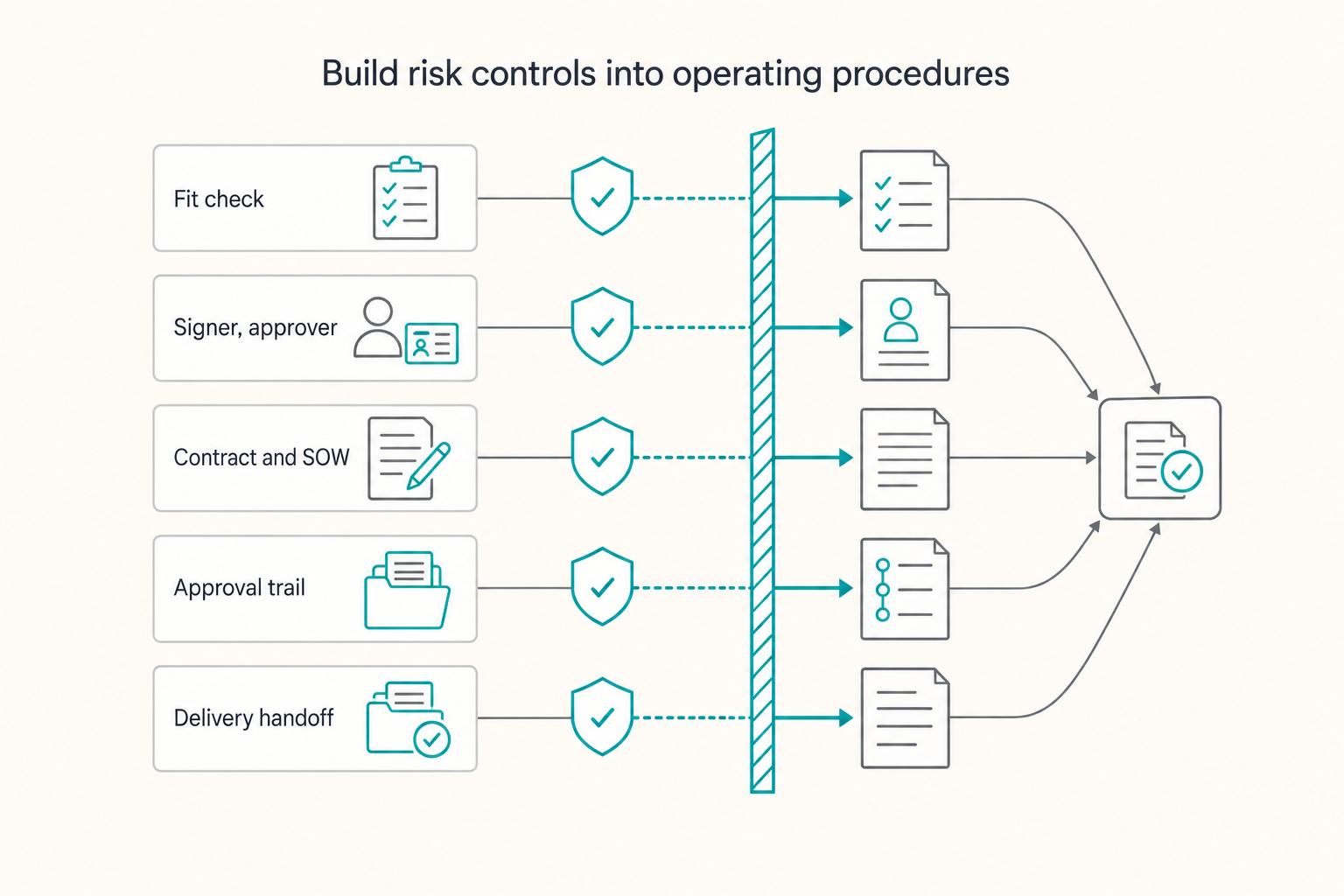
Use this section to reduce avoidable risk before it turns into rework, delayed payment, or disputes. Your first controls should consistently do three things: qualify the client, validate invoices before sending, and preserve a complete decision trail.
Set up one reusable client folder first: Intake, Contract and SOW, Invoices, and Collections. For each SOP step, define the trigger, owner, evidence saved, and review cadence.
Define the prerequisites for this engagement#
Write the prerequisites that this engagement actually needs: agreed scope, relevant authorization, available inputs and any required contract, deposit or access. Resolve missing information that affects the next task; avoid blocking unrelated authorized work with a universal onboarding checklist.
| Checkpoint | What to confirm | Record or rule |
|---|---|---|
| Fit check | The work matches your service, budget range, timeline, and working style | Clarify the uncertain requirement before committing affected work |
| Signer, approver, and payer details | Who is authorized to sign, approve, and pay; legal business name; primary contact; billing contact; document-delivery address | Save what you relied on |
| Contract and SOW review | Party names and signer authority; payment terms, approval points, cancellation language; in scope; out of scope; written change-request path; final approver; approval date; version | Run a lightweight redline checklist |
| Approval trail | Later disagreements can be traced to a documented decision | Save the marked draft, clean final, and written acceptance of disputed points |
| Delivery handoff | Required acceptance and any required agreement are recorded | Start the next authorized task when its prerequisites are satisfied |
Check service fit, budget range, timeline and working style when an inquiry becomes serious. Ask about the uncertain point before promising it; exploratory discussion or an authorized preliminary task does not require every later delivery detail.
Then confirm who is authorized to sign, approve, and pay. Capture the legal business name, primary contact, billing contact, and document-delivery address, and save what you relied on, such as provided business details or documented correspondence.
Next, run a lightweight redline checklist against the contract and SOW:
- Party names and signer authority match the proposal.
- Payment terms, approval points, and cancellation language are reviewed against your standard position.
- The SOW states
in scope,out of scope, and a written change-request path. - Final approver, approval date, and version are recorded.
Keep the approval trail, not just the final file. Save the marked draft, clean final, and written acceptance of disputed points so later disagreements can be traced to a documented decision.
Record the engagement’s actual start rule. If it requires a signed agreement and approved SOW, link those files before delivery. If accepted scope is recorded in one agreement or another valid approval route, use that record rather than requiring duplicate documents as a universal rule.
Validate invoices against the supplier, service and customer facts#
Your invoicing SOP should reduce preventable rejections and back-and-forth. Run it at each billing milestone or billing date, and save both the invoice and the validation record you used to issue it.
| Billing context | Fields checkpoint | Tax checkpoint | Evidence |
|---|---|---|---|
| Same-country supply | Use the applicable local invoice template | Check supplier registration and the service’s tax treatment | Contract details, invoice reference, dates and rule relied on |
| Supply involving a UK customer | Check which jurisdiction’s invoice rules apply to your supply | Supplier location, service type and customer status can affect VAT treatment | Billing details and applicable rule or adviser note |
| Supply involving an EU business | Include applicable tax identifiers and invoice wording | Check customer status, place of supply and any applicable reverse charge | Dated VAT validation where relevant, transaction facts and rule applied |
Customer region alone does not determine tax or invoice rules. VIES checks EU cross-border VAT registration information; a valid result does not by itself settle the service’s tax treatment. An invalid result can mean registration is incomplete, not activated for intra-EU transactions or not finalized; a service error calls for retry rather than treating it as invalid. Preserve the result and resolve the relevant tax facts. The EU invoicing guidance describes applicable invoice fields, including reverse-charge wording where the customer is liable.
Escalate collections in stages and document every step#
Collections work better when escalation is predefined. Start with reminder automation, move to structured follow-up, and prepare a formal dispute file only when needed.
Run the collection sequence when an invoice reaches the agreed reminder point. Routine messages can be sent automatically where authorized and accurate. Route disputes, legal threats, changed terms or payment hardship to the designated decision-maker rather than requiring manual handling of every status question.
Use a staged flow:
- Automated reminders before and at due date.
- Structured manual follow-up confirming receipt, status, amount due, and payment method.
- Formal dispute-prep mode when the client disputes charges or stops responding.
Maintain the applicable collections evidence: the agreement or accepted scope, invoice, proof of invoice delivery, reminder log, approved changes and any written delivery or acceptance confirmations. Include a signed contract or separate SOW where this engagement requires them. Review the SOP after late-payment cases that expose missing evidence or unclear wording.
With this risk layer in place, you can focus on revenue and delivery quality instead of preventable admin fires. For a step-by-step walkthrough, see How to Create a Business Email Address for Your Freelance Business.
Proposal and delivery procedures#
A proposal SOP can reduce drafting inconsistency; a delivery SOP can clarify inputs, versions and acceptance. Use either when it addresses a recurring problem in your work.
Write proposals from outcomes, not activity#
Use the same sequence every time: discovery inputs, problem framing, solution mapping, scope boundaries, then value rationale tied to business impact. This helps you avoid the last-minute habit of writing from scratch with no consistent format.
Before you draft, run a short gate:
- Discovery notes identify the problem or deliverable requested
- The outcome can be evaluated against agreed criteria
- In-scope and out-of-scope boundaries are clear enough for this proposal
- Claims about past results have appropriate evidence
Resolve the specific missing input before committing that part of the proposal. A simple fixed deliverable does not require a testimonial or extensive discovery to be quotable.
Use a package matrix to guide decisions without making unsupported pricing claims:
| Package | Scope shape | Decision fit | Delivery depth | Over-servicing risk |
|---|---|---|---|---|
| Core | Essential deliverables only | Client needs a clearly bounded result | Lighter support | Lower when boundaries are enforced |
| Preferred | Core deliverables plus added guidance | Client needs execution plus decision support | Moderate support | Medium if revision/change limits are unclear |
| Expanded | Broadest support and involvement | Only when complexity and impact justify it | Deep support | Higher if approvals and change control are loose |
If relevant proof exists, include an authorized testimonial or result example near the claim it supports. Do not invent results or force two proof points into every proposal. Related: Value-Based Pricing for Freelancers.
Control delivery so margin survives contact with the project#
Profit usually slips during execution, not during the price discussion. Your delivery SOP should remove ambiguity with a kickoff readiness check, clear file/version governance, a fixed communication cadence, and a documented done checkpoint.
Treat kickoff readiness as a yes/no gate: prerequisites are complete, responsibilities are clear, and the team can start without preventable back-and-forth. For file control, define one source of truth and one current-version rule so rework does not quietly consume time.
Use the same weekly update structure on every project:
- what was completed this period
- current risks or blockers
- next actions
- client decisions needed now
Close each phase with a definition-of-done check tied to the agreed outcome and documented acceptance path. If work falls outside that boundary, route it through a separate change request instead of absorbing it as silent extra effort. Once this runbook is stable, your delivery quality stays more consistent and your margins are easier to defend. For the next step in systemizing repeatable execution, see How to Create a Content Flywheel for Your Freelance Business.
Make Delivery Transferable to Another Person#
If you delegate, the collaborator needs sufficient instructions and permission to perform the task. If you work alone, the same record helps you resume after time away.
Document each repeatable task for handoff, not for your own memory#
Build each task SOP so its intended user can follow it without guessing. Adapt this structure to the task rather than requiring every procedure to be long:
| SOP element | What it captures |
|---|---|
| Context | Why this task exists and what outcome it protects |
| Trigger | The exact event that starts the task |
| Step order | The sequence to follow |
| Owner | Who executes it |
| Handoff point | Where responsibility shifts |
| Definition of done | What must be true before the task is closed |
| Inputs and permissions | Required files, templates and authorized access |
| Exceptions | What to do when an input is missing or a step fails |
| Version and review | Current owner, revision date and update trigger |
A written checklist may be enough. Add a short screen recording when it explains a decision better than text. Use synthetic or approved example data, close unrelated client tabs and notifications, and inspect the recording before sharing. Restrict its audience: Loom distinguishes public links from sharing with specific people.
Be precise with triggers. "Start onboarding" is vague. "After signature, create the project folder, send onboarding, assign the first task" is executable and maps cleanly to workflow automation.
Try the SOP yourself after a gap, or have an authorized colleague follow it with safe example data. Observe where the user hesitates about files, inputs, a decision or completion. Revise those points, and update the procedure whenever the actual workflow changes.
Treat credential handling as a standard operating control#
Delegation stays reliable when access is managed inside the SOP, not in side messages. For each delegated workflow, define:
- role-based access: who needs what level of access
- revocation workflow: what happens when scope changes or work ends
- access log: who received access, when, and when it was removed
Keep access ownership and grant/revocation records with the task, but do not paste passwords, secret tokens or recovery codes into the SOP or recordings. Link to approved credential storage and use named accounts with the minimum permissions needed; follow client authorization requirements before granting a collaborator access.
| Execution mode | Quality risk | Turnaround reliability | Oversight load |
|---|---|---|---|
| Solo execution | Lower variation while you are available; risk rises under overload | Usually reliable until your calendar saturates | Lower formal oversight, higher personal mental load |
| Delegated execution with weak SOPs | Higher variation from inconsistent interpretation | Unstable when handoffs depend on ad hoc clarification | High due to repeated questions and rework |
| Delegated execution with clear SOPs and access control | Lower and easier to review against done criteria | More predictable across handoffs | More setup effort upfront, lighter ongoing oversight |
Run a quarterly decision cycle and fix the next bottlenecks first#
Use a quarterly review as a repeatable control loop, not a broad brainstorm.
- Review completed-work fees, actual time, support costs and unbilled extra effort
- Identify repeated delays caused by missing information, approval or access
- Choose the few procedure updates likely to remove that repeated friction
- Set relevant next-period actions; delegation or automation is optional
If your data is not clean enough for a hard benchmark yet, write that explicitly in the roadmap note (for example: "Benchmark to be verified after two more completed projects with tracked hours"). Clear uncertainty is better than false precision.
A maintained SOP can reduce repeated explanations and make selected work easier to delegate. It does not remove judgment, workload limits or your responsibility for the promised service.
Run a Lean Stack and Choose Each Tool With Four Filters#
Begin with a shared document or folder you can keep current. Add a knowledge hub, capture tool or automation only when its benefit exceeds setup and maintenance work. Compare setup effort, ongoing burden, collaboration permissions and integrations.
Choose a single source of truth (knowledge hub)#
Keep SOPs, checklists, templates and project records easy to navigate. Link raw assets from the matching project record rather than duplicating them. In a tool such as Notion, page ownership and verification can help track maintenance; plan-dependent features are optional. A clear folder index can serve the same basic retrieval need.
| Tool | Best use case | Limitation to watch | Handoff readiness |
|---|---|---|---|
| Notion | Flexible knowledge hub with linked docs and records | Easy to overbuild and confuse people | Strong if templates stay simple |
| Coda | Docs plus connected tables in one place | More upfront design effort to keep clean | Strong if views and owners are clear |
| Loom | Short screen walkthroughs with context | Video alone is slow to scan and goes stale | Medium unless paired with written steps |
| Scribe | Fast click-by-click process capture | Auto-generated steps still need cleanup | Good for repeatable tool tasks |
| Zapier | Simple app-to-app automations | Reliability depends on clean triggers | Good if each automation has an owner |
| Make | Multi-step automations with branching | Higher maintenance when logic grows | Good only with clear naming and notes |
Choose the documentation formats the task needs#
Use a written checklist for execution and an optional screen recording for decisions that need demonstration. Add the quality checks that matter for the deliverable. Capture tools such as Scribe can generate step guides, but review captured text, screenshots and sharing settings before treating them as an approved SOP.
Use one handoff test: another person should open one record and find the current steps, current template, and live assets without asking you where anything lives.
Add automation only after guardrails are documented (automation layer)#
Document the trigger, required inputs, allowed actions and recovery behavior before automating a project-setup flow. Use a stable project or request identifier to distinguish a retry from a new engagement.
- Validate required inputs such as approved scope, client contact and project ID before running the affected action.
- Send failure alerts to a monitored destination and name who handles them.
- Before retrying or completing a step manually, check destination records and pending retries so you do not duplicate a folder, task, invoice or message.
- Use an authorized test environment or safe destination accounts. Zapier action tests can create records or send messages in the connected apps; a dummy client name alone does not make a test isolated.
- Record the failed step and actual destination state, finish only the missing authorized action, and reconcile status before restarting automation.
Zapier’s test-step documentation explains live action effects; Make’s error-handling guidance describes its recovery options. Apply the behavior of your actual tool and connected app rather than assuming an alert or replay prevents duplicate work.
Write and try one procedure#
You do not need a giant manual to document recurring freelance tasks well. You need a few written decisions that reduce guessing, protect your time, and let work move without you re-explaining it every week.
Step 1. Document one recurring task today. Start with the task you repeat most often or the one that causes the most back-and-forth. Write the trigger, the steps, the final check, and where the related files live. Then leave it for a day, come back, and see whether you can follow it without filling gaps from memory.
Step 2. Standardize one client-facing step next. Pick onboarding, proposal creation, scope-change handling, or invoicing. This is where clear structure matters most: define the risk check, the commercial decision, and the delivery step in plain terms. If a step affects what the client sees, agrees to, or pays for, document it before you polish lower-value admin.
Step 3. Review one procedure for handoff readiness. Ask whether another person could complete it accurately without sending you a clarifying message. If not, add the missing checkpoint, example, or template. A common failure mode is making the process either too vague to use or so rigid that it stops fitting real projects. Treat your documentation as guidance you adapt to context, not a fixed checklist you follow blindly.
What to do next is straightforward: this week, write one procedure. Next week, tighten one client-facing step. Then put a recurring review on your calendar so you keep improving one procedure at a time. That can help you move from reactive freelance work to more intentional operations without overbuilding.
This pairs well with our guide on How to Create a Disaster Recovery Plan for Your Freelance Business.
Frequently Asked Questions
How should you set up your invoicing SOP?
Start with a checklist that runs from approved scope to sent invoice to follow-up, not just a template you fill in when you remember. Keep the client and invoice records together so you can verify core details before sending anything. If payment or tax details need verification for that client, note what you checked and where so you keep a clear documentation trail.
Which SOP should you write first if you want better revenue, not just tidier admin?
Choose the workflow whose repeated errors or delays cost you most. Onboarding is a good first candidate when missing briefs or approvals repeatedly cause extra meetings; invoicing or delivery review may be more urgent in another business. Track the actual problem, write the relevant procedure and assess whether it helps.
How can an SOP reduce legal risk without pretending to replace legal advice?
Use it to create a clean record of decisions and approvals. Keep dated versions of key project documents and signoff notes in the same client file, and make sure each record shows who approved what and when. An SOP can improve consistency and documentation, but it does not replace legal advice, so get qualified review when terms are unclear.
What documentation format should you pick for handoff and maintenance?
Choose the lightest format that still lets another person complete the task accurately and without guessing. A single shared document with a table of contents can work well when someone can find the right procedure quickly. A template SOP works when every new procedure needs the same basics. Whatever format you choose, set clear storage and maintenance habits so the SOP stays usable.
How do you stop scope creep with an SOP?
Build the control point into your process, not your inbox. Define how scope changes are documented and approved, then link that step to onboarding and project delivery. A common failure mode is documenting only from the task performer's perspective and missing implicit steps, so review the change workflow with another person for clarity.
How long should an SOP be?
Make it long enough that you or someone else can complete the task without a follow-up message. Use a checklist for linear repeat tasks, and a template when judgment repeats but details change. The verification point is simple: come back to it later, or ask another person to follow it, and mark the exact step where they hesitate.
Try a related tool
Researched and edited by the Gruv editorial team. Gruv builds cross-border billing, payouts, and finance-operations software for global businesses.
Sources
Includes 5 external sources outside the trusted-domain allowlist.
- epa.gov/sites/default/files/2015-06/documents/g6-fin...trusted
- europa.eu/youreurope/business/finance-and-tax/vat/chec...trusted
- taxation-customs.ec.europa.eu/taxation/vat/vat-businesses/invoicing_entrusted
- help.make.com/error-handlingexternal
- help.zapier.com/hc/en-us/articles/18811411817741-Test-Zap-stepsexternal
- notion.com/help/wikis-and-verified-pagesexternal
- scribe.com/featuresexternal
- support.atlassian.com/loom/docs/share-your-recording-with-specific...external
Educational content only. Not legal, tax, or financial advice.
Related Posts

Value-Based Pricing for Freelancers Under Real Payment Risk
Value-based pricing starts with the client’s expected benefit and willingness to pay. It still needs a deliverable, scope and payment agreement you can perform. Use a discovery phase when the benefit or effort is too uncertain to support a defensible quote.

The Freelance Payment Penalty: A Modeled Audit of Platform Fees, FX Spreads, and Payout Delays
The money rarely disappears through a single, easy-to-spot fee. The real loss is stacked. A marketplace takes its commission, a processor adds a charge for international cards, a bank or payment company converts the currency at a spread, a platform holds the funds before release, and a wire sheds a little to intermediaries on the way in. Each layer looks defensible on its own, but the worker feels the combined result as a smaller deposit and a later payday.

How to Respond to a Subpoena for Business Records
Move fast, but do not produce records on instinct. If you need to **respond to a subpoena for business records**, your immediate job is to control deadlines, preserve records, and make any later production defensible.