
Quick Answer
Create a speaker one-sheet by treating it as a booking decision tool, not a design exercise. Pick one use case, write a clear booking spine (who you help, outcomes, topics, proof, and contact), then apply QA checks before design. Keep it to one page, make it easy to forward, and update it whenever your positioning, proof, or contact details change.
You're not missing a "pretty template" - you're missing a booking-ready asset#
If you run a business-of-one, you're not here for vibes; you're here for a repeatable system you can actually use.
Treat your one-sheet like an operational tool, not a design project you keep polishing. Set a clear standard for what "done" means so you can ship without risking credibility.
Optimize it for clarity and easy handoff. The person considering you may need to forward it internally, so make it obvious what you do and how to reach you.
Here's the mental model: your one-sheet should answer a few basic questions without forcing extra clicks or extra context.
| What the reader needs to know fast | What you can provide on the sheet |
|---|---|
| "Is this relevant to our audience?" | A clear audience-fit statement plus a few talk topics and outcomes |
| "Can they deliver?" | Proof you can stand behind (clients, roles, results, testimonials) |
| "What would they cover?" | What you offer and a short bio |
| "How do we reach or book them?" | One clear path (email or booking link) |
One-session operating framework (decision tree → assembly → QA gates)#
Step 1: Decide the booking moment. Pick one primary use, for example a conference session, corporate training, or webinar. Don't try to serve every market on one page.
Step 2: Assemble the "booking spine." Write the copy first: who you help, what outcomes you aim for, your best topics, and your proof. This keeps personal branding from turning into autobiography.
Step 3: Run QA gates before design. Verify every client name, title, claim, and testimonial. If you can't defend it, cut it.
In practice, you might pitch a programming lead who likes you, then they forward your sheet internally. If the second person can't tell what you speak about or how to reach you, you just created delay.
Professional readiness (not guarantees) + maintenance#
A one-sheet won't guarantee bookings. The goal is professional readiness and risk control so you can send it today without flinching.
Step 4: Maintain it like an asset. Add a "last updated" line if it's useful so readers know the information is current. Refresh it periodically. When your positioning shifts, revisit your broader personal brand system so your one-sheet stays consistent everywhere.
What is a freelance speaker one-sheet - and when should you use it?#
A freelance speaker one-sheet is a one-page marketing document that tells a potential client what you speak about and how to hire you for a speaking engagement. The job is decision support: fast fit, credible proof, and a clean next step.
Definition you can operate (so you don't build the wrong thing)#
Step 1: Define the job of the page in one sentence. Your one-sheet should help a potential client understand what you do so they can hire you for the engagement. Treat it as a booking aid, not a biography.
Step 2: Center the offer, not your history. Describe the presentation and why someone should book it. In practice, that means outcomes, proof, and key details an event planner needs.
Step 3: Use a boundary so it stays useful. Keep it tight and talk-first:
- What you speak about, and for whom
- What the presentation is and why it matters
- Proof, for example testimonials when you have them
- Key details an event planner needs
- A clear next step to book you
If you have other assets, like longer background materials, keep them separate so this page stays skimmable.
When to use it (and when not to)#
Step 4: Use it when someone needs a quick "can this speaker deliver?" answer. It's most useful when a potential client or event planner wants a one-page view of the presentation, the fit, and how to proceed.
| Situation | How to use it | Detail |
|---|---|---|
| Quick "can this speaker deliver?" answer | Pull it out | A potential client or event planner wants a one-page view of the presentation, the fit, and how to proceed |
| Outreach | Attach a single-page PDF | The reader can skim and respond quickly |
| Website/profile support | Offer it as a simple download | Alongside your main speaker page |
| On-request | Keep it ready | When someone says, "Can you send me details on your talk?" |
Step 5: Don't use it as an "everything page." If you pack it with every credential, every talk, and every logo, you force the reader to sort your story for you. You want the opposite: a page that stays sharply relevant.
Step 6: Use it wherever you need a clean, sendable summary. In practice, that usually means:
- Outreach: attach a single-page PDF so the reader can skim and respond quickly.
- Website/profile support: offer it as a simple download alongside your main speaker page.
- On-request: keep it ready for the moment someone says, "Can you send me details on your talk?"
Someone might like your topic but need a concise overview before they can move the conversation forward. Your one-sheet should handle that in one page, with a clear next step.
Should you hire a designer, buy a template, or DIY?#
Pick the production path that protects clarity, credibility, and update speed, then worry about visual flair. The build approach should match your deadline, how solid your proof is, and how often you expect to update the page.
Step 1: Run this decision tree (safe defaults)#
Step 1: Decide based on deadline, proof, and iteration needs. Use this operator logic:
- If you need a sendable one-page PDF fast: DIY in a simple editor and ship version 1. Refinement can come after you have something you can actually send.
- If you already have strong proof, like a client list you can name, tight testimonials, and clear outcomes: buy a paid template or hire a designer, because proof gives the design something real to organize.
- If you feel uncertain about your topics and positioning: DIY with a clean layout and spend your time tightening the offer. Typography will not rescue unclear thought leadership.
- If you hire help: treat the role as design support for marketing material. Some web designers also create graphics for ads, brochures, logos, and other marketing materials, but you still have to direct the content.
Verification point: after you choose a path, you should still control the "booking spine" of topics, outcomes, proof, and booking link. Do not outsource that.
Step 2: Compare paths with professional criteria (not vibes)#
| Path | Best for | What you control | Primary risk | Non-negotiables |
|---|---|---|---|---|
| DIY (simple editor) | Speed, frequent updates | Copy, layout, iteration | You overdesign and underproof | Clear topics, real testimonials, clear booking link |
| Paid template | Consistent structure | Copy and proof, minor styling | Template look if your proof runs thin | Tight positioning, credible client list (if allowed), export to a one-page PDF |
| Hire a designer | Visual cohesion when brand matters | Direction and inputs | Slow iteration, design-first decisions | Written outcomes, approved logos/names, required formats |
Step 3: Run the "inputs gate" before you spend money. If you cannot supply verified topic outcomes, past engagements, a permitted client list, and testimonials you have permission to use, a designer will fill empty space with fluff. That weakens credibility in public speaking contexts.
Example: you hire a designer with no testimonials, no outcomes, and a vague bio. They deliver a beautiful page that says nothing an organizer can defend in a programming meeting. You still lose the booking.
Step 4: Reality-check cost and expectations. Marketplaces show lots of offers, but cost only buys time and craft. It does not guarantee results.
If you want the asset to support personal branding long-term, build it so you can update it yourself, or at least update the copy without friction. For that broader system, see How to Manage Your Personal Brand as a Freelancer.
Prerequisites: what to prepare in 30 minutes before you open Canva#
Prepare your inputs first so your one-sheet reads like decisive marketing material, not a collage built from scattered tabs. If you get the inputs right, design becomes assembly instead of thrash.
Step 1: Build a "source of truth" folder (one place, one version)#
Create a single folder, local or cloud, and drop in only what you'd feel comfortable shipping today. The goal is simple: deliver key messaging and drive real results. Your folder should support that outcome, not distract from it.
Use this operator table to stay honest and move fast:
| Asset | Why it matters on a speaker one-sheet | Safe default if you don't have it yet |
|---|---|---|
| Headshot | Immediate recognition and credibility | Use a clear, recent photo (skip heavy filters) |
| Logo + a couple brand colors (if you have them) | Consistency across your personal branding | Borrow colors from your website, keep contrast high |
| Client examples (only names you have permission to share) | Proof signals for public speaking buyers | Use industry categories or "selected audiences" language |
| Testimonials (with permission) | Social proof in the buyer's words | Ask for approval, or omit rather than guessing |
Verification point: you can answer, "Where did this claim come from?" for every logo, name, and quote you include.
Step 2: Write your booking spine (copy-first, design-second)#
Step 2: Draft one positioning sentence that anchors your thought leadership. Keep it simple: who you help, and the outcome you deliver. Do not write your life story.
| Booking spine element | What to draft | Guardrail |
|---|---|---|
| Positioning sentence | Who you help, and the outcome you deliver | Do not write your life story |
| Three talks | A benefit-led description for each | Make each talk's promise obvious in the first line |
| Outcomes | Outcomes you can defend | If you cannot measure it, describe it concretely |
| Contact path | One clear path to reach you | Decide what you will not claim |
Step 3: Choose three talks and give each a benefit-led description. Lead from the audience's perspective and make the unifying theme clear. On the sheet, that means each talk's promise should be obvious in the first line.
Step 4: Add outcomes you can defend. If you cannot measure it, describe it concretely: skills gained, decisions unblocked, process clarified.
Example: you feel tempted to list eight topics. Instead, you pick three, name the audience for each, and the page becomes much easier to forward inside a programming committee.
Step 5: Decide how people should contact you, and what you won't claim. Give organizers one clear path to reach you, for example an email address or a booking page, and keep it simple. Then decide what you will not claim so you avoid overpromising and keep the sheet grounded.
Assemble the one-sheet block by block with a QC check#
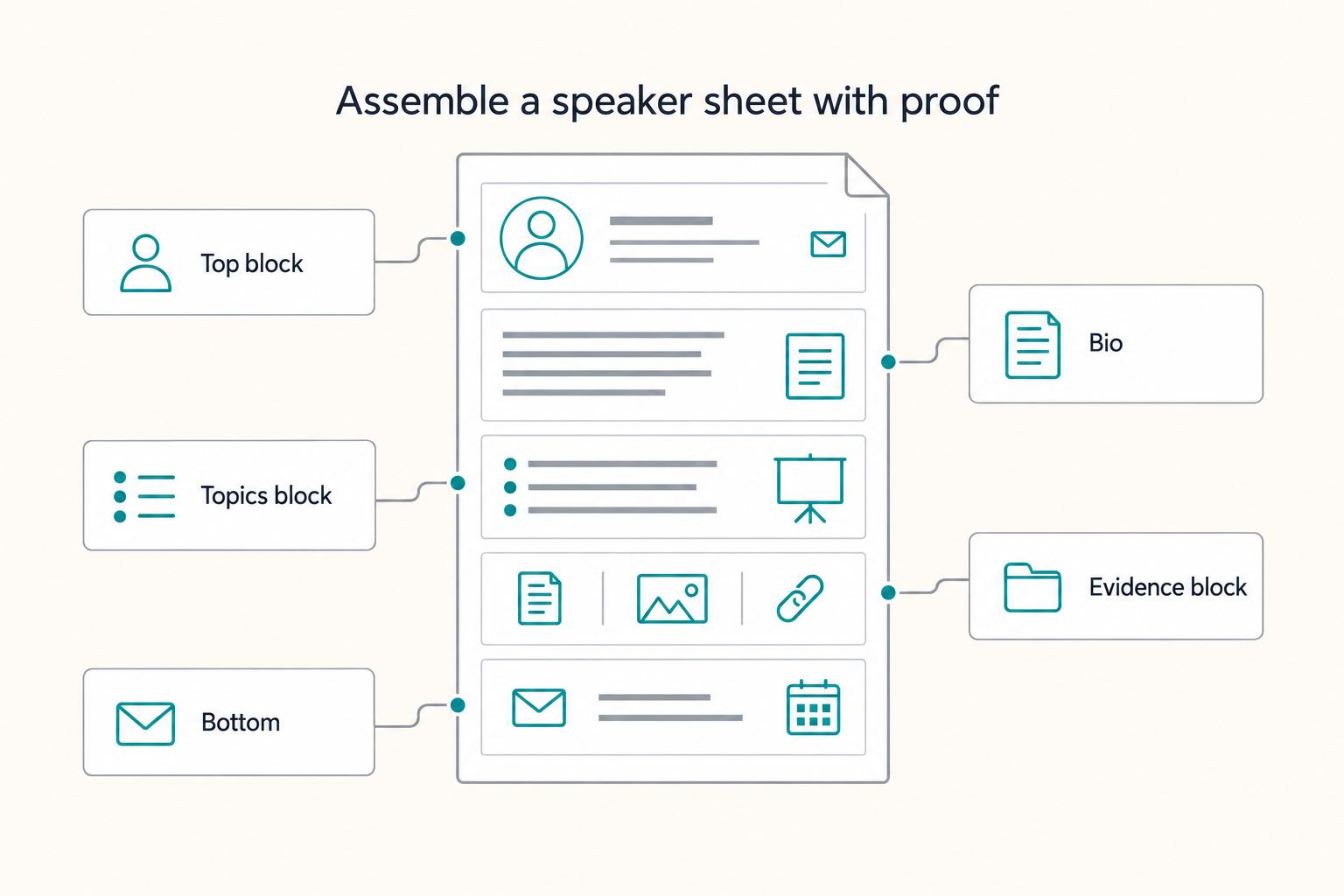
Assemble your one-sheet like an operator: one page, no scavenger hunt, and every claim traceable back to your source-of-truth folder. With inputs ready, you are assembling a booking asset, not "making a design."
| Section | Include | QC check |
|---|---|---|
| Top block | Name + role + clear positioning line; one primary contact path | Someone can reach you quickly without hunting through other materials |
| Bio | Proof you can stand behind; your point of view; what you help audiences do | You can answer "how do I know this is true?" for every named outlet, credential, or accomplishment |
| Topics block | Audience fit; outcomes; delivery | Tie each topic to proof you can show and verify |
| Evidence block | Only evidence you can support and share appropriately | You can substantiate every claim |
| Bottom | Repeat your contact details; make the next step obvious; add location or time zone only if it reduces scheduling friction | It stays readable, clickable, and forwardable as-is |
Step 1: Lock the top block (fast identification, instant contact)#
Make it immediately obvious who you are and how to reach you. A simple name + role + clear positioning line usually beats a generic personal-branding tagline.
Pick one primary contact path and stick to it. Verification point: someone can reach you quickly without hunting through other materials.
Step 2: Write a credibility-first bio (proof, then point of view)#
Keep this section tight and skimmable. Lead with proof you can stand behind: work you can publicly reference, relevant coverage, or a clear credential. Then state your point of view and what you help audiences do.
Avoid fluffy claims like "as seen on" unless you can substantiate them. Verification point: you can answer "how do I know this is true?" for every named outlet, credential, or accomplishment. If you need a brand-coherence check, use How to Manage Your Personal Brand as a Freelancer.
Step 3: Build the topics block (the buying section)#
List a small set of talks, not every idea you've ever had. For each topic, make three things easy to scan:
- Audience fit: who it serves
- Outcomes: what changes after the session
- Delivery: how you typically run it, for example a talk vs. an interactive session
Tie each topic to proof you can show and verify.
In practice, a programming lead may forward your one-sheet internally. If your topics read like outcomes plus fit, your champion does not need to "sell" you.
Step 4: Make trust easy with an evidence block (no fabrication)#
Use this block to reduce perceived risk. Include only evidence you can support and share appropriately, and do not invent or imply relationships you cannot verify.
Use this QC table to keep it clean:
| Block | Include | QC gate you must pass |
|---|---|---|
| Topics | Fit, outcomes, delivery | Each topic answers "who, what changes, how delivered" |
| Evidence | Verifiable proof points | You can substantiate every claim |
| Contact | One clear contact method | Every link/address works, every time |
Step 5: Close the loop at the bottom (repeat the next step)#
Repeat your contact details and make the next step obvious. Add location or time zone only if it genuinely reduces scheduling friction.
Before you send it, open the file the way recipients will read it and do a quick click-check. Verification point: it stays readable, clickable, and forwardable as-is.
How long should a speaker one-sheet be - and what do you cut?#
Aim for a one-page speaker one-sheet, and cut until every line supports a booking decision. Once you have a draft, the real work is constraint management. Constraints force prioritization, and prioritization makes your sheet forwardable.
That framing matters because it sets the job of the document. This is closer to a business card than a brochure, which means extra pages usually add friction instead of confidence.
Step 1: Commit to the one-page constraint (then enforce it)#
Treat one page as your default, not because of aesthetics, but because it forces sharper decisions. If your draft spills over, you likely do not need better design. You need tighter content.
Verification point: someone can scan your speaker one-sheet and understand, in one pass, (1) what you speak about, (2) why they should trust you, and (3) how to contact you.
In practice, a programming lead may want to forward your one-sheet to a committee. If it reads cleanly in one pass, they forward it. If it feels like homework, they delay, and the opportunity cools.
Step 2: Use a ruthless booking filter to decide what stays#
Run every element through the same filter: does this reduce uncertainty for the organizer? If not, cut it or move it elsewhere, like your website, a longer supporting doc, or a follow-up email.
Use this decision table to make cuts without drama:
| Content candidate | Booking question it answers | Keep it on the one-sheet when... | Move it out when... |
|---|---|---|---|
| Talk topics and outcomes | "What will the audience get?" | It states clear outcomes in plain language | It reads like vague thought leadership |
| Credibility signals | "Can you deliver?" | You can stand behind it and keep it compact | It needs long context to sound credible |
| Contact details | "What's the next step?" | A reader can act immediately | It creates choices, clutter, or confusion |
| Extra background | "What else should we know?" | It directly supports fit for the event | It satisfies curiosity, not booking |
Step 3: Tighten the format for real-world sharing. Make it easy to share and easy to scan as a single page.
Step 4: Accept the known unknowns and optimize what you control. There is no universal layout that guarantees results. You can control clarity, credible proof, and contactability. Those variables hold up across public speaking contexts.
Risk-aware credibility review: claims, proof, and consistency checks before you send#
Before you send anything out publicly, do a quick risk-aware review: keep it accurate, keep it clear, and only share what you're prepared to stand behind. Think of this as a defensive pass, not a perfection exercise.
Step 1: Treat this as part of your defenses (not a perfection exercise)#
The point is not to over-polish. It's to reduce avoidable stress later by making sure what you share won't create problems when things get busy.
Step 2: Cut what you can't confidently stand behind#
If a line makes you hesitate, simplify it or remove it. Prefer plain language over hype. Clarity is a credibility win even when you say less.
Step 3: Keep your public story easy to follow#
Wherever people might encounter you, aim for a consistent, understandable version of what you do and how you describe it. Confusion slows decisions, and you want the path from "interested" to "yes" to feel straightforward.
If you want a broader system for keeping your public story aligned, use How to Manage Your Personal Brand as a Freelancer.
Make it usable in real booking workflows (forwardable, updateable, paid)#
Make your one-sheet an operational asset by designing it for sharing, maintenance, and payment follow-through, not just personal branding. If it cannot travel without you, it is not doing its job.
Step 1: Make it easy to share and skim (without a meeting)#
Treat your one-sheet as marketing material that has to survive being copied, shared, and skimmed by someone who has never met you.
Use this practical checklist to keep it honest:
- Instant clarity: the reader can name your topics, ideal audience, and what outcome your public speaking delivers.
- One obvious next step: include a single "book me" path, a booking email or booking link. Do not make them choose between five CTAs.
- Low-context proof: keep thought leadership signals concrete, like a short testimonial, a specific credential you can defend, or a tight client list only where you have permission.
In practice, a coordinator may share your one-sheet with a programming lead and the note, "thought you'd like this speaker." If the lead cannot tell what you speak about in seconds, you just lost momentum.
Step 2: Systemize updates and pricing so you do not create admin drag#
You do not need a complicated content calendar. You need a repeatable operating rhythm.
Update triggers (simple and safe):
- You receive a new testimonial you can use.
- You add a client to your client list, with permission.
- You change a flagship talk title or promise.
Payment ops (get paid like an operator): standardize how you quote, invoice, confirm payment, and store records. When you price work, anchor to an effective rate that covers both time and overhead.
One planning reference targets $45 to $55 per hour of work. It also frames effective day, week, and month ranges as $280 to $320 per day, $1,400 to $1,600 per week, and $6,000 to $6,500 per month. Those numbers are framed under assumptions like 30 billable hours per week and 3 weeks off per year. Use them as a reality check, not a rule.
| What to standardize | Why it matters | Verification point |
|---|---|---|
| Quote and scope summary | Prevents "we thought it included..." drift | One paragraph that states format, length, deliverables |
| Invoice + payment confirmation | Protects cashflow and reduces follow-up | You can point to "paid" status in your records |
| Tax-ready categorization | Supports taxable income tracking after expenses | You can separate business expenses from income cleanly |
If your speaking engagements require contracts, protect the downside early with clear terms. Use How to Write an Arbitration Clause for a Freelance Contract as a starting point for risk control.
Ship it: your "ready to send" standard + copy/paste checklist#
Your "ready-to-send" standard is simple: keep it consistent, on-brand, and easy to forward without extra context. The goal is not a one-off design win. The goal is a repeatable standard you can run every time.
Consistency matters more than most people think. You do not need a full brand book. You do need stable brand components like fonts, colors, and tone of voice so your one-sheet matches your broader personal branding.
Step-by-step "ready to send" standard (safe defaults)#
Step 1: Decide what "consistent" means for you. Pick the basics you will not change from doc to doc: fonts, colors, and tone of voice. The point is recognizability and steady communication, not fancy design.
Step 2: Make it defensible. Keep claims accurate and phrased in a way you can stand behind if someone asks follow-ups. If you feel tempted to imply certainty, like "guaranteed results," switch to language you can actually support.
Step 3: Make it easy to circulate. Assume you will not be there to explain it. The reader should be able to understand what you do, why it matters, and what the next step is without hunting.
Step 4: Check for cross-platform consistency. Match your positioning and key details across wherever you show up online: your website, profiles, and directories. Obvious mismatches create friction.
Copy/paste "Ready-to-Send" checklist (no fluff, just the standard)#
- It follows my style guide basics (fonts, colors, tone of voice) for consistent communications
- The core message is consistent with my broader personal brand
- Any claims are accurate and written in language I can stand behind
- It's understandable when forwarded, without extra context from me
Example: you land a referral for a panel. The organizer asks for "something we can circulate." You send your one-sheet and they can pass it along cleanly because your materials are consistent and ready before you hit send. If you want that same consistency across your wider presence, use How to Manage Your Personal Brand as a Freelancer as your companion operating manual.
Frequently Asked Questions
What is a freelance speaker one-sheet?
A freelance speaker one-sheet is a single, organizer-facing piece of marketing material that helps a potential client understand what you speak about so they can hire you for engagements. Freelance Goldmine describes it as “a great way to let potential clients know what you do so that they can hire you,” packaged as a “one page marketing document.” Treat it as a booking decision aid, not a brand manifesto.
What should a speaker one-sheet include (must-have vs nice-to-have)?
Include only what helps someone answer the buyer questions fast: what you speak about, who it’s for, and why you’re a safe choice. Freelance Goldmine calls out those exact questions as the ones prospects ask. Cover them cleanly, then stop. | Must-have (booking-critical) | Nice-to-have (only if it fits) | |---|---| | Topics (what you speak about) | QR code to booking link | | Who it’s for (your market) | Short “signature framework” graphic | | Proof you can defend (credentials, accomplishments) | Selected media links | | Organizations or groups you’ve worked with (only with permission) or credible alternatives | Headshots/logos (when authorized) | | One clear contact path (email or booking link) | Social links (only if relevant) |
What’s the difference between a speaker one-sheet, a media kit, a press kit, and a resume?
These labels get used differently depending on the person and context. Instead of over-optimizing the naming, focus on the function: your speaker one-sheet should make it easy to answer “What do you speak about, who is it for, and have you done this before?” and make the next step to contact you obvious.
Should I hire a designer or use a template like Canva?
Choose the path that keeps you shipping and updating without friction. A template tool can be a practical option when you need speed and control, especially early when you are still tightening positioning. Hire a designer when your copy is already tight and your proof is verified, and you want visual cohesion (not conceptual clarity).
How long should a speaker one-sheet be?
Aim for a one-page format because the core asset works as a “one page marketing document.” Do not cram every credential you have onto it. If you need more depth, keep the one-sheet tight and store the longer context elsewhere.
Do I need testimonials and a client list to get booked?
No, but you do need credible proof. If you have permission to share organizations or groups you’ve worked with, include them. If you lack a client list, lean on what you can support: credentials, accomplishments, and the fact that you can deliver a focused talk you could teach as a 60-minute training today (Forbes advice starts with “one topic,” kept tight and deliverable).
How often should I update my speaker one-sheet?
Update it whenever the truth changes and at a cadence you can sustain. Use simple triggers: a new permissioned client name, a talk title or outcome change, or a contact method change. If you want a simple system, schedule a periodic review and do quick, event-driven edits in between.
Try a related tool
Researched and edited by the Gruv editorial team. Gruv builds cross-border billing, payouts, and finance-operations software for global businesses.
Sources
- millikin.edu/sites/default/files/2023-03/reg-finalbulleti...trusted
- ocw.mit.edu/courses/24-914-language-variation-and-change...trusted
- science.osti.gov/-/media/grants/pdf/foas/2023/DEFOA0002844000...trusted
- ucsc-extension.edu/sites/default/files/documents/72/ucsc-ext--w...trusted
- ucsc-extension.edu/course-catalogs/winter-2026trusted
Educational content only. Not legal, tax, or financial advice.
Related Posts

How to Manage Your Personal Brand as a Freelancer
Your brand is not a mood board. Think of it as the experience people have of your work: the promise you make, the proof you can show, and the way you present yourself across client touchpoints. Get that clear first, and your fit is easier to read from profile to proposal.

How to Write an Arbitration Clause for a Freelance Contract
**Build a simple dispute playbook so both sides know what happens next. Use it when conflict starts.** When you run a solo business, you cannot absorb unpaid work, vague terms, or open-ended civil court uncertainty. You are the CEO of a business-of-one, which means your contracts need to function like systems, not wishful thinking.

A Guide to Getting a Long-Stay Visa in France
**Treat your France long-stay visa plan like an operations project, not a form-filling task, so you control risk before you commit time or money.**