
Quick Answer
Start by running your public roadmap with notion as one decision record: show only contract-backed milestones, track each item with a clear Status and date, and link it to the signed proposal, contract, or statement of work. Keep new asks in a separate lane such as Proposed or Change requested until approval is explicit. Then update this page first after meetings, and use email only to point clients back to that record.
Beyond Transparency: Why a Roadmap is Your #1 Tool for Client Control#
A roadmap should help control the work, not just display it. If you set up a client-facing roadmap in Notion, treat it as the working agreement for the project. It should show what is committed now, what is parked for later, and what needs formal approval before anyone starts building.
That distinction matters because confusion usually does not come from one bad request. It comes from scope living in the proposal, status living in email, and decisions living in somebody's memory. A single roadmap will not solve that on its own. But one authoritative record, updated with discipline, usually means fewer conflicting requests, cleaner approvals, and easier handoffs.
| Approach | Where scope, status, and decisions live | Typical risk or outcome |
|---|---|---|
| Email threads, calls, chat messages | Spread across channels | Clients quote different versions, dates drift, and handoffs get messy |
| One roadmap page with defined fields or sections | One visible record for scope, status, and decisions | Fewer contradictions and faster approval checks |
| Roadmap plus a separate "later" or "change requested" area | Current commitments separated from new ideas | New requests get acknowledged without quietly expanding the project |
- Define committed scope in one place.
Put only contract-backed deliverables on the client-facing roadmap. For each item, include a clear title, the current status, the target timing you are willing to stand behind, and one reference back to the signed contract, proposal, or statement of work where that deliverable was originally agreed. Use a simple checkpoint: when a client asks, "Is this included?", you should be able to answer by opening one item and one supporting document, not by reconstructing a conversation.
A common failure mode is vague entries like "improve onboarding" or "refine dashboard." Those sound harmless, but they invite interpretation and turn approval into debate. If a milestone cannot be verified against a document you already agreed, it does not belong in the committed section yet.
- Update status there first, then echo it elsewhere.
The roadmap should be the first place you update when work moves, slips, or gets blocked. Emails and meeting recaps can summarize the change, but they should point back to the roadmap instead of becoming alternate records. A January 2026 comparison of 12 roadmap tools noted a shift toward all-in-one platforms that connect feedback directly to public roadmaps, because disconnected tools create drift.
In Notion, that means your page or database needs a small set of stable statuses and a clear update habit. After a meeting, any stakeholder should be able to open the roadmap and answer three questions without asking you again: What changed? What is next? What is waiting on approval?
- Record decisions where the work lives.
Every scope decision should leave a visible trace next to the related item or in a short dated decision log on the same page. Keep it plain. Note what was requested, what was decided, who approved it, and what changed in timing or budget. That gives you the governance layer. "Committed now" stays separate from "parked for later," and both stay separate from "pending approval."
Access discipline matters here. Some product tools separate contributor and maker roles so more people can weigh in without giving everyone full editing access. If you are using Notion as a DIY roadmap, copy that logic manually. Keep edit rights narrow, and do not let multiple stakeholders rewrite status or scope directly.
- Gate change requests before they touch the plan.
New requests should not go straight into the committed timeline. Put them in a clearly labeled area such as "Later," "Proposed," or "Change requested," then move them only after formal approval on scope, timing, and price. Your evidence pack here is a dated approval note plus the updated commercial document if the change affects budget.
Notion can support this process, but you may still need to define formal change-approval states yourself. It also has known limits as a documentation tool, including weaker search for content you have not previously consulted. Keep the roadmap tight and scannable. It should hold the current truth, not every scrap of project history. For a broader Notion setup, see A Guide to Notion for Freelance Business Management.
How to Build a Client-Control Roadmap in 4 Steps#
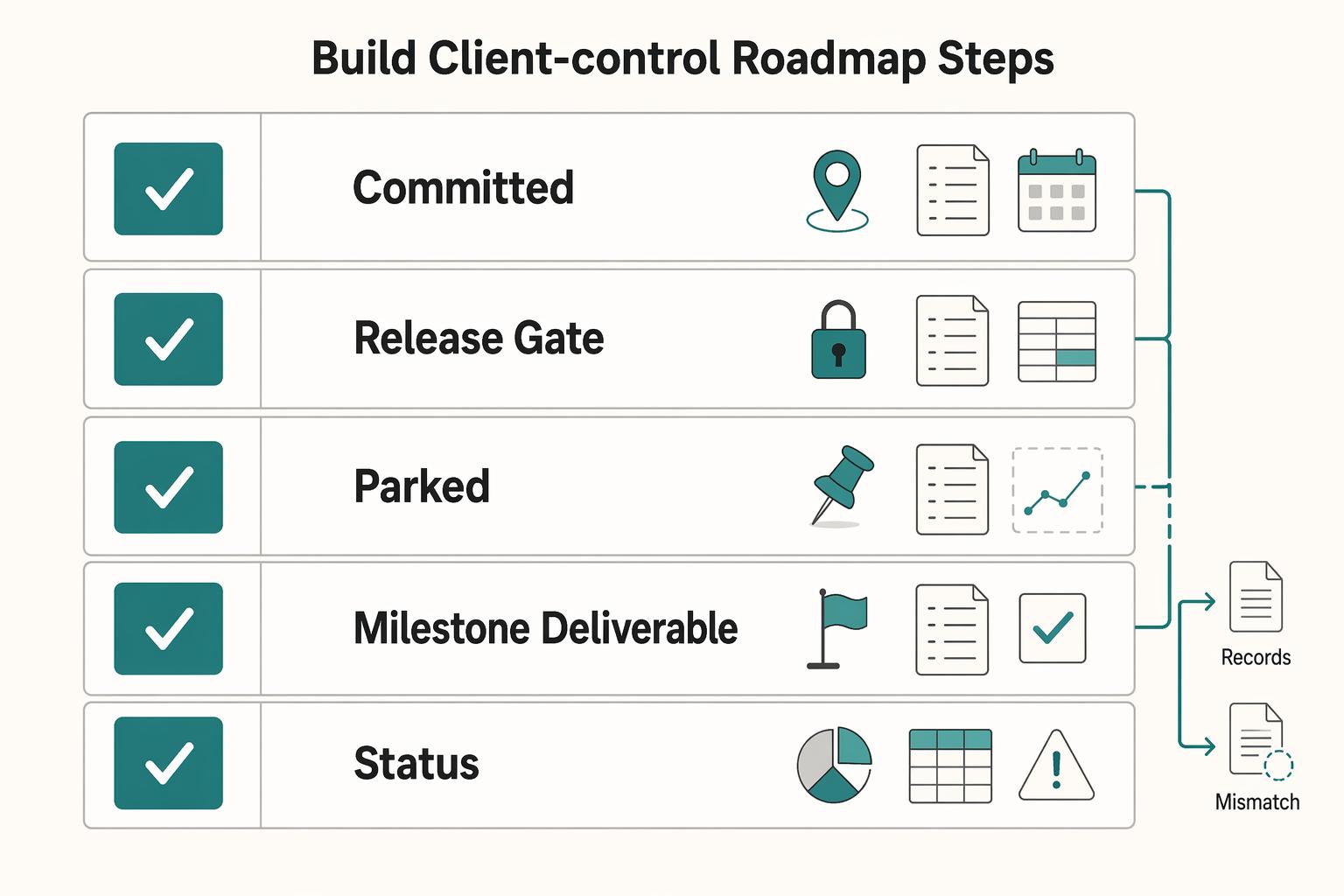
Build this as one system: one Notion database, two views, and three scope states tied to your statement of work.
| Scope state | Definition |
|---|---|
| Committed | already covered by your signed scope document |
| Pending approval | requested, but not promoted into live commitments yet |
| Parked | acknowledged, intentionally deferred ("not now") |
Step 1. Build a minimum viable schema first. Start with one roadmap database you will actually maintain. In Notion, each project item can live on its own page, so you can keep context with the item instead of spreading it across tools.
| Property | Type | Why it matters | Public by default |
|---|---|---|---|
| Milestone / Deliverable | Title | States the promised outcome in client language | Yes |
| Status | Select | Shows current progress in plain terms | Yes |
| Target Date | Date | Shows timing you are prepared to stand behind | Yes |
| Category / Phase | Select or tag | Groups work into phases for quick scanning | Usually |
| SOW Reference | Text or URL | Connects the item to the signed scope document | Usually |
| Owner | Person or text | Helps handoffs and accountability | Optional |
| Dependency | Text or relation | Shows what must happen first | Internal unless needed |
| Change Request Flag | Checkbox or select | Marks requests not yet approved into scope | Internal |
Run a 30-second test on each item: what is it, is it in scope, when is it due, and where was it agreed? If that is hard to answer, tighten the field values before adding more fields.
Step 2. Split internal execution from client commitments. Use two views on the same data, but never give them the same purpose. Your internal view is for execution detail; your client-facing view is only for commitments.
Keep the public view clean and dated by Target Date. Do not show rough notes, internal blockers, speculative ideas, or negotiation comments there. If you share it publicly, verify what is visible from a logged-out or incognito session before sending the link.
Step 3. Control scope with three states, not status alone. Status tracks progress; scope state controls what belongs on the plan. Keep every item in one of three buckets: Committed, Pending approval, or Parked.
- Committed: already covered by your signed scope document.
- Pending approval: requested, but not promoted into live commitments yet.
- Parked: acknowledged, intentionally deferred ("not now").
Anything outside committed scope stays out of the active commitment view until formal change approval is recorded.
Step 4. Publish with a repeatable checklist. Treat publishing as an ongoing operating habit, not a one-time share action.
Before each share or major update, check:
- Permissions: limit who can edit scope or status.
- Page hygiene: remove internal-only notes and draft clutter from the client-facing view.
- Update cadence: use a rhythm you can maintain, and update the roadmap first.
- Communication rhythm: when something changes, point back to the roadmap as the current record.
| Aspect | Raw shared page | Managed client-facing roadmap |
|---|---|---|
| First impression | Fast to publish, but can read like a working draft | More setup, but reads like a clear client record |
| Scope clarity | Easy to mix commitments with ideas and notes | Clear separation of committed, pending, and parked |
| Ongoing upkeep | Lower upfront effort, more cleanup risk later | More curation upfront, fewer scope clarifications later |
If you want a faster start, use a template. Notion highlights a template gallery with over 10,000 options, and its product roadmap catalog has shown 242 templates. Use the template as a starting point, then keep only fields that help you show clear commitments.
From Raw Link to Polished Portal: Projecting Unquestionable Authority#
Pick the simplest publishing setup that keeps the roadmap clear, permission-safe, and easy to maintain. Presentation helps only if clients can quickly see what is committed, what changed, and what happens next.
Choose your publishing setup by control needs, not appearance#
Use this as a decision filter before you add another layer:
| Option | Brand consistency | Access control options | Editing workflow friction | Maintenance responsibility |
|---|---|---|---|---|
| Native Notion share | Is the page already client-ready without extra design work? | What sharing limits can you verify in your workspace right now? | Can you publish updates directly from one source page? | Who owns page QA and link checks? |
| Notion-site wrapper | Does the handoff feel consistent with your client-facing site? | Which controls can you confirm before launch? | Do edits stay in one place, or split across tools? | Who maintains both wrapper and source page? |
| Full website embed | Does the roadmap fit naturally inside your site flow? | What can visitors see publicly, and what remains exposed underneath? | Are mobile behavior and update flow still workable after testing? | Who owns site changes, roadmap updates, and troubleshooting? |
If native sharing passes your checks, keep it. Add complexity only when it solves a specific client-facing problem.
Run publishing guardrails before every share#
Validate the public URL, not just the editor view. Open the page while logged out, confirm HTTPS, and test every exposed link. If you reference official U.S. government resources, use quick credibility checks: official sites use .gov, and secure pages use HTTPS.
| Check | Guidance |
|---|---|
| Public URL | Validate the public URL, not just the editor view |
| Logged-out review | Open the page while logged out |
| HTTPS | Confirm HTTPS |
| Exposed links | Test every exposed link |
| Official U.S. government resources | Official sites use .gov |
Pre-publish checklist:
- Workspace permission review completed
- Public page reviewed while logged out
- Current workspace sharing and security settings reviewed
- No draft links, comments, or dead resources
Watch for a common failure mode: a link that looks fine internally but opens to a holding page or a download-preparation notice for clients.
Launch and upkeep checklist#
- Confirm domain mapping status
- Run page QA on desktop and mobile
- Add a visible change-log line or update note
- Keep one client communication cadence: update the roadmap first, then point clients to it in email
This cadence does more for trust and control than the publishing shell alone. We covered related workflow structure in How to Create a Content Workflow in Notion for a Marketing Team.
The Graceful 'No': Using Your Roadmap to Eliminate Scope Creep#
Use your roadmap as the place where every new request is classified before it is promised. The practical rule is simple: each request gets a status, a route, and a next decision point before it becomes committed work.
| Response step | Action |
|---|---|
| 1 | Acknowledge the request |
| 2 | Classify it as in-scope or out-of-scope for the current phase |
| 3 | Route it to the active plan or the backlog/change path |
| 4 | Confirm when the next decision will be made |
| Decision area | Informal request handling | Roadmap-based change handling |
|---|---|---|
| What the client hears | "We'll try to fit it in" | "We've logged it and assigned a status" |
| Timeline discussion | Often handled later | Discussed before anything is marked committed |
| Decision record | Scattered across chat or email | Kept in one visible record with owner and next review |
| Boundary setting | Can feel personal | Stays tied to an agreed process |
Step 1. Set the rule during onboarding. At kickoff, define how new ideas are handled: the roadmap shows current commitments, and new requests enter as requests first. Use one shared status model, such as Committed, Proposed, Approved, and Deferred, and confirm both sides interpret those labels the same way.
Step 2. Keep a governed parking lot. Capture out-of-scope ideas in a structured backlog, not a vague "someday" list. Keep each request with a short summary, who raised it, when it was raised, current status, and next decision point.
Use the same response sequence each time:
- Acknowledge the request
- Classify it as in-scope or out-of-scope for the current phase
- Route it to the active plan or the backlog/change path
- Confirm when the next decision will be made
Step 3. Run scope reviews from the roadmap, not memory. In meetings, show the current Committed items first, then show where a new request sits if it is Proposed or Deferred. This keeps tradeoffs visible and keeps the conversation on process instead of personality.
Step 4. Document the outcome the same day. After the meeting, update the request status and send a short recap that matches the roadmap: request, status, impact on sequence or timing, and next review point. If pricing changes are needed, move that into your normal commercial flow rather than blending it into a status note. For that workflow, see Value-Based Pricing: A Freelancer's Guide.
Use the roadmap as your system for client communication#
Use your roadmap as a system for client communication, not a static list. Keep a public roadmap for client-facing status, keep a separate private roadmap for internal planning, and use the public one to anchor every review conversation.
| Passive roadmap list | Command-center roadmap |
|---|---|
| Behavior | Updated occasionally |
| Client communication | Reacts to ad hoc "what's happening?" messages |
| Scope control | New asks slide into active work |
Step 1. Keep one clear status source#
In Notion, start with a Status property and a date. Then add only fields that make decisions readable in your workflow, such as owner, a short decision note, a request log, or links to the doc you treat as the source of truth. Keep the public view high level; your private roadmap should carry deeper implementation detail.
During calls, each committed item should be easy to read: current status, what changed, and what gets reviewed next.
Step 2. Run a visible review rhythm#
Use a Now/Next/Later view so active work and future ideas stay separate without overpromising fixed timelines. After each review, update statuses and refresh the visible "Last updated" line so clients can trust that the page reflects current decisions.
Step 3. Route requests before you commit#
When a new request comes in, put it in your change-request queue first, not directly in Now. Capture the request date, likely impact on current milestones, and the decision. In the next review, reference agreed milestones, then place the request in Next, Later, or a separate commercial discussion.
This is the balance you want: not so rigid that the roadmap becomes a promise you cannot keep, and not so vague that it looks evasive. For a step-by-step walkthrough, see How to create a 'Help Center' for your product using Notion.
Frequently Asked Questions
What belongs on your public roadmap?
Put client-visible milestones, delivery phases, and decisions that affect timing or expectations. The core field is the Status property, so each item should clearly show the state you use publicly, such as Up Next, In Progress, or Done. If a client cannot act on it, approve it, or measure progress against it, it usually does not belong there.
What should stay private?
Keep your internal task list, draft thinking, pricing notes, and any rationale you would not want taken as a promise. A timeline view can show sequence, but it often does not explain why item A is ahead of item B, so keep that deeper prioritization context in private notes if it would create confusion. The public page should show the decision, not every internal debate behind it.
How do you handle off-scope requests on the roadmap?
Do not move them straight into your active delivery lane. Mark them with a request state (for example, Backlog or Upcoming), attach the date raised and next review point, and confirm the impact before anything moves. If the request changes budget or sequencing, split that into a separate commercial discussion rather than hiding it inside a status change.
Should you use native Notion sharing, a wrapper tool, or a custom domain?
Use native sharing if you want the fastest setup and can live with a basic Notion presentation. If you need a polished stakeholder view, plan for additional custom work or tooling. If you are considering branded or custom-domain publishing, verify your exact publishing and permission setup before you promise that experience.
How do you make the roadmap feel current and credible?
Add a visible freshness checkpoint, such as a “Last updated” line, and review it every time you change status. One live public roadmap example shows Last updated on 2026/01/21, which is simple but effective because readers can immediately tell whether the page is being maintained. Your check is easy: if the page date is stale, clients will treat every status on it as suspect.
What properties should each roadmap item have?
At minimum, keep Status and a Date so readers can understand stage and timing. If ownership needs to be visible internally, use a Person property, but decide whether that should appear on the shared version. If you need ranking, add a select field such as P1 or P2, but remember that Notion does not give you a built-in prioritization method by itself.
How do you share a roadmap without exposing sensitive information?
Check permissions before every share, especially if the page sits inside a larger workspace or database. Notion’s sharing model distinguishes access by role and page context, so verify the current labels in your workspace first (including member/guest roles and any page-level database access options). This is an operations check, not legal advice. If an item includes confidential client details, keep it off the public page.
Try a related tool
Researched and edited by the Gruv editorial team. Gruv builds cross-border billing, payouts, and finance-operations software for global businesses.
Sources
Includes 3 external sources outside the trusted-domain allowlist.
- bis.gov/news-updatestrusted
- case.edu/issacs/sites/default/files/2024-02/A_Manufac...trusted
- docs.nrel.gov/docs/fy22osti/83041.pdftrusted
- ec.europa.eu/research/participants/documents/downloadPublictrusted
- nvlpubs.nist.gov/nistpubs/SpecialPublications/NIST.SP.500-291...trusted
- aakashg.com/best-product-management-toolsexternal
- holistics.notion.site/Public-Product-Roadmap-Holistics-8cdb082325c...external
- ideaplan.io/blog/roadmap-templates-for-notion-teamsexternal
Educational content only. Not legal, tax, or financial advice.
Related Posts

Value-Based Pricing for Freelancers Under Real Payment Risk
Value-based pricing starts with the client’s expected benefit and willingness to pay. It still needs a deliverable, scope and payment agreement you can perform. Use a discovery phase when the benefit or effort is too uncertain to support a defensible quote.

A Guide to Notion for Freelance Business Management
If your workspace feels busy but fragile, you do not need more pages. You need one connected system. Treat your freelance business like a business-of-one and use Notion as the control layer that connects client decisions, delivery, and billing in one place.
How to Build a Trust-First Project Roadmap for Client Work
Your expertise is your product, but your client relationship is your business. For a global professional, a mismanaged project isn't just a setback; it's an existential threat. It means payment disputes that disrupt cash flow, scope creep that destroys profitability, and reputational damage that can take years to repair. Forget the generic advice written for corporate teams. This is your operating manual for transforming a project plan into a powerful shield - a 'Bulletproof' Roadmap that engineers certainty, eliminates compliance anxiety, and puts you in complete control.