
Quick Answer
Build your notion project timeline from one master database, then use filtered views for different jobs: internal execution, client reporting, and ready-to-bill follow-up. Keep scope stable with a brief that defines what is in and out, add dependencies so delays are visible, and route new requests through a change record before scheduling. Mark billing milestones, link them to invoice records, and review payment status weekly so completed work is not disconnected from cash flow.
Keep the setup light: one database, a few working views#
Step 1. Anchor everything in one master project database. You do not need a rigid methodology to make a project timeline useful. You need one master project database with a Timeline view so key project details, tasks, costs, and progress live in the same place. This approach is intentionally light. One database, a few working views, and a record you can trust. It is not a heavy process, a pile of disconnected templates, or a setup that makes you manage work in three places.
Step 2. Build the timeline around three operating outcomes. The value is not how polished the setup looks. It is what it helps you decide during the week.
| Operating outcome | Notion mechanism | What you can actually observe |
|---|---|---|
| Work visibility | Timeline view inside the master project database | New requests are easier to spot because added work shows up as a dated item, a status change, or both. |
| Status clarity | Database filters and rollups | You can produce a cleaner progress view from the same data, so reporting stays consistent even if your internal task list is messy. |
| Cost-and-progress tracking | Project records that keep costs and progress together | You can review delivery progress next to cost-related details, which makes reporting simpler when a project starts expanding. |
Step 3. Verify the setup before you add complexity. A good checkpoint is whether you can answer three questions from one page quickly. What is in scope? What is the current status? What has already been delivered? If you still have to jump across email, meeting notes, and a separate tracker, you are still in a common failure mode this setup is meant to reduce: scattered records and constant app switching.
With that foundation in place, the next step is turning it into a build you can use the same day.
Introduction: Stop Managing Tasks. Start Commanding Your Business.#
If you want your timeline to reduce chaos, treat it as your command center, not a prettier task list. Keep one project record you can scan quickly, so you are adjusting from a clear map instead of rebuilding context from chat, notes, and memory.
Step 1. Use it as your shield. Start with scope control. Your timeline is the project map for what is in scope, when it happens, and what each task connects to. Notion supports deadlines, priorities, and links between tasks and larger projects, so new requests should be added to that map before they are treated as committed work.
Step 2. Use it as your signal. Use a cleaner, filtered view for client communication. Views and filters let you show milestones, current status, and what comes next without exposing your full internal task list. If one client-facing view can answer those questions quickly, your updates stay clear and consistent.
Step 3. Use it as your ledger. Use the same timeline to support billing reliability. Flag milestone tasks tied to invoicing and check those milestones against your invoice draft before sending. You are not turning Notion into accounting software; you are keeping a dependable delivery record so billable work is easier to verify.
A reactive workflow forces you to piece things together after the fact. A controlled workflow means scope, communication, and billing all run from the same source of truth. Next, you will set up this structure so it works day to day without adding admin drag.
We covered this in detail in Managing a Six-Figure Consulting Project in Asana: A Step-by-Step Guide.
First, The Fundamentals: Building Your Timeline Foundation in Under 5 Minutes#
Start with one tasks database and keep the setup simple. Your baseline is solid when the timeline can answer three questions fast: what needs to happen, who owns it, and when it should finish.
Step 1. Create a timeline view from one database. Use a new tasks database or your existing one, then add a Timeline view. The key choice is using one live set of task entries and properties, not scattered pages.
Quick check: open an item and confirm it is a database entry with editable properties.
Step 2. Add minimum viable properties. Keep your first property set short so you can use it daily:
- Task name (deliverable or work item)
- Owner (who is responsible)
- Status (tracked as its own property)
- Date range (start and end date)
- Priority (only where it changes action)
If the page starts feeling noisy, enter top-level deliverables first, then add subtasks later.
Step 3. Update timing based on the real change. If the work itself expands, update the date range to reflect the longer effort. If the work is unchanged but starts later, move the scheduled dates forward without redefining the scope.
Set your timescale to match the decision you need to make: tighter for near-term handoffs, wider for milestone and capacity checks.
Step 4. Add supporting views from the same database. Keep Timeline for schedule logic, then add views like Board (status flow) and Table (sorting and quick edits) from that same database. One database with multiple views keeps planning and execution aligned, so updates stay in one place.
Before you move on, run a foundation quality check:
- Every deliverable has an owner, status, and date range
- Status labels are simple enough to use consistently
- Priority is only used where it changes what you do next
- Core project work is captured in the database, not only in chat or email
If this passes, you are ready for scope-control tactics in the next section: where new requests get added, priced, or pushed back.
This pairs well with our guide on How to Create a Content Workflow in Notion for a Marketing Team.
Beyond To-Do Lists: Why Your Timeline is Your #1 Defense Against Scope Creep#
Your timeline should be the record of agreed work, not just a task list. When new work appears without a decision on time, budget, and ownership, scope starts drifting.
Step 1. Turn the timeline into the shared scope map#
Start each project with a short scope brief that states both what is included and what is excluded. That shared map keeps you and the client aligned, and it gives you a stable reference when requests change mid-project.
A practical format is a one-page version 1.0 brief with two sections: IN scope and OUT of scope. Then require every timeline item to map back to that brief, kickoff notes, or an approved change.
Set one clear re-estimation rule you can repeat in plain language: if a request adds a deliverable, changes an approved deliverable, or expands review cycles, you re-estimate before scheduling. Record that decision in the timeline entry so the timeline also becomes your decision log.
Step 2. Add dependency logic so impact is visible#
Use dependencies to show cause and effect early. You are making sequence risk visible, not assigning blame.
Example: if drafting depends on client materials, review depends on draft completion, and handoff depends on approval, a delay in client materials pushes downstream dates. Put client-input tasks directly in the timeline so everyone can see what each step is waiting on.
Use a quick check: if a major deliverable has no clear predecessor (input, review, or approval), add it now. That keeps schedule conversations factual and reduces last-minute compression.
Step 3. Route new requests through a formal change record#
Do not move new asks straight into active work. Route them through a backlog-style change record first, then schedule only what gets approved.
Keep each change request decision-ready with these minimum fields:
- Request summary
- Impact on timeline
- Impact on budget
- Approval status
If you want a cleaner audit trail, also add requester and decision date. Either way, the rule stays the same: no approval, no scheduling.
Once these boundaries are stable, your next job is presentation: a clean client-facing timeline view that shows progress without exposing every internal detail.
Need the full breakdown? Read How to Create an 'Anti-Burnout' System Using Notion and Google Calendar.
How to Create a "C-Suite Ready" Timeline to Project Unquestionable Authority#
Create a separate client-facing view from your master database so clients can quickly see progress, decisions, approvals, and the next milestone without all your internal operating detail.
If the previous section made your timeline the scope record, this section turns that same record into a clean communication layer. Keep the internal view detailed for execution, and keep the client view simple enough to scan in under a minute.
Step 1. Duplicate your master view and name it like a deliverable. Create a second timeline view from the same database, not a new database. Use a clear name such as "Client Project Timeline" so it is obvious what is safe to share.
Checkpoint: update one test item and confirm both views reflect the same underlying record. If they do not, you have created a second source of truth.
Step 2. Filter for milestones and decisions, not activity. Your client view should answer four questions fast: What is done? What is in review? What is waiting on approval? What is next?
| Hide from client view | Show in client view |
|---|---|
| Internal task noise and admin sub-tasks | Project phases and major deliverables |
| Internal-only properties (internal notes, staffing detail, working status) | Agreed start and due dates |
| Draft/rework items still being iterated | Approval checkpoints and review windows |
| Prep back-and-forth that does not change client decisions | Upcoming milestones and clear next steps |
| Private execution commentary | Final decision state per milestone |
Checkpoint: if a client could not understand status quickly, reduce internal execution detail further.
Step 3. Add a lightweight sign-off framework. For each major deliverable, add one approval property and define clear states your team and client both understand. Keep review comments on the deliverable page so decisions are traceable in one place.
Use sign-off states as decision gates:
Approved: downstream work proceeds.Changes requested: review the request against your prior scope-change rule before scheduling new work.
If you want less manual follow-up, use database automations. Notion automations follow a trigger-action pattern based on property changes, so a status change can update properties, edit pages in another database, or send a Slack notification. Check the database lightning-bolt menu before relying on them, since manual follow-up steps are easy to miss across multiple projects.
Step 4. Share only after a quick pre-share risk check. Share only the client-facing page/view, then run this short verification flow:
- Open the exact page you plan to share and confirm it is the client view, not the master database.
- Review visible properties and remove anything internal.
- Test the page from a separate browser or non-owner account when possible.
- Open a few milestone pages and confirm comments, attachments, and linked records do not expose sensitive material.
Once this view clearly shows milestones, decisions, and upcoming dates, you can connect the same timeline to your financial workflow so communication and billing stay aligned in the same system.
For a step-by-step walkthrough, see How to Manage a Software Project in ClickUp with a Remote Team.
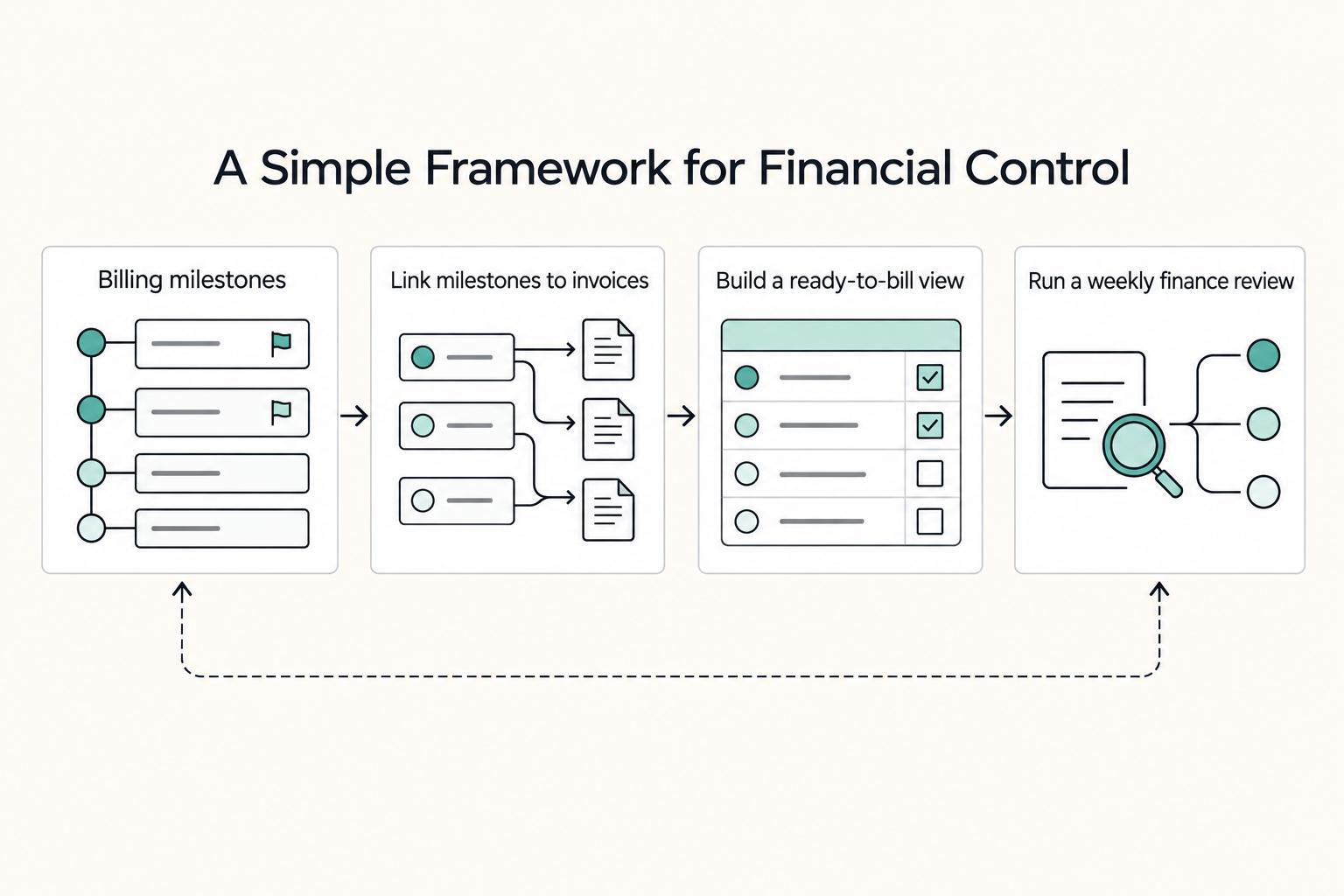
Connecting Your Timeline to Your P&L: A Simple Framework for Financial Control#
Once your client view is clean, use the same timeline to track what is earned, invoiced, and still pending. The key move is to treat billing milestones as financial events, not just project dates.
Step 1. Define billing milestones from your signed scope#
Only mark milestones that actually trigger billing under your agreement, such as deposit points, phase approvals, final delivery, or other agreed checkpoints. If a milestone cannot be tied to the signed scope, do not use it for billing.
Add these properties to your project database:
- Billing Milestone: flags items that can trigger revenue.
- Invoice Link: connects the milestone to its invoice record.
- Payment Status: shows whether payment is pending, paid, or needs follow-up.
- Expected Payment Window: gives you a planning window for expected cash arrival.
Quick check: every item marked as a billing milestone should map to a clear scope or approval point.
Step 2. Link milestones to invoices and surface invoice state in the timeline#
Create a separate invoice database and connect records through Invoice Link. Then set up relation-based rollups/formula fields so each project item can show invoice state directly in your timeline view.
This cuts down on handoff misses between delivery and billing. Review your timeline and confirm each completed billing milestone either has an invoice linked or appears in your ready-to-bill queue.
| Tracking approach | Visibility | Follow-up risk | Forecasting reliability |
|---|---|---|---|
| Timeline-only tracking | Delivery timing is visible | Invoices are easier to miss after completion | Lower, because delivery dates are not payment timing |
| Timeline + invoice-linked tracking | Delivery and invoice state are visible together | Lower, because missing invoice links are easier to spot | Higher, because expected payment windows are explicit |
Step 3. Build a ready-to-bill view and a simple cash-flow view#
Create a filtered Ready to bill view for completed items where Billing Milestone is marked and billing still needs action (for example, no Invoice Link or unresolved Payment Status). Then create a second view grouped by Expected Payment Window so you can see likely inflows by period.
Use this as an operating forecast, not a full accounting model. For broader workspace architecture beyond this section, see A Guide to Notion for Freelance Business Management.
Step 4. Run a weekly finance review routine#
Keep the review short and repeatable:
- Check completed billing milestones with missing invoice links.
- Update invoice records, payment status, and expected payment windows.
- Review upcoming billing milestones against your current timeline.
- Escalate items blocked by approvals, missing purchase confirmation, or stale unpaid status.
- Summarize month-to-date cash flow in one short note (a monthly summary is often enough to keep tabs on cash flow).
Keep the system simple. Overly complex formulas and excessive automation can make financial decisions harder to see. If you want a deeper database setup pattern, A guide to using Notion 'Databases' for freelance project management.
Notion, Asana, or Jira: pick the tool that matches your workflow#
If your weekly reality includes delivery work, client updates, and billing follow-up, pick the tool that matches that workflow, not the one with the biggest feature list. For many solo operators, that points to Notion as a single workspace; if you only need assignment and status tracking, a dedicated PM tool can be enough.
Step 1. Compare tools against how you actually run projects#
Use your operating model as the test: what is due, what is billable, and what the client can see.
| Decision criterion | Notion | Asana or Jira |
|---|---|---|
| Setup friction | Flexible, but you must design your structure and views. | More structured tracking, reporting, and analytics out of the box. |
| Workflow flexibility | Better if you want to adapt fields and views to your process. | Better if you want a more predefined way to track work. |
| Cross-function visibility | Notes, tasks, databases, and dashboards can live in one workspace with less context switching. | Strong for assignments and status; docs and invoicing context often live in separate tools. |
| Cost predictability | Can be simpler when one workspace covers planning, documentation, and status views. | Can work well for pure task tracking, but predictability can drop as you add surrounding tools. |
Notion's tradeoff is real: flexibility can become a learning-curve risk if you overbuild. If your needs are simple, keep the setup simple.
Step 2. Test this article's setup on one live project#
In this framework, you use one project database for timeline work and link it to an invoice database for billing status. The same record then supports multiple views: internal timeline, client-safe status, and ready-to-bill follow-up.
Run a quick live check:
- What is the next milestone?
- Did the billing-trigger milestone get completed?
- Can you share a client-safe status view without rewriting updates?
If you cannot answer those quickly, simplify the database design before switching tools.
Step 3. Decide for the next 90 days, not by brand#
Asana or Jira may fit when you want stricter, ready-made tracking and reporting workflows. Notion usually fits better when your week mixes project delivery, documentation, client communication, and billing follow-up in one place.
Use this checklist:
- Choose Notion if you want one workspace for dates, notes, client status, and billing checkpoints.
- Choose Asana or Jira if your main need is structured task assignment and status reporting out of the box.
- Avoid a heavy custom setup if you only need a basic task list right now.
- Reevaluate your stack if you keep duplicating the same project facts across multiple apps.
If one accurate record needs to feed several views, Notion is usually the cleaner fit. If not, a more structured PM tool may be the better call. For template ideas, see The Best Notion Templates for Freelancers.
Conclusion: Keep the timeline current with a steady review rhythm#
If you want this setup to hold up under real client work, treat the timeline as the place where plans, tasks, decisions, and updates stay together. That is the real win. You are not just tracking dates. You are running scope control, visibility, and operational follow-through from one shared context instead of scattering work across notes, email, and separate tools.
- Step 1: Finalize the properties that make the timeline usable.
Lock in the fields you actually review: deliverable, status, start and end date, owner, client sign-off, billing milestone, and invoice reference. Your checkpoint is simple: every active item should plot on the timeline and show who owns it or what stage it is in. If records are missing dates or ownership is unclear, you get the classic failure where no one knows who owns what and handoffs start to slip.
- Step 2: Review the shared view before you send it.
Use the same database, then review the filtered view as if you were the recipient. Confirm it shows only the milestones, phases, and dates you mean to expose. This matters because a multi-view project database is only useful if each view stays clear and reliable.
- Step 3: Set a recurring financial review.
Add a recurring database template entry for a weekly check, or use a daily, weekly, or monthly cadence if that better matches your volume. You can also set a specific day and time. Verify that each completed billing milestone has a matching invoice record. The red flag is finished work that looks done on the timeline but is still disconnected from revenue tracking.
Keep that habit, and you can reduce surprises, keep handoffs cleaner, and maintain better visibility into what has shipped, what is blocked, and what still needs to be billed. The value is not the initial setup. It is the review rhythm you maintain.
Related reading: How to create an 'invoice template' in Notion. Want to confirm what is supported for your specific setup? Talk to Gruv.
Frequently Asked Questions
How do you use a Notion timeline for client reporting?
Notion databases support multiple views, including timeline, so you can create a separate reporting view from the same project data. Add a new view with the + next to your database or current view name, then select Timeline. Keep that view focused on the phases and dates you want to review.
How do you keep scope changes from slipping past the timeline?
Put each approved change onto the timeline as a dated item, then update its date range if timing shifts. If extra work is not reflected in dated timeline items, your schedule view can drift from the actual plan.
What should your template include for consulting or client work?
If you want a starting point, the Projects and tasks template is only available in the Notion app. If you build your own timeline, keep the fields plain and practical: | Field label | What it does | | --- | --- | | Project phase | Groups work into stages such as discovery, delivery, and revision | | Deliverable | Names the actual output so the item is not just a vague task | | Status | Tells you what needs attention now | | Start and end date | Gives the timeline a date range so items will plot correctly | | Client sign-off | Records whether approval happened |
How do you connect the timeline to invoicing?
The provided Notion excerpts do not document a timeline-to-invoicing workflow. If you connect project work to invoices, treat that as a custom process in your workspace rather than a built-in timeline function described here.
Is Notion a better fit than Asana or Jira?
There is no direct head-to-head comparison of Notion with Asana or Jira. What is clear is that Notion project and task databases can be viewed in multiple formats, including timelines and kanban boards, so fit depends on the workflow you need.
Why is my timeline not showing the right items, or nothing at all?
Start with the basics: a timeline needs at least one date property with a range of dates, or nothing will plot. Then click Today to re-center the timeline, check that items have valid date ranges, and adjust the timeline scale (from hours to years) to confirm you are viewing the right planning horizon.
Try a related tool
Researched and edited by the Gruv editorial team. Gruv builds cross-border billing, payouts, and finance-operations software for global businesses.
Sources
Includes 5 external sources outside the trusted-domain allowlist.
- flcourts-media.flcourts.gov/content/download/217600/file/Diversity-Impli...trusted
- jewell.edu/sites/default/files/pdf/2024-2025_Jewell_Cat...trusted
- pmc.ncbi.nlm.nih.gov/articles/PMC3482144trusted
- aiprompthackers.com/p/13-ai-prompts-to-run-your-side-hustleexternal
- ebpearls.com.au/blog/avoiding-scope-creepexternal
- jeffsu.org/jeff-su-notion-command-centerexternal
- larksuite.com/en_us/blog/notion-project-management-templatesexternal
- matthiasfrank.de/en/top-reasons-why-scaling-startups-should-c...external
Educational content only. Not legal, tax, or financial advice.
Related Posts

Best CRM for Freelancers Who Need Reliable Client Follow-Up
If your client work is solid but your admin lives across email, notes, calendar alerts, and a spreadsheet, your CRM choice will succeed or fail on operations, not features. That is why so much advice on the **best crm for freelancers** misses the real issue. The main risk is not choosing a tool with too few buttons. It is choosing one that looks polished in a demo but still lets follow-ups slip when work gets busy.

A Guide to Notion for Freelance Business Management
If your workspace feels busy but fragile, you do not need more pages. You need one connected system. Treat your freelance business like a business-of-one and use Notion as the control layer that connects client decisions, delivery, and billing in one place.
The Best Notion Templates for Freelancers
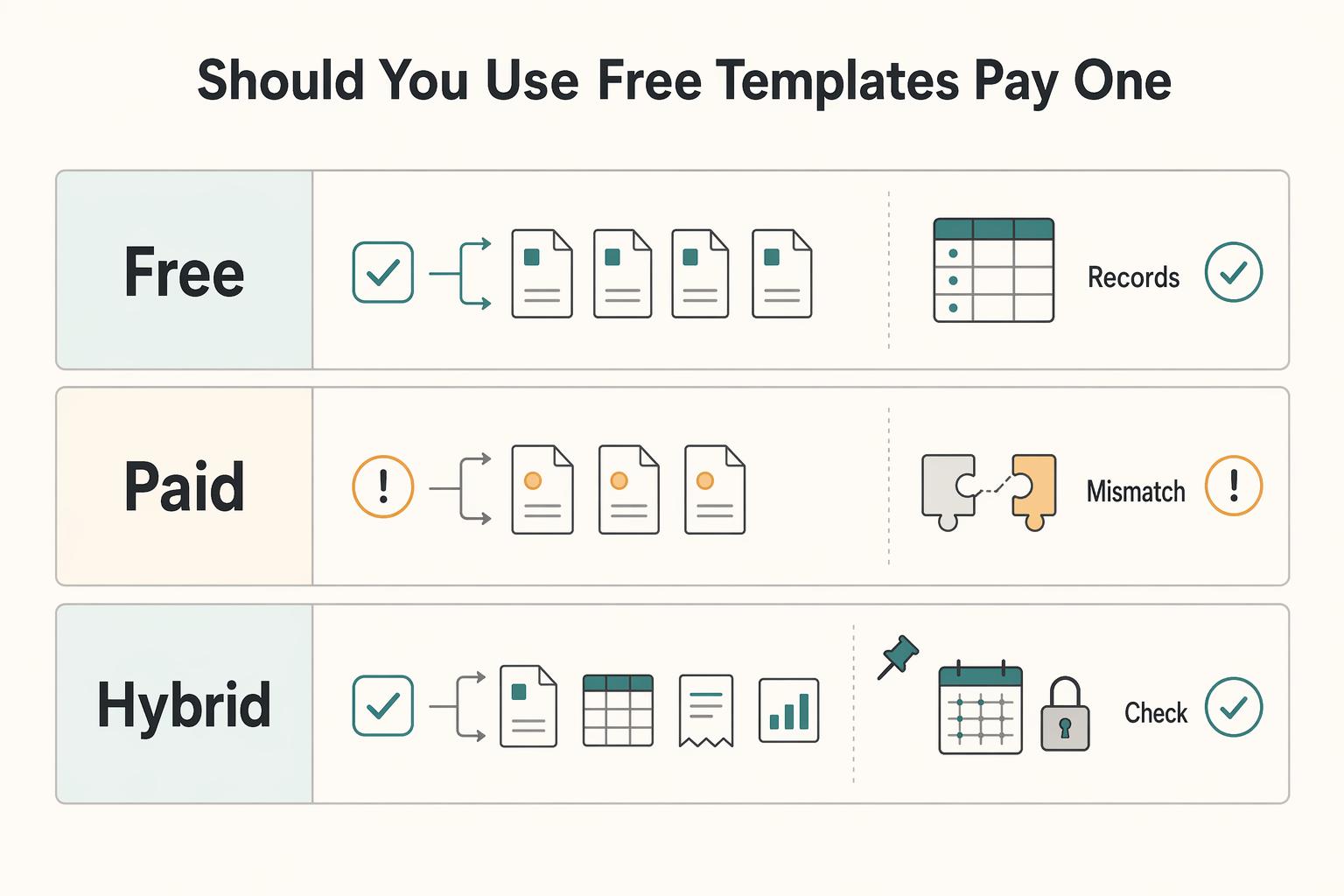
The **best Notion templates for freelancers** are not the prettiest ones. They are the ones you can verify, update, and trust when a client needs an answer now.