
Quick Answer
Build your logo presentation for client around a single decision, not visual applause. Start from the Client Brief, Design Brief, and Scope of Work, then present each Logo Concept in a consistent order with clear judging criteria. Use a simple scorecard to mark advance, revise, or reject, and capture comments by criterion during the meeting. Close with written Sign-off details, including next actions and revision boundaries, so the project can move forward without ambiguity.
Start with the outcome and constraints#
Step 1 Define the decision before you design the deck#
A professional logo review is successful when you leave with a decision, not applause. The outcome should be simple. The client understands the direction, surprises are reduced, and you have clear agreement on what was chosen and what happens next.
Write the decision in one line before you open slides. For example, choose a preferred logo concept, approve one creative direction to refine, or confirm that the work is on brief and ready for the next step. If you cannot name the decision, the meeting will drift into personal taste, side requests, and open-ended debate.
Use one checkpoint while you build. Can every slide help the client judge fit, clarity, or direction? If a slide only shows craft and does not help with that decision, it belongs in your portfolio, not this meeting.
Step 2 Anchor the presentation to the Client Brief and Scope of Work#
This is not a style showcase. It is a decision process tied to the Client Brief, the Design Brief, and the Scope of Work. Those documents frame the job, and the presentation should make it obvious that your choices came from them.
A strong presentation does more than show options. It explains the idea behind the mark and the reasoning behind the visual choices. In the room, your job is not just to display concepts. It is to show that the direction is grounded in the client's goals, constraints, and priorities.
The practical rule is simple. If a concept cannot be defended with something already agreed in the brief, treat it as risky. A common failure mode is polished work with no clear link back to the brief. That can lead to vague feedback or confusion about why a direction is on the table.
Step 3 Define what "professional" means in practice#
Professional does not mean more mockups or fancier slides. It means the presentation moves a decision forward, aligns expectations, and leaves a usable record of what was chosen and what comes next.
You should be able to explain each concept in plain language. What problem does it solve? Which brief requirement does it answer? What tradeoff does it make? You should also leave with clear notes on the selected direction and any requested changes.
Use that as your verification point. If your notes show what was chosen, why it was chosen, and what the next step includes, the presentation did its job. If all you have is "they liked option two, sort of," you still have ambiguity.
For a step-by-step walkthrough, see How to Design Merch Your Audience Will Actually Buy.
Prepare the inputs before you open slides#
Before you build slides, lock four inputs: non-negotiables, approved direction, decision roles, and phase boundaries. This prep keeps the review structured around client priorities instead of drifting into taste debates.
| Input | What to confirm | Why it matters |
|---|---|---|
| Non-negotiables | Audience, brand goals, constraints, timeline | Keeps each concept tied to agreed inputs, not improvised in the room |
| Approved direction | Approved Mood Board or direction sign-off | Keeps logo rationale aligned with the brand identity direction already reviewed and accepted |
| Decision roles | Who approves, who advises, who needs the post-meeting recap | Reduces last-minute resets |
| Phase boundaries | What this phase covers now and what stays for later | Keeps the meeting decision-ready and captures out-of-scope requests for the next phase |
Step 1 Gather the non-negotiables from the Client Brief and Design Brief. Pull the items that should stay fixed during review: audience, brand goals, constraints, and timeline. Keep them visible while building so each concept can be explained against agreed inputs, not improvised in the room.
Step 2 Lock the approved Mood Board and Creative Direction. Logo rationale should follow the brand identity direction already reviewed and accepted. Use the approved mood board or direction sign-off as your reference; if that direction is still unsettled, pause concept review until it is clear.
Step 3 Confirm who decides and how approval moves. A client presentation can involve one decision-maker or a multi-role stakeholder group, so confirm roles in advance. Clarify who approves, who advises, and who needs the post-meeting recap to reduce last-minute resets.
Step 4 Separate this review from later Brand Guidelines work. State what this phase covers now (selecting or refining logo direction) and what stays for later (full style guide and broader identity rules unless already in scope). Capture out-of-scope requests for the next phase so this meeting stays decision-ready. Related: A Freelance Designer's Guide to Presenting Work to Clients.
Define decision criteria before showing any logo#
Set the decision rules before you show any concept. That keeps feedback tied to the brief instead of personal taste.
Step 1 Set a short judging list from the brief. Use a small set of criteria that map to what was already approved in the Client Brief, Design Brief, and creative direction.
| Criterion | What you are testing | Good prompt to ask |
|---|---|---|
| Fit | Alignment with brand goals and audience | Does this feel right for the brand we described? |
| Clarity | Immediate readability and message | Is the idea understandable without explanation? |
| Distinctiveness | Separation from generic category cues | Does this feel ownable, not interchangeable? |
| Scalability | Performance at small and large sizes | Will this still work in compact and simple uses? |
| Use context | Suitability in real applications | Does it hold up in the places the client will actually use it? |
Checkpoint: can you tie each criterion back to the brief or approved direction? If not, you are creating standards in the room instead of applying them.
Step 2 Match concept count to alignment. If alignment is strong, present fewer concepts and go deeper on rationale. If strategy is still unsettled, present a narrower comparison set to validate direction first.
Step 3 State disqualifiers up front. Call out what should not win, even if someone likes it, such as off-brief style directions or options that fail in practical use contexts. This keeps the review anchored to the agreed scope.
A useful line is: "We are judging against the brief and approved direction, not reopening style categories today."
Step 4 Use a simple scorecard for decisions. Use one row per concept, one column per criterion, and a final advance / revise / reject call. Keep comments under criteria so decisions stay comparable and sign-off is cleaner.
You might also find this useful: How to Create a Social Media Report for a Client.
Build a slide sequence that moves to approval#
Your deck should make a direction decision easy, not invite open-ended taste feedback. Treat the presentation as a decision tool: re-establish context, show concepts in a consistent process, force a checkpoint, and close with a clear sign-off action.
Step 1 Re-anchor the room before any concept#
Start with approved context in this order: Client Brief business context, Mood Board recap, then a one-sentence creative direction statement. Keep it short, but clear enough that even late-joining stakeholders understand the decision frame before they see a logo.
Step 2 Present each concept as a complete case#
Show one Logo Concept at a time so comparisons stay fair and structured. For each concept, cover:
- Intent tied to the brief.
- Construction logic at decision level (not a full design lecture).
- Real-use mockup contexts that reflect where the logo actually needs to work.
If mockups look polished but the mark fails in simple or compact uses, call that out. The goal is to evaluate identity performance, not surrounding visuals.
Step 3 Add one explicit decision checkpoint#
After all concepts, use a checkpoint slide that asks for a direction decision against the criteria already set. Summarize each concept with strongest fit, main tradeoff, and recommended status: advance, revise, or stop.
Avoid ending with "any thoughts?" If two routes are close, name the tradeoff plainly and define what the next round must resolve.
Step 4 End with a concrete approval action#
Close with exact next steps: what gets revised next, what deliverables are included at this stage, and what sign-off you need now. Be explicit about who approves and what confirmation moves the project into refinement.
If later documentation is a separate phase, say so directly and link it: Brand Guidelines. Need the full breakdown? Read How to Write a Script for a Marketing Video That Wins Client Trust.
Present concepts in a way that improves feedback quality#
Feedback gets more useful when each concept is judged on its own intent first, then in context.
- Show each concept cleanly before mockups.
Start with one slide per logo concept so first impressions are about the mark, not presentation polish. Then move to supporting slides that explain the rationale and show realistic applications. This keeps concepts comparable and helps the room evaluate choices the way the brief intended.
- Route vague reactions back to agreed criteria.
When feedback drifts into personal taste, bring it back to the approved criteria and creative direction. Ask which criterion the comment relates to, then tie the response to the concept rationale. That turns loose opinion into feedback you can act on in revisions.
- If two concepts are close, choose future consistency.
When options score similarly, choose the one that will be easier to keep consistent in future brand documentation and handoffs. The decision is not just what feels strongest in the room today, but what can be governed clearly in How to Create a Brand Style Guide for a Client.
- Capture feedback by criterion, not as a comment pile.
Log notes live by concept and criterion so each revision request is traceable. Record the exact comment, the decision for the next revision round, and who owns follow-up if needed. If a requested change cannot be tied back to a concept and criterion, clarify it before the meeting ends.
Use templates and inspiration without becoming generic#
Use templates to support the story, not replace it#
Templates should speed polish, not drive decisions. Use Canva or any deck template for layout quality, then check that each slide maps to the approved brief direction from your research and moodboard alignment. If a slide looks good but does not support the client's goals, audience, or constraints, remove or rebuild it.
Use references for pacing, not borrowed strategy#
Use Behance and YouTube for pacing and delivery cues, not strategy. Your structure still needs to follow your own logic from brief to direction to concept to decision, so the presentation stays tied to what was agreed with the client. A quick stress test: if visuals are removed, the deck should still explain why the concept fits.
Keep one presentation system throughout the deck#
Keep one visual system across the full deck (type, spacing, grid, caption style, and concept pattern). Consistency helps the work read as one cohesive presentation built from research, not a mix of borrowed styles. If the slides look polished but still cannot explain why one concept should win, the presentation is underbuilt.
This pairs well with our guide on How to Use the Pyramid Principle for Client Communication.
Prevent scope creep with explicit revision and approval terms#
The fastest way to prevent scope creep is to define revision limits, change triggers, and approval ownership in writing before revisions begin.
Step 1. Define revision limits inside the Scope of Work. State exactly what is included: how many revision rounds, what feedback counts as a revision, and what is billed separately. A proposal may include 2-3 revision rounds, but that number is a project choice, not a universal standard. Your scope document should clearly list deliverables, included changes, and extra-cost items.
A practical boundary to define upfront:
- A revision refines an approved direction.
- A new direction changes the approved path and should move through a Change Order.
| Request type | Treat it as | What to write into the Scope of Work |
|---|---|---|
| Adjustments to an approved concept | Revision | Included within the stated revision-round limit |
| Request for a different concept path after direction approval | New direction | Triggers a Change Order |
| Added outputs beyond the agreed logo package | Expanded deliverables | Priced separately through a Change Order |
| More review loops because new stakeholders join late | Additional stakeholder cycles | Triggers timeline and fee review |
Step 2. Name the Change Order triggers before they happen. Keep triggers plain and explicit: net-new concept path, expanded deliverables, and additional stakeholder cycles. This prevents hidden requests from being treated like minor tweaks and keeps timeline and pricing decisions accountable.
Step 3. Build an Approval Workflow with names and response windows. A structured sign-off process works only when owners are named. Specify who consolidates feedback, who gives final approval, and when each response is due. If feedback comes from multiple contacts without one final approver, pause and confirm decision ownership before further design work.
Step 4. Pause when feedback crosses concepts and reset the decision criteria. If feedback mixes elements across concepts or conflicts with earlier direction, stop execution and reset against the agreed criteria from the brief. Then confirm one concept path before revisions resume. In follow-up notes, name the concept in review, the approved change list, and any request that sits outside the current round. If you want a deeper dive, read Thailand's Long-Term Resident (LTR) Visa for Professionals.
Run the meeting like an operator and document sign-off#
Run this meeting to secure one clear decision, capture usable feedback, and leave a written record for the next round.
- Open with the decision frame before design opinions start.
In your opening, restate the goal, the agenda, and the exact decision needed today. If the group cannot answer "What are we deciding today?" before the first concept, pause and reset.
- Follow the deck in order, including context slides.
Keep the sequence: brief context, constraints, creative direction, then concepts. Skipping setup usually weakens feedback quality, so pull comments back to the brief and concept intent when discussion drifts.
- Use one shared feedback log during the call.
Capture every comment in a single place, tied to the decision criteria, Concept ID, and action owner. This keeps conflicting requests visible and easier to resolve before design work starts.
- End with written recap and explicit sign-off trail.
Close by confirming the selected direction, approved changes, next revision-round scope, and sign-off date or approval checkpoint. Store the Brand Presentation, feedback log, and approval note together so later Brand Style Guide work starts from clear evidence.
Related reading: A guide to 'Maslow's Hierarchy of Needs' for understanding client motivation.
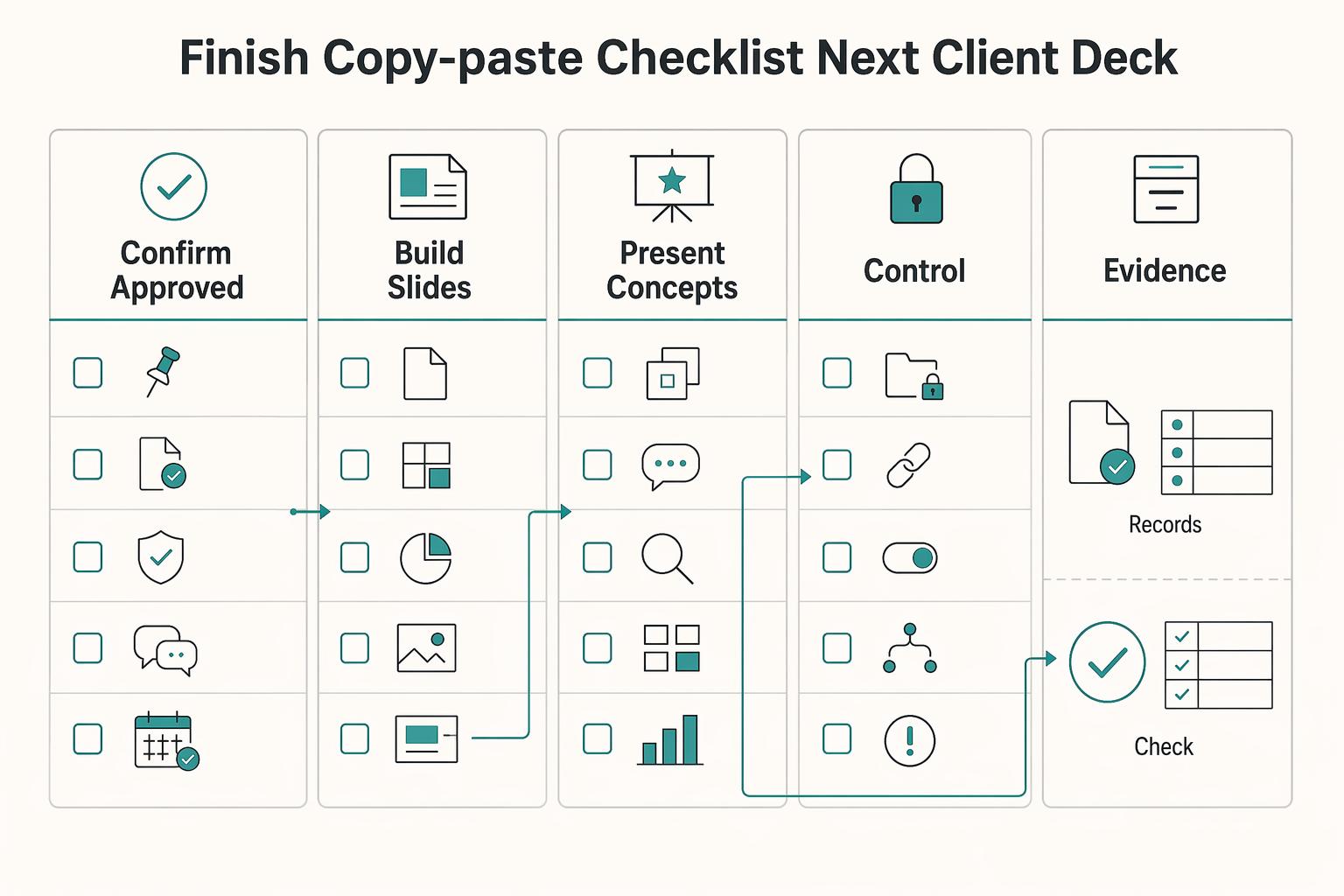
Finish with a copy-paste checklist for your next client deck#
Use this checklist to keep the review decision-focused and reduce missed steps.
- Confirm approved inputs first: Client Brief, Design Brief, Mood Board, and creative direction are approved (not just discussed), with one current version everyone agrees to use.
- Build slides in decision order: brief context, design constraints, approved direction, then concepts, so feedback stays tied to purpose instead of taste.
- Present concepts one by one, then compare: show each concept cleanly, add real use context, then compare against explicit criteria (including appropriateness, simplicity, and distinctiveness) tied back to the brief.
- Set control points in writing: define revision-round boundaries, what counts as revision vs. new direction, change-order triggers, and who reviews, approves, and consolidates feedback.
- Send same-day sign-off recap: document chosen direction, approved edits, owners, and dates, and keep it with the presentation and feedback log for a clear record as deliverables expand into broader brand assets.
We covered implementation details in How to Use Google Drive for Client Collaboration and File Delivery.
Frequently Asked Questions
What should a professional logo presentation include?
The clearest standard is consistency: present the brand the same way across platforms and touchpoints, and keep the rationale clear enough that reviewers can evaluate direction, not just preference.
How many logo concepts should I present to a client?
Present only what you can explain clearly against the agreed direction and evaluation criteria.
What is the best slide order for a logo presentation meeting?
Use an order that keeps context clear and maintains consistent brand presentation across touchpoints.
How do I reduce revision rounds without seeming rigid?
A practical approach is to align on feedback criteria, decision roles, and checkpoints before changes begin, then restate those agreements in the recap.
Are Canva templates enough for client-ready logo presentations?
Not on their own. Canva provides free FAQ templates you can customize and share, and templates can help with layout consistency, but this guide does not support treating templates alone as professionally sufficient.
What exactly should be agreed before final sign-off?
Before sign-off, confirm in writing what is approved, what (if anything) remains, who owns next actions, and the timing so there is one consistent record.
Try a related tool
Researched and edited by the Gruv editorial team. Gruv builds cross-border billing, payouts, and finance-operations software for global businesses.
Sources
Includes 3 external sources outside the trusted-domain allowlist.
- fda.gov/about-fda/center-drug-evaluation-and-researc...trusted
- federalregister.gov/documents/2025/12/29/2025-23853/weighted-sel...trusted
- ftc.gov/business-guidance/resources/ftcs-endorsement...trusted
- lackawanna.edu/wp-content/uploads/2025/07/25-26-Student-Han...trusted
- wicourts.gov/sc/rules/chap20a.pdftrusted
- beginstudio.co.uk/blog/my-logo-and-branding-processexternal
- brandwell.ai/blog/how-to-customize-logo-slider-logo-showc...external
- dock.us/library/sales-deck-examplesexternal
Educational content only. Not legal, tax, or financial advice.
Related Posts

Thailand's Long-Term Resident (LTR) Visa for Professionals
For a long stay in Thailand, the biggest avoidable risk is doing the right steps in the wrong order. Pick the LTR track first, build the evidence pack that matches it second, and verify live official checkpoints right before every submission or payment. That extra day of discipline usually saves far more time than it costs.
A Freelance Designer's Guide to Presenting Work to Clients
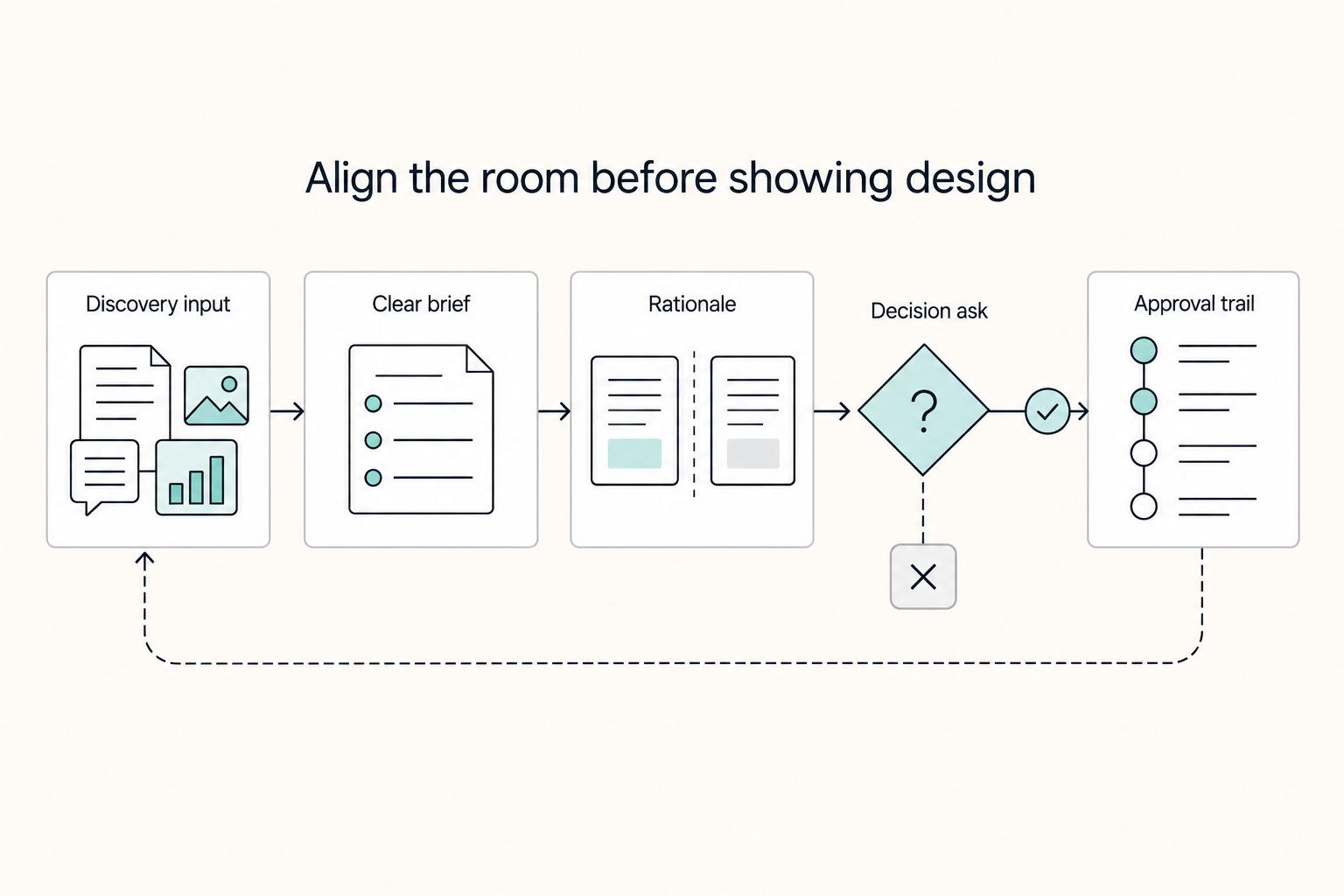
A client presentation should end with a decision, not a show-and-tell. The core question is simple: what do you need the client to approve, choose, or confirm today?
How to Create a Brand Style Guide for a Client
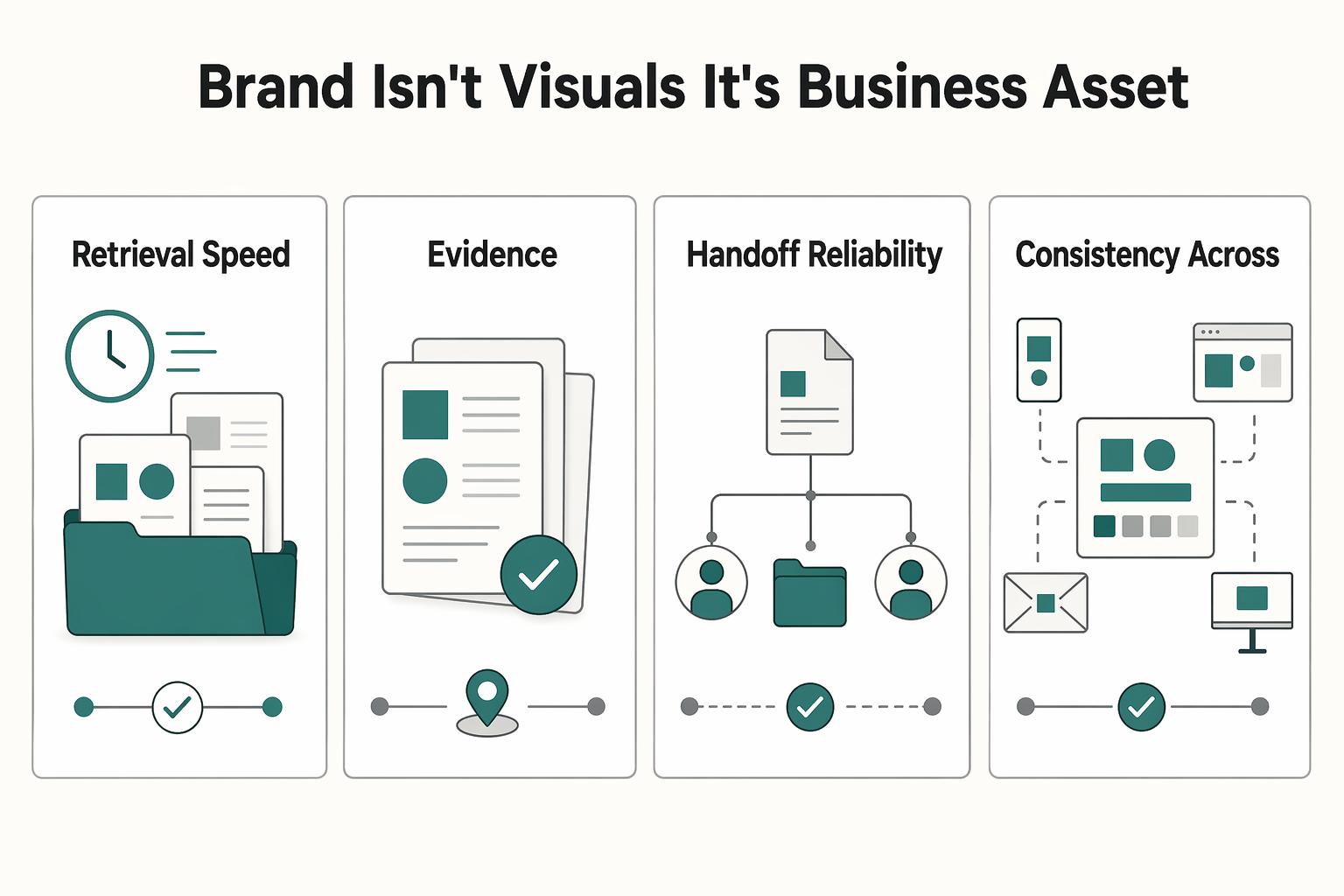
If you work alone, your guide does not need to be a full brand book. It should work as a control document. Standardize the few choices that keep coming up so your proposals, reports, invoices, decks, and delegated work look and sound like they come from the same business.