
Quick Answer
Build your saas knowledge base as an operating workflow, not a content dump. Begin with repeated support intents, publish by format (FAQ, how-to, troubleshooting), and run a four-week rollout with quality gates for structure, resolution, discoverability, and governance. Keep each page tied to one user job, test search using customer wording, and require named owners plus approval history on high-impact updates.
Build a SaaS knowledge base you can trust when growth gets messy#
Treat your SaaS knowledge base as part of your support system. As volume rises, answers often get scattered across docs, saved replies, and team chat. When guidance fragments, work slows down and small mistakes pile up.
Step 1. Name the intake signals before you publish#
Start with evidence, not a blank page. Review recent tickets, chat transcripts, and onboarding notes, then mark signals you can actually see: repeated ticket intents, recurring "how do I do this?" questions, and places where answers are scattered across channels. If the same question keeps coming back, that is a coverage gap, not random noise.
Use a simple feature audit to keep scope honest. Map product areas, list features, then prioritize by user impact.
Step 2. Set the minimum rules for trust#
Keep the rules simple enough to follow under pressure, then write them down in one place.
| Decision area | Default rule | Verification check |
|---|---|---|
| Coverage | Publish topics tied to repeated support and onboarding questions | Each new article maps to a recurring question |
| Scope | Run a feature audit before drafting (map areas, list features, prioritize by user impact) | Priority list exists before writing |
| Success checks | Track ticket deflection, time saved, and user satisfaction | Metrics are reviewed after launch |
| Launch cadence | Plan a 30-day rollout: Week 1 foundation, Week 2 core content, Week 3 polish, Week 4 launch and measure | Each checkpoint is completed |
Step 3. Keep scope narrow before you debate tools#
Do not jump straight into platform shopping. First prove that your help center can become a single source of truth. If answers stay fragmented, a new tool can just make the mess easier to publish.
One source recommends buy-over-build for most teams as a default, but make that choice after your scope and measurement rules are clear. If you are ready for that comparison, use The Best Customer Support Software for SaaS Businesses.
What is a SaaS knowledge base and how is it different from an FAQ?#
Use an FAQ when one direct answer is enough. Use a knowledge base article when the reader needs steps, decisions, or troubleshooting to finish the job.
An FAQ is a list of common questions with direct answers to help people get started quickly. A knowledge base is broader: a public set of resources that helps customers use your product, including tutorials and feature documentation. They are not interchangeable. If users cannot figure out how to use the product, they get frustrated, use it less, and are more likely to cancel.
Step 1. Classify the issue before you draft#
Before choosing a format, map each issue to three points:
- Intent type: Is this a factual question, a task to complete, or a problem to diagnose?
- Complexity: Can you answer it clearly in one short response, or does it require sequence and decision points?
- Expected outcome: Should the reader understand one point, complete an action, or restore something that failed?
Use this as a practical triage rule. If intent is factual, complexity is low, and the outcome is understanding, publish an FAQ. If intent is procedural or diagnostic and the outcome is completion or recovery, publish a guide. If one issue includes both, keep a short FAQ answer and link to the deeper guide.
Step 2. Match the user job to the format#
| User job | Use this | Use this when | Avoid this when | Success check |
|---|---|---|---|---|
| Confirm one common point | FAQ | The answer is short and complete on its own | The reader needs steps or decision guidance | The user resolves the question in one read |
| Complete setup, onboarding, or feature use | Guide | The reader must follow a sequence to reach a result | The page is only a one-line answer expanded into filler | The user completes the task |
| Troubleshoot a recurring issue | Guide | The reader needs checks, likely causes, and fix paths | The next action is unclear after reading | The user identifies a likely cause and applies a fix |
Do not collapse everything into hybrid pages. FAQ entries that become mini-guides are harder to scan, and guides that hide the quick answer make self-service less reliable.
Step 3. Test the path, not just the page#
Treat tools as containers, not the strategy. Your real system is your help center taxonomy, article template, and search intent. Platform capabilities like search, permissions, SEO, integrations, versioning, feedback collection, and performance tracking matter, but they do not fix a bad format decision.
Run a reality test for each topic cluster: the user finds a quick answer first, can move to a deeper guide when needed, and can complete the task without agent escalation. If that path fails, check classification and linking before blaming the platform.
This pairs well with our guide on How to Build a Waitlist for Your SaaS Product Launch, and
What should you prepare before building the first article?#
Before you draft, gather your inputs: pull evidence, assign decision ownership, set a repeatable template, and confirm tool constraints.
| Step | What to prepare | Readiness check |
|---|---|---|
| Build an evidence map from real support demand | Start with recurring issues in support tickets, chat logs, and sales call notes, then map each topic to user intent, lifecycle stage, and the exact language users use | Each planned article should serve one clear intent for one lifecycle stage |
| Assign clear publish roles and checks | Use an article owner, a subject reviewer, and a final approver | Before publish, confirm the draft matches customer language, steps are accurate, the expected result is achievable, the page is clear, scoped for public self-service, and includes escalation guidance |
| Standardize the draft template | Require one shared structure for every draft: problem, prerequisites, steps, expected result, and escalation path | If output structure varies widely or key sections are missing, tighten the template before scaling |
| Run a tooling preflight before launch | Validate search behavior, permissions, SEO support, support-stack integrations, and define your URL approach | Search a planned topic using the exact words from tickets or chat |
Step 1. Build an evidence map from real support demand. Start with recurring issues in support tickets, chat logs, and sales call notes, then map each topic to user intent, lifecycle stage, and the exact language users use in that channel before you write.
| Input source | What to pull | Planning output | Publish priority |
|---|---|---|---|
| Support tickets | Repeated issue types, tags, resolutions | Topic cluster + intent type | Publish first if the same question appears ten times a week |
| Chat logs | Exact phrasing, confusion points, missing context | Search terms, article title language, front-door guidance | Publish early if users cannot describe the problem clearly |
| Sales calls | Pre-purchase objections, setup misunderstandings, expectation gaps | Onboarding and evaluation topics | Queue unless the issue blocks activation or handoff |
Checkpoint: each planned article should serve one clear intent for one lifecycle stage. If one page tries to cover everything, it usually becomes an FAQ trap.
Step 2. Assign clear publish roles and checks. Use named responsibility so articles do not drift. A simple setup is an article owner, a subject reviewer, and a final approver (one person can hold multiple roles on a small team).
Use these readiness checks before publishing:
- Article owner: confirms the draft matches customer language and stays focused on one use case
- Subject reviewer: confirms steps are accurate and the expected result is achievable
- Final approver: confirms the page is clear, scoped for public self-service, and includes escalation guidance
Step 3. Standardize the draft template. Require one shared structure for every draft so contributors produce usable, comparable pages. A practical structure is: problem, prerequisites, steps, expected result, and escalation path.
Quality check: give the template to two contributors. If output structure varies widely or key sections are missing, tighten the template before scaling.
Step 4. Run a tooling preflight before launch. Validate search behavior, permissions, SEO support, and support-stack integrations, then define your URL approach before the library grows.
Final check: search a planned topic using the exact words from tickets or chat. If title, taxonomy, or permissions make it hard to find, it is not ready to publish.
If you want a deeper dive, read Thailand's Long-Term Resident (LTR) Visa for Professionals.
How do you choose the right platform without getting trapped later?#
Choose by operating risk first, then vendor preference. If you score the work your team must do before demos, you are less likely to pay monthly or annually for features you do not use while still carrying integration and security overhead.
Step 1. Score capability families before you compare vendors#
Build a simple matrix around your real support workflows, not feature lists. Your goal is a tool that helps customers find answers quickly, supports agent reuse in live support, and lets you update content without trust-breaking mistakes.
| Capability family | What you should test | Implementation effort | Operational owner | Migration risk |
|---|---|---|---|---|
| Search and findability | Can users find the right article using the same words they used in tickets or chat? Can you adjust titles, labels, or structure without engineering help? | Low to medium when admin controls are clear | Support lead or documentation owner | High if search depends on rigid structure you may outgrow |
| Agent handoff and support integrations | Can agents share the article inside normal ticket or chat flow? Can one article be reused across support touchpoints? | Medium because setup and testing usually cross tools | Support ops or support manager | Medium to high if content is separated from your support stack |
| Chatbot suggestions | During a real conversation, does the bot suggest the right article in a usable moment? | Medium because intent matching needs tuning | Support ops and chatbot owner | Medium if bot behavior depends on tool-specific setup |
| Governance and change control | Before go-live, do you have approval states, role-based publishing, revision history, and rollback you can use quickly? | Medium | Documentation owner and approver | High if history is weak or rollback is hard to execute |
| Reporting and usability | Can you see which articles are used, missed, or abandoned, and can editors maintain pages without friction? | Low to medium | Support lead | Low to medium unless reporting is locked into one stack |
Checkpoint: if you cannot name an owner for each row, pause selection.
Step 2. Run workflow tests that match real support paths#
Do not accept "integrates with chat" or "AI suggestions included" at face value. Test each shortlisted tool with one real article draft and one real ticket topic.
First, test help-center search with the exact customer phrasing, including imperfect wording. Next, test agent handoff in a live support flow to confirm agents can share the article without workaround-heavy steps. Then, test chatbot suggestions in a realistic conversation and verify the article appears when it is actually useful.
Capture evidence for each test: steps, result quality, and any workaround required.
Step 3. Verify governance controls before go-live#
Explicitly verify approval states, role-based publishing, revision history, and rollback usability. A control that exists but is hard to execute is still operational risk.
If your content includes trust-sensitive guidance, prioritize stronger publishing control even if the editor experience is less polished.
Step 4. Break ties with risk policy, not preference#
When scores are close, use this rule: choose the setup with stronger control when trust, accuracy, or compliance pressure is high. Treat usability and reporting as secondary differentiators after search, handoff, and governance.
This policy helps you avoid two common traps: stitching together a dozen niche tools and hoping they work together, or choosing an all-in-one that promises everything but misses critical jobs. For a shortlist to test, use The Best Customer Support Software for SaaS Businesses.
How should you structure content so users find answers fast?#
Structure by user intent first, then write. When each article has one clear job, search and navigation stay easier to use, and people can solve issues without opening a support ticket.
Step 1. Pick the content type before drafting. Use a practical three-layer model so users can predict what they will get from each result.
| Layer | Entry trigger | Format style | Expected outcome |
|---|---|---|---|
| FAQ | User asks one narrow question | Short answer with a clear purpose statement | User gets a fast yes/no or brief explanation |
| Task guide | User needs to complete a workflow | Step-by-step instructions in small actions | User completes the task correctly |
| Troubleshooting | User tried a task and something failed | Symptom-led checks with next actions | User isolates the issue or knows when to escalate |
Checkpoint: if one draft mixes a definition, a long workflow, and failure recovery, split it. FAQ content alone is useful, but it should not carry the full help center by itself.
Step 2. Use one required skeleton for action-oriented articles. For task guides and troubleshooting pages, keep this structure in order:
- Purpose and scope
- Prerequisites
- Steps
- Expected outcome
- Escalation path
This keeps quality consistent across writers and makes reviews faster. If a tester cannot tell what is in scope, what they need first, what success looks like, or when to contact support, the article is not ready.
Step 3. Name categories and titles in customer language. Build taxonomy from support tickets, chat logs, and search queries, not internal labels. Use clear categories tied to core features or use cases, and keep naming conventions consistent so you avoid synonym drift across sections.
Keep a prominent Getting Started or Quick Start area on the homepage. For titles, lead with the task or symptom users actually type.
Step 4. Treat drift checks as part of publishing. Before and after publishing, verify the article owner, review status, and whether linked flows still match the current product experience. If you use screenshots, re-check them whenever the UI changes, because visual steps can become outdated quickly.
Need the full breakdown? Read How to Choose a Tech Stack for Your SaaS Product.
What is the 30 day launch plan with quality gates at each step?#
Run your first 30 days as four weekly quality gates, not one launch date. Move to the next week only when you have clear entry criteria, exit criteria, one owner, and an explicit pass, warn, or fail decision.
| Week | Objective | Owner | Entry criteria | Exit criteria | Failure signal |
|---|---|---|---|---|---|
| Week 1 | Lock structure before content volume grows | Documentation owner + support lead | Platform selected, initial article backlog started, support-ticket/chat themes collected | Taxonomy rules documented, template minimums published, article owners assigned, first FAQ set published | New articles cannot be categorized consistently, or titles drift into internal language instead of customer wording |
| Week 2 | Publish content for the most repeated support intent | Support lead (intake) + writer/product owner (draft) | Top support issues grouped by intent, template minimums applied in drafts | Priority FAQ, how-to, and troubleshooting pages published; guides include purpose/scope, prerequisites, steps, expected outcome, escalation path; "task resolved end to end" definition documented and used in review | A tester still needs live support to complete the task, or cannot tell prerequisites, success state, or when to escalate |
| Week 3 | Verify discoverability in real user paths | CX/support ops owner | Week 2 priority pages are live and internally linked | Search tested with customer phrases, navigation paths tested for clarity, cross-links validated between FAQ, how-to, and troubleshooting pages, dead ends fixed | You test vanity/internal queries, or users land on an FAQ with no clear path to the guide or troubleshooting step they need |
| Week 4 | Finalize governance before wider release | Knowledge base owner + approver | Discoverability checks completed and issues triaged | Approval flow tested, version notes process active, review cadence set, ownership visible on live pages | Changes can be published without approval, or change history/owner/review date is unclear |
Step 1. Setup gate (Week 1)#
Define taxonomy rules before you scale publishing: one article type per page, one customer term per concept, and one primary category per article. Build intake from support tickets, chat logs, and recurring search wording so structure matches real user intent.
Set template minimums now. For how-to and troubleshooting pages, require: purpose and scope, prerequisites, steps, expected outcome, and escalation path.
Step 2. Resolution gate (Week 2)#
Treat article count as secondary. Your main check is whether a reader can resolve the task end to end from the page, or reach a clear escalation point without guessing.
If testers still ask support what to do first, what access they need, or how to confirm success, hold the gate and revise before moving on.
Step 3. Discoverability gate (Week 3)#
Test what customers actually type, not what your team calls features internally. Then test navigation clarity from the help center entry points, and verify cross-links so readers can move naturally between short answers, step-by-step guides, and troubleshooting flows.
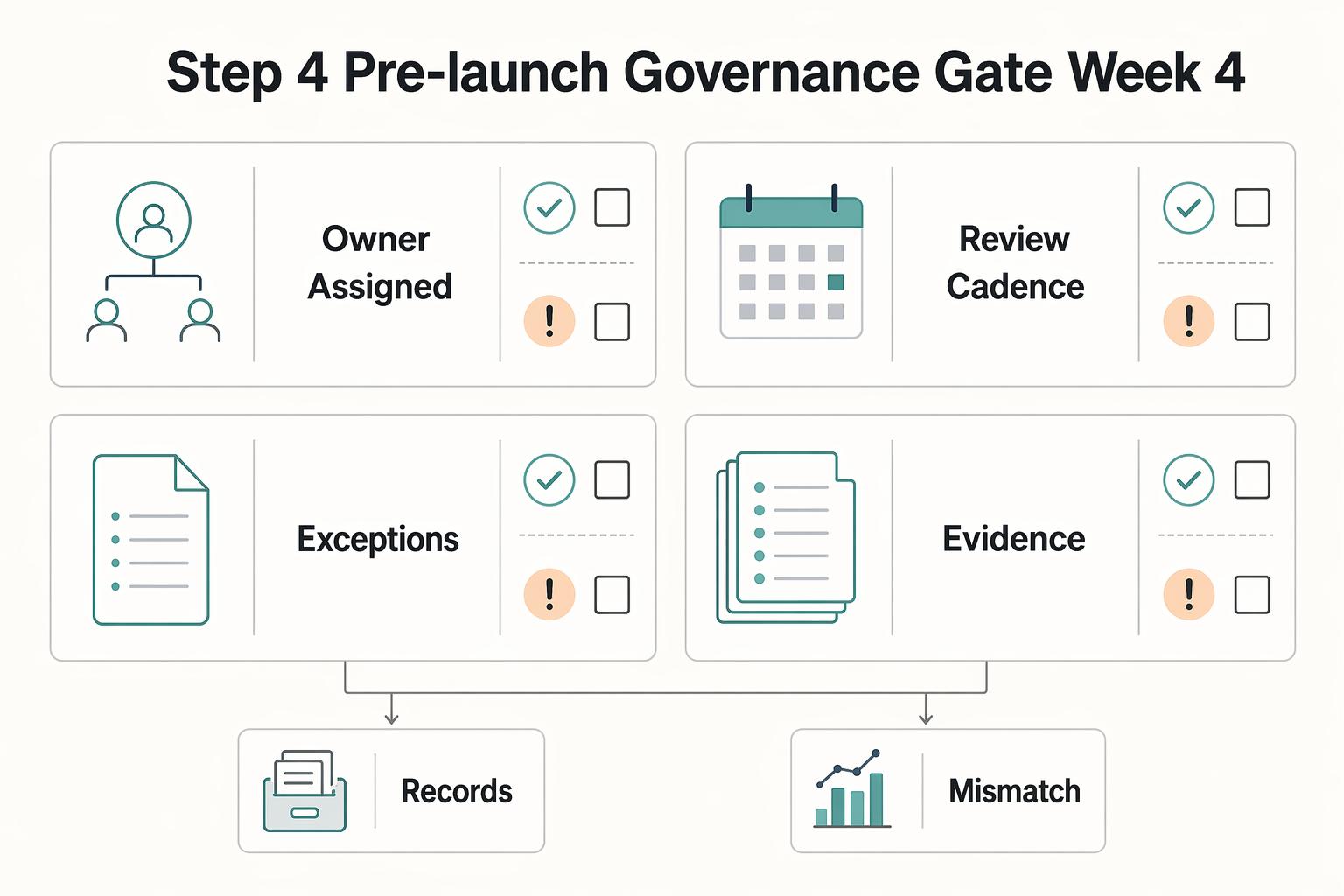
Step 4. Pre-launch governance gate (Week 4)#
Before broader rollout, run a short formal checklist. Each item is either completed or explicitly accepted as a known risk.
- Owner assigned for each live article: record the responsible team member's name
- Review cadence set:
[every __ days] - Escalation path defined:
[team/queue] - Rollback/update process documented:
[location of version log and approval record]
Use Zendesk Guide or any equivalent tool if it supports this control model; the requirement is governance, not a specific vendor.
How do you keep it governable and audit ready as your team grows?#
Keep governance simple and visible: every live page has an owner, every meaningful edit has a traceable reason and approval state, and high-impact pages pass a stricter republish check than routine FAQs.
- Step 1. Define your governance loop from live signals.
Use support tags, failed searches, and reopened tickets as your intake sources. Review them on a recurring rhythm that fits your volume, then apply one decision rule each time: update when the task is still valid but instructions, labels, or prerequisites changed; archive when the task no longer applies, the feature is retired, or another page has replaced it. Quick control check: can you point to the source signal behind this change? If not, pause the edit.
- Step 2. Require lightweight change control on every edit.
For each edit, record four fields: page owner, reason for change, approval state, and where the record is stored. Use native version history when available; otherwise keep a simple external log. The core check is traceability. You should be able to show request, approval, and next review point without digging through chat or memory. When edits happen outside a controlled path, gaps can stay invisible until an audit, incident, or escalation.
- Step 3. Add stricter republish checks for high-impact pages.
For pages tied to core customer tasks, require a named reviewer before republish. That reviewer confirms: template compliance, task accuracy as written, and expected outcome in product. Verify prerequisites, labels, click path, and stop points before approval. A small mismatch here can break task completion even when the edit looks correct.
| Team stage | Ownership model | Approval rule | Audit evidence |
|---|---|---|---|
| Solo | One named owner manages each page end to end | Owner publishes after self-check | Version history or log entry with reason, approval state, and next review point |
| Small team | Category owner drafts; second reviewer checks high-impact pages | High-impact pages require reviewer signoff | Record of who changed the page, why, and who approved |
| Growing team | Shared ownership across support, product, and operations | Approval path is based on page impact | Review queue, owner list, approval trail, and archive history |
- Step 4. Run this audit-ready test any time.
Pick any live page and confirm you can answer all four quickly:
- Who changed it?
- Why was it changed?
- Who approved it (if approval was required)?
- When is it due for review, or should it be archived?
If you cannot answer these fast, fix the control before publishing more.
For a step-by-step walkthrough, see How to Create a Referral Program for Your SaaS Product.
Common mistakes that make knowledge bases fail and how to recover#
If your knowledge base is losing trust, pause new publishing and fix the system first. Recover in this order: scope drift, tool mismatch, unclear ownership, broken AI-to-agent handoff, and labels that do not match customer language.
| Failure pattern | Recovery action | Verification check |
|---|---|---|
| You publish reactively, one issue at a time | Freeze low-volume requests, rebuild your queue from recurring support tags, failed searches, and reopened tickets, and keep one current page per recurring issue | Recent tickets for a recurring issue should point to one current article, not several partial ones |
| You picked a tool first | Run the same real task set in each candidate and record where each workflow succeeds, breaks, or needs manual workarounds | Pick the platform that gives you the clearest evidence trail for daily operations, not the slickest demo |
| No clear owner | Set four controls per critical page: page owner, reviewer role, review trigger, and change-log expectation | On one critical page, show owner, reviewer, last meaningful change reason, and the next trigger that would force review |
| AI returns a plausible article | Define intent routing rules up front and map both paths explicitly: best article first, then the exact queue path if self-service fails | For each top intent, confirm one mapped article link and one mapped human destination |
| Internal naming hides useful content | Pull phrasing from ticket subjects, chat transcripts, and failed searches, then update titles, navigation labels, and search synonyms | Top customer phrases return live pages with matching language, failed-search phrases decrease, and reopened tickets decline |
- Stop scope drift before adding new pages.
Failure pattern: you publish reactively, one issue at a time, until content becomes fragmented and hard to trust. Recovery action: freeze low-volume requests, rebuild your queue from recurring support tags, failed searches, and reopened tickets, and keep one current page per recurring issue. Open each kept article with two or three plain-language lines, then include the top three "it still didn't work" cases when they recur. Also verify screenshots still match the product, because stale screenshots create more confusion than no screenshot. Verification check: recent tickets for a recurring issue should point to one current article, not several partial ones.
- Choose your platform with a proof of concept, not a demo.
Failure pattern: you picked a tool first, then discovered it does not support your real publishing, governance, or handoff flow. Recovery action: run the same real task set in each candidate and record where each workflow succeeds, breaks, or needs manual workarounds. If helpful, use The Best Customer Support Software for SaaS Businesses for vendor context, then validate against your own tasks.
| PoC criterion | What to test | Evidence to keep |
|---|---|---|
| Workflow fit | Draft, review, publish, update, and archive one real article | Time taken, blockers, manual steps |
| Governance controls | Owner assignment, version history, approval path, archive trace | Logs or screenshots showing who changed what and why |
| Handoff support | Route an answer to an article, then to a human queue when needed | Transcript or recording of the full path |
| Reporting visibility | Failed searches, article usage, reopen signals, handoff volume | Export or dashboard view your team can access directly |
Verification check: pick the platform that gives you the clearest evidence trail for daily operations, not the slickest demo.
- Define ownership on every critical article.
Failure pattern: no clear owner means quality drifts, updates lag, and conflicting versions appear. Recovery action: set four controls per critical page: page owner, reviewer role, review trigger, and change-log expectation. Use practical triggers such as product changes, permission changes, repeated reopen patterns, or label changes that can break task completion. Verification check: on one critical page, you should be able to show owner, reviewer, last meaningful change reason, and the next trigger that would force review.
- Map AI-to-agent handoff before exposing AI answers.
Failure pattern: AI returns a plausible article, but the user still cannot complete the task and has no clear next step. Recovery action: define intent routing rules up front. Route informational, repeatable requests to grounded articles first; route account-specific, permission-specific, payment-related, or repeated-failure requests to a human queue. For each high-volume intent, map both paths explicitly: best article first, then the exact queue path if self-service fails. Verification check: for each top intent, confirm one mapped article link and one mapped human destination.
- Rewrite labels in customer language and recalibrate continuously.
Failure pattern: internal naming hides useful content because users search with different words. Recovery action: pull phrasing from ticket subjects, chat transcripts, and failed searches, then update titles, navigation labels, and search synonyms to match that language. Add related links so articles are not dead ends, and use three to five short follow-up questions on key pages only when support patterns justify them. Verification check:
- Your top customer phrases return live pages with matching language.
- Failed-search phrases decrease for rewritten topics.
- Reopened tickets decline on the topics you relabeled.
- Agents stop sharing alternate links for the same task.
Related reading: How to Create a Sales Playbook for Your SaaS Team.
Turn this into your operating system this week#
Run your knowledge base on a weekly operating standard: users should find the right page quickly, complete the task without guesswork, and move to assisted help with context only when self-service is no longer the right path.
| Step | What you do | How you verify |
|---|---|---|
| Reconfirm the promise | Write one sentence your team uses to judge every update: we publish help that is easy to find and good enough for a user to finish the task | Test with real ticket or chat phrasing and confirm the right page appears quickly through search, troubleshooting paths, or related links |
| Run a weekly shipping loop | Follow the same order every week: intake from support signals, prioritize by user friction, publish updates, then confirm task completion before adding net-new content | Publish only after a non-author can follow the page and complete the task |
| Choose the CTA by user intent and risk | Choose the next step based on intent and risk, not a default CTA | If the path is clear and low-risk, route to the next article; if the case is account-specific, prior steps already failed, or risk is higher, route to assisted help |
| Lock ownership and change control before scale | Set governance fields on critical pages: owner assigned, review trigger set, change record captured, escalation path mapped | Spot-check critical pages each week and confirm all four fields are present before calling them operational |
- Step 1. Reconfirm the promise.
What you do: write one sentence your team uses to judge every update: we publish help that is easy to find and good enough for a user to finish the task. Why it matters: a cloud-hosted help center only works when people can actually reach and use the information. How you verify: test with real ticket or chat phrasing and confirm the right page appears quickly through search, troubleshooting paths, or related links. If users cannot find it in their own language, treat it as unfinished.
- Step 2. Run a weekly shipping loop.
What you do: follow the same order every week: intake from support signals, prioritize by user friction, publish updates, then confirm task completion before adding net-new content. Why it matters: drift starts when shipping becomes a special event, and consistent answers to common questions reduce support load only when the loop stays active. How you verify: use this weekly loop and check completion before closing work:
- Gather repeated questions and blockers from support and onboarding.
- Group each item into existing lanes (FAQ, how-to, troubleshooting, onboarding).
- Fix weak existing pages before creating new ones.
- Publish only after a non-author can follow the page and complete the task.
- Step 3. Choose the CTA by user intent and risk.
What you do: choose the next step based on intent and risk, not a default CTA. Why it matters: some users need one more self-service step, while others need an assisted handoff to avoid compounding errors. How you verify: if the path is clear and low-risk, route to the next article. If the case is account-specific, prior steps already failed, or risk is higher, route to assisted help and require context support can use immediately (page URL, failed step, what was already tried).
- Step 4. Lock ownership and change control before scale.
What you do: set governance fields on critical pages: owner assigned, review trigger set, change record captured, escalation path mapped. Why it matters: as contribution volume grows, you need clear accountability and traceability to keep guidance consistent. How you verify: spot-check critical pages each week and confirm all four fields are present before calling them operational.
Weekly checklist
- Pull repeated questions and blockers from tickets, chat, and onboarding notes
- Rank updates by user friction, not by draft convenience
- Improve existing pages before creating overlapping articles
- Confirm task completion on each updated page with a non-author check
- Match each article CTA to user intent and risk level
- Assign a named owner to every critical page
- Set a review trigger for each critical page
- Capture a change record for meaningful edits
- Map the escalation path so assisted help receives context, not just urgency
Operating standard: users find pages fast, complete tasks from the page, and move into support with a clean handoff only when self-service has done its job.
You might also find this useful: How to create a 'Help Center' for your product using Notion.
Frequently Asked Questions
What is a SaaS knowledge base?
Treat a saas knowledge base as your public product-help library, not just a page of quick answers. Build it to help customers complete tasks and find help easily, because an FAQ alone does not give the same depth or coverage.
How do I create a knowledge base for my SaaS product?
Start with common customer questions, then expand beyond short answers into broader instructional content. Add practical how-to and troubleshooting guidance, and keep organization simple so people can still find help easily as content volume grows.
What should be included in a SaaS help center?
At minimum, include clear FAQ content for common questions and broader instructional content for task-level guidance. Keep those content types distinct so quick answers and deeper help are both easy to navigate.
How do I choose SaaS knowledge base software?
Use the same checklist across tools and compare results side by side. Prioritize ease of setup and learning curve, then test whether the tool can handle larger FAQ volume with categorization, quick edits, and distribution. Also confirm how responsibilities and ongoing monitoring will be handled in your operating model. If you want a shortlist before testing, see The Best Customer Support Software for SaaS Businesses.
What is the difference between an FAQ and a knowledge base?
Use an FAQ for short, common questions that help people get started quickly. Use a knowledge base for broader instructional content that goes beyond simple question and answer pairs and supports complete tasks.
How do I structure knowledge base content for onboarding and support?
Structure content around what customers are trying to do, and make sure answers are easy to find. Keep quick-start questions in FAQ-style entries and place broader support guidance in knowledge-base articles.
What governance steps make a knowledge base audit-ready?
Start by defining responsibilities clearly, since cloud-based resources can shift who owns which operational tasks. A responsibility matrix plus consistent change and monitoring practices gives you a safer baseline, and you can add stricter controls later if needed.
Try a related tool
Researched and edited by the Gruv editorial team. Gruv builds cross-border billing, payouts, and finance-operations software for global businesses.
Sources
Includes 4 external sources outside the trusted-domain allowlist.
- cio.gov/assets/resources/Cloud%20Operations%20Best%2...trusted
- dodcio.defense.gov/Portals/0/Documents/Library/DoD%20Enterprise...trusted
- pmc.ncbi.nlm.nih.gov/articles/PMC10142206trusted
- sei.cmu.edu/documents/5777/5692_CSG_Book_20-optimized.pdftrusted
- blog.helpdocs.io/a-guide-to-setting-up-a-saas-knowledge-baseexternal
- blog.hubspot.com/service/saas-knowledge-baseexternal
- bullet.so/blog/best-saas-knowledge-base-software-startupsexternal
- decidr.ai/blog/how-to-choose-saas-tools-that-actually-...external
Educational content only. Not legal, tax, or financial advice.
Related Posts

Thailand's Long-Term Resident (LTR) Visa for Professionals
For a long stay in Thailand, the biggest avoidable risk is doing the right steps in the wrong order. Pick the LTR track first, build the evidence pack that matches it second, and verify live official checkpoints right before every submission or payment. That extra day of discipline usually saves far more time than it costs.
The Best Customer Support Software for SaaS Businesses
When you compare the **best saas customer support software**, start with one question: when a customer issue changes hands, who owns it next? A shared inbox can work when one person reads and replies to everything. It can start to crack when onboarding questions, account requests, and product issues arrive across multiple channels and need triage and reassignment.

The Freelance Payment Penalty: A Modeled Audit of Platform Fees, FX Spreads, and Payout Delays
The money rarely disappears through a single, easy-to-spot fee. The real loss is stacked. A marketplace takes its commission, a processor adds a charge for international cards, a bank or payment company converts the currency at a spread, a platform holds the funds before release, and a wire sheds a little to intermediaries on the way in. Each layer looks defensible on its own, but the worker feels the combined result as a smaller deposit and a later payday.