
Quick Answer
Start by setting one official repository, then map each file category to a trigger, retention window, and disposal method; that is your document retention policy. Use consistent naming, move final records out of inboxes, and keep a simple schedule with ownership and review cadence. Before deleting anything, confirm no legal hold or other keep duty applies, then log who approved the action, what was removed, and when it happened.
The low-grade anxiety of the "digital shoebox" comes from a scattered collection of contracts, receipts, and invoices spread across inboxes, downloads folders, and cloud accounts. It ends when you put one workable system in place. Records management is not busywork. It is basic professional self-defense and a practical business control.
Before you build a retention policy, you need to get your files under control. This playbook uses three pillars to turn records from a source of friction into something you can rely on. First, centralize the official copy. Then decide what to keep, why, and for how long. Finally, dispose of records in a controlled way when they no longer need to exist. The goal is simple: less guesswork, more control.
Pillar 1: Centralize & Conquer#
A retention policy gets harder to enforce when final records live in multiple places. Put the official copy in one system you control, then route every intake channel into it.
Step 1. Choose one repository and keep the structure lean#
Use a central location that works across locations and that the right people can access if you are unavailable. Start with a short top-level structure by function, then sort by year, then by client or matter only where needed, for example: Business Records/Admin, Finance, Clients, Signed.
Keep file and folder names platform-independent so moves and transfers stay reliable. Keep paths short and treat 255 total path characters as a practical ceiling. If you use Microsoft 365 Purview later, retention can cover SharePoint files, Exchange email, and Teams messages. Retention settings do not apply to folders or libraries as organizing structures.
Step 2. Set ownership, permissions, and backups before scale#
Set ownership and recovery rules before the repository fills up. Designate clear repository ownership, then give everyone else least-privilege access, only what they need to do their work.
| Area | Rule | Details |
|---|---|---|
| Ownership | Designate clear repository ownership | Set ownership and recovery rules before the repository fills up |
| Permissions | Use least-privilege access | Give everyone only what they need to do their work |
| Backups | Use the 3-2-1 baseline | 3 copies total (1 primary + 2 backups), with 1 copy offsite |
| Backup security | Keep at least one backup encrypted and offline | Set backups before relying on the repository |
| Recovery test | Restore files to test recovery | Do not rely only on checking sync status |
Set backups before relying on the repository. Use the 3-2-1 baseline: 3 copies total (1 primary + 2 backups), with 1 copy offsite. Keep at least one backup encrypted and offline, and test recovery by restoring files, not just checking sync status.
Step 3. Route inbound records with one decision rule#
Your inboxes and app dashboards are intake points, not archives. For channels like email, chat, invoicing, and e-sign tools, move or export final records into your repository when they document decisions, approvals, obligations, payments, or delivery.
If classification is unclear, treat the item as a record until clarified. Purge nonrecord copies when they are no longer needed for reference.
Step 4. Use filenames that stand on their own#
Good filenames save time later, especially when search is imperfect or someone else has to retrieve the file. Use sortable dates in YYYYMMDD, clear descriptors, and version labels where revisions matter. Avoid special characters.
| Use case | Good filename | Weak filename | What to include |
|---|---|---|---|
| Signed client contract | 20260324_Acme_MasterServicesAgreement_v3.pdf | final contract!!.pdf | Client, document type, and version until execution is complete |
| Invoice | 20260324_Acme_Invoice_1042.pdf | invoice march.pdf | Client and invoice number for finance tracking |
| Scope or matter file | 20260324_Acme_WebsiteRedesign_SOW_v2.docx | SOW new.docx | Matter name when one client has multiple projects |
Use this quick operations checklist:
- Setup: Create the repository, top folders, and current-year structure. Check for any jurisdiction or sector rules affecting storage location.
- Permissions: Set an owner, review shared access, remove stale permissions, and check for any client or contract-specific access limits.
- Intake: Sweep email, chat, invoicing, and e-sign channels into the repository using your decision rule.
- Weekly maintenance (operating cadence, not a legal mandate): Clear holding areas, normalize filenames, and purge nonrecord duplicates no longer needed for reference.
For a related operational guide, see Canada's Digital Nomad Stream: How to Live and Work in Canada.
Pillar 2: Classify & Control#
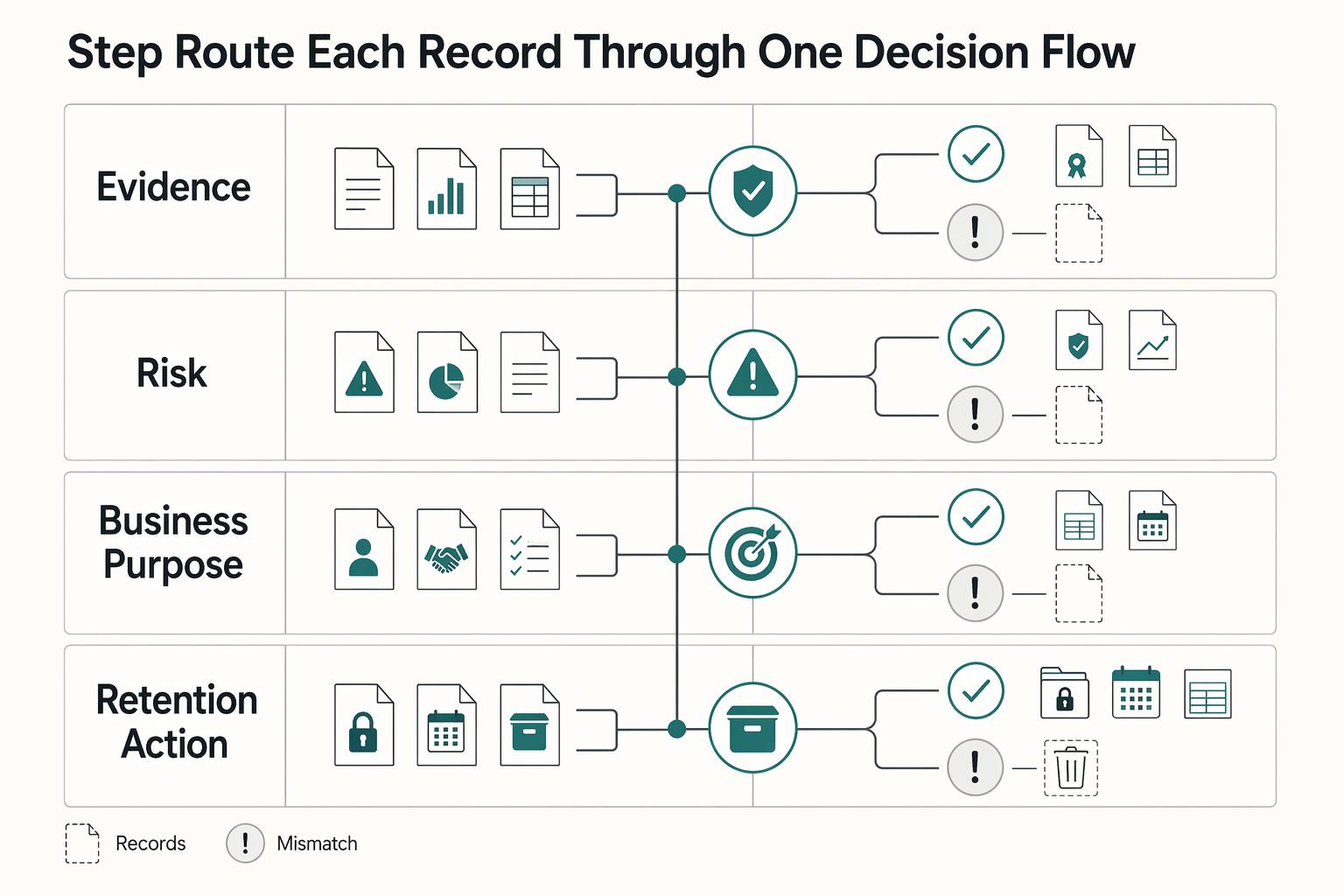
Once the official copy has a home, the next job is consistency. Classify each record the same way every time: document type, risk level, business purpose, then retention action. That gives you repeatable decisions instead of defaulting to "keep everything." Use the same four questions on the file in front of you.
Step 1. Route each record through one decision flow#
| Decision point | Prompt | Examples or next step |
|---|---|---|
| Document type | What is it? | contract, invoice, tax support, formation record, license, approval, payroll item, or draft |
| Risk level | What happens if you cannot produce it later? | If you are unsure, classify up, not down |
| Business purpose | Does it support something important? | filings, disputes, identity, operations, or nothing important |
| Retention action | What should happen next? | Keep while the retention rule is unresolved, archive, review on cadence, or dispose when no longer needed |
If you are unsure, classify up, not down. Keep records that prove decisions, approvals, obligations, payments, or delivery. Remove duplicate convenience copies that add no proof value.
Step 2. Use a minimum policy format you can maintain#
A short policy you actually maintain is better than a detailed one nobody follows. For each category, capture five fields: category owner, storage location, retention trigger, review cadence, disposal handoff. That is usually enough to assign accountability and make disposal decisions traceable.
| Category | What usually belongs here | Retention trigger | Retention period status | Default action |
|---|---|---|---|---|
| Tax and filing support | returns, invoices, receipts, bank support tied to reporting | filing date, payment date, or tax-year close (as applicable) | Confirm against current tax authority rules before finalizing | Archive, then review before disposal |
| Client and delivery records | signed contracts, SOWs, approved changes, acceptance/sign-off, final invoices | contract end, final delivery, or final payment | Confirm against the contract, claim window, and governing law before finalizing | Archive, then dispose only after review |
| Core identity and authority records | formation papers, registrations, ownership records, licenses, insurance evidence | issuance, renewal, or superseded date | Confirm whether each item needs long-term retention before finalizing | Keep active or archive; verify whether any item needs long-term retention |
Use precise triggers you can verify from the record itself, for example, "final payment received," not vague labels like "end of relationship."
Step 3. Apply three defenses without keeping everything forever#
A practical way to manage retention is to use three defensible buckets: tax or authority support, client relationship proof, and core business identity. That framing helps you keep what matters without dragging along every draft and duplicate.
| Bucket | What to keep |
|---|---|
| Tax and authority support | What supports what you filed, paid, or reported |
| Client relationship proof | What shows agreement, change, delivery, acceptance, and payment |
| Core business identity | What proves legal identity, operating status, and authority to act for the business |
For the first two buckets, exclude redundant drafts, routine chatter, and duplicate downloads that do not add proof value. For core business identity, keep what proves legal identity, operating status, and authority to act for the business.
For cross-border matters, escalate early when requests involve supporting documents, time limits, or legal challenges to a tax claim. For labor authority, banking or compliance, or visa or licensing reviews, do not hard-code assumptions about required records or timelines. Verify against the jurisdiction and reviewer context, then document your rule.
Step 4. Verify retrieval before you trust the policy#
A category is only useful if you can retrieve records quickly. Test with metadata-based searches such as document type, location, classification, status, document ID, and external access. Review externally shared records with an external-access filter when your platform supports it.
Also account for indexing lag. Missing search results may reflect indexing delay rather than true absence, so confirm indexing status before disposal reviews. In Lucid specifically, Discovery is Enterprise-only. The guidance is to recheck after one day if results are missing right after an upgrade.
Final rule: do not retain data just because storage is cheap. Keeping unnecessary data can increase cost and operational drag. Keep what proves, protects, or explains, and route jurisdiction-specific edge cases to counsel.
If you want a deeper dive, read Germany Freelance Visa: A Step-by-Step Application Guide. If your category map is ready but invoice records are inconsistent, use the free invoice generator to standardize what you store before locking retention windows.
Pillar 3: Secure & Sunset Your Data#
When a record's retention period ends, the default should be controlled disposal, not passive storage. Over-retention creates risk in three ways: it can increase exposure to unauthorized access, add more ESI to review and produce in discovery, and keep sensitive client data with no current purpose.
This is not just housekeeping. It is part of compliance and risk control. Under the UK GDPR storage limitation principle, personal data should not be kept longer than needed. The ICO warns that without planned disposal, information may be retained for too long. In U.S. discovery, FRCP Rules 26 and 34 can require production of designated documents and ESI under your control, so over-retention can increase review burden.
Step 1. Identify records eligible for disposal#
Only build a disposal list from records whose retention trigger has clearly passed. Use the trigger defined in Pillar 2 and your retention schedule. Verify it from the record before queuing deletion.
For each category, spot-check that the file is complete, the trigger date is documented, and no one has reclassified it for a longer period. If you use automated purge rules, confirm the built-in retention period matches your schedule before enabling it.
Step 2. Confirm no hold or other keep obligation applies#
Before you delete anything, confirm there is no reason it must stay. Pause disposal when litigation is anticipated or another legal duty requires retention. Preservation duties can arise when litigation is anticipated, not only after a lawsuit is filed, and FRCP 37(e) examines whether reasonable preservation steps were taken. If retention rules conflict across jurisdictions, pause disposal for that category and escalate instead of guessing. Use this trigger-and-response checklist:
- Trigger: a dispute is serious enough that litigation is reasonably anticipated, or you receive a demand, preservation request, or advice to preserve relevant material.
- Response: suspend deletion for affected records, custodians, folders, mailboxes, and devices.
- Verify: record who issued the hold, what categories are covered, the start date, and who acknowledged it.
- Escalate: for deeper procedure, follow your hold protocol or see What is a 'Legal Hold' and When Do You Need to Issue One?.
Step 3. Approve method, execute disposal, and capture evidence#
Deletion method matters. A standard delete is not the same as sanitization. NIST SP 800-88r2, announced on September 26, 2025, distinguishes methods such as Clear, Purge, and Destroy. Current guidance points to an approved standard or organizationally approved method for tool selection.
| Disposal method | When to use it | What it actually does | Verification and evidence | Main caution |
|---|---|---|---|---|
| Standard delete | Low-risk housekeeping inside a managed repository when sanitization is not required | Removes normal access to the file, but data may still be recoverable | Confirm retention expired and no hold applies; log category, date, and approver | Not equivalent to secure destruction |
| Secure wipe or erasure | Expired digital files or media with sensitive client or personal data | Applies sanitization so recovery is infeasible at the intended effort level | Policy-approved tool to be confirmed; keep asset ID, operator, date, and execution log | Method must match the media and your approved standard |
| Certified destruction | Paper archives, retired drives, or bulk media handled internally or by a vendor | Physical destruction or contracted destruction with supporting evidence | Policy-approved tool or approved vendor to be confirmed; keep manifest and certificate if provided | A certificate can support auditability, but is not automatically required everywhere |
If you handle consumer report information, U.S. disposal rules require reasonable measures so information cannot practicably be read or reconstructed. If a vendor performs destruction, monitor compliance with the contract.
Step 4. Run disposal as recurring governance#
Controlled disposal only works if it happens on a schedule and leaves evidence behind. Treat it as a recurring control with assigned ownership, not a one-time cleanup. For each category, require logged approval before deletion. Execute the approved method, then keep a deletion log with category, retention rule, hold-check result, approver, method, date, operator, and any vendor evidence.
At each scheduled review, retain evidence that the process actually ran: updated schedule, hold register, deletion log samples, and documented exceptions. If expired records were missed, treat that as an incident, fix the cause, and record corrective action so you can demonstrate accountability.
You might also find this useful: How to Create a Communication Policy for a Remote Team.
Conclusion: Your Records Are Your Legacy - and Your Shield#
Run your document retention policy as a lifecycle control: keep the official copy, review it against a schedule, and destroy records only after the required checks are cleared. That practical stance helps you respond cleanly in audits and records reviews without rebuilding your history under pressure.
The three pillars stay the same. Centralize records so the official copy is easy to find. Classify records so each category has a clear trigger and retention period. Dispose in a controlled way so records are destroyed only after schedule conditions are met and no audit prerequisite or suspension is still active.
Use this quick test: can you retrieve the right file fast, explain why it is retained, and show why another file was eligible for destruction? If not, tighten the system. A useful benchmark from Oregon public-records practice is process discipline: destruction follows the scheduled retention terms, prior-audit requirements, and any active suspension order. The schedule itself is not universal for private businesses, but the control logic is worth adopting. What to do next:
- Centralize official copies. Choose one primary repository and confirm you can retrieve key records quickly.
- Classify by trigger and period. Define retention in plain language for each record category, including superseded and obsolete records.
- Dispose with control evidence. Before destruction, confirm schedule conditions are met, audit prerequisites are clear, and no suspension is active; document what was destroyed and when.
- Make suspension-readiness explicit. Assign who can pause destruction and where that decision is recorded.
Keep this as a living system: review and update your policy after material business changes, new jurisdictions, tool changes, or regulatory updates.
For a step-by-step walkthrough, see How to Create a Flexible Work Hours Policy.
If you want collection, payout visibility, and traceable records in one workflow, review Gruv for freelancers and confirm market coverage for your setup.
Frequently Asked Questions
What is a document retention policy for a solo business?
Your policy should tell you what to keep, where the official copy lives, what starts retention, how long to keep it, and when deletion must stop. In practice, that means a records schedule with clear disposition instructions, not just folders. A quick check is whether you can explain any file's category, trigger, owner, and destruction rule in under a minute.
How long should you keep invoices and contracts?
Do not rely on one generic retention window for all records. Keep invoices, contracts, statements of work, amendments, payment records, and closeout emails for the period required by your tax authority, contract terms, and any non-tax obligation (for example, insurance or creditor requirements). Before finalizing your schedule, confirm the applicable retention period, contract governing-law clause, and filing jurisdiction.
What tax records should you keep if you live or work across borders?
Keep the evidence behind the positions on your return, not only the filed return. That can include filed returns and workpapers, foreign address and tax-home records, income records, foreign tax assessments and payment receipts, and per-country tracking for foreign tax credit work. If you use Form 2555 or Form 1116, keep the records that support the details reported there, and escalate to a licensed tax advisor when you have multi-country filings, treaty-rate issues, or missing core documentation.
Is there a simple template you can use?
Yes, but treat a template as a starting point, not proof of compliance. Include record category, examples, official copy location, owner, trigger event, retention period, legal or business basis, hold status, and disposal method. Test it first on tax records and client contracts to make sure the triggers and rules are usable.
What is the difference between records management, data retention, and a legal hold?
These terms are related, but they do different jobs. Records management covers the full lifecycle of records, data retention sets the keep period, and a legal hold pauses scheduled destruction when litigation is pending or reasonably anticipated. | Term | Purpose | Typical trigger | What you should do | |---|---|---|---| | Records management | Control records across their full lifecycle | A record is created, received, used, stored, or disposed | Classify it, assign ownership, store the official copy, and document disposal | | Data retention | Decide how long information must be kept | A legal, tax, regulatory, or business need to keep it | Set a trigger-based retention rule and review it periodically | | Legal hold | Preserve potentially relevant information for disputes | Litigation is pending or reasonably anticipated | Pause deletion, notify custodians, preserve relevant files, and log the hold | For the hold process in detail, read What is a 'Legal Hold' and When Do You Need to Issue One?.
How should you store and protect retained records?
Use layered controls, because cloud storage alone is not enough. Keep digital records with reasonable administrative, technical, and physical safeguards, plus controls that preserve integrity, accuracy, reliability, and readable reproduction; keep physical originals with limited access. When records reach disposal, destroy paper and erase or destroy electronic media so data cannot be practicably read or reconstructed.
Try a related tool
Researched and edited by the Gruv editorial team. Gruv builds cross-border billing, payouts, and finance-operations software for global businesses.
Sources
- archives.gov/records-mgmt/bulletins/2015/2015-04-appendix...trusted
- archives.gov/files/preservation/formats/pdf/naming-and-or...trusted
- cisa.gov/audiences/small-and-medium-businesses/secure...trusted
- cisa.gov/sites/default/files/publications/data_backup...trusted
- csrc.nist.gov/glossary/term/least_privilegetrusted
- desitsupport4u.des.wa.gov/hc/en-us/articles/15311199652375-File-Naming...trusted
- ecfr.gov/current/title-16/chapter-I/subchapter-F/part...trusted
- fjc.gov/publications/amendments-federal-rules-practi...trusted
Educational content only. Not legal, tax, or financial advice.
Related Posts

Germany Freelance Visa Application Path for Freiberufler and Gewerbe
Choose your track before you collect documents. That first decision determines what your file needs to prove and which label should appear everywhere: `Freiberufler` for liberal-profession services, or `Selbständiger/Gewerbetreibender` for business and trade activity.
Canada Digital Nomad Visa Planning for Visitor Status and Work Permits
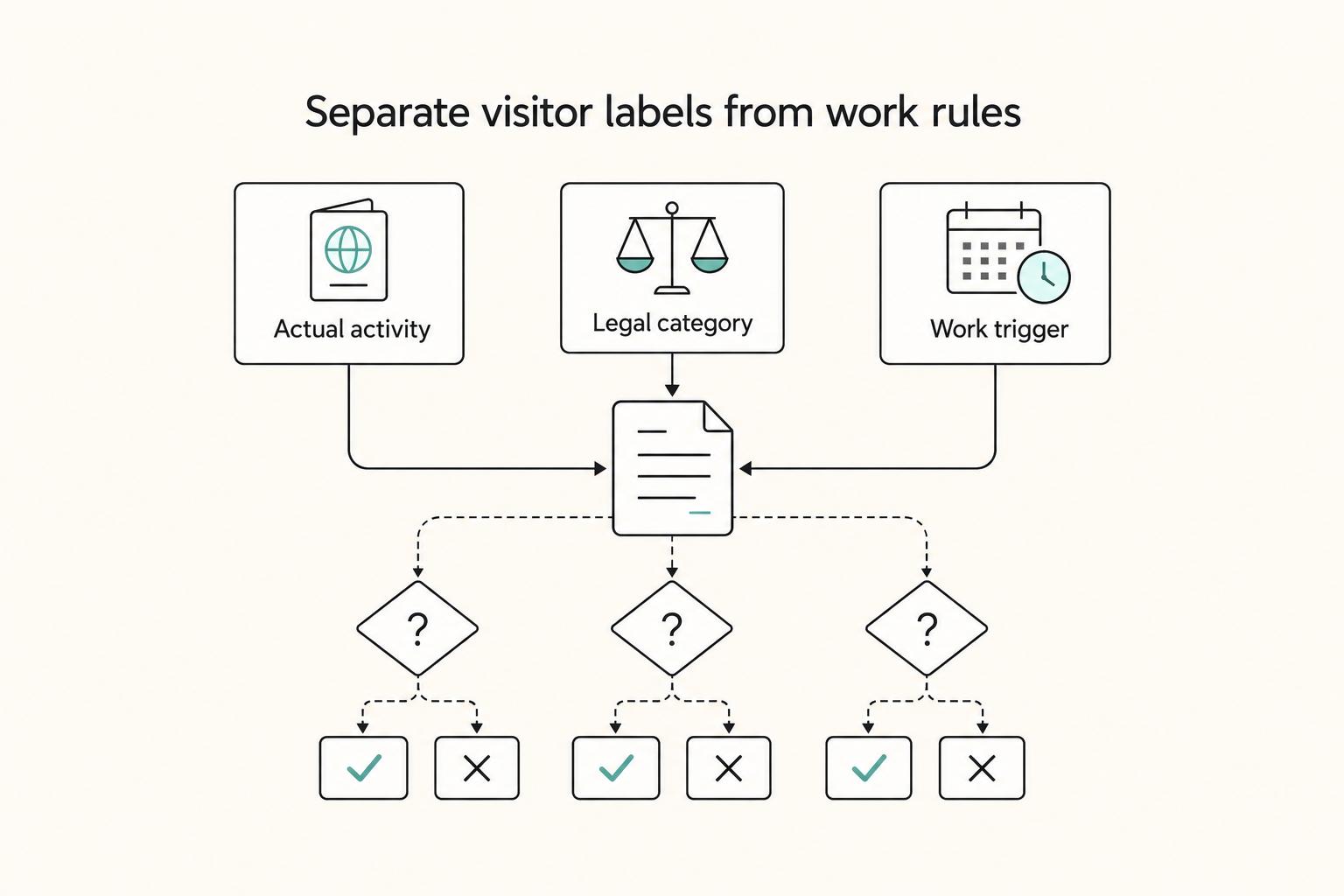
The phrase `canada digital nomad visa` is useful for search, but misleading if you treat it like a legal category. It is shorthand for existing Canadian status options, mainly visitor status and work permit rules, not a standalone visa stream with its own fixed process. That difference is not just technical. It changes how you should plan the trip, describe your purpose at entry, and organize your records before you leave.
What Is a Legal Hold and When Should You Issue One?
A legal hold works best when the process is defensible: spot the trigger early, pause ordinary deletion, and document what was preserved and by whom.