
Quick Answer
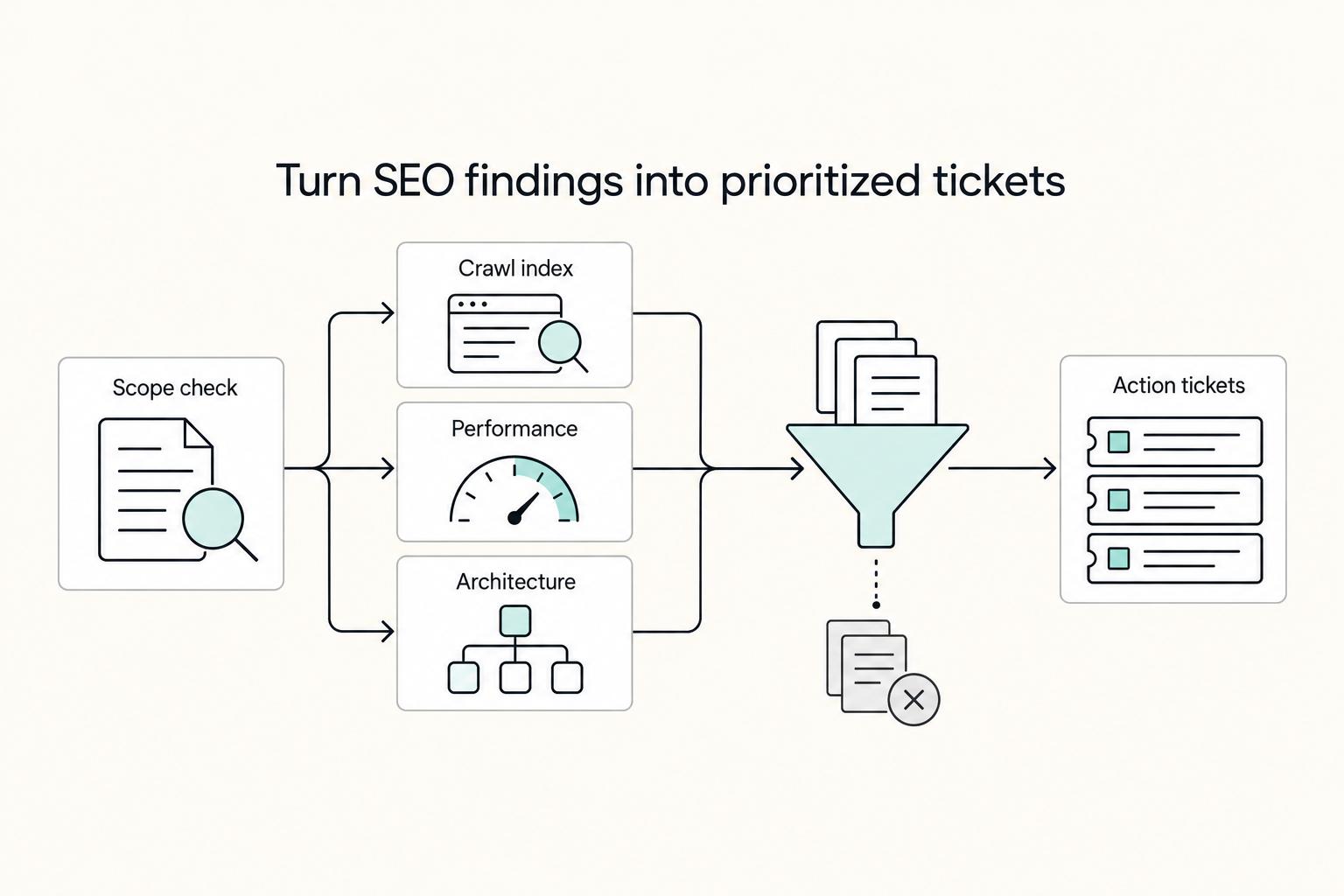
Start by locking scope and access, then verify crawl and index health before anything else. Use Google Search Console with one crawler such as Screaming Frog or Semrush Site Audit, and treat mismatches between tools as priority clues. From there, move to performance and architecture checks, then deliver recommendations with owner, dependency, and a verification step so the client can approve and implement without guesswork.
Start Here and Define What This Audit Is#
Step 1: Frame the audit as infrastructure risk review, not content editing. A technical SEO audit checks whether search engines can crawl, index, and render the site you already have. The focus is the crawl, index, and render path, along with conditions like site speed and mobile-friendliness. It is not a rewrite of service pages or a pass on blog tone.
That distinction matters because content work may not compound if the crawl, index, and render setup is broken. If important URLs cannot be crawled or indexed, or key pages are too slow to load well on mobile, better copy will not fix the bottleneck. Set that expectation in the first conversation so the client understands they are buying risk reduction in the site's infrastructure, not a messaging refresh.
Expected outcome: you and the client agree that the audit will focus on how the crawler and indexing systems interact with the site's technical setup to affect search visibility.
Step 2: Separate technical audit work from an on-page SEO audit. Clients often lump these together, so draw the line early. A technical audit covers crawlability, indexing, site speed, mobile-friendliness, and related technical conditions. An on-page audit is broader and more content-visible, often focused on posts, keywords, and other page-level content elements.
The practical rule is simple. If the recommendation requires changing technical conditions that affect crawl, index, or render behavior, it is probably technical. If it requires rewriting copy, changing keyword targeting, or expanding topical coverage, it belongs in on-page or content strategy. This is worth stating plainly on client calls because scope drift usually starts when "just fix SEO" quietly becomes "rewrite half the site."
Verification checkpoint: write one sentence in the proposal that names both tracks separately. If the client cannot repeat the difference back to you, the scope is still too fuzzy.
Step 3: Define the deliverable and the boundaries before you audit anything. Promise a client-ready action plan, not a pile of findings. The output should show priority, owner, recommended fix, and how each fix will be verified after implementation. The goal is an audit that can be repeated and operationalized, not a one-off report artifact.
A simple scope note keeps this clean:
- In scope: crawlability, indexing, technical signals, site performance checks, mobile issues, architecture risks
- Out of scope unless added: copy rewrites, keyword mapping, new content strategy, brand messaging, full UX redesign
Put those boundaries in the proposal, kickoff notes, or statement of work. When a client later asks for title tag rewrites, you can say "happy to add that, but it sits outside this engagement" without sounding evasive. That one document prevents the most common failure mode: a deep technical review getting judged as if it were a content strategy project. Related: How to Conduct an SEO Audit of Your Freelance Website.
Set Scope and Gather Access Before You Touch a Tool#
Do not run a full audit until scope and access are complete, because missing context or access turns technical findings into guesswork.
| Item | Action | Grounded detail |
|---|---|---|
| Site setup | Lock scope in writing | State what site setup you are auditing. |
| Templates that matter most to the business | Lock scope in writing | Define which templates matter most. |
| Markets | Lock scope in writing | State which markets are in scope. |
| International SEO or multilingual variants | State explicitly | If included, state that explicitly. If they are out of scope, state that too. |
| Google Search Console access | Confirm before kickoff | Part of the minimum access stack. |
| Analytics read access | Confirm before kickoff | Part of the minimum access stack. |
| CMS access or a named CMS/dev contact | Confirm before kickoff | Part of the minimum access stack. |
| One crawler | Confirm before kickoff | Screaming Frog, Semrush Site Audit, or Moz Pro Site Crawl. |
Start by locking scope in writing: what site setup you are auditing, which templates matter most to the business, and which markets are in scope. If international SEO or multilingual variants are included, state that explicitly. If they are out of scope, state that too.
Then confirm the minimum access stack before kickoff:
- Google Search Console access
- Analytics read access
- CMS access or a named CMS/dev contact
- One crawler (Screaming Frog, Semrush Site Audit, or Moz Pro Site Crawl)
Before any fixes, create a small evidence pack with baseline screenshots, known incidents, release notes, and the current issue list. This gives you a clear before-state for later validation.
If access is incomplete, run discovery only and label recommendations as provisional. Use multiple tools to validate important issues, since one platform will not show every diagnostic area. You might also find this useful: The Best Online Courses for Freelancers.
Choose Your Tool Stack Without Overcomplicating It#
Step 1: Start with a focused stack, not overlapping tools. Your stack only earns its keep if it helps you measure, diagnose, and execute faster. A small two- or three-tool setup is often enough: Search Console for platform signals, one crawler for site-level evidence, and your analytics source if you already have access.
If you need hands-on URL investigation, Screaming Frog is a common choice for technical audits. Semrush and Google Search Console are also commonly used in site-audit stacks. The real decision rule is simple: choose the tools that match the workflow gap you need to close this week, not the stack that looks most complete on paper.
Step 2: Use Google Search Console for triage, then add crawler data when needed. Search Console can surface high-level issues and trend signals. When the question requires deeper technical diagnosis, crawler data helps investigate crawl issues and build a fuller audit view.
Verification is straightforward. Test your chosen setup against a short URL set that includes one healthy page, one known problem page, and one template variant. If the outputs do not reflect reality, fix scope or settings before you trust any summary report.
Step 3: Make sure your stack covers the full audit data set. A practical technical audit workflow should include crawl data, log files, and Core Web Vitals, not just one dashboard. This keeps your tooling aligned with SEO as an system for discoverability, not only a writing task.
Save exported URL samples and Search Console examples so your handoff stays concrete instead of purely descriptive.
Run Step 1 and Prove Crawl and Index Health#
Before you audit speed or structured data, confirm the foundation: important pages must be crawlable and indexable. If Search Console and your crawler disagree, treat that as a priority signal.
| Check | Review | Grounded note |
|---|---|---|
| Search Console vs crawler | Compare the platform view with crawl findings | If they disagree, treat that as a priority signal. |
| Index coverage and exclusions | Indexed URLs, excluded URLs, and representative pages from key templates or sections | Shows whether issues are isolated or pattern-level. |
| Robots rules | Robots directives | Blocked pages are a common technical cause of crawl and index problems. |
| Status/redirect behavior | Status codes and redirect behavior | Incorrect redirects are a common technical cause of crawl and index problems. |
| Canonical setup | Canonical tags | Canonical conflicts are a common technical cause of crawl and index problems. |
| Sitemap signals | Whether the sitemap supports the intended canonical, indexable URL set | Use as signal validation, not a standalone verdict. |
Step 1: Start in Google Search Console to see the platform view. Review index coverage and exclusions first so you can see whether issues are isolated or pattern-level. Pull a small sample set while you review: indexed URLs, excluded URLs, and representative pages from key templates or sections.
Step 2: Compare those findings with a crawl-based tool. Check the same areas for robots directives, status codes, canonical tags, and sitemap signals. You are not chasing perfect report parity; you are looking for contradictions that explain why important URLs are handled differently than expected.
Step 3: Prioritize blockers that affect visibility fastest. Validate robots rules, then status/redirect behavior, then canonical setup. Blocked pages, incorrect redirects, and canonical conflicts are common technical causes of crawl and index problems, and they are easy to miss in manual page checks.
Step 4: Use sitemap checks as signal validation, not a standalone verdict. Your sitemap should support the intended canonical, indexable URL set. When sitemap entries conflict with crawl/index signals, log it as evidence and resolve it with the underlying URL rules.
Step 5: Re-crawl a focused URL set after fixes, then confirm in Search Console. Re-test your small sample set first, verify the expected crawl/index signals, and then confirm Search Console is reflecting movement in the right direction. If mismatches remain, stay on crawl/index health before moving deeper into the audit. Need the full breakdown? Read How to Create a Brand Style Guide for a Client.
Run Step 2 and Remove Performance Bottlenecks That Block Results#
After crawl and index health are stable, prioritize fixes that improve both user performance and crawl efficiency before cosmetic technical cleanup.
| Issue | Validation | Priority cue |
|---|---|---|
| Core Web Vitals | Use Search Console, then compare by template and page group in your crawl or audit tool | Anchor on real-user impact and focus on repeated template-level issues. |
| Heavy JavaScript | Inspect the render path | Escalate ahead of minor markup warnings if critical templates depend on late-loading scripts. |
| Render-blocking CSS | Inspect the render path | Delays meaningful content. |
| Excessive HTTP requests | Inspect the render path | Delays meaningful content. |
| Weak browser cache policy | Review caching with a small template-based sample set | Check it together with redirects. |
| Redirect chains | Validate with key pages and legacy redirected URLs | Re-test after deployment and confirm fewer redirect hops. |
| Redirect loop | Validate with a small template-based sample set | Catch path-level issues that homepage checks miss. |
Start by lining up Core Web Vitals with lab and crawl data. Use Search Console to anchor on real-user impact, then compare by template and page group in your crawl or audit tool. Focus on repeated template-level issues, not one-off low-value URL noise.
Inspect the render path next: heavy JavaScript, render-blocking CSS, and excessive HTTP requests that delay meaningful content. If critical templates depend on late-loading scripts or third-party requests, escalate that ahead of minor markup warnings. Performance is not just aesthetic; cited Google research tied a mobile load-time increase from 1 to 7 seconds to a 113% increase in bounce probability.
Then review caching and redirects together. Check for weak browser cache policy, redirect chains, and any redirect loop. Validate with a small template-based sample set, including key pages and legacy redirected URLs, so you catch path-level issues that homepage checks miss.
Use a simple decision rule for prioritization: if one fix improves crawl efficiency and user performance at the same time, move it above cosmetic tasks. Re-test the affected templates after deployment and confirm cleaner render behavior, fewer redirect hops, and improving Search Console signals over time.
For a step-by-step walkthrough, see How to Price a Technical SEO Audit for an Enterprise Website.
Run Step 3 and Clean Site Architecture, Duplicates, and Technical Signals#
After performance issues are stabilized, focus Step 3 on site structure and technical signals so search engines can reach, understand, and index important pages reliably. Work at the template or section level first, not one URL at a time.
Audit internal links and navigation depth#
Start with priority pages in scope and confirm they are reachable through navigation paths and relevant contextual links. A page can be technically indexable but still weak if it is buried, lightly linked, or disconnected from related pages.
Validate with three inputs together: your crawl data, Search Console Pages report (indexed vs. excluded), and the priority URL list. If a key page appears deep in the crawl, has weak internal linking, or depends mainly on sitemap discovery, flag it as an architecture issue and document evidence (URL, depth, inlinks, and missing link sources).
Navigation supports discovery, but contextual linking supports topic relationships. If important pages lack internal context, prioritize that before low-impact cleanup tasks.
Cluster duplicate content by pattern#
Treat duplicate content as a pattern diagnosis, not a URL-by-URL cleanup. Group issues by template behavior, parameter patterns, or repeated generation rules so the root cause is clear.
Run diagnosis before fixes: compare indexed and excluded patterns in Search Console against crawl exports to confirm whether duplication is structural or isolated. If one repeatable pattern drives the issue, recommend one rule-level fix with representative examples, then verify with a focused recrawl of that cluster.
Validate structured data and scope international checks carefully#
If structured data exists, verify that it is valid, consistent, and still applied on the right templates. The goal here is not to audit every schema type, but to catch malformed, missing, or contradictory markup that can reduce search understanding.
Use one sample URL per major template and capture practical proof: rendered/source markup plus the specific error or omission. Template or CMS updates often create uneven markup quality across similar pages, so test for consistency.
Only include international or multilingual checks when that scope is active for the client. If the business serves multiple languages or regions, include the check; if not, mark it out of scope and keep the audit focused. For related workflow context, see A Guide to Local SEO for Freelancers.
Prioritize What Gets Fixed Now, Next, and Later#
Prioritize fixes by sequence, not volume: restore crawl/index stability first, schedule understanding/performance improvements second, and monitor lower-impact or low-confidence items last. If search engines cannot reliably find, crawl, or store priority pages, advanced enhancements should wait.
Score the issue, not the error count#
A long crawl export can make everything look urgent, but your ranking should come from four checks: business impact, implementation effort, dependency risk, and confidence of outcome.
Put business impact first. A structural issue on priority templates outweighs many minor issues on low-value pages. Treat non-200 responses on important URLs as high priority, especially 4xx or 5xx cases, because those pages may be skipped for rendering.
Confidence matters just as much as impact. If a finding appears in one tool but is not yet confirmed on representative URLs, treat it as provisional until verified.
For every urgent item, keep a compact proof set:
- affected template or section
- two to three example URLs
- where it was detected
- exact condition to change
Place each fix in one of three lanes#
Use a three-lane plan so clients can approve quickly.
| Lane | Use this lane when | Owner and cost signal | Expected SEO effect |
|---|---|---|---|
| Immediate blockers | Crawl, index, or rendering stability is affected on priority pages | Development owner; often medium to high depending on template reach | Restores discovery, crawlability, and indexability |
| Scheduled improvements | Stability is in place, but understanding or technical performance still lags | SEO + development; variable cost based on dependencies | Improves interpretation, efficiency, and site performance |
| Monitored backlog | Impact is limited, uncertain, or low-priority | SEO owner first; typically lower near-term cost | Keeps risk visible without slowing critical work |
If blockers and enhancements compete for the same slot, ship blockers first.
Write if-then rules and decision-ready recommendations#
Turn findings into rules clients can act on:
- If indexing blockers exist on priority URLs, pause advanced enhancements until crawl/index stability is restored.
- If a fix depends on a template or CMS release, mark that dependency explicitly before scheduling.
- If a finding is not verified beyond one tool view, move it to monitored backlog until confirmed.
- If a fix supports both crawl/index reliability and user-facing technical performance, prioritize it over cosmetic technical cleanup.
Then write each recommendation as an approval-ready decision: owner, cost signal, dependency, expected SEO effect, and verification step.
If you want a deeper dive, read How to Use SEO to Attract High-Quality Freelance Clients.
Deliver a Client Action Plan That Survives Real-World Handoffs#
Your ranked findings only create impact when they are translated into clear implementation decisions. The handoff should let leadership approve quickly and let implementers execute without guessing.
Convert each priority fix into a ticket-ready recommendation#
Make each approved issue a single, testable implementation note. Keep it practical:
- Affected area (template, section, or page type)
- Two or three representative URLs
- Exact condition to change
- Acceptance criteria for done
- A short rollback note if results regress
Keep recovery notes lightweight, not overengineered. The goal is simple: if a release causes a visible regression, the team knows what to revert first and what to re-check before closing the issue.
Split the deliverable into an executive summary and an appendix#
Use two layers so the document stays fast to approve and useful to ship.
| Part | Purpose | What to include |
|---|---|---|
| Executive summary | Show a clear path from effort to impact | outcome framing, affected area, owner, cost signal, dependency, first expected change |
| Implementation appendix | Support execution and verification | proof set, URL samples, edge cases, and the current technical baseline |
This keeps leadership focused on decisions while giving technical teams the detail they need.
Add recovery guidance for predictable failure modes#
Call out likely handoff failures up front so the team can respond quickly after release. Focus on common breakpoints such as partial deploys, conflicting canonical behavior, or regressions after later template updates.
For each failure mode, include three items: what to check first, what confirms the issue, and who owns follow-up. Keep the language operational so status can be reported in a repeatable way.
End with ownership and a re-audit trigger. Name who approves, who implements, who verifies, and who reports. Then tie re-audits to clear triggers (for example: major template or CMS changes, or repeated regressions), so this becomes an ongoing governance cadence rather than a one-time document.
We covered this in detail in A Guide to Airbnb SEO to Rank Higher in Search.
Wrap Up With a Copy and Paste Audit Checklist#
Use this at handoff: confirm scope, validate crawl/index first, then performance, then architecture, and finish with prioritized, ticket-ready actions.
- Reconfirm scope and access before you start.
Confirm brief, templates, markets, and tool access. Verify Google Search Console access and define whether this is full-site or partial-scope. If access is partial, label findings as provisional.
- Run crawl and index checks first.
Compare crawler output (for example, Screaming Frog or Semrush Site Audit) with Search Console, then review status codes, robots directives, canonicals, sitemap inclusion, and important orphan URLs. Confirm that important pages are crawlable and intended for indexing, since crawlable does not always mean indexable.
- Check performance next, before cleanup work.
Review speed and rendering issues, including major Core Web Vitals and heavy patterns affecting mobile performance. One cited benchmark reports that 53% of mobile visitors leave when load time passes 3 seconds, so treat performance as a real prioritization factor rather than cosmetic polish.
- Review architecture, internal links, and duplication patterns.
Look for deep important pages, weak internal paths, and duplicate clusters from templates, parameters, or canonical inconsistency. Report pattern-level findings with sample URLs and affected templates instead of repeating near-identical URL-by-URL notes.
- Prioritize by impact, effort, and dependencies.
Group findings into immediate blockers, scheduled improvements, and monitored backlog. If crawl/index blockers exist, handle those before lower-impact enhancements.
- Deliver ticket-ready recommendations, then verify outcomes.
For each recommendation, include issue, affected area, sample URLs, expected change, owner, and one verification step. After implementation, re-crawl the affected URLs and check the live state in Google Search Console.
Related reading: On-Page SEO for Writers: Attract Better-Fit Client Leads.
Frequently Asked Questions
What is the difference between a technical SEO audit and an on-page SEO audit?
A technical SEO audit checks whether Google can crawl, index, and rank the pages that matter. An on-page SEO audit looks at page-level elements like keywords, title tags, and content quality. If the site’s technical foundation is weak, content and link work will not perform as cleanly as they should.
What tools do I need to run a credible technical SEO audit for a client?
Start with Google Search Console and one crawl-based tool. That is the practical minimum for a credible client audit. Search Console shows what Google is reporting, while a crawler gives you a second view of technical patterns across the site. Compare important URLs in both tools and flag mismatches before you write recommendations.
What are the minimum sections every technical SEO audit should include?
At minimum, include crawlability, indexability, and technical issues that can affect ranking, plus a prioritized fix list. Keep the scope tied to whether search engines can crawl, index, and rank the pages that matter. If a section does not end in a decision or next action, it is probably still too vague.
What should I fix first when a site has many technical issues?
Fix anything that stops important pages from being crawled, indexed, or ranked before you spend time on lower-impact cleanup. After the fix, re-check a focused URL set in Search Console and your crawler instead of assuming the deploy worked.
How long does a technical SEO audit usually take for a client site?
There is no honest fixed number you can give before you know the scope. The timeline depends on scope and how deep you need to validate patterns before making recommendations. If you have not had time to validate patterns on real URLs and turn them into handoff-ready recommendations, the audit is not done yet.
Can I run a useful audit without paid tools?
Yes, you can still do useful work without paid software. Search Console plus a crawl-based tool is a practical baseline. If your tooling only covers part of the site, label findings as provisional and avoid pretending you validated every template.
How do I present technical findings so clients actually approve and implement them?
Do not present a pile of issues. Present a short executive summary for decision-makers and an appendix with proof, sample URLs, acceptance criteria, and one rollback note per recommendation. The fastest path to approval is to show the affected area, the business risk, the owner, and the exact condition that needs to change.
Try a related tool
Researched and edited by the Gruv editorial team. Gruv builds cross-border billing, payouts, and finance-operations software for global businesses.
Sources
Includes 8 external sources outside the trusted-domain allowlist.
- anhco.org/blog/seo-tools-for-coaching-websites-the-ult...external
- avatarwebsitedesign.com/uncategorized/technical-seo-checklistexternal
- bluetree.digital/best-seo-toolsexternal
- convey911.com/blog/online-website-translateexternal
- gracker.ai/seo-101/technical-seo-audit-prioritizationexternal
- gryffin.com/blog/ai-technical-seo-auditsexternal
- hatsoffdigital.com/blogs/search-engine-optimization/a-complete-...external
- infinitemediaresources.com/seo-strategy/toolsexternal
Educational content only. Not legal, tax, or financial advice.
Related Posts

How to Use SEO to Attract High-Quality Freelance Clients
**Build your *seo for freelancers* around qualified leads, not raw traffic: tighten who you target, what you prove, and how you gate inquiries.** You're the CEO of a business-of-one. Your marketing job isn't "get more attention." It's "get the right work, predictably, without turning your calendar into a sorting machine."

How to Conduct an SEO Audit of Your Freelance Website
**Run a fundamentals-first SEO audit to prove what Google can access, understand, and rank. Then capture what you find in a way you can actually use.** If you run solo, you're the CEO of a business-of-one, and your website is one of your core operating assets. A site can look fine and still underperform. You need a workflow that forces reality. Not opinions, not tool scores, not vibes. Measurable checkpoints.

The Best Online Courses for Freelancers Building a Stronger Business
If you are already earning well from your craft, your next course should reduce business risk, not teach beginner tactics. The useful filter is simple: map the exposures that can actually hurt your business, then buy learning that closes those gaps faster than you could on your own.