
Quick Answer
To build an email list as a freelancer, create one clear opt-in path, send a short onboarding sequence, and commit to a weekly newsletter you can sustain in about 60 minutes. Use social platforms to drive discovery and email for follow-through and conversion. Keep operations clean with consent tracking, unsubscribe testing, simple tagging, and limited admin access so your system stays reliable as you grow.
You don't need "more followers" - you need an owned pipeline you can run in 60 minutes/week#
As the CEO of your business-of-one, you need a repeatable system you can actually run.
If you rely on followers alone, your lead generation depends on variables you do not fully control. Feeds change. Attention fluctuates. But your clients still need a consistent way to find you, understand your value, and take the next step. Email list building gives you a direct, permission-based channel you can treat like infrastructure, not a mood.
This guide starts from zero and treats list building as an operations problem, not a creativity contest. The goal is one simple capture path, one simple onboarding path, and one simple recurring send. Keep it boring. Boring scales.
Definition of done (what you're building, not what you're "hoping for")#
Use this as your operator checklist before you touch ConvertKit or Mailchimp. If you cannot point to these artifacts, you do not have a system yet:
- One opt-in flow: a single landing page and form that turns a warm visitor into a subscriber (no scattered links, no five different CTAs).
- A first-month email plan: one short onboarding sequence plus a repeatable weekly newsletter format you can sustain during heavy client delivery.
- Consent hygiene you can audit: you only email people who asked for it, and you keep your records clean enough to answer, "Where did this contact come from?"
- A KPI view that avoids vanity metrics: you track actions that map to revenue, not ego.
Use this mental model to keep you honest:
| Channel | Best use | What you can measure without fooling yourself |
|---|---|---|
| LinkedIn / Instagram | Discovery and top-of-funnel attention | Clicks to your opt-in page, DMs that turn into signups |
| Email marketing | Follow-through and conversion | Replies, clicks to your service page, consult bookings, unsubscribes |
The "keep it small" operating principle (a safe default)#
You do not need a massive content engine. You need a small, repeatable block you protect. In a typical week, run lean like this:
| Action | Detail |
|---|---|
| Write one email | Teach one thing and ask for one action: reply, click, or book |
| Review replies | Tag high-intent leads in your email tool |
| Log two numbers | Track new subscribers and outcomes (replies or bookings) in a simple sheet |
Hypothetical scenario: you post a short LinkedIn insight from a client project (sanitized). You link to one opt-in page. Then your onboarding email delivers the promised checklist and invites the reader to reply with their situation. One reply can beat a thousand impressions.
Keep your access and admin clean from day one. If you need a starting point, use The Best Password Managers for Freelancers and Teams to lock down your email tools like the business infrastructure they are.
Prep work (30-45 minutes): set your "safe default" before you touch any tools#
Before you adopt any system, set a baseline for time, cost, and review responsibility so you can tell if it's actually helping.
This is an ops habit more than an email task. If you're a Dutch freelancer (one of the more than 1.2 million ZZP'ers), it's the difference between "we tried a tool" and "we changed the way the business runs."
Before you start: If your calendar already feels tight, keep this lean. You can refine later. The point is to set a default you can live with.
Step 1: Write down your current time baseline#
Get specific about what "normal" looks like today for the work you're trying to simplify. One source reports bookkeeping time often clusters around 4-6 hours per week when things are calm, and can spike at quarter-end. Over a month, that's easily 16-24 hours.
Verification: You can point to a rough weekly and monthly number that feels true for you, even if it fluctuates.
Step 2: Put a cost baseline on the status quo#
Decide what you're currently paying, or what you're willing to pay, to reduce that time and stress.
A source says traditional accountants for Dutch freelancers are often seen with monthly retainers in the €150-€600 range, depending on complexity and services. The same source states its Fiscal Agent pricing starts at €99/month.
Verification: You know your "this is too much" number before you start comparing tools or services.
Step 3: Decide what still needs human review#
Automation can help, but you still need a plan for exceptions. A source reports 95%+ categorisation accuracy on real Dutch bank transactions, with edge cases flagged for review.
Verification: You've decided who checks the flagged items, and you're not assuming "accurate" means "hands-off forever."
Step 4: Define success in plain language#
Keep it practical: what would "working" look like for you? Less time spent per week, fewer quarter-end surprises, or clearer visibility into where money is going.
Verification: After a short trial, you should be able to tell whether the tool is moving the needle on your baseline.
Step 5: Set an access baseline before you invite anyone in#
Decide who controls logins and permissions, and how access changes when responsibilities change.
Verification: Access is intentional, not accidental.
Email list vs social media: what should a freelancer prioritize first?#
Prioritize social for discovery, then prioritize your email list for follow-through you control.
This split keeps you visible without turning your week into constant posting.
Step 1: Assign each channel a job (and stop expecting one tool to do everything)#
Treat social platforms as distribution. Treat email marketing as the follow-through layer where you build trust and actually reach the audience you've built.
A practical way to frame it: 6 Figure Creative describes email marketing as a way to "stay top-of-mind, build trust, and actually reach the audience you've built." It specifically calls out "building trust in a one-to-many setting." That is the job your list does for a freelance business.
Use this table as a decision rule:
| Channel | Primary job | What you control | "Failure mode" to plan for |
|---|---|---|---|
| Social | Discovery and credibility | Content, positioning, CTA placement | Distribution can shift (including "pay to play") |
| Follow-through | Audience access, cadence | Your consistency and consent hygiene |
Step 2: Make the list portable on purpose (so you never feel trapped)#
Build your list like an operator. Keep it organized and portable so you're not dependent on any one platform for access to your audience. Plan for flexibility even if everything works today.
Your portability checklist:
- Use one primary list (not five disconnected forms across random pages).
- Keep tags/segments simple so you can migrate cleanly later.
- Store your opt-in page URL somewhere you can update fast if needed.
Hypothetical scenario: if a platform's reach shifts, you do not panic-post. You redirect effort to another steady surface and keep email as your follow-through layer.
Step 3: Pick one capture moment per platform (boring beats clever)
Install one consistent CTA per platform so your lead gen data stays readable:
- LinkedIn: every post ends with the same CTA to the same opt-in page.
- YouTube: every description uses the same link (top line, same wording).
- Twitter/Instagram: one consistent "start here" link, not a rotating menu.
Practical check: if your CTA changes weekly, your tracking turns to noise. Then you will blame email marketing instead of your measurement.
Step 4: Run the low-time operator rule (consistency test, not a promise)
Choose one reliable inflow source plus one cadence you can sustain and commit to it.
Verification: ask yourself, "Can I maintain this cadence for 12 weeks without resentment?" If not, reduce scope first: fewer platforms, simpler email, less friction.
Which tool should you pick first - Mailchimp or ConvertKit?#
Pick the tool you will actually run weekly, because consistency beats "perfect features."
Treat this as an operations decision, not a personality test.
Step 1: Choose with a simple decision rule (then stop shopping)#
Start with the baseline: EmailTooltester notes that both platforms "offer very similar features (landing pages, contact tagging, and automations)." Your first pick should optimize for workflow friction, not a fantasy feature list.
Use this operator table to decide:
| If you prioritize... | Choose Mailchimp | Choose ConvertKit (Kit) |
|---|---|---|
| More features overall | Yes. EmailTooltester says Mailchimp "takes the lead" on number of features | Not the main emphasis in that summary |
| A creator-friendly newsletter workflow | Maybe, depending on your preferences | Yes. EmailTooltester says "Kit shines brighter as a newsletter tool" |
| A well-known default | EmailTooltester describes it as "the world's most popular email marketing platform" | Not positioned that way |
| A generous free tier (third-party summary) | EmailTooltester cites 250 subscribers and 500 emails | EmailTooltester cites up to 10,000 subscribers and unlimited emails |
Notes: Kit is "formerly called ConvertKit." Also, do not treat any plan limits or pricing examples as current or official. EmailTooltester gives examples like $75/month for 5,000 contacts (Mailchimp) and $89 (Kit), but pricing changes.
Practical check (use this as a test, not a promise): In your first working session, try to create (1) a form, (2) a landing page, (3) a simple automation, and (4) a broadcast draft. If the UI keeps blocking you or you feel lost, you just found your answer.
Step 2: Install non-negotiables, plan migrations, and prevent common failures#
You can run professional list ops in either ConvertKit or Mailchimp by locking these "no-regrets" defaults:
| Item | Verify | Note |
|---|---|---|
| Easy export | Confirm you can export subscribers | So you never feel trapped |
| Unsubscribe handling | Test unsubscribe on your own address and confirm suppression | Clear unsubscribe handling |
| Automation logs | Make sure you can see what fired and why | Auditability |
| Tags | Keep tags simple | So you can migrate cleanly later |
| Permission settings | Limit admin access; tie your admin email to a Google account with strong recovery options; store recovery codes securely | Prevent permission mistakes |
Migration triggers (no panic-switching): Switch tools only when you can name one concrete gap: deeper automations, cleaner segmentation, or better reporting. Write that gap down before you migrate from Mailchimp to ConvertKit.
Failure modes to plan for now: deliverability dips, accidental re-sends, duplicate subscribers, and permission mistakes. Before your first broadcast, confirm your platform's resend rules and exactly how it handles suppression and unsubscribes.
Hypothetical scenario: you draft a broadcast, duplicate a segment, and almost resend to people who already opted out. If you already tested suppression behavior and permission settings, you catch it in preview instead of apologizing after the fact.
Build your lead magnet + opt-in flow (the "one afternoon" implementation)#
Build one outcome-aligned lead magnet and one opt-in path, then drive one repeatable traffic loop into it.
Keep it tight so list building does not turn into a side quest.
Before you start#
You need three inputs, nothing more:
- Your service outcome: what you help clients achieve or avoid.
- Your primary channel: pick the one you can show up on consistently.
- One next step: reply, book a call, request a quote, or view your service page.
Step 1: Choose a lead magnet that matches a real service outcome#
Skip the generic ebook. Choose an asset that previews how you think, because you want subscribers who value your approach, not just free stuff.
The Copywriter Club Podcast host talked with copywriter Meg Kendall about creating an "industry report" that "immediately communicates that they're the expert, an advisor clients can trust." That is the bar: credibility that connects to what you actually deliver.
Use one of these simple shapes:
| Lead magnet type | Best for | Example title |
|---|---|---|
| Checklist | Fast self assessment | "Pricing Checklist for [Your ICP] Projects" |
| Template | Standardizing inputs | "Client Intake Template (Copy/Paste)" |
| Worksheet | Preventing scope creep | "Scope Control Worksheet" |
| Agenda | Better sales calls | "Discovery Call Agenda + Questions" |
Operator test: If someone uses it and still feels confused about what you do, you picked the wrong asset.
Step 2: Build one clean opt-in path
Pick one primary capture method: a hosted landing page or an embedded form. Then connect it to one clear confirmation and one clear "you're in" message, either a thank you page or thank you email. You do not need five different opt-ins yet.
Verification checklist:
- Submit your own form using a real inbox you control.
- Confirm you see the confirmation and the thank you exactly once.
- Confirm your lead magnet delivery works (download link or email delivery).
Hypothetical scenario: you share your link and a prospect signs up. They get two conflicting emails. Fix that now, once, and you stop bleeding trust every week.
Step 3: Install one primary traffic loop (boring on purpose)
Run this loop until it feels automatic:
- Weekly post on your primary channel
- One consistent CTA linking to your opt-in
- Onboarding sequence
- Soft CTA to your core offer
After that works, repurpose to other channels. Do not multitask lead generation before your email system proves it can convert attention into conversations.
Step 4: Add one trust proof element (minimal, specific)
Add one of these to the landing page:
- A one line testimonial
- A short case snippet
- A 3 bullet "what you'll learn"
Practical check: your first two lines must answer who this is for and what problem it helps them solve. Clarity beats design tweaks.
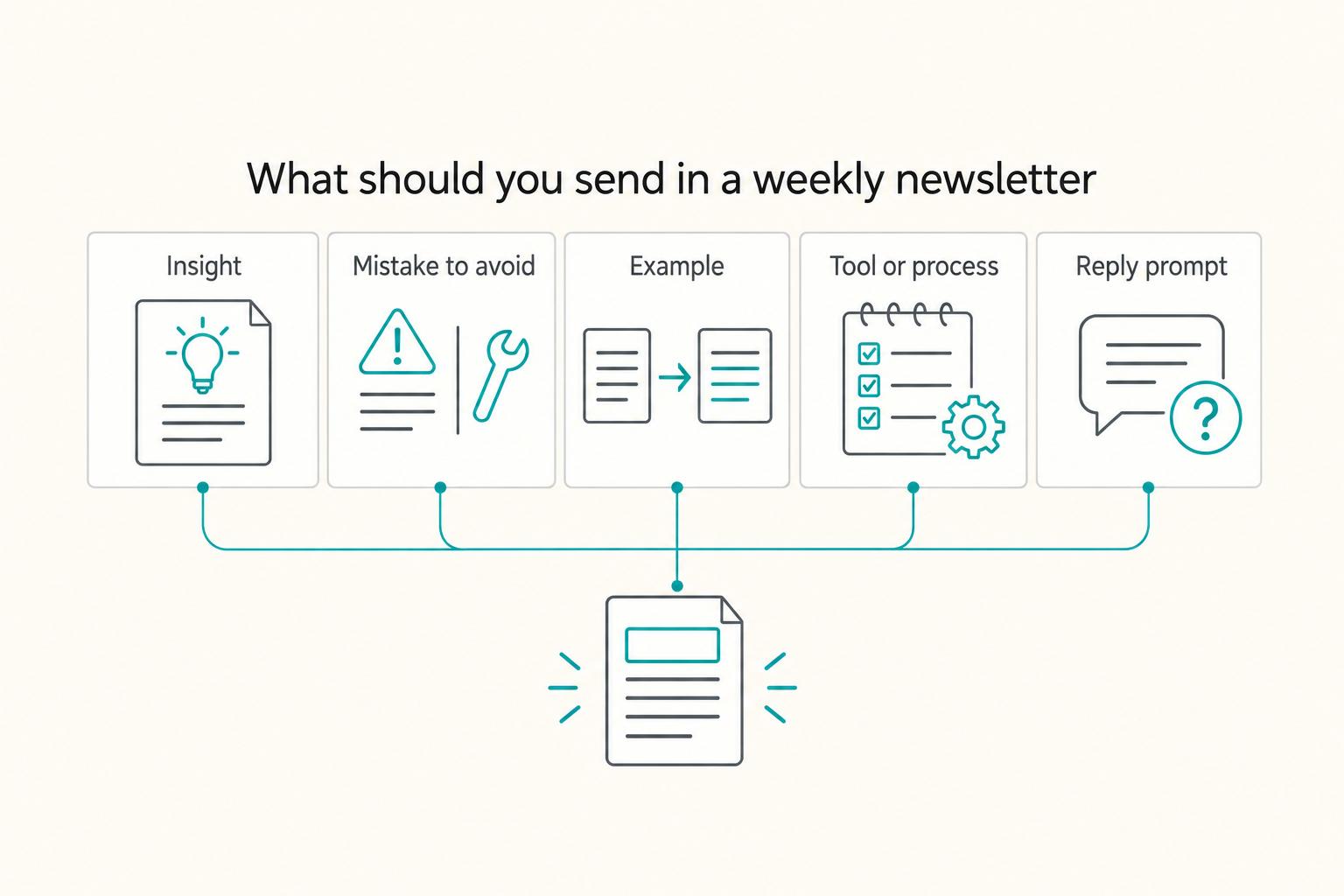
What should you send in a weekly newsletter when client work is busy?#
Send the smallest, most repeatable email that keeps marketing active, sets expectations, and invites replies.
This is how you avoid the feast-or-famine rollercoaster: you stop marketing because you're too busy, and then your client pipeline dries up.
Step 1: Set up a short welcome note (or small sequence)#
Write a brief welcome note, or a short sequence, that does a few simple jobs. You want momentum and clarity, not literary greatness.
At minimum, your welcome email should:
- Set expectations for what you'll send and why it's worth reading.
- Make it easy to engage (for example: invite a reply with a simple question).
- Point to a next step that fits your work, if it's relevant.
Practical check: keep each email to one primary call to action so the reader knows what to do next.
Step 2: Use a sustainable newsletter template (and a busy-week fallback)#
Email marketing can be a time-saving way to keep marketing yourself with minimum effort while you are busy. Build a simple format you can reuse.
Here's one repeatable content mix you can rotate through:
| Block | What to include | Where to pull it from |
|---|---|---|
| Insight | One thing you now believe about the work | Client delivery notes |
| Mistake to avoid | A common misstep and a fix | Comments and FAQs you keep seeing |
| Example | A simplified before/after or decision | Sanitized project moments |
| Tool or process | One tool, checklist, or SOP snippet | Your own systems |
| Reply prompt | One direct question | Current pipeline needs |
Cadence: pick a schedule you can actually sustain, and keep it consistent so people know what to expect.
Busy-week fallback: send a short "field note" from current work (sanitized). Capture these as bullets in a running Google Doc titled "Newsletter backlog," so you never start from a blank page.
Compliance-first list operations: consent hygiene, unsubscribe handling, and auditability#
Capture clean consent, make exits effortless, control access, and keep records you can explain under pressure.
Run your email list like infrastructure. Litmus defines email deliverability as whether your email reaches the inbox, not a promotions or spam folder. Mailbox providers have also tightened bulk-sender expectations around things like list hygiene and unsubscribe handling, so your operations need to be consistent and defensible.
Step 1: Standardize consent hygiene (the part competitors skip)#
Treat every subscriber as a record you may need to explain later. Do not add people "because you met them" at a conference, in a LinkedIn DM, or on a sales call.
Action steps:
- Choose an opt-in standard for your list (single opt-in or confirmed/double opt-in). Pick the safest default for your audience expectations and risk tolerance, then stay consistent.
- Capture opt-in context in your tool. Store the source (landing page, form, referral) and any tags that explain intent.
- Verification check: open a random subscriber profile in your email platform and answer: when did they opt in, and through what form/page? If you cannot answer quickly, fix your capture flow before you scale.
Hypothetical scenario: you meet a perfect-fit buyer. They hand you a card, and you feel tempted to "helpfully" add them. Instead, send them your opt-in link and let them choose.
Step 2: Treat unsubscribe like a policy gate (not a feature)#
Mailbox providers have tightened bulk-sender expectations around list hygiene and unsubscribe handling. Do not negotiate with exits.
Operational rules:
- Configure a clear unsubscribe path in every broadcast and sequence, then verify your exact setup.
- Never resubscribe someone manually without explicit permission from that person.
- Verification check: subscribe with your own address, send a test broadcast, unsubscribe, then confirm you're no longer sending to that address.
Step 3: Minimize data and lock access (auditability matters)
Collect only what you will actually use for segmentation or personalization, then control who can touch the system.
Use this operator checklist:
- Limit admin seats. Remove contractor access promptly when a project ends.
- Store recovery codes and credentials in a password manager. Use The Best Password Managers for Freelancers and Teams.
- Verification check: can you remove access without breaking automations, forms, or sending permissions?
| Practice | Safe default | Risky default |
|---|---|---|
| Consent | Track opt-in details (source and time) | Add contacts from memory |
| Unsubscribe | Test it end-to-end | Assume the tool "handles it" |
| Access | Role-based access mindset (RBAC) | Shared logins |
| Records | Simple audit trail notes | No documentation |
Step 4: Document retention and deletion routines (simple, defensible)
Mailchimp notes that experts recommend regular audits, and that audits help "identify opportunities for improvement" and optimize campaigns. Build a one-paragraph policy in Google Docs that states how you handle:
- Inactive subscribers (your review trigger and your action)
- Bounces (your cleanup action)
- Deletion requests (your execution steps)
Verification check: you can hand that paragraph to a contractor and they can follow it without guessing.
The 60-minute/week operating rhythm (plus a monthly health check that prevents surprises)#
Timebox list building into one weekly "run the system" block and one lightweight monthly review so you keep shipping, not tinkering. The whole point is boring, repeatable, and easy to audit.
Step 1: Run the weekly system block (in one sitting)#
Treat this like a standing ops block. You do it even when you do not feel inspired.
| Task | What to do | Output |
|---|---|---|
| Review replies and tag leads | Read every reply first; tag "Warm lead," "Past client," "Partner," or whatever matches your pipeline; reply fast to sales-adjacent questions; log the intent | Tagged leads and logged intent |
| Write and schedule the newsletter | Write for one outcome; end with one clear CTA: reply with a question, view your service page, or book a consult | One scheduled send |
| Update backlog and add one CTA to your next LinkedIn post | Pull a topic from replies, objections, or active client work (sanitized); publish one LinkedIn post that points to the same opt-in page | One LinkedIn post pointing to the same opt-in page |
Practical check: end the block with one scheduled send. If you finish with "draft saved," you left the job half-done.
Hypothetical scenario: you get a reply that says, "Do you do this for teams like mine?" Tag it "Lead," reply with a single qualifying question, and make next week's newsletter about that exact scenario.
Step 2: Track outcomes that tie to revenue (not vibes)#
Do not grade yourself on applause. Pick a small set of outcomes you can review consistently, and look at trends monthly, not hourly. The point is to see whether your emails are starting real conversations and whether those conversations are turning into paid work.
Step 3: Do a monthly health check and set scaling gates#
Once a month, run a short review. Ask: what did you ship, what did it trigger (replies, conversations, opportunities), and what are you repeating next month?
Practical check: answer "what worked last month?" in three bullets.
When you feel tempted to add segmentation or more automations, apply a gate. Only add complexity you can explain, maintain, and reverse.
A founder on dev.to learned that "the code is often the easiest part. The real challenges lie in everything else, understanding your market, finding customers." Email marketing works the same way. If you cannot keep a steady cadence, new workflows often signal avoidance, not strategy.
Common mistakes (and how to recover without burning your list)#
Recover by tightening who you attract, restoring consistency, and simplifying operations until engagement stabilizes.
Fix list mistakes by tightening who you attract, restoring consistency, and simplifying operations until engagement stabilizes. You will make at least one of these mistakes. The win is recovering fast without thrashing your list.
Match each list mistake to its recovery move#
Step 1: Correct audience mismatch (wrong people opt in). When your list fills with freebie-seekers, replies dry up and your offers feel "pushy" because the list never wanted the outcome you sell.
- Recovery: Rewrite your landing page to call out the buyer and the problem in the first two lines. Then re-share the same opt-in CTA in the places you already reach your ideal clients. Stop pushing the opt-in in broad, general-audience spots that attract the wrong intent.
- Practical check: Ask every new subscriber one question: "What are you trying to solve right now?" Save the answers, even in a simple doc, so your next emails match reality.
Step 2: Recover from inconsistent sends (low engagement). 6 Figure Creative calls out a common failure mode: "They're actually building their list, but they're never sending emails (not good)." Treat consistency as a deliverable.
- Recovery: Send a reset email: "Here's what I send and how often. Want to stay?" Then commit to a cadence you can actually maintain (a weekly newsletter works if you can stick to it).
- Practical check: Plan your email work like a project, not one massive to-do list, so it doesn't disappear when client work spikes.
Step 3: Address deliverability warning signs (bounces, complaints, spam placement). Treat these signals as an operations issue first: permission and relevance, not just copywriting.
- Recovery: Pause "blast everyone" behavior. Double-check where new subscribers are coming from, whether they clearly opted in, and whether your recent emails still match what you promised at signup. If you need help, ask your email service provider what they can see on their side.
- Practical check: Watch for patterns right after specific promos or list-growth pushes. That's usually where drift shows up.
Step 4: Unwind overcomplicated systems you cannot maintain. Complexity kills execution. Execution drives client acquisition, and it has to be sustainable.
- Recovery: Keep the simplest setup you can run reliably (for example: a basic welcome flow plus your regular newsletter). Pause or archive anything you're not actively maintaining.
- Practical check: If you can't explain what a subscriber receives, and why, in plain language, you built too much.
Quick diagnostic table (use this before you "fix" anything)#
| Symptom you notice | Likely root cause | First move that keeps you safe |
|---|---|---|
| Lots of subs, few replies | Audience mismatch | Tighten landing page language; promote where your real buyers already are |
| You "go dark" for weeks | Cadence isn't sustainable | Send a reset email; choose a cadence you can maintain |
| Complaints or bounces spike | Permission or relevance drift | Stop blasting; review opt-in sources and what you promised at signup |
| You dread your system | Process/automation sprawl | Pause or archive extras; return to the simplest reliable flow |
Hypothetical scenario: you promote a template in a big public thread and your list jumps. Almost every reply asks for more freebies. Pull back, rewrite the opt-in for your actual buyer, then promote again in channels where your future clients already hang out until the list "sounds" like them.
Install a small, documented email system you can repeat#
Build your email list by installing a small, documented system you can repeat. Consistency beats chaos.
This section is the simple system. The goal is to avoid the two traps that make marketing feel hard: too many channels and not enough time, plus inconsistent execution and no system.
The durable email ops system (principles you can reuse)#
1) Choose a system you can actually execute. If you don't have a system, you'll end up improvising and calling it "strategy."
2) Reduce the channel sprawl. Too many channels and not enough time is a real constraint. Pick fewer places to show up so you can show up well.
3) Don't confuse motion with progress. "Just post daily" isn't the full story. There's more to growth (and monetization) than simply writing great content.
4) Make consistency the default, even when life gets chaotic. Your system only compounds when you keep showing up on a cadence you can sustain.
Here's the operating map to keep you honest:
| Principle | What you standardize | What you review |
|---|---|---|
| System | One repeatable plan | Where you're improvising instead of executing |
| Focus | Fewer channels | What's pulling your time without paying you back |
| Consistency | A cadence you can keep | Whether you're sticking to it under stress |
| Learning | Small tweaks over time | What you'll change next (and what you'll leave alone) |
Hypothetical scenario: you publish on LinkedIn and a post performs worse than usual. You feel the urge to rewrite everything. Do not. Keep showing up, log what happened, and keep executing the system. Consistency gives you signal. Chaos gives you stories.
If you want a deeper dive (or you're also building your travel setup), read The Best Anti-Theft Backpacks for Digital Nomads.
Frequently Asked Questions
How do I build an email list as a freelancer if I have no audience yet?
Start anyway. An email list can make communicating with people interested in what you’re doing “infinitely easier and more productive.” Keep the first goal small: capture the next interested person.
What should subscribers expect when they join my email list?
Set expectations at signup. Location Rebel models a straightforward disclosure: by entering your email address, you agree to receive emails, and “you can unsubscribe at any time.”
Try a related tool
Researched and edited by the Gruv editorial team. Gruv builds cross-border billing, payouts, and finance-operations software for global businesses.
Sources
Includes 7 external sources outside the trusted-domain allowlist.
- freelancecake.com/blog/why-every-freelancer-should-build-an-em...external
- instagram.com/p/DT5IS5ZCAkqexternal
- instagram.com/reel/DUzTW7UiZJ7external
- itsjillwise.com/how-to-create-an-email-listexternal
- itsjillwise.com/how-to-create-an-email-listexternal
- locationrebel.com/how-to-build-an-email-listexternal
- locationrebel.com/how-to-build-an-email-listexternal
Educational content only. Not legal, tax, or financial advice.
Related Posts

The Best Password Managers for Freelancers and Teams
A client asks for an urgent file, you open their portal, and the login fails. Ten minutes later your invoicing app wants a reset too. That is why your password setup is a business risk, not just a nuisance. Weak credential habits can turn one mistake into wider account access problems, then into delivery delays and cleanup work.
The Best Anti-Theft Backpacks for Digital Nomads
**Choose your anti-theft backpack by running a 10 minute risk-control decision, then lock in a primary pick, a backup pick, and a theft contingency routine.**

The Freelance Payment Penalty: A Modeled Audit of Platform Fees, FX Spreads, and Payout Delays
The money rarely disappears through a single, easy-to-spot fee. The real loss is stacked. A marketplace takes its commission, a processor adds a charge for international cards, a bank or payment company converts the currency at a spread, a platform holds the funds before release, and a wire sheds a little to intermediaries on the way in. Each layer looks defensible on its own, but the worker feels the combined result as a smaller deposit and a later payday.