
Quick Answer
Start by setting enforceable consent and suppression controls, then build an email list as an author through one simple funnel you can measure. Use a one-page operating brief, confirm your ESP stores signup source and opted-in date, and make sure unsubscribes are honored on time (including CASL's 10-business-day requirement). After that, run a single magnet-to-welcome path, keep tagging minimal, and expand only when monthly source-to-conversion data shows real business outcomes.
Before You Send a Single Email: Building Your Compliance-First Foundation#
If you want to build an email list as an author, treat this as your pre-launch checklist, not legal window dressing. Before you test lead magnets, forms, or a newsletter welcome flow, set rules you can actually enforce inside your email service provider.
Step 1 Write a one page compliance brief#
Start with a short brief that answers six things in plain English. Keep it short enough that you will actually use it when you review forms, automations, and subscriber records.
| Brief item | What to define |
|---|---|
| List purpose | What you are collecting email addresses for, such as book updates, essays, launch news, or bonus content |
| Data owner | The person or business entity responsible for the list |
| Audience geography | Where subscribers are likely to be, including mixed audiences with possible UK, EU, Canada, Brazil, and California residents |
| Sending identity | The sender name, sender address, and domain or inbox you will use |
| Consent language | The exact promise shown on the signup form |
| Unsubscribe handling | How opt outs, bounces, and invalid addresses are suppressed |
- List purpose: what you are collecting email addresses for, such as book updates, essays, launch news, or bonus content.
- Data owner: the person or business entity responsible for the list.
- Audience geography: where subscribers are likely to be, even if the answer is "mixed, with possible UK, EU, Canada, Brazil, and California residents."
- Sending identity: the sender name, sender address, and domain or inbox you will use.
- Consent language: the exact promise shown on the signup form.
- Unsubscribe handling: how opt outs, bounces, and invalid addresses are suppressed.
Keep this brief short enough to use. Several frameworks focus on proof, not just intent. GDPR Article 7 requires that if you rely on consent, you must be able to demonstrate it. CASL also expects you to be ready to provide proof of consent, and CASL unsubscribe requests must be processed without delay and no later than 10 business days after receipt.
Your first pass or fail test is simple. If you cannot explain what someone agreed to, who owns the list, and how you would stop sending to them, you are not ready to publish the form.
Step 2 Map each regional rule to an ESP control#
Compliance should live in your ESP, not in a separate notes doc. Map each framework to a control you can point to in the subscriber record, form, or automation. For a setup that holds up over time, keep these in scope:
| Framework | Main rule | ESP control |
|---|---|---|
| GDPR | If you rely on consent, you must be able to demonstrate it | Subscriber profile shows signup source, marketing status, and opted in date |
| PECR | Specific consent for electronic marketing to individuals is the usual rule, with a limited prior-customer soft opt in exception | Separate soft opt in contacts from fully opted in readers if you rely on that exception |
| CASL | Be ready to provide proof of consent | Distinguish express and implied consent in records, and make sure unsubscribe suppression happens on time |
| CCPA | If it applies to you and you sell or share personal information | Collection notice includes the Notice of Right to Opt out of Sale/Sharing link, and opt out requests are immediately effected or routed to the opt out notice page |
| LGPD Art. 18 | Readers have rights over their personal data | Make it possible to locate and act on a subscriber record for correction, suppression, or export |
- GDPR: retrievable consent evidence. You should be able to open a subscriber profile and see signup source, marketing status, and opted in date.
- PECR: specific consent for electronic marketing to individuals is the usual rule, with a limited prior-customer exception often called soft opt in. If you rely on that exception, separate those contacts from fully opted in readers.
- CASL: distinguish express and implied consent in your records, and make sure unsubscribe suppression happens on time.
- CCPA: if it applies to you and you sell or share personal information, your collection notice must include the Notice of Right to Opt out of Sale/Sharing link. Opt out requests should be immediately effected or routed to the opt out notice page.
- LGPD Art. 18: readers have rights over their personal data, so your setup should make it possible to locate and act on a subscriber record (for example, correction, suppression, or export) without digging through multiple tools.
If your audience is mixed and you do not want regional branching on day one, use explicit opt in everywhere and keep one consistent record standard. That is usually easier to defend and easier to run.
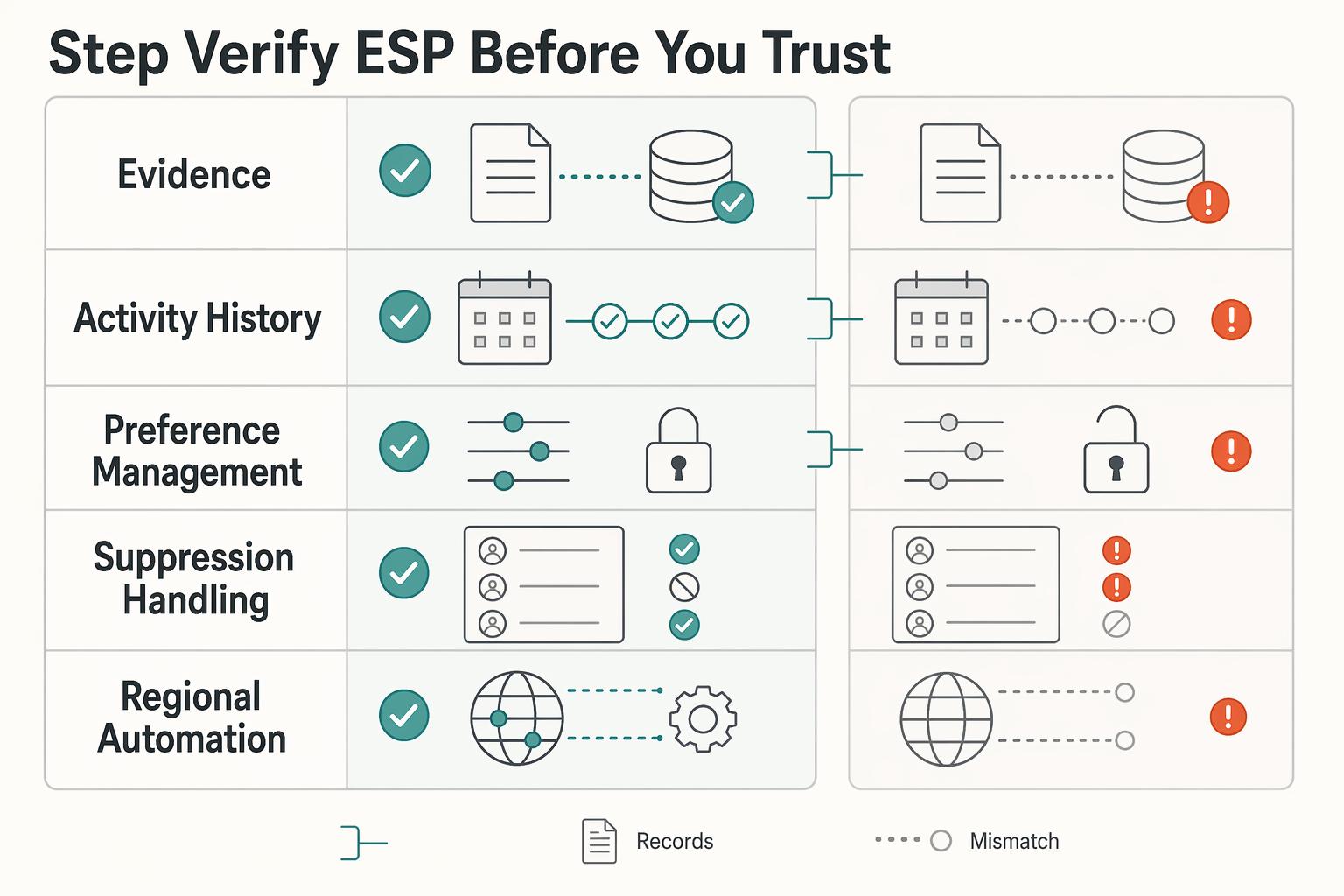
Step 3 Verify your ESP before you trust it#
Choose your ESP for evidence retrieval and control visibility, not template polish. Run a real test signup, click through the contact profile, unsubscribe, and inspect what the tool actually stores.
| Control area | What must be visible | How to verify before launch | Red flag |
|---|---|---|---|
| Consent evidence retrieval | Signup source, opted in date, marketing status | Test subscribe and confirm those fields appear on the subscriber profile | You cannot tell which form captured consent |
| Activity or history visibility | Per subscriber email history and key status changes | Open one contact and confirm send history or profile history is visible | No usable record of what was sent or changed |
| Preference management | Topic level opt in or opt out options | Check whether subscribers can manage content preferences, not just fully unsubscribe | Only all or nothing subscription control |
| Suppression handling | Unsubscribes and bounced or invalid addresses excluded from sends | Unsubscribe a test contact and confirm bounced contacts are suppressed automatically | Suppressed contacts can still re enter normal sends |
| Regional automation branching | If or then branching by conditions such as country or consent type | Confirm automations can route contacts down different paths based on conditions | Everyone gets the same path regardless of region or consent status |
A failure mode to watch for is a setup that collects emails but cannot retrieve proof later because the form, landing page, and ESP are disconnected. Another failure mode is weak suppression handling, where unsubscribed or bounced contacts stay inside broad broadcasts and create avoidable risk.
Step 4. Apply a publish gate before any form goes live. Before you publish anything, run one final gate. If any part of this depends on manual cleanup after launch, it is a fail.
- Pass if you can retrieve consent evidence for a test subscriber.
- Pass if your form promise matches the emails you will actually send.
- Pass if unsubscribes, bounces, and invalid addresses are excluded from future sends.
- Pass if you can branch or segment by region or consent type where needed.
- Fail if any of those checks depend on manual cleanup after launch.
Once this gate is green, move on to the part readers actually see: the signup path, welcome sequence, and automation logic that turns a clean list into a usable audience asset. If you want a deeper dive, read The Best Password Managers for Freelancers and Teams.
How to Design an Automated System That Attracts Your Ideal Readers#
Launch one clean path first: reader magnet -> opt-in page -> welcome sequence -> behavior tags. This gives you a reliable baseline before you add branching. After your compliance gate is green, keep the signup promise narrow, deliver it quickly, and only split paths when readers will receive meaningfully different messages.
Step 1: Match the magnet to immediate intent. A reader magnet is free content in exchange for signup, but the practical test is intent clarity. Your opt-in page should promise one specific outcome, so your follow-up can stay specific too.
| Magnet promise | Ideal reader signal | Follow-up path | When to iterate or retire |
|---|---|---|---|
| Bonus chapter or exclusive scene | Wants more of a specific story, series, or voice | Deliver immediately, then send one email to reading order or the related book page | Iterate if downloads are high but clicks to that series stay low, or replies show a different expectation |
| Reading order guide or world primer | Already interested but needs orientation | Deliver guide, then ask which series, trope, or character they want next | Retire if it mostly gets curiosity clicks with little follow-up engagement |
| Checklist, template, or resource guide | Wants a practical nonfiction outcome | Deliver the asset, then send one related tip and one reply prompt about their main obstacle | Iterate if clicks cluster around a different problem than the promise |
Use clicks and replies as primary intent signals. Open and click reporting can be distorted by bot activity, so do not make magnet decisions from opens alone.
Step 2: Build the welcome sequence as an execution checklist. Give each email one job and one clear CTA, with an obvious handoff to the next message. In Kit, actions wait for the previous step to complete, which is a good model for any provider: avoid downstream steps that depend on tags or events the prior email does not reliably create.
Before publish, run one live test signup and verify:
- magnet delivery is immediate
- links resolve to the intended pages
- sender name and sender email match the signup promise
- replies route to an inbox you monitor
- expected tag fires once
- no conflicting automation is triggered
Step 3: Keep tagging lightweight and automation hygiene strict. Treat tags as internal labels, not achievements. Create a tag only if it changes what gets sent. A simple naming pattern such as interest:series-a, engaged:clicked-guide, and offer:preorder is enough when used consistently.
If you use Kit, remember subscribers stay in one list and tags/segments do the organizing. Add a Condition only when the split changes the next message. If both paths receive the same content, keep a single path.
Review tags on a schedule, remove stale labels, and check trigger conflicts as you add new automations. If you use Mailchimp, archiving inactive contacts can reduce active audience counts without deleting underlying data. Related: How to Build an Email List for Your Freelance Business.
Beyond Subscribers: How to Measure and Monetize Your Audience Asset#
Measure business outcomes, not list size. Each month, decide which sources bring readers who click, reply, buy, or book, and which sources only add maintenance work.
If you cannot trace signup source to a later action, fix tracking before adding more traffic.
Step 1: Track a monthly KPI stack tied to decisions#
Use one dashboard with consistent source, segment, and campaign naming. In GA4, mark business-critical actions as key events, and use the Traffic acquisition report plus tagged URLs to compare channels, including Email traffic.
| KPI | Exact definition | Primary data source | Monthly action trigger |
|---|---|---|---|
| Subscriber value | Email-attributed revenue divided by total subscribers, or by your fixed active-subscriber definition | ESP campaign reports + checkout/store/booking records | If value declines for 2 review cycles, reduce weak sources before adding spend |
| Conversion by segment | Share of a defined segment that completes a key event (purchase, booking, application) | ESP segment reporting + GA4 key events | If one segment materially outperforms, give it a dedicated nurture path or offer |
| Revenue by campaign type | Revenue mapped to campaign classes (welcome, launch, partner promo, newsletter CTA) | ESP naming taxonomy + revenue log | Repeat campaign types that produce qualified actions, not only clicks |
| Retention and risk signals | Click rate, replies, unsubscribes, inactivity, spam complaints | ESP reports + reply inbox + Gmail Postmaster Tools when volume justifies it | If complaints or unsubscribes spike, reduce promotional pressure and audit targeting |
Use opens cautiously. Open tracking is imperfect, and Apple MPP/bot activity can inflate open and click signals, so prioritize clicks, replies, unsubscribes, and key events in post-send reviews.
Step 2: Compare channels by intent match, operational load, and conversion quality#
Channel labels matter less than promise quality at the capture page. If a channel grows subscribers but produces weak downstream key events for two review cycles, pause it and rework targeting, CTA, or landing-page promise before resuming.
| Channel | Intent match test | Operational load | Downstream quality check | Pause and rework when |
|---|---|---|---|---|
| Giveaways | Prize and opt-in promise closely match the books or offer you sell next | Medium: frequent creative refresh + list hygiene | Key events after welcome period, not just opt-ins | Opt-ins rise but purchases/bookings/replies stay weak across 2 reviews |
| Partnerships / cross-promotions | Partner audience overlap is clear and promise is narrow | Medium: partner coordination + tracking discipline | Post-signup clicks/replies by partner source | Source grows but engagement quality lags your baseline for 2 reviews |
| Guest appearances | CTA matches the episode/article topic and audience problem | Low to medium: prep + link tracking | Key events from tagged appearance links | Traffic is strong but conversion quality stays low for 2 reviews |
Step 3: Build one monetization path per segment, then gate premium offers#
Use one clear automation path per segment with a defined trigger, nurture sequence, and exit condition.
| Segment | Entry signals (trigger) | Nurture steps | Exit conditions |
|---|---|---|---|
| Fiction | Series magnet signup, bonus-scene click, reading-order guide signup, repeated clicks to one book page | Deliver asset, send one reading-order/next-book email, then one direct related offer (title, bundle, or membership tier) | Purchase, store-path click you track as key, or inactivity long enough to move back to general nurture |
| Service / consulting | Topic-specific opt-in, repeated service-page visits, reply intent, inquiry-start key event | Send proof + practical help, then one clear invitation to book or apply | Booking, qualified reply, purchase, or no-action fallback to education path |
Gate premium asks by readiness and cadence. Keep subscribers eligible only after the engagement window and threshold are verified from platform or source records, using signals such as recent clicks, replies, prior purchase, or repeated topic interest.
If your volume reaches Gmail's bulk-sender range (about 5,000 messages/day in a 24-hour period), monitor Postmaster Tools and keep user-reported spam below 0.1% and away from 0.3% or higher. For monetization emails, disclose material connections clearly, and remember CAN-SPAM applies to all commercial messages.
You might also find this useful: The Best Anti-Theft Backpacks for Digital Nomads.
Your Audience is Your Most Valuable Asset - Treat It That Way#
Treat this as an operating routine, not a one-time setup. Your list is an owned audience channel only if you can prove consent, send what you promised, and make it easy for people to leave.
Step 1 Audit consent and trust every cycle#
Before adding any new signup source, run a live test signup yourself. You should be able to retrieve the signup source, submitted data, timestamp, and form version for that record so you can demonstrate consent when needed.
| Audit check | What to verify |
|---|---|
| Live test signup | Run one yourself before adding any new signup source |
| Consent record retrieval | Be able to retrieve the signup source, submitted data, timestamp, and form version |
| Promise to delivery | If the form promises a sample chapter, the first email should deliver it |
| Opt-out availability | The opt-out path should be clear and available for at least 30 days after send |
| Opt-out timing | Unsubscribe requests should be honored within 10 business days |
Then verify promise-to-delivery and unsubscribe handling in the same check. If the form promises a sample chapter, the first email should deliver it; your opt-out path should be clear, available for at least 30 days after send, and honored within 10 business days.
Step 2 Enforce segmentation hygiene#
Do not push mixed-intent subscribers through one nurture path. A reader magnet subscriber, a preorder clicker, and a general-updates subscriber have different intent, so segment by declared interests and observed behavior.
Keep only tags that change messaging decisions. If a tag does not change content, timing, or suppression, remove it. For implementation detail on welcome flow logic, see How to Create an Automated Email Welcome Sequence.
| Trigger condition | Owner action | Follow-up check |
|---|---|---|
| Consent record is missing source, timestamp, submitted data, or form version | Pause new acquisition from that form and fix capture/storage | Complete a fresh test signup and confirm the record is retrievable |
| Subscribers with different intent are receiving the same sequence | Split paths by interest tags and behavior signals (clicks/replies) | Verify each segment now receives a different next email |
| Engagement is shallow (opens without downstream action) | Tighten offer-message match and suppress low-intent contacts | Review clicks, replies, and store visits in the next cycle |
Step 3 Close the cycle before scaling#
Before you add volume, run the same closeout checklist each cycle: confirm consent evidence is retrievable, confirm unsubscribe handling is working, remove automation/tag clutter, and validate monetization by segment behavior instead of list size alone.
If a source adds subscribers but not downstream action, pause it until the promise and targeting are corrected. For practical implementation depth, see Best Author Websites That Stay Useful Between Launches.
Frequently Asked Questions
How should you set up consent without making sign-up friction too high?
Use plain signup language that tells people exactly what they will receive, then use your mailing list provider to manage signups. If you serve readers across regions, legal requirements can vary and are not defined here, so verify your form and confirmation flow before you widen traffic. Do this next: test your own form end to end and confirm your provider captures the opt-in details you need.
How should you track ROI when you do not have clean attribution yet?
Start with simple source tracking before you add more channels or automation. This section does not provide benchmark ROI targets, so focus on consistent naming and trend comparisons first. Do this next: choose one source naming convention and use it everywhere for a full month so your comparisons stop breaking.
What kind of reader magnet should you choose?
Pick a reader magnet that matches your target reader, not just anyone who likes free stuff. If your early list includes mixed-fit subscribers, which is common, narrow the promise so the segment intent matches the next book, topic, or offer. Do this next: ask whether the magnet would attract your version of "Timothy," then check engagement signals like clicks or replies, not just opt-ins.
How far should you automate the list?
Automate only the parts that clearly improve what gets sent and when. This section does not establish a required automation stack, so keep rules simple and remove anything that does not change a real messaging decision. Do this next: map every tag and rule to one visible action, then delete anything that does not affect timing, content, or suppression.
How often should you send?
Choose a cadence you can keep without long gaps and panic bursts. There is no universal benchmark here, and provider costs can rise as your list grows, so consistency matters more than volume. Do this next: set one realistic send rhythm, review replies and unsubscribes after each send, and hold frequency increases until consent clarity, magnet fit, and workflow quality are stable.
Try a related tool
Researched and edited by the Gruv editorial team. Gruv builds cross-border billing, payouts, and finance-operations software for global businesses.
Sources
Includes 2 external sources outside the trusted-domain allowlist.
- ftc.gov/business-guidance/resources/can-spam-act-com...trusted
- ftc.gov/business-guidance/resources/disclosures-101-...trusted
- legislation.gov.uk/eur/2016/679/article/7trusted
- michigan.gov/mdard/business-development/grantfund/study-o...trusted
- oag.ca.gov/privacy/ccpatrusted
- ico.org.uk/for-organisations/direct-marketing-and-priva...external
- support.google.com/a/answer/14229414external
Educational content only. Not legal, tax, or financial advice.
Related Posts

The Best Password Managers for Freelancers and Teams
A client asks for an urgent file, you open their portal, and the login fails. Ten minutes later your invoicing app wants a reset too. That is why your password setup is a business risk, not just a nuisance. Weak credential habits can turn one mistake into wider account access problems, then into delivery delays and cleanup work.
How to Build an Email List for Your Freelance Business
As the CEO of your business-of-one, you need a repeatable system you can actually run.
The Best Anti-Theft Backpacks for Digital Nomads
**Choose your anti-theft backpack by running a 10 minute risk-control decision, then lock in a primary pick, a backup pick, and a theft contingency routine.**