
Quick Answer
Build your saas launch waitlist as a controlled workflow from signup to paid beta, not a list-building campaign. Set one launch objective, qualify at form level, assign each channel a single role, and admit users in manageable cohorts. Use checkpoint metrics to decide when to pause or expand, and treat Product Hunt spikes as awareness until activation and paid movement hold. Add audit-ready logs and retry-safe handling early so growth does not create cleanup debt.
Build a SaaS Waitlist That Converts Without Creating Operational Debt#
Your waitlist should lower launch risk, not create cleanup work the week you open access. Treat your waitlist as a control layer for readiness: who signs up, what intent they show, what promise they heard, and what has to be true before you invite the next group.
Early demand is useful, but it is not the same as product market fit. Builders often hit the gap between initial validation and a product people keep using. A common failure mode is acting on feature requests people later ignore. That is how operational debt starts. Decisions that feel smart in the moment can turn into extra work later.
| Launch motion | Use it when your decision criterion is | Early signal quality | Operational load | Main failure risk |
|---|---|---|---|---|
| Open interest list | You need message testing and broad curiosity signals | Often noisy | Low upfront, can create cleanup later | Vanity volume can hide weak fit |
| Segmented waitlist | You need to sort real intent before launch | Can be clearer when segmentation is tight | Moderate | Poor form design can create noisy segments |
| Controlled beta cohorts | You need activation and payment evidence before wider release | Often strongest for activation/payment learning | Higher upfront, can reduce chaos later | You can move too slowly and starve learning |
If you already have something usable and support capacity is limited, segmented waitlists and controlled cohorts can be safer. If the idea is still loose, an open list can help with message testing, but do not treat raw signups as proof of fit.
-
Define one launch goal. Owner: you. Pick a single stage gate for this phase: problem validation, activation validation, or paid beta conversion. Decision gate: if every signup path does not map to that one goal, do not promote yet. Measure:
[primary outcome per signup]. -
Segment intent at signup. Owner: you or whoever manages your list. Ask only for fields that help you separate urgency from curiosity, such as role, use case, and current workaround. Decision gate: if you cannot pull a clean view of high-intent signups in one export, your form or tagging is too messy. Measure:
[share of signups in high-intent segment]. -
Map channel roles. Owner: you. Give each channel one job only: awareness, qualification, or invite conversion. Keep a simple evidence pack with source, message promise, signup date, segment, invite status, activation status, and notes on why a cohort was paused or advanced. Decision gate: if a source brings names but no measurable next step, cut it or rewrite it. Measure:
[source-to-activation rate]. -
Control cohort release. Owner: you and the person handling onboarding, even if both are you. Invite in small cohorts, then run a metrics checkpoint before each next release. Decision gate: if activation quality drops or support burden spikes, pause the next batch and review what people actually used, not just what they said they wanted. Measure:
[activation in your defined window]and[paid conversion by cohort].
A practical example: if a niche workflow tool gets a signup spike from one post, do not open the doors to everyone. Invite the clearest-intent segment first, watch which actions they complete, and compare usage against feature requests before you change the roadmap.
What to do this week: write your goal statement, choose your signup fields and tags, and create the decision log you will review before every cohort release. Then set up the assets and tracking that make the rest of the launch workable.
What to Prepare Before You Start#
Before you promote your waitlist, set up a simple system you can trust under traffic: one owner, one workspace, one goal, and one qualification flow.
Step 1. Assign one owner and one operating workspace. Put one person in charge of the process from signup to invite decision, even if that person is you. Keep records and drafts in one place so you can quickly see who signed up, what they asked for, what they received, and what should happen next.
Step 2. Decide launch mode and ICP before you ask for traffic. Define your goal first, then narrow your audience to early adopters who already feel the problem. If you target everyone, your message gets weaker and your waitlist data gets noisier.
| Launch mode | Use it when your immediate proof goal is | Be ready before promotion when | Hand off to the next mode when |
|---|---|---|---|
| MVP | Validate demand and learn from early feedback | You can show the core concept clearly (for example through demos or mockups) and collect direct feedback through calls or surveys | Feedback repeats the same pain and value pattern |
| Paid beta | Validate activation and willingness to pay with a narrow group | Your invite and follow-up flow is documented, and your segmentation works consistently | Cohort behavior is repeatable and payment intent is clear |
| Full launch | Expand beyond early adopters without losing control | Your waitlist and onboarding workflow can run without constant manual fixes | Channel quality and conversion stay stable as volume increases |
Step 3. Set a lightweight measurement framework and QA it. Use one naming convention for tagged links and apply it consistently so you do not split one source into multiple labels. In your operating sheet, track a minimal schema for each lead: channel source, lead stage, intent tier, cohort status, and next action (plus signup date if you use it for sequencing).
Run a quick QA pass before opening traffic: click each tagged link, submit test signups, confirm source mapping, verify stage/tier assignment, and confirm the right first email is triggered. If test records break, fix the flow before promotion.
Step 4. Prewrite qualification logic, routing rules, and first-touch emails. Keep capture simple: name and email can be enough, then add one qualifier only if it helps sort urgency, for example role or current workaround. Decide routing before launch: high-intent ICP matches go to your invite-ready segment; lower-intent signups go to an education-first sequence, not a hard sell.
Use a clear go/no-go gate: open promotion only after test signups consistently land in the right segment, with correct source tracking, and trigger the correct first-touch sequence.
Waitlist First or Product First for Your SaaS Launch#
Choose waitlist-first when your core outcome is not yet reliable without manual help. Choose product-first only when users can reach the main result consistently and your onboarding flow can handle invites without constant exceptions.
| Path | Use it when | Evidence to require before scaling | Downside if you move too early | Recommended next action |
|---|---|---|---|---|
| Waitlist-first | New users still need manual rescue, or the main job is inconsistent | Feedback from surveys or beta invites repeats the same pain, tracking is clean, and signups look like future customers | You collect names but do not validate demand | Keep the form minimal, qualify lightly, and invite in small beta waves |
| Product-first (controlled) | Main use case works end to end for your target user | Cohorts move from invite to activation with predictable support load, and intent signals stay stable | Support and onboarding debt grows faster than learning | Open to one narrow segment and cap each cohort |
| Product-first (expansion) | Controlled cohorts are stable across channels | Stable movement through invite -> activation -> paid intent for your own threshold window | More volume can hide weaker lead quality | Expand one channel at a time with a written pause rule |
The sequencing choice is a risk decision: product risk, onboarding risk, or channel-quality risk.
Step 1. Core outcome reliability gate. Before you decide on sequence, confirm a new user can complete the main job without manual rescue. Use beta invites, short surveys, or both, and look for repeated pain and repeated successful outcomes.
Step 2. Support capacity gate. Even with a working product, stay waitlist-first if each cohort triggers one-off fixes, repeated clarifications, or manual routing. Move to product-first only when onboarding and first-touch flow run predictably for a small cohort.
Step 3. Channel expansion gate. Set the invite-to-activation, activation-to-paid-intent, support-issue, and cohort-count thresholds from verified cohort data before you use them as expansion gates. Hold those thresholds for consecutive cohorts. If signups rise but best-fit activation drops, treat it as a qualification problem, not a growth win. Value-first, education-led messaging is safer than hard-sell messaging when you need qualified demand.
Step 4. No-go trigger (pause, re-qualify, resume). If a promotion wave increases signups but onboarding stalls, pause new invites immediately. Re-check source tags and survey responses, tighten qualification, and resume with a smaller best-fit cohort only after invite -> activation -> paid-intent movement returns to your baseline pattern.
How Big Should a SaaS Waitlist Be Before You Launch#
Your waitlist is big enough when qualified people move from signup to invite to activation to paid intent at a stable pace your team can support. List size is context, not proof. A smaller list can outperform a bigger one when quality is higher and onboarding stays controlled.
Step 1. Define launch readiness with a weekly go/hold table. Use thresholds you set from your own data, then tie each metric to a clear action.
| Metric | Your threshold | Go action | Hold action | Owner | Escalation path |
|---|---|---|---|---|---|
| Qualified signups by source | Set from verified source data | Keep current invite pace | Tighten qualification and messaging | Growth owner | Review signup answers + source tags |
| Invite acceptance | Set from verified invite data | Open next cohort size | Rework invite timing/message | Growth owner | Recheck channel mix and sequence |
| Activation after invite | Set from verified activation data | Continue rollout | Pause expansion and fix onboarding | Product owner | Prioritize onboarding blockers |
| Paid intent or paid beta start | Set from verified paid-intent data | Expand one channel at a time | Narrow segment and hold next wave | Founder | Run cohort review before resuming |
Step 2. Lock instrumentation before you compare channels. If tracking is inconsistent, channel comparisons are noise. Define fixed stage labels, entry and exit rules, and attribution once, then keep them stable.
| Stage | Event label (example format) | Entry rule | Exit rule | Attribution rule |
|---|---|---|---|---|
| Signup | waitlist_signup_submitted | Form submitted with required fields | Record created | Store source + medium on create |
| Qualified | waitlist_qualified | Meets your qualifier criteria | Moved to invite queue | Keep original source/medium |
| Invited | waitlist_invited | Invite sent | Invite accepted or expired | Do not overwrite first-touch attribution |
| Activated | waitlist_activated | User completes core first-use action | Activation confirmed | Compare activation by original source |
| Paid intent | waitlist_paid_intent | Trial-to-paid signal or paid beta start | Converted or dropped | Attribute outcome to same source lineage |
Step 3. Open cohorts with explicit gates, not momentum alone. Check three gates before each wave: quality trend, support load, and pause/resume discipline.
- Quality trend gate: proceed only if qualified signup, activation, and paid-intent trends are stable for your chosen window.
- Support load gate: proceed only if onboarding can absorb the next cohort without manual rescue becoming normal.
- Pause/resume rule: if quality drops or support strain rises, pause new invites, fix the bottleneck, and resume only after the next cohort returns to baseline behavior.
Step 4. Use your cohorts to set launch criteria. Define an activation window and the support capacity for your next wave. Compare qualified signup, invite acceptance, activation and paid conversion with prior cohorts. A larger list alone does not justify expansion.
Related: How to Build a Waitlist for a New Freelance Service.
How Do You Attract Qualified Leads Instead of a Bloated List#
If signup volume rises while activation quality drops, tighten qualification before you scale traffic. In SaaS, the funnel is usually longer and decision-maker driven, so lead quality is more useful than raw list size.
Step 1. Match each source to buyer readiness, not signup volume. Treat each source as a signal source, not just a name source. A broad channel can still help, but only if you route those leads to the right next step.
| Source type | Intent stage fit | Proof signal to expect | Routing action |
|---|---|---|---|
| Community or discussion traffic | Early problem awareness | People describe a concrete pain in their own words | Send to your waitlist landing page with a gated qualifier |
| Waitlist landing page | Interest and self-selection | Form answers include specific use case and timing context | Label MQL or SQL before any invite decision |
| Active lead sourcing or direct outreach | Higher-intent, ICP-fit accounts | Prospect can clearly discuss fit, ownership, and buying path | Route to manual review and high-touch follow-up |
Keep only channels that produce recurring proof signals you can route on. If a source produces names without usable intent evidence, it is likely list noise.
Step 2. Use a lightweight qualification framework before onboarding. A short gated form is enough when the questions separate curiosity from readiness.
Score each signup on three checks:
- Problem urgency
Ask what is broken now and why it matters now.
- Use-case fit
Ask what job they want your product to handle.
- Implementation readiness
Ask whether they can test soon, who will use it, and what might block setup.
Route by answer pattern, not a universal cutoff. An MQL is interested but not sales-ready. An SQL fits your ICP and is close to a demo, onboarding call, or paid beta conversation. If you use a numeric threshold, set it from verified cohort data before it becomes a routing rule.
Step 3. Run a weekly source-quality loop. Review signal quality, then activation quality, then channel allocation. Change one major variable per week and log outcomes so you can tell what actually moved quality.
If activation quality drops, check whether source mix, messaging, or qualifier behavior changed before you buy more traffic. Reallocate effort toward sources that activate cleanly, and tighten or pause sources that inflate signups without fit. For any drop trigger, set the activation-quality threshold from verified cohort data before you use it as a pause rule.
Scale traffic only after message quality and activation signals stabilize.
Step 4. Make disqualification explicit and enforce it pre-invite. Show disqualification rules in three places: the landing page, the start of the qualifier form, and the invite or hold email. State who the beta is for, who it is not for, and what happens next.
Assign one owner to enforce the rule before access is granted, typically the founder or growth owner. Route rejected leads to nurture, not silence: lighter updates, a later reapply path, or a launch-notification flow.
If you simplify qualification or assisted onboarding, change one layer at a time and watch activation quality before changing the next.
We covered this in detail in How to Write a Cold Email Sequence That Converts for a SaaS Product.
How Do You Convert Waitlist Signups Into Paying Users#
Convert better by treating your waitlist as a controlled pipeline, not a volume contest: admit in batches you can support, define one activation milestone, and pause expansion when behavior quality drops.
| Rollout option | Fit | Operational risk | Use it when |
|---|---|---|---|
| Strict cohort waves | High-touch beta and hands-on onboarding | Invite backlog if review and onboarding are slow | You need close feedback loops and manual invite decisions |
| Rolling admits | Simple product and stable self-serve onboarding | Weak-fit users can slip in and spread support load | Your activation path is already consistent |
| Hybrid | Mixed lead readiness | Extra admin if ownership is unclear | You want manual review for high-value leads and rolling access for clear-fit users |
Step 1. Set invite criteria before access goes out. Use your signup qualifiers to admit people with a clear use case and near-term testing readiness. Log each decision with source, qualifier answers, reviewer, and invite date so you can diagnose later whether issues came from targeting or onboarding.
Step 2. Define one activation milestone and one owner. Choose one action that proves real product use, and assign one owner to track it through completion. Do not treat email opens or a single login as activation.
Step 3. Run onboarding with one objective, one action, and one signal per step.
| Step | Email objective | User action | Progression signal | If user stalls |
|---|---|---|---|---|
| 1 | Confirm access | Start setup | Setup started | Send one plain follow-up focused on setup |
| 2 | Drive first real value | Complete core task | Activation milestone reached | Send one unblock message tied to that task |
| 3 | Move to commercial intent | Choose paid step or commit to beta path | Plan selection or call booked | Hold new admits in that segment until friction is clear |
Step 4. Use behavior quality to pause or resume. If invite-to-activation lag is getting longer, shorten the time between signup, survey or beta invite, and first product use before widening the next wave. Compare invite delays with your own activation data before changing the schedule.
Failure signal -> corrective action:
- Many invites accepted, few setups started -> tighten invite copy and access instructions.
- Many setups started, few core actions completed -> simplify onboarding and add manual assist.
- Strong activation, weak paid movement -> tighten fit criteria or clarify paid beta terms.
Put Compliance and Auditability Into the Waitlist Workflow Early#
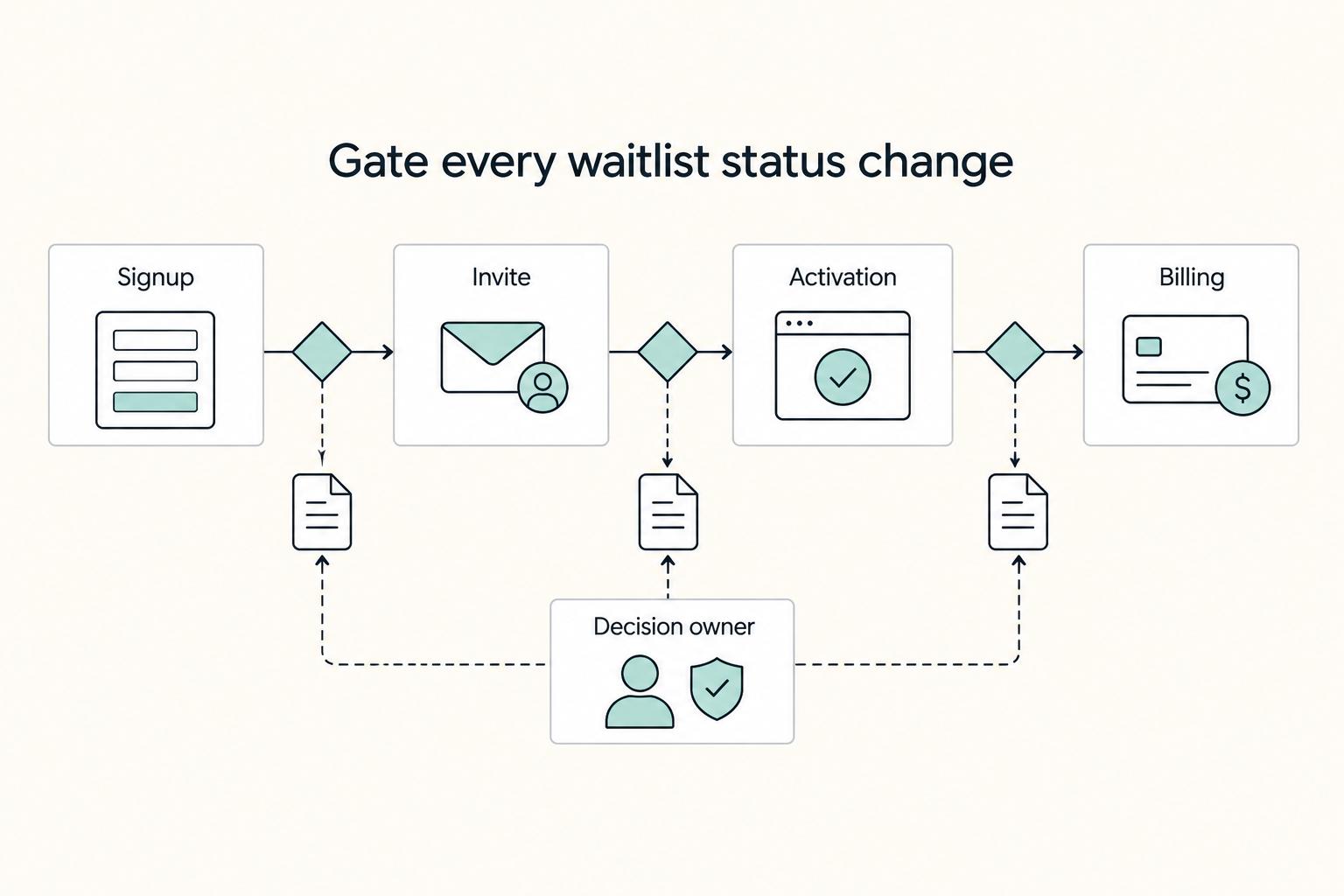
As soon as you start inviting cohorts, set controls that let you explain who got in, what you collected, and what changed next. The real risk is not a lean form. It is expanding access before each field, status change, and retry has a clear reason.
Step 1. Set risk gates before you enable access#
Assign one internal owner to each gate: waitlist signup, invite acceptance, activation, and billing. If you use an external verification provider, treat its output as supporting input; your team still decides approve, hold, or escalate.
Define each gate the same way every time using:
- onboarding stage
- market or country at signup
- account type (individual or company)
- enabled features (for example paid plans or admin roles that change billing or access)
Collect the lightest data early, then add checks only when a user action creates operational or billing risk. If a feature does not change a buying decision or retention behavior in the next 60 days, defer it.
Verification point: for any approved invite, you can show who reviewed it, which gate applied, and why it passed.
Step 2. Minimize data by stage and give every field a job#
Start with an email address. Add one use-case or role question at signup only if it changes qualification; defer further questions until invite review. Explain why each field is needed.
Explain what updates the signup requests, link your privacy notice, set a retention period, and provide an opt-out. Keep requested access updates separate from unrelated promotions. For UK recipients, the ICO’s electronic-mail marketing guidance distinguishes individual and corporate subscribers and applicable consent or exception rules; a waitlist signup is not blanket permission for all campaigns.
| Workflow stage | Required data now | Defer until later | Operational purpose |
|---|---|---|---|
| Waitlist signup | email; optionally one use-case or role answer when needed for qualification | role, company details, identity documents, billing details | confirm interest and create a contact record |
| Invite acceptance | email, country, one use-case answer | legal entity records, payout details, extra profile data | route invites, review fit, and handle market-specific flow |
| Activation | account owner name, billing contact, required verification fields when enabled | nonessential team profile fields | provision access, support onboarding, and apply required checks |
| Paid plan start | billing details and payment event linkage | any field not tied to billing or support | handle trials, upgrades, downgrades, and cancellations cleanly |
Keep auth, roles, billing, and data-model decisions explicit early. If you defer them too long, they return as decision debt and rework.
Verification point: every collected field maps to one purpose: contact, qualification, or billing and activation.
Step 3. Log enough events to replay one user path end to end#
Use a minimum event schema your team applies consistently. A practical baseline is: event ID, timestamp, actor, account or user ID, workflow stage, previous status, new status, source channel, and decision reason.
When support or compliance asks what happened, run the same replay routine:
- pull the account timeline
- sort by timestamp
- confirm what data was captured at each stage
- confirm who changed status and why
- confirm billing events match the user-facing state
If you cannot replay signup to current status quickly, your auditability is weak. Test this on your beta cohort, including failed and repeated actions.
Step 4. Make failure recovery retry-safe before billing goes live#
Treat billing webhooks, error handling, and 404/500 coverage as pre-launch controls.
| Control | What to do |
|---|---|
| Idempotency | Use a stable business-operation ID and the provider’s supported idempotency key for retries of the same request |
| Event deduplication | Verify signatures, persist the event durably, and atomically commit local deduplication with its state change |
| Canonical status | Reconcile provider payment status separately from invite and account-access status |
| Retry logging | Log each retry attempt and final outcome |
| Device testing | Test onboarding on mobile as well as desktop |
Verification point: simulate a duplicate event and a crash between processing and acknowledgment. Commit local event handling atomically, and use durable pending work for remote calls. If a charge times out, query its provider state or retry the same request within that provider’s key rules; do not start a new charge while the outcome is unknown. Stripe caches the first result, including 500 responses, and may prune keys after at least 24 hours. A local flag alone cannot make a remote charge atomic. Review webhook handling for signature checks and duplicate delivery.
Step 5. Publish the same coverage qualifier everywhere#
Write one plain-language qualifier and repeat it on the waitlist page, invite email, and activation flow. Keep wording consistent, for example: availability varies by market and account type, and some billing or verification steps apply only when specific features are enabled.
Consistent wording reduces avoidable support confusion across channels.
Diagnose Waitlist Failure Modes by Cohort and Source Before Scaling Again#
When your funnel slips, do not scale invites to protect vanity totals. Diagnose by cohort and source, assign one owner action, and scale again only after the validation check improves.
Step 1. Match the symptom to the first fix#
Use this table as an execution tool: pick the matching row, assign one owner, run one recovery move, then recheck.
| Symptom | Likely root cause | Validation check | First recovery move |
|---|---|---|---|
| High signups, low activation | Weak qualification or noisy analytics from a broad multi-goal page | Split results by source and cohort, then compare first-use completion and activation by entry page | Refocus the page on one objective and tighten the intake question before reopening invites |
| Strong traffic, replies, or upvotes, weak paid conversion | Awareness without a clear purchase case | Review beta-user feedback, then check how many users reach activation before the payment ask | Rewrite the offer around the problem, expected outcome, onboarding commitment, and explicit paid decision point |
| One high-volume source floods the list while quality drops | Source-audience mismatch | Re-segment by source and stated intent, then compare invite acceptance and activation quality | Launch a source-specific opening variant and requalify before sending more invites |
| Support spikes, onboarding slows, errors rise, or pricing complaints appear | Operational instability or launch configuration issues | Check load times, error rates, and exception logs for the affected cohort | Pause expansion, stabilize onboarding, and relaunch in stages |
Step 2. Requalify noisy sources before inviting again#
High-volume bursts are awareness signals, not conversion proof. You can get 800 signups and still see zero paying customers, so treat source quality as unproven until conversion behavior holds.
| Requalification step | Action |
|---|---|
| Adjust intake question | Adjust one intake question to screen urgency |
| Re-segment | Re-segment by source and intent |
| Invite higher-fit slice | Invite only the higher-fit slice |
| Reopen broader cohorts | Reopen broader cohorts only after a full review cycle where invite acceptance and activation quality stabilize |
Run that requalification loop, then reopen broader cohorts only after a full review cycle, for example two weeks, shows stable invite acceptance and activation quality.
Step 3. Fix offer clarity when engagement does not become paid action#
If people click, reply, or book calls but do not start paid beta, the offer is usually unclear. Your invite and activation flow should clearly state the problem fit, expected first-session outcome, onboarding commitment, and the exact point where users decide to start paid beta.
| Offer element | What to state |
|---|---|
| Problem fit | State the problem fit |
| First-session outcome | State the expected first-session outcome |
| Onboarding commitment | State the onboarding commitment |
| Paid beta decision point | State the exact point where users decide to start paid beta |
Judge recovery by progression to activation before the payment ask, not by engagement volume alone.
Step 4. Pause and relaunch in stages when operations wobble. When avoidable errors start driving support load, pause expansion first. Stabilize onboarding, log exceptions by cohort, source, and failed step, and review beta feedback with load-time and error-rate signals before reopening.
Relaunch with updated guardrails and aligned messaging in a staged sequence: private beta, then public beta, then full launch. If pricing or access terms changed, update the waitlist page, invite email, and billing screen together so users see one consistent message.
Run the Waitlist as a Controlled Rollout and Expand Only on Evidence#
Run your waitlist as a controlled rollout, not a one-day push. Your pilot is a proving window, so keep scope tight, protect trust, and expand only when activation and paid conversion stay healthy.
Step 1. Choose your launch mode from the product you actually have. Match launch scope to current product readiness. If core flows are unstable, stay in a private or limited beta. Early users who hit broken core paths can leave with a negative impression, and recovery is difficult.
Use the same evidence pack every week so decisions stay consistent: qualified signups by source, invite acceptance, activation by cohort, paid conversion by source, repeated objections, core-path issues, and unresolved compliance qualifiers. Keep distribution narrow until that evidence is stable.
If you want a fixed rhythm, use one. An illustrative cadence is week 1-4 for audience building and problem framing, week 5 for pre-launch teasing and waitlist growth, week 6 for launch signups and revenue, and week 7+ for post-launch conversion tuning.
Step 2. Give every lead and channel a defined path before you scale. Assign one role per source, define a qualification rule, set a disqualification trigger, and name the owner who can pause or expand that path.
| Entry or gate | Role | Qualification rule | Disqualification trigger | Gate owner |
|---|---|---|---|---|
| Owned content or email capture | Steady intent capture | Signup matches your ICP and states a real problem you solve | Broad, vague, or curiosity-only responses dominate | Founder or marketing owner |
| Founder outreach or community | High-context feedback and early beta recruiting | Prospect can explain current pain and why they want to test now | Interest without a concrete use case | Founder |
| Product Hunt or another burst channel | Short attention burst after messaging is proven | Source is tagged separately and onboarding can absorb a surge | Signup spike with weak activation or support strain | Growth owner plus product/support owner |
| Invite to beta | Controlled access | Lead passes ICP screen and accepts current limits/qualifiers | Missing required details or unresolved fit questions | Product owner |
| Move to paid beta | Revenue validation | Activated user reaches the promised outcome and accepts pricing/terms | Repeated manual rescue, trust objections, or billing friction | Founder or revenue owner |
If a source produces names but not movement, treat it as awareness, not proof, and pause it.
Step 3. Hold weekly measurement and compliance gates. Review one live view from signup to invite to activation to paid conversion by source and cohort. That same review is your compliance gate: confirm required qualifiers are collected before you open the next invite wave.
Before each wave, verify every lead has a current status, known source, and clear next action. If you cannot clearly separate ready, paused, and disqualified leads, your system is not ready to scale.
Step 4. Rehearse failure recovery before launch week. Make retries safe: idempotent writes, deduplication, and one canonical status view. That prevents duplicate invites, duplicate records, and conflicting support states. Set the retry-window threshold from verified failure-recovery tests before you use it in the retry policy.
The risk to avoid is quiet corruption, not only visible outages. Test duplicate-event handling, source tagging integrity, and status consistency before public launch.
Use this checklist right before launch:
- Launch mode matches current product stability and current evidence.
- Every active channel has a role, qualification rule, disqualification trigger, and owner.
- Your dashboard shows source-to-activation-to-paid conversion by cohort, not just total signups.
- Compliance qualifiers are collected where needed, with exceptions visible before invites.
- Invite waves include clear pause guardrails when quality drops or support strain rises.
- Recovery testing confirms idempotency, deduplication, and one canonical status view.
- Your next expansion step is supported by the latest evidence pack, not ambition alone.
If you are unsure, choose safer scope first. Keep the cohort tight, state limits clearly, and widen only after both metrics and operations hold.
Frequently Asked Questions
Should you build the waitlist before the product is fully built?
Yes, if you can already show a prototype, demo, or mockup. If you still need to explain the product with hand-waving, wait. Before you expand beyond a small cohort, check that early users can complete the main task within a realistic window for your product.
What metrics matter most in a pre-launch waitlist?
Track cohort movement from qualified signup to activation to paid beta by source. If a channel brings names but those users stall before activation, treat it as awareness, not proof of demand. | Vanity metric | Decision metric | | --- | --- | | Total signups | Qualified signups by ICP fit | | Open rate | Activation rate by cohort | | Upvotes or traffic spikes | Paid beta conversion by source |
How do you know if the list is big enough to launch?
Do not wait for a magic list size. Launch when a small group is moving through the same conversion path and giving clear validation signals. Set cohort size from onboarding capacity, and resolve critical core-path bugs before inviting more users.
How do you stop low-quality signups from taking over?
Ask only what changes the invite decision. At signup, email and at most one useful use-case or role question may be enough. During invite review, request further details such as company size or implementation readiness only when relevant to your product. Review answers by source before the next wave.
What is the right sequence to turn signups into paid beta users?
Use a waitlist nurture sequence, not a single launch email, timed to when the product will be available. Each message should move one step closer to activation, then the paid beta decision. If your product uses AI, answer the "why not use a free AI tool?" objection before the paywall.
How should you use scarcity without damaging trust?
Use scarcity only when the limit is real, such as onboarding capacity or support bandwidth. State the rule plainly, then make sure your waitlist page, invite email, and access terms all say the same thing. If the limit is not real, avoid scarcity language.
Which channels should you prioritize first?
Start with channels that match your ICP and let you verify source quality. Search can work well if your pages are easy to crawl and understand, but paid shortcuts will not replace solid content and technical setup. For bursty sources like Product Hunt, check activation and paid beta by cohort before you scale that channel.
Try a related tool
Researched and edited by the Gruv editorial team. Gruv builds cross-border billing, payouts, and finance-operations software for global businesses.
Sources
Includes 1 external source outside the trusted-domain allowlist.
Educational content only. Not legal, tax, or financial advice.
Related Posts

The Best Password Managers for Freelancers and Teams
A client asks for an urgent file, you open their portal, and the login fails. Ten minutes later your invoicing app wants a reset too. That is why your password setup is a business risk, not just a nuisance. Weak credential habits can turn one mistake into wider account access problems, then into delivery delays and cleanup work.

How to Build a Waitlist for a New Freelance Service
**Build your freelance waitlist like an operator: treat it as a controlled intake pipeline, not just a "collect emails" project.** You're the CEO of a business-of-one. Your waitlist is how you control demand without letting demand control your calendar. The goal is simple: avoid calendar chaos during your next service launch and keep records clean if you ever need to explain who got offered what, when, and why.

The Freelance Payment Penalty: A Modeled Audit of Platform Fees, FX Spreads, and Payout Delays
The money rarely disappears through a single, easy-to-spot fee. The real loss is stacked. A marketplace takes its commission, a processor adds a charge for international cards, a bank or payment company converts the currency at a spread, a platform holds the funds before release, and a wire sheds a little to intermediaries on the way in. Each layer looks defensible on its own, but the worker feels the combined result as a smaller deposit and a later payday.