
Quick Answer
Build a freelance media kit as a decision tool, not a visual portfolio. Start by naming the action you want from the reader, then include only what supports that action: positioning, services, proof, operating terms, and contact route. Pick a canonical format such as an online portfolio or PDF media kit, keep one backup version, and verify both show matching offer language before each send.
Build a Freelance Media Kit That Prevents Client Friction#
Treat your media kit as a buyer decision tool, not a design exercise. If a prospect can spot fit, proof, and the next action quickly, you cut a lot of avoidable back and forth before a call is scheduled. That is this document's job.
A press kit and a media kit overlap, but they serve different moments. A press kit supports coverage and fact accuracy. A media kit supports a partnership or hiring decision. Once you keep that distinction clear, the structure, tone, and content choices get much easier.
Use one filter throughout: every section should remove one point of buyer uncertainty. If a paragraph does not help someone decide whether to contact you, buy from you, or pass, it is probably decoration. That standard keeps the piece useful when you are tempted to add more pages, more proof, or more design.
- Step 1: Define the decision your kit must unlock.
Write one sentence naming the action you want. Good examples are booking a discovery call, requesting a proposal, or confirming shortlist fit. Keep that sentence visible while you draft so every block in the document has to earn its place.
- Step 2: Commit to a usable outcome before design.
Aim for one shareable version that works in real outreach, not a perfect first draft. If you chase polish too early, it is easy to hide weak positioning under attractive design that does not help a buyer decide.
- Step 3: Define reliability in practical terms.
Success can look like fewer clarification emails, cleaner handoffs, and fewer scope surprises. If a buyer can repeat your offer in plain language after a quick skim, you are close to a version that is ready to use.
- Step 4: Set scope boundaries for this guide.
This article covers what to include, how to maintain it, and when to send it. Keep your proposal and contract aligned with what appears here so public promises and signed terms do not drift apart later.
Once that decision is clear, gather the raw materials before you touch layout.
Gather Prerequisites and Proof Assets Before You Design#
Build your asset pack first. A polished layout will not rescue weak or unverified proof, and late asset collection is one of the fastest ways to stall a draft that otherwise looked straightforward.
Create one folder named media-kit-assets and one tracking sheet. Use the folder for files and the sheet for owner, source path, permission status, and last-updated notes. That simple record speeds revisions, reduces stale claims, and makes it much easier to see what still needs approval before you share anything externally.
Before you move into design, do a quick readiness check. Can you answer who approved each testimonial, where each logo came from, and when each data point was last confirmed? If not, keep collecting. Design moves much faster once those answers exist.
- Step 1: Collect core identity inputs.
Gather your mission statement, contact information, logos, and social handles before you touch layout. Keep only approved logos in the working folder and move retired versions into an archive subfolder. Add one short note on where each file should be used so you are not guessing during final assembly.
- Step 2: Assemble proof assets around partnership decisions.
Add testimonials, case study summaries, and any partnerships you are allowed to name. Include the concrete data buyers use to evaluate fit, such as follower counts, engagement rates, audience demographics, and pricing. If a proof point sounds impressive but does not help someone decide whether a partnership makes financial sense, cut it.
- Step 3: Prepare brand-control files before sharing.
Store distributable graphics with clear file names, plus a short do-and-do-not usage note drawn from your style guide so presentation choices stay consistent. Keep that note in the same folder as your share-ready assets. If collaborators have to hunt for usage guidance, they will improvise.
- Step 4: Verify every claim before drafting.
If a claim has no clear owner, source, or permission note, do not publish it yet. Rewrite it, generalize it, or remove it until it is defensible. This one habit prevents a lot of avoidable trust damage later.
One common failure pattern is collecting assets in chat threads, then downloading whatever looks right each time you update the kit. That creates version drift fast. Keep one working folder and one tracking sheet as your single reference during revisions. If your materials touch related business or compliance positioning, keep those references aligned too. For related context, read The 1% Tax Regime for Entrepreneurs in Georgia.
Once your proof is organized and verified, format choice gets much easier because you are choosing delivery, not inventing content on the fly.
Choose a Format Based on Maintenance Burden and Buyer Context#
Pick the format you can keep current with the least ongoing effort. In practice, that usually means one primary version and one fallback. The moment you start maintaining several slightly different copies, details drift and buyers get mixed signals.
Different buyers ask for different delivery formats. Some want a link. Others specifically ask for a one-file summary. The real decision is not which format looks better. It is which format you can keep aligned to the same current message without creating extra work every time rates, scope, or proof changes.
| Format | Best fit | Main tradeoff |
|---|---|---|
| online portfolio | Link-based requests | Keep one canonical page and update it consistently |
| PDF media kit | One-file requests | Re-export when core details change so copies do not go stale |
| presentation deck | Guided calls where you control the narrative | Ongoing slide upkeep to stay aligned with core messaging |
| shared folder | Asset handoff requests | Version control can drift without a clear owner |
Use the table to make the first choice, then test it in real outreach. The goal is consistent messaging across every send, not maximum variety.
- Step 1: Pick your primary format by request pattern and update cadence.
If most requests are link-first, an online portfolio can be your primary version. If one-file requests are common, a PDF media kit can take that role. Choose based on how people actually ask for information, not on what seems most impressive.
- Step 2: Assign one fallback for your second-most common buyer context.
Use a presentation deck for live calls or a shared folder for source-file handoff. A fallback should mirror your primary message, not introduce different scope, pricing language, or proof.
- Step 3: Add a version checkpoint before every send.
Confirm both formats show the same contact information, core offer language, and next step. This takes very little time and prevents the awkward situation where a buyer is comparing two different versions of you.
- Step 4: Pressure-test with one real request path.
Send your primary version in an actual conversation and note the first follow-up question. That question usually shows you the next revision more clearly than another hour of solo editing.
If your outreach happens across email, social DMs, and referral intros, this two-format approach keeps the message stable while still matching channel expectations.
Build the Minimum Viable Media Kit Structure in This Order#
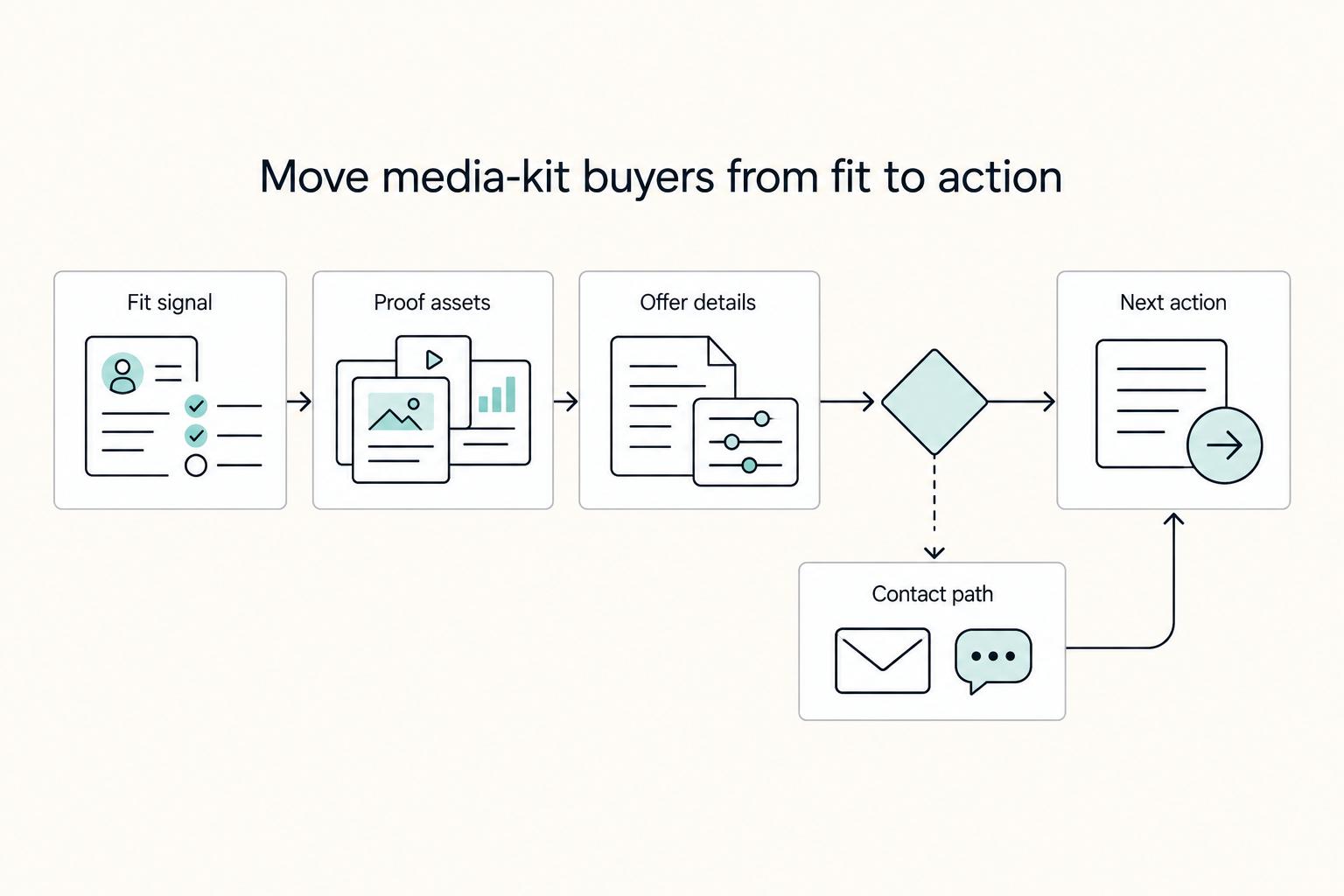
Build the kit as a decision path, not a gallery. A buyer should move from fit to proof to practical next steps without guessing what comes next or emailing you for basic clarification.
| Section | What to include | Decision signal to end with |
|---|---|---|
| Intro positioning | Brief positioning statement and who this is for | Fit or no fit |
| Services | Service list in buyer language with outcome lines | Scope fit or scope mismatch |
| Proof | Relevant credibility signals (for example: testimonials, partners, logos, or public presence) | Proof relevance for this buyer |
| Process | Ordered delivery steps from kickoff to handoff | Timeline fit or timeline risk |
| Commercial terms | Pricing approach, payment structure, and revision expectations | Budget fit or not a fit |
| Contact information | Best contact channel and response expectation | One clear next action |
Start with this baseline, then adapt it to your scope and complexity. Validate it against recurring buyer questions before you expand it. If a page does not improve fit, trust, or next-step clarity, it is probably making the document harder to use.
Intro positioning
Open with a short positioning statement and a direct who-this-is-for line. A buyer should know within a few seconds whether they are in your target audience. This is not the place for a long origin story. It is the place for quick fit.
Services
Describe what you deliver in buyer language, not internal labels or vague categories. Pair each service with a practical outcome so readers can map your work to an immediate need. The more plainly you connect service to result, the less explanation you will need later.
Proof
Add only proof that supports the claim you are making and matters to the person reading it. Testimonials, partner names, logos, or public presence can all work, but only when they help answer a real decision question. The goal is trust, not volume.
Process
Show the delivery sequence from kickoff to handoff. Include enough detail to reduce uncertainty around timing, revisions, and communication handoffs. Buyers do not need every internal detail, but they do need to know what working with you feels like.
Commercial terms
State your pricing approach, payment structure, and revision expectations at a high level. This helps people self-qualify before they ask for custom terms. Clear commercial framing also saves you from repeated scope and budget clarification later.
Contact information
End with one clear action and one clear contact route. If you offer several contact options, identify the fastest path so qualified leads do not stall while deciding how to reach you.
Skim your own draft as if you were the buyer. If you cannot answer what you offer, whether it fits, and what to do next in one pass, the structure still needs work.
The next layer is where many otherwise solid kits fail: operating terms. If those are fuzzy, strong positioning will not save you from scope confusion later.
Add Operating Terms That Reduce Legal and Scope Surprises#
Put operating terms in the kit early, then mirror them in your proposal and contract. That alignment reduces scope, timing, and permission disputes and keeps them from being renegotiated through scattered email threads.
| Operating term | What to state |
|---|---|
| Scope boundaries | Included deliverables, out-of-scope items, and what triggers a change request |
| Communication and revisions | Communication windows, what counts as a revision, and when feedback is considered final for the current phase |
| Proposal and contract alignment | Make sure matching language exists in your proposal or contract for claims that appear in your kit |
| Permissions for shared proof | Who approved use, where use is allowed, and when approval should be rechecked |
This section does not replace your contract. It prepares the ground so the contract feels like confirmation, not a surprise. Buyers should see your boundaries before they invest time in detailed negotiation. When those boundaries appear only after the proposal stage, even reasonable terms can feel like a late change.
State terms in plain language and keep each line easy to scan. Dense legal wording inside a media kit usually hides the point and creates more questions than it answers.
- Define scope boundaries clearly.
List included deliverables, out-of-scope items, and what triggers a change request. Use concrete wording tied to the services you already described. If scope is vague here, later conversations drift into interpretation instead of progress.
- Set communication and revision expectations before delivery starts.
Define communication windows, what counts as a revision, and when feedback is considered final for the current phase. These boundaries are much easier to enforce when they are shared before kickoff rather than introduced after work begins.
- Align public promises with signed documents.
If a claim appears in your kit, make sure matching language exists in your proposal or contract. If it does not, revise one side until they match. For dispute-language support, see How to Write an Arbitration Clause for a Freelance Contract.
- Add a permissions note for shared proof.
For graphics, testimonials, and partnership mentions, record who approved use, where use is allowed, and when approval should be rechecked. For commissioned creative work, make sure contract language clearly defines the scope of any IP-rights assignment.
Before you publish, compare the terms block, proposal template, and contract template side by side. Reconcile any mismatch in scope, timing, or usage rights. It is a short check, but it carries real weight because it protects both trust and delivery quality.
If you work with repeat clients, this consistency also shortens future negotiations. Buyers know what to expect, and you stop rewriting the same boundaries from scratch every time.
With the terms set, the next question is proof. You want enough detail to support trust, but not so much detail that you create privacy or permission problems.
Make Proof Credible Without Oversharing Sensitive Details#
Use progressive proof. Share enough detail to confirm fit, then release deeper information only when the relationship and scope justify it.
A practical case study can be short and decision-focused. Keep each one to context, your action, measurable outcome, and why that result matters for a similar buyer. Remove internal or identifying details that are not needed for early-stage evaluation. Strong proof is selective. It gives the reader what they need to assess relevance and nothing extra that could create unnecessary exposure.
This balance matters because freelance work often depends on trust, and oversharing can create privacy risk you cannot reverse once a file is forwarded. The goal is to make trust easy without giving away details you do not need to share yet.
- Build each case study as a compact evidence card.
Keep the sequence consistent so buyers can compare examples quickly. Similar structure makes patterns easier to spot and helps the proof feel intentional instead of random.
- Use clear contracts before you share deeper project details.
Define scope and what needs to be shared at each stage so both sides have the same expectations. If sensitive material is going to enter the conversation, the rules should be clear before it does.
- Share sensitive information through secure communication channels and trusted platforms.
Staged disclosure works best when both sides agree on where and how details are exchanged. That keeps the public version useful while reserving deeper project material for active scoping.
- Set a proof-sharing boundary for privacy and security.
Use summary-level proof early, then share deeper detail during active scoping through agreed channels. Make that progression explicit so buyers understand why details are staged rather than missing.
Before you publish any proof, do one internal check: can you explain why each item is here and what buyer decision it supports? If the answer is no, it is probably filler or risk. Neither helps.
Once the evidence is doing the right job, you can use templates without sounding generic.
Customize Templates So You Don't Look Like Everyone Else#
Templates are for speed, not sameness. Use them to get past layout decisions quickly, then rewrite until the document sounds like your actual offer. A template can save time on structure and formatting, but it cannot decide your audience, scope boundaries, or proof strategy for you.
Start with Canva or another template tool if that helps you move faster, then replace every line of stock phrasing that could apply to any freelancer. If a sentence could describe almost anyone, it is not helping a buyer decide. Pull language from your services, proof, and operating terms so the final version sounds grounded in your work.
Keep one set of brand rules across every page. Use consistent typography, logo treatment, and graphics so the document feels coherent from start to finish. Inconsistency often looks small when you are editing, but to a first-time buyer it can make the whole piece feel less reliable.
Be strict about section value. Remove decorative pages that do not improve fit, credibility, or next-step clarity. Extra pages add skim time and bury the information buyers actually need. The easiest way to look generic is to keep sections just because the template included them.
Before you publish, run a skim test. Ask someone to scan once and find your value proposition and contact information without guidance. If they cannot do that quickly, fix the structure first, then the wording, then the visuals. That order matters. It keeps you from polishing the wrong draft.
A practical editing sequence is simple: tighten section order, simplify language, then polish formatting. That keeps template speed tied to a usable result instead of a prettier version of a weak message.
Now that the piece reads like yours, the next job is timing. Even a strong document underperforms if you send it at the wrong stage or in the wrong form.
Package and Deploy Your Kit at the Right Buyer Moments#
Package one core offer, then deploy it consistently. The message should stay stable while the amount of detail changes by context.
This is where many strong drafts lose momentum. The content is solid, but the offer is not standardized enough for quick evaluation. If a buyer cannot quickly compare, understand, or act on what you send, you create sales friction even when the underlying work is strong.
- Step 1: Build one standardized kit from one core source.
Define a named, outcome-based offer with clear scope, price, and deliverables. Package reusable assets such as a proposal, visuals, copy, and handoff files so buyers can compare and buy without decoding different versions of the same offer.
- Step 2: Make buyer clarity explicit in every version.
State what buyers get, when they get it, and what it costs. Keep these points easy to find. The more effort a prospect has to spend piecing together basics, the less likely they are to keep moving.
- Step 3: Keep the package consistent.
Reuse the same core offer details across assets so buyers can evaluate quickly instead of reconciling mismatched language. Consistency matters as much as completeness here.
- Step 4: Add a clear next step.
After scope, timing, and pricing are clear, tell the buyer exactly how to proceed. Do not make them guess whether the right move is a reply, a call request, or a proposal request.
Use a quick pre-send checklist: named offer, clear scope, clear timeline, clear pricing, and complete handoff assets. Done well, this packaging approach reduces sales friction because it gives buyers fewer reasons to pause.
Once you start sending it regularly, maintenance becomes part of the job. Reliability is less about one perfect launch and more about keeping the next send accurate.
Set a Maintenance Cadence So Your Kit Stays Reliable#
Treat maintenance as a scheduled habit, not occasional cleanup. The real risk is not a stray typo. It is conflicting promises across formats, stale proof, and old contact details continuing to circulate after your offer has changed.
A common reliability problem is drift. Guidance gets written once, filed away, and not updated as related materials change. In distributed teams, a shared-drive PDF alone is not enough. Someone has to own updates, and the update moments need to be obvious.
Set clear triggers and assign one owner. Document what should prompt a review, then make one person responsible for updating and logging changes. If ownership is vague, revisions usually happen only when something breaks.
Run a regular integrity check. Use a fixed 20-minute audit to verify core guidance, social handles, and contact information, and confirm the kit has been updated in the last 12 months. Short, scheduled reviews are easier to keep up than occasional full rebuilds.
Keep version labels consistent everywhere. Apply the same label across your PDF, online portfolio, and presentation deck, and maintain a short changelog. If a buyer forwards an older copy, you want it to be obvious which version is current.
A practical review pass can follow this order: contact details, social handles, version label, changelog, then links and file access. If one item fails, fix it before the next outreach wave so outdated copies do not keep doing quiet damage.
Even with a good maintenance habit, mistakes happen. What matters is how quickly you spot the failure mode and correct it.
Common Mistakes and How to Recover Fast#
If your outreach starts stalling, fix it in this order: rebalance confidence, tighten the offer, then reset follow-up before the next outreach cycle.
Recovery usually does not require a full rewrite. Most weak approaches improve when you tighten the message, remove overclaims, and restore one clear next action. Start with the smallest fix that improves buyer clarity.
- Mistake: leaning too far on either side of the confidence spectrum. Recovery: recalibrate to confident and realistic.
Keep the pitch clear and specific. Avoid timid asks that make the offer sound uncertain, and avoid claims you cannot support consistently. Buyers respond best when your tone matches the evidence you provide.
- Mistake: undervaluing your service. Recovery: complete your marketing package before outreach.
When your value is undersold, the package and the follow-up usually weaken with it. Tighten both before the next client message. A strong offer needs matching presentation, not inflated language.
- Mistake: overpromising. Recovery: narrow claims to what you can deliver consistently.
Clear scope protects trust better than broad promises that later force a difficult reset. If you find yourself explaining exceptions after the fact, your claims were probably too broad upstream.
- Mistake: weak follow-up. Recovery: send one focused follow-up with one clear next action.
If the ask is vague, replies are usually vague too. Keep the next step explicit so the buyer knows exactly what response would move things forward.
After each recovery pass, do a quick check: is confidence balanced, is the package complete, and is the next action clear? One referenced article in this set is member-only and dated 2018, so treat these points as directional rather than exhaustive. If you want a fast implementation path after that check, Browse Gruv tools.
Your Next Step and Copy Paste Launch Checklist#
Make the practical call now: publish a link-first version as your canonical kit, then keep one attachment-ready backup. Use the checklist below as an execution pass, not a brainstorming exercise. The goal is to get something accurate and usable into real conversations, then improve it based on actual buyer response.
- Define one audience and one primary use case.
Write one sentence for who this is for and one sentence for what decision it should help them make. If either sentence feels broad, tighten it before you continue. A narrow decision target will do more for clarity than another round of design tweaks.
- Choose one primary format and one backup format.
If your goal is easy reuse by journalists, bloggers, or partners, make a website-based version primary and keep a PDF media kit as fallback. Record which one is canonical so future updates do not split across competing files.
- Add core assets before polishing design.
Include core profile details, clear contact information, brand assets, and relevant proof of work. Confirm that each proof item has an owner and permission status in your tracking sheet before it goes live.
- Add operating terms where they are relevant.
State scope boundaries, revision policy, response times, and handoff expectations in plain language. Match this wording with your proposal and contract templates before publishing so the public version and the signed version do not conflict.
- Publish and test in one real outreach conversation.
Send the link or file to a real prospect, use one clear call to action, and note the first follow-up question. Treat that response as editing input for the next revision instead of guessing what might need work.
- Schedule the first maintenance review.
Review both formats together and keep them aligned so your page and PDF do not contradict each other. Update version labels and changelog notes during that review so your next send is based on current information, not memory.
If you finish these six steps, you have more than a polished asset. You have a practical tool that supports better buyer decisions, clearer scope conversations, and faster next-step movement. To make the kit easier to activate, pair it with Social Proof for Your Freelance Website That Lowers Buyer Risk and How to Write a Pitch Email to a Brand for a Sponsorship. If you need a starting layout, use a free media kit template as scaffolding, then rewrite it to match your real offer.
Frequently Asked Questions
What is a freelance media kit, and how is it different from a press kit?
A freelance media kit is a collection of information that helps someone understand your work and contact you. A press kit is typically organized for media coverage, and a PDF version is often called an electronic press kit (EPK). Structure the asset around the audience and decision you want to support.
What should a freelancer include in a media kit at minimum?
There is no single correct media kit format, so there is no universal minimum checklist. Include enough current information for someone to understand your offer and know the next step to contact you.
How is a media kit different from an online portfolio?
A media kit is often packaged for focused external sharing, while an online portfolio can be a broader website presence. The two can overlap: a case-study page or simple page on your website can be a practical way to approach potential partners or clients.
Should I use a PDF media kit or a web page first?
There is no single correct answer for every context. A web page can stay accessible 24/7 and is often easier to keep current. A PDF media kit can still be useful for attachment-based sharing, but updates can be time-consuming, especially when rates or stats change. Large PDF files can also create sharing friction in some workplace environments.
How often should I update my media kit?
Update it whenever key details change, especially rates, stats, or contact details. Small, regular updates can be easier to manage than occasional full rewrites.
Can I use Canva or Adobe Express templates and still look credible?
Yes, if the final result is clear, current, and specific to your offer. If you want to tighten positioning voice next, read How to Manage Your Personal Brand as a Freelancer.
Try a related tool
Researched and edited by the Gruv editorial team. Gruv builds cross-border billing, payouts, and finance-operations software for global businesses.
Sources
Includes 5 external sources outside the trusted-domain allowlist.
- copyright.gov/policy/moralrights/full-report.pdftrusted
- journalism.utexas.edu/sites/default/files/sites/journalism.utexas....trusted
- ursuline.edu/files/assets/2024-2025-reg-ug-course-catalog...trusted
- blog.hubspot.com/marketing/media-kit-examplesexternal
- canva.com/media-kits/templatesexternal
- cision.com/about/media-kitexternal
- hubspot.com/resources/templates/media-kitexternal
- prnewswire.com/resources/articles/press-kit-vs-media-kitexternal
Educational content only. Not legal, tax, or financial advice.
Related Posts

Georgia 1% Tax for Entrepreneurs Without Filing Surprises
Treat Georgia's 1% tax path as a compliance question first and a rate discussion second. The goal is a setup you can defend under review, not a shortcut that fails at filing time.

How to Manage Your Personal Brand as a Freelancer
Your brand is not a mood board. Think of it as the experience people have of your work: the promise you make, the proof you can show, and the way you present yourself across client touchpoints. Get that clear first, and your fit is easier to read from profile to proposal.

How to Write an Arbitration Clause for a Freelance Contract
**Build a simple dispute playbook so both sides know what happens next. Use it when conflict starts.** When you run a solo business, you cannot absorb unpaid work, vague terms, or open-ended civil court uncertainty. You are the CEO of a business-of-one, which means your contracts need to function like systems, not wishful thinking.