
Quick Answer
Choose local currency whenever a foreign terminal offers both options; that is the simplest defense against a dynamic currency conversion scam. Then run two separate checks: checkout conversion exposure and your card’s foreign transaction fee policy. Keep the receipt, compare it with the posted line item, and escalate quickly if the billed currency or amount does not match what you approved.
Why choosing local currency at foreign checkouts is a payment-control decision, not a convenience feature#
When a checkout abroad offers your home currency, treat it as a payment-control decision, not just a convenience feature. That one tap changes how the amount is converted at checkout.
Dynamic Currency Conversion, or DCC, lets international customers pay in their home currency while shopping abroad. In that path, the conversion happens at checkout using an exchange rate set by the DCC provider. If you choose the merchant's local currency, you decline that checkout conversion. That creates a control risk at checkout: you can approve provider-set conversion at the terminal without meaning to.
For freelancers and small teams managing cross-border spending, consistency matters. Terminals may show both currencies, and they may also show a DCC markup fee. If you move too fast, you can approve a conversion path you did not intend.
| Problem signal | Likely impact | Immediate action |
|---|---|---|
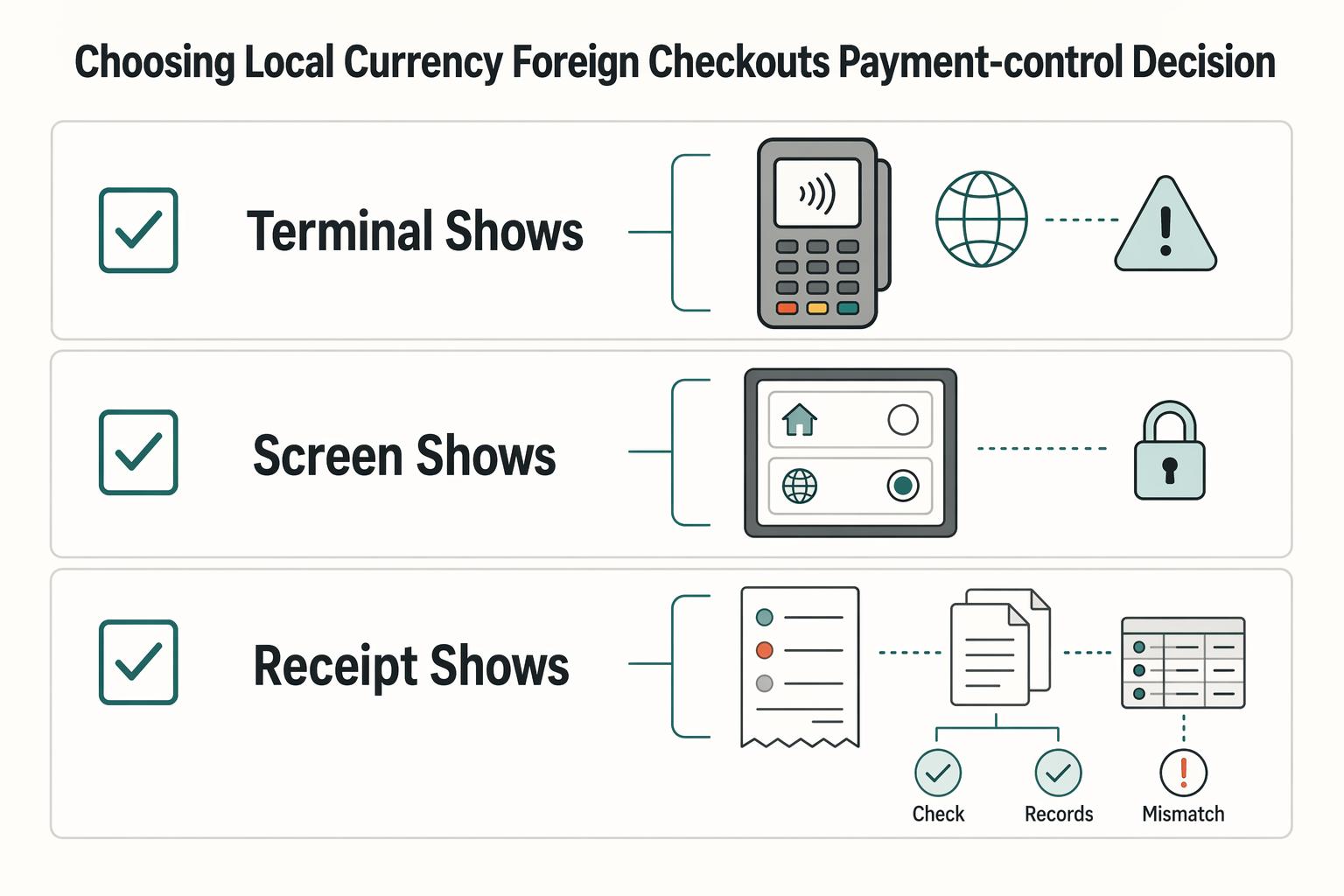
| Terminal shows both local and home currency | Checkout conversion is being offered | Choose the merchant's local currency |
| Screen shows a DCC markup fee | Extra cost may be included in the DCC path | Pause and read before approving |
| Receipt shows home currency when you expected local | You may have approved home-currency conversion | Keep the receipt and compare it with your card statement |
Use a repeatable process, not instinct. The next sections lay out a practical pre-pay, pay, and post-pay routine. Prepare your payment setup, confirm the currency at the terminal, and verify receipt versus statement so nothing slips through. You might also find this useful: How to Get Local Currency Abroad Without a Recordkeeping Mess.
Why 'Convenience' at the Checkout Is a Threat to Your Financial Integrity#
The "pay in your home currency" option is not just a convenience prompt. In some checkout flows, choosing home currency can add extra fees without you realizing it.
Challenge the convenience story#
A familiar currency can feel safer when you are tired or rushed, and that is exactly when bad decisions slip through. Modern scams can look legitimate at first glance, and point-of-sale systems can bury conversion fees inside normal checkout screens.
Treat any dual-currency screen as a pause point. If the terminal shows both currencies, an exchange rate, or urgency language such as a rate being valid only for the "next hour," slow down. Confirm which currency will actually be charged before you approve.
Follow the incentive chain#
You do not need a detailed model of the payment chain to make a safer choice. Focus on what you can verify at checkout: which currency you are selecting, what rate is shown, and whether urgency is being used to rush you.
You do not need a precise markup figure to act correctly. The practical risk is enough. Choosing home currency at checkout can add extra fees without you realizing it.
Treat this as an operating risk, not a travel annoyance#
For freelancers and small teams, this is not just a one-off travel cost. Repeated extra fees at checkout can add up over time.
Keep receipts whenever a terminal shows two currencies or an exchange-rate line so you can compare what was shown at checkout with the posted charge later.
| Decision point | Pay in local currency | Pay in home currency at checkout | Operational impact |
|---|---|---|---|
| Checkout setup | Local-currency amount is shown for approval | A converted home-currency amount is offered | You need to verify the choice before approving |
| Pressure signals | No urgency prompt to lock a conversion rate | Convenience or urgency language may appear | Treat "limited-time rate" language as a red flag |
| Cost risk | Lower risk of hidden checkout conversion fees | Higher risk of extra fees | Cost control becomes less predictable |
| Recordkeeping | Save the checkout receipt | Save the checkout receipt | You can compare what was shown at checkout with the posted charge |
The working rule for this article is simple: when a foreign checkout offers your home currency, choose local currency unless you have a specific, documented reason not to. For a step-by-step walkthrough, see How to Use a Forward Contract to Hedge a Foreign-Currency Invoice.
Step 1: The Pre-Deployment Toolkit for Financial Control#
Set this up before travel or before any cross-border spending day starts. The goal is simple: make local-currency checkout your default so you are not making avoidable decisions under pressure. Have your primary card, one backup method, app access, and one place to store receipts or screenshots.
Choose the card you will use by default#
Start with a card whose foreign transaction fee policy you can confirm in writing. This matters because foreign transaction fees and checkout conversion are separate risks, and some issuers base fees on where the transaction happens, not only on the currency selected.
Before the trip, check these items:
- Confirm the terms clearly state the card's foreign transaction fee policy.
- Confirm alerts include enough detail to match a receipt later.
- Save the fee-policy proof (screenshot or PDF) before the trip.
Control note: choosing your home currency at checkout does not reliably prevent issuer-side foreign transaction fees. Keep DCC risk and issuer-fee risk as separate lines in your checklist.
Decide if a multi-currency account is necessary#
Keep this checklist focused on checkout behavior and card fee policy. Whatever account setup you use, plan to select local currency whenever a terminal shows both local-currency and home-currency options.
Use this rule for checkout:
- If the terminal shows both options, choose local currency.
- If the terminal defaults to home currency, pause and confirm the charge is run in local currency before you approve.
Turn on alerts and define your review checkpoint#
After each foreign transaction, verify what currency was used at checkout and keep the receipt or screenshot when both options were shown.
| Control | Scope | Action |
|---|---|---|
| Push alerts | Approvals and key spend activity | Enable before you leave |
| Receipt retention | Transactions where the terminal showed home and local currency options | Keep the receipt or screenshot |
| Review checkpoint | Home-currency checkouts | Review promptly |
One more practical choice is how you respond when the terminal gives you options:
| Setup choice | Likely risk exposure | Recommended default action |
|---|---|---|
| Terminal shows local and home currency; you choose local currency | Avoids DCC conversion-rate risk; issuer foreign transaction fees may still depend on where the purchase occurs | Preferred default |
| Terminal shows local and home currency; you choose home currency (DCC) | Higher risk of unfavorable exchange rates and increased total cost; foreign transaction fees may still apply | Avoid as default |
| Terminal prompt is unclear before confirmation | Accidental DCC selection | Pause and ask to run the charge in local currency before approving |
If you keep one rule from this phase, make it this: when the terminal shows two currency options, choose local currency and treat DCC risk and issuer-fee risk as separate checks. If you want a deeper dive, read Separating Business and Personal Finances: An Important Step for LLCs.
Step 2: Your Point-of-Sale Protocol for Maintaining Control#
The terminal is where you keep control or lose it. If you are offered local currency or your card's home currency, choose local currency and keep the receipt. That keeps processing aligned with your instructions and lowers the risk of worse conversion outcomes or extra transaction-currency fees.
Give the instruction before the transaction is run#
Say this before you tap, insert, or hand over your card:
- "Please charge me in the local currency."
- "Local currency, please."
- "Please do not convert it to my home currency."
Keep it short and explicit. If staff handle the terminal, slow it down and confirm the amount and currency before approval. A reported failure mode is home-currency processing without a real choice.
Use a simple escalation ladder#
If your first request is ignored, escalate once and decide quickly:
| Stage | What you say | When to use |
|---|---|---|
| Initial request | Please charge me in the local currency. | Before you tap, insert, or hand over your card |
| Correction request | Please run this in local currency, not my home currency. | If your first request is ignored |
| Exit decision | If it can't be processed in local currency, I won't continue this transaction. | If it can't be processed in local currency |
If they already processed home currency, ask to void it and rerun it in local currency. If available, keep proof of the void.
Run a fast on-screen and receipt check#
Under checkout pressure, use a short routine:
- Confirm the transaction is being processed in local currency, not your home currency.
- Treat any home-currency offer as a conversion prompt.
- Decline conversion and proceed with local-currency processing.
- Verify the receipt before leaving. The receipt may separately show conversion commission or exchange details.
In one cited incident, a 1,163 NZD bill should have been 762.57 USD at market rate. It was charged as 806.96 USD, a $44.39 (5.8%) difference. Treat that as a case example, not a universal markup rule.
Keep proof at the counter#
Proof matters most later, so collect it before you leave.
| Terminal behavior | What you say | What you do | What proof to keep |
|---|---|---|---|
| You are offered local vs home currency | "Local currency, please." | Choose local-currency processing | Receipt showing final charged currency |
| Staff steer the transaction to home currency | "No thanks, local currency only." | Wait for local-currency processing before approval | Receipt and a brief note of what was said |
| Home currency was already selected | "Please void and rerun in local currency." | Do not approve the first version | Void record if available, plus corrected receipt |
| No local-currency processing is offered | "If it can't be local currency, I won't continue." | Stop and use another method or merchant | Any canceled slip and your note of what happened |
Before you walk away, confirm two things: you approved local-currency processing, and you have proof. If either is missing, treat the charge as high risk in your same-day review.
We covered this in detail in Currency Hedging for Freelancers Without Guessing the Market. Before your next trip, run your common payment scenarios in the payment fee comparison tool. That gives your local-currency rule a clear cost baseline.
Step 3: Reconcile posted charges and escalate mismatches#
Checkout is only the first control point. Once a foreign card charge posts, reconcile it against what you approved and escalate quickly if the posted currency or amount does not match. For credit cards, preserve your billing-error rights. Send written notice within 60 calendar days after the charge appears on your statement.
Reconcile each charge before you decide what went wrong#
Start with documents, not memory: receipt first, statement line item second, then any conversion details shown at checkout. You are checking whether conversion was applied, whether you had a real currency choice, and whether exchange rate or markup details were disclosed.
Use this working log when charges post, then review it again at month-end:
| Date and merchant | Receipt currency | Receipt amount | Posted currency | Posted amount | Expected network-converted amount* | Variance | Action owner | Status |
|---|---|---|---|---|---|---|---|---|
| [ ] | [ ] | [ ] | [ ] | [ ] | [ ] | [ ] | You | Open |
| [ ] | [ ] | [ ] | [ ] | [ ] | [ ] | [ ] | You or bookkeeper | Investigate |
| [ ] | [ ] | [ ] | [ ] | [ ] | [ ] | [ ] | You | Escalated |
*Treat network calculator output as an estimate, not final posted truth. If the merchant or ATM already converted the transaction, network conversion rates may not apply to that posted amount.
Run a month-end checklist that closes the loop#
Do a full statement review every cycle, not just a spot check of suspicious travel charges. As part of that review, compare your starting balance to the prior bill and reconcile foreign transactions line by line.
- Match each foreign receipt to the exact statement entry: date, merchant, amount.
- Mark whether the charge was processed in local or home currency based on receipt and statement evidence.
- Record unexplained conversion cost as a flagged exception, not a routine expense.
- Log unresolved items with date found, owner, and next follow-up date.
That keeps your books cleaner and gives you an audit trail if you need to dispute later.
Escalate with an operational dispute protocol#
Handle the dispute in stages, not as a generic complaint. A strong dispute file is usually simple. What matters is that the pieces line up and stay together.
| Stage | What you do | Output |
|---|---|---|
| Issuer contact | Contact issuer immediately by phone or secure chat; state the mismatch clearly (instruction vs posted result). | Case opened and initial notes |
| Case framing | State what is wrong and why in plain terms: what you requested, what posted, and why it conflicts. | Clear dispute narrative |
| Written notice | Send written billing-error notice promptly (credit cards: within 60 calendar days from statement appearance). | Legal-rights-preserving filing |
| Network coding check | Ask issuer to confirm current DCC-related network classification from the live rulebook before final filing. | Verified classification (placeholder: [Issuer-confirmed reason code]) |
| Follow-up cadence | Track acknowledgment and status checks until resolution window closes. | Active, documented timeline |
Keep a compliance-grade evidence pack in one file#
Keep the file simple, but keep it together.
| Evidence item | Why it strengthens your file |
|---|---|
| Receipt image | Proves original amount and transaction currency |
| Terminal prompt proof (if available) | Supports whether a real currency choice or disclosure appeared |
| Statement line item | Proves what actually posted to the account |
| Call or chat record | Shows what you reported and when |
| Case ID + follow-up log | Proves timeline, ownership, and repeated contact history |
If terminal proof is unavailable, you can still build a solid file with the receipt, statement entry, and dated issuer-contact record.
Follow the clock and escalate stalled cases#
Timing matters once a dispute is open. After written dispute receipt, issuers have 30 days to acknowledge. The investigation window is up to two billing cycles (max 90 days). Use those points as your follow-up schedule, and keep all follow-up dates in the same case file.
| Point | Timeframe | Note |
|---|---|---|
| Issuer acknowledgment | 30 days after written dispute receipt | Issuers have 30 days to acknowledge |
| Investigation window | Up to two billing cycles (max 90 days) | Use as part of your follow-up schedule |
| CFPB complaint channel | About 15 days | Most companies respond within about 15 days |
If acknowledgment is late or the case stalls without a clear path, escalate through the CFPB complaint channel. Most companies respond within about 15 days. Related: The Best Debit Cards for International Travel.
Conclusion: Make prevent, execute, and verify your standard routine#
The whole article comes down to one routine: prevent, execute, verify. You reduce payment risk by repeating a control habit, not by relying on split-second judgment.
This focus on routine matches broader evidence on fear and financial literacy. A March 2025 study of college undergraduates (n = 433) found that general financial literacy was associated with lower personal fear of financial crimes. The practical takeaway is simple: know your checks, keep your proof, and review quickly enough to catch issues before they spread into your books.
Prevent (prepare). Set your payment plan before you pay, enable transaction alerts, and decide what records you will keep. If a charge posts later, you should already have the evidence you need to reconcile it.
Execute. Pause long enough to confirm the transaction details before approval. If the screen or receipt does not clearly match what you intended to authorize, stop and resolve it before completing payment.
Verify. Match the posted charge to your receipt and log any mismatch while the details are still fresh. Keep a basic evidence pack: receipt image, statement line, and a dated contact record when you escalate.
| Trip point | Your action | Proof to keep | Risk avoided |
|---|---|---|---|
| Before payment | Use your planned card, enable alerts, and open your expense log | Card alert settings, trip spend log | Guessing later which charge belongs where |
| At terminal | Confirm transaction details before approval and keep the receipt | Receipt image or paper receipt | Approving terms or amounts you did not intend to accept |
| After posting | Reconcile the statement entry against the receipt and log exceptions | Statement line, dated notes, case ID if escalated | Uncaught errors, weak dispute file, messy books |
Turn this into a reusable checklist inside your expense process and card-alert routine. When you can run it the same way every time, you are in a better position to protect cash flow and keep cleaner books.
This pairs well with our guide on Currency Options for Hedging Against Forex Risk. If you want this protocol to become routine across how you get paid, review Gruv for freelancers. It supports a more traceable collection-to-payout workflow where supported.
Frequently Asked Questions
Should I pay in local currency or my home currency?
Choose the local currency. Choosing your home currency at checkout can add extra fees, even when the prompt looks routine. Before you approve, confirm the terminal shows the amount in the local currency and keep the receipt.
Is dynamic currency conversion a scam?
Treat this as two separate questions: legal status and real-world implementation risk. Do not assume every case is automatically illegal or automatically compliant. The practical risk is that conversion offers can look legitimate and still hide fees in the checkout flow. If you were rushed, not given a clear choice, or later see a converted amount you did not intend to approve, keep your records and escalate to your issuer.
How does DCC affect business expenses?
It can create extra review work when a charge is converted in a way you did not expect. That creates friction when you match receipts, alerts, and statement lines. If anything does not line up, flag it quickly and save your receipt image, statement line, and dated notes.
Does choosing the local currency mean I will not pay a foreign transaction fee?
Not necessarily. Choosing local currency can reduce checkout conversion risk, but it does not guarantee zero cross-border costs in every case. Check your card terms before you travel. One option is to start with this list of no foreign transaction fee cards.
What should I do if the merchant says the machine automatically converts the currency?
Slow the transaction down and restate that you want local currency. Rushing people before they can verify details is a known scam pattern, and aggressive pressure is a red flag. Ask to restart in local currency. If that is refused, switch payment method or walk away if you can. If conversion is still processed after you object, keep proof and escalate to your issuer.
Try a related tool
Researched and edited by the Gruv editorial team. Gruv builds cross-border billing, payouts, and finance-operations software for global businesses.
Sources
- bryan.edu/wp-content/uploads/2025-26_catalog.pdftrusted
- consumerfinance.gov/ask-cfpb/how-do-i-dispute-a-charge-on-my-cre...trusted
- consumerfinance.gov/consumer-tools/credit-cards/how-to-fix-mista...trusted
- dhs.gov/sites/default/files/2024-09/2024aepphaselllc...trusted
- dls.maryland.gov/pubs/prod/RecurRpt/24rs_90_Day_Report.pdftrusted
- en.wikipedia.org/wiki/Dynamic_currency_conversiontrusted
- fdic.gov/sites/default/files/2024-05/cleary-report-to...trusted
- federalreserve.gov/econres/notes/feds-notes/comparing-means-of-...trusted
Educational content only. Not legal, tax, or financial advice.
Related Posts

How LLC Owners Separate Business and Personal Finances
For an LLC, separating business and personal money is best treated as a weekly habit, not a one-time bank setup. It keeps records cleaner, cuts month-end cleanup, and creates clearer boundaries as the company grows.

The Best Debit Cards for International Travel
If reliable cash access is the priority, do not evaluate this like a perks list. Treat it like continuity planning. Give one card the everyday ATM job, fund a second card for disruptions, and decide that split before you leave.
The Best Credit Cards with No Foreign Transaction Fees
If one blocked card can interrupt your workday, you do not have a card strategy. You have a single point of failure. The **Resilient Wallet** is a practical way to avoid that. Its job is simple: keep you paying, protect cash flow, and stop one payment problem from turning into an operations problem.