
Quick Answer
Start with an operating model, not a gadget list: to automate your airbnb, place a booking review gate before access, use smart locks with expiring credentials and a tested backup key method, and document a clear escalation path for noise or occupancy alerts. Then connect one PMS workflow end to end and test create, edit, and cancel behavior, with manual fallback steps for outages, lockouts, and missed turnovers.
The internet is full of advice on "automating your Airbnb," and most of it starts in the wrong place. It treats automation like a pile of gadgets instead of an operating model. For a serious investor, that is a distraction. You are not trying to build a clever smart home. You are trying to run a resilient, scalable, profitable hospitality business that performs the same way whether you are across town or across the globe.
That means thinking less like a host and more like an operator. Good automation does not remove all work. It removes the right work, gives you a cleaner operating record, and makes exceptions easier to spot before they become guest problems. This is the blueprint for building your Airbnb Autopilot: a three-phase system to protect the asset, tighten operations, and prepare the portfolio to grow.
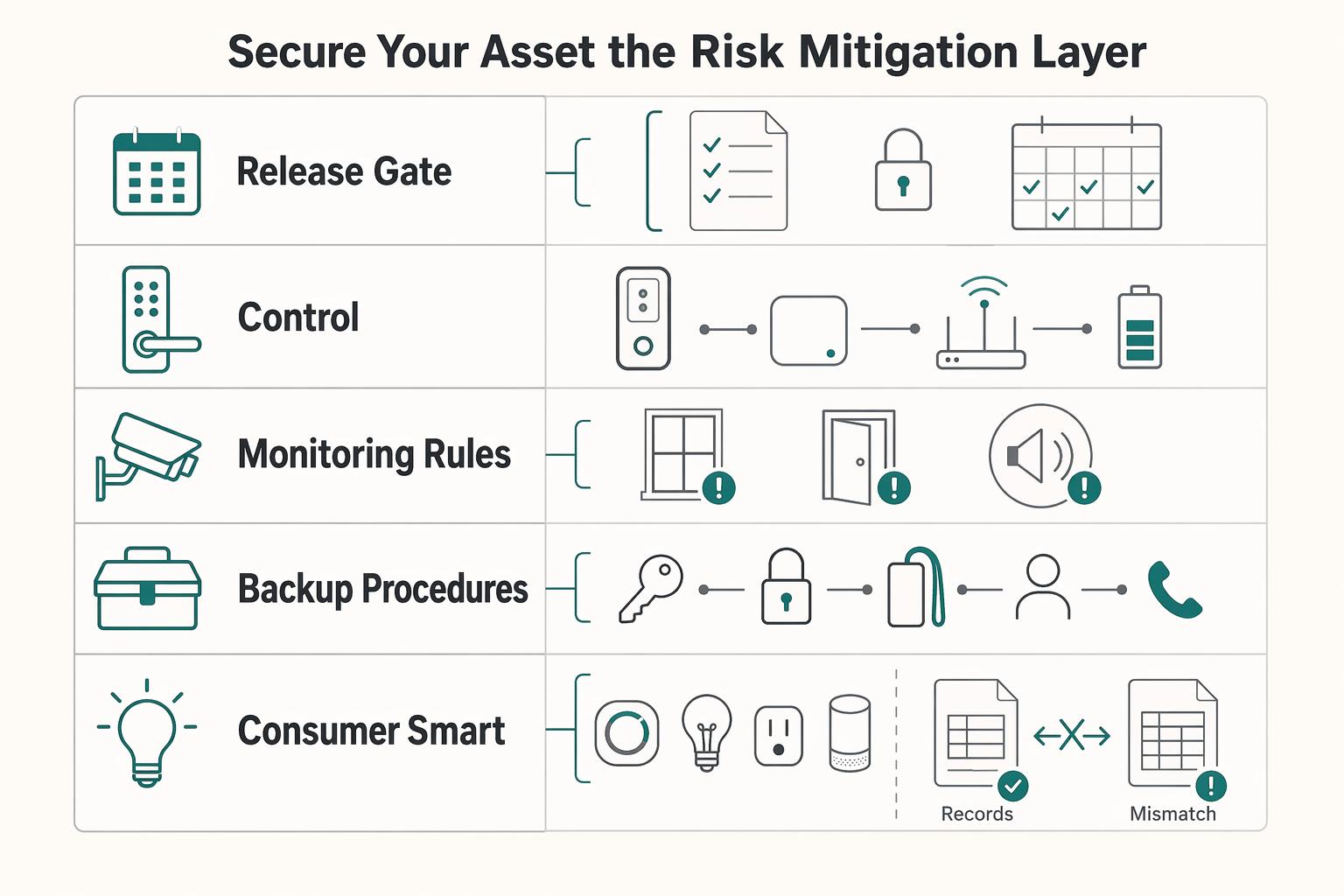
Phase 1: Secure Your Asset (The Risk Mitigation Layer)#
If you want to automate your Airbnb without creating new failure points, start with risk controls, not guest-facing convenience. The sequence is straightforward: review the booking, control entry, monitor for rule breaks, and keep a manual fallback for the day an app, battery, or internet connection fails.
| Control | Requirement |
|---|---|
| Booking review gate | Documented with consistent manual-review triggers |
| Access control | Expiring credentials and a tested backup entry method |
| Monitoring rules | Verified disclosure requirements and a written alert-escalation path |
| Backup procedures | Covers lockouts, dead batteries, internet outages, and after-hours incidents |
Before you touch any tools, write down the rules you will actually enforce. That includes maximum occupancy, quiet hours, check-in windows, and who gets called if something goes wrong after hours. If you list on more than one channel, sync calendars with a channel manager early. That matters because it helps prevent double-booking risk before screening even starts.
Step 1. Put screening in the booking funnel before access is granted. Screening belongs after the inquiry or reservation request and before you send entry instructions or issue a door code. The goal is not a perfect risk score. It is to push every reservation through the same review gate and document what happened in a way you can review later.
In practice, define your review triggers in advance and apply them consistently. Keep one decision log with the same fields every time: booking date, trigger, follow-up question sent, guest response, final decision, and the booking fact or house rule used for that decision. Keep the log focused on booking facts and policy checks.
It also protects your operating metrics. In 2026, trust badges are treated as meaningful ranking inputs, and Superhost is still assessed quarterly in Jan, Apr, Jul, and Oct. The source lists 4.8+ rating, under 1% cancel, and 90%+ response as Superhost benchmarks, so your screening process should reduce bad stays without creating unnecessary cancellations or slow replies. For new hosts, the first ten reviews are especially important.
Step 2. Choose access control like an operator, not a gadget buyer. Your lock decision should answer four questions up front: Will it connect reliably to the rest of your stack? Can you create and revoke credentials cleanly? Can you review entry history when needed? What happens when the primary method fails? If you cannot answer those before you buy, keep looking.
| Option | Integration fit | Credential control | Activity visibility | Fail-safe access | What to verify before buying |
|---|---|---|---|---|---|
| Consumer smart lock | Varies by model and setup | Varies by app and device features | Varies by vendor logs | Varies by battery, app, and local access method | How codes are created, expired, and exported |
| Professional access lock | Varies by vendor and booking-system integration | Often supports timed and role-based access | Often includes clearer operational logs | Usually includes a documented backup path | Whether it connects to your booking software and how logs are retrieved |
| Mechanical backup such as a locked key safe | No software dependency | Physical key only | None beyond manual logkeeping | Strong fallback if power or internet fails | Who can access it, where the record is kept, and how keys are rotated |
Whatever you choose, run two tests before the first live stay: confirm a guest code expires when it should, and confirm a backup entry method works without your phone.
Step 3. Add sensors only after you verify disclosure and local rules. Noise or occupancy monitoring can help you catch a problem before it turns into a neighbor complaint, but treat this as a verify-first decision. Check your local rules, building terms, lease terms, permit conditions, and platform disclosures for your market. Do not assume a device is compliant everywhere just because it is widely used. Verify the rule set, then disclose the device in your listing, house rules, and pre-arrival message, including where it is located and what it measures.
Write the escalation path before the first alert arrives. First, confirm the alert maps to a real rule such as quiet hours or occupancy limits. Second, send a calm message through the platform. Third, if the alert continues, place a call or send a second warning tied to the specific rule. Fourth, escalate to your local contact or security response if your policy allows it. Fifth, close the loop with an incident log that records alert time, screenshots, guest messages, actions taken, and the outcome.
Step 4. Build the minimum viable risk stack before moving on. Do not add more automation until these four controls work together:
- A documented booking review gate with consistent manual-review triggers
- Access control with expiring credentials and a tested backup entry method
- Monitoring rules with verified disclosure requirements and a written alert-escalation path
- Backup procedures for lockouts, dead batteries, internet outages, and after-hours incidents
Once those are in place, you can automate operations without weakening the asset you are trying to protect.
Phase 2: Systematize Your Operation (The Five-Star Efficiency Engine)#
In Phase 2, you turn repetitive hosting work into a repeatable system you can manage, audit, and improve. The goal is practical: one PMS as your operating hub, message automations for predictable guest moments, and dynamic pricing rules that adapt to demand without removing your judgment.
| Step | Detail |
|---|---|
| 1 | Checkout status updates in PMS |
| 2 | Guest access is revoked |
| 3 | Turnover task is created |
| 4 | Cleaner access is issued for a limited window |
| 5 | An alert fires if the task is not accepted by your cutoff time |
Before you add tools, lock in three basics: your current tool list, one written exception SOP, and a message library you would actually send as-is. If you cannot explain your reservation-to-checkout flow on one page, fix that first.
Step 1. Map required integrations before choosing a PMS. Pick your PMS by connection fit, not feature count. Start with the systems you must connect: booking channels or channel manager, access control, guest messaging, cleaner tasking, and dynamic pricing. Then define the data each one must share, such as reservation dates, guest count, check-in status, and checkout status.
Test the workflow directly: create a reservation, edit it, then cancel it. Confirm what syncs, in which direction, and how failures show up. You are validating behavior, not assuming it.
| Evaluation point | Feature-rich PMS lens | Integration-first PMS lens |
|---|---|---|
| Built-in tools | Useful if you want fewer separate apps | Useful if you already rely on specialist tools |
| Connection fit | Broad coverage, but can miss one critical tool | Better when specific lock, pricing, or ops tools must connect cleanly |
| Two-way sync checks | Easy to assume native means complete | Forces create/update/cancel testing before commitment |
| Failure handling | Exceptions may be buried in one interface | Easier to design alerts, logs, and manual fallback steps |
Your output should be simple: a must-connect list, a nice-to-have list, and one documented manual fallback path.
Step 2. Build one checkout-to-turnover automation chain. Start with one narrow chain and test it end to end. Example flow: checkout status updates in PMS, guest access is revoked, turnover task is created, cleaner access is issued for a limited window, and an alert fires if the task is not accepted by your cutoff time.
Document the fallback beside it. If task creation fails, review a daily departure report at a fixed time, contact the cleaner manually, and issue access manually through your lock workflow or backup key process. Test this on a non-live booking and log timestamps so delays are visible.
Step 3. Automate guest communication by intent. Each automated message should solve one guest need at one moment: confirmation, pre-arrival, arrival check, pre-checkout, and post-stay. Keep each message direct and useful.
Use only reliable personalization fields (for example: first name, check-in date, property name, and listing-specific check-in instructions). Route safety concerns, access failures, billing disputes, damage, and emotionally charged complaints to human support. If messages feel robotic, cut generic filler, forced warmth, and repetitive punctuation.
Step 4. Use a dynamic pricing control model you can audit. Dynamic pricing works best when you set rules before rates start moving. Define base-rate logic, then add event/season overrides, minimum-stay rules, and manual review checkpoints. Use verified market inputs before you replace placeholders like [weekday floor], [weekend lift], [peak-season minimum stay], [event override], and [last-minute review window].
Keep human review in the loop. Check pricing outputs on a schedule, and review manually when local events, cancellations, or unusual rate shifts appear. Automation should reduce pricing guesswork, not remove your responsibility. For deeper tooling comparisons, see The Best Software for Managing Short-Term Rentals.
Before Phase 3, confirm Phase 2 readiness:
- Core systems are connected, tested, and covered by one exception SOP.
- Message automations are live for key guest moments and escalate edge cases to a human.
- Dynamic pricing rules are active, and outputs are reviewed on a defined cadence.
If you want hardware ideas to support this layer, see The Best Smart Home Devices for an Airbnb.
Phase 3: Stabilize Multi-Listing Operations Before You Add Units#
To run multiple listings remotely without losing control, treat your PMS as your single source of truth and make every decision from that same record.
| Readiness area | What must be true |
|---|---|
| Dashboard records | Match real-world operations across listings |
| Turnover proof | Consistent, not occasional |
| Delegated admin work | No longer blocking growth |
Step 1. Review one dashboard and take one corrective action per weak metric. Use the same four KPIs across every unit so you can spot where operations are drifting, not just where gross revenue looks strong.
| Metric | What to check | Action if off-track |
|---|---|---|
| Occupancy | Unbooked gaps, blocked dates, stay-rule friction | Verify channel sync, review minimum-stay settings, and clear accidental blocks |
| ADR | Rate strength by unit and date | Recheck discount rules and event/season overrides |
| RevPAR | Whether pricing and booking pace are working together | Audit rate logic and calendar rules together before changing only one |
| Operating cost | Cleaning, maintenance, linens, supplies by unit | Isolate the cost-heavy listing and review vendor charges plus repeat issues |
After each weekly review, name one unit that needs intervention and one change you will test first.
Step 2. Lock your turnover SOP so handoffs are provable. Your chain should be explicit: checkout trigger -> task assignment -> access provisioning -> proof-of-work capture -> exception escalation. Keep ownership clear at each handoff using placeholders you can verify in your stack: cleaner accepts by [assignment cutoff], proof is uploaded by [proof cutoff], and unresolved items escalate by [escalation window].
Test the full flow on a blocked stay. A clean without proof is still an operations risk, because you cannot confirm readiness or document issues.
Step 3. Add reliability layers before you add another listing. Write fallback rules next to the SOP: backup access method, missed-task alerts, and communication fallback order (for example: call -> SMS -> app message). If recurring guest messages, calendar updates, and maintenance coordination are consuming your week, delegate those first and keep safety incidents, refunds, and disputes under your direct control.
Step 4. Use a buy box built from your own portfolio data. Base expansion decisions on patterns you already operate well: demand pattern, stay profile, cost-to-serve, and repeat review friction points. Then score each new unit against that same buy box before committing.
If you buy, plan for ownership-level capital needs (often 15-25% down, plus closing costs and furnishings). If you use rental arbitrage, setup may be closer to $10,000-$25,000 per property, but it builds no equity and carries added risk, so do not proceed without written lease clauses that allow subletting.
Scale only when this checklist is true:
- dashboard records match real-world operations across listings
- turnover proof is consistent, not occasional
- delegated admin work is no longer blocking growth
If any point is still unstable, stabilize current units first. For a step-by-step walkthrough, see How to Price Your Airbnb From Abroad Without Losing Margin.
Conclusion: Know What Runs Without You and What Still Needs You#
Once the dashboard is reliable, your weekly job should get narrower, not blurrier. The goal is not hands-off hype. It is to remove preventable decisions, keep proof where it belongs, and make exceptions obvious fast.
Step 1. Keep ownership of the few calls that need judgment. You still own pricing direction, refunds and disputes, owner communication, vendor changes, and the decision to add another unit. Your PMS and scheduled guest messages should handle the repeatable work, but standard PMS AI may not be enough for true "autopilot" messaging. You step in manually for edge cases like weather disruptions, lockouts, device troubleshooting, or any message thread where automation gets something wrong and revenue or trust is at risk.
Step 2. Use a phased rollout to reduce risk and decision fatigue. Phase 1 should focus on risk controls: booking review, access, monitoring, and backups. Phase 2 should tighten operations by routing updates and team coordination into one operating flow instead of scattered chats and notes. Phase 3 should focus on scale readiness by reviewing exception trends, response performance, and operating costs before you add units.
Step 3. Validate readiness before you scale. Do not add inventory until you can verify, in your own operation, three things for a consistent number of consecutive turns or a set number of weeks:
- Process stability: routine messages send on time, handoffs happen when automation fails, and turnovers are accepted before your
[assignment cutoff]. - Documentation quality: runbooks, checklists, and status records are clear enough that the team can execute without guesswork.
- Exception handling: your fallback order works in a live test, and manual escalation is clear for events like weather disruptions, lockouts, or device troubleshooting.
Run one simple reliability test before you trust any vendor or assistant: include a clear instruction in the brief, like a keyword check, and confirm they actually follow it. If proof is inconsistent or exceptions still depend on memory, stabilize first. The win is not autopilot. It is knowing what runs without you, what still needs you, and seeing the gap before a guest does.
Frequently Asked Questions
What are the biggest risks of automating an Airbnb?
Common risks are broken handoffs, not just "too much tech." That usually shows up when a booking confirms but the message does not fire, or when availability fails to sync and you create a double-booking problem. Before you trust the setup, make one test booking and verify three checkpoints: confirmation message sent, calendar updated across channels, and self check-in instructions matched the reservation.
How do you automate guest screening for Airbnb?
Automate only the review steps you are allowed to automate, not the final judgment in every case. Local law or platform policy can limit what you collect or how you act on it. Write your screening criteria in plain language first, then verify current platform policy and local requirements before you turn on any automated flag or decline rule.
Can you run an Airbnb business 100% remotely?
You can run many parts remotely if repeatable tasks are automated and local exceptions still have an owner. It works when messaging, cleaning coordination, and self check-in are consistent, but maintenance, guest incidents, and access failures still need a real person to respond. Document who handles lockouts, urgent repairs, and guest calls after hours, then test that chain before you depend on it.
What is the best PMS for managing multiple properties?
There is no single best choice for every host, so pick based on fit, not brand reputation. Once you have more than one listing, the features that matter most are channel sync, message automation, task coordination, and one dashboard for reservations, messages, and calendars. Shortlist tools by required integrations and reporting first, then compare options in The Best Software for Managing Short-Term Rentals.
Are noise monitoring devices legal in an Airbnb?
Sometimes, but treat this as a verify-before-install question. Privacy, disclosure, and device limits can vary by jurisdiction and by platform policy, so do not assume a device is compliant everywhere. Confirm your local rule and disclosure duty first, then add those verified requirements to your house rules and listing copy.
How much does it cost to fully automate an Airbnb?
Costs vary by your setup and by how many listings you manage. Build two simple budgets before you buy: single-unit setup plus monthly, and multi-unit setup plus monthly, using current vendor pricing you verify directly with each provider.
How do smart home devices improve the guest experience?
They help when they remove friction, especially around entry. Self check-in can eliminate key handoff coordination, and a device is only useful if your instructions are clear and the guest does not need extra support to use it. Check your arrival flow on your own phone from outside the property and make sure the entry steps work without extra explanation.
Try a related tool
Researched and edited by the Gruv editorial team. Gruv builds cross-border billing, payouts, and finance-operations software for global businesses.
Sources
Includes 5 external sources outside the trusted-domain allowlist.
- downloads.cs.stanford.edu/nlp/data/jiwei/data/vocab_wiki.txttrusted
- sec.gov/Archives/edgar/data/1559720/0001193125202948...trusted
- snap.berkeley.edu/project/11166188trusted
- gethostai.com/blog/advertisements-for-vacationexternal
- getpaidforyourpad.com/blog/airbnb-automation-ultimate-guideexternal
- gigabpo.com/airbnb-virtual-assistantexternal
- guesty.com/blog/guide-to-airbnb-automationexternal
- hello.pricelabs.co/blog/airbnb-roi-forecasting-platformsexternal
Educational content only. Not legal, tax, or financial advice.
Related Posts

Value-Based Pricing for Freelancers Under Real Payment Risk
Value-based pricing starts with the client’s expected benefit and willingness to pay. It still needs a deliverable, scope and payment agreement you can perform. Use a discovery phase when the benefit or effort is too uncertain to support a defensible quote.
The Best Software for Managing Short-Term Rentals
If you own or manage a short-term rental, your job is not just answering guest messages and turning over a property. You are managing an income-producing asset. The real work is protecting cash flow, reducing operating mistakes, and making sure one missed detail does not turn into a booking issue or a compliance problem.
The Best Smart Home Devices for an Airbnb
The **best smart home devices for airbnb** are the ones that give you reliable control. Novelty is not the point. Access, climate, alerts, and guest handoffs should work without constant manual fixes. If you are still bouncing between apps, texting door codes by hand, or hoping each handoff goes smoothly, you may not have an operating setup yet. You may have a pile of gadgets.