
Quick Answer
Use one reconciled ledger, match gross receipts, fees and bank payouts, and route uncertain items to an owner with a deadline. Build a current tax projection, approve actual authority payments and keep confirmations. Reserve transfers are not tax payments, and unresolved bookkeeping should not automatically delay a statutory deadline.
Automate bookkeeping and keep tax decisions under review#
Automate transaction imports, receipt matching, recurring categories and reminders, then review the calculations and positions used for filings. A reliable setup makes the records easier to inspect when clients, income or countries change.
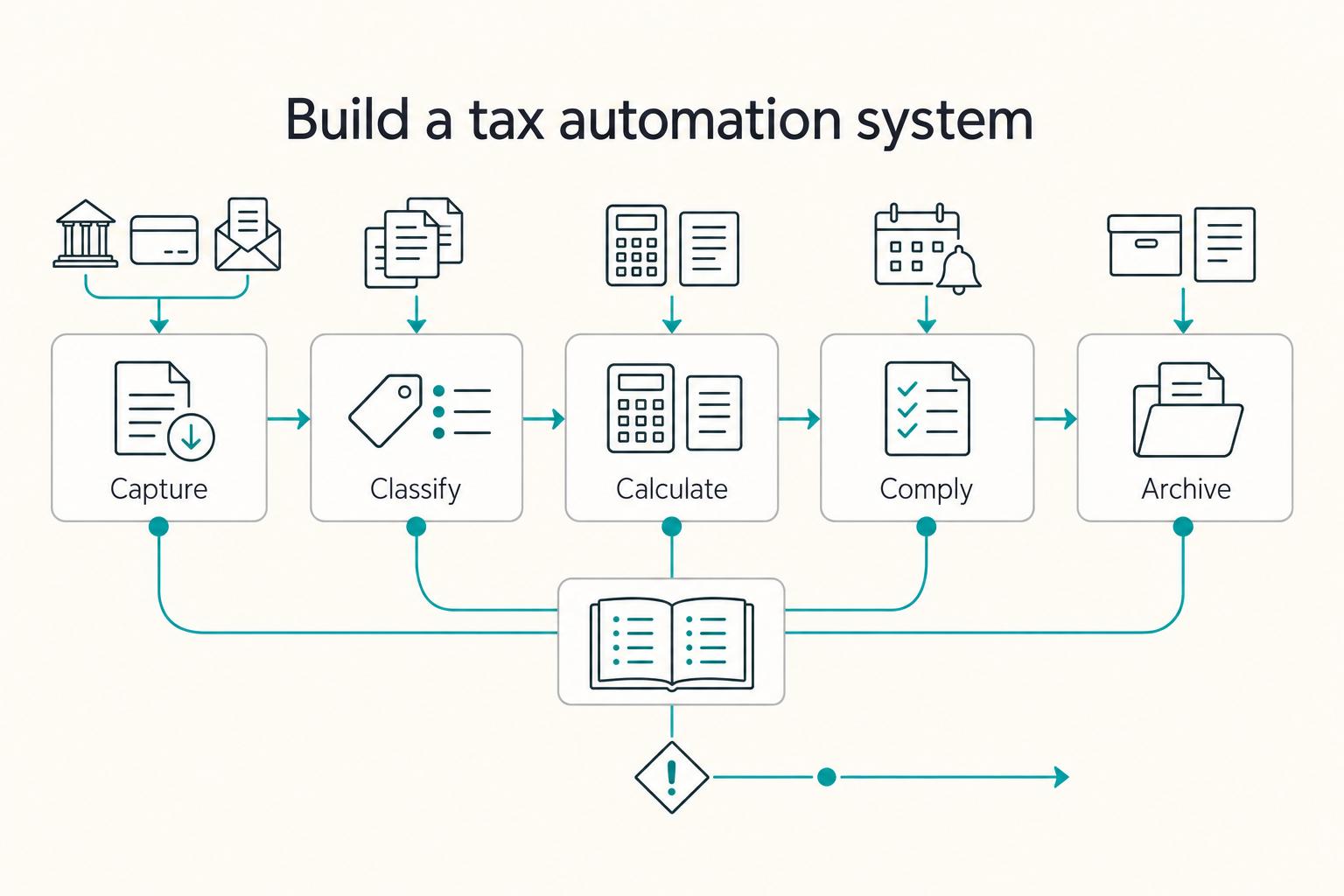
Use five stages: Capture → Classify → Calculate → Comply → Archive. The ledger supplies records; a tax calculation applies the relevant rules, adjustments and payment history. Keep a human review at each material exception.
Step 1: Build the pipeline (with automation + human gates)#
Repeat the five stages through the year, with a named owner and an exception list. Test a known transaction through the full loop before enabling bulk rules.
- Step 1. Capture: Auto-import transactions (bank and card), auto-forward receipts, and standardize invoice collection. Outcome check: every business transaction lands in one ledger, not in inbox purgatory.
- Step 2. Classify: Use rules to categorize recurring items (software, travel, contractor payments). Outcome check: you can explain every "uncategorized" line item without a scavenger hunt.
- Calculate: produce reconciled income, expense and balance reports, then apply reviewed tax adjustments and payment history.
- Step 4. Comply: Put filings, registrations, and payments behind a checklist and calendar reminders. Outcome check: nothing sneaks up on you.
- Archive: keep supporting records and actual filing/payment confirmations under a record-specific retention policy.
Decide which mechanics to automate and which conclusions need review:
| Stage | Automate (low risk) | Human approval (high risk) |
|---|---|---|
| Capture | Imports, receipt forwarding, reminders | Excluding personal items, deciding what counts as business |
| Classify | Rules, bulk categorization | Grey areas (mixed-use, travel, home office) |
| Calculate | Reports, FX conversions and tagging | Residency positions, treaty interpretation |
| Comply | Due-date reminders, export packages | Estimated tax payments, VAT/GST registration decisions, FEIE analysis |
| Archive | Auto-attach receipts, export folders | Evidence gaps, narrative notes for unusual items |
Step 2: Cover the cross-border gaps that often get missed#
For cross-border work, add evidence, currency and jurisdiction checks rather than assuming the accounting app covers them:
| Gap | What to do | Grounded trigger |
|---|---|---|
| Audit-ready evidence | Attach receipts and contracts to transactions; keep a short note on anything unusual | Anything unusual should carry a short note |
| FX discipline | Pick one base currency for reporting, keep the original currency amount, and store the conversion rate used | Keep both the original currency amount and the conversion rate used |
| Residency checkpoints | Schedule recurring reviews when you move, open accounts, add a new country client, or change living patterns | Use life changes as recurring review triggers |
| Know when to talk to a pro | Do not guess if FBAR, FATCA, tax treaty benefits, or VAT/GST might apply | For applicable U.S. persons, FBAR reviews financial interest/signature authority and aggregate reportable foreign-account value over $10,000 at any time |
For a U.S. person with a financial interest in or signature/other authority over reportable foreign accounts, review FBAR when aggregate value exceeds $10,000 at any time in the calendar year. Form 8938 is a separate test and filing; one report does not substitute for the other.
Keep a dated account inventory with owner, location, account type and reporting review status alongside the bookkeeping setup.
Assess your tax situation before connecting tools#
Identify the facts that determine your filing and payment obligations before creating rules. A category imported correctly can still produce the wrong tax result if the underlying residence or deduction assumption is wrong.
1) Run the four checks (set a 10-minute timer)#
Residency check: record moves and travel dates, then assess the applicable rules. Moving mid-year does not automatically create split-year treatment. For example, UK split-year treatment requires meeting an applicable statutory case, rather than selecting an arrival date in an app.
| Check | What to review | Grounded detail |
|---|---|---|
| Residency reality check | Moves, split-year treatment, FEIE or treaty reliance | Split-year treatment depends on applicable country tests; FEIE requires more than a foreign mailing address |
| Multi-jurisdiction exposure | Clients in more than one country, cross-border work, PE risk | EU B2B service place-of-supply general rule has special exceptions; customer country alone is insufficient |
| Document obligations inventory | Forms you might need to collect or issue | Form W-9 provides your correct TIN; Form W-8BEN establishes foreign status and can claim treaty-based reduced withholding |
| Payments footprint check | Bank transfer, ACH, payment apps, and where funds land | Bank feed integrations can automatically import transaction data from your bank account into accounting software |
For U.S. foreign earned income exclusion planning, check foreign tax home and the applicable bona fide residence or physical presence test. The physical presence route generally requires 330 full days in foreign countries during a consecutive 12-month period. FEIE does not itself remove self-employment tax; social-security treaty/totalization treatment requires its own review.
Cross-border exposure: record where you live and work, where the customer receives the service and whether an entity or fixed business presence exists. Multiple foreign clients alone do not prove that you owe income tax in every client country. Ask which registration, withholding, sourcing or treaty rules apply to the actual facts.
For EU service VAT, customer status and establishment are starting inputs. The general B2B rule points to the customer and general B2C rule to the supplier, but special service rules can override them, including electronic services and services connected with property. Capture the service type and supplier establishment before assigning treatment.
C) Document obligations inventory (forms you give or receive): List the forms you might need to collect or issue. In the U.S., IRS guidance says: "Use Form W-9 to provide your correct Taxpayer Identification Number (TIN) to the person who is required to file an information return with the IRS."
If you are a foreign individual dealing with U.S. withholding, Form W-8BEN is used to establish foreign status and, if applicable, claim treaty-based reduced withholding.
Payments footprint: list bank, processor and wallet accounts and the path each payment takes. Imported bank credits alone can miss processor fees, refunds, retained balances and transfers between your own accounts.
For example, a hypothetical $1,000 processor payment with a $30 fee yields a $970 bank payout. Record $1,000 gross income and $30 fee where that treatment fits your accounting method, then match the $970 payout through the processor clearing account. The bank-feed credit is not another $970 sale. A $100 refund is a linked adjustment, and a $200 transfer to your own tax reserve is neither a second expense nor a tax payment.
2) Pick your track and write it down (this drives your automation plan)#
| Track | Choose this when | Automation posture |
|---|---|---|
| Track A: Single-country, stable | No move, one main tax home, simple client footprint | Automate recurring mechanics, reconcile accounts and review material decisions |
| Track B: Moved countries or likely to | You changed countries, or you anticipate a move | Automation plus scheduled compliance gates tied to life changes |
| Track C: Multi-country obligations | Multiple client countries, cross-border work, treaty or VAT questions | Automation plus professional review gates for the decision items |
What to prepare before you automate anything (prereqs + safe defaults)#
Choose one bookkeeping hub, consistent accounts and an evidence standard before enabling bulk imports. Those choices let you review the same transaction across invoices, processor activity and bank statements.
Step 1: Choose your system of record (one) and demote everything else#
Pick one accounting/bookkeeping hub and treat every other tool as an input, not the ledger. Invoicing and project tools can run ops, but do not let them become your books. Safe default: bank feeds and transaction categorization live in one place, then you export reports to your tax preparation workflow.
Verification: inspect a known invoice, fee and bank payout in the reconciled ledger. A fast dashboard result is useful only if the period, accounting method and underlying entries are correct.
Step 2: Open clean financial lanes (or enforce ruthless tagging)#
Separate business and personal transactions where possible. The legal requirement depends on your business form and jurisdiction; a sole proprietor’s tagging policy and a company’s separate finances should not be treated as the same arrangement.
If you cannot separate yet, use strict rules that make every "wrong lane" transaction obvious later:
- Require one tag for every personal transaction that hits the business lane (example:
Owner Draw). - Require one tag for every business transaction that hits a personal lane (example:
Business Reimbursable). - For PayPal and ACH deposits, record the gross amount, fees, and net payout consistently, so your income matches platform summaries.
Verification: every deposit has an identified source (client, platform, or transfer), not mystery money.
Step 3: Define your "tax-ready record" standard (per transaction)#
Define fields and supporting records you need for the transaction and the accounting method. The IRS recordkeeping guide covers income, expenses and supporting documents; an app category is not evidence of deductibility.
| Transaction type | Must include | Why it matters |
|---|---|---|
| Income | Invoice or other authentic sale record, payment reference and gross/fee/net mapping | Supports gross-income, receivable and information-return reconciliation without duplicate payout revenue |
| Expense | Receipt + business purpose note + consistent vendor name | Defends deductions, and preserves VAT details if embedded on foreign receipts. |
Also create a "Forms" folder for W-9 (used "to provide a correct TIN" to payers who file information returns) and, when relevant/requested, W-8BEN-E documentation (W-8BEN-E documents foreign entity status for U.S. withholding and reporting purposes).
Step 4: Set retention and escalation rules now#
Set retention by record type and jurisdiction. IRS guidance commonly uses three years, but also covers six years for certain substantial income omissions, seven for certain bad-debt/security losses, indefinite retention for unfiled or fraudulent returns, and separate rules for employment and property records. Do not automatically delete every file after three years.
Then pre-commit your risk gates, where you pause automation and escalate to a pro:
- You move countries.
- You approach a VAT/GST threshold (do not guess; rules vary by jurisdiction).
- For applicable U.S. persons, foreign financial accounts nearing the over-$10,000 aggregate FBAR test or specified assets nearing the relevant Form 8938 threshold need review.
- You take a tax treaty position (treaties can provide reduced rates or exemptions).
- Entity mismatch or on-the-ground activity creates Permanent Establishment risk (generally framed as a "fixed place of business").
The pipeline that actually automates freelance taxes: Capture → Classify → Calculate → Comply#
Run capture, classification, calculation, compliance and archiving together. Keep an exception queue for ambiguous or failed steps, with an owner, due date and resolution note. A low queue count alone does not establish correct tax treatment.
Step 1 to Step 4: Build the pipeline (and the verification checks)#
Step 1: Capture (inputs). Connect your invoicing and payout sources to your accounting software so every dollar enters once, automatically, where supported. The non-negotiable is this: give every payment a stable reference that survives PayPal and ACH.
Use invoice numbers on invoices and in payment memos. For platform payouts, record the payout ID (and keep gross, fees, and net consistent) so reconciliation stays mechanical. Remember: reconciliation means "comparing two sets of records or financial information," so you need identifiers that let you match records without detective work.
Verification: you can pick any deposit and trace it to an invoice or payout reference quickly.
Step 2: Classify (controls). Add rules-based categorization and tagging for client, country, and project to keep reporting usable. Then add explicit flags for tax-sensitive items. VAT and GST should never disappear into generic "Software" or "Expenses."
Use clear labels like VAT Collected, VAT Paid, GST Collected, GST Paid, or separate tax liability categories if your accounting software supports it.
Verification: you can filter transactions to show all VAT/GST-touched items with one click.
Calculate: produce reconciled bookkeeping totals, then apply the reviewed tax method and adjustments. Include other household income, withholding, credits, prior payments and jurisdiction-specific rules where relevant; current freelance P&L is not the complete estimated-tax calculation.
Your job is to work from actual year-to-date profit reports, not vibes. Keep "special-case" flags for planning conversations (not DIY tax law) based on your situation and jurisdiction.
Verification: keep the dated projection, assumptions, reconciliation status and unresolved items alongside the proposed payment. Identify any annualization or prior-year comparison used.
Step 4: Comply (filing + artifacts). Produce an accountant-ready export pack: P&L, balance sheet, transaction detail, and receipt links. Maintain a forms folder for U.S. Form 1099 documentation where relevant.
Compare information returns with your own records and explain differences such as gross reporting, fees, refunds and timing. Receiving Form 1099-NEC does not legally determine worker classification. Correct an erroneous form where possible, and report income under the applicable rules even if no form arrives.
Assign and resolve exceptions#
Automation fails quietly through uncategorized transactions, missing receipts, FX anomalies, and refunds or chargebacks. (In banking/accounting workflows, an uncategorized transaction is one that doesn't fit into predefined categories.) Keep one list called Exception Queue and clear it weekly:
- Uncategorized or unmatched items
- Missing receipt or missing business-purpose note
- PayPal fee mismatch vs deposit
- FX conversion surprises, duplicated payouts, chargebacks
Review exceptions weekly. Escalate material unknowns and record a reasonable treatment for unresolved items with qualified help. Do not postpone a statutory payment or filing deadline merely because a receipt or category is still missing.
Automate estimated-tax preparation and approve payments#
Automate reports, reminders and reserve transfers; approve the amount and payment instruction using a current tax projection. A reserve transfer is not payment to the tax authority. If records are incomplete near a deadline, estimate or seek help promptly rather than waiting for a perfect ledger.
For ordinary U.S. calendar-year individual estimates in 2026, the scheduled dates are April 15, June 15, September 15 and January 15, 2027, subject to applicable exceptions or relief. The payment periods are unequal, so do not schedule only by calendar-quarter end. Publication 505 explains required payments, prior-year comparisons and annualization for uneven income.
Step 1: Automate calculation + cash segregation (not the payment)#
- Automate the calculation. Use your accounting software reporting to generate year-to-date profit and your working estimate. (The IRS: "Estimated tax is the method used to pay tax on income that is not subject to withholding.")
- Automate set-asides. Schedule rules-based transfers into a dedicated "tax" holding account or wallet on a regular cadence (for example, weekly, or after invoice deposits). This does not guarantee the right tax amount. It keeps operating cash from becoming "accidentally" spendable.
- Approve authority payments: calculate under the current-year rules, record tax year/period and confirm the actual instruction. The reserve account transfer is separate.
Separate preparation from the actual payment instruction:
| Automate (good ROI) | Manually approve (risk control) |
|---|---|
| Pulling income and expense totals from your books | The actual dollar amount you send this period |
| Moving money into a tax holding account | The due date and funding amount under the applicable rules |
| Storing payment confirmations and notes | Any catch-up payment if you missed earlier periods |
Step 2: Build a quarterly review packet and add override triggers#
- Assemble your packet before you pay: a simple snapshot of what you earned, what you spent, and anything unusual that could change the estimate.
- Pay through an accepted authority channel. Confirm the authority, taxpayer, tax year/period, amount and payment reference.
- Override automation when facts change: a major revenue swing, a new income stream, a one-time expense, or other changes that could affect your tax picture. These are "stop, recalculate, document" events.
- Information returns: check the payment year, recipient and payment method. IRS guidance raises the general 1099-NEC reporting threshold from $600 before 2026 to $2,000 for 2026, with exceptions such as backup withholding. Check the applicable instructions and shifted January 31 deadline, rather than reusing a $600 rule indefinitely.
For the next step, create a dated payment worksheet showing tax year, authority, amount, due date, approval, funding account and confirmation. If an attempted debit fails, record the failure and resolve it; a scheduled instruction alone does not establish payment.
What changes when you work in multiple countries (and how to keep it compliant)?#
When you go cross-border, your tax automation must track "where" as aggressively as it tracks "what." That means residency checkpoints, work-location facts, and consistent documentation that holds up when you file.
Step 1: Run a regular residency checkpoint (treat days as a system input)#
- Track country-days: for applicable noncitizens, the U.S. substantial presence test generally uses at least 31 current-year days and 183 weighted days across three years: all current days, one-third prior-year and one-sixth second-prior-year days. Review excluded days and exceptions rather than applying the arithmetic to every traveler.
- Archive travel proof. Save boarding passes, entry/exit stamps, accommodation receipts, and calendar exports. Store them next to your tax working papers.
- Escalate early if the story looks complex. If you might need a tax treaty position, don't automate your way through it. The IRS notes that under U.S. income tax treaties, residents of foreign countries can face reduced rates or exemptions on certain U.S.-source income (treaty- and article-specific).
Step 2: Separate residency facts from where the work happens (don't let automation hide reality)#
- Document "where you live" and "where the work is performed" as two different fields. Your accounting software can categorize revenue perfectly while still failing the compliance test if it can't show where you physically worked.
- Add a Permanent Establishment (PE) risk note when you stay put. Permanent Establishment often shows up in treaty analysis. One definition describes PE as "a fixed place of business through which the enterprise's business is carried on." Your automation should flag situations that may merit a PE review, especially if your setup starts looking like a fixed place of business.
Verification point: On a regular cadence (e.g., quarterly), you can answer, in one paragraph, where you were and why, with dates.
Step 3: Lock down cross-border evidence (invoice-by-invoice, not year-end)#
For each invoice or payment, store a consistent packet. Do it at the point of sale, not months later.
- Contract/SOW (scope, deliverables, location expectations).
- Proof of payment (processor receipt, bank record) and your FX method (rate source used and date).
- Where applicable: VAT amount or reverse-charge note plus VAT ID validation evidence. If you validate an EU VAT ID via VIES, save a time-stamped confirmation as audit evidence.
| Artifact | What it proves | Safe default storage |
|---|---|---|
| SOW + invoice | What you sold, to whom | Client folder + month folder |
| Payment proof + FX note | Amount received and conversion logic | Attach to transaction in your books |
| VAT ID check screenshot/PDF | You validated the number at the time | "Tax/VAT/VIES" subfolder |
Step 4: Add a foreign account reporting gate (check thresholds, don't guess)#
- Run a monthly "funds abroad" check. Include foreign bank accounts and certain foreign financial accounts.
- FBAR review: assess U.S.-person status, reportable foreign accounts, financial interest or signature/other authority and aggregate value exceeding $10,000 at any time. Check exceptions and submit separately to FinCEN where required.
- FATCA gate: Add a "Form 8938 review" task to your checklist. Thresholds vary by person and situation, so operationalize the check and escalate to a pro when you see foreign assets growing.
Do you need to charge VAT/GST-and how do you automate the decision without guessing?#
Capture the facts needed for VAT/GST treatment, then apply reviewed rules for the jurisdiction and service type. Route missing or uncertain data for prompt review; an internal invoice hold must not cause you to miss a legal invoice or tax deadline.
Capture customer, supplier and service facts#
On each customer and transaction, record customer location and business status, supplier establishment, service type and the reviewed tax-treatment basis.
| Field or rule | Requirement | Grounded note |
|---|---|---|
| Customer location | Mandatory field on every customer record | General EU B2B services rule points to customer establishment, subject to special rules |
| B2B vs B2C status | Mandatory field on every customer record; default to Unknown until verified | General EU B2C rule points to supplier establishment, subject to special rules |
| Invoice send rule | Route unknowns for review with legal invoice/tax deadline tracked | Country, customer status, service type, establishment and treatment basis must be reviewed |
EU service place-of-taxation guidance distinguishes general B2B/B2C rules from special rules. Customer country and business status alone cannot decide every service’s treatment. Check exemptions, reverse charge, registration and any fixed establishment relevant to the supply.
Safe default workflow (automatable in your CRM, proposal tool, or accounting software intake form):
- Country field: required dropdown, no free-text.
- Customer type field: B2B or B2C, default to "Unknown" until verified.
- Review rule: unknown facts or special service types create an assigned exception with a deadline and approved treatment before issue.
Verification: filter unknown facts and treatment exceptions, assign an owner and deadline, and keep evidence of the decision. Use a reviewed rule version rather than a hard-coded country-to-tax shortcut.
Step 2: Validate VAT IDs and tag transactions so reporting stays mechanical#
Where you rely on an EU VAT number, validate it through VIES and save the result, date and relevant customer evidence. An invalid result or outage needs investigation, not an automatic consumer reclassification. A valid number alone does not decide the service’s place of supply or every reverse-charge condition.
VIES does not validate ordinary GB VAT numbers. Northern Ireland XI arrangements concern relevant goods transactions; do not use an XI result as proof that services follow EU VAT rules. Use the appropriate national check where required.
Action: Use tax tags (or classes) in your books so your internal review and reporting prep stays mechanical instead of line-item archaeology.
| Tag | Use it when | What it enables |
|---|---|---|
| VAT-collected | You charged VAT | Fast period-end totals and review |
| Reverse-charge | You applied reverse-charge treatment | Accountant can spot-check logic quickly |
| VAT-exempt | You did not charge VAT under an exemption you track | Exceptions list for review |
| GST-collected | You charged GST | Separate reporting stream |
A Merchant of Record can handle transaction-level indirect tax within its contract and coverage. Confirm who sells what to whom and keep invoices, tax statements and payout reports. Your income tax, business registration, reporting and the tax treatment of your own supply to the MoR can still require review.
Monthly practical check (15 minutes):
- Reconcile totals for VAT/GST-tagged transactions.
- Filter customers where country is blank or B2B/B2C = Unknown. Fix them. Missing metadata equals automation failure.
Use AI for drafts and questions, with verified tax inputs#
An AI tool can help draft checklists or questions, but its output still needs verification against current official rules and your records. Assess the actual tool’s privacy and review workflow before sharing tax data; its name does not establish filing accuracy.
Step 1: Assign AI a narrow job description (and keep your ledger authoritative)#
Use a drafting tool for explanations, checklists and questions for your preparer. Keep reconciled records in the accounting system and verify substantive tax conclusions using official sources or qualified review. No particular TaxGPT, Plutio or accounting product is endorsed by this workflow.
Keep responsibility and evidence clear: record who reviewed the filing, which source version applied and what was actually submitted. A correct-looking draft is not a filing receipt.
Practical split:
| Task | Use AI? | Use accounting software? |
|---|---|---|
| Draft "questions to ask my CPA" | Yes | No |
| Classify expenses and track receipts | Limited (review) | Yes |
| Produce totals for filings | No (verify only) | Yes |
| Explain terms (FEIE, FBAR) | Draft only; verify current rules | No |
Step 2: Implement a PII minimization policy (non-negotiable)#
Apply data minimization: use only the information needed for the task and review the tool’s access, retention and data-use settings. Keep identifiers and raw statements in appropriately protected storage rather than assuming every prompt is private or treating all prompts as literally public.
Operator rules you can actually follow:
- Replace names, account numbers, and identifiers with short internal IDs (Client-07, Bank-02).
- Share totals and categories, not raw statements. Example: "Foreign accounts peaked at approximately X" instead of uploading documents.
- Keep sensitive artifacts in your secure storage, then reference them by ID and date.
Step 3: Make AI outputs auditable, not magical#
Save useful AI output as a dated draft note with jurisdiction, source links, assumptions and reviewer decision. Keep it separate from original receipts and filing evidence; generated text does not substantiate an expense.
Verification point: you can answer, "What did we assume, and what record supports it?" in under 3 minutes.
Review guidance when facts or rules change#
Action: Re-check your assumptions when key facts change, especially in cross-border situations (for example, moving countries, opening foreign accounts, or expanding into new markets). This is where "set it and forget it" gets risky.
Use concrete thresholds to prompt a re-check:
- FBAR: for applicable U.S. persons, reportable foreign accounts over $10,000 aggregate at any time merit review.
- FEIE physical presence: generally 330 full foreign-country days in 12 consecutive months, with tax-home and other conditions; separate self-employment tax review.
- Form 8938: the $50,000 year-end/$75,000 any-time pair applies to specified unmarried or separately filing individuals living in the U.S.; other statuses and residence have different thresholds.
AI can help you spot these flags. You still validate positions with primary sources or a qualified pro when money, residency, or treaties enter the picture.
Common automation failures (and how to recover fast without blowing compliance)#
When automation fails, identify the affected records, preserve the originals and correct the mapping or rule. Keep filing and payment deadlines visible while resolving exceptions.
Step 1: Triage the failure mode (pick one, fix it all the way)#
Action: Figure out which of these five broke. Do not half-fix three of them.
| Failure | What it looks like | Fast recovery move | Verification point |
|---|---|---|---|
| Uncategorized transactions pile up | Your QuickBooks "Uncategorized" grows weekly | Resolve material exceptions, document estimates and meet the payment deadline | Reviewed projection and actual authority payment confirmation |
| Income does not match payer reporting | Your ledger differs from payer totals | Reconcile statements, document supported treatment and pursue corrections while meeting the filing deadline | Material differences explained or assigned for correction; timely filing preserved |
| Cross-border receipts lack key details | Deductions feel shaky | Require receipt details, store VAT evidence when relevant | Each receipt has minimum fields attached |
| You moved mid-year, kept old setup | Residency and forms feel fuzzy | Run a split-year checkpoint immediately | You flagged FEIE/FBAR/FATCA decision points |
| You "automated" payments, cash got tight | Low cash, missed buffer | Check pending instructions, fund the correct payment and seek lawful options if necessary | Next 30 days cash plan stays positive |
Step 2: Match each failure to its recovery action#
Uncategorized items: work through the weekly queue, check bank-feed matches and attach available records. Near an estimated-tax deadline, document material unresolved items and use a supported estimate or professional review; do not make zero uncategorized items a prerequisite for payment.
Failure: income does not match payer reporting. Action: Create a single "Income Proof" folder with subfolders for Form 1099 and payout reports (especially if you get paid via PayPal or other processors). Reconcile each payer's statement to your ledger line by line, then document the difference (fees, refunds, timing).
Keep in mind: payment-card and third-party network transactions can get reported on Form 1099-K, not on Forms 1099-NEC/MISC, so you must reconcile, not assume.
Failure: cross-border receipts lack required fields. Action: Enforce a receipt rule: vendor name, date, amount, currency, proof of payment, and business purpose. The IRS expects supporting documents to identify the payee, the amount paid, proof of payment, the date incurred, and a description, so build those fields into your expense tracking.
If input VAT recovery is claimed, keep the required invoice evidence and confirm recovery eligibility. A VAT tag, proof of payment or VIES check alone does not make VAT deductible.
Move during the year: reassess residence and source rules using the actual dates; split-year treatment is jurisdiction-specific. Review FEIE eligibility and separate self-employment tax, FBAR for applicable U.S. persons and Form 8938’s person/asset/threshold tests. Do not carry the old country profile forward by default.
Cash shortage or unreliable autopay: check pending payment instructions before disabling or replacing them, so you do not pay twice. Recalculate the current-year projection and reserve funding, confirm the deadline and seek an available lawful payment arrangement if needed. Last year’s effective rate can be a rough starting point, not the final amount due.
Your copy/paste checklist: the compliance-first automation setup you can run every week#
Use this checklist as a recurring task series. Keep the ledger reconciled, exceptions assigned and evidence attached, with payment and filing dates visible throughout the review.
Step 1: Pick one system of record (and demote everything else)#
Action: choose one accounting system as the book of record (for example, an accounting tool such as QuickBooks). Treat other tools (dashboards, calculators, invoicing tools, time trackers) as inputs, not truth.
Verification: export the ledger and attachments and trace a known sale, fee, refund and bank payout without counting the payout twice. Keep originals and filing confirmations available under the relevant retention policy.
Step 2: Install the "Capture → Classify → Exception → Archive" cadence#
Action: set up banking feeds or imports so invoices + payouts land in your ledger with stable references (invoice number, payout ID, client). Remember that some third-party network payments can show up under different information-reporting regimes (for example, certain card/third-party network payments may get reported on Form 1099-K rather than 1099-NEC).
Action: implement classification rules:
- Categories (income + expense)
- Tags: client, project, country, currency
- VAT/GST: add a tax treatment tag where relevant (VAT is a consumption tax in the EU applied broadly to goods and services)
Action: define your exception queue (your "human required" list):
- Uncategorized
- Missing receipt or proof of payment
- FX anomaly (wrong currency, duplicate conversions)
- Refund/chargeback
- Duplicate vendor or duplicated transaction
Action: archive evidence. Attach the receipt/invoice plus proof of payment plus business purpose to the transaction.
| Cadence | What you do | What "done" looks like |
|---|---|---|
| Weekly | Clear receipts inbox, shrink Uncategorized, work exceptions | Exceptions only for items you truly cannot resolve yet |
| Monthly | Reconcile accounts, review set-aside rate, check customer metadata | Reconciliation matches statements, tags complete |
| Before each applicable payment deadline | Review projection, withholding, prior payments, exceptions and funding; approve instruction | Supported amount and authority confirmation; U.S. ordinary individual periods are unequal |
| Year-end | Lock books, export tax pack, review forms folder, archive | One folder that a preparer can use without chasing you |
Seek qualified review when a move, treaty position, foreign-income exclusion, foreign-account test, indirect-tax registration or business presence creates a material unresolved question. Preserve the factual records and meet deadlines while resolving it.
Frequently Asked Questions
Can you automate quarterly estimated tax payments as a freelancer?
Automate reports, reminders and reserve funding, then approve the amount, tax year, authority and payment instruction against a reviewed projection. Keep actual confirmation and resolve failed debits. Incomplete bookkeeping should prompt a supported estimate or help before the deadline, rather than delaying payment.
What's the best way to automate freelance taxes if I work in multiple countries?
Treat "multi-country" as a data discipline. Keep one system of record (for example, QuickBooks). Then enforce transaction metadata you can filter, especially country, currency, and a consistent tax treatment assumption. Pair that with a recurring residency-and-reporting checkpoint so changes in where you live/work and other cross-border reporting questions get handled before filing season.
What should I track to make taxes as automatic as possible?
Track what a reviewer would demand, not what your app can guess. Minimum viable tracking: All income, even if you never receive a Form 1099 (the IRS expects gig-economy income reporting even when it is not on an information return). For each expense: vendor, date, amount, currency, proof of payment, and business purpose. Supporting documents (sales slips, invoices, receipts, deposit slips, canceled checks) stored with the transaction.
Is it safe to use AI tools like TaxGPT to do my taxes?
Use AI for draft explanations and questions, then verify substantive conclusions against current rules and records. Minimize personal data and check the tool’s privacy settings. Generated answers are not proof of a transaction or of filing.
How much should freelancers set aside for taxes?
Use a current projection that includes applicable income and self-employment taxes, other income, deductions, credits, withholding and prior payments. A prior effective rate can inform an initial reserve but may be wrong after an income or residence change. Keep the reserve target and actual authority payments as separate figures.
What expenses are tax-deductible for freelancers-and what documentation is required?
Deductibility depends on facts, the accounting method and local rules. Keep a receipt or invoice, payment evidence and business purpose; review mixed-use and other special items. Retention differs by record and circumstances, so a three-year default is not universal.
Do I need to charge VAT/GST as a freelancer selling services internationally?
Check supplier and customer establishment, business status, service type and applicable registration and special place-of-supply rules. For EU cross-border B2B work, validate a VAT number where relied on and save evidence, but do not treat it as the only tax input. Escalate uncertain treatment without missing invoice or filing deadlines.
Try a related tool
Researched and edited by the Gruv editorial team. Gruv builds cross-border billing, payouts, and finance-operations software for global businesses.
Sources
Includes 1 external source outside the trusted-domain allowlist.
- europa.eu/youreurope/business/finance-and-tax/vat/chec...trusted
- irs.gov/businesses/small-businesses-self-employed/re...trusted
- irs.gov/businesses/small-businesses-self-employed/ho...trusted
- taxation-customs.ec.europa.eu/taxation/vat/vat-directive/place-taxation_entrusted
- gov.uk/government/publications/rdr3-statutory-resid...external
Educational content only. Not legal, tax, or financial advice.
Related Posts

Value-Based Pricing for Freelancers Under Real Payment Risk
Value-based pricing starts with the client’s expected benefit and willingness to pay. It still needs a deliverable, scope and payment agreement you can perform. Use a discovery phase when the benefit or effort is too uncertain to support a defensible quote.

The Best Project Management Tools for Freelance Designers
Start with [operating rules](https://www.asyncagile.org/blog/project-management-not-just-for-project-managers), then pick the interface. If scope, ownership, approval rights, and timeline checkpoints are vague, even a clean board becomes a status mirror instead of a delivery engine.

The Freelance Payment Penalty: A Modeled Audit of Platform Fees, FX Spreads, and Payout Delays
The money rarely disappears through a single, easy-to-spot fee. The real loss is stacked. A marketplace takes its commission, a processor adds a charge for international cards, a bank or payment company converts the currency at a spread, a platform holds the funds before release, and a wire sheds a little to intermediaries on the way in. Each layer looks defensible on its own, but the worker feels the combined result as a smaller deposit and a later payday.