
Quick Answer
Define your sales stages and required CRM fields, then automate lead capture, qualification tasks, booking, follow-up and invoicing one workflow at a time. Stop sequences on replies, meetings, acceptance or marketing opt-outs. Check outreach eligibility before sending, and unlock work only at the payment or approved credit milestone your contract requires.
Build a freelance sales pipeline you can follow#
Automate repetitive sales steps such as capture, reminders, scheduling and logging while keeping fit, pricing and scope decisions human. A small, predictable CRM workflow makes the next action visible and keeps the agreed scope close to the deal.
Keep the definition simple so you don't overbuild: sales automation is taking the manual, repetitive parts of your sales process and turning them into behind-the-scenes workflows. Tools like Zapier can run those workflows, but the tool is never the strategy.
Your strategy lives in the sales pipeline inside your CRM: a visual view of where active deals sit in your process. CRM software centralizes lead and customer information across channels, so your inbox stops acting like a leaky database. It also gives you quick access to interaction history and opportunity status. If you need help selecting one, use The Best CRMs for Freelancers to Manage Client Relationships.
The workflow mental model (Trigger, Action, Result, Guardrail)#
Think about every automation in four parts:
- Trigger is the event that starts the flow.
- Action is the work that follows.
- Result is what changes in your pipeline (stage moved, task created, email logged).
- Guardrail keeps trust intact (stop rules, human review, and documented decisions).
| Stage | Trigger | Action | Guardrail |
|---|---|---|---|
| Lead captured | Form submission | Create/update CRM record, send confirmation | Ask only for what you need, log source |
| Discovery booked | Calendar booking | Send agenda, create note template | Require manual prep for high-value leads |
| Proposal sent | Proposal status updated | Queue follow-ups, set next-step date | Stop if they reply or book, avoid blast behavior |
Trust guardrails that keep you out of "spammy automation" territory#
If you run email sequences, design them like a professional operator: keep volumes conservative, personalize for real, especially the first line, and store clear stop rules in your CRM.
If you contact people across different jurisdictions, treat compliance like a design constraint, not an afterthought. Rules vary by location and by message type, so build your system to support opt-outs and accurate recordkeeping.
Hypothetical: a lead asks for a proposal "by Friday." Your system creates the deal, schedules a reminder, and drafts the follow-up. You still review the proposal details, decide whether you want the work, and only then click send. That balance is the whole game. It helps keep follow-ups and reminders on time without turning your process into something careless.
Step 0 - Prerequisites: what to prepare before you automate anything#
Prepare your SOP, paperwork, and compliance boundaries first, because automation amplifies whatever process you already run.
You need stable inputs so your automations don't crumble under real client edge cases.
Step 0.1: Write a short Sales SOP (somewhere you'll actually use it)#
A Sales SOP is step-by-step instructions you follow to do work consistently. Keep it short and usable. Define:
- Pipeline stages (the exact names you will use in your CRM)
- Owner (still "you," but write it down so you stop freelancing from memory)
- Definition of done per stage (what must be true before a deal moves)
Verification point: open any deal in your CRM and answer "what happens next?" in 10 seconds. If you can't, pause the automations.
Step 0.2: Build your minimum artifacts folder (so "yes" triggers clean paperwork)#
Create a simple drive structure now so a "yes" can move cleanly into contracts without a scramble.
| Artifact | What it is | What to standardize |
|---|---|---|
| Proposal template | Your commercial offer | Sections, pricing format, approval step |
| SOW | Defines scope, deliverables, timelines, responsibilities | Scope boundaries, assumptions, acceptance criteria |
| NDA | Confidentiality contract when sharing sensitive info | Parties, term, signature workflow |
| Change control doc | How you handle scope changes | Trigger conditions, approval path, updated SOW/invoice link |
Hypothetical: a client says "yes, but add one more deliverable." If you already have a change control doc, you route that request through a documented decision instead of burying it in email threads.
Step 0.3: Start simple, then set compliance and naming guardrails#
Use as few automation tools as you can at the start. Fewer moving parts makes troubleshooting and governance easier.
Then decide what you will automate under your compliance posture:
- CAN-SPAM Act sets requirements for commercial messages and gives recipients the right to have you stop emailing them.
- CASL: covered commercial electronic messages generally require express or qualifying implied consent, unless an exemption applies. Record the basis before enrollment.
- When you handle personal data, follow data minimisation. Keep personal data "adequate, relevant and limited to what is necessary" for your purpose.
- Privacy and outreach rules vary by jurisdiction. If you operate under European rules like the ePrivacy Directive (Directive 2002/58/EC of 12 July 2002), make sure your workflow matches what applies to you.
For Upwork leads, follow the platform’s communication rules and use only authorized integrations within their permitted scope. A human approving a third-party bot does not by itself authorize that bot. Keep native-platform handling as the default until you have checked the actual integration and use case.
Use consistent names for stages, tags and deals so you can search and repair the workflow later. For example, choose one label for Proposal Sent and one date field for its next follow-up, rather than letting each connected tool invent a different version.
Start with one lead source and one service offer. Add another intake path only after the first creates the right contact, deal and next-action task without duplicates.
Step 1 - Define CRM pipeline stages with entry and exit criteria#
Define CRM pipeline stages with objective entry and exit criteria so every deal has a clear next step you can automate safely.
Your sales process and artifacts become a pipeline your CRM can help enforce. That blueprint is the backbone for sales automation, email sequences, proposal handoffs, and clean client acquisition reporting.
1.1 Create a stage map with exit criteria (not vibes)#
A sales pipeline gives you a visual view of every active deal, which stage it sits in, and what must happen to move it forward. Build the first draft in your CRM with a simple stage map, then attach entry criteria and exit criteria so you stop advancing deals on enthusiasm alone.
Use this as a starting template and customize it to your Sales SOP:
| Stage (example) | Exit criteria (proof, not intention) | CRM "proof" you should attach |
|---|---|---|
| New Lead | You captured minimum contact and context | Lead source, service line, notes |
| Qualified | You confirmed Budget, Authority, Need, Timeline (BANT) | Structured fields, call notes |
| Discovery Booked | A calendar event exists with the right attendees | Invite, agenda link |
| Proposal Sent | You sent a specific version to a specific person | Proposal version, sent date |
| Verbal Yes | Buyer confirmed intent plus next step | Approval email, decision process note |
| Contract Signed | Signatures completed | Signed SOW, NDA (if needed) |
| Invoice Sent | You sent invoice and payment instructions | Invoice link, sent date |
| Paid | Provider records confirmed receipt at the payment milestone required by your contract | Verified payment reference, amount, currency and invoice allocation |
| Onboarding Started | Kickoff sent and access checklist confirmed | Kickoff email, checklist link |
| Active | Delivery started under signed scope | Project workspace link |
1.2 Define "qualified," add two risk gates, and timebox each stage#
Define Qualified with non-negotiables and red flags in structured CRM fields, not inbox archaeology. Track budget fit, timeline fit, decision maker involvement (authority), and scope clarity (need). Keep a "red flag" dropdown, for example vague scope, no owner, procurement delay, so you can analyze patterns later.
Add two mandatory risk gates as checkpoints (workflow preference, not a legal requirement):
- Before Proposal: confirm the decision maker and scope boundaries. This can help reduce scope creep and Change Order chaos later.
- Before Work Starts: confirm signed SOW and NDA (if applicable) plus payment status. This can help reduce "we started, then they stalled on paperwork" disputes.
Set stage-aging thresholds that fit your market. When a deal exceeds one, create a review task rather than automatically declaring it lost: a procurement delay may need a revised date or different contact. Move it to Nurture or Closed Lost after checking the facts and recording a reason.
Verification point: open any deal and answer quickly: "What happens next?" and "What proof have I collected so far?" If you hesitate, tighten your exit criteria before you automate at scale.
What should you automate first (so you don't overbuild or break trust)?#
Automate the repetitive, operational steps first (lead capture, routing, follow-up tasks, activity logging, scheduling), then add higher-risk outreach automation only after your pipeline runs clean.
Once your stages and exit criteria are real, you can add automation with a clear definition of what "next" means.
Step 1: Start with "no-regret" automations (low risk, high use)#
Sales automation commonly covers lead capture, routing, follow-up, activity logging, and scheduling, which makes these smart first targets. Build them as connector workflows in Zapier or Make using the simplest mental model, trigger then action, and keep your CRM as the system of record.
Use this ordering as an operator's rule of thumb:
| Automate first (no-regret) | Why it is a useful first test | Example Trigger → Action |
|---|---|---|
| Lead capture confirmation | Confirms a genuine inquiry; keep marketing additions separate | Form submitted → create CRM record, send "got it" email |
| Task creation for qualification | Prevents forgetting | New lead in CRM → create "Qualify" task, set next step date |
| Reminders and "last touch" logging | Improves follow-through | Email reply received → log activity, update last touch |
| Scheduling handoffs | Removes friction | Discovery booked → create agenda doc, send pre-call questions |
Hypothetical: a lead fills your form while you're in back-to-back calls. The automation creates the CRM record, tags the service line, and puts a qualification task on your list. You respond like a professional, not like someone who "just saw this."
Step 2: Put a baseline CRM field set in place (so workflows don't misfire)#
You don't need a bloated CRM, but you do need consistent fields so automations route correctly. At minimum, make sure you can reliably capture lead source, owner/service line, stage, next step date, and last touch/activity. Add a simple status/reason when something goes cold.
| Field | Article guidance |
|---|---|
| Lead source | Capture it consistently so automations route correctly |
| Owner/service line | Capture it consistently so automations route correctly |
| Stage | Do not let sequences or reminders fire unless a record has a stage |
| Next step date | Do not let sequences or reminders fire unless a record has a next step date |
| Last touch/activity | Capture it consistently so automations route correctly |
| Status/reason | Use a simple status/reason when something goes cold |
Practical default: don't let sequences or reminders fire unless a record has a stage and a next step date.
Keep these human-led (most of the time):
- Negotiation and pricing exceptions
- Scope changes and any Change Order
- Outreach where you're not confident it matches your policies and local rules: route it for manual review instead of letting a workflow decide
Sanity check: if you pause automations tomorrow, you should still be able to run the pipeline manually from the CRM with clear next actions and clean notes.
Step 2 - Set up your minimal stack + CRM schema (tool-light, durable, auditable)#
Build a minimal stack around a CRM deal record, then connect everything else back to that record so your automation stays auditable and sane. The failure mode you're avoiding is tools firing while nobody knows what is true.
1) Choose the baseline stack (then stop shopping)#
Pick the few components that cover the full lead-to-paid path, and give each one a clear job. CRM automation means you automate sales processes within or around your CRM. You want that power, not a Frankenstack of disconnected sequences and handoffs.
Use this as your safe default:
| Component | What it owns | What it should write back to the CRM |
|---|---|---|
| CRM (or CRM-lite table) | The "minimum deal record" (enough info captured consistently so decisions are repeatable and workflows can be automated) | N/A (this is where your deal record lives) |
| Email + calendar | Conversations, meetings | Last touch, meeting booked, notes link |
| Proposal tool | Proposal drafts and sends | Proposal sent date, version link |
| E-sign | NDA and SOW signatures | Signature status, signed doc link |
| Invoicing and payment collection | Invoice status, payment state | Invoice sent date, payment status |
| Connector (integration/automation tool) | Moves data between tools | Creates and updates fields consistently |
2) Configure CRM stages and required fields first (connect second)#
Set your stages and required fields before you wire anything. Your CRM should be the source of truth for opportunity stage and, where you use them, ownership and forecast, not your inbox.
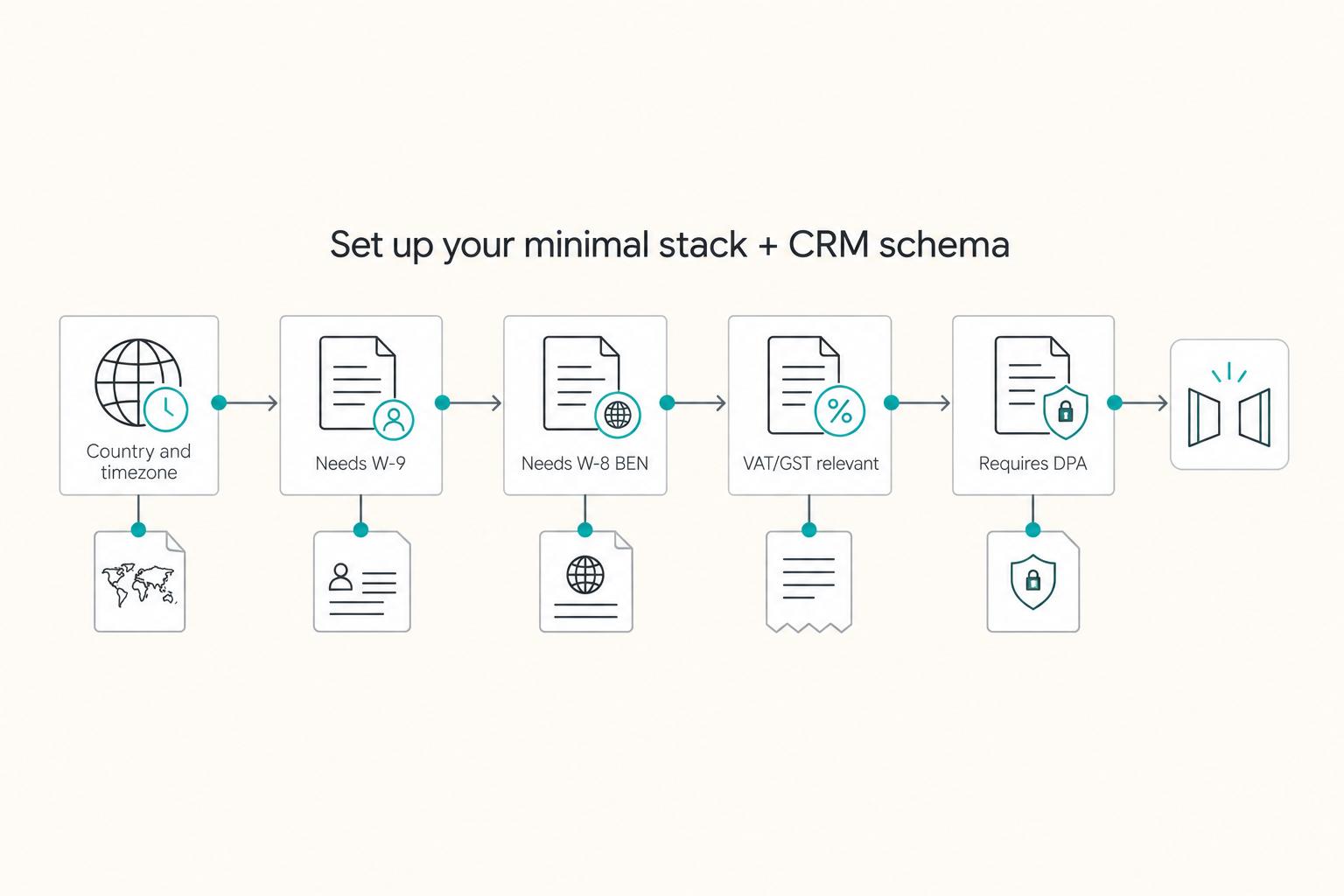
Add a few compliance and finance flags now, because procurement may ask later and you'll want a clean answer:
| Flag | When to use it |
|---|---|
| Country and timezone | Prevents scheduling friction and routing mistakes |
| Needs W-9 | Requested U.S. payee documentation; use the actual payee’s tax status |
| Needs W-8 BEN | Foreign-individual status where appropriate; foreign entities and some U.S.-performed service income need different forms |
| VAT/GST relevant | Record the applicable tax treatment, rather than assuming all cross-border work has the same VAT/GST duties |
| Requires DPA | Where applicable GDPR controller–processor processing requires Article 28 terms; link the contract without copying sensitive data into the CRM |
Run one synthetic lead end-to-end through booking, proposal, signature and invoice creation in test mode. Disable live messages and payments or send only to addresses you control. Check the stage, flags, document versions and next action. Then test a duplicate event and an opt-out to confirm the system updates once and stops correctly. The diagram shows possible fields, not a requirement to collect both W-9 and W-8BEN from every lead.
How do you automate follow-ups without sounding spammy (or violating rules)?#
Automate follow-ups with a small, timed email sequence with clear stop rules in your CRM, then pair it with compliance guardrails and solid activity logging.
Your goal is consistency without turning client acquisition into spray-and-pray.
Step 1: Build a follow-up sequence as a system (with CRM stop rules)#
Treat an email sequence as a series of targeted, timed emails that nurture a contact over time. Keep it finite, relevant, and easy to shut off the second the lead engages.
Set up your sequence around CRM-owned stop rules stored on the deal record, not in your head:
| Stop rule (CRM condition) | What you stop | Why it protects trust |
|---|---|---|
| Reply received | All remaining sequence steps | You respect the conversation and avoid double-tapping. |
| Meeting booked | Sequence, replace with meeting prep tasks | You switch from "nurture" to "serve." |
| Proposal accepted (or stage moves forward) | Sequence, trigger contract workflow | You prevent awkward "just checking in" after a yes. |
| Marketing unsubscribe or opt-out logged | Promotional sequences across connected senders | Keep essential contract, invoice or payment messages separate and limited to their genuine purpose |
Practical setup: trigger the sequence when you move a deal to "Qualified" or "Proposal Sent," then let the CRM unenroll the contact when they reply or book a meeting.
Step 2: Add compliance, deliverability, and audit logging guardrails#
If you email commercially, you need a compliance posture, not vibes.
| Area | Article detail | Operational response |
|---|---|---|
| CAN-SPAM Act (US) | Recipients have the right to have you stop emailing them | Suppress promptly, within the 10-business-day limit; keep the opt-out mechanism working for at least 30 days |
| CASL (Canada) | Covered messages need express or qualifying implied consent unless exempt | Keep required unsubscribe routes working for 60 days; act without delay and no later than 10 business days |
| Email throttling | Internet service providers can limit how many emails you can send in a timeframe | Start with conservative send volume, especially when you launch a new sequence |
| Audit log / audit trail | Records actions taken in your account and can log changes to customer records and user access | Write each send, reply, meeting booking, and stage change back to the record |
Now protect deliverability. Internet service providers can apply email throttling, which means they limit how many emails you can send in a timeframe. Start with conservative send volume, especially when you launch a new sequence.
Finally, log what matters. In many CRMs, an audit log (audit trail) records actions taken in your account, and auditing features can log changes to customer records and user access for later review. Use your CRM, and its integrations where available, to write each send, reply, meeting booking, and stage change back to the record.
Hypothetical: a lead replies with a scope question that touches SOW terms. Your system stops the sequence immediately, creates a "Respond personally" task, and logs the thread link on the deal so you don't lose context.
Step 3 - Plug-and-play automations (8 workflows with Trigger → Action → Result → Guardrail)#
Use these eight "Trigger → Action → Result → Guardrail" workflows so your CRM runs your next step automatically, without letting automation make risky decisions for you.
This is where most freelancers lose deals or create disputes: not from lack of hustle, but because handoffs are sloppy.
The 8 workflows (copy this pattern into your CRM + sales automation tool)#
An outreach trigger is a predefined condition, a data change, buyer signal, or time event, that kicks off a sales action. Use triggers to automate the boring parts of client acquisition, then attach guardrails so you stay compliant and human.
| Workflow | Trigger | Action | Result | Guardrail |
|---|---|---|---|---|
| Lead intake → CRM + acknowledgment | Website form, inbound email | Create or update CRM record. Send confirmation email. | No lead gets lost. | Practice data minimisation. Tag any internal compliance notes you actually need. |
| Qualification routing → next step task | Lead created | Create "Qualify" task. Set next step date in CRM. | Consistent screening. | Use clear qualification criteria (for example BANT-style checks like budget/need) before moving to Qualified. This reduces bad-fit proposals and messy SOW revisions. |
| Calendar booking → pre-call questionnaire + agenda | Meeting booked | Send questionnaire. Create call-notes doc. | Tighter discovery calls. | Only collect what you need. Be cautious with special category data under GDPR Article 9 (for example health, biometric). |
| Proposal sent → follow-up sequence | Proposal sent date set in CRM | Enroll in a finite follow-up sequence. | Fewer stalled deals. | Apply stop rules. Route "pricing exception" language to manual review per your Sales SOP. |
| Deal won → contract pack | Stage moves to Verbal Yes | Send NDA + SOW for e-sign. | Agreements move fast. | Verify the signing entity (subsidiary vs agency) before you send final docs. |
| Contract signed → invoice/deposit | Signed SOW received | Generate invoice. Send payment link. | Paid work starts cleanly. | Hold work until the agreed payment or approved credit milestone; processing alone does not mean paid. |
| Payment status → onboarding kickoff | Verified payment event meets the agreed release milestone | Send kickoff email + access checklist. | Handoff without scrambling. | Match invoice, amount and currency, ignore duplicate events, and retain the project folder and acceptance criteria. |
| Weekly pipeline review snapshot | Weekly recurring event | Generate list of deals missing next step date in CRM. | Automation stays accountable. | Mandatory human review. Automation supports your calendar, it does not own it. |
Implement like an operator (so it stays stable)#
- Define entry and exit criteria per stage inside your CRM. Criteria make automations fire when reality changes, not when your mood changes.
- Write one failure mode per workflow. Example: if a lead books a call but never completes the questionnaire, your system creates a task to confirm attendance instead of sending more sequence emails.
Hypothetical: a lead replies "Yes, but procurement needs the contract in our parent company name." Your Verbal Yes trigger tries to send your standard NDA and SOW. The guardrail catches the entity mismatch, pauses sending, and creates a "Confirm legal entity" task so you don't start a paperwork loop that delays payment.
Step 4 - Compliance-first guardrails (privacy, outreach laws, platform ToS)#
Set a compliance baseline that your sales automation and CRM must obey, then hard-code it as guardrails.
You're protecting trust, deliverability, and platform access at the same time.
Step 1: Lock your outreach rules by jurisdiction (and bake them into sequences)#
Treat outreach laws like requirements your email sequences must satisfy before anything sends. Use this as your baseline:
| Regime | What you must operationalize | What to hard-code in your sales automation |
|---|---|---|
| CAN-SPAM Act (US) | For covered commercial email: truthful headers and subjects, required ad identification, valid postal address and a clear opt-out. | Footer block that always includes your address. A clear unsubscribe link. A global "Do Not Contact" field in your CRM that stops sequences. |
| CASL (Canada) | Covered messages need express or qualifying implied consent unless exempt. Business email is not automatically exempt; a qualifying organization relationship can be relevant. | Record the basis and any expiry. Include required identity/contact information and unsubscribe mechanism. Keep contact and unsubscribe routes valid for 60 days; process requests without delay, within 10 business days. |
| GDPR + ePrivacy Directive (EU) | GDPR governs personal-data processing; national ePrivacy rules govern the email channel. Article 13 includes prior-consent rules, a conditional existing-customer exception and protections for legal persons through national law. | Record recipient country/type, the applicable sending rule and evidence of consent or a valid exception. A GDPR legitimate-interest field alone does not authorize the email. |
Hypothetical: an imported list is queued for a sequence. Block enrollment until you establish the actual recipient location/type and message eligibility, not just the email domain. For a Canadian record, document qualifying consent or an exemption. For an EU record, check both the applicable national email rule and the personal-data basis. Do not let a guessed country field unlock sending.
Step 2: Minimize data, then attach the right paperwork#
Build restraint into every form and every CRM property. Store only what you need to sell and deliver: name, role, email, company, lead source, notes. Avoid collecting data you don't need.
Also, don't paste identifiable client details into AI prompts by default. Treat that as a privacy and professionalism risk unless you have a clear policy and permission.
Add agreement-level safeguards where they match the relationship:
- Processor contract / DPA: where GDPR applies and you process personal data for a client as its processor, include the binding Article 28 terms in the main agreement or a separate DPA. Link the signed terms to the deal with appropriate access controls.
- NDA: Use it when confidentiality matters, then store the signed version beside the SOW inside the deal.
Upwork’s automation guidance prohibits unauthorized bots and restricts even approved API use to its authorized scope. Its current MCP guidance describes proposal drafting and submission with explicit user review and confirmation. Check the official route available to your account. External scraping or auto-sending is not made compliant just because you review the text.
Verification check: you can answer "Where did we get this lead? What did we store? What did we send? How can they unsubscribe?" from one CRM record, without hunting across five tools.
Step 5 - Sales-to-cash automation: get paid, stay traceable, reduce disputes (with Gruv as the final layer)#
Treat payment as a first-class sales stage inside your CRM, then automate invoices and reminders with stop rules so you do not keep chasing a client who already paid.
Outreach automation gets attention. Cash automation protects your time, reputation, and runway.
Step 1: Define "Invoice Sent" and "Paid" like you define "Qualified" Create explicit stages in your CRM and attach a default action to each status:
| CRM stage | What it means (operationally) | Default next action (system) | Guardrail (human) |
|---|---|---|---|
| Invoice Sent | You issued an invoice tied to a signed SOW or approved milestone | Log invoice link, due terms, and send confirmation email | Verify billing contact and entity name match the signed SOW |
| Processing | Provider reports a pending payment; receipt is not confirmed | Pause duplicate payment requests and create a timed status check | Keep work release tied to the agreed milestone; follow up if it fails or remains pending |
| Paid | Verified receipt meets the agreed invoice/deposit milestone | Stop collection reminders and create the approved onboarding task | Match invoice, amount and currency; payment can still later be disputed or reversed |
| Failed/Returned | Payment did not complete, or funds were reversed | Stop automation, open an "AR follow-up" task | Reach out manually before you trigger relationship damage |
Step 2: Automate invoice and reminders, then stop on signal Build this workflow in your sales automation tool (Zapier/Make) so it runs consistently:
- Trigger: signed SOW received and stored in the deal record, and/or milestone approval logged
- Action: generate invoice, send payment link, schedule reminders, and log every send to the CRM timeline
- Guardrail: stop collection reminders on confirmed payment, pause duplicate requests during processing, and route failed, returned or stale states to review. Record each reminder and relevant response.
Hypothetical: a bank payment becomes processing. Pause payment chasers, schedule a status check and keep delivery locked if the agreement requires receipt first. A verified paid event stops collection reminders and triggers onboarding once. A duplicate webhook must not send a second kickoff or invoice; a failed event creates a personal follow-up task.
Add fields for actual procurement requirements, such as VAT/GST treatment and a requested U.S. tax form. Use Not applicable where appropriate. These fields should route a documented question, rather than automatically deciding tax treatment from the client’s country.
W-9 generally documents a U.S. person’s TIN. W-8BEN instructions distinguish foreign individuals from entities, which generally use W-8BEN-E, and from certain U.S.-performed personal-service treaty claims, which use Form 8233 instead. Match the actual payee and income facts to the payer’s appropriate process. Store completed forms through a secure document channel; a CRM flag need not expose a tax ID.
If you use Gruv for payment collection (where enabled), use it as your traceability layer by attaching the invoice link, payment status, and any confirmation reference directly to the CRM deal. For reconciliation workflows, keep this tight with Automating Your Freelance Finances: A Guide to Tools and Workflows.
Practical check: open any deal and confirm you can see (1) signed SOW, (2) invoice status, (3) payment confirmation reference, and (4) the exact moment you allow onboarding to start.
Step 6 - When automations break: stop outbound, restore one source of truth#
Stop outbound first, restore one source of truth in your CRM, then add a guardrail so the failure can't recur.
Once you automate, your risk shifts from "I forgot" to "the system did something confidently wrong."
Quarantine the misfired workflow, then fix duplicates and triggers#
Step 1: Quarantine the workflow that misfired (stop outbound first). Pause any live email sequences and proposal follow-ups until you can explain the trigger. This protects your brand and reduces the risk of sending outreach to the wrong people.
Step 2: Repair duplicate leads and deals before restarting messages. Choose identifiers for the actual objects: a contact email is not always a unique deal, and one domain can represent several legal entities. HubSpot’s deduplication documentation describes email/domain matching for supported entry paths but says companies created through the API, including third-party sync apps, are not automatically deduplicated by domain. Test your actual connector path. Review merges and retain proposal, SOW and invoice history.
For polling triggers, Zapier compares item IDs with IDs already seen. That prevents repeated trigger events; it does not merge two destination CRM records. Use a supported search/update or upsert path and an event ID for duplicate handling. Replay a test event, verify that it creates no second deal, invoice or message, and log any manual merge.
Step 3: Rebuild your follow-up trigger so it can't target the wrong person. Before any sequence can run, require enough structure to avoid ambiguity, at minimum a clear stage plus a human-confirmed "what happens next" signal, whatever your CRM supports. Then add a manual review gate for anything after "Proposal Sent" because it is higher stakes and easier to look sloppy.
Step 4: Recheck platform authorization. Tag platform leads for native or explicitly authorized handling. If an integration exceeds its permitted API/MCP scope, stop it; adding a manual approval step does not fix unauthorized scraping or submission.
Prevent the two money fights: payment state and scope state#
| Failure mode | What you'll see | Safe fix |
|---|---|---|
| Payment received vs not received confusion | Onboarding starts with no confirmed payment | Check the provider’s verified status and required amount against the contract’s receipt or approved credit milestone. Keep pending separate from paid, retain the invoice reference and route reversals to review. |
| Scope creep with no gate | "Quick add-on" work sneaks in | Use a Change Order (or similar written amendment). Document the scope review, update the SOW, then revise the invoice or milestone before you continue. A change order can function as a "formal, written amendment" to the original contract. |
Hypothetical: a client replies "Loop in my ops manager" and your sequence keeps targeting the original contact. Your manual gate after "Proposal Sent" forces you to update the CRM contact role and next step before the next email can send. That's how you automate freelance sales without automating embarrassment.
Your copy/paste checklist: the "one-afternoon" setup that keeps you in control#
Automate follow-up and handoffs, not judgment, and keep every step traceable, compliant, and auditable inside your CRM.
Use this as your baseline setup for sales automation, CRM hygiene, email sequences, proposal flow, and client acquisition guardrails.
Before you start: your operating principle (non-negotiable)#
Treat every automation as if/then logic that creates a clear paper trail. CRM automation exists to eliminate manual, repetitive tasks, not to outsource decision-making. Your system should always answer: what triggered this, what happened, what got logged, and what stops it.
Hypothetical: a lead replies "We're going with someone else." Your system stops the follow-up sequence, logs the reply, moves the deal to Closed Lost, and creates a task for you only if you want to ask for feedback. No awkward extra nudges. No guessing later.
Copy/paste checklist (baseline)#
- Wrote a 1-page Sales SOP with stages + "definition of done"
- Configured CRM stages + minimum fields: source, stage, next step date, and compliance flags (example: "needs DPA discussion")
- Picked an automation tool and documented what it connects
- Created templates: discovery agenda, proposal email, follow-up email sequences with stop rules, kickoff email
- Finalized agreements and linked them inside each CRM deal:
Use the agreements your relationship needs: a SOW for scope and acceptance; an NDA where confidentiality requires it; written change control; and applicable controller–processor terms. Link the signed versions and restrict document access.
- Implemented core automations you can audit (lead intake logging, qualification task creation, booking workflow, proposal follow-ups, deal-won contract pack, contract-signed invoicing trigger, payment-confirmed onboarding trigger, weekly pipeline review)
- Set compliance guardrails for CAN-SPAM Act, CASL, GDPR:
[ ] Check sending eligibility by jurisdiction and message purpose, store evidence, and test suppression across connected senders. Apply the relevant opt-out deadlines and keep required routes working. Do not use a GDPR basis as a substitute for the applicable email-channel rule.
- Checked platform rules and integration authorization; native or approved handling only, within its permitted scope
- Mapped processing, paid, failed and returned separately; work release follows the agreed payment or credit milestone
- Scheduled a weekly pipeline review (stale deals, missing next steps, aging proposals)
Once this baseline runs cleanly for a while, you can tighten sales-to-cash traceability and reconciliation-ready records with Gruv where enabled. If you want the finance workflow layer, use Automating Your Freelance Finances: A Guide to Tools and Workflows.
Frequently Asked Questions
What does it mean to automate freelance sales?
It means your lead-to-paid path is a system, not a memory test. You turn repetitive steps into triggers, tasks, and logged outcomes inside a CRM, while keeping the relationship and judgment calls human.
What should I automate first in my freelance sales process?
Start with low-risk ops: lead capture into your CRM, acknowledgment emails, task creation, scheduling prompts, and basic reminders. Leave pricing exceptions, scope changes, and negotiation as manual steps until your pipeline is behaving cleanly.
How much of sales can a freelancer realistically automate?
You can automate the workflow and admin, not the relationship. Automate record creation, routine status updates, scheduled touches, and logging. Keep high-stakes moments manual, especially compliance-sensitive outreach and anything that changes scope or terms.
How do I set up an automated lead intake system as a freelancer?
Route every inbound source, form, referral email, or calendar booking, into one CRM record, then automate two outcomes: (1) an acknowledgment to the lead, and (2) a "Qualify" task for you with a next step date. Use one consistent integration path so you don't create duplicate records and conflicting triggers. Verify it by sending a test lead through and confirming you can see the full trail in the CRM.
What is a simple freelance CRM workflow?
A simple workflow keeps one step-by-step path from lead to deal and creates the next action so deals don't stall. At minimum, it should (1) create or update the contact, (2) log the last touch, and (3) set a next step date.
Is cold email automation legal (CAN-SPAM Act, CASL, GDPR)?
Some cold email is permitted, but the answer depends on the rules that apply. CAN-SPAM covers commercial email with identity, address and opt-out requirements; its opt-out deadline is 10 business days. CASL generally requires express or qualifying implied consent for covered messages unless exempt. EU email rules depend on national ePrivacy implementation and recipient type; a GDPR legitimate-interest basis alone does not authorize sending. Record the actual eligibility and suppress marketing promptly when someone opts out.
Can automating Upwork proposals get my account banned?
Unauthorized automation can lead to restrictions or bans. Use native tools or an official, authorized integration within its permitted scope. Upwork’s MCP guidance allows proposal drafting and submission after explicit review and confirmation; clicking a human approval button does not make an unapproved scraper or sender authorized.
Try a related tool
Researched and edited by the Gruv editorial team. Gruv builds cross-border billing, payouts, and finance-operations software for global businesses.
Sources
Includes 1 external source outside the trusted-domain allowlist.
- crtc.gc.ca/eng/com500/faq500.htmtrusted
- crtc.gc.ca/eng/archive/2019/2019-111.htmtrusted
- eur-lex.europa.eu/legal-content/EN/TXTtrusted
- eur-lex.europa.eu/eli/reg/2016/679/oj/engtrusted
- ftc.gov/business-guidance/resources/can-spam-act-com...trusted
- irs.gov/forms-pubs/about-form-w-9trusted
- irs.gov/instructions/iw8bentrusted
- help.zapier.com/hc/en-us/articles/8496244568589-How-Zap-trig...external
Educational content only. Not legal, tax, or financial advice.
Related Posts

Automating Freelance Finances Without Losing Cashflow Control
Automate repeated administrative steps while keeping invoice, payment, settlement and available-cash records distinct. A scheduled invoice saves work; it does not guarantee collection or make funds available.

Best CRM for Freelancers Who Need Reliable Client Follow-Up
If your client work is solid but your admin lives across email, notes, calendar alerts, and a spreadsheet, your CRM choice will succeed or fail on operations, not features. That is why so much advice on the **best crm for freelancers** misses the real issue. The main risk is not choosing a tool with too few buttons. It is choosing one that looks polished in a demo but still lets follow-ups slip when work gets busy.

The Freelance Payment Penalty: A Modeled Audit of Platform Fees, FX Spreads, and Payout Delays
The money rarely disappears through a single, easy-to-spot fee. The real loss is stacked. A marketplace takes its commission, a processor adds a charge for international cards, a bank or payment company converts the currency at a spread, a platform holds the funds before release, and a wire sheds a little to intermediaries on the way in. Each layer looks defensible on its own, but the worker feels the combined result as a smaller deposit and a later payday.