
Quick Answer
Start by treating automate client gift sending as an operational workflow: pick one verified trigger, activate one campaign, and test it live. In NiceJob, campaign sends are non-retroactive, so only future qualifying events run after activation. Use a source event that leaves a clear record, such as a paid invoice event, then confirm privacy and cross-border handling before physical delivery. Keep one evidence file per send so approvals, costs, and outcomes are traceable.
Standardize the Trigger, the Risk Check, and the Record#
To automate client gifts well, standardize the trigger, the risk check, and the record before you automate the send. Treat gifting as part of retention, not as a nice extra. If you automate client gifts before you check shipping, privacy, and bookkeeping risk, you raise the odds of client surprises and create cleanup work later.
| Step | Focus | Grounded detail |
|---|---|---|
| Set the intent | Why the gift exists | Tie sends to client value tiers and real relationship moments: contract signed on Day 1, first success milestone around Day 30 to 60, end of onboarding at Day 90, or 90 days before renewal |
| Run the risk check | Customs, privacy, accounting | Prefer DDP for international sends, use addressless gifting platforms, and keep records; the commonly referenced U.S. business gift deduction limit here is $25 per person annually |
| Match the platform to the risk | Platform fit | If you need cross-border delivery, DDP matters more than fancy packaging; if you do not want to store home addresses, addressless sending matters more than catalog size |
| Write the send policy | Send rules and proof | Decide who gets what, at which trigger, and what proof you keep after sending |
A simple way to keep gifting useful is to run the same four-step check before every send:
- Set the intent. Decide why the gift exists before you pick the item. Good triggers are tied to client value tiers and real relationship moments, like contract signed on Day 1, a first success milestone around Day 30 to 60, end of onboarding at Day 90, or 90 days before renewal.
- Run the risk check. Ask three quick questions: Will customs create friction, are you collecting personal address data, and how will this be recorded? For international sends, prefer Delivery Duty Paid (DDP) or a platform that guarantees it to help avoid surprise customs fees for the client. For privacy, use addressless gifting platforms so the recipient enters delivery details themselves. For accounting, keep records because the commonly referenced U.S. business gift deduction limit here is $25 per person annually.
- Match the platform to the risk. If you need cross-border delivery, DDP matters more than fancy packaging. If you do not want to store home addresses, addressless sending matters more than catalog size.
- Write the send policy. Decide who gets what, at which trigger, and what proof you keep after sending.
Each gift should have a trigger, a risk decision, and a record. A common failure mode is reactive sending with no plan, where the most memorable peaks in the relationship come after a billing issue or support escalation. The rest of the article turns that playbook into setup steps, compliance controls, and execution choices you can use.
You might also find this useful: How to Automate Client Reporting with Google Data Studio and Supermetrics.
Why Standard Gifting Advice Fails the Global Professional#
Most standard gifting advice misses the mark if you manage a small, cross-border client portfolio.
Diagnose the mismatch#
Generic playbooks assume your main problem is operational friction. They emphasize automating budget tracking and delivery coordination, and they frame traditional gifting as slow and inconsistent. That works for broad outreach and high send volume.
If you work with a smaller set of high-trust clients, the job is different. Each gift is a relationship signal tied to a meaningful client moment, not just a branded impression. If guidance starts with catalog scale or bulk fulfillment before clarifying the purpose of the gift, you are using the wrong model.
| Decision area | Generic advice | Risk-first professional approach |
|---|---|---|
| Audience | Large lead lists or broad segments | Small portfolio of high-trust clients |
| Gift intent | Brand visibility at scale | Retention, appreciation, relationship depth |
| Execution model | Standardize everything for speed | Standardize triggers and logistics; keep selection deliberate |
| Expected outcome | Efficient send volume | Professional, low-friction client experience |
Checkpoint: if you cannot name the relationship moment and intended client outcome, pause the send.
Set the automation boundary#
Use this decision rule: automate logistics, not thoughtfulness. Automate reminders, approvals, vendor handoff, budget tracking, and delivery coordination. Keep gift selection intentional so important clients do not get the same default experience.
Efficiency matters, but it should follow intent. A polished but generic send can still weaken the signal you want to send.
Check the hidden operational risks#
The main risk buckets are privacy handling, cross-border delivery friction, and record-keeping or accounting exposure.
A concrete privacy checkpoint is the California regulations effective 1/1/2026, which include Notice at Collection of Personal Information, Contract Requirements for Service Providers and Contractors, and Training and Record-Keeping. If a gifting vendor handles recipient data, treat this as a documentation and contract review step before collecting addresses.
For federal sensitive-personal-data questions, do not rely on a FederalRegister.gov XML rendering by itself; the site states you should verify against an official edition. The referenced rule was published 01/08/2025 and notes a correcting amendment on 04/18/2025. In practice, keep your verified rule copy, vendor terms, and send records together, and validate any specific legal threshold against current official text before you finalize policy.
Related: Thailand's Long-Term Resident (LTR) Visa for Professionals.
Step 1: Build Your Gifting Workflow#
Start with tiers and triggers, then automate. If you cannot state who the client is, why the send is happening, and what fallback is allowed, pause before sending.
Use the same sequence every time: define tier -> map trigger -> choose gift policy -> set send window -> log outcome. This keeps automation focused on admin work, not thoughtfulness.
Define your tiers#
Group clients into practical tiers so each send is executable rather than improvised.
| Tier | Client profile | Trigger type | Budget band | Approval owner | Fallback gift type |
|---|---|---|---|---|---|
| Tier 1 | Ongoing, high-value clients where retention matters most | Relationship milestones and major shared wins | Highest within your preset annual cap | You personally | Gift with choice when fit is uncertain |
| Tier 2 | Strong project clients or accounts with growth potential | Launches, project completions, renewal conversations | Mid-range | You, with light pre-approval rules | Curated, broadly useful gift |
| Tier 3 | New clients, referral partners, or lower-value but strategic relationships | Welcome touch, referral thank-you, selective re-engagement | Lower and tightly capped | Pre-approved by your rules | Digital or choice-based gift |
A quick check: you should be able to assign a tier in under a minute. If every client becomes Tier 1, the system is not doing its job.
Map relationship triggers before delivery triggers#
Set the reason first, then the logistics. That is how you avoid random gifting.
| Type | Item | Detail |
|---|---|---|
| Relationship milestone | Week one of the partnership | Use relationship milestones as your primary triggers |
| Relationship milestone | 1-year anniversary | Use relationship milestones as your primary triggers |
| Relationship milestone | Milestone or renewal | Use relationship milestones as your primary triggers |
| Relationship milestone | Thank-you after a referral | Use relationship milestones as your primary triggers |
| Relationship milestone | Re-engagement when someone has not responded for 2+ weeks | Only when that silence is unusual for that relationship |
| Delivery milestone | Gift policy for that tier is selected | Confirm before sending |
| Delivery milestone | Note is ready | Confirm before sending |
| Delivery milestone | Fallback is set if preferences are unclear | Confirm before sending |
| Delivery milestone | Send window is still timely | Confirm before sending |
Use relationship milestones as your primary triggers:
- Week one of the partnership
- 1-year anniversary
- Milestone or renewal
- Thank-you after a referral
- Re-engagement when someone has not responded for 2+ weeks (only when that silence is unusual for that relationship)
Then confirm delivery milestones before sending:
- Gift policy for that tier is selected
- Note is ready
- Fallback is set if preferences are unclear
- Send window is still timely
Choose the gift policy, set the window, and log the outcome#
Pick a gift policy by tier, then define an exact send window. Avoid vague timing like "this month." Use windows tied to real moments, such as "week one," "during renewal," or "after referral."
Log every send in one record:
- Client tier
- Trigger
- Gift policy used
- Send date/window
- Fallback used (yes/no)
- Spend
- Client response
- Next signal
Track outcomes with both non-financial and financial indicators:
- Non-financial: renewal signal, response quality, referral activity
- Financial: retention trend, campaign ROI trend, and baseline pending campaign or finance-record verification where you need a hard benchmark
If you cannot log a send clearly, do not send yet. That check keeps the workflow strategic, consistent, and ready for the compliance layer in the next step.
If you want a deeper dive, read Value-Based Pricing: A Freelancer's Guide.
Step 2: Navigate the Minefield of Global Compliance#
Before you automate a single send, lock your compliance system: policy, process, platform, and proof. This keeps gifting operational instead of reactive.
- Policy: define what you will and will not send by tier and destination.
- Process: assign who checks tax treatment, shipping terms, and data handling before approval.
- Platform: use tools that expose charges, capture delivery details cleanly, and export records.
- Proof: store one evidence pack per send so decisions are traceable later.
Check tax treatment by jurisdiction#
Treat tax as a verification step, not a template. Start with the jurisdiction where you record the expense, then confirm whether the destination adds documentation or customs complexity. Mark the exact cap or reporting threshold as pending until your accountant verifies it from the current official source.
For context, OECD Tax Administration 2025 is explicitly comparative across OECD and other advanced and emerging economies, so avoid assuming one market's practice applies everywhere.
Keep classification consistent once agreed. For each gift, retain an audit-ready file with the vendor invoice, approval note, client name, business purpose tied to the trigger, item value, shipping cost, and any customs or tax documents created during fulfillment.
Make cross-border shipping boring#
Your target for international sends is simple: no recipient surprise.
| Control point | What to confirm before approval | Proof to keep | Red flag |
|---|---|---|---|
| Import-charge responsibility | Written confirmation of who pays duties, taxes, and related import charges | Quote, checkout summary, or platform order detail | Charges are payable on arrival or still unclear |
| Landed-cost visibility | Best available total cost before checkout, not only item price | Screenshot or exported order record | Shipping appears but import costs are missing |
| Restricted-item screening | Confirmation the item category can ship to that destination with that carrier/vendor | Platform note, carrier confirmation, or vendor confirmation | No destination check before purchase |
| Failed-delivery handling | Named owner for reattempt, substitution, return, or refund | Internal policy note and order record | Parcel stalls and no owner is assigned |
If any row is unclear, pause the send.
Minimize personal data first#
Default to addressless or recipient-entered delivery flows so you do not collect home addresses in inboxes, spreadsheets, or CRM notes. If direct address capture is unavoidable, request only delivery-required fields, explain why you need them, and document exactly who can access or export that data.
Write retention and access rules before collection starts: where data is stored, who can access it, when it is deleted, and how removal requests are handled. If you cannot answer those points immediately, the workflow is not ready yet.
This pairs well with our guide on How to Calculate Client Lifetime Value (CLV) for Your Agency.
Step 3: Execute with Zero-Friction Professionalism#
With compliance controls in place, execution should run as a repeatable SOP. Your safest default is an addressless send: it keeps delivery details with the recipient, lowers your privacy handling risk, and helps you manage delivery outcomes consistently.
Run one standard send SOP#
Use the same sequence for every send. If a workflow asks you to collect a home address in email or a spreadsheet, pause and route it through an approved exception.
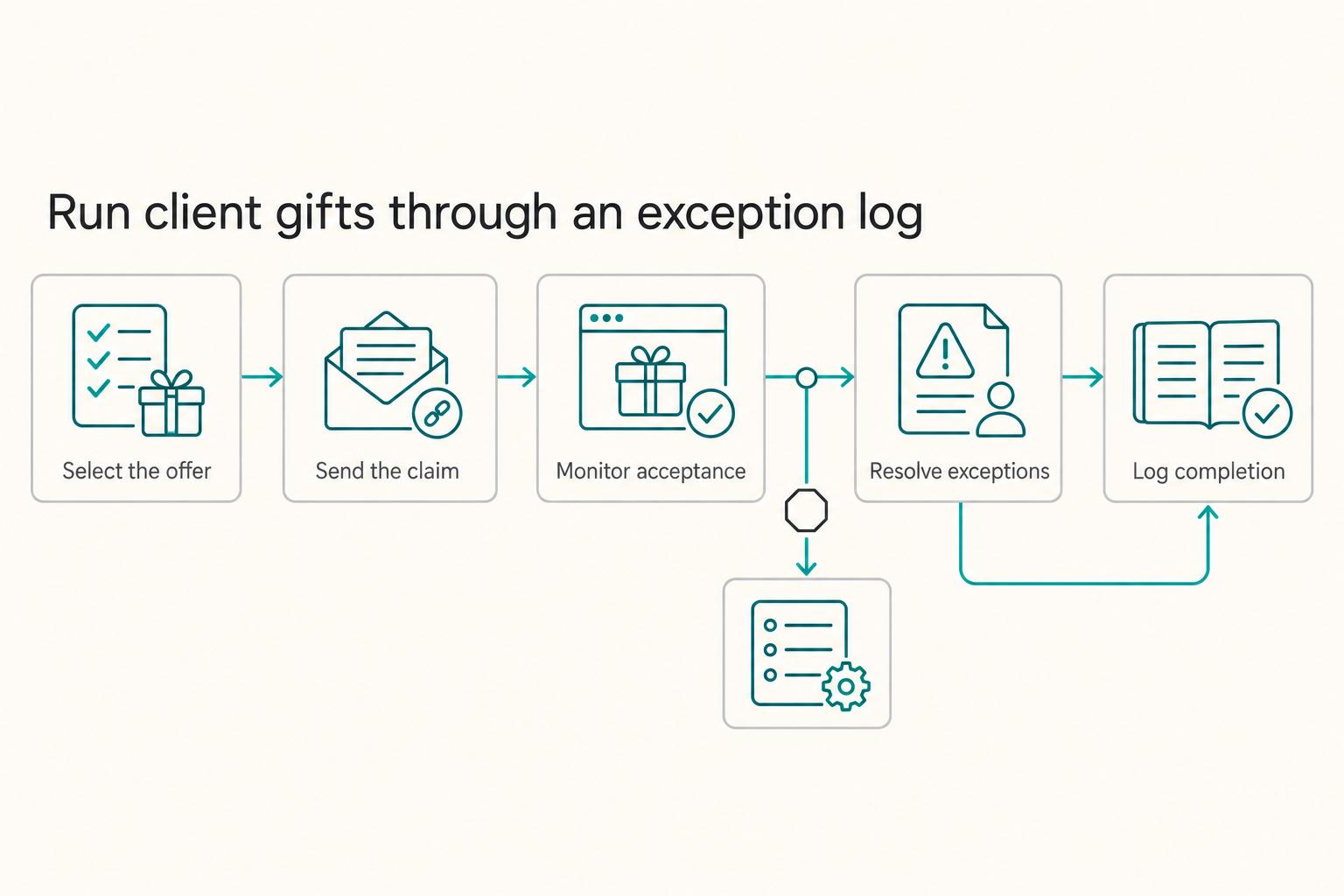
| Step | Action | Key detail |
|---|---|---|
| 1 | Select the offer | Use your preapproved rules for client value tier and project milestone trigger; for cross-border physical gifts, confirm DDP or an equivalent guarantee before approval |
| 2 | Send the claim link | Use a short note tied to the business moment and let the recipient enter delivery details privately on the claim page |
| 3 | Monitor acceptance | Track until the gift is claimed or the digital reward is accepted; checkout is not completion |
| 4 | Resolve exceptions | Use a named owner for unclaimed links, swaps that affect availability, stalled shipments, or customs issues |
| 5 | Log completion | Keep order status, item value, shipping cost, and any customs documents in the same record as the trigger and approval |
- Select the offer from your preapproved rules for client value tier and project milestone trigger. For cross-border physical gifts, confirm Delivery Duty Paid (DDP) or an equivalent guarantee before approval to avoid surprise customs charges.
- Send the claim link with a short note tied to the business moment. Let the recipient enter delivery details privately on the claim page.
- Monitor acceptance until the gift is claimed or the digital reward is accepted. Checkout is not completion.
- Resolve exceptions through a named owner. Typical exceptions are unclaimed links, swaps that affect availability, stalled shipments, or customs issues.
- Log completion in the same record as the trigger and approval, including order status, item value, shipping cost, and any customs documents.
Your record should show the trigger, tier, offer, claim or delivery status, and final booked amount in one place. If you book the expense in the U.S., keep visibility on the $25 per person annually limit your accountant is tracking.
Match platform setup to client tier#
Pick platform capabilities based on your operating needs, not brand familiarity.
| Client tier | Default send model | Recipient choice flexibility | International fulfillment coverage | Branding control | Integration depth | Fallback handling |
|---|---|---|---|---|---|---|
| Tier 1 strategic clients | Addressless recipient-choice flow | Higher flexibility is usually safer | Require clear cross-border coverage and DDP visibility for physical sends | Strong control over message and claim experience | Deeper trigger/reminder support if volume is steady | Clear owner for unclaimed links, swaps, and failed delivery |
| Tier 2 key projects and renewals | Curated or preselected gift with swap path | Moderate flexibility to reduce mismatch | Coverage for your active markets | Practical, consistent branding | Reliable exports or basic workflow connection | Defined substitute path for stock or delivery issues |
| Tier 3 lighter-touch relationships | Digital reward or simple addressless offer | Low to moderate flexibility | Use physical cross-border only when coverage is clear | Light branding is usually enough | Minimal integration can work with dependable reminders | Easy cancel/resend/digital replacement path |
If a relationship is high value and international, favor recipient choice with stronger exception handling. If the relationship is lighter touch, avoid creating physical shipping risk when a digital option can deliver the same intent.
Automate trigger events, not judgment#
Automate milestone and reminder creation, then keep gift selection rules human-approved. Define what each tier can receive, who can approve overrides, and who owns edge cases such as unclear destination coverage, missing DDP confirmation, or sends that fall outside policy.
Then run a simple feedback loop after each send: accepted/not accepted, swapped/not swapped, delivery issue/no issue, thank-you signal/no signal. Review by tier on a regular cadence and adjust rules when patterns repeat. This improves client experience and delivery reliability without rebuilding your process each cycle.
For a step-by-step workflow example, see How to Automate Client Onboarding with Notion and Zapier.
Conclusion: Treat Gifting as a Retention Process You Supervise#
If you want to automate client gifting well, treat it as a retention process you supervise, not a feel-good task you hand off and forget. The advantage comes from controlling the parts that usually break: privacy handling, unclear return steps, and inconsistent follow-up when something goes wrong.
You cannot control every courier delay. You can control how recipient details and sensitive messages are handled, whether your trigger comes from a clean source record, whether your return instructions are explicit, and whether complaints are handled the same way every time. That is what produces clearer expectations, fewer support inquiries, and a more consistent client experience.
A useful final check is whether your process is relationship-led or just transaction-led. Loyalty efforts often stall when they reward activity instead of the relationship itself, so keep the trigger tied to client value and milestone meaning, not just volume.
- Set a written policy. Decide who gets what, who approves exceptions, and what evidence you keep for each send. Verify that required process fields are present before anything goes live.
- Choose the right send model. Use recipient-choice when recipient preference is the priority. Use curated physical sends when relationship signaling is the priority. A hybrid model can combine both. If returns are possible, keep a transparent return policy with instructions, conditions, timeframe, and support details.
- Define one trigger you can verify. Start with a source event that leaves a clean record, then run a live test so you can confirm the gift actually fires.
- Prepare recovery rules. Write complaint-response standards before your first exception. The common failure is not the gift itself, but slow, inconsistent handling after a damaged item, address issue, or unwanted send.
- Review results by client tier. Keep the process if it supports your highest-value relationships with less friction and more consistency. Change it if the effort is high but the signal to the client is weak.
We covered this in detail in How to Automate Your Airbnb with Smart Home Tech.
Frequently Asked Questions
How do you automate client gift sending without over-automating it?
Start with one built-in automation and one trigger you can actually verify. In a tool like NiceJob, that means going to Gifts or Campaigns, choosing a prebuilt option such as Welcome new customers or Reward loyal customers, then clicking confirm to activate it. Before you rely on it, check that you have a valid credit card on file and that one of the required integrations is connected. If the help doc you are following was updated over 2 years ago, run a live test first.
Will the automation catch past clients or invoices?
Usually not. NiceJob’s gift campaigns are non-retroactive, so only future qualifying events fire after the campaign is turned on. If you are trying to recognize earlier clients, pull a manual list and send those separately.
What trigger should you trust first?
Use a trigger that leaves a clean record in the source system, not a vague milestone you have to interpret later. One concrete example is a paid invoice greater than $0 coming through an integration such as Jobber or QuickBooks. If you use a loyalty campaign, set the visits or transactions threshold deliberately, then test one qualifying event so you can confirm the campaign fires when expected.
How should you handle privacy and international shipping?
Your stack may or may not support addressless gift links or DDP. For any cross-border physical gift, verify privacy handling and duty handling with your provider before approval. If you cannot confirm landed-cost handling, switch to digital or keep the send domestic only.
Can you deduct client gifts, and what records should you keep?
Deductibility is jurisdiction-dependent, so verify the current rule where your business is taxed before you set any internal limit. Keep the recipient name, business purpose, send date, item value, shipping cost, and the platform receipt or invoice so you have an evidence pack if your accountant asks.
Which send model should you choose?
Match the model to client tier, delivery risk, and how much exception handling you are willing to own. | Model | Choose it when | Verify before you commit | |---|---|---| | Recipient-choice | Your highest-value clients have varied tastes or locations, and you want fewer mismatches | Country coverage, swap rules, reminder handling, reporting or audit exports | | Curated box | You want tighter brand control for a specific milestone and mostly predictable delivery | Stock consistency, substitute policy, damage handling, manual follow-up burden | | Global logistics-first | Cross-border fulfillment is the hard part and customs mistakes would damage the relationship | Duty model, destination coverage, exception ownership, delivery status visibility |
Try a related tool
Researched and edited by the Gruv editorial team. Gruv builds cross-border billing, payouts, and finance-operations software for global businesses.
Sources
- academia.edu/64999604/Dictionary_of_Acronyms_and_Technica...trusted
- cppa.ca.gov/regulations/pdf/cppa_regs.pdftrusted
- federalregister.gov/documents/2025/01/08/2024-31486/preventing-a...trusted
- irs.gov/pub/irs-pdf/p1500.pdftrusted
- medicaid-documents.dhhs.utah.gov/Documents/pdfs/HRSN%20Infrastructure%20Proto...trusted
- medicaid.gov/medicaid/section-1115-demonstrations/downloa...trusted
- oecd.org/content/dam/oecd/en/publications/reports/202...trusted
- pmc.ncbi.nlm.nih.gov/articles/PMC12939948trusted
Educational content only. Not legal, tax, or financial advice.
Related Posts

Value-Based Pricing for Freelancers Under Real Payment Risk
Value-based pricing works when you and the client can name the business result before kickoff and agree on how progress will be judged. If that link is weak, use a tighter model first. This is not about defending one pricing philosophy over another. It is about avoiding surprises by keeping pricing, scope, delivery, and payment aligned from day one.

Thailand's Long-Term Resident (LTR) Visa for Professionals
For a long stay in Thailand, the biggest avoidable risk is doing the right steps in the wrong order. Pick the LTR track first, build the evidence pack that matches it second, and verify live official checkpoints right before every submission or payment. That extra day of discipline usually saves far more time than it costs.

The Freelance Payment Penalty: A Modeled Audit of Platform Fees, FX Spreads, and Payout Delays
The money rarely disappears through a single, easy-to-spot fee. The real loss is stacked. A marketplace takes its commission, a processor adds a charge for international cards, a bank or payment company converts the currency at a spread, a platform holds the funds before release, and a wire sheds a little to intermediaries on the way in. Each layer looks defensible on its own, but the worker feels the combined result as a smaller deposit and a later payday.