
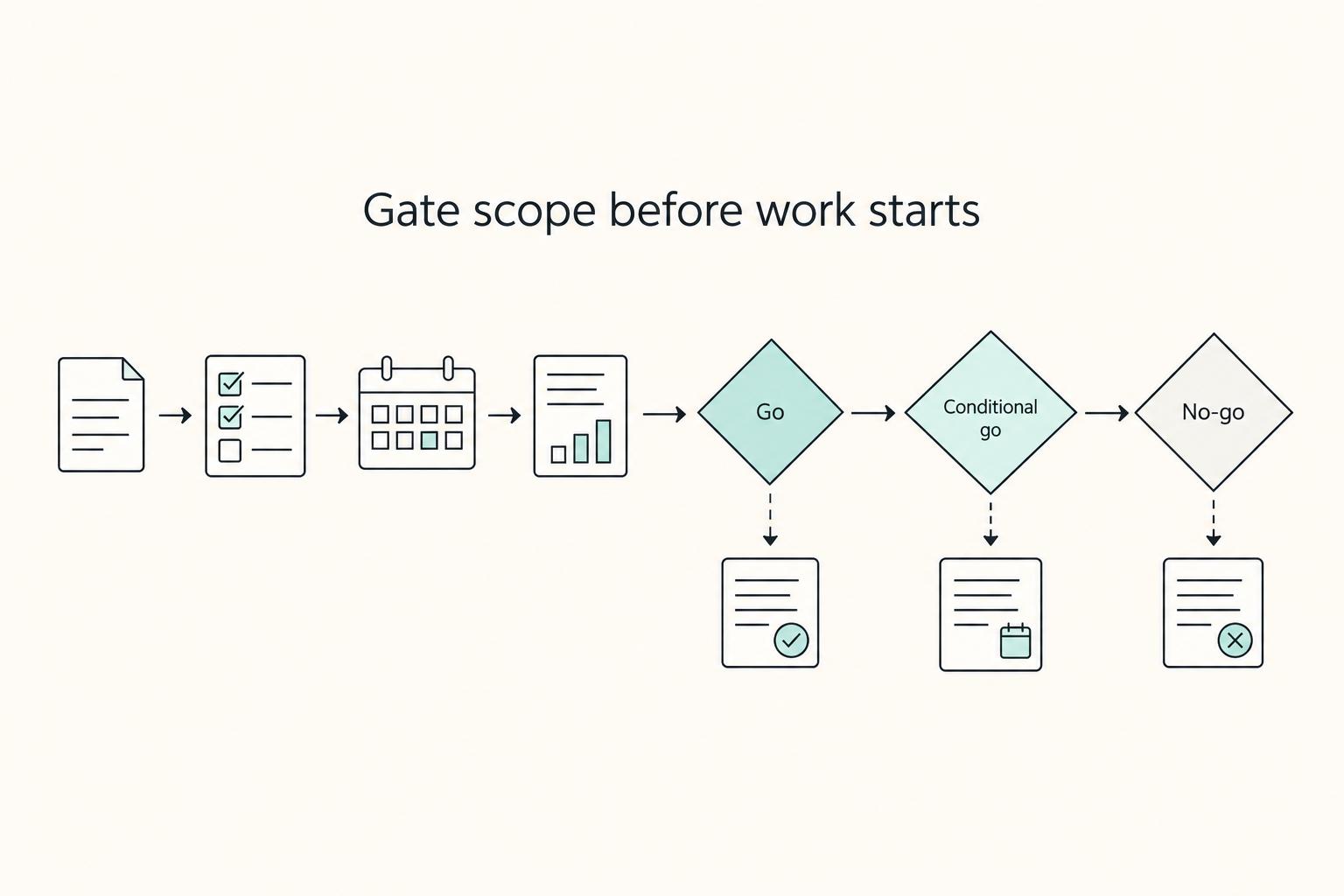
Quick Answer
Write the SOW around specific pages, templates, features, client inputs, milestones and payment triggers. Name the review criteria, review window and approver, and define included revisions, corrections and extra-scope approval. Use current artefact references and a worked change example. Before commitment, resolve material scope or authority conflicts and identify which agreement controls; every file need not use identical wording.
Write a web development scope of work that protects the deal#
Use your SOW as a pre-work control document, not a project diary. Before work starts, make sure the key project documents describe the same deliverables, responsibilities, and timing.
That alignment slows scope drift. Most projects do not fail all at once. They drift through small changes like a deadline slipping, a deliverable changing shape, or different people working from different assumptions.
A strong SOW gives your team a clear baseline under normal project pressure. When priorities shift or questions come up, people should be able to point to that baseline and decide next steps without relying on memory.
Step 1. Align the document set first#
Put your key documents side by side. Standardize names for phases, deliverables, and roles so the same promise is described the same way everywhere.
Use a stable deliverable ID and explain aliases where needed. Homepage design, home-page template and homepage comp may describe different outputs or the same output in different documents. Resolve the meaning rather than requiring every label to be identical.
Self-check: Can a reviewer identify included work, exclusions and owners from the SOW and its clearly incorporated references?
Step 2. Write boundaries as decisions#
Write scope as decisions you can act on, not intentions. For each vague promise, classify it as one of these:
- Included item
- Assumption
- Exclusion or change path
This gives you a working reference when priorities shift instead of forcing everyone to rely on memory.
A useful drafting test is to ask what the team would actually do when a request comes in. If the line says "optimize content layout," that does not tell anyone whether the work means rearranging an approved template, designing a new module, or revisiting a prior decision. If the line says "build approved page templates shown in the approved wireframes," the team has a baseline and a clearer review path.
Self-check: Can someone with no deal context find one included item, one assumption, and one exclusion in under a minute?
Step 3. Name ownership and decision records#
State who provides inputs and who is responsible for outputs. Keep that consistent across the signed set so completed items are less likely to be reopened because participants are working from different assumptions.
Self-check:
- Who provides required client inputs or decisions?
- Who owns each deliverable decision?
- What written record confirms a decision?
Keep the source approval and link it to the project record. A chat or email can be an agreed approval channel; an informal discussion without the required authority or approval is different.
Go one step further and decide where that record lives. It should be easy to retrieve later, not buried across threads. If your team has to reconstruct decisions by searching messages, the control has weakened even if the decision happened.
Step 4. Pressure-test before sending#
Before you send the draft, test it against likely request types for this project. For each one, confirm the SOW lets you classify the request quickly as in scope, assumption-dependent, or change-path work.
Use requests that are actually likely on this project, not generic examples. Pull them from discovery notes, proposal comments, or past rounds of client feedback. If a request sounds simple but forces everyone to stop and explain how to read the SOW, your language still needs work.
Clarify an ambiguous request before committing to its scope. You can still draft and progress unrelated defined work while recording an unresolved assumption.
If you want a parallel technical-service example, see How to Write a Scope of Work for Clear Delivery and Payment.
If you want a deeper dive, read How to Write a Scope of Work for an AI Development Project.
Gather inputs before you draft the SOW#
Build one input pack before you draft, then resolve conflicts there instead of inside the SOW. Review the proposal, discovery notes, current draft SOW, and governing contract set side by side, including amendments and later revisions.
Identify the operative documents, incorporation and precedence. A superseded proposal or intentionally more detailed SOW can differ without creating a conflict. Resolve an unexplained material contradiction rather than silently carrying it into delivery.
Step 1. Assemble one source-of-truth pack#
Extract scope, approvals and ownership from each relevant source. Confirm whether call notes, emails or a proposal are incorporated or independently operative; a document is not automatically irrelevant merely because it lacks a signature.
| Input document | Purpose | Extract now | If language conflicts |
|---|---|---|---|
| Proposal | Records offered outcomes and commercial framing | Deliverables, timelines, pricing assumptions, client expectations | Identify incorporation, supersession and any operative proposal obligations; apply agreed precedence |
| Discovery notes | Capture decisions, context, and open items | Goals, constraints, client-provided inputs, unresolved dependencies | Confirm relevant decisions through the agreed approval method |
| Draft SOW | Shows current scope framing | Included work, exclusions, approval flow, acceptance checks, dependencies | Fix drift now; do not inherit outdated draft language. |
| Governing contract set | Sets controlling legal and commercial rules | Precedence language, approval authority, and other governing signed terms | Apply agreed precedence and resolve unexplained material conflicts |
Verification check: You can trace each major deliverable to written source text and identify which document controls if wording differs.
As you review, mark conflicts explicitly instead of trying to remember them. A short conflict note beside each issue is enough: what the proposal says, what the signed agreement says, and what needs to be carried into the SOW. That simple discipline keeps hidden assumptions from reappearing later as "but we discussed this already."
Step 2. Lock one approved baseline artifact set#
Draft against one approved artifact set and name it clearly. For web projects, that can include Project Overview, Information Architecture, Wireframes, and approved Design Mockups, with file name, version, and approval date recorded in one place.
Do not use "latest file in the folder" as control. If versions compete, apply an explicit supersession rule, such as "Version 3 supersedes all previous versions," and route later updates through change control.
This matters most where multiple artifacts overlap. A sitemap may imply one page set while a later wireframe deck shows another. A design mockup may reflect a revised navigation that never made it back into the Information Architecture. If those differences exist, resolve them before the SOW depends on them. The baseline set should not be a pile of files. It should read as one approved package.
Step 3. Split master-agreement terms from SOW terms#
Keep project-specific execution details in the SOW and reference standing terms where the master agreement governs. Explain any intended project override and obtain the required agreement; identical wording in every document is unnecessary when incorporation and precedence are clear.
If the contract set includes an integration clause or an order-of-precedence rule, use that structure to resolve conflicts instead of drafting around it.
A common failure mode here is paraphrasing a controlling clause inside the SOW to make it "more practical." That usually creates a second version of the same rule. If the legal term already exists, cross-reference it and keep the SOW focused on how the project will operate within that framework. Your goal is one rule applied consistently, not two similar rules that can be read differently.
Step 4. Run a go/no-go gate#
Before authorising the affected work, decide whether its scope, inputs and permission are sufficient:
| Gate decision | Use when |
|---|---|
| Go | The affected work, terms and permissions are defined and authorised. |
| No-go for affected commitment | A material scope or authority conflict prevents that commitment. |
| Conditional go | Authorised bounded discovery or work under explicit approved assumptions; settle later inputs at their decision point. |
Use a written assumptions log for unresolved inputs, dependencies or artefacts. Identify the affected work and approval needed. Drafting and paid discovery can proceed with visible assumptions; missing final mockups need not stop the entire SOW process.
When you use a conditional go, keep the assumptions narrow and visible. Each item should tell the reviewer what is missing, what you are proceeding on, and what event will force confirmation or change handling. That keeps the SOW usable while still making uncertainty explicit. Without that record, unresolved inputs get treated later as silent approvals.
Related: A Guide to the Statement of Work (SOW) for a SaaS Development Project.
Define project scope boundaries in plain language#
Compare requests with the whole agreed scope, including obligations, revision allowances and referenced artefacts. Classify as included work or correction, a clarification, or a genuine addition/change proposal. An out-of-scope request becomes authorised work only through the applicable approval path.
Plain language does not mean broad language. It means a client, project manager, designer, and developer can all read the same line and reach the same operational result. The cleaner the classification, the less likely a request turns into an argument about what someone "meant."
Step 1. Write boundaries as decisions, not intent#
Write each boundary so someone can verify it against a named deliverable.
Included: state the inspectable output you will deliver.Out-of-Scope: state what is not being purchased in this engagement.Change Request: state what should be approved in writing before work starts.
Prefer verbs you can verify against the baseline: build, configure, migrate, replace, deliver. Avoid intent-only wording like improve, enhance, optimize, or refine unless you also name the artifact or deliverable being changed.
Example: a new page template absent from the artefacts and the agreed scope may need a change request. If the SOW already promises that template or an included revision covers it, update the artefact within the existing commitment.
Ask whether the requested page type is covered by the agreed scope, allowance or an existing defect. If not, explain the extra output and price or schedule impact. The artefact is evidence of scope, not a substitute for the full agreement.
Step 2. Classify requests by lane and baseline artifact#
Keep requests in three lanes so they do not drift: design, development, and CMS/config. Tie each lane to its approval artifact.
| Common request | Lane | Check against approved baseline | Usually Included when | Escalate to Change Request when |
|---|---|---|---|---|
| Reorder navigation items within the approved site map | design | Information Architecture | Within agreed IA/revision allowance or needed correction | Changes agreed architecture beyond allowances |
| Restyle a page to match an approved mockup | design | Design Mockups | It follows an approved mockup variation | New direction beyond the agreed rounds or obligations |
| Build page templates shown in approved wireframes | development | Wireframes | The template count matches the approved set | Adds obligations absent from all agreed scope and allowances |
| Add a new third-party form or API integration | development | Wireframes + deliverables list | The integration is already named in scope | The integration is new or changes the agreed deliverables |
| Create new content types, fields, or permission rules | CMS/config | Approved CMS/config specification | The configuration item is in the approved baseline | It adds structures, roles, or settings beyond the approved set |
For CMS/config, do not treat live-site tweaks as proof of scope. Keep a written configuration record so approved changes and new changes stay separate.
This lane approach is useful because not every request changes the project in the same way. A design change may affect review and mockups. A development change may affect the build, testing, and acceptance. A CMS/config change may look small in the interface but still alter fields, permissions, or deployment handling. Classifying the lane first helps you route the request to the right baseline instead of arguing from urgency.
Step 3. Apply one trigger rule and one redesign checklist#
Apply one classification check across lanes: is this required to meet the existing promise, covered by an agreed revision or allowance, or a genuine addition? Record baseline updates in all cases; use formal change approval where the agreed obligations, price or schedule change.
For redesign projects, a retained/replaced/migrated checklist can keep inherited assets from turning into silent scope expansion:
- Retained: pages, components, or content that stay materially as-is.
- Replaced: assets that will be redesigned or rebuilt.
- Migrated: content, files, or data moved from named source to named target.
This checklist is most useful when stakeholders assume an item will "come over automatically." A retained item still needs to be identified as retained. A migrated item needs a source and target. A replaced item needs to connect back to the approved redesign baseline. That keeps inherited assets from sitting in an undefined middle state where everyone assumes someone else covered them.
Before sending the draft, test a few likely client requests. If any request cannot be mapped cleanly to a lane, baseline artifact, and classification, rewrite that clause before kickoff.
Specify deliverables and acceptance criteria that can be tested#
For each deliverable, specify the artefact, review criteria and evidence. Public procurement examples can inform structure, but their acceptance rules do not automatically govern a private web-development engagement.
This is where many SOWs look complete but still allow misalignment. They list work, but they do not say how a reviewer will determine whether the work is complete. If completion depends on preference alone, the project has no stable finish line.
Step 1. Define inspectable deliverables#
Write deliverables as inspectable outputs, not effort labels. Use nouns that point to something a reviewer can open, run, compare, or confirm.
Acceptance criteria are the conditions that must be met for acceptance, so each line item should map to a visible result and a baseline. Keep criteria clear and straightforward for everyone involved. If a line describes effort but not an output, rewrite it until the result is reviewable.
A useful editing pass is to remove verbs that only describe internal activity. "Support implementation" or "assist with rollout" may describe effort, but neither tells the client what they will review. Rewrite until the line points to something a reviewer can inspect without extra narration.
Step 2. Pair each deliverable with a test and acceptance check#
For each major deliverable, pair the output with a pass/fail test and a clearly defined reviewer or review group. Keep criteria clear enough that a reviewer can determine whether the condition is met without negotiating what "done" means.
| Deliverable | How you test it | Who reviews it | How acceptance is tracked |
|---|---|---|---|
| Feature behavior | Compare behavior to the approved user story and acceptance criteria; run the defined scenario checks | The stakeholder(s) assigned for that story | Record the decision in the project's agreed approval channel |
| Data transfer output | Run the defined transfer/submission test and confirm expected data reaches the target | The stakeholder(s) assigned to the data workflow | Record the decision in the project's agreed approval channel |
| Content update batch | Check outputs against the approved list and expected format | The stakeholder(s) assigned to content scope | Record the decision in the project's agreed approval channel |
| Handoff package | Confirm scoped handoff items were delivered and required access works | The stakeholder(s) assigned to handoff acceptance | Record the decision in the project's agreed approval channel |
If you already know the likely review problem area, write the test tightly there. For example, if visual reviews usually turn into open-ended comments, tie acceptance back to the approved version under review. If list-based updates usually create uncertainty, make that list part of the baseline so acceptance checks against a defined set instead of a general expectation.
Step 3. Define an approval path per deliverable#
Define how approval moves from review to decision for each deliverable, even when several stakeholders comment. Set expectations for how feedback is consolidated and how the final decision is communicated.
That keeps acceptance traceable and reduces the chance that finished work gets reopened across scattered threads.
You do not need to stop stakeholders from reviewing. You do need to stop review from fragmenting the record. If stakeholders disagree, resolve that before final acceptance is sent back to the team.
Step 4. Separate defects from new requests#
Compare feedback with the acceptance criteria and agreed defect-support terms. A failure to meet a promised criterion is correction work under those terms; an included revision is also distinct from a new request. Acceptance does not automatically extinguish every latent-defect or warranty obligation.
It also helps your team respond calmly when late feedback appears. The first question is not urgency or size; it is whether the issue is a failure against accepted criteria or a new request beyond the approved baseline.
Step 5. Run a handoff check before signature#
Before signature, run a handoff check for each major deliverable:
- What exact version is being reviewed?
- What exact test determines acceptance?
- How will acceptance be confirmed and tracked?
If those answers are unclear, revise the SOW language before signature.
It helps to read this section as if you were the replacement project manager coming in midstream. Could you tell what is being delivered, how to review it, and where acceptance is tracked without asking the original team? If not, the acceptance language still depends too much on context that may disappear once the project gets busy.
Need the full breakdown? Read A DevOps Engineer's Statement of Work That Prevents Scope Creep.
A worked scope for a small marketing website#
For a hypothetical $6,000 site, specify three templates—home, service and contact—and five published pages using those templates. Include one contact form with required fields, validation, consent wording supplied by the client and delivery to a named mailbox. The client supplies approved copy, image rights and hosting/DNS access. Exclude ecommerce, CRM integration and additional templates unless approved. Define a supported browser/device list and who owns third-party subscriptions.
| Milestone | Output and acceptance | Example payment trigger |
|---|---|---|
| M1 design | Versioned mockups for three templates; one consolidated revision round against the brief | $1,500 agreed commencement deposit |
| M2 build | Staging site; five pages; navigation links work; form validates and reaches the test mailbox | $3,000 after the agreed staging acceptance review |
| M3 launch/handoff | Deployment, source repository, administrator access and agreed training; rollback procedure recorded | $1,500 on agreed launch/handoff trigger |
Set a five-business-day review window for each submitted milestone, with one client approver and specific defect notices. Define what happens if the reviewer does not respond rather than assuming silence is acceptance. A missed promised form validation check is correction; a new CRM integration is an addition only if no existing commitment covers it. Two hours at an agreed $100 per hour would add $200 after approval. If client access arrives late, record the effect on the launch date and agree on a revised date while continuing work that can proceed.
If accessibility or performance is part of the scope, specify the standard, pages, test method and remediation boundary. For example, WCAG 2.2 conformance has defined requirements; an automated scan alone is not proof of conformance. Avoid a blanket promise of legal compliance or fast loading without a defined assessment. State support duration, defect handling, excluded later enhancements and the client’s responsibility for ongoing content or hosting changes.
Price, timeline, and responsibility mapping without over-detailing#
Price, timing, and ownership should stay aligned in the SOW. When scope, timelines, and deliverables are described inconsistently, projects can drift through slipped deadlines, changing deliverables, and mismatched assumptions.
The goal is not to turn the SOW into a full production plan. The goal is a clear reference that sets expectations before work starts and keeps stakeholders aligned during execution. Each milestone should make clear what is being delivered, who owns it, and when it is due.
Step 1. Use one milestone label everywhere#
Use a stable milestone ID and clear names in scope, timeline and invoices. Document aliases so the team can trace the same milestone even where a schedule uses a shorter label.
Before signature, run a clarity check: does each milestone have one clear name, an owner, due timing, and an expected deliverable? If not, rewrite until it does.
This is especially important when milestones cover different kinds of work. A design checkpoint, a build checkpoint, and a launch handoff can close in different ways. That is fine as long as labels and descriptions stay consistent across documents.
Step 2. Draft boundaries with clear scope language#
Clear boundaries reduce scope drift. Define what is included, what is excluded, and how scope updates are recorded when priorities shift.
| Drafting point | Clarity focus |
|---|---|
| Scope boundary | State included deliverables and exclusions in clear terms |
| Change handling | Record scope changes in writing so teams use the same current scope |
| Timeline alignment | Keep milestone names, due timing, and deliverables consistent |
Resolve any material difference in the milestone commitments before signing; harmless abbreviations or mapped labels need not stop the project.
The difference is mostly about where change is expected, not whether clarity matters. Even when priorities move, teams still need a current written reference for what work is in scope now.
Step 3. Write responsibilities as explicit handoffs#
Write responsibilities as explicit handoffs, not broad shared intentions. For each dependency, document who owns the task, who receives the output, and when it is due.
| Responsible party | Primary responsibility | Receiving party | Timing |
|---|---|---|---|
| Client | Provides required project inputs | Delivery team | Before dependent work starts |
| Delivery team | Produces agreed deliverables | Client approver | By milestone due date |
| Client approver | Reviews deliverables and responds | Delivery team | Within the agreed review timing |
When multiple teams or vendors are involved, avoid vague "shared responsibility" language unless ownership is still clear. If ownership is unclear, assumptions diverge and delays follow.
You are not trying to assign blame in advance. You are making dependencies visible so teams know what starts work and what confirms a handoff.
Step 4. Keep execution detail out of the SOW#
Keep execution-level project management detail out of the SOW unless it changes scope, responsibilities, deliverables, or timeline commitments. Keep day-to-day operating routines in the project plan.
A practical filter is this: if removing a line would not change what is in scope, who owns it, what is delivered, or when it is due, it likely belongs in the project plan instead of the SOW. That keeps the SOW readable and useful as a reference when priorities shift.
Handle changes before they become unpaid work#
Classify a request against the current agreed scope before pricing it as an extra. Existing corrections and included revisions can change an approved artefact without becoming additional paid work.
Keep the request and approval evidence together. A log supports the decision; it does not create authority on its own or make every unlogged correction new scope.
Step 1. Define change triggers before build work starts.
Use formal change approval for a genuine change to the agreed obligations, deliverable count, price or schedule. Distinguish a correction or included revision from an addition even when both update a baseline file.
List the current applicable artefacts and approvals. Where a design or configuration is not yet final, define its discovery/design phase and decision point rather than pretending the final version already exists.
| Request type | Covered work or clarification | Genuine change proposal |
|---|---|---|
| Approved artefact | Correction, included revision or clarified implementation | Different or additional obligation outside the agreed scope/allowance |
| Deliverables | Fulfils existing feature/template/integration promise | Adds a feature, template or integration beyond that promise |
| Milestones | Resequence within agreed authority without altering commitments | Materially changes agreed due date, price or payment trigger |
Keep this trigger simple enough that the team will actually use it during delivery. If the rule depends on a long interpretation exercise, people will skip it and decide based on convenience.
Step 2. Log every request in one record before work begins.
Use the agreed approval channel, including email or chat where permitted, and link the decision to the request record. Calls can identify requests; record any approval in the form the agreement requires. Already authorised correction work need not wait for a formal change order.
Keep a practical schema, for example: request source, date, baseline artifact affected, impact summary, approval status, and implementation state. Track state explicitly, such as Draft, Under Review, Approved, Rejected, In Progress, Paused, or Closed, so everyone can see what is proposed versus what is authorized.
The value of this log is not just administrative. It creates a single place where the team can see whether a request is still a question, already approved, or blocked pending scope confirmation. That visibility prevents implementation from racing ahead of authorization.
Step 3. Classify by baseline check, not by urgency or tone.
Compare the request with the agreed output and revision allowance. Ask whether it fulfils an existing obligation, clarifies it, or proposes a different/additional obligation.
Record covered work or correction against the existing scope. For a genuine addition, assess impact and obtain the agreed approval before committing to changed work. An artefact update alone does not decide the fee.
Explain what changes and why it is covered or additional. A small integration can add an obligation, while a substantial repair may be required to fulfil the original promise. Size and urgency do not replace that classification.
Step 4. Enforce order, then recover cleanly if work started early.
For genuine additions, log the request, assess impact and obtain approval from an authorised person through the agreed channel before implementation. Approval may be a priced change or a bounded no-charge addition. Continue unaffected authorised work.
If unapproved extra work started early, stop the affected addition, record what changed and assess the remaining impact. Seek the required approval or agree on rollback. Do not stop ordinary defect correction merely because the change log is incomplete.
Without that pause-and-restart record, partial execution is often treated later as "already included," which is how small exceptions become unpaid work.
Recovery matters because early work can create false momentum. Once the team has already touched the change, it becomes harder to separate authorized work from helpful improvisation. A short pause with a clean record is usually less disruptive than carrying an undocumented exception through the rest of the project.
You might also find this useful: How to Write a Scope of Work for a Mobile App Development Project.
Add legal clauses that prevent expensive disputes#
Once scope and change control are clear, the next failure point is clause mismatch across your signed documents. Keep one aligned position on termination, liability, indemnification, and dispute routing, and make conflict resolution explicit before kickoff.
The point here is not to turn the SOW into a legal memo. It is to stop avoidable conflicts between project execution language and the governing contract set. If the clauses that control exit, risk, and dispute routing point in different directions, operational clarity elsewhere will not save you.
| Clause | SOW | Master contract | Client agreement | If wording conflicts |
|---|---|---|---|---|
| Termination | State notice requirements, handover items, and closeout steps | Keep core termination rights and legal effect | Mirror notice mechanics and defined terms | Apply agreed precedence and resolve material conflict or intentional project override |
| Liability | Reference the controlling clause and project risk assumptions | Hold full limitation language and carve-outs | Use the same defined terms and clause references | Use a clear controlling reference; resolve a substantive cap/carve-out conflict |
| Indemnification | Cross-reference the controlling indemnity clause | Define covered claims, defence/control, exclusions and parties | Reference or state agreed project-specific scope | Check the actual governing law and intended first-/third-party coverage |
| Governing law, forum, dispute path | Cross-reference the controlling clause | State governing law, forum selection, and escalation sequence | Mirror the same path | Clarify arbitration, court, interim-relief or enforcement roles and resolve contradiction |
Check incorporation and precedence. Identify the operative master/client agreement, SOW and amendments. Reference controlling clauses and record intentional overrides; do not import a federal procurement hierarchy into a private contract automatically.
This review should be exact. A mismatch in defined terms or document titles can create confusion even where the business meaning seems obvious. Your team should be able to follow one clear reference path from the SOW to the controlling clause without guessing which document was intended.
Make termination operational, not abstract. Confirm the notice clause specifies the extent of termination and effective date. Add closeout checkpoints your team can execute: stop affected work, inventory completed and partially completed files, hand over agreed work product, confirm payment status for work performed before the effective date, and record the outcome in a closeout record with invoice or payment and completion status.
This is where the project side and the legal side need to meet. A termination clause that names rights but does not support an orderly project closeout leaves the team improvising during a high-friction moment.
Check liability and indemnification meaning. Confirm parties, caps, exclusions, covered claims and control of defence where relevant. Use an existing controlling reference when appropriate. Interpretation and enforceability depend on the wording and governing law; there is no universal rule about first-party coverage.
The safest move is consistency. If the controlling clause already exists, do not rewrite it in summary form. Summaries create gaps. Cross-references preserve alignment.
Align law and dispute procedures. Specify governing law separately from courts or arbitration. Clear exceptions for interim relief or enforcement can coexist; resolve an unexplained contradiction before committing to the affected terms.
Even if the project never reaches a dispute, the signed set should tell both sides where a disagreement would go. Ambiguity on that point is expensive because it creates a new disagreement before the original one is addressed.
Red flags before signing and how to recover#
Before signature, check that material promises and dependencies are explicit in the operative scope or incorporated references. Confirm how existing emails, proposals and master terms relate to it rather than treating every unsigned record as legally absent.
This section is where you catch the items that often feel too minor to delay signing but create avoidable friction later. Recovery is usually easiest before kickoff, while the deal is still being assembled and no one has started working from conflicting assumptions.
| Red flag signal | Required recovery action |
|---|---|
| Scope uses vague verbs, for example "optimize" or "ongoing" | Rewrite each item using one pattern: concrete deliverable, measurable acceptance test, and named approver |
| A deliverable appears in calls or messages but not in the signed documents | Confirm whether the promise is incorporated or operative, then document its agreed inclusion/exclusion |
| Revisions are open-ended, such as "as needed" or "until approved" | Define included rounds, corrections and extra-scope approval separately |
| Many stakeholders comment, but no one has approval authority | Assign one approval owner per side, and use those same roles in acceptance and change records |
| SOW, master agreement, and client agreement conflict or reuse old template text | Align governing law, forum selection, defined terms, and order of precedence so one document set controls cleanly |
A good recovery habit is to ask whether the current wording would help or hurt during a difficult conversation. If the line only works when everyone is cooperative and remembers the context, it is not strong enough yet. Tighten it while the fix is still simple.
Pre-signing checklist#
Step 1. Tighten scope clauses. If a line cannot be tested at handoff, rewrite it. Use the same repeatable structure every time: deliverable, measurable acceptance test, and approver.
A useful edit pass is to circle every line that depends on taste or broad interpretation. Those are usually the first lines to create review friction.
Step 2. Set revision boundaries. Define included rounds, consolidated feedback and the correction process. Genuine additions beyond the allowance use the agreed change approval; fixing an existing failure is governed by the original scope and support terms.
Step 3. Lock change control in writing. Confirm that scope, schedule, and price-impact changes are documented and approved in writing by the authorized approver before or with implementation.
If your team expects to "sort it out later," the project can slip out of contract control.
Step 4. Close legal gaps. Check governing law and forum selection as separate controls, then confirm they align across the signed set. If documents differ, set a clear order of precedence.
Do not rely on template language staying aligned after multiple revisions. Read the current signed set as a whole.
Step 5. Confirm decision ownership. Name one approval owner per side, and tie acceptance notices and change approvals to those roles. If you want a response window, write it explicitly in the documents.
The closer this ownership is to the actual review flow, the easier it will be to enforce once delivery begins.
For a step-by-step walkthrough, see How to Write a Scope of Work for a HubSpot Implementation Project.
Fourteen questions to settle for this site#
- What business goal and audience guide the site?
- Which templates and page quantities are included?
- Which existing pages/assets stay, change or migrate?
- Who writes, approves and enters content?
- Who supplies image and font rights?
- Which forms, integrations and data flows are included?
- Which browsers, devices and environments are supported?
- What accessibility or performance standard and test scope is agreed?
- Who provides hosting, domains, accounts and credentials?
- What are the milestones, dependencies and client-input deadlines?
- What are the price, deposit, invoice and payment triggers?
- Who reviews, by when, and against which acceptance checks?
- Which revisions, corrections and changes are included or separately approved?
- What launch, rollback, source/access handoff and support are included?
Use this copy-paste checklist before kickoff#
Before kickoff, resolve issues that prevent the affected work being authorised or delivered. Record conditional assumptions and keep optional administration or later-phase questions from automatically blocking unrelated agreed work.
Before review: collect the exact signed versions of your SOW, client agreement or master contract, schedule or timeline attachment, approval log, and change request form or log in one folder.
| SOW field | Matching contract/schedule/approval-log field | Required fix if labels or owners conflict |
|---|---|---|
| Deliverable name | Schedule milestone and approval-log item | Use a stable ID or documented alias to resolve material ambiguity |
| Approval owner | Named approver in contract or approval log | Assign one final approver per deliverable in writing |
| Acceptance criteria | Approval-log completion criteria | Use agreed observable checks and explicitly bounded design-review criteria |
| Change trigger | Change request log or form and modification clause | Define what counts as a change and who can approve it |
| Period of performance | Timeline attachment dates | Reconcile dates so one timeline governs execution |
1. Scope and ownership. Identify work, deliverables, dependencies, timeline and acceptance owner in the operative documents. Include location or specific build methods where they matter to the engagement. Confirm how emails and proposal promises are incorporated, superseded or otherwise treated.
Map working file names to the operative deliverable IDs. Fix a substantive mismatch; documented aliases need not be renamed everywhere.
2. Acceptance and revision check (pass/fail) Pass only if each major deliverable has measurable acceptance criteria and a named acceptance owner. Use this test: a new reviewer can decide whether the item conforms without asking the delivery team. Fail if acceptance language is subjective, for example "looks good," or revision terms are inconsistent across signed documents.
If the project has phase approvals, make sure the revision language matches those phases and does not reopen already accepted work by default.
3. Change control. Define additions, corrections and included revisions, and name who can approve changed obligations, price or timing. Preserve approval through the agreed email, chat or signature process. A verbal request is not necessarily the formal approval required by your terms.
Check that the change log or form matches the language in the signed set. A good clause with a weak operating record still fails in practice.
4. Legal alignment. Identify the operative documents and controlling references, including precedence where useful. Resolve unexplained material conflicts. An incorporated master clause, a superseded proposal or a clearly scoped court/arbitration exception can differ from SOW wording without contradiction.
This review should include titles, dates, parties, and defined terms, not just the clause headings.
5. Sign-off readiness. Confirm correct parties, signer authority, operative versions and the required approval method. Record remaining assumptions and who approves the affected work. A signature date need not be identical across every document, and there is no universal readiness score. Resolve a material authorisation gap before starting the affected commitment.
The point of this final check is simple: once work starts, undocumented gaps are usually harder to correct. If the file set, approvals, and control path are clean before kickoff, the project has a much better chance of staying inside the deal it was actually meant to deliver.
Related reading: How to Structure a Statement of Work for a Penetration Testing Engagement.
Frequently Asked Questions
What must a web development scope of work include to hold up in practice?
Include the project goal, specific pages/templates/features, content and migration responsibilities, integrations, environments, dates and dependencies, price and payment triggers, review/acceptance criteria, included revisions, change approval, support and handoff. Name the parties, approvers and incorporated agreement so the team can find the operative terms.
How detailed should the SOW be before it turns into project-management noise?
Include enough detail to answer build-defining questions before work begins. If detail does not affect those decisions, keep it in working project-management documents rather than the signed scope.
What should be explicitly out of scope in a website project?
List adjacent work the client might assume is included: copywriting, images, content entry, extra templates, historical-data cleanup, third-party integrations, hosting, domains, analytics, accessibility work and ongoing support. Some of these may be included in your engagement; specify the actual boundary and supplier/client responsibility rather than excluding them automatically.
How do you decide whether a request is included work or a Change Request?
Compare the request with all agreed promises, referenced artefacts, revision allowances and defect obligations. Covered work remains included even if it updates an artefact. For a genuine addition, document the price/schedule impact and obtain the required approval; keep unrelated authorised work moving.
What is the difference between a Statement of Work and a Client Agreement?
The SOW usually describes project-specific deliverables, dependencies, review and commercial details. A client or master agreement commonly holds standing legal terms. They can also be integrated into one document. State incorporation, permitted project overrides and precedence rather than assuming hierarchy from the title.
Where should termination, limitation of liability, and indemnification live if you already have a master contract?
Use the master’s controlling terms by reference where they govern, and put project-specific handoff or notice detail in the SOW. Identify intentional overrides and obtain the required agreement. Resolve an unexplained material conflict; duplication with consistent meaning or an explicit precedence rule is not automatically a defect.
How should governing law, jurisdiction, and dispute language be handled for cross-border clients?
Specify applicable law and the forum or arbitration process separately, then explain any escalation, interim-relief or enforcement exceptions. Court and arbitration provisions can coexist with clear roles; resolve contradictory obligations rather than requiring only one mechanism in every case.
What is one practical checkpoint before kickoff if the client is new to the process?
Ask who owns content, supplies assets, approves designs, provides access, tests the site and supports it after launch, and settle the price, timeline and change process. Use the fourteen-question list above as a practical aid; it is not an official legal threshold.
Try a related tool
Researched and edited by the Gruv editorial team. Gruv builds cross-border billing, payouts, and finance-operations software for global businesses.
Sources
Includes 1 external source outside the trusted-domain allowlist.
Educational content only. Not legal, tax, or financial advice.
Related Posts

The Freelance Payment Penalty: A Modeled Audit of Platform Fees, FX Spreads, and Payout Delays
The money rarely disappears through a single, easy-to-spot fee. The real loss is stacked. A marketplace takes its commission, a processor adds a charge for international cards, a bank or payment company converts the currency at a spread, a platform holds the funds before release, and a wire sheds a little to intermediaries on the way in. Each layer looks defensible on its own, but the worker feels the combined result as a smaller deposit and a later payday.

How to Respond to a Subpoena for Business Records
Move fast, but do not produce records on instinct. If you need to **respond to a subpoena for business records**, your immediate job is to control deadlines, preserve records, and make any later production defensible.

A US Expat's Guide to Investing in UCITS ETFs to Avoid PFIC Issues
The real problem is a two-system conflict. U.S. tax treatment can punish the wrong fund choice, while local product-access constraints can block the funds you want to buy in the first place. For **us expat ucits etfs**, the practical question is not "Which product is best?" It is "What can I access, report, and keep doing every year without guessing?" Use this four-part filter before any trade: