
Quick Answer
Choose Google Workspace Business Starter if you want cleaner separation between client operations and personal life. Set up custom-domain email, then build Drive with 01_CLIENTS, 02_OPERATIONS, and 03_FINANCE so contracts, deliverables, invoices, and tax files have fixed homes. Keep 03_FINANCE as a Digital Shoebox with same-day receipt capture and consistent naming, then run scheduling and template routines to reduce recurring admin drag.
Choose the edition for your email and account needs#
If you want cleaner operations, set up a business workspace early. You are deciding where client records, files, calendar history, and account ownership will live. You are also deciding whether those things stay inside the business or remain mixed with your personal life.
Business Starter is a useful starting point when you want business apps and a separate work account. For a custom address such as you@yourcompany.com, verify your domain. Buying a Business subscription with a personal Gmail address alone does not create that custom-domain identity.
A business account can help separate invoices, client approvals, and receipt emails from personal messages and subscriptions. It can also make document sharing cleaner by giving work a dedicated home tied to your business identity.
There is a practical failure mode here. When file management is loose, you stop knowing where to find what you need when you need it. Over time, that friction becomes missed deadlines and burnout. A dedicated business account will not organize the business for you, but it gives you the right place to build that discipline.
What the three options actually tell you#
Compare the account model before the productivity extras:
| Option | Email and account model | Useful when |
|---|---|---|
| Personal Google account | Personal account and ordinary sharing | Your current workflow needs no paid extras |
| Workspace Individual | Paid productivity features on a personal account | You want solo scheduling and document features |
| Domain-verified Business Starter | Custom-domain email and organization administration | You need a distinct business identity |
Check your storage use alongside the account model. Business Starter contributes 30 GB per user to pooled storage; Business Standard contributes 2 TB per user. Compare the features you will use and the local subscription price before choosing a plan.
Why buyers care before you even start work#
A custom domain can make your business identity clearer during onboarding and day-to-day communication. It signals that business communication comes from a business-branded address rather than a personal inbox.
That does not guarantee procurement approval or security clearance, and you should not treat it as if it does. But if a client has a formal onboarding process, a consistent business identity can reduce avoidable back-and-forth.
Use a simple owner checklist#
Once you choose a business setup, treat rollout as an owner checklist, not an afterthought.
| Item | Action | Note |
|---|---|---|
| Confirm the identity setup | Make sure your domain and primary business email are configured the way you intend to present your business | Domain and primary business email |
| Verify current plan details directly | Re-check current Starter vs Standard pricing and feature differences in official docs before purchase | Starter vs Standard pricing and features |
| Estimate storage needs | Compare existing files and expected growth with the edition allowance | Starter: 30 GB per user; Standard: 2 TB per user |
| Define basic file discipline | Set simple folder and naming habits so documents are easy to find when deadlines are tight | Folder and naming habits |
If you do only one thing after reading this section, do this: move core business records into a dedicated business workspace instead of keeping everything in a personal account. The professional email address is the visible part; the practical value is clearer separation and easier day-to-day operations. If you want a deeper dive, read Value-Based Pricing: A Freelancer's Guide.
Step 1: Architecting Your 'Single Source of Truth' in Google Drive#
Make Google Drive your single system of record for client work, operations, and finance. This is an operating decision, not a Google requirement, but it reduces file-hunting, version confusion, and messy handoffs.
Start with three top-level folders#
Create these parent folders in your business-owned Drive, and number them so they stay in order.
| Folder | What belongs there | Default sharing posture |
|---|---|---|
01_CLIENTS | Live client records, signed agreements, drafts, final deliverables, key approvals | Mostly internal, with selected client-shared subfolders only |
02_OPERATIONS | SOPs, templates, brand assets, onboarding and offboarding docs, internal admin references | Internal only |
03_FINANCE | Invoices, expense records, tax documents, payment confirmations, bookkeeping exports | Internal only |
Keep the top layer simple so every file has an obvious home. If you use multiple Google accounts, confirm the account avatar before you move files so this structure is built in the correct business account.
Run 01_CLIENTS with a repeatable template#
Use the same client folder pattern every time instead of improvising. A practical template is _Contracts, _Proposals, _WIP, _Deliverables, and _Comms.
| Subfolder | Store here | Examples |
|---|---|---|
_Contracts | Signed files | signed agreements, SOWs, NDAs |
_WIP | Active drafts | active drafts and working files |
_Deliverables | Approved finals | final approved outputs only |
_Comms | Approval and feedback records | approval records, scope-change notes, key feedback summaries |
Use one naming pattern consistently, for example Client_Asset_v03 or Client_SOW_signed_YYYY-MM-DD. Keep ownership clear: signed files in _Contracts, active drafts in _WIP, approved finals in _Deliverables.
Use 02_OPERATIONS as your repeatability layer#
Put your reusable business system here: SOPs, proposal and contract templates, onboarding and offboarding checklists, brand assets, bios, and standard client communication docs. Update the master files in 02_OPERATIONS, not copies inside client folders.
Add permissions and sharing guardrails#
Use this short governance checklist:
- Keep
02_OPERATIONSand03_FINANCEinternal unless there is a clear reason to share - In
01_CLIENTS, share a specific client-facing subfolder instead of the whole client folder when possible - Before you send any link, confirm exactly who has access and whether link scope is broader than intended
- Review access at a cadence that fits your workload, and always at project closeout or collaborator exit
With this structure in place, move to 03_FINANCE next and configure it as your controlled archive for receipts, invoices, and tax records. You might also find this useful: How to Create a Business Email Address for Your Freelance Business.
Step 2: Build a 'Digital Shoebox' of Complete, Retrievable Records#
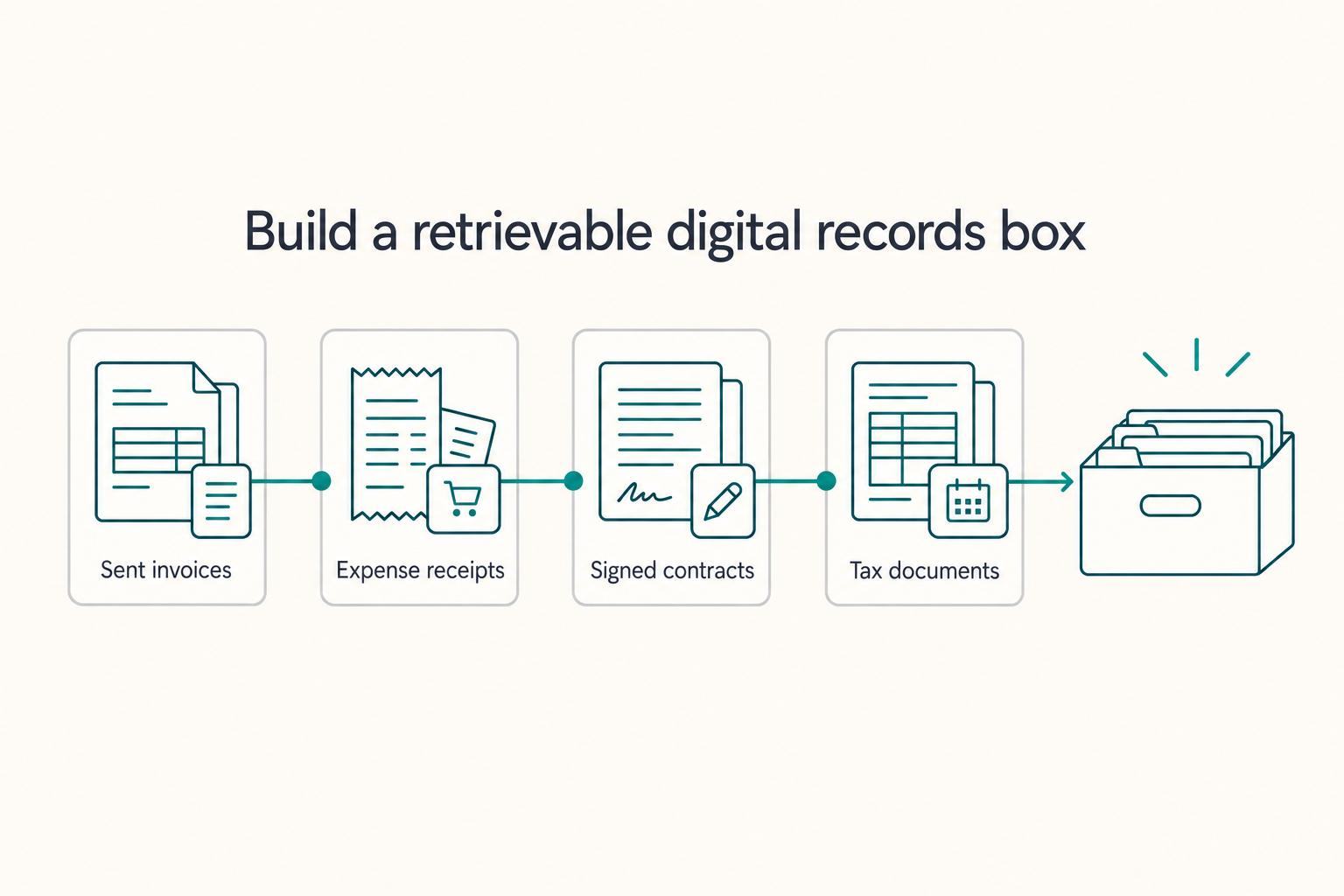
Use 03_FINANCE as your evidence trail, not a storage bin. Your goal is simple: keep complete, categorized, retrievable proof of what you billed, what you spent, and what you signed.
Payment flow and recordkeeping are different jobs. Sending invoices fast and getting paid fast helps cash flow, but it does not replace a clean archive of supporting documents. If records stay split across inboxes, apps, photos, and random folders, you create the same data silos that make review and handoff harder.
Build 03_FINANCE with four working drawers#
| Subfolder | Purpose | What goes in it |
|---|---|---|
01_Invoices_Sent | Issued billing record | Final PDF copy of each invoice you send |
02_Receipts_Expenses | Expense evidence trail | Vendor receipts, purchase confirmations, subscription renewals, travel docs |
03_Contracts_Signed | Agreement proof file | Signed contracts, SOWs, NDAs |
04_Tax_Documents | Tax-time retrieval set | Tax forms received, filing copies, payment confirmations, key correspondence |
Use one naming pattern so files sort cleanly and are readable under pressure: YYYY-MM-DD_VendorOrClient_DocumentType_AmountOrStatus Examples: 2026-03-20_Acme_Invoice_1200, 2026-03-20_Adobe_Receipt_59.99, 2026-03-20_Acme_SOW_signed.
Quick checkpoint: can you find one invoice, one receipt, one signed agreement, and one tax document in under a minute each? If not, fix the structure now while volume is still manageable.
Ad-hoc storage vs structured Digital Shoebox#
| Area | Ad-hoc storage | Structured Digital Shoebox |
|---|---|---|
| Retrieval speed | Search across inbox, downloads, phone, app exports | One folder path + consistent naming |
| Deduction support | Evidence may be partial or hard to verify | Stronger support when documentation is complete; verify local rules/requirements |
| Accountant handoff | Forwarded emails, screenshots, mixed formats | Clean folder handoff with categories already separated |
| Audit readiness | Harder to show complete, dated records | Easier to produce dated, categorized files; verify local standards |
Execution checklist (use every time)#
- Capture physical receipts immediately: scan or photograph right away, save to
02_Receipts_Expenses, and delete unreadable copies on the spot. - Route digital receipts from Gmail the same day: save attachments or PDFs into the correct finance subfolder as they arrive.
- Verify before you move on: the file opens, the date is visible, the vendor/client is clear, and the filename matches your pattern.
Tool sprawl is a common failure mode. You may use multiple tools, but your record archive should still live in one place so proof stays complete and retrievable. Related: How to Create a Professional Email Signature That Gets Results.
Step 3: Reclaiming Your Time by Automating the 'Admin Tax'#
Start with the repetitive admin that interrupts your day: scheduling messages, copied templates and scattered feedback. Standardize one workflow at a time so you can check whether it actually saves effort.
| Area | Setup | Verify |
|---|---|---|
| Scheduling | Build booking options for the meeting types you actually run; set clear availability windows; add buffer logic around calls; require intake questions before a slot is confirmed | Test each flow from a personal email and confirm the event lands correctly, intake details are usable, and deep-work blocks stay protected |
| Templates | Keep master files in 02_OPERATIONS/_Templates, treat them as source files, and create a copy for each live engagement | Apply one naming pattern for masters and working copies, then do a periodic cleanup pass to retire outdated drafts and keep current language easy to find |
| Collaboration | Use a shared draft for edits, collect change requests in one place, then complete an explicit approval handoff before finalizing | Archive the final version in that client folder under 01_CLIENTS so working drafts and signed-off files do not get mixed |
For scheduling, define your meeting types, availability, buffers and intake questions, then test a booking from a personal email. Premium options vary by edition: use the features your account supports and confirm they preserve your focus blocks.
Use templates as your second lever so repeat work stays consistent. Keep master files in 02_OPERATIONS/_Templates, treat them as source files, and create a copy for each live engagement. Apply one naming pattern for masters and working copies so old versions are easy to spot, then do a periodic cleanup pass to retire outdated drafts and keep current language easy to find.
For collaboration, define one review protocol and stick to it. Use a shared draft for edits, collect change requests in one place, then complete an explicit approval handoff before finalizing. After approval, archive the final version in that client folder under 01_CLIENTS so working drafts and signed-off files do not get mixed.
| Area | Manual admin handling | Workspace automation |
|---|---|---|
| Turnaround speed | Rebuilds and back-and-forth each time | Reusable scheduling and document flows |
| Context switching | Constant inbox and file hopping | Fewer interruptions across tools |
| Revision clarity | Multiple attachments and unclear latest version | One shared working draft with visible changes |
| Client experience | Process changes by project | Predictable intake and review process |
Use this implementation checklist for this section:
- Define your real meeting types, availability windows, buffers, and intake questions.
- Test-book each meeting type and verify the workflow end to end.
- Set up
02_OPERATIONS/_Templateswith master files and copy-first usage. - Apply a naming standard for masters and live copies.
- Run a recurring template cleanup to remove outdated versions.
- Lock your review protocol: edit, review, approve, archive to
01_CLIENTS. - Confirm that your chosen edition supports the booking and document features you intend to use.
For a step-by-step walkthrough, see Microsoft 365 for Freelancers Who Need Client-Ready Operations.
Conclusion: Keep the Business Easy to Run When Work Gets Busy#
If the FAQ helped you choose a setup and migration path, the next job is simpler: keep the business easy to run when work gets busy. Think less about a perfect stack and more about steady decisions you can defend later, especially when tradeoffs get uncomfortable.
If you followed this guide, you should now have the core pieces of a cleaner operating setup: clearer separation between personal and business admin, a structured place for key files, a routine for capturing finance records, and repeatable admin steps. That does not make the business automatic, but it can reduce how much depends on memory, inbox search, or last-minute scrambling.
Day to day, this can change the feel of the work. It may be easier to find the latest file, hand off documents cleanly, and protect focus when bookings, drafts, and filing rules are already defined.
A common risk is gradual drift: loose sharing permissions, duplicate folders, stale templates, and receipts slipping back into email and chat.
At your next review, check these four things:
- permissions on shared assets and access settings
- folder hygiene, especially duplicates and misfiled finance documents
- template accuracy, including links, placeholders, and current terms
- automation checkpoints, such as filters, reminders, and your end-to-end client path test
Keep these routines small enough to maintain during busy projects.
We covered related tooling ideas in The Best Google Workspace Add-Ons for Productivity.
Frequently Asked Questions
How should you organize your freelance business in Google tools?
Keep the structure simple: 01_CLIENTS, 02_OPERATIONS, and 03_FINANCE. Put live project files under 01_CLIENTS, master templates and recurring admin docs under 02_OPERATIONS, and invoices, receipts, and tax records under 03_FINANCE. Then tie that structure to scheduling and contract templates so files, meetings, and approvals all point back to the same place.
Can this help with taxes and recordkeeping?
Yes, if you use it as an evidence folder rather than accounting software. File every invoice, receipt, and tax document into 03_FINANCE as it arrives, with enough context that you or your accountant can understand it later. The failure mode is scattered proof: receipts in email, invoices in chat, and no clear paper trail.
Is a paid Workspace option worth it if you work solo?
It can be. Workspace Individual includes appointment schedules, buffers, appointment caps, booking payments, eSignature and 1 TB of storage. Google offers a 14-day trial. To subscribe, you must be located and have a payment profile in a supported country or region. Compare those features with a business edition when custom-domain email or organization administration matters.
How does Workspace Individual compare with a business Workspace plan?
Workspace Individual adds solo productivity features to a personal account. A domain-verified business edition provides custom-domain email and organization administration. Choose between those account models first, then compare storage and the specific scheduling or document features you need.
Can one account cover multiple separate companies or brands?
One Workspace organization can have a primary domain plus secondary or alias domains. Those domains do not create separate administrative organizations. If separate companies need independent administration or data boundaries, evaluate separate organizations and accounts. Use distinct browser profiles to keep account selection clear.
How do you transition from a personal setup without disrupting active client work?
Move in slices, not in one bulk transfer. Keep active projects stable, then test one real client path end to end: booking flow, document handoff, template copy, and final filing into the right CLIENTS or FINANCE folder. Your checkpoint is that nothing breaks for the client. The common failure mode is moving a live draft mid-review and breaking access to the latest version.
Try a related tool
Researched and edited by the Gruv editorial team. Gruv builds cross-border billing, payouts, and finance-operations software for global businesses.
Sources
Includes 3 external sources outside the trusted-domain allowlist.
Educational content only. Not legal, tax, or financial advice.
Related Posts

Value-Based Pricing for Freelancers Under Real Payment Risk
Value-based pricing starts with the client’s expected benefit and willingness to pay. It still needs a deliverable, scope and payment agreement you can perform. Use a discovery phase when the benefit or effort is too uncertain to support a defensible quote.
How to Create a Professional Freelance Email Signature
Treat your signature like a working document, not a decorative footer. If you want clearer client verification and fewer avoidable questions, your email block needs to make your identity, your role, and the next action clear at a glance.

How to Create a Business Email Address for Your Freelance Business
A business email is not a logo choice. It is the identity layer most clients, vendors, and software tools treat as the real you.