
Quick Answer
Using airport lounges works best when you treat access like an operations workflow, not a perk. Pick an access method, verify the exact lounge and rules for your terminal, and run a short task-focused work sprint once inside. Keep a fallback workspace ready in case access fails or the lounge is full. This approach helps relocation travel stay productive, calmer, and more predictable.
Stop treating lounges like a perk - treat them like relocation infrastructure#
Treat airport lounges like operational infrastructure on relocation days because they can be one of the few semi-controllable environments inside an otherwise chaotic system. When you're in move mode (paperwork, logistics, tight timelines), you need habits that protect throughput, not aspirational travel perks. Lounge access can help when it works, if you run it like a process, not a vibe.
Relocation travel turns airport time into three different days at once: a workday (calls, deliverables), a paperwork day (forms, scans, receipts), and a recovery day (sleep, food, a corner that's hopefully calmer than the concourse). The catch is that lounges do not guarantee entry or calm. Overcrowding is real.
As one aviation commentator put it, "Lounges are often so jam-packed that customers are turned away or asked to come back later on." Build your plan assuming that outcome can happen, even when you have valid airport lounge access.
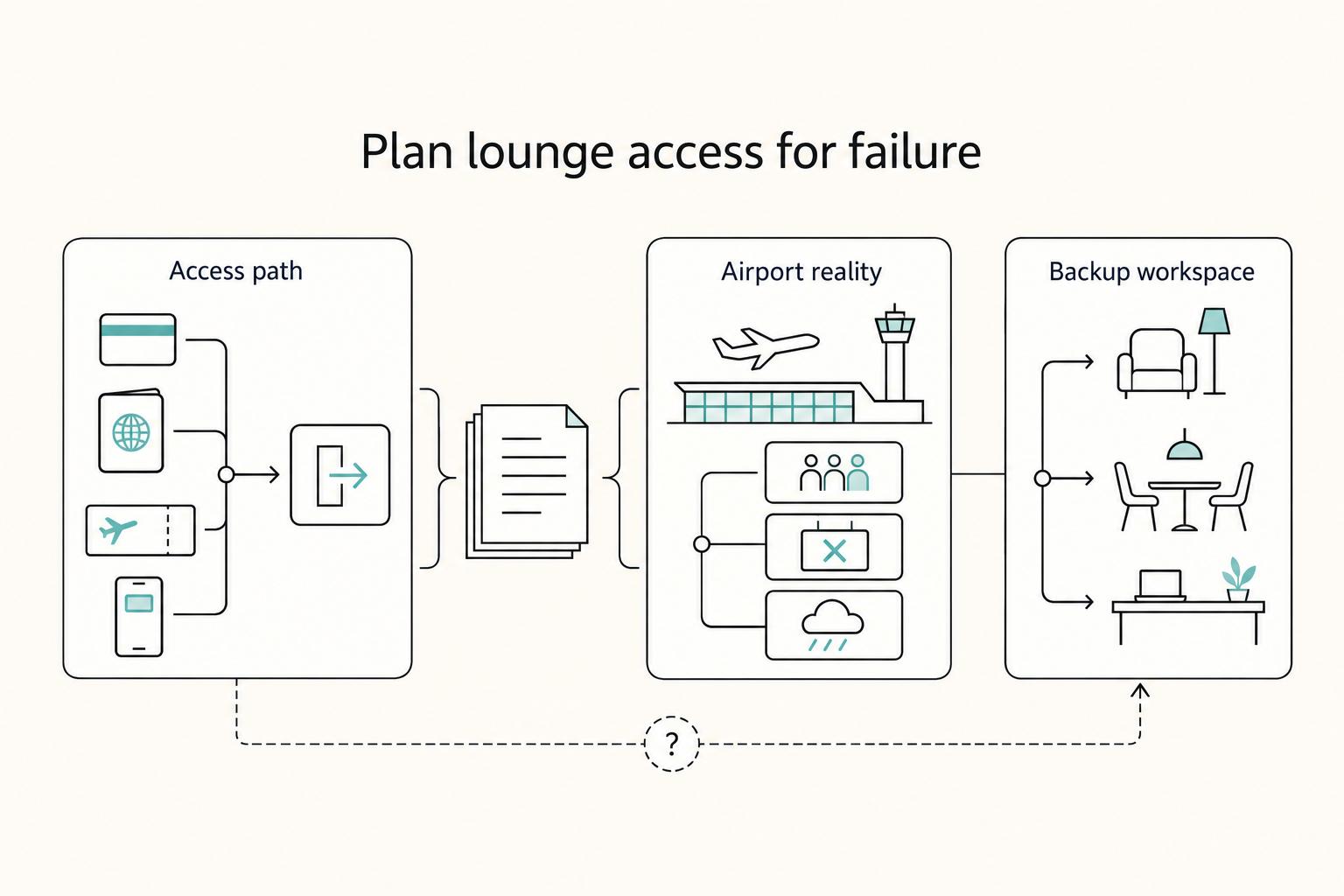
The 10-minute framework: decide, then verify, then operationalize#
Use this as your safe-default system, and run it the same way every time. It keeps you moving even when rules, terminals, and crowding create "it depends" moments.
| Step | Decision | Safe default (reduces surprises) | What you do in under 2 minutes |
|---|---|---|---|
| 1 | Choose an access path | Pick the path you can verify fastest (often a card-linked benefit or a membership you already have set up) | Pull up your membership or credit card benefits and note what credential you need at the door |
| 2 | Confirm airport reality | Assume coverage varies by program and airport | Check the official directory or issuer info for your specific airport and terminal before you commit |
| 3 | Plan for failure | Assume you might not get in | Pick a non-lounge workspace option in advance (quiet gate area, a café, or another terminal strategy) |
Hypothetical: you land for a scouting trip and need to sign a lease addendum, hop on a call, and charge two devices. You route toward a lounge you believe you can access, and you pre-pick a backup so a full lounge doesn't blow up your timeline.
Your travel-day checklist (plus a fallback plan that actually works)#
Run this every time you plan to use a lounge. The goal is fewer airport decisions and fewer surprises at the door.
- Credential ready: boarding pass plus your lounge credential (app login, membership card, or whatever proof your access method requires).
- Mission list (one page): 3 tasks max (documents, calls, charging), then execute in that order.
- Workspace kit: charging cable, headphones, and offline access to key files.
- Capacity-proof fallback: decide where you will go if you get turned away before you walk to the lounge.
If you want a clean way to pick which credit card benefits to rely on (versus paying out of pocket), use this next: The Best Business Credit Cards for Freelancers.
The lounge mental model (and the terms you must understand before you choose anything)#
Treat lounge access like you treat a border crossing: clear eligibility, confirm local rules, keep a backup route.
If you want lounges to function as relocation infrastructure, you need the vocabulary that prevents "I thought I had access" moments at the door. Terms matter because different programs, issuers, and lounge brands enforce different constraints in different airports.
Define the asset you're buying: "lounge" does not mean "standard"#
An airport lounge is an exclusive airport space, but what it offers can vary dramatically by location and operator. Some lounges aim for luxury, with amenities that go well beyond the concourse.
| Priority | What to look for |
|---|---|
| Must-haves | power outlets; stable Wi-Fi; quiet enough for a call |
| Nice-to-haves | showers; better food; private rooms |
| Non-negotiable | the lounge sits in your terminal and you can enter when you need it |
National Geographic describes these spaces as "extraordinary spaces with elite amenities," and it points to examples like shower suites and even bars with more than 100 types of whiskey (in some lounges, not all). The point is simple: amenities depend on the specific lounge, not the word "lounge."
When you evaluate airport lounge access, run this quick filter so you don't overpay for things you won't use:
- Must-haves (relocation day): power outlets, stable Wi-Fi, quiet enough for a call.
- Nice-to-haves: showers, better food, private rooms.
- Non-negotiable: the lounge sits in your terminal and you can enter when you need it.
Access paths: membership networks, card-linked benefits, and proprietary lounges#
Most confusion comes from mixing three models. Separate them first, then verify the one you plan to use.
| Model | What you "have" | What can change fast | Your safe verification step |
|---|---|---|---|
| Membership network (example: Priority Pass) | A membership credential plus a directory of participating locations | Participating lounge list, local restrictions, real-world capacity | Check the program directory for your exact airport and terminal before you leave |
| Card-linked access (a credit card benefit) | Access defined by your card issuer's benefit guide | Eligibility, enrollment steps, and what the issuer actually covers | Pull the benefit guide, then screenshot the relevant terms for travel day |
| Network-specific lounges (examples: Capital One Lounge, Centurion Lounge, Delta One Lounge) | Entry tied to that brand's rules | Entry rules and capacity controls | Confirm the specific lounge's entry requirements before you route your workflow around it |
One operational detail that catches people: some lounge programs require enrollment and eligibility verification. For Mastercard Airport Experiences, registration may show a temporary $1.00 (USD) pending transaction to verify eligibility, and your card will not be charged. The pending amount typically disappears (usually within 10 business days). Treat this like a systems check, not a billing problem.
Hypothetical: you plan to print and sign a relocation document during a layover, then discover entry rules differ from what you assumed. Operator response: open the directory, confirm the terminal, confirm eligibility, then walk to your pre-chosen fallback workspace if anything looks uncertain.
If you want a deeper dive, read A Guide to Webflow for Freelance Designers.
How do I get airport lounge access? Use this 3-profile decision tree (occasional → regular → frequent)#
Pick your lounge access path based on how many times you will actually enter a lounge, then verify coverage for your exact airports before you pay.
This keeps lounge access predictable on travel days. It also avoids buying "airport lounge access" as a vague perk.
The 3-profile decision tree (with safe defaults)#
1) Occasional traveler (rare lounge visits) Default to pay-per-use or single-entry day passes where a lounge sells them. A pay-per-use pass commonly runs $30 to $50 per visit, which can be cheaper than paying an annual fee if you rarely enter.
If you consider any paid lounge network plan, run the math only after you confirm which lounges you will realistically use. Start with your actual airport and terminal options before you assume coverage.
2) Regular traveler (around 6 to 10 trips a year) Prioritize card-linked access when you already want the card for broader credit card benefits (earn rates, travel protections, expense management). Treat lounge entry as a bonus.
LoungePair notes that travelers around 6 to 10 trips a year may see "more marginal" dollar value, so be honest about how many lounge entries you will really take on those trips. Compare a card path against buying a standalone membership only after you read the issuer's current benefit guide and confirm what's included.
3) Frequent or relocation traveler (15+ trips per year, multi-leg) Choose the option that gets you consistent access across the airports you actually fly. At 15+ trips per year, frequent travelers can break even quickly on an annual lounge membership ($400 to $600) or a premium credit card ($400 to $700 annual fee) when travel volume stays high.
| Profile | Default access method | What you optimize for | Your verification step |
|---|---|---|---|
| Rare lounge visits | Pay-per-use ($30 to $50) | Lowest commitment | Confirm a usable lounge exists for your airports |
| Around 6 to 10 trips/year | Card-linked vs membership | Avoid wasted spend | Read issuer guide, then check coverage by airport |
| 15+ trips/year | Membership or premium card | Break-even + reliability | Map your top airports, then pick the best-fit option |
Anchor to your footprint (and your relocation workload)#
If your flying is concentrated in one region versus another, your lounge map can look very different. Don't optimize for a lounge brand you'll never see.
Relocation rule: if your travel days include document review, immigration forms, or client calls, optimize for quiet + power + Wi-Fi first, then food. Hypothetical: you plan to review a lease addendum during a connection. You pick the access option that reliably gets you a seat and outlets in your actual terminal, not the option that promises the best buffet on paper.
Access-method selector: membership vs eligible card vs network mix (choose what you can verify)#
Pick the access method you can verify end to end for your exact airports and terminals, not the one that sounds like the best travel perk.
Relocation mode is unforgiving. "Airport lounge access" only helps if you can repeat it without surprises.
Quick selector (what you buy, what can drift, what you verify)#
| Access method | What it optimizes for | What can drift | What you verify before you commit |
|---|---|---|---|
| Membership (buy a lounge program membership directly) | Clear "I paid for access" logic and one program to manage | Lounge participation and per-location entry conditions | Your frequent airports actually have usable lounges where you travel |
| Eligible credit card (issuer-provided access) | High value if you already want the card's broader credit card benefits | Issuer terms can differ from retail-style program terms | The issuer benefit guide, enrollment steps, and what access you actually receive |
| Proprietary lounge network (a card-issuer or brand lounge footprint) | Reliability on repeat routes that hit those airports | Location footprint and on-site entry conditions | That your regular terminals include that lounge and you can access it on your travel days |
| Airline premium lounges | Strong fit for travelers who routinely fly premium itineraries | Airline-specific eligibility requirements | Your ticket, status, and itinerary qualify on the day you travel |
| Network mix (a lounge network plus a "home" lounge) | Best odds of a usable workspace across multiple legs | More moving parts | You can name at least one "sure thing" lounge for your most common hubs |
A useful calibration: a third-party lounge access guide puts it plainly, "you don't need elite airline status or a first class ticket, you just need the right credit card." Treat that as permission, not a purchase order.
You still need to read the issuer's benefit guide. Issuer-provided access can come with different conditions than buying access outright.
Decision rule (safe default) + fallback script#
Use this operator-grade decision rule. It's designed to be fast, boring, and repeatable.
- (1) Confirm the exact lounge in your terminal (not just the airport).
- (2) Confirm entry conditions using the program's terms and your issuer's benefit guide (if applicable).
- (3) Predict crowding risk using recent reviews and your own schedule (early mornings and tight connections punish assumptions).
- (4) Keep a non-lounge fallback you can execute in two minutes.
Hypothetical: you land, you need to review a lease addendum, and your planned lounge sits in another terminal. You don't debate it. You switch to Plan B: find a quiet gate area near power, buy a coffee, hotspot if Wi-Fi fails, and keep moving. That mindset makes lounge access a tool, not a dependency.
Is Priority Pass worth it in 2026? Run the math with tiers, visit-fee logic, and your relocation calendar#
Priority Pass feels worth it when your real-world lounge events (including guests) fit your plan's visit logic and your airports actually offer usable partner lounges in your terminal.
The goal is not theoretical value. It's predictable workspace coverage under relocation-style travel.
Step 1: Count lounge events, not trips (relocation math)#
Relocation travel creates more entry attempts than your calendar suggests. One move can stack departures, connections, and "oops, I need to fly back for one signature" returns.
Instead of "two trips," count lounge events. That means each time you would realistically try for airport lounge access.
Use this table as your worksheet, and fill it with your next 2 to 4 weeks:
| Your relocation pattern | What to count | What to verify in Priority Pass (or issuer guide) | What it means for your membership/benefit level |
|---|---|---|---|
| Nonstop out, nonstop back | 2 departures | Lounge in your terminal, hours, entry rules | Lower-commitment options can work if per-visit costs don't sting |
| One connection each way | Departures + connections | Terminal match at each stop | Higher coverage can reduce per-visit uncertainty |
| Multi-leg week (move, scout, return) | Every segment where you arrive early | Capacity notes, "conditions" text, day-of listing | More inclusive access can reduce decision fatigue |
Next, add guest demand as a multiplier. Write down: solo, +1, family.
Then confirm guest rules twice: in the Priority Pass directory for that location and in your card's benefit guide if you access Priority Pass through credit card benefits. Details can vary depending on how you get access, so don't assume they match.
Hypothetical: you fly with a partner, you plan to co-work in a lounge between connections, and guests count as extra entries (or trigger a fee). That single detail can flip your "worth it" decision fast.
Step 2: Separate coverage value from quality value (then recon for crowding)#
Treat Priority Pass as coverage infrastructure, not guaranteed quiet. Coverage varies by airport, terminal, and partner mix. Even a major hub can surprise you if the lounge sits in a different terminal than your gate.
Then check quality signals without outsourcing your brain. Use them to decide whether you need an additional option on key routes.
- Skim a couple recent lounge reviews on The Points Guy and community reports (for example, TravelHacks) for crowding patterns, Wi-Fi reliability, and noise.
- Use those notes to decide if you need a "home network" fallback (like a Centurion Lounge) on key routes.
Calibrate expectations: Thrifty Traveler reports Centurion Lounge crowding with "lines of fellow cardholders out the door and virtually no space to sit." If premium spaces clog up, Priority Pass lounges can also hit peak stress. Run your plan like an operator: verify, screenshot rules, and keep a Plan B.
If you evaluate cards mainly for lounge access, remember fees can sit in premium territory. One Mile at a Time notes the Chase Sapphire Reserve launched in 2016 and references a $795 fee in the context of changes for new applications. Run the math before you commit.
For a structured way to compare credit card benefits beyond lounges, use The Best Business Credit Cards for Freelancers.
Can I use lounges on domestic flights? Yes - if you clear the real gatekeepers (terminal, time window, and eligibility)#
Yes, you can often use airport lounges on domestic flights if the specific lounge's location, hours, and your eligibility line up on that exact travel day.
Domestic travel exposes the most common failure mode: you show up confident, then reality says "not here, not now, not with that credential."
The three gatekeepers you must verify (not assume)#
1) Terminal reality, not airport branding. Lounges live in specific terminals and sometimes near specific gates. A concrete example shows why: one Yelp listing for a United Club describes it as "in Terminal G, near Gate 6," with posted hours of 5:00 AM to 12:00 AM (next day). That level of specificity matters. "There's a lounge at SFO" doesn't help if you depart elsewhere.
| Gatekeeper | What to verify | Example or note |
|---|---|---|
| Terminal reality | the exact terminal and sometimes the gate area | "in Terminal G, near Gate 6" |
| Time window | the lounge's posted hours | "5:00 AM to 12:00 AM (next day)" |
| Eligibility | the rules for your access method at that specific lounge | rules can vary by lounge and by the credential you're using |
2) Time window equals posted hours. Lounge doors close, and hours can be the difference between "great plan" and "wasted walk."
3) Eligibility depends on your access method. Even when a lounge exists and is open, access rules can vary by lounge and by the credential you're using (for example, membership vs. other forms of access). You can't safely generalize. You have to check what applies to you for that specific lounge.
Safe domestic execution (multi-leg)#
If you string together multi-leg domestic moves, build buffer time for terminal-to-terminal movement and checkpoint flow. Lounges do nothing if you can't physically reach them in time.
Use this tight confirmation loop, even when you "know" you have access:
- Day-of: check the lounge's listing for the exact location and posted hours.
- Cross-check: confirm your own access terms match what that lounge accepts.
- Decide: if you need a critical call, pick a backup location in the terminal. A Quora respondent notes terminals typically have essentials like "food, water, toilets, plenty of floor space or chairs," which gives you a baseline Plan B.
Hypothetical: you land early for a domestic connection and plan a sensitive client call. You check the listing, spot a constraint you can't meet, and pivot to a quiet gate-area setup instead of burning time at the desk.
If you want this to run on rails, convert the steps above into a reusable template in A Guide to Notion for Freelance Business Management.
Verify your access before you fly, then set up to work#
Treat lounge time as a repeatable operations block (admin throughput first), not a perk.
The goal is to walk in with a plan, do high-leverage work fast, and leave with fewer loose ends than you arrived with.
T-24 to wheels-up: verification that survives airport reality#
Airport access is segmented. The Port Authority's Airport Security Guidelines Manual explicitly separates Airside, Landside, and Terminals. Your lounge plan only works if you end up on the right side of the right boundary for the right terminal.
Run this pre-flight verification loop (T-24 hours works well because you still have time to pivot):
- Priority Pass: confirm the exact lounge options for your departure terminal (don't rely on "this airport has lounges").
- Network lounges: check whether a Capital One Lounge (or a Centurion Lounge, if that's your access path) is actually reachable from where you'll be that day.
- Screenshot the rules: capture entry conditions you expect to matter at the desk (entry window wording, guest language, any "access may be restricted" notes). Apps lag, airport Wi-Fi lags, and policies change.
If you rely on credit card benefits for lounge access, keep the issuer benefit page handy. Make the access path explicit (membership card, QR code, or app credential, where supported).
5-minute lounge sprint setup: make it a workspace, not a snack stop#
Don't gamble your workday on lounge food. Bet on power, network, and logins.
- Power first: if you spot an outlet, take the seat, plug in immediately, then unpack.
- Noise control: headphones in, mic tested, calls scheduled tight.
- VPN and login readiness: the Port Authority manual lists Two Factor Authentication as a security requirement topic. If your work requires 2FA, bring your method (authenticator access, backup codes) so you don't lock yourself out mid-connection.
- Offline backups: save the documents you must ship today (forms, scans, itineraries) locally before you depend on Wi-Fi.
Hypothetical: you need to submit relocation paperwork before a time zone cutoff. You enter the lounge, run a short submission sprint (scan, upload, confirm receipts), then use the remaining time to plan the next leg.
Mini checklist (copy/paste):
- Boarding pass + lounge credential ready (membership card, QR, or app credential)
- Lounge location confirmed for your route/terminal
- Entry rules captured (guest count, entry window language)
- Backup plan selected (paid quiet area, café, or gate strategy)
- Devices charged + key documents accessible offline
What can I actually do in an airport lounge - and what etiquette keeps you productive (and welcome)?#
Airport lounges can give you a place to work or relax between flights, with easy access to refreshments. They're also not just for business-class or first-class flyers anymore; access can come through the right credit card, a day pass, or an annual membership.
Use a lounge as a controlled work zone for 1 to 3 high-leverage outcomes, not as an all-purpose office.
If you walk in without a target, you drift. If you walk in with a tight menu, you leave with output.
The remote-pro "use-case stack" (pick your top 2)#
Lounges vary by network and location, so avoid assumptions and build around functions you can verify quickly. A Quora traveler captured the core value plainly: "They allow me a place to work and relax between flights, provide easy access to refreshments." You want a place to work, recover, and keep moving.
Here's the operator stack, from highest leverage to lowest:
| Use case | What "done" looks like | Safe default to reduce risk |
|---|---|---|
| Deep work block | One deliverable shipped (email sent, doc finalized, invoice submitted) | Choose one task with a clear finish line |
| Sensitive calls (if it's workable) | One short call completed, with notes captured | Assume noise and interruptions. Keep it tight |
| Admin throughput | Receipts logged, forms uploaded, confirmations saved | Use a checklist and save proof offline |
| Basic refuel | Light food and water so you stop hunting in the terminal | Treat food as support, not the event |
| Reset action | A quick reset (wash up, stretch, re-pack) | If you need something specific, verify it before you rely on it |
Quiet-first workflow + security and courtesy defaults#
Some lounges can feel busy, so design for quiet first:
- Pick your conditions: choose the quietest spot you can find and build your session around what the room is actually like.
- Call discipline: if you take a call, keep it short and use headphones. If you need a longer conversation, step out if possible and follow any posted lounge rules.
- Document safety: keep passports and sensitive paperwork contained when you're not actively using them. Lock your screen before you stand up, even briefly, and angle your display away from foot traffic.
- Shared-space mindset: keep your setup compact and be mindful that the space is designed for multiple travelers at once.
Hypothetical: you need to review relocation documents before boarding. You claim a quieter corner, run a single focused edit pass, upload the final PDFs, save confirmation emails offline, then reset for the flight.
When lounge access fails: your fallback plan + the "what varies / how to confirm safely" box#
Build a verified Plan B for every airport you touch because lounge access can fail due to where the lounge sits (airside/terminal), your itinerary, or timing and security constraints you didn't confirm.
Treat lounge access as a productivity option, not a dependency. Lounges can fail for predictable reasons: you cannot reach the right security zone yet, you are not eligible for that specific lounge area, or a policy detail you did not verify. This section is the counterweight.
Your Plan B (built before you travel)#
Start with one simple rule: one airport, one backup workspace you can reach after security. Keep it boring and reachable.
| Fallback option | What it is | What to check |
|---|---|---|
| Quiet gate strategy | a lower-traffic gate area near your departure gate | power and fewer interruptions |
| Airport public zones designed for work | areas some airports position as places "to relax" or "to work" | airport maps and "shop, dine, relax" pages |
| Paid passenger-assistance support (situational) | paid programs that can include VIP lounges and "no lines" | an option when a travel day turns mission-critical |
A few fallback options people use, depending on the airport:
- Quiet gate strategy: identify a lower-traffic gate area near your departure gate. Look for power and fewer interruptions.
- Airport public zones designed for work: some airports explicitly position areas as places "to relax" or "to work," not just to sit. Use airport maps and "shop, dine, relax" pages to find them.
- Paid passenger-assistance support (situational): The Wall Street Journal reported growing interest in paid passenger-assistance programs that can include perks like VIP lounges and "no lines." You do not need this every trip, but it can be an option when a travel day turns mission-critical.
Hypothetical: you plan a document review sprint in a lounge, but you cannot access that area yet based on how security and customs are being handled for your flight. You pivot to your pre-picked quiet gate area, tether for the upload, and save the lounge attempt for the return leg.
The "what varies / how to confirm safely" box#
Even with broad networks, reality changes by airport, terminal, and itinerary. Priority Pass, for example, describes access to over 1,600 lounges and travel experiences worldwide. Coverage concentration varies by region (FinlyWealth lists 440+ in Asia Pacific, 370+ in Europe, 150+ in North America and Canada, and 70+ in the Middle East). Translation: your lounge experience shifts with your route map.
Use this operator-grade confirmation box:
| What varies in the real world | What you do to confirm safely (fast) |
|---|---|
| Airside reachability (terminal, security, customs flow) | Confirm you can actually enter the correct security zone. YYC, for example, notes U.S. travelers can face limits like access to security and customs only two hours before departure. |
| Eligibility tied to itinerary (some lounges target specific flows) | Check whether the lounge sits in a transborder or special area. Canadian Interiors describes YYC's Aspire WestJet Garden Lounge as accessible to passengers traveling to the United States. |
| What your access method actually includes (paid membership vs. card-provided access) | Treat your Priority Pass membership details and your card's benefit terms as the source of truth. Priority Pass access can come through participating credit cards or paid memberships, so verify the current terms tied to your path before you travel. See: The Best Business Credit Cards for Freelancers. |
| Amenity reality (workspaces, charging) | Confirm essentials, not vibes. Some lounges explicitly advertise workspaces and charging ports, but you should still verify day-of. |
Safe workflow (day-of):
- Re-check the lounge listing and location details in your Priority Pass account.
- Open your card issuer's current benefit terms (if your access is provided through a credit card).
- Call the lounge or airport info line if you cannot tolerate surprises.
The relocation-ready lounge system: decide once, verify fast, execute every travel day#
Use a simple, repeatable lounge runbook - pick your access path, verify the current lounge listing, and keep a fallback - so changing pricing and availability don't derail your travel day.
Airport lounges can offer "complimentary food and drinks" plus "high-speed internet, comfortable seating, power outlets, and more," and some include "private workspaces... showers, and sleeping pods." The catch: don't treat any lounge as guaranteed, because "Pricing and availability are subject to change." Plan like you'd plan any dependency: confirm what you can, then move.
Here's one clean sequence to reuse: profile → access method → verification checklist → fallback plan. It's not about perfect information - it's about reducing last-minute decisions. If you want fewer surprises, prioritize the basics you'll reliably use (a seat, internet, power) before you spend energy chasing "nice-to-haves" like showers.
Use this table to lock your decisions into a simple runbook:
| Step | Your decision | What to verify (fast) | Output you save |
|---|---|---|---|
| Profile | Solo vs +1, work needs vs rest needs | Your non-negotiables (power, quieter seating, food) | A 1-line "travel-day intent" |
| Access method | Membership vs card-linked benefit vs specific network | That your credential matches the program you plan to use | The exact credential to present |
| Verification checklist | Where you will go and what you will show | The program's official listing for that lounge | A screenshot or note with the entry requirements |
| Fallback plan | What you do if the lounge fails | A nearby alternative you can tolerate | One Plan B per airport |
Your setup in one quick session (keep it practical)#
Do this once, then reuse it:
- List the airports you'll be traveling through soon.
- For each airport, open the official directory for the access you already have (your lounge program app/site, or your card issuer's benefit page) and confirm which lounges are currently listed.
- Choose one primary access path you can verify end to end, plus one fallback you're willing to execute without drama.
Finally, pair predictable travel-day operations with predictable finance ops. If you're building a relocation stack, Gruv can support cross-border money movement with compliance gates and audit-ready records where supported and when enabled - so the financial side stays as operational as your travel runbook. If you need to sanity-check which travel perks you'll truly use, start with: The Best Business Credit Cards for Freelancers.
Frequently Asked Questions
How do I get airport lounge access?
You get airport lounge access by joining a lounge program (like Priority Pass) or by using an eligible payment card program (like Mastercard Airport Experiences provided by LoungeKey). For Priority Pass entry, bring a valid boarding pass and your Priority Pass Digital Membership Card in the Priority Pass app (or a physical card). If your bank gives you Priority Pass as a card benefit, Priority Pass says you may be eligible to use your payment card to enter. | Access path | What you use at the door | What to verify first | |---|---|---| | Priority Pass | Boarding pass + Digital Membership Card in the app (or physical card) | The lounge listing for that location | | Mastercard Airport Experiences (LoungeKey) | Your eligible Mastercard payment card | That your specific card qualifies and what it covers |
Is Priority Pass worth it?
Priority Pass can be worth it if you will actually use it enough that the overall cost and any extra charges (like per-visit or guest charges, where applicable) work in your favor. Keep it grounded: confirm your actual airports and terminals show usable options in the directory before you pay.
Can I use lounges on domestic flights?
Sometimes, yes, but only if the specific lounge’s location, hours, and your eligibility line up. The safe baseline is a valid boarding pass plus whatever credential your program requires (for Priority Pass, your digital or physical membership card). When you cannot tolerate surprises, check the listing right before you walk over.
What can I actually do in an airport lounge?
Use lounges for controlled downtime and a calmer preflight setup, not as a guaranteed coworking space. The Points Guy puts it simply: “Airport lounges can be great places to relax before your flight.” Depending on the program, you may also see experiences and offers tied to dining, spa, and retail outlets (Mastercard Airport Experiences says it includes those categories).
What if I arrive early or clear security quickly, how do I use that time well?
Convert the extra time into a deliberate buffer, not wandering. Pull up your lounge credential (Priority Pass app or eligible card), then choose one outcome: decompress, prep your next travel step, or finish a small admin task you can complete in one sitting. Hypothetical: you clear security earlier than expected, so you sit down, open your documents, and knock out a single relocation form before boarding starts.
Which cards include lounge access?
Some payment cards include lounge access as a benefit, often through Priority Pass or Mastercard Airport Experiences (LoungeKey). Mastercard Airport Experiences states your benefit is enabled through your eligible Mastercard payment card and stays valid until the card gets cancelled or expires. For a practical starting point, use: The Best Business Credit Cards for Freelancers.
What should I do if I’m denied entry or the lounge is full?
Lounge access and enforcement can vary by location, and entry is not always possible. Have your boarding pass plus your digital or physical credential ready, and if your Priority Pass membership comes from a payment card, remember Priority Pass notes you may be eligible to use that payment card for entry.
Try a related tool
Researched and edited by the Gruv editorial team. Gruv builds cross-border billing, payouts, and finance-operations software for global businesses.
Sources
Includes 1 external source outside the trusted-domain allowlist.
- oecd.org/content/dam/oecd/en/publications/reports/201...trusted
- panynj.gov/content/dam/airports/pdfs/cx-performance-sta...trusted
- panynj.gov/content/dam/airports/employees/airport-secur...trusted
- rosap.ntl.bts.gov/view/dot/86879/dot_86879_DS1.pdftrusted
- thepointsguy.com/airline/airport-lounge-etiquetteexternal
Educational content only. Not legal, tax, or financial advice.
Related Posts
The Best Business Credit Cards for Freelancers
Pick for reliability first. For a freelancer, the right business card is usually the one that keeps recurring bills moving, keeps records clean, and avoids extra costs when income swings from month to month. Rewards still matter, but they sit on top of those basics. They do not replace them.

A Guide to Notion for Freelance Business Management
If your workspace feels busy but fragile, you do not need more pages. You need one connected system. Treat your freelance business like a business-of-one and use Notion as the control layer that connects client decisions, delivery, and billing in one place.

Webflow for Freelance Designers Who Want Predictable Client Work
If you want **webflow for freelance designers** to pay like a business rather than a string of one-off builds, you need three things working together: a way to accept only the right projects, a repeatable delivery path, and controls for the moments when scope and risk start drifting. By the end of this guide, you should have a practical way to qualify leads faster, run one clear approval path, and reduce the chance of mid-project expansion quietly hurting your margin.