
Quick Answer
The best secure messaging apps for client communication are the ones your clients will use consistently while meeting your handling rules. For sensitive work, choose one primary app with default end-to-end encryption, one narrow fallback channel, and a written policy that routes contract terms, temporary credentials, payment coordination, and decision-critical instructions back to the primary lane.
What Secure Messaging Needs to Handle Under Pressure#
Client work goes more smoothly when you set messaging rules before pressure hits: one primary channel, one fallback, and a short written policy.
In 2025, CISA reported a rise in nation-state cyber espionage and described attacks on commercial telecom infrastructure, including theft of customer call records. The alert focused on highly targeted people in government, military, and political roles, not freelancers. Even with that scope, the practical takeaway for sensitive client work is to assume communications can be intercepted or manipulated, then set boundaries before sensitive details are shared.
End-to-end encryption protects message content between sender and recipient. It does not remove metadata, which can still reveal patterns such as who contacted whom and from what device or IP.
In client work, messaging failures are often process failures, not app failures. A project can start in one channel, then slip into SMS, email, and social chat when deadlines tighten. Approval notes can get split across threads. Sensitive files can land in the wrong inbox. Later, teams may struggle to reconstruct what was agreed and where.
You can reduce that drift with simple lane discipline. Decide where sensitive decisions happen, where low-risk logistics happen, and write that rule down before kickoff. Then repeat it when the first off-channel message appears.
- Primary app: Pick one channel for sensitive client communication and use it consistently. If you pick Signal, account for the tradeoff that registration requires a phone number.
- Fallback app: Keep exactly one backup channel for continuity, and keep its scope narrow. Move sensitive decisions back to the primary channel.
- Client policy: Share a short written policy that states what belongs in chat, what moves to email, and what is never sent through messaging.
Treat app rankings as inputs, not verdicts. What matters is fewer surprises, cleaner records, and communication that stays professional when conditions get messy.
How to choose secure messaging apps for client communication#
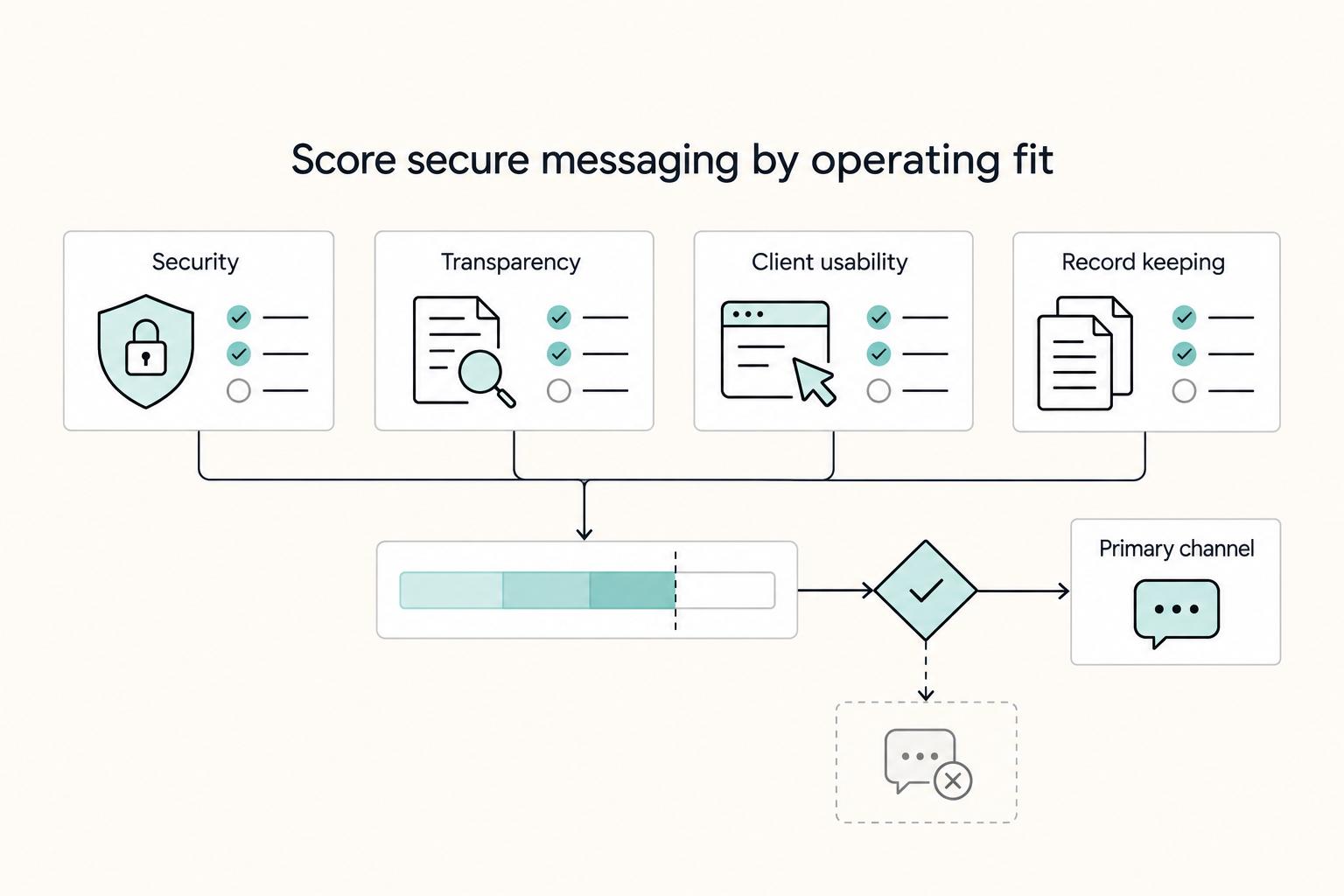
Choose for operating fit, not brand preference. Use a scorecard that balances security, transparency, and day-to-day execution for independent professionals and small teams handling client files, payment details, and project decisions in chat.
| Criterion | What to prioritize | Why it matters |
|---|---|---|
| End-to-end encryption defaults | E2EE is normal behavior for regular chats, not an optional mode | Without it, sensitive data may be exposed in unencrypted form at transition points |
| Compliance and policy fit | Tools that help protect sensitive information while supporting compliance obligations and internal communication policies | Keeps app choice aligned with obligations and policy |
| Client adoption friction | Lower setup friction for consistent client use | Setup friction can still block consistent client use |
| Transparency signals | Clear and recent independent security review signals | If that evidence is missing, treat it as a risk flag |
| Day-to-day usability | Options that balance protection with practical use | Security only helps if people actually use the app for files, decisions, and follow-ups |
Before comparing tools, define your own sensitivity boundaries. If a message includes contract terms, temporary credentials, payment coordination details, or decision-critical instructions, route it through the primary lane. If it is scheduling, reminders, or meeting links, the fallback may be acceptable. That distinction improves app selection because you are judging tools against real message types, not abstract security language.
Use five criteria:
- End-to-end encryption defaults: Prioritize apps where E2EE is normal behavior for regular chats, not an optional mode. Without it, sensitive data may be exposed in unencrypted form at transition points.
- Compliance and policy fit: Prioritize tools that help protect sensitive information while supporting your compliance obligations and internal communication policies.
- Client adoption friction: Setup friction can still block consistent client use.
- Transparency signals: Prefer clear and recent independent security review signals. If that evidence is missing, treat it as a risk flag.
- Day-to-day usability: Security only helps if people actually use the app for files, decisions, and follow-ups. Favor options that balance protection with practical use.
Add one practical gate before you name any primary app: run a live pilot thread that includes the exact behaviors your team needs. Send a normal status update, confirm one decision in writing, and share one non-sensitive file as a handling check. If people struggle with basic execution in that pilot, sensitive handling will not improve under pressure.
Decision rule for shortlist order: prioritize apps that make E2EE the default, show transparency signals, and are easy for clients to adopt. As a red-flag filter, one comparison table marks Google Messages, iMessage, and Facebook Messenger as not recommended for securing messages and attachments, so treat them as caution flags for sensitive client communication and validate against your requirements.
Quick comparison table for the shortlist#
Use this as a verify-first shortlist. Signal, Threema, Wire, Session, and WhatsApp are explicitly noted as offering end-to-end encryption, and E2EE is described as the top standard for messaging apps.
| App | E2EE explicitly noted | Evidence status |
|---|---|---|
| Signal | Yes | Explicitly noted here |
| Threema | Yes | Explicitly noted here |
| Wire | Yes | Explicitly noted here |
| Session | Yes | Explicitly noted here |
| SimpleX | Not established | Keep in verification lane |
| Yes | Explicitly noted here | |
| Telegram | Not established | Keep in verification lane |
Decision rule: if key fields remain unconfirmed, do not make that app your primary channel yet. Pilot first, then promote only what your checks support.
Treat the table as a working decision aid, not a leaderboard. "Explicitly noted here" means E2EE is named here for that app. "Not established" means those security properties are not established yet.
"Unconfirmed here" should trigger discipline, not guesswork. Capture what you verified, where you verified it, and what policy decision followed. This makes handoffs cleaner when someone else on your team needs to explain the decision trail. For a related setup angle, read The Best Gear for a Portable Home Office.
Signal for most client communication#
For many teams, Signal is a practical primary lane because setup is familiar and its privacy features are clear enough to roll out quickly. It presents itself as privacy-centered, free, and easy to use, with end-to-end encryption, and it is available on Android and iPhone or iPad.
In practice, it can handle day-to-day communication in one place. It says it supports encrypted voice and video calls, including group calls up to 50 participants, plus group chats up to 1,000. That helps reduce channel sprawl when you need both chat and calls.
Adoption indicators are useful for planning, not proof of security. The Google Play listing shows 100M+ downloads, 2.84M reviews, and a 4.5 rating. Use those numbers to gauge likely client familiarity, then validate your own requirements separately.
Two setup checks can prevent avoidable onboarding stalls. Desktop requires a phone first, so confirm that before kickoff with desktop-heavy clients. Also verify current signup requirements before rollout if account identifiers are part of your threat model.
Use case: with a new retainer client, keep contract summaries, temporary credentials, and payment-coordination messages in your primary encrypted lane. If a client prefers another app, limit that fallback to low-sensitivity scheduling until your requirements are validated.
Execution quality depends on consistency, not app branding. Send a short kickoff note that names the approved channel for sensitive content and tells clients where to send everything else. When someone posts sensitive details in fallback, acknowledge receipt, redirect the message, and close the loop in the primary lane so the official record stays intact.
It also helps to separate convenience from approval. A fast back-and-forth in fallback can keep momentum, but final decisions should be restated in the primary thread before anyone acts. That one habit reduces disputes about which instruction was current.
If this lane starts to break down, the warning signs are usually obvious. People ask for status in multiple apps, attachments appear in different places, and sensitive requests arrive with "can we just do this here?" language. Treat that as a policy issue and reset expectations immediately.
Threema for paid privacy without social-network baggage#
Treat Threema as a policy choice tied to client behavior. If a client accepts stricter channel rules for sensitive material and follows them during onboarding, it may work as one approved lane for that engagement. If adoption is inconsistent, keep your default app and reserve sensitive conversations for the approved encrypted channel both sides accept from day one.
Verify Threema pricing, confirm its trusted positioning alongside Signal and Wire, and check onboarding complexity versus WhatsApp or iMessage before you lock contract language.
Two facts still matter in practice. End-to-end encryption protects message content between sender and recipient. Metadata may still be collected even when a product is marketed as secure. That is why channel policy still matters after app selection.
Practical use case: intake terms may require sensitive files and decision-critical instructions to stay in one approved encrypted app. Verify that separately before you rely on Threema for that case.
Adoption discipline is the deciding factor here. Some clients agree to stricter handling during kickoff, then revert to older habits as soon as a deadline compresses. Plan for that behavior up front. Write a redirect line you can send quickly when sensitive details appear in the wrong channel, and keep the tone neutral so compliance does not feel like friction.
A simple escalation path keeps projects moving. If a client repeatedly avoids the approved lane for sensitive exchanges, pause that topic, redirect to the approved app, and continue once the message is posted there. This protects both sides without turning routine communication into a debate.
When this approach works well, you get cleaner records and fewer conflicting instructions. When it fails, confusion shows up as duplicate requests, contradictory approvals, and uncertainty about which thread contains the final decision.
Wire for client accounts with team collaboration needs#
Choose Wire when your main risk is multi-person coordination inside one client account, not one-to-one chat.
Wire is positioned as an enterprise collaboration product for messaging, calls, and file collaboration, with always-on MLS encryption and end-to-end encryption noted in its app listings. It supports private and group conversations, and guest rooms are described for one-time conversations with external participants.
Before you make Wire your primary channel, run this pre-kickoff checklist:
- Confirm device support: iOS 16.4+, Android 8.0+, macOS 11.6.0+, or Windows 10+.
- If web calling is required, confirm Chrome 100 or higher.
- Validate one full thread with a message, a call, and a file share.
- If outside participants are involved, test a guest room for that one-time conversation.
If client messages are split across Telegram, email, and SMS, moving the project conversation into Wire can keep messages and files in one place. Decision checkpoint: if multi-person handoffs are your weak point, Wire is a strong fit once setup checks pass.
This matters most for teams with shared ownership. One person handles billing, another handles delivery, and someone else approves scope changes. Without a single collaboration lane, decisions scatter and no one is sure whether a task was approved or only discussed.
Set clear room ownership before kickoff. Decide who can invite external participants, who summarizes call outcomes, and who confirms final decisions in writing. Those ownership decisions are not about control. They prevent important context from disappearing when several people touch the same client thread.
Guest-room use also needs boundaries. If a guest room is for one-time external participation, close that loop when the objective is complete and move ongoing sensitive discussion back to your core lane. This prevents long-term drift into temporary spaces that may not be ideal for final records. Related: The Best Bank Accounts for Kids and Teens.
Session for anonymity-first client scenarios#
Choose Session when identity minimization is a core requirement. If your default encrypted app already covers your risk level with clear handling rules, keep it as standard and use Session only where identity minimization needs outweigh onboarding convenience.
Session describes itself as a private messenger focused on metadata protection and encrypted communication. Its FAQ states that conversations are end-to-end encrypted, communicating identities are protected, and messages are routed through a decentralized onion routing network similar to Tor using onion requests. Its App Store listing says users can create an Account ID without a phone number or email. The listing also says Session does not store messaging metadata and that closed groups support up to 100 people.
That places Session on the anonymity-first end of the shortlist. The upside is potentially reduced exposure of direct personal identifiers while keeping encrypted client messaging available.
The tradeoff can be onboarding friction and stricter communication discipline for client work. Use this checkpoint before you make Session primary.
- Confirm all participants can use Session Account IDs.
- Set channel rules before kickoff for where sensitive communication must happen.
- Verify your team structure fits the closed-group limit.
- Define a fallback rule for sensitive details that drift into other channels.
A simple way to frame this choice for clients is: if identity minimization is part of the requirement, extra onboarding effort may be expected. If that requirement is not central, a lower-friction lane may produce better consistency in daily use.
In practice, rollout issues can appear early. Participants may ask to switch back to familiar channels, identity details may be shared out of habit, or sensitive notes may be posted in fallback because someone is rushing. Treat those moments as policy enforcement points and redirect immediately.
Use behavior as your validation signal. If clients reliably keep sensitive communication in the approved lane after kickoff, the choice is working. If sensitive content keeps moving elsewhere, the risk posture on paper is stronger than the real handling in practice.
SimpleX for stricter metadata-conscious communication#
Use SimpleX as a cautious test option when metadata exposure is the primary concern and you can accept a more involved setup.
The evidence here is narrow. One article dated 30 January 2026 presents SimpleX for threat-model-aware professionals and describes metadata-free communication. The same source also claims zero-trust routing that removes server-side contact discovery. A separate privacy article supports the broader point that metadata can still reveal patterns even when message content is encrypted.
Because source quality is mixed, treat SimpleX as a candidate, not a default choice. Current material does not confirm adoption outcomes, phone-number-registration behavior, or independently validated performance claims, so avoid promising those details in client-facing language before testing.
The practical downside is familiarity. Clients already settled on WhatsApp, Telegram, or iMessage may resist another install and contact flow, especially under time pressure. When boundaries are vague, sensitive updates can drift back to older channels.
Use case: a client segment with written requirements to reduce metadata exposure and accept stricter setup steps. In that case, consider SimpleX only after you verify current account creation and contact exchange behavior in the live app.
Run a short pilot with one active client before you make SimpleX primary:
- Set a channel matrix at kickoff: what must stay in SimpleX, what can stay in email, and what is prohibited everywhere.
- Complete early checks: account creation, first message, and acknowledgment from both sides.
- Validate workflow continuity: one file share and one decision confirmation inside the same thread.
- Track drift throughout the pilot: log every sensitive message sent outside SimpleX and why it happened.
- Make a go or no-go call at the end based on drift count, response time, and client compliance.
Decision checkpoint: if the pilot shows consistent use with minimal off-channel drift, keep SimpleX for that high-sensitivity segment. If adoption breaks down, move that segment to a lower-friction channel aligned to its risk level.
Pilot quality depends on what you log. Capture where off-channel messages appeared, what type of message drifted, how quickly it was redirected, and whether the client followed the redirect. This gives you a clear behavior record instead of a vague "it felt hard" conclusion.
Do not let edge-case success hide broad friction. A pilot can pass with a highly motivated contact and still fail in normal client communication. Test the app with the same pace, response style, and decision pressure you expect in real delivery.
At the end of the pilot, choose clarity over optimism. If sensitive handling remains consistent, keep it for the segment that needs stricter metadata posture. If usage breaks down, switch that segment to a channel clients can actually follow while still meeting your documented boundaries.
WhatsApp and Telegram when client adoption wins#
When client adoption is the blocker, use WhatsApp or Telegram as a coordination lane, not the place for sensitive exchanges.
Both are commonly described as encrypted messaging apps with large user bases, and that lower friction can help with scheduling and quick updates. WhatsApp is widely used for customer support, including business communication at scale through WhatsApp Business API features. Telegram is often positioned as a flexible option, with bots and open APIs that are easier to connect to external services.
Keep your trust posture conservative. Treat these apps as practical mainstream channels for convenience, not your primary lane for high-sensitivity content.
Use them for scheduling, lightweight updates, meeting links, and deadline nudges. Move sensitive content to your approved primary app before you send it. If you keep WhatsApp or Telegram, define written boundaries for what is never shared there and enforce that line consistently.
A clear boundary statement can prevent confusion. Tell clients exactly what these channels are for and what they are not for. Keep the language short enough to reuse in onboarding, reminders, and redirect messages.
When a sensitive request arrives in a convenience channel, respond with a brief acknowledgment and redirect without debate. That quick move helps protect momentum and keeps your records consistent. The point is not to police tone. The point is to keep decision-critical content where it belongs.
If convenience channels start carrying approvals or sensitive attachments, treat it as a signal that your policy is too vague or not being reinforced often enough. Tighten the wording and repeat the rule at natural project milestones.
Apps to avoid as your default sensitive channel#
For sensitive client data, do not let convenience-first chat become your primary channel. Encryption claims alone are not enough to make a tool your default for confidential exchanges. If messages are not properly encrypted, they could be intercepted.
When rankings conflict, check the criteria behind them. Convenience-focused lists may emphasize reach and speed, while privacy-focused reviews prioritize clear end-to-end encryption, transparent development, and stronger security principles. Those are different standards, so a fast app is not automatically suitable for sensitive communication.
Separate message content from metadata risk. End-to-end encryption can protect message content, but some messenger apps may still expose patterns such as contacts, chat length, device fingerprints, and location trails. A common failure mode is assuming encrypted means every layer is protected.
Before you onboard clients, write a short channel policy:
- Allowed message types per app
- Never-send data classes
- Redirect channel for confidential content
Use this section as a filter, not a ban list for all communication. A convenience app can still be useful for non-sensitive logistics. The issue is what role it plays in your communication structure.
If evidence is incomplete, do not force a primary decision. Keep the app in secondary use and route sensitive content through your approved lane until verification catches up. This avoids overconfidence based on partial comparisons.
Projects often hit moments of urgency. When urgency appears, teams can default to the fastest channel in front of them. A written policy, repeated often, helps keep speed from overriding confidentiality.
Client rollout checklist for policy, onboarding, and verification#
Lock your messaging rollout before onboarding starts: decide channels, define boundaries, verify identity early, and keep a clear record of exceptions and updates.
| Control | What to do | Grounded detail |
|---|---|---|
| Primary and fallback channels | Set one primary app for sensitive chat and one fallback for lower-risk coordination, including email when appropriate | Make this an onboarding gate, not a mid-project decision |
| Channel matrix | Use three columns: allowed in chat, keep in email, and never send | Include examples such as sensitive personal identifiers, payment details, and unredacted files |
| Identity verification | Require email or phone verification during onboarding, then record date, method, and confirmer | Treat verification as mandatory before any confidential file is shared |
| Identity hygiene controls | Document which clients should use lower-exposure channels and when escalation is required | Evaluate security features in a structured way instead of relying on familiarity |
| Checkpoints and evidence pack | Set a recurring review cadence, track exceptions in one log, and update policy language after near-misses | Keep the onboarding message template, accepted-channel list, incident notes, and policy acknowledgments |
- Pick primary and fallback channels first: Set one primary app for sensitive chat and one fallback for lower-risk coordination, including email when appropriate. Make this an onboarding gate, not a mid-project decision. Teams already use structured onboarding checklists, often framed as 9-step or 10-step flows, so channel choice belongs at the start.
- Publish a one-page channel matrix: Use three columns: allowed in chat, keep in email, and never send. Include concrete examples in the never-send column based on your policy, such as sensitive personal identifiers, payment details, and unredacted files. This removes ambiguity and helps prevent fragmented handling when requests and documents spread across scattered threads.
- Verify identity at first contact and log it: Require email or phone verification during onboarding, then record date, method, and confirmer. A large audit of 100+ retailer sign-up and login flows reported that roughly 30% skipped email or phone verification. Treat verification as mandatory before any confidential file is shared.
- Add practical identity hygiene controls: If identity exposure is a concern, document which clients should use lower-exposure channels and when escalation is required. During app selection, evaluate security features in a structured way instead of relying on familiarity.
- Run checkpoints and keep an evidence pack: Set a recurring review cadence for active client channels, track exceptions in one log, and update policy language after near-misses. Keep an evidence pack with your onboarding message template, accepted-channel list, incident notes, and policy acknowledgments. Clear documentation makes follow-through easier and more defensible.
Rollout quality comes from repetition. A single kickoff note is not enough, especially when projects shift pace or add participants. Reconfirm channel boundaries whenever scope changes, team members change, or a new sensitive topic appears.
Keep your channel matrix practical. If a client cannot tell whether a message belongs in chat or email, your matrix is too abstract. Use examples from actual client communication so decisions can be made quickly in the moment.
Identity verification should be treated as a prerequisite, not a courtesy step. If verification has not happened, sensitive files wait. This rule feels strict until the first time a rushed handoff sends confidential material to the wrong recipient.
Exception handling matters as much as the primary policy. You do not need a long memo for each exception. You need a short log entry that explains what happened, what was done to contain it, and what wording change will reduce repeat incidents.
Evidence packs are useful because they make your position reviewable. If a client asks why a message was redirected, you can point to the onboarding policy and prior acknowledgments. If your team asks why one app is primary, you can point to documented checks instead of personal preference.
Keep the evidence pack simple. It usually includes:
- The onboarding message that sets channel boundaries
- The current accepted-channel list
- Notes on near-misses and the follow-up action
- Policy acknowledgments from client contacts
When these basics are maintained, teams make fewer on-the-fly exceptions. That keeps handling consistent even when timelines tighten and communication volume rises.
Final recommendation and next step#
Set a stable two-app model: one primary channel for sensitive client communication and one fallback for low-risk coordination. Start with a primary app that meets secure defaults, then switch only if your trust boundaries or usability needs are not met. If you need a starting sequence, use this:
- Choose the primary app with a five-pillar check: prioritize default-on E2EE, metadata handling, and open-source transparency, then weigh the remaining security checks against day-to-day usability. Treat mandatory phone-number signup as an explicit tradeoff when it applies.
- Define strict fallback boundaries: use fallback channels for logistics and quick updates, not sensitive content. Keep this line clear because sources can conflict on how private mainstream apps are in edge cases.
- Publish one clear channel policy: state approved channels, what must never be shared in fallback chats, and how sensitive messages are redirected to the primary channel.
After that, focus on execution. Send the policy in onboarding, reinforce it when communication expands, and log exceptions with short, practical notes. Tool choice alone is not enough; reliable outcomes come from explicit tradeoffs and consistent handling.
Frequent app switching may not improve outcomes by itself. Reliable communication comes from clear rules, explicit tradeoffs, and consistent follow-through.
Frequently Asked Questions
What is the best secure messaging app for client communication in 2026?
There is no single best app for every client context. Choose the one your clients can adopt consistently while still meeting your handling requirements. Pick one primary channel, test it in real use, and keep it if your boundaries hold.
Is WhatsApp secure enough for professional client chats?
Not as a blanket rule for every professional use case. The article recommends using WhatsApp as a coordination lane for low-sensitivity communication such as scheduling, meeting links, and quick status notes. Redirect sensitive material to your approved primary lane and define those boundaries in writing.
Should I choose Signal, Threema, Wire, Session, or SimpleX if anonymity matters?
The article does not support a strict anonymity ranking across Signal, Threema, Wire, Session, and SimpleX. If identity minimization is central, evaluate each app against your trust boundaries and onboarding needs before standardizing. Test one lane per client segment under real communication pressure before broad rollout.
Do phone number registration requirements change which app I should pick?
Yes, they can change practical fit. The article says not to rely on older assumptions and to verify current registration requirements directly before rollout. Document the result in your channel policy so future decisions stay consistent.
Why do secure messaging rankings disagree so much across different websites?
Because they use different scoring criteria and optimize for different outcomes. One list may emphasize usability, while another emphasizes trust boundaries, transparent development, or infrastructure assumptions. Use rankings as inputs, then apply your own checks.
Can I use Telegram or iMessage as a primary client channel for sensitive information?
Treat Telegram or iMessage as coordination channels unless your documented checks show they meet your sensitive-use requirements. Keep one clearly approved primary channel for sensitive content and enforce it consistently. When in doubt, redirect sensitive messages and final decisions to the approved lane.
Try a related tool
Researched and edited by the Gruv editorial team. Gruv builds cross-border billing, payouts, and finance-operations software for global businesses.
Sources
Includes 4 external sources outside the trusted-domain allowlist.
- cisa.gov/sites/default/files/2025-12/guidance-mobile-...trusted
- cloudsek.com/knowledge-base/best-secure-messaging-appsexternal
- cyble.com/knowledge-hub/top-secure-messaging-apps-encr...external
- pcmag.com/picks/best-secure-messaging-appsexternal
- wire.com/en/blog/secure-messaging-apps-comparison-guideexternal
Educational content only. Not legal, tax, or financial advice.
Related Posts

The Best Gear for a Portable Home Office
Portable-office gear decisions are not directly tested in this guide, so use this as a practical framework rather than a proven standard.
The Best Bank Accounts for Kids and Teens
**Design a controlled money workflow first, then pick the product whose official terms match it.** You are not shopping for a shiny "best kids account." You are building a predictable system where money flows in, spending stays bounded, savings stays protected, and you can review activity without turning it into a daily fight.

The Freelance Payment Penalty: A Modeled Audit of Platform Fees, FX Spreads, and Payout Delays
The money rarely disappears through a single, easy-to-spot fee. The real loss is stacked. A marketplace takes its commission, a processor adds a charge for international cards, a bank or payment company converts the currency at a spread, a platform holds the funds before release, and a wire sheds a little to intermediaries on the way in. Each layer looks defensible on its own, but the worker feels the combined result as a smaller deposit and a later payday.